Seat controls NISSAN ALTIMA 2019 Owner´s Manual
[x] Cancel search | Manufacturer: NISSAN, Model Year: 2019, Model line: ALTIMA, Model: NISSAN ALTIMA 2019Pages: 592, PDF Size: 7.4 MB
Page 17 of 592
This manual was prepared to help you un-
derstand the operation and maintenance
of your vehicle so that you may enjoy many
miles (kilometers) of driving pleasure.
Please read through this manual before
operating your vehicle.
A separate Warranty Information Book-
let explains details about the warranties
covering your vehicle. The “Maintenance
and schedules” section of this manual
explains details about maintaining and
servicing your vehicle. Additionally, a
separate Customer Care/Lemon Law
Booklet (U.S. only) will explain how to re-
solve any concerns you may have with
your vehicle, and clarif y your rights un-
der your state’s lemon law.
When you require any service or have any
questions, a NISSAN dealer will be glad to
assist you with the extensive resources
available to them.
In addition to factory-installed options,
your vehicle may also be equipped with
additional accessories installed prior to de-
livery. It is recommended that you visit a
NISSAN dealer for details concerning the
particular accessories with which your ve-
hicle is equipped. It is important that you
familiarize yourself with all disclosures,warnings, cautions and instructions con-
cerning proper use of such accessories
prior to operating the vehicle and/or ac-
cessory. It is recommended that you visit a
NISSAN dealer for details concerning the
particular accessories with which your ve-
hicle is equipped.
Before driving your vehicle, please read this
Owner’s Manual carefully. This will ensure
familiarity with controls and maintenance
requirements assisting you in the safe op-
eration of your vehicle.
WARNING
IMPORTANT SAFETY INFORMATION
REMINDERS!
Follow these important driving rules to
help ensure a safe and comfortable trip
for you and your passengers!
∙ NEVER drive under the influence of
alcohol or drugs.
∙ ALWAYS observe posted speed limits and never drive too fast for
conditions.
∙ ALWAYS give your full attention to driving and avoid using vehicle fea-
tures or taking other actions that
could distract you.
∙ ALWAYS use your seat belts and appropriate child restraint systems.
Preteen children should be seated in
the rear seat.
FOREWORD READ FIRST—THEN DRIVE SAFELY
Page 23 of 592
Table of
ContentsIllustrated table of contents
Safety—Seats, seat belts and supplemental restraint system
Instruments and controls
Pre-driving checks and adjustments
Monitor, climate, audio, phone and voice recognition systems
Starting and driving
In case of emergency
Appearance and care
Do-it-yourself
Maintenance and schedules
Technical and consumer information
Index
0
1
2
3
4
5
6
7
8
9
10
11
Page 30 of 592
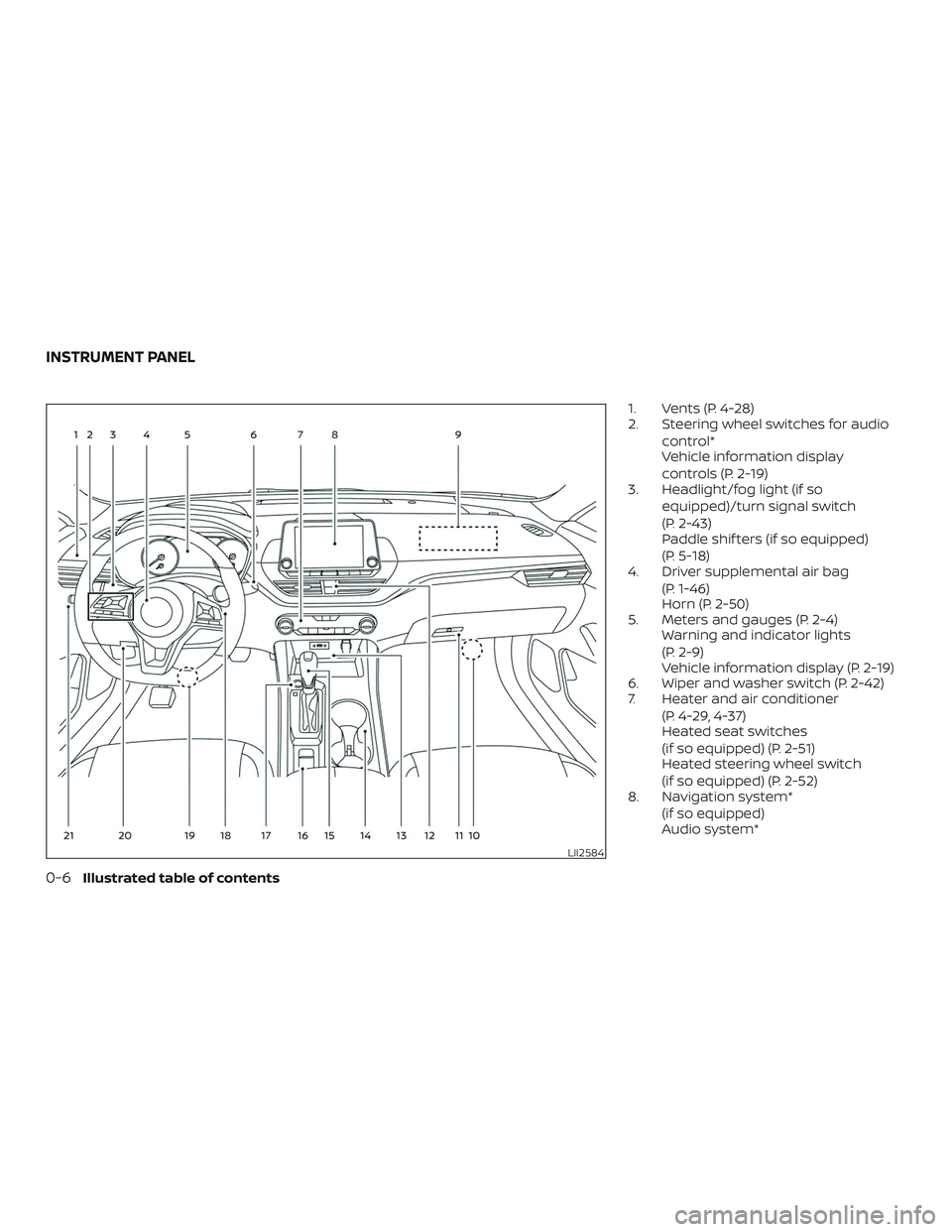
1. Vents (P. 4-28)
2. Steering wheel switches for audiocontrol*
Vehicle information display
controls (P. 2-19)
3. Headlight/fog light (if so
equipped)/turn signal switch
(P. 2-43)
Paddle shif ters (if so equipped)
(P. 5-18)
4. Driver supplemental air bag
(P. 1-46)
Horn (P. 2-50)
5. Meters and gauges (P. 2-4) Warning and indicator lights
(P. 2-9)
Vehicle information display (P. 2-19)
6. Wiper and washer switch (P. 2-42)
7. Heater and air conditioner
(P. 4-29, 4-37)
Heated seat switches
(if so equipped) (P. 2-51)
Heated steering wheel switch
(if so equipped) (P. 2-52)
8. Navigation system*
(if so equipped)
Audio system*
LII2584
INSTRUMENT PANEL
0-6Illustrated table of contents
Page 38 of 592
WARNING
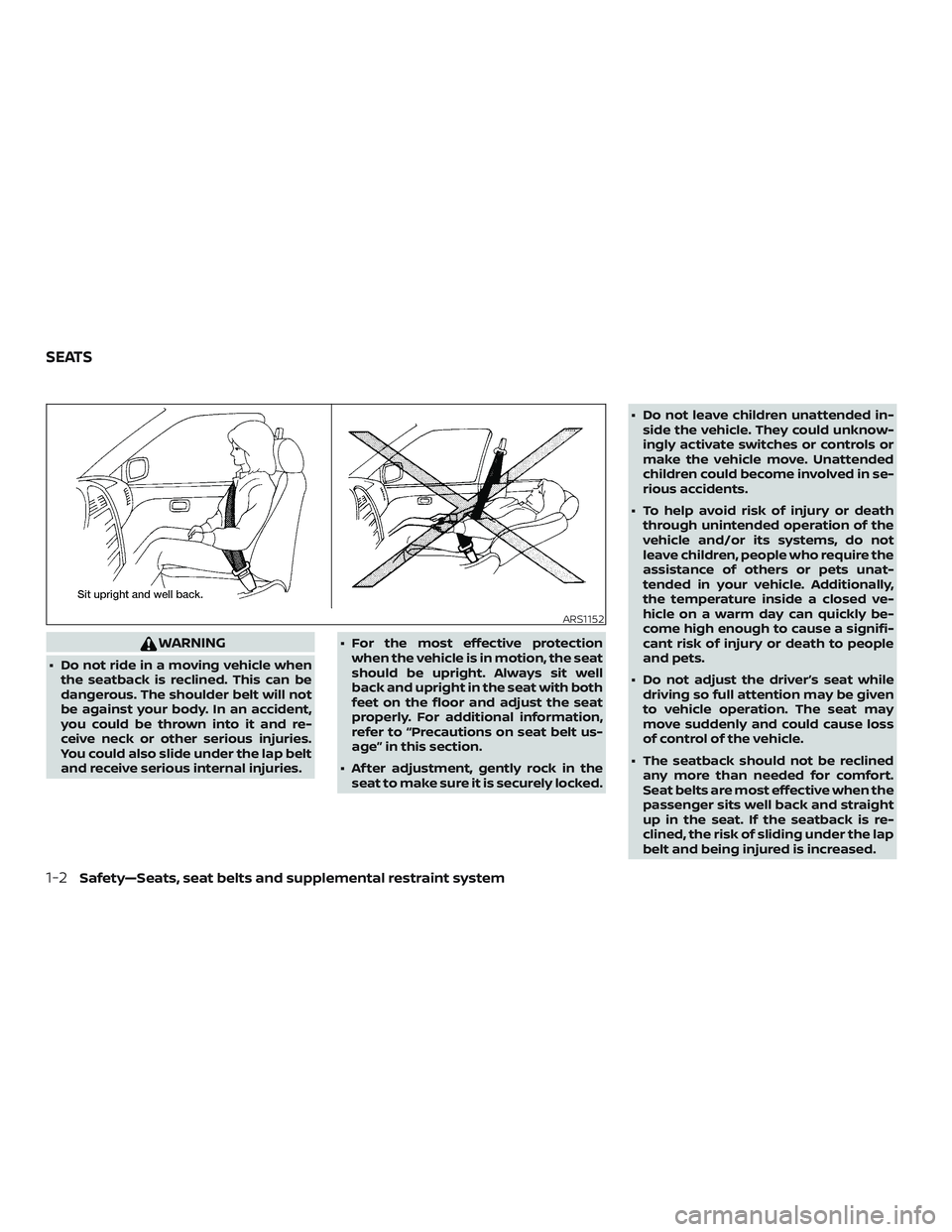
∙ Do not ride in a moving vehicle whenthe seatback is reclined. This can be
dangerous. The shoulder belt will not
be against your body. In an accident,
you could be thrown into it and re-
ceive neck or other serious injuries.
You could also slide under the lap belt
and receive serious internal injuries. ∙ For the most effective protection
when the vehicle is in motion, the seat
should be upright. Always sit well
back and upright in the seat with both
feet on the floor and adjust the seat
properly. For additional information,
refer to “Precautions on seat belt us-
age” in this section.
∙ Af ter adjustment, gently rock in the seat to make sure it is securely locked. ∙ Do not leave children unattended in-
side the vehicle. They could unknow-
ingly activate switches or controls or
make the vehicle move. Unattended
children could become involved in se-
rious accidents.
∙ To help avoid risk of injury or death through unintended operation of the
vehicle and/or its systems, do not
leave children, people who require the
assistance of others or pets unat-
tended in your vehicle. Additionally,
the temperature inside a closed ve-
hicle on a warm day can quickly be-
come high enough to cause a signifi-
cant risk of injury or death to people
and pets.
∙ Do not adjust the driver’s seat while driving so full attention may be given
to vehicle operation. The seat may
move suddenly and could cause loss
of control of the vehicle.
∙ The seatback should not be reclined any more than needed for comfort.
Seat belts are most effective when the
passenger sits well back and straight
up in the seat. If the seatback is re-
clined, the risk of sliding under the lap
belt and being injured is increased.
ARS1152
SEATS
1-2Safety—Seats, seat belts and supplemental restraint system
Page 106 of 592
2 Instruments and controls
Instrument panel................................2-2
Meters and gauges ..............................2-4
Speedometer and odometer .................2-4
Tachometer ..................................2-6
Engine coolant temperature gauge ..........2-6
Fuel gauge ................................... 2-7
Distance To Empty (DTE) ...................... 2-7
Variable Compression Turbo
(if so equipped) ...............................2-8
Warning lights, indicator lights and audible
reminders .......................................2-9
Checking lights .............................. 2-10
Warning lights ............................... 2-10
Indicator lights .............................. 2-15
Audible reminders ........................... 2-18
Vehicle information display .....................2-19
How to use the vehicle information
display ...................................... 2-19
Startup display .............................. 2-20
Resetting the drive computer ................2-20
Oil control system (if so equipped) ...........2-21
Settings ..................................... 2-21
Vehicle information display indicators .......2-29
Vehicle information display warnings ........2-32 Security systems
............................... 2-39
Vehicle security system .....................2-39
NISSAN Vehicle Immobilizer System .........2-40
Wiper and washer switch .......................2-42
Switch operation ............................ 2-42
Rear window and outside mirror
(if so equipped) defroster switch ................2-43
Headlight and turn signal switch ...............2-43
Headlight control switch .....................2-43
Daytime Running Lights (DRL) system
(Type A) (if so equipped) .....................2-48
LED Daytime Running Lights (DRL)
system (Type B) (if so equipped) .............2-48
Instrument brightness control ...............2-49
Turn signal switch ........................... 2-49
Fog light switch (if so equipped) .............2-50
Horn ........................................... 2-50
He
ated seat switches (if so equipped) ..........2-51
Heated steering wheel switch (if so equipped) . . 2-52
Steering Assist switch (for vehicles with
ProPILOT Assist) (if so equipped) ................2-52
E-call (SOS) button (if so equipped) .............2-53
Rear Door Alert ................................. 2-53
Power outlet .................................... 2-54
Page 108 of 592
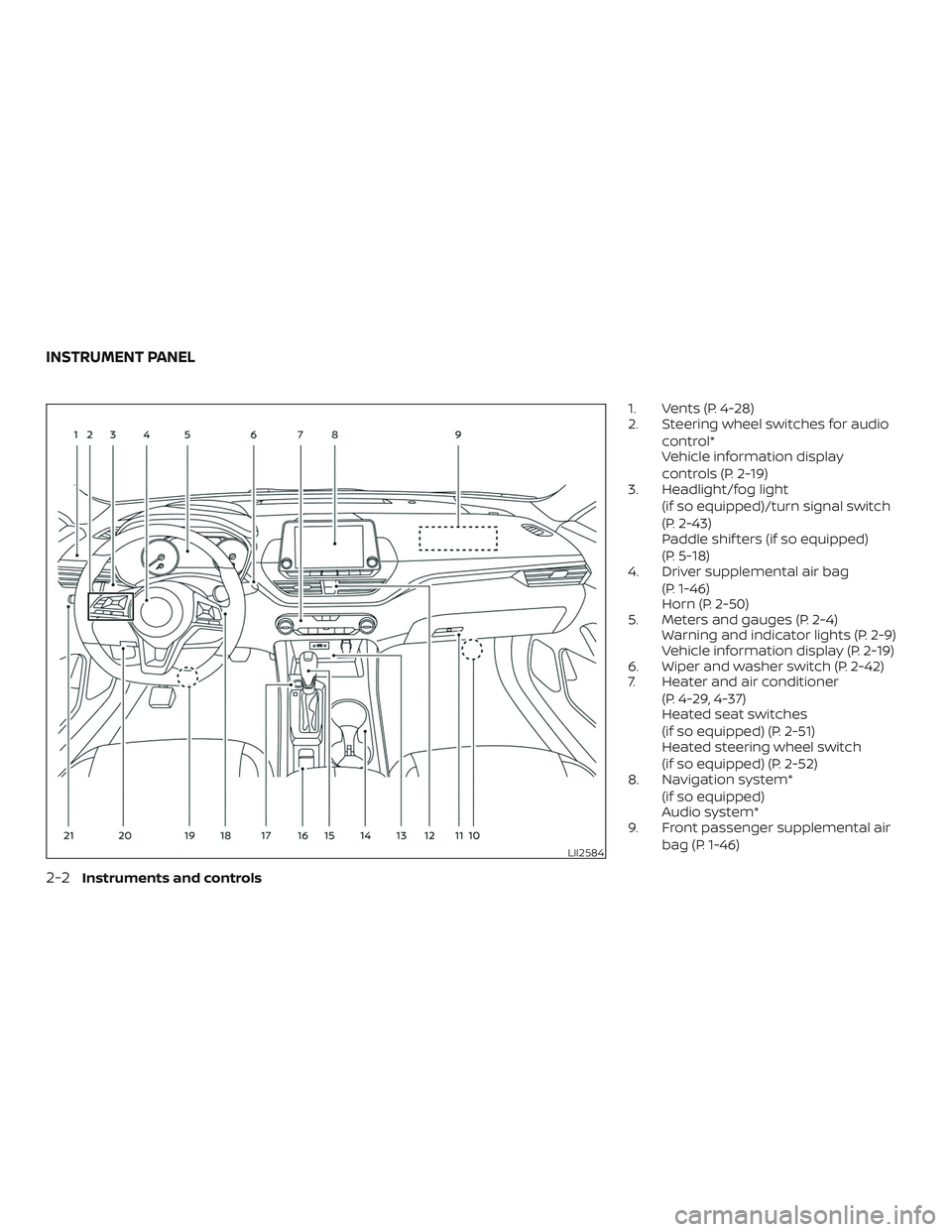
1. Vents (P. 4-28)
2. Steering wheel switches for audiocontrol*
Vehicle information display
controls (P. 2-19)
3. Headlight/fog light
(if so equipped)/turn signal switch
(P. 2-43)
Paddle shif ters (if so equipped)
(P. 5-18)
4. Driver supplemental air bag
(P. 1-46)
Horn (P. 2-50)
5. Meters and gauges (P. 2-4) Warning and indicator lights (P. 2-9)
Vehicle information display (P. 2-19)
6. Wiper and washer switch (P. 2-42)
7. Heater and air conditioner
(P. 4-29, 4-37)
Heated seat switches
(if so equipped) (P. 2-51)
Heated steering wheel switch
(if so equipped) (P. 2-52)
8. Navigation system*
(if so equipped)
Audio system*
9. Front passenger supplemental air
bag (P. 1-46)
LII2584
INSTRUMENT PANEL
2-2Instruments and controls
Page 115 of 592
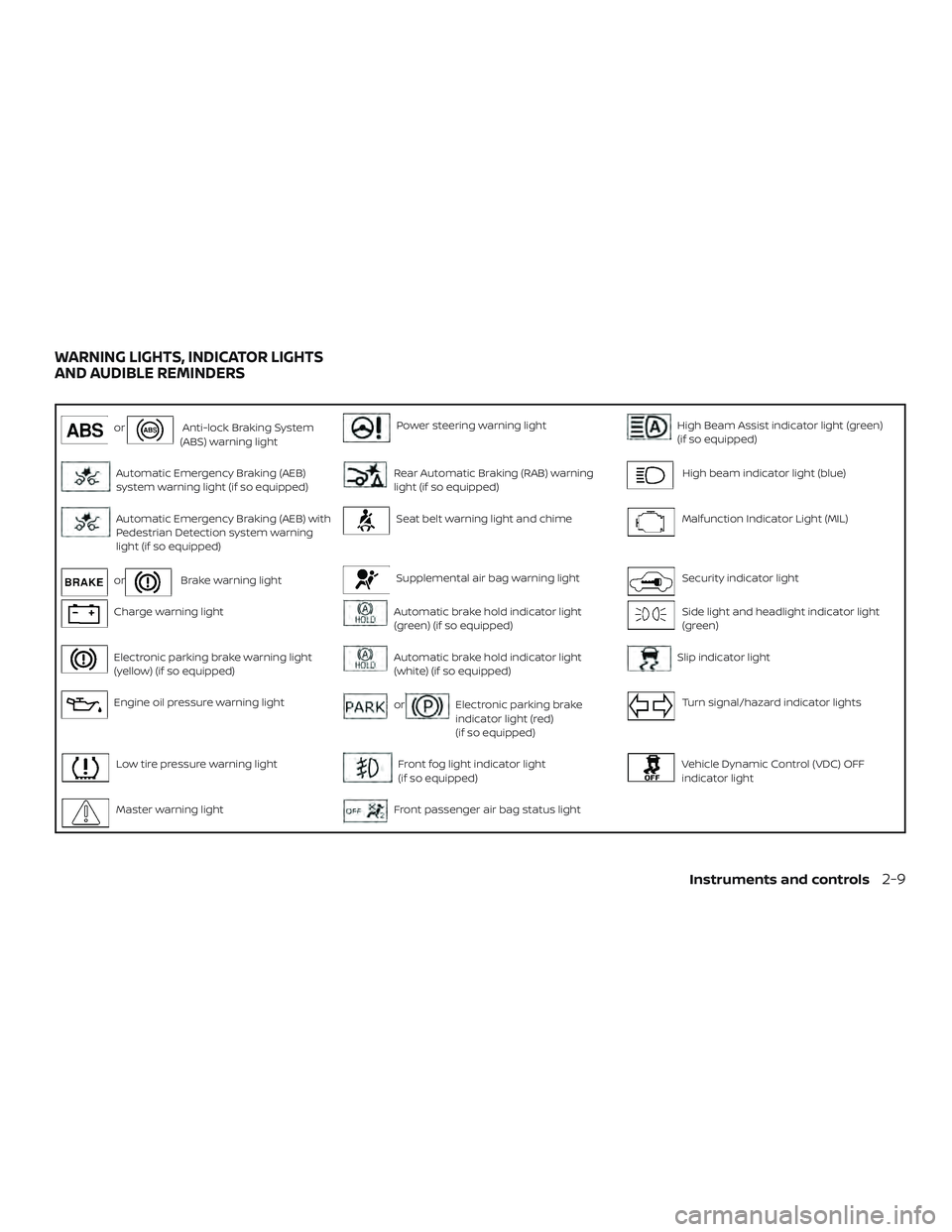
orAnti-lock Braking System
(ABS) warning lightPower steering warning lightHigh Beam Assist indicator light (green)
(if so equipped)
Automatic Emergency Braking (AEB)
system warning light (if so equipped)Rear Automatic Braking (RAB) warning
light (if so equipped)High beam indicator light (blue)
Automatic Emergency Braking (AEB) with
Pedestrian Detection system warning
light (if so equipped)Seat belt warning light and chimeMalfunction Indicator Light (MIL)
orBrake warning lightSupplemental air bag warning lightSecurity indicator light
Charge warning lightAutomatic brake hold indicator light
(green) (if so equipped)Side light and headlight indicator light
(green)
Electronic parking brake warning light
(yellow) (if so equipped)Automatic brake hold indicator light
(white) (if so equipped)Slip indicator light
Engine oil pressure warning lightorElectronic parking brake
indicator light (red)
(if so equipped)Turn signal/hazard indicator lights
Low tire pressure warning lightFront fog light indicator light
(if so equipped)Vehicle Dynamic Control (VDC) OFF
indicator light
Master warning lightFront passenger air bag status light
WARNING LIGHTS, INDICATOR LIGHTS
AND AUDIBLE REMINDERS
Instruments and controls2-9
Page 116 of 592
CHECKING LIGHTS
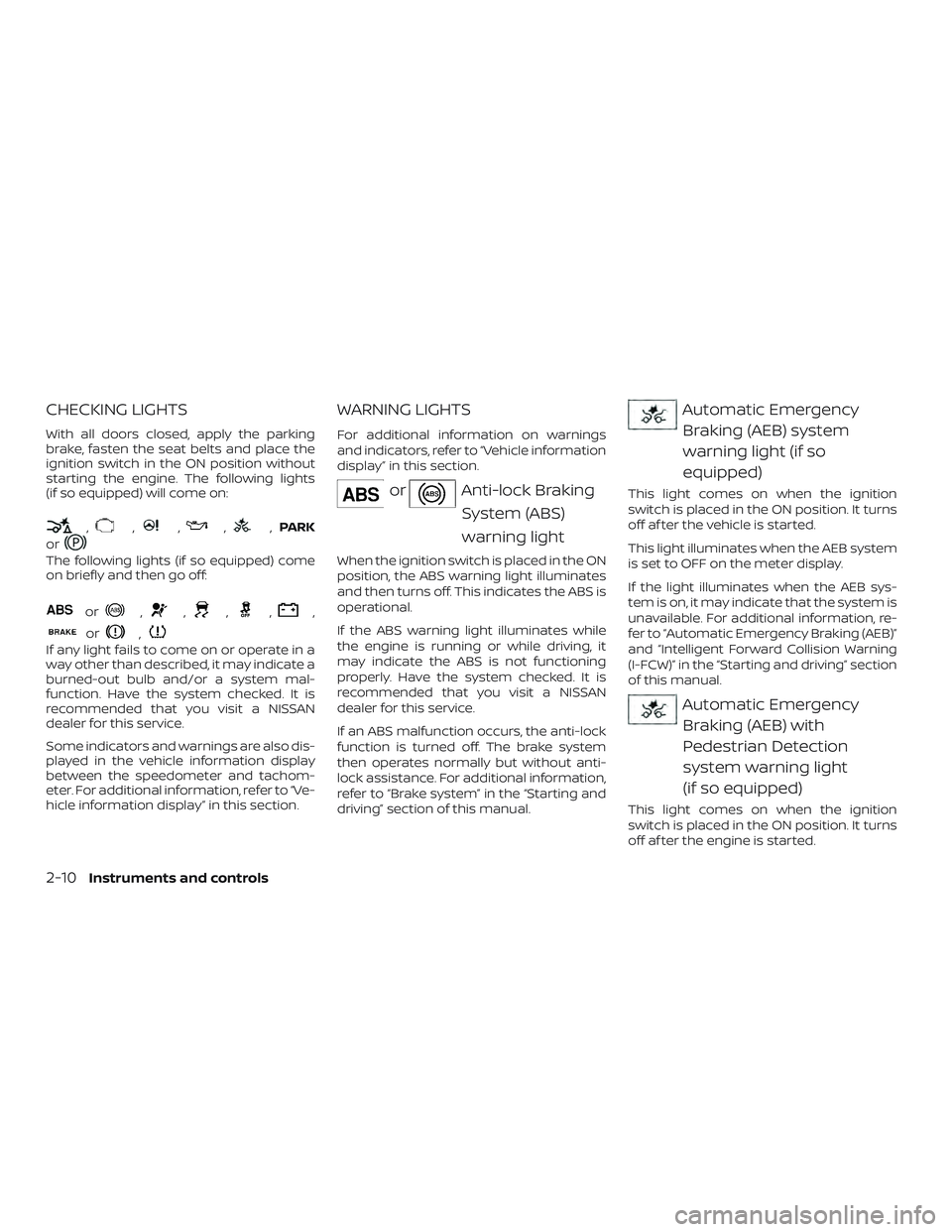
With all doors closed, apply the parking
brake, fasten the seat belts and place the
ignition switch in the ON position without
starting the engine. The following lights
(if so equipped) will come on:
,,,,,PARK
or
The following lights (if so equipped) come
on briefly and then go off:
or,,,,,
or,
If any light fails to come on or operate in a
way other than described, it may indicate a
burned-out bulb and/or a system mal-
function. Have the system checked. It is
recommended that you visit a NISSAN
dealer for this service.
Some indicators and warnings are also dis-
played in the vehicle information display
between the speedometer and tachom-
eter. For additional information, refer to “Ve-
hicle information display” in this section.
WARNING LIGHTS
For additional information on warnings
and indicators, refer to “Vehicle information
display” in this section.
orAnti-lock Braking
System (ABS)
warning light
When the ignition switch is placed in the ON
position, the ABS warning light illuminates
and then turns off. This indicates the ABS is
operational.
If the ABS warning light illuminates while
the engine is running or while driving, it
may indicate the ABS is not functioning
properly. Have the system checked. It is
recommended that you visit a NISSAN
dealer for this service.
If an ABS malfunction occurs, the anti-lock
function is turned off. The brake system
then operates normally but without anti-
lock assistance. For additional information,
refer to “Brake system” in the “Starting and
driving” section of this manual.
Automatic EmergencyBraking (AEB) system
warning light (if so
equipped)
This light comes on when the ignition
switch is placed in the ON position. It turns
off af ter the vehicle is started.
This light illuminates when the AEB system
is set to OFF on the meter display.
If the light illuminates when the AEB sys-
tem is on, it may indicate that the system is
unavailable. For additional information, re-
fer to “Automatic Emergency Braking (AEB)”
and “Intelligent Forward Collision Warning
(I-FCW)” in the “Starting and driving” section
of this manual.
Automatic EmergencyBraking (AEB) with
Pedestrian Detection
system warning light
(if so equipped)
This light comes on when the ignition
switch is placed in the ON position. It turns
off af ter the engine is started.
2-10Instruments and controls
Page 120 of 592
Master warning light
When the ignition is in the ON position, the
master warning light illuminates if any of
the following are displayed on the vehicle
information display.∙ No key warning
∙ Low windshield-washer fluid warning
∙ Parking brake release warning
∙ Door/trunk open warning
∙ Loose fuel cap
∙ Low tire pressure warning
Power steering warninglight
WARNING
∙ If the engine is not running or is turned off while driving, the power as-
sist for the steering will not work.
Steering will be harder to operate. ∙ When the power steering warning
light illuminates with the engine run-
ning, there will be no power assist for
the steering. You will still have control
of the vehicle, but the steering will be
harder to operate. Have the power
steering system checked. It is recom-
mended that you visit a NISSAN dealer
for this service.
When the ignition switch is placed in the ON
position, the power steering warning light
illuminates. Af ter starting the engine, the
power steering warning light turns off. This
indicates the power steering is operational.
If the power steering warning light illumi-
nates while the engine is running, it may
indicate the power steering is not function-
ing properly and may need servicing. Have
the power steering checked. It is recom-
mended that you visit a NISSAN dealer for
this service.
When the power steering warning light illu-
minates with the engine running, there will
be no power assist for the steering, but you
will still have control of the vehicle. At this
time, greater steering effort is required to
operate the steering wheel, especially in
sharp turns and at low speeds. For additional information, refer to “Power
steering” in the “Starting and driving” sec-
tion of this manual.
Rear Automatic Braking
(RAB) warning light (if so
equipped)
This light comes on when the ignition
switch is placed in the ON position. It turns
off af ter the engine is started.
This light illuminates when the RAB system
is turned off in the vehicle information dis-
play.
If the light illuminates when the RAB sys-
tem is on, it may indicate that the system is
unavailable. For additional information, re-
fer to “Rear Automatic Braking (RAB)” in the
“Starting and driving” section of this
manual.
Seat belt warning light andchime
The light and chime remind you to fasten
the driver and front passenger seat belts.
For additional information, refer to “Seat
belts” in the “Safety—Seats, seat belts and
supplemental restraint system” section of
this manual.
2-14Instruments and controls
Page 121 of 592
Supplemental air bagwarning light
When the ignition switch is placed in the ON
or START position, the supplemental air
bag warning light illuminates for about
7 seconds and then turns off. This means
the system is operational.
If any of the following conditions occur, the
front air bag, side air bag, curtain air bag,
and pretensioner systems need servicing
and your vehicle must be taken to a NISSAN
dealer:
∙ The supplemental air bag warning light remains on af ter approximately 7 sec-
onds.
∙ The supplemental air bag warning light flashes intermittently.
∙ The supplemental air bag warning light does not come on at all.
Unless checked and repaired, the supple-
mental restraint system (air bag system)
and/or the pretensioners may not function
properly. For additional details, refer to
“Supplemental Restraint System (SRS)” in
the “Safety—Seats, seat belts and supple-
mental restraint system” section of this
manual.
WARNING
If the supplemental air bag warning
light is on, it could mean that the front
air bag, side air bag, curtain air bag sys-
tems and/or pretensioner systems will
not operate in an accident. To help
avoid injury to yourself or others, have
your vehicle checked as soon as pos-
sible. It is recommended that you visit a
NISSAN dealer for this service.
INDICATOR LIGHTS
For additional information, refer to “Vehicle
information display” in this section.
Automatic brake hold indicator light (green) (if so
equipped)
The automatic brake hold indicator light
(green) illuminates while the automatic
brake hold system is operating.
For additional information, refer to “Auto-
matic brake hold” in the “Starting and driv-
ing” section of the Owner’s Manual.
Automatic brake holdindicator light (white)
(if so equipped)
The automatic brake hold indicator (white)
illuminates when the automatic brake hold
system is on standby.
For additional information, refer to “Auto-
matic brake hold” in the “Starting and driv-
ing” section of the Owner’s Manual.
orElectronic parking
brake indicator
light (red) (if so
equipped)
This light illuminates when the electronic
parking brake system is operating.
When the ignition switch is placed in the ON
position, the electronic parking brake
warning light illuminates. When the engine
is started and the parking brake is released,
the warning light turns off.
If the parking brake is not released, the
electronic parking brake warning light re-
mains illuminated. Ensure the electronic
parking brake warning light has turned off
before driving.
Instruments and controls2-15