RECOMMENDED NISSAN ALTIMA 2021 Owner's Manual
[x] Cancel search | Manufacturer: NISSAN, Model Year: 2021, Model line: ALTIMA, Model: NISSAN ALTIMA 2021Pages: 559, PDF Size: 6.26 MB
Page 246 of 559
CAUTION
∙ Keep the antenna as far away as pos-sible from the electronic control
modules.
∙ Keep the antenna wire more than 8 in (20 cm) away from the electronic con-
trol system harnesses. Do not route
the antenna wire next to any harness.
∙ Adjust the antenna standing-wave ratio as recommended by the
manufacturer.
∙ Connect the ground wire from the CB radio chassis to the body.
∙ For additional information, it is rec- ommended that you visit a NISSAN
dealer for servicing.
Monitor, climate, audio, phone and voice recognition systems4-43
Page 254 of 559
∙ If the low tire pressure warning lightilluminates while driving, avoid sud-
den steering maneuvers or abrupt
braking, reduce vehicle speed, pull off
the road to a safe location and stop
the vehicle as soon as possible. Driv-
ing with underinflated tires may per-
manently damage the tires and in-
crease the likelihood of tire failure.
Serious vehicle damage could occur
and may lead to an accident and could
result in serious personal injury.
Check the tire pressure for all four
tires. Adjust the tire pressure to the
recommended COLD tire pressure
shown on the Tire and Loading Infor-
mation label to turn the low tire pres-
sure warning light off. If you have a flat
tire, replace it with a spare tire as soon
as possible. (For additional informa-
tion, refer to “Flat tire” in the “In case of
emergency ” section for changing a
flat tire.) ∙ When replacing a wheel without the
TPMS such as the spare tire, when a
spare tire is mounted or a wheel is
replaced, tire pressure will not be indi-
cated, the TPMS will not function and
the low tire pressure warning light will
flash for approximately 1 minute. The
light will remain on af ter 1 minute. It is
recommended that you visit a NISSAN
dealer for tire replacement and/or
system resetting.
∙ Replacing tires with those not origi- nally specified by NISSAN could affect
the proper operation of the TPMS.
∙ Do not inject any tire liquid or aerosol tire sealant into the tires, as this may
cause a malfunction of the tire pres-
sure sensors.
Page 264 of 559
∙ Make sure the area around the vehicle isclear.
∙ Check fluid levels such as engine oil, coolant, brake fluid, and windshield-
washer fluid as frequently as possible,
or at least whenever you refuel.
∙ Check that all windows and lights are clean.
∙ Visually inspect tires for their appear- ance and condition. Also check tires for
proper inflation.
∙ Lock all doors.
∙ Position seat and adjust headrests/head restraints.
∙ Adjust inside and outside mirrors.
∙ Fasten seat belts and ask all passen- gers to do likewise.
∙ Check the operation of warning lights when the ignition switch is pushed to
the ON position. For additional informa-
tion, refer to “Warning lights, indicator
lights and audible reminders” in the “In-
struments and controls” section of this
manual. 1. Apply the parking brake.
2. Move the shif t lever to P (Park) or N
(Neutral). P (Park) is recommended.
The starter is designed not to oper-
ate if the shif t lever is in any of the
driving positions.
3. Push the ignition switch to the ON po- sition. Depress the brake pedal and
push the ignition switch to start the
engine.
To start the engine immediately, push
and release the ignition switch while
depressing the brake pedal with the
ignition switch in any position.
∙ If the engine is very hard to start in extremely cold weather or when re-
starting, depress the accelerator
pedal a little (approximately 1/3 to the
floor) and while holding, crank the en-
gine. Release the accelerator pedal
when the engine starts.
∙ If the engine is very hard to start be- cause it is flooded, depress the accel-
erator pedal all the way to the floor
and hold it. Push the ignition switch
to the ON position to start cranking
the engine. Af ter 5 or 6 seconds, stop
cranking by pushing the ignition switch to the LOCK position. Af ter
cranking the engine, release the ac-
celerator pedal. Crank the engine
with your foot off the accelerator
pedal by depressing the brake pedal
and pushing the ignition switch to
start the engine. If the engine starts,
but fails to run, repeat the above pro-
cedure.
Page 286 of 559
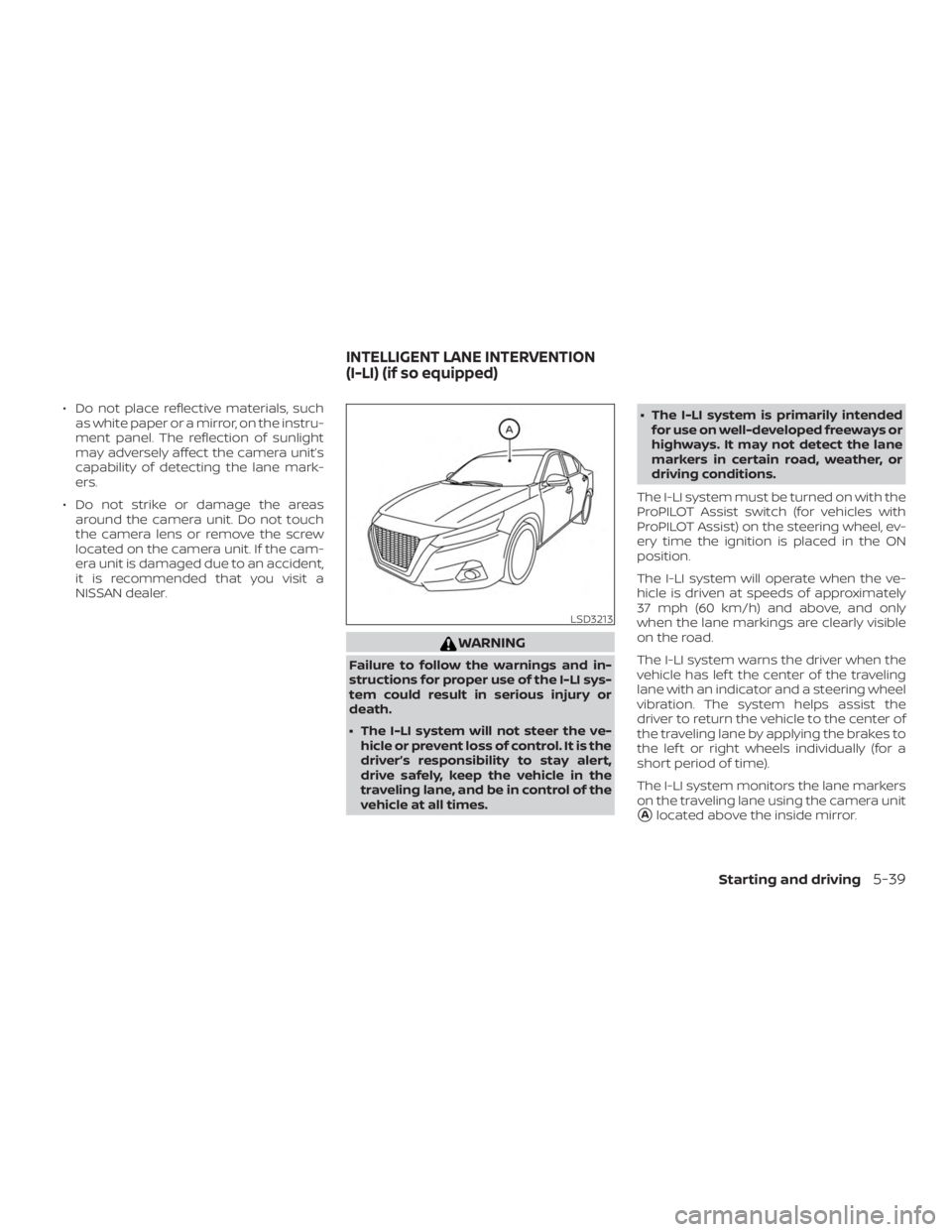
∙ Do not place reflective materials, suchas white paper or a mirror, on the instru-
ment panel. The reflection of sunlight
may adversely affect the camera unit’s
capability of detecting the lane mark-
ers.
∙ Do not strike or damage the areas around the camera unit. Do not touch
the camera lens or remove the screw
located on the camera unit. If the cam-
era unit is damaged due to an accident,
it is recommended that you visit a
NISSAN dealer.
Page 326 of 559
– Interference by other radarsources
∙ Do not use the ICC system if you are towing a trailer. The system may not
detect a vehicle ahead.
∙ In some road or traffic conditions, a vehicle or object can unexpectedly
come into the sensor detection zone
and cause automatic braking. Always
stay alert and avoid using the ICC sys-
tem where not recommended in this
warning section.
The radar sensor will not detect the follow-
ing objects: ∙ Stationary and slow moving vehicles
∙ Pedestrians or objects in the roadway
∙ Oncoming vehicles in the same lane
∙ Motorcycles traveling offset in the travel lane
The sensor generally detects the signals
returned from the vehicle ahead. Therefore,
if the sensor cannot detect the reflection
from the vehicle ahead, the ICC system
may not maintain the selected distance. The following are some conditions in which
the sensor cannot properly detect a ve-
hicle ahead and the system may not oper-
ate properly:
∙ When snow or road spray from traveling vehicles reduces the sensor’s detection.
∙ When your vehicle is towing a trailer, etc.
∙ When excessively heavy baggage is loaded in the rear seat or cargo area of
your vehicle.
The ICC system is designed to automati-
cally check the sensor’s operation within
the limitations of the system.
When the sensor is covered with dirt or is
obstructed, the system will automatically
be canceled. If the sensor is covered with
ice, a transparent or translucent vinyl bag,
etc., the ICC system may not detect them.
In these instances, the vehicle-to-vehicle
distance control mode may not cancel and
may not be able to maintain the selected
following distance from the vehicle ahead.
Be sure to check and clean the sensor
regularly. The detection zone of the radar sensor is
limited. A vehicle ahead must be in the de-
tection zone for the vehicle-to-vehicle dis-
tance detection mode to maintain the se-
lected distance from the vehicle ahead.
A vehicle ahead may move outside of the
detection zone due to its position within
the same lane of travel. Motorcycles may
not be detected in the same lane ahead if
they are traveling offset from the centerline
of the lane. A vehicle that is entering the
lane ahead may not be detected until the
vehicle has completely moved into the
lane.
If this occurs, the ICC system may warn
you by blinking the system indicator and
sounding the chime. The driver may
have to manually control the proper dis-
tance away from vehicle traveling ahead.
Starting and driving5-79
Page 355 of 559
∙ Always pay attention to the operationof the vehicle and be ready to manu-
ally control the proper following dis-
tance. The ICC system may not be able
to maintain the selected distance be-
tween vehicles (following distance) or
selected vehicle speed under some
circumstances.
∙ The system may not detect the ve- hicle in front of you in certain road or
weather conditions. To avoid acci-
dents, never use the ICC system under
the following conditions:
– On roads with heavy, high-speed traffic or sharp curves
– On slippery road surfaces such as on ice or snow, etc.
– During bad weather (rain, fog, snow, etc.)
– When rain, snow or dirt adhere to the bumper around the distance
sensor
– On steep downhill roads (the ve- hicle may go beyond the set ve-
hicle speed and frequent braking
may result in overheating the
brakes) – On repeated uphill and downhill
roads
– When traffic conditions make it dif- ficult to keep a proper distance be-
tween vehicles because of fre-
quent acceleration or deceleration
– Interference by other radar sources.
∙ Do not use the ICC system if you are towing a trailer. The system may not
detect a vehicle ahead.
∙ In some road or traffic conditions, a vehicle or object can unexpectedly
come into the sensor detection zone
and cause automatic braking. Always
stay alert and avoid using the ICC sys-
tem where not recommended in this
warning section.
The ICC system will not detect the following
objects: ∙ Stationary or slow moving vehicles
∙ Pedestrians or objects in the roadway
∙ Oncoming vehicles in the same lane
∙ Motorcycles traveling offset in the travel lane The following are some conditions in which
the radar sensor cannot properly detect a
vehicle ahead and the system may not op-
erate properly:
∙ When the sensor detection is reduced (conditions such as rain, snow, fog, dust
storms, sandstorms, and road spray
from other vehicles)
∙ Driving on a steep downhill slope or roads with sharp curves
∙ Driving on a bumpy road surface, such as an uneven dirt road
∙ If dirt, ice, snow or other material is cov- ering the radar sensor area
∙ A complicated-shaped vehicle such as a car carrier trailer or flatbed
truck/trailer is near the vehicle ahead.
∙ Interference by other radar sources
∙ When your vehicle is towing a trailer, etc.
∙ When excessively heavy baggage is loaded in the rear seat or cargo area of
your vehicle.
The ICC system is designed to automati-
cally check the radar sensor’s operation
within the limitations of the system.
5-108Starting and driving
Page 360 of 559
ICC sensor maintenance
The radar sensor is located on the front of
the vehicle.
To keep the ICC system operating properly,
be sure to observe the following:∙ Always keep the sensor area clean.
∙ Do not strike or damage the areas around the sensor.
∙ Do not attach a sticker (including trans- parent material) or install an accessory
near the sensor. This could cause failure
or malfunction.
∙ Do not attach metallic objects near the sensor area (brush guard, etc.). This
could cause failure or malfunction.
∙ Do not alter, remove, or paint the front bumper.
Before customizing or restoring the front
bumper, it is recommended that you visit a
NISSAN dealer.
The camera sensor is located above the
inside mirror. To keep the proper operation of the sys-
tems and prevent a system malfunction,
be sure to observe the following:
∙ Always keep the windshield clean.
∙ Do not attach a sticker (including trans- parent material) or install an accessory
near the camera unit.
∙ Do not place reflective materials, such as white paper or a mirror, on the instru-
ment panel. The reflection of sunlight
may adversely affect the camera unit’s
capability of detecting the lane mark-
ers.
∙ Do not strike or damage the areas around the camera unit. Do not touch
the camera lens or remove the screw
located on the camera unit.
If the camera unit is damaged due to an
accident, it is recommended that you visit a
NISSAN dealer.
STEERING ASSIST
Page 365 of 559
– When driving on roads where thetraveling lane merges or separates
or where there are temporary lane
markers because of road
construction
– When there is a lane closure due to road repairs
– When driving on a bumpy road sur- face, such as an uneven dirt road
– When driving on sharp curves or winding roads
– When driving on repeated uphill and downhill roads
∙ Do not use the Steering Assist under the following conditions because the
system will not operate properly:
– When driving with a tire that is not within normal tire conditions (for
example, tire wear, abnormal tire
pressure, installation of a spare
tire, tire chains, nonstandard
wheels)
– When the vehicle is equipped with non-original brake or suspension
parts – When an object such as a sticker or
cargo obstructs the camera
– When excessively heavy baggage is loaded in the rear seat or lug-
gage area of your vehicle
– When the vehicle load capacity is exceeded
– When towing a trailer or other vehicle
∙ Excessive noise will interfere with the warning chime sound, and the beep
may not be heard.
∙ For the ProPILOT Assist system to op- erate properly, the windshield in front
of the camera must be clean. Replace
worn wiper blades. The correct size
wiper blades must be used to help
make sure the windshield is kept
clean. Only use Genuine NISSAN wiper
blades, or equivalent wiper blades,
that are specifically designed for use
on your vehicle model and model
year. It is recommended that you visit
a NISSAN dealer for the correct parts
for your vehicle.Steering Assist temporary
standby
Automatic standby due to driving opera-
tion:
When the driver activates the turn signal,
the Steering Assist is temporarily placed in
a standby mode. (The Steering Assist re-
starts automatically when the operating
conditions are met again.)
Automatic standby:
In the following cases, a warning message
is displayed along with the chime, and the
Steering Assist is placed in a temporary
standby mode. (The Steering Assist re-
starts automatically when the operating
conditions are met again.)
∙ When lane markers on both sides are no longer detected
∙ When a vehicle ahead is no longer de- tected under approximately 37 mph
(60 km/h)
5-118Starting and driving
Page 375 of 559
– An ultrasonic wave source, such asanother vehicle’s sonar, is near the
vehicle.
∙ Once the automatic brake control op- erates, it does not operate again if the
vehicle approaches the same
obstacle.
∙ The automatic brake control can only operate for a short period of time.
Therefore, the driver must depress
the brake pedal.
∙ In the following situations, the RAB system may not operate properly or
may not function sufficiently:
– The vehicle is driven in bad weather (rain, fog, snow, etc.).
– The vehicle is driven on a steep hill.
– The vehicle’s posture is changed (e.g., when driving over a bump).
– The vehicle is driven on a slippery road.
– The vehicle is turned sharply by turning the steering wheel fully.
– Snow chains are used. – Wheels or tires other than NISSAN
recommended are used.
– The brakes are cold at low ambient temperatures or immediately af ter
driving has started.
– The braking force becomes poor due to wet brakes af ter driving
through a puddle or washing the
vehicle.
∙ Turn the RAB system off in the follow- ing conditions to prevent the occur-
rence of an unexpected accident re-
sulting from sudden system
operation:
– The vehicle is towed.
– The vehicle is carried on a flatbed truck.
– The vehicle is on the chassis dynamometer.
– The vehicle drives on an uneven road surface. – Suspension parts other than those
designated as Genuine NISSAN
parts are used. (If the vehicle
height or the vehicle body inclina-
tion is changed, the system may
not detect an obstacle correctly.)
∙ Excessive noise (e.g., audio system volume, an open vehicle window) will
interfere with the chime sound, and it
may not be heard.
SYSTEM MALFUNCTION
If the RAB system malfunctions, it will be
turned off automatically, the RAB system
warning light will illuminate, and the “Sys-
tem fault” warning message will appear in
the vehicle information display.
Action to take
If the warning light illuminates, park the ve-
hicle in a safe location, turn the engine off,
and restart the engine. If the warning light
continues to illuminate, have the RAB sys-
tem checked. It is recommended that you
visit a NISSAN dealer for this service.
5-128Starting and driving
Page 420 of 559
∙ If wheels or tires other than theNISSAN recommended ones are used,
the VDC system may not operate
properly and the