Turning NISSAN ALTIMA 2023 User Guide
[x] Cancel search | Manufacturer: NISSAN, Model Year: 2023, Model line: ALTIMA, Model: NISSAN ALTIMA 2023Pages: 644, PDF Size: 4.12 MB
Page 208 of 644
Once step 4 is completed, every time the
ignition is switched from ON to OFF, the
memory positions of the driver’s seat and
outside mirror (if so equipped) are linked to
the Intelligent Key.
Follow the same procedure if you want
to link the 2nd, 3rd or 4th Intelligent Key.
NOTE:
If new memory positions are set prior to
turning the ignition from ON to OFF, the
previously linked memory positions for
the respective key will be overwritten by
new positions.
Recalling Intelligent Key memory
positions
If the “Key-Linked Settings” are enabled in
the vehicle information display for that par-
ticular key, every time you enter the vehicle
the driver’s seat and outside mirrors (if so
equipped) will automatically move to the
driver’s last position of the respective Intel-
ligent Key.
NOTE:
The key-linked memory positions can be
different from the positions stored in the
memory switch (1 or 2).
MEMORY STORAGE FUNCTION
(switch)
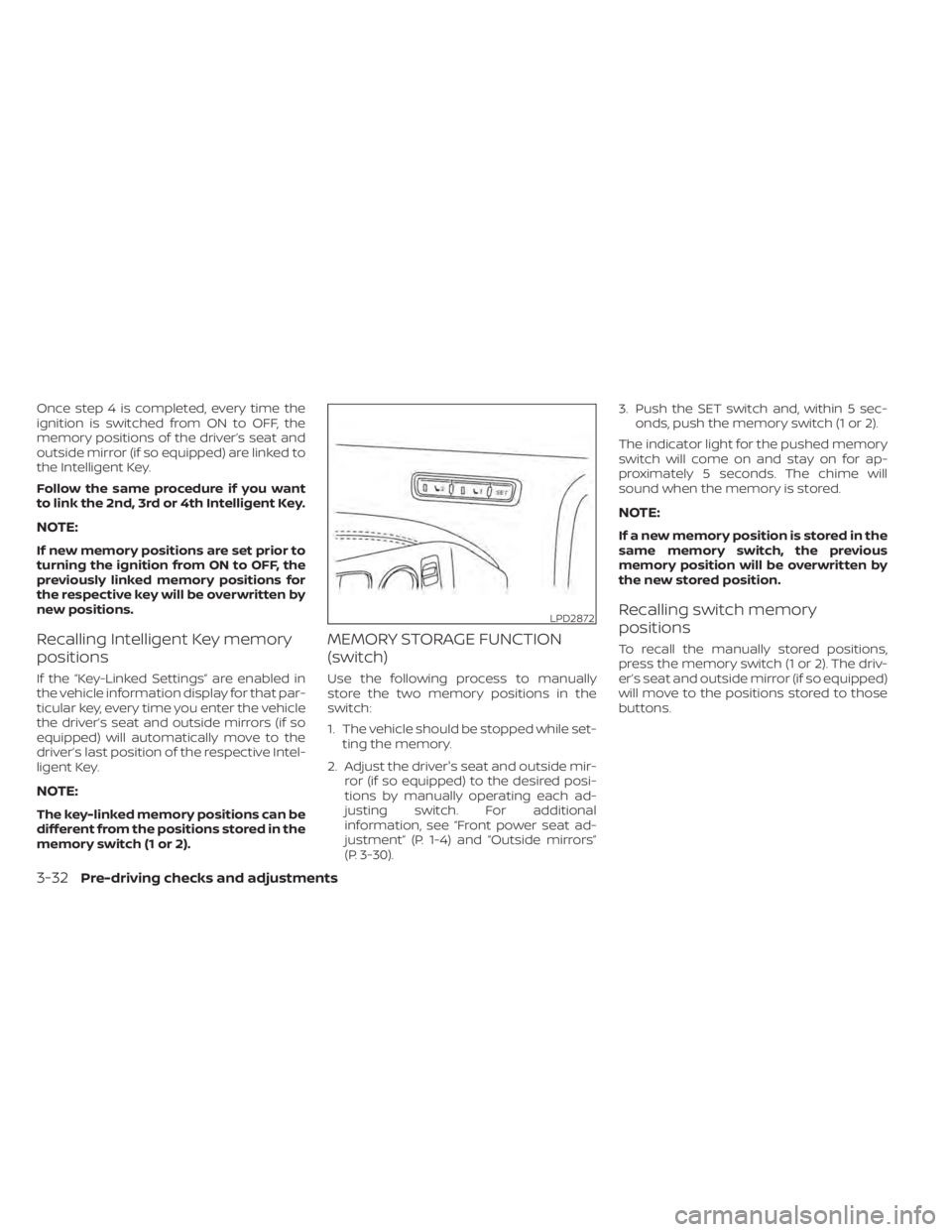
Use the following process to manually
store the two memory positions in the
switch:
1. The vehicle should be stopped while set-ting the memory.
2. Adjust the driver's seat and outside mir- ror (if so equipped) to the desired posi-
tions by manually operating each ad-
justing switch. For additional
information, see “Front power seat ad-
justment” (P. 1-4) and “Outside mirrors”
(P. 3-30). 3. Push the SET switch and, within 5 sec-
onds, push the memory switch (1 or 2).
The indicator light for the pushed memory
switch will come on and stay on for ap-
proximately 5 seconds. The chime will
sound when the memory is stored.
NOTE:
If a new memory position is stored in the
same memory switch, the previous
memory position will be overwritten by
the new stored position.
Recalling switch memory
positions
To recall the manually stored positions,
press the memory switch (1 or 2). The driv-
er’s seat and outside mirror (if so equipped)
will move to the positions stored to those
buttons.
LPD2872
3-32Pre-driving checks and adjustments
Page 210 of 644
4 Monitor, climate, audio, phone and
voice recognition systems
NissanConnect® Owner’s Manual...............4-2
Control panel buttons ...........................4-3
How to use the touch-screen ................4-4
How to use the
MENU button ...........4-5(brightness control) button .............4-7
How to use the VOL (volume) knob /
PUSH
(power)button....................4-7
Selecting menu from launch bar .............4-7
RearView Monitor (if so equipped) ...............4-8
RearView Monitor system operation ..........4-9
How to read the displayed lines ..............4-9
Difference between predicted and
actual distances ............................ 4-10
How to park with predicted course
lines .......................................... 4-11
Adjusting the screen ........................ 4-13
How to turn on and off predicted
course lines ................................. 4-13
RearView Monitor system limitations ........4-13
System maintenance ....................... 4-15
Intelligent Around View Monitor
(if so equipped) ................................. 4-16
Intelligent Around View Monitor system
operation ................................... 4-17
Difference between predicted and
actual distances ............................ 4-20How to park with predicted course
lines
......................................... 4-22
How to switch the display ...................4-23
Adjusting the screen ........................ 4-24
Intelligent Around View Monitor system
limitations .................................. 4-24
System maintenance .......................4-26
Moving Object Detection (MOD)
(if so equipped) ................................. 4-27
MOD system operation ......................4-28
Turning MOD on and off (if so equipped) .....4-30
MOD system limitations .....................4-30
System maintenance ....................... 4-31
Vents .......................................... 4-31
Heater and air conditioner (manual)
(if so equipped) ................................. 4-33
Controls ..................................... 4-34
Heater operation ............................ 4-34
Air conditioner operation ....................4-35
Air flow charts ............................... 4-36
Heater and air conditioner (automatic)
(if so equipped) ................................. 4-40
Automatic operation ........................ 4-41
Manual operation ........................... 4-42
Operating tips ............................... 4-43
Page 240 of 644
If the MOD system is turned off, the MOD
icon
O3is not displayed.
TURNING MOD ON AND OFF (if so
equipped)
Some vehicles include the option to allow
the MOD system to be turned on or off.
To turn the MOD system on or off:
1. Touch the “Setting” key.
2. Touch the “Camera” key.
3. Touch the “Moving Object Detection” keyto switch between ON or OFF.
MOD SYSTEM LIMITATIONS
WARNING
Listed below are the system limitations
for MOD. Failure to operate the vehicle
in accordance with these system limi-
tations could result in serious injury or
death.
• Do not use the MOD system when
towing a trailer. The system may not
function properly.
• Excessive noise (for example, audio
system volume or open vehicle win-
dow) will interfere with the chime
sound, and it may not be heard. •
The MOD system performance will be
limited according to environmental
conditions and surrounding objects
such as:
– When there is low contrast be-
tween background and the mov-
ing objects.
– When there is a blinking source of
light.
– When strong light such as another
vehicle’s headlight or sunlight is
present.
– When camera orientation is not in
its usual position, such as when a
mirror is folded.
– When there is dirt, water drops or
snow on the camera lens.
– When the position of the moving
objects in the display is not
changed.
• The MOD system might detect flow-
ing water droplets on the camera
lens, white smoke from the muffler,
moving shadows, etc.
• The MOD system may not function
properly depending on the speed, di-
rection, distance or shape of the
moving objects. •
If your vehicle sustains damage to
the parts where the camera is in-
stalled, leaving it misaligned or bent,
the sensing zone may be altered and
the MOD system may not detect ob-
jects properly.
• When the temperature is extremely
high or low, the screen may not dis-
play objects clearly. This is not a
malfunction.
NOTE:
The blue MOD icon will change to or-
ange if one of the following has oc-
curred:
• When the system is malfunctioning.
• When the component temperature
reaches a high level (icon will blink).
• When the RearView camera has de-
tected a blockage (icon will blink).
If the icon light continues to illuminate
orange, have the MOD system checked. It
is recommended that you visit a NISSAN
dealer for this service.
4-30Monitor, climate, audio, phone and voice recognition systems
Page 296 of 644
5 Starting and driving
Precautions when starting and driving..........5-4
Exhaust gas (carbon monoxide) ..............5-4
Three-way catalyst ...........................5-4
Tire Pressure Monitoring System
(TPMS) .......................................5-5
Avoiding collision and rollover ................5-9
Off-roadrecovery ............................5-9
Rapid air pressure loss .......................5-9
Drinking alcohol/drugs and driving ..........5-10
Driving safety precautions ...................5-10
Push-button ignition switch ....................5-13
Operating range ............................ 5-14
Push-button ignition switch positions .......5-14
Emergency engine shut off ..................5-15
NISSAN Intelligent Key® battery
discharge ................................... 5-15
NISSAN Vehicle Immobilizer System .........5-16
Before starting the engine .....................5-16
Starting the engine ............................. 5-16
Remote Engine Start ........................ 5-17
Driving the vehicle .............................. 5-18
Continuously Variable Transmission
(CVT) ........................................ 5-18
Parking brake .................................. 5-25
Manual parking brake (pedal type) ...........5-25
Electronic parking brake (switch type) .......5-25 Automatic brake hold (if so equipped)
..........5-27
How to activate/deactivate the
automatic brake hold function ..............5-28
How to use the automatic brake hold
function ..................................... 5-29
Traffic Sign Recognition (TSR) (if so equipped) . . . 5-30 System operation ........................... 5-31
Turning the Traffic Sign Recognition
(TSR) system on and off .....................5-32
System temporarily unavailable .............5-32
System malfunction ......................... 5-32
System maintenance .......................5-33
Lane Departure Warning (LDW) .................5-33
LDW system operation ......................5-34
How to enable/disable the LDW system .....5-36
LDW system limitations .....................5-38
System temporarily unavailable .............5-39
System malfunction ......................... 5-39
System maintenance .......................5-39
Intelligent
Lane Intervention (I-LI)
(if so equipped) ................................. 5-40
I-LI system operation ........................ 5-41
How to enable/disable the I-LI system ......5-42
I-LI system limitations .......................5-43
System temporarily unavailable .............5-44
System malfunction ......................... 5-45
Page 297 of 644
System maintenance.......................5-45
Blind Spot Warning (BSW) (if so equipped) .......5-46
BSW system operation ......................5-48
How to enable/disable the BSW system .....5-49
BSW system limitations .....................5-51
BSW driving situations .......................5-52
System temporarily unavailable .............5-55
System maintenance .......................5-57
Rear Cross Traffic Alert (RCTA) (if so equipped) . . 5-58 RCTA system operation .....................5-58
How to enable/disable the RCTA
system ...................................... 5-61
RCTA system limitations .....................5-63
System temporarily unavailable .............5-65
System maintenance .......................5-67
Cruise control (if so equipped) ..................5-68
Precautions on cruise control ...............5-68
Cruise control operations ...................5-69
Intelligent Cruise Control (ICC) (if so equipped) . . 5-71 How to select the cruise control mode ......5-73
Vehicle-to-vehicle distance control
mode ....................................... 5-73
Vehicle-to-vehicle distance control
mode operation .............................5-74 Vehicle-to-vehicle distance control
mode switches
............................. 5-76
Vehicle-to-vehicle distance control
mode limitations ............................ 5-82
System temporarily unavailable .............5-86
System maintenance .......................5-88
Conventional (fixed speed) cruise
control mode ............................... 5-90
ProPILOT Assist (if so equipped) ................5-94
ProPILOT Assist system operation ...........5-96
Turning the conventional (fixed speed)
cruise control mode on .....................5-99
Operating ProPILOT Assist ..................5-100
How to enable/disable the Steering
Assist ...................................... 5-105
Intelligent Cruise Control (ICC) (for
vehicles with ProPILOT Assist) ..............5-106
Steering Assist .............................. 5-117
Conventional (fixed speed) cruise
control mode .............................. 5-123
Rear Automatic Braking (RAB)
(if so equipped) ................................
5-127
RAB
system operation ...................... 5-128
Turning the RAB system on/off .............5-130
Page 298 of 644
RAB system limitations.....................5-132
System malfunction ........................ 5-134
System maintenance ......................5-134
Automatic Emergency Braking (AEB) with
Pedestrian Detection .......................... 5-135
AEB with Pedestrian Detection system
operation .................................. 5-136
Turning the AEB with Pedestrian
Detection system ON/OFF .................5-138
AEB with Pedestrian Detection system
limitations ................................. 5-140
System temporarily unavailable ............5-143
System malfunction ........................ 5-145
System maintenance ......................5-146
Intelligent Forward Collision Warning (I-FCW) . . 5-147 I-FCW system operation ....................5-150
Turning the I-FCW system on/off ...........5-151
I-FCW system limitations ...................5-153
System temporarily unavailable ............5-158
System malfunction ........................ 5-160
System maintenance ......................5-161
Intelligent Driver Alertness (I-DA) ...............5-162
Intelligent Driver Alertness system
operation .................................. 5-162How to enable/disable the Intelligent
Driver Alertness (I-DA) system
..............5-164
Intelligent Driver Alertness (I-DA)
system limitations ......................... 5-165
Break-in schedule ............................. 5-167
Fuel efficient driving tips .......................5-167
Increasing fuel economy ......................5-168
All-Wheel Drive (AWD) (if so equipped) ..........5-168
Parking/parking on hills ........................5-171
Power steering ................................ 5-172
Brake system ................................. 5-173
Brake precautions .......................... 5-173
Anti-lock Braking System (ABS) .............5-173
Brake Assist ................................ 5-175
Vehicle Dynamic Control (VDC) system ........5-175
Brake force distribution ....................5-177
Chassis Control (if so equipped) ...............
5-178
Intelligent
Trace Control (I-TC) ..............5-178
Active Ride Control (ARC) ...................5-178
Hill start assist system ........................5-178
Rear Sonar System (RSS) (if so equipped) ......5-179
System operation .......................... 5-180
Page 308 of 644
•For AWD equipped vehicles, do not
attempt to raise two wheels off the
ground and shif t the transmission to
any drive or reverse position with the
engine running. Doing so may result
in drivetrain damage or unexpected
vehicle movement which could result
in serious vehicle damage or per-
sonal injury.
• Do not attempt to test an AWD
equipped vehicle on a 2-wheel dyna-
mometer (such as the dynamom-
eters used by some states for emis-
sions testing) or similar equipment
even if the other two wheels are
raised off the ground. Make sure you
inform test facility personnel that
your vehicle is equipped with AWD
before it is placed on a dynamom-
eter. Using the wrong test equipment
may result in drivetrain damage or
unexpected vehicle movement
which could result in serious vehicle
damage or personal injury.
• When a wheel is off the ground due to
an unlevel surface, do not spin the
wheel excessively. •
Accelerating quickly, sharp steering
maneuvers or sudden braking may
cause loss of control.
• If at all possible, avoid sharp turning
maneuvers, particularly at high
speeds. Your NISSAN vehicle has a
higher center of gravity than a pas-
senger car. The vehicle is not de-
signed for cornering at the same
speeds as passenger cars.
• Failure to operate this vehicle cor-
rectly could result in loss of control
and/or a rollover accident.
• Always use tires of the same type,
size, brand, construction (bias, bias-
belted, or radial), and tread pattern
on all four wheels. Install tire chains
on the front wheels when driving on
slippery roads and drive carefully.
• Be sure to check the brakes immedi-
ately af ter driving in mud or water.
For additional information, see
“Brake precautions” (P. 5-173).
• Avoid parking your vehicle on steep
hills. If you get out of the vehicle and
it rolls forward, backward or side-
ways, you could be injured. •
Whenever you drive off-road through
sand, mud or water as deep as the
wheel hub, more frequent mainte-
nance may be required. For addi-
tional information, see “Maintenance
under severe operating conditions”
(P. 9-7).
5-12Starting and driving
Page 325 of 644
How to activate the automatic
brake hold function
1. With the ignition switch in the ON posi-tion, push the automatic brake hold
switch
O1. The indicator light on the au-
tomatic brake hold switch
O2
illuminates.
2. When the automatic brake hold function goes into standby, the automatic brake
hold indicator light (white) illuminates.
To use the automatic brake hold function,
the following conditions need to be met:
• The driver’s seat belt is fastened.
• The electronic parking brake is released.
• The shif t lever is not in the P (Park) position.
• The vehicle is not parked on a steep hill.
NOTE:
The automatic brake hold function re-
sets to OFF every time the ignition
switch is switched from the OFF position
to the ON position.
How to deactivate the automatic
brake hold function
While the automatic brake hold function is
activated, push the automatic brake hold
switch to turn off the automatic brake hold
indicator light and deactivate the auto-
matic brake hold function. To deactivate
the automatic brake hold function while
the brake force has been maintained by
the automatic brake hold function, depress
the brake pedal and push the automatic
brake hold switch.
WARNING
Make sure to firmly depress and hold
the brake pedal when turning off the
automatic brake hold function while
the brake force is applied. When the au-
tomatic brake hold function is deacti-
vated, the brake force will be released.
This could cause the vehicle to move or
roll away unexpectedly. Failure to pre-
vent the vehicle from rolling may result
in serious personal injury or property
damage.
HOW TO USE THE AUTOMATIC
BRAKE HOLD FUNCTION
For additional information on using the au-
tomatic brake hold function, refer to the
instructions outlined in this section.
To maintain braking force
automatically
With the automatic brake hold function ac-
tivated and the automatic brake hold indi-
cator light (white) illuminated on the meter,
depress the braking pedal to stop the ve-
hicle. The brake force is automatically
maintained without your foot depressed
on the brake pedal. While the brake hold is
maintained, the automatic brake hold indi-
cator light (green) illuminates on the meter.
To start the vehicle from a
standstill
With the shif t lever not in the P (Park) or N
(Neutral) position, depress the accelerator
pedal while the brake force is maintained.
The brake force will automatically be re-
leased to restart the vehicle.
The automatic brake hold indicator light
(white) illuminates and the automatic
brake hold returns to standby.
Starting and driving5-29
Page 328 of 644
–When a sudden change in bright-
ness occurs. (For example, when
the vehicle enters or exits a tunnel
or under a bridge.)
– If there are deviations in relation
to the navigation, for example due
to changes in the road routing.
– When overtaking buses or trucks
with speed stickers.
TURNING THE TRAFFIC SIGN
RECOGNITION (TSR) SYSTEM ON
AND OFF
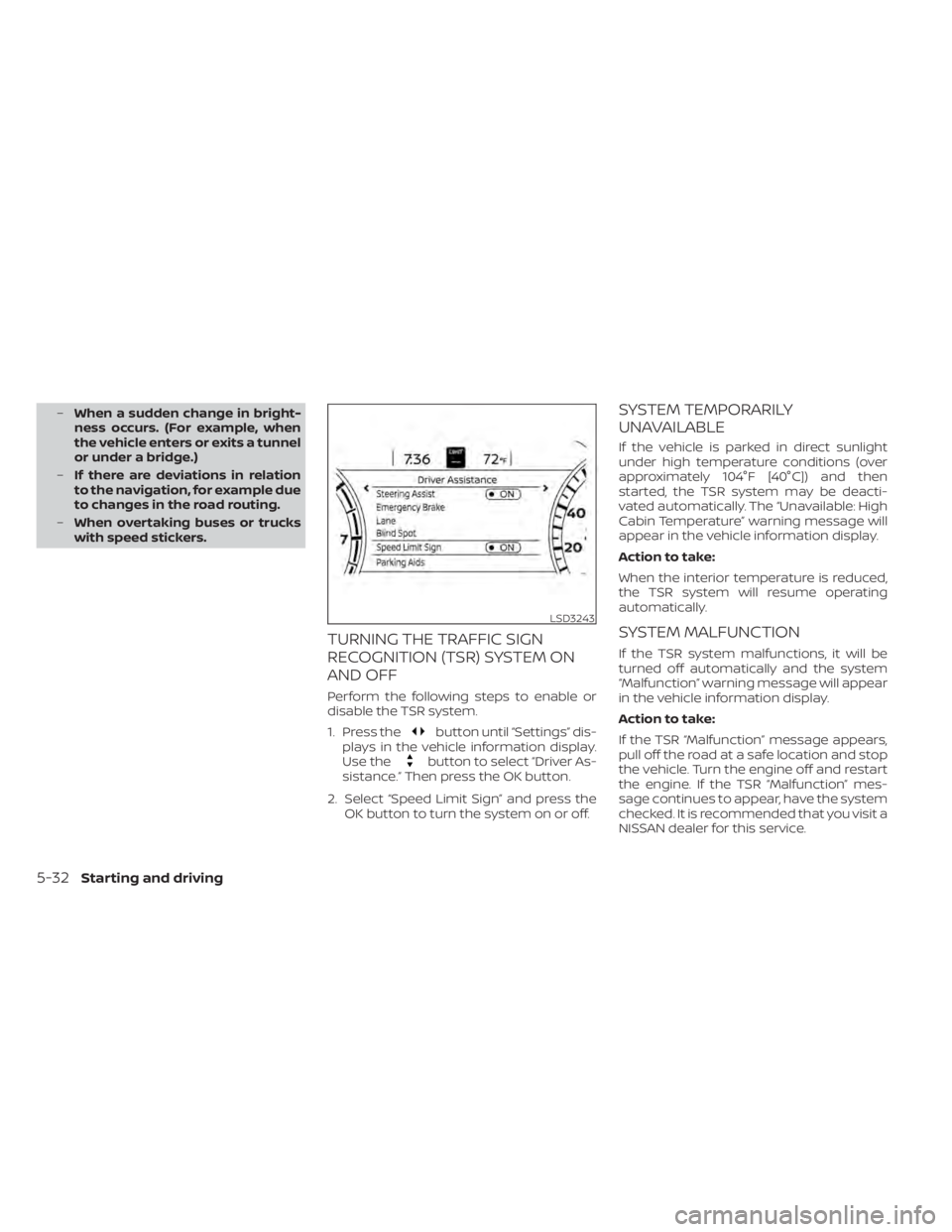
Perform the following steps to enable or
disable the TSR system.
1. Press the
button until “Settings” dis-
plays in the vehicle information display.
Use the
button to select “Driver As-
sistance.” Then press the OK button.
2. Select “Speed Limit Sign” and press the OK button to turn the system on or off.
SYSTEM TEMPORARILY
UNAVAILABLE
If the vehicle is parked in direct sunlight
under high temperature conditions (over
approximately 104°F [40°C]) and then
started, the TSR system may be deacti-
vated automatically. The “Unavailable: High
Cabin Temperature” warning message will
appear in the vehicle information display.
Action to take:
When the interior temperature is reduced,
the TSR system will resume operating
automatically.
SYSTEM MALFUNCTION
If the TSR system malfunctions, it will be
turned off automatically and the system
“Malfunction” warning message will appear
in the vehicle information display.
Action to take:
If the TSR “Malfunction” message appears,
pull off the road at a safe location and stop
the vehicle. Turn the engine off and restart
the engine. If the TSR “Malfunction” mes-
sage continues to appear, have the system
checked. It is recommended that you visit a
NISSAN dealer for this service.
LSD3243
5-32Starting and driving
Page 338 of 644
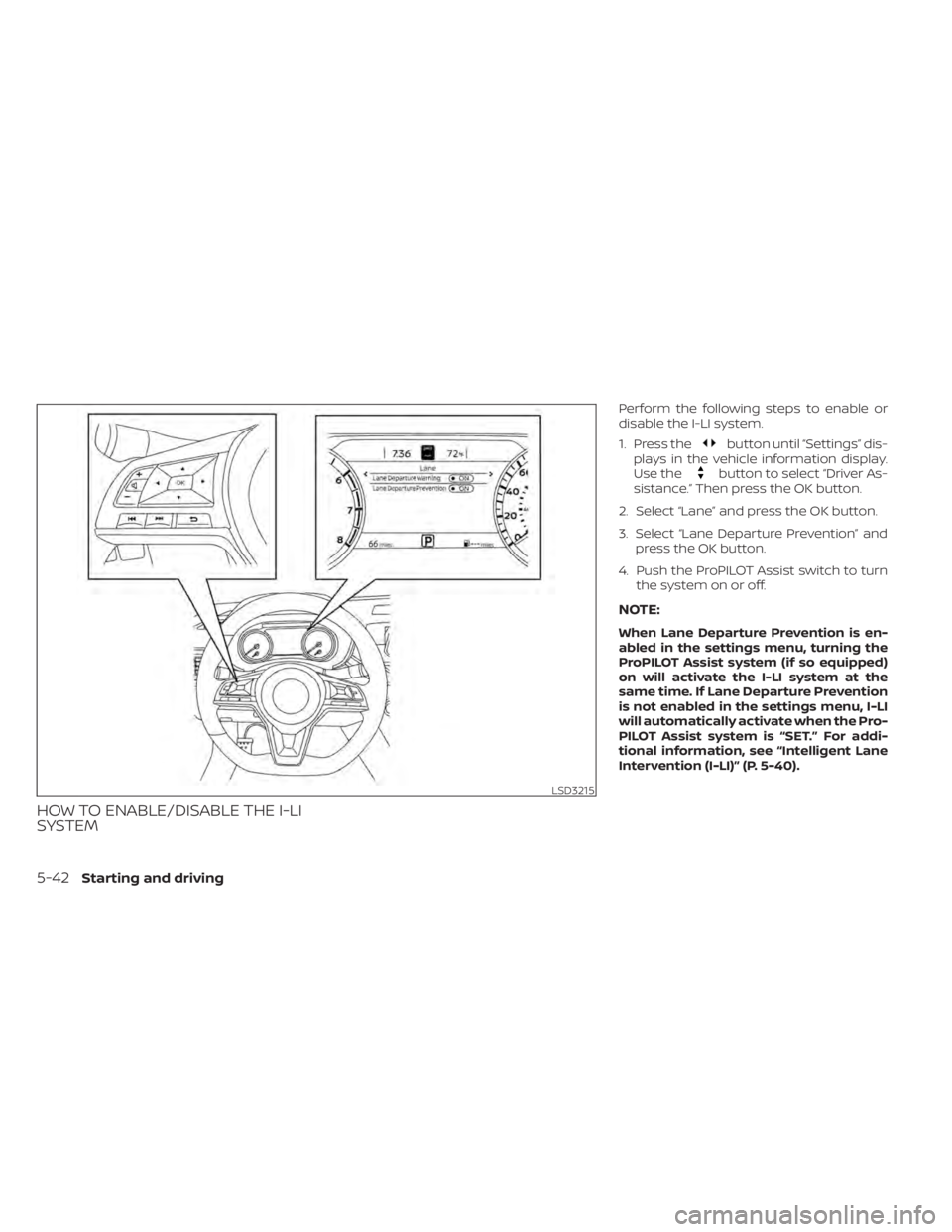
HOW TO ENABLE/DISABLE THE I-LI
SYSTEM
Perform the following steps to enable or
disable the I-LI system.
1. Press the
button until “Settings” dis-
plays in the vehicle information display.
Use the
button to select “Driver As-
sistance.” Then press the OK button.
2. Select “Lane” and press the OK button.
3. Select “Lane Departure Prevention” and press the OK button.
4. Push the ProPILOT Assist switch to turn the system on or off.
NOTE:
When Lane Departure Prevention is en-
abled in the settings menu, turning the
ProPILOT Assist system (if so equipped)
on will activate the I-LI system at the
same time. If Lane Departure Prevention
is not enabled in the settings menu, I-LI
will automatically activate when the Pro-
PILOT Assist system is “SET.” For addi-
tional information, see “Intelligent Lane
Intervention (I-LI)” (P. 5-40).
LSD3215
5-42Starting and driving