audio NISSAN ALTIMA COUPE 2009 D32 / 4.G Owners Manual
[x] Cancel search | Manufacturer: NISSAN, Model Year: 2009, Model line: ALTIMA COUPE, Model: NISSAN ALTIMA COUPE 2009 D32 / 4.GPages: 373, PDF Size: 4.79 MB
Page 6 of 373
Table of
ContentsIllustrated table of contents
Safety—Seats, seat belts and supplemental restraint system
Instruments and controls
Pre-driving checks and adjustments
Monitor, climate, audio, phone and voice recognition systems
Starting and driving
In case of emergency
Appearance and care
Maintenance and do-it-yourself
Technical and consumer information
Index
0
1
2
3
4
5
6
7
8
9
10
Page 14 of 373
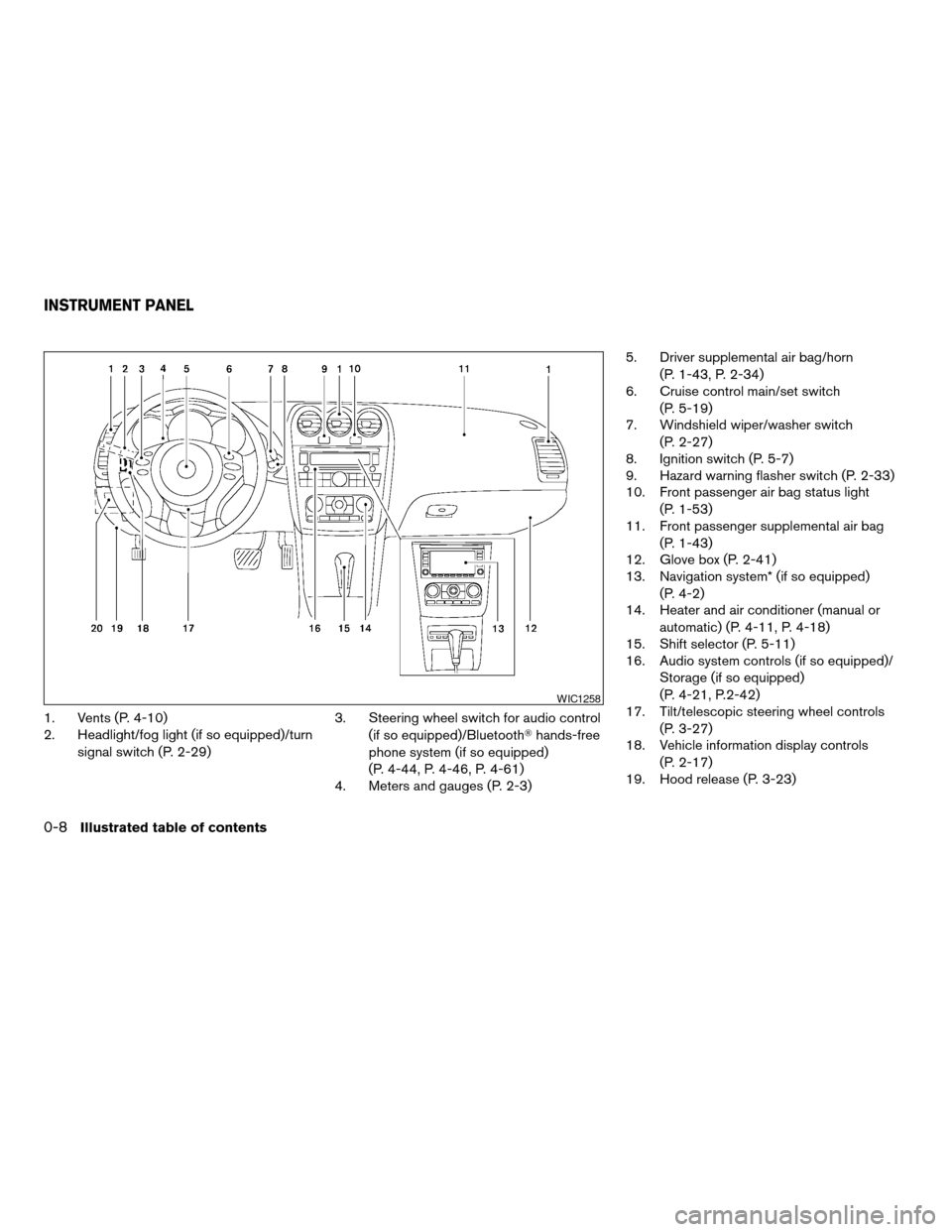
1. Vents (P. 4-10)
2. Headlight/fog light (if so equipped)/turn
signal switch (P. 2-29)3. Steering wheel switch for audio control
(if so equipped)/BluetoothThands-free
phone system (if so equipped)
(P. 4-44, P. 4-46, P. 4-61)
4. Meters and gauges (P. 2-3)5. Driver supplemental air bag/horn
(P. 1-43, P. 2-34)
6. Cruise control main/set switch
(P. 5-19)
7. Windshield wiper/washer switch
(P. 2-27)
8. Ignition switch (P. 5-7)
9. Hazard warning flasher switch (P. 2-33)
10. Front passenger air bag status light
(P. 1-53)
11. Front passenger supplemental air bag
(P. 1-43)
12. Glove box (P. 2-41)
13. Navigation system* (if so equipped)
(P. 4-2)
14. Heater and air conditioner (manual or
automatic) (P. 4-11, P. 4-18)
15. Shift selector (P. 5-11)
16. Audio system controls (if so equipped)/
Storage (if so equipped)
(P. 4-21, P.2-42)
17. Tilt/telescopic steering wheel controls
(P. 3-27)
18. Vehicle information display controls
(P. 2-17)
19. Hood release (P. 3-23)
WIC1258
INSTRUMENT PANEL
0-8Illustrated table of contents
ZREVIEW COPYÐ2009 Altima(alt)
Owners Manual(owners)ÐUSA_English(nna)
02/03/09Ðdebbie
X
Page 80 of 373
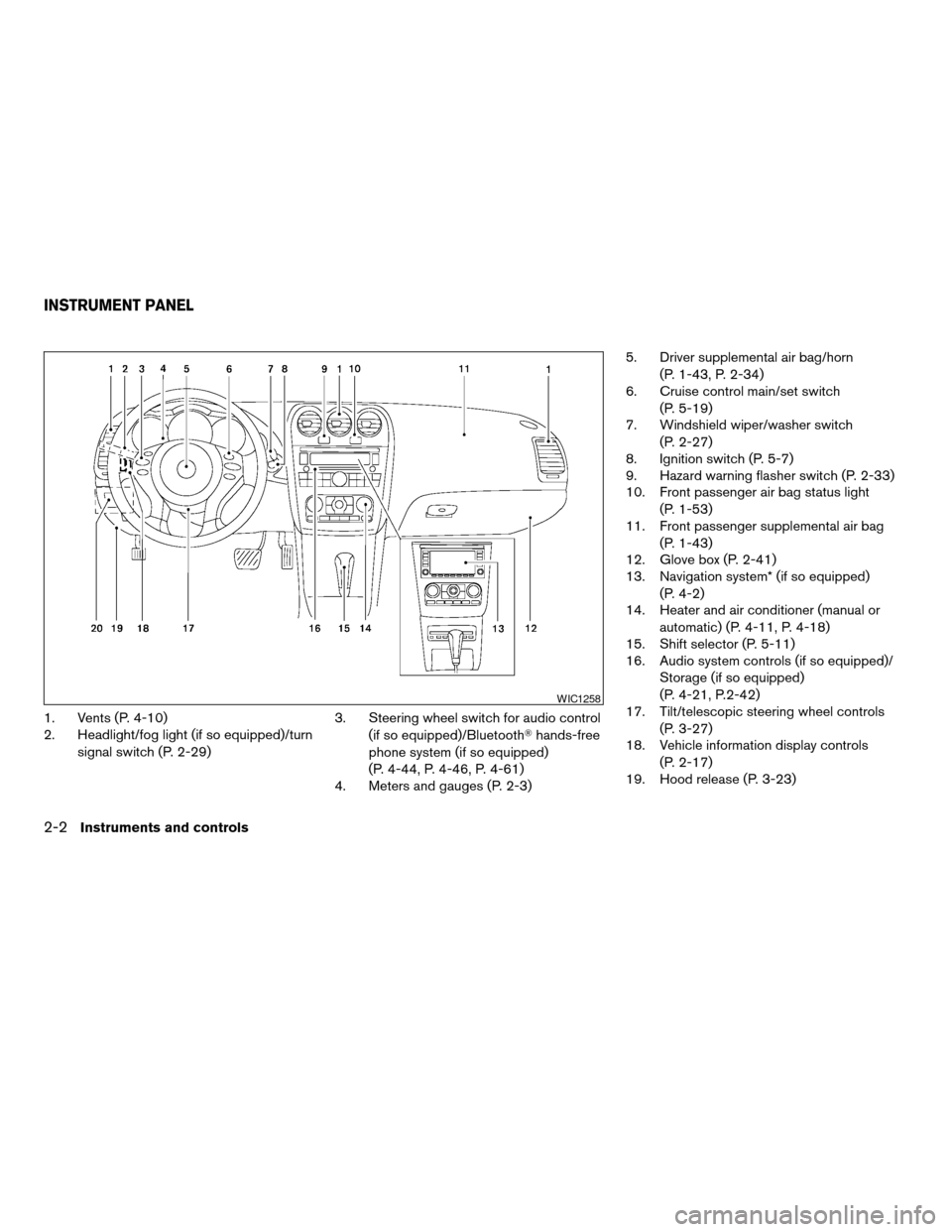
1. Vents (P. 4-10)
2. Headlight/fog light (if so equipped)/turn
signal switch (P. 2-29)3. Steering wheel switch for audio control
(if so equipped)/BluetoothThands-free
phone system (if so equipped)
(P. 4-44, P. 4-46, P. 4-61)
4. Meters and gauges (P. 2-3)5. Driver supplemental air bag/horn
(P. 1-43, P. 2-34)
6. Cruise control main/set switch
(P. 5-19)
7. Windshield wiper/washer switch
(P. 2-27)
8. Ignition switch (P. 5-7)
9. Hazard warning flasher switch (P. 2-33)
10. Front passenger air bag status light
(P. 1-53)
11. Front passenger supplemental air bag
(P. 1-43)
12. Glove box (P. 2-41)
13. Navigation system* (if so equipped)
(P. 4-2)
14. Heater and air conditioner (manual or
automatic) (P. 4-11, P. 4-18)
15. Shift selector (P. 5-11)
16. Audio system controls (if so equipped)/
Storage (if so equipped)
(P. 4-21, P.2-42)
17. Tilt/telescopic steering wheel controls
(P. 3-27)
18. Vehicle information display controls
(P. 2-17)
19. Hood release (P. 3-23)
WIC1258
INSTRUMENT PANEL
2-2Instruments and controls
ZREVIEW COPYÐ2009 Altima(alt)
Owners Manual(owners)ÐUSA_English(nna)
02/03/09Ðdebbie
X
Page 106 of 373
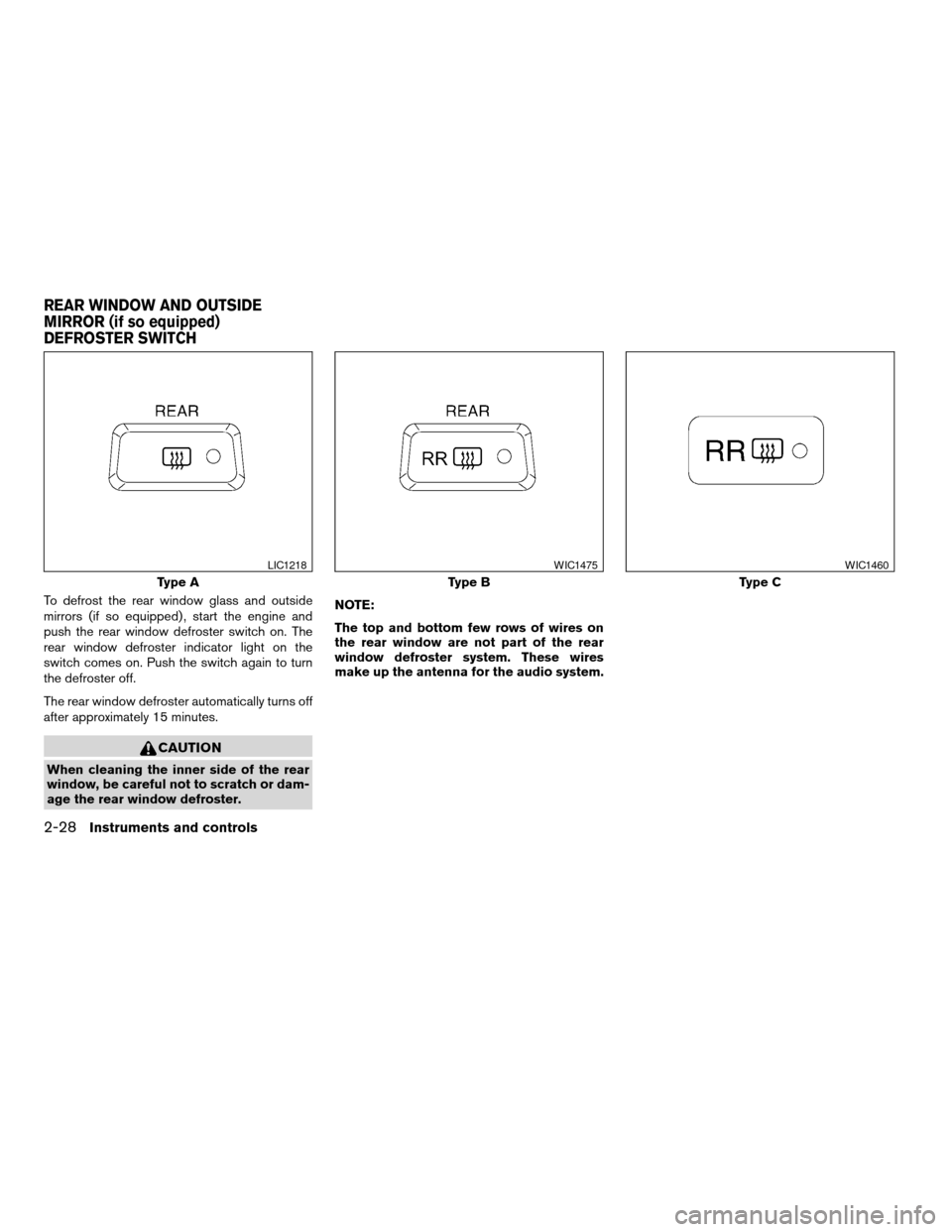
To defrost the rear window glass and outside
mirrors (if so equipped) , start the engine and
push the rear window defroster switch on. The
rear window defroster indicator light on the
switch comes on. Push the switch again to turn
the defroster off.
The rear window defroster automatically turns off
after approximately 15 minutes.
CAUTION
When cleaning the inner side of the rear
window, be careful not to scratch or dam-
age the rear window defroster.NOTE:
The top and bottom few rows of wires on
the rear window are not part of the rear
window defroster system. These wires
make up the antenna for the audio system.
Type A
LIC1218
Type B
WIC1475
Type C
WIC1460
REAR WINDOW AND OUTSIDE
MIRROR (if so equipped)
DEFROSTER SWITCH
2-28Instruments and controls
ZREVIEW COPYÐ2009 Altima(alt)
Owners Manual(owners)ÐUSA_English(nna)
02/03/09Ðdebbie
X
Page 134 of 373
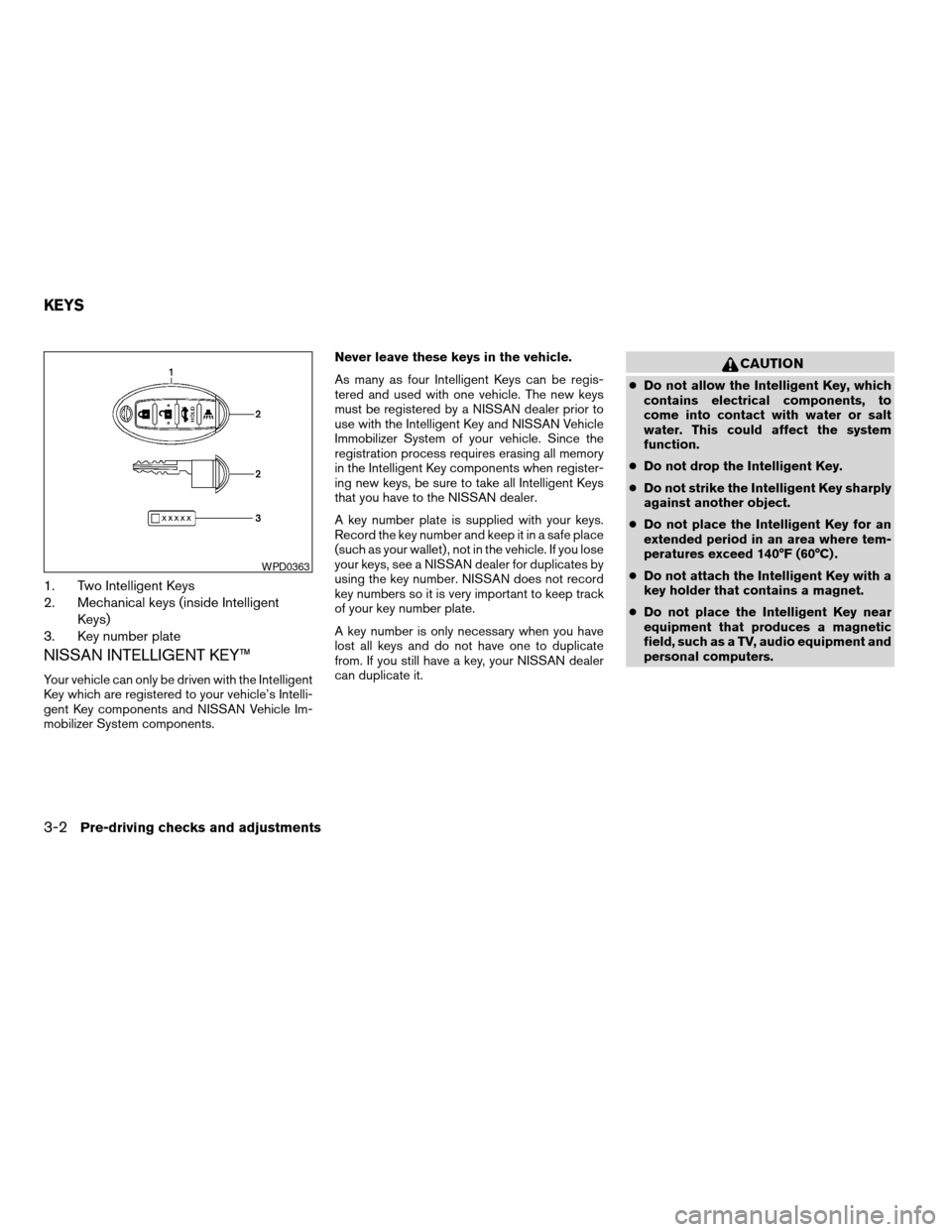
1. Two Intelligent Keys
2. Mechanical keys (inside Intelligent
Keys)
3. Key number plate
NISSAN INTELLIGENT KEY™
Your vehicle can only be driven with the Intelligent
Key which are registered to your vehicle’s Intelli-
gent Key components and NISSAN Vehicle Im-
mobilizer System components.Never leave these keys in the vehicle.
As many as four Intelligent Keys can be regis-
tered and used with one vehicle. The new keys
must be registered by a NISSAN dealer prior to
use with the Intelligent Key and NISSAN Vehicle
Immobilizer System of your vehicle. Since the
registration process requires erasing all memory
in the Intelligent Key components when register-
ing new keys, be sure to take all Intelligent Keys
that you have to the NISSAN dealer.
A key number plate is supplied with your keys.
Record the key number and keep it in a safe place
(such as your wallet) , not in the vehicle. If you lose
your keys, see a NISSAN dealer for duplicates by
using the key number. NISSAN does not record
key numbers so it is very important to keep track
of your key number plate.
A key number is only necessary when you have
lost all keys and do not have one to duplicate
from. If you still have a key, your NISSAN dealer
can duplicate it.
CAUTION
cDo not allow the Intelligent Key, which
contains electrical components, to
come into contact with water or salt
water. This could affect the system
function.
cDo not drop the Intelligent Key.
cDo not strike the Intelligent Key sharply
against another object.
cDo not place the Intelligent Key for an
extended period in an area where tem-
peratures exceed 140°F (60°C) .
cDo not attach the Intelligent Key with a
key holder that contains a magnet.
cDo not place the Intelligent Key near
equipment that produces a magnetic
field, such as a TV, audio equipment and
personal computers.
WPD0363
KEYS
3-2Pre-driving checks and adjustments
ZREVIEW COPYÐ2009 Altima(alt)
Owners Manual(owners)ÐUSA_English(nna)
02/03/09Ðdebbie
X
Page 140 of 373
cDo not attach the Intelligent Key with a
key holder that contains a magnet.
cDo not place the Intelligent Key near
equipment that produces a magnetic
field, such as a TV, audio equipment and
personal computers.
If an Intelligent Key is lost or stolen, NISSAN
recommends erasing the ID code of that Intelli-
gent Key from the vehicle. This may prevent the
unauthorized use of the Intelligent Key to operate
the vehicle. For information regarding the erasing
procedure, contact a NISSAN dealer.
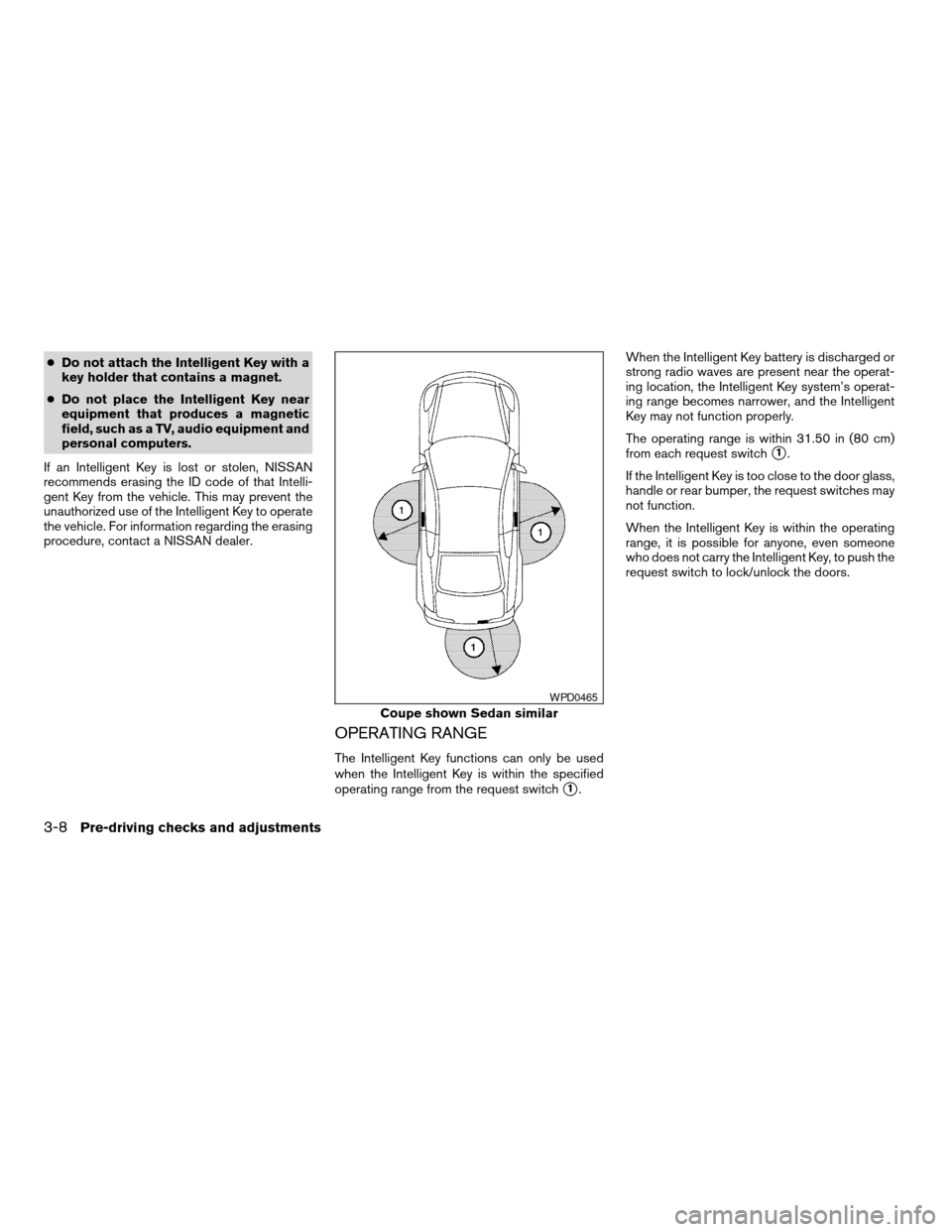
OPERATING RANGE
The Intelligent Key functions can only be used
when the Intelligent Key is within the specified
operating range from the request switch
s1.When the Intelligent Key battery is discharged or
strong radio waves are present near the operat-
ing location, the Intelligent Key system’s operat-
ing range becomes narrower, and the Intelligent
Key may not function properly.
The operating range is within 31.50 in (80 cm)
from each request switch
s1.
If the Intelligent Key is too close to the door glass,
handle or rear bumper, the request switches may
not function.
When the Intelligent Key is within the operating
range, it is possible for anyone, even someone
who does not carry the Intelligent Key, to push the
request switch to lock/unlock the doors.
Coupe shown Sedan similar
WPD0465
3-8Pre-driving checks and adjustments
ZREVIEW COPYÐ2009 Altima(alt)
Owners Manual(owners)ÐUSA_English(nna)
02/03/09Ðdebbie
X
Page 150 of 373
As many as 4 Intelligent Keys can be registered
and used with one vehicle. For information about
the purchase and use of additional Intelligent
Keys, contact a NISSAN dealer.
CAUTION
cDo not allow the Intelligent Key, which
contains electrical components, to
come into contact with water or salt
water. This could affect the system
function.
cDo not drop the Intelligent Key.
cDo not strike the Intelligent Key sharply
against another object.
cDo not change or modify the Intelligent
Key.
cWetting may damage the Intelligent
Key. If the Intelligent Key gets wet, im-
mediately wipe until it is completely dry.
cDo not place the Intelligent Key for an
extended period in an area where tem-
peratures exceed 140°F (60°C) .
cDo not attach the Intelligent Key with a
key holder that contains a magnet.cDo not place the Intelligent Key near
equipment that produces a magnetic
field, such as a TV, audio equipment and
personal computers.
If an Intelligent Key is lost or stolen, NISSAN
recommends erasing the ID code of that Intelli-
gent Key from the vehicle. This may prevent the
unauthorized use of the Intelligent Key to operate
the vehicle. For information regarding the erasing
procedure, contact a NISSAN dealer.
OPERATING RANGE
The Intelligent Key functions can only be used
when the Intelligent Key is within the specified
operating range.
When the Intelligent Key battery is discharged or
strong radio waves are present near the operat-
ing location, the Intelligent Key system’s operat-
ing range becomes narrower, and the Intelligent
Key may not function properly.
The operating range is within 33 ft (10 m) of the
vehicle.
HOW TO USE THE REMOTE
KEYLESS ENTRY FUNCTION
The remote keyless entry function can operate all
door locks using the remote keyless function of
the Intelligent Key. The remote keyless function
can operate at a distance of 33 ft (10 m) away
from the vehicle. The operating distance de-
pends upon the conditions around the vehicle.
The remote keyless entry function will not func-
tion under the following conditions:
cWhen the Intelligent Key is not within the
operational range.
cWhen the doors or the trunk are open or not
closed securely.
cWhen the Intelligent Key battery is dis-
charged.
CAUTION
When locking the doors using the Intelli-
gent Key, be sure not to leave the key in
the vehicle.
3-18Pre-driving checks and adjustments
ZREVIEW COPYÐ2009 Altima(alt)
Owners Manual(owners)ÐUSA_English(nna)
02/03/09Ðdebbie
X
Page 164 of 373
4 Monitor, climate, audio, phone and voice
recognition systems
Control panel buttons (if so equipped)...............4-2
Setting up the start-up screen...................4-3
How to use the SETUP button...................4-3
button...................................4-7
RearView Monitor (if so equipped)...................4-8
How to read the displayed lines..................4-8
Adjusting the screen............................4-9
Operating tips..................................4-9
Vents...........................................4-10
Heater and air conditioner (manual)
(if so equipped)..................................4-11
Controls......................................4-11
Heater operation..............................4-12
Air conditioner operation.......................4-13
Air flow charts.................................4-14
Heater and air conditioner (automatic)
(if so equipped)..................................4-18
Automatic operation...........................4-18
Manual operation..............................4-19
Operating tips.................................4-20
Servicing air conditioner...........................4-20
Audio system (if so equipped)......................4-21
Radio........................................4-21FM radio reception............................4-21
AM radio reception............................4-21
Satellite radio reception (if so equipped).........4-22
Audio operation precautions....................4-22
FM/AM radio with compact disc (CD) player......4-27
FM/AM/SAT radio with compact disc (CD)
changer (if so equipped).......................4-31
FM/AM/SAT radio with compact disc (CD)
changer (if so equipped).......................4-38
CD care and cleaning..........................4-43
Steering wheel switch for audio control
(if so equipped)...............................4-44
Antenna......................................4-45
Car phone or CB radio............................4-45
BluetoothTHands-Free Phone System without
Navigation System (if so equipped).................4-46
Regulatory Information.........................4-48
Using the system..............................4-48
Control buttons...............................4-50
Getting started................................4-51
List of voice commands........................4-53
Speaker adaptation (SA) mode..................4-58
Troubleshooting guide.........................4-60
ZREVIEW COPYÐ2009 Altima(alt)
Owners Manual(owners)ÐUSA_English(nna)
02/03/09Ðdebbie
X
Page 166 of 373
WARNING
cDo not disassemble or modify this sys-
tem. If you do, it may result in accidents,
fire, or electrical shock.
cDo not use this system if you notice any
abnormality, such as a frozen screen or
lack of sound. Continued use of the
system may result in accident, fire or
electric shock.
cIn case you notice any foreign object in
the system hardware, spill liquid on it,
or notice smoke or smell coming from
it, stop using the system immediately
and contact your nearest NISSAN
dealer. Ignoring such conditions may
lead to accidents, fire or electrical
shock.
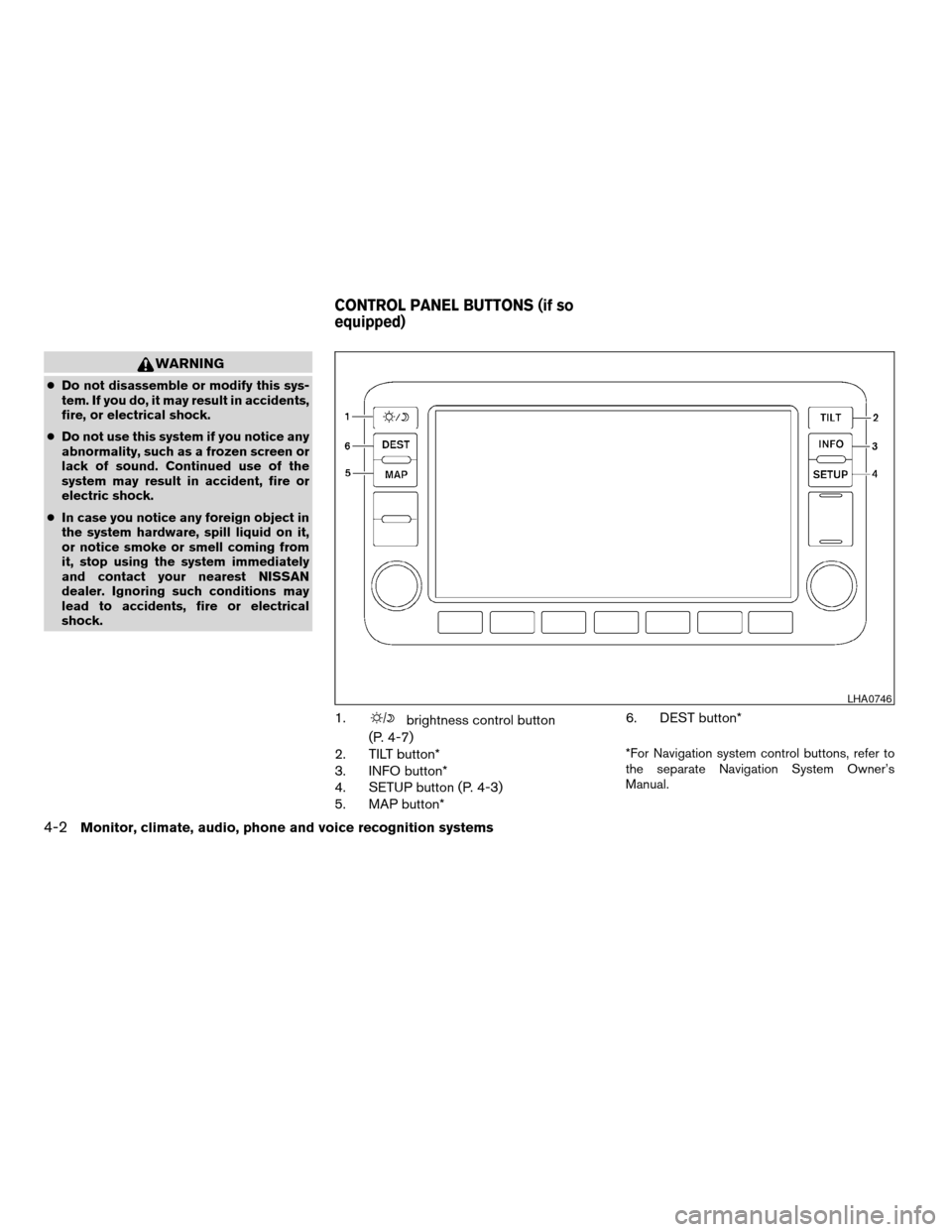
1.brightness control button
(P. 4-7)
2. TILT button*
3. INFO button*
4. SETUP button (P. 4-3)
5. MAP button*6. DEST button*
*For Navigation system control buttons, refer to
the separate Navigation System Owner’s
Manual.
LHA0746
CONTROL PANEL BUTTONS (if so
equipped)
4-2Monitor, climate, audio, phone and voice recognition systems
ZREVIEW COPYÐ2009 Altima(alt)
Owners Manual(owners)ÐUSA_English(nna)
02/03/09Ðdebbie
X
Page 167 of 373
When you use this system, make sure the engine
is running.
If you use the system with the engine not
running (ignition ON or ACC) for a long
time, it will use up all the battery power,
and the engine will not start.
Reference symbols:
SETUP button — This is a button on the control
panel.
“Display” key — This is a select key on the touch-
screen. By touching this key you can proceed to
the next function.
SETTING UP THE START-UP
SCREEN
With the ignition to ACC or ON, the SYSTEM
START-UP warning is displayed on the screen.
Read the warning and touch the “I agree” key
(English) or the “Enter” (Français) key.
If you do not touch the “I agree” key, the Naviga-
tion system will not proceed to the next step
display.If you do not press a button or touch a screen key
for more than 1 minute on the START-UP screen,
the screen will change to the audio screen auto-
matically.
To proceed to the next step, refer to the separate
Navigation System Owner’s Manual.
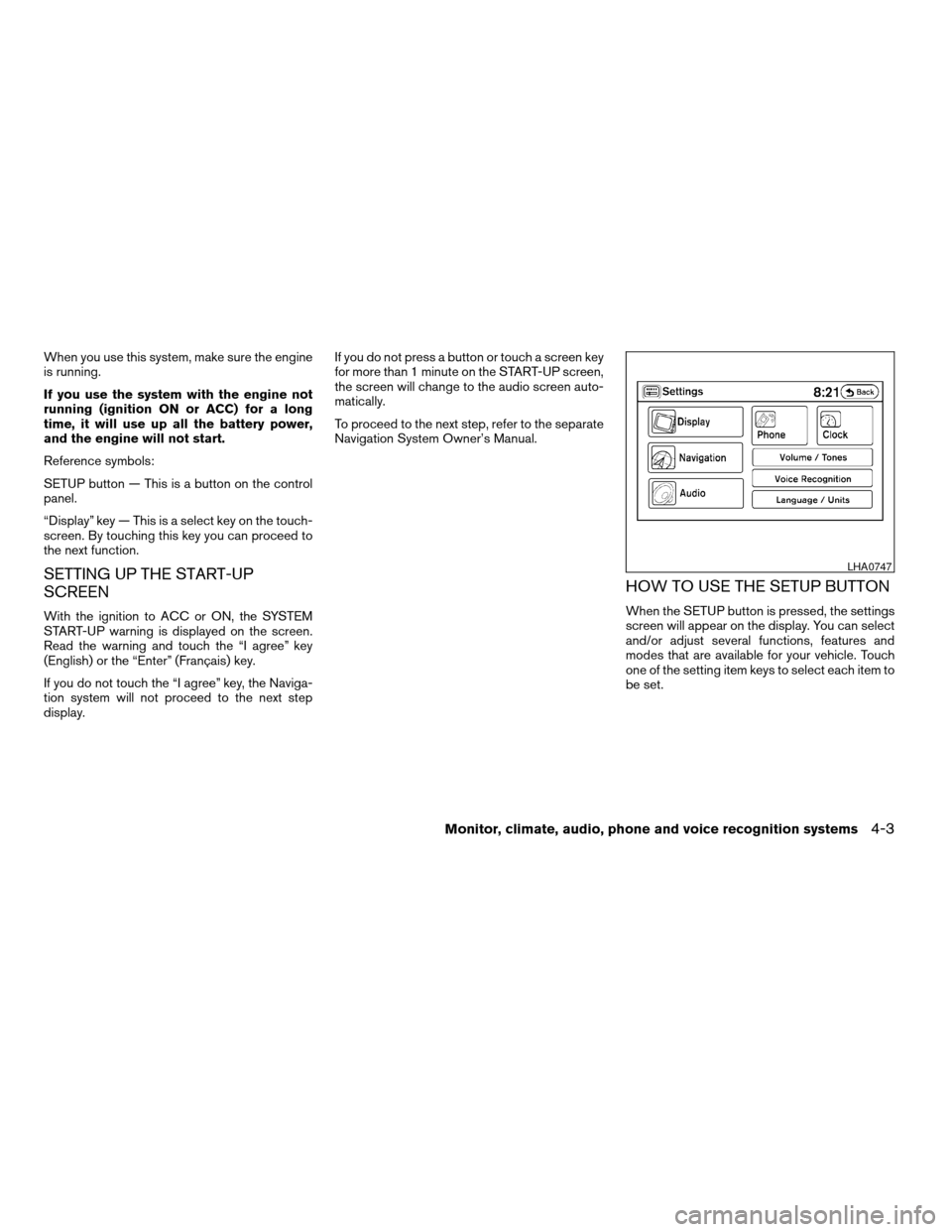
HOW TO USE THE SETUP BUTTON
When the SETUP button is pressed, the settings
screen will appear on the display. You can select
and/or adjust several functions, features and
modes that are available for your vehicle. Touch
one of the setting item keys to select each item to
be set.
LHA0747
Monitor, climate, audio, phone and voice recognition systems4-3
ZREVIEW COPYÐ2009 Altima(alt)
Owners Manual(owners)ÐUSA_English(nna)
02/03/09Ðdebbie
X