check engine NISSAN ALTIMA SEDAN 2017 User Guide
[x] Cancel search | Manufacturer: NISSAN, Model Year: 2017, Model line: ALTIMA SEDAN, Model: NISSAN ALTIMA SEDAN 2017Pages: 497, PDF Size: 5.51 MB
Page 99 of 497
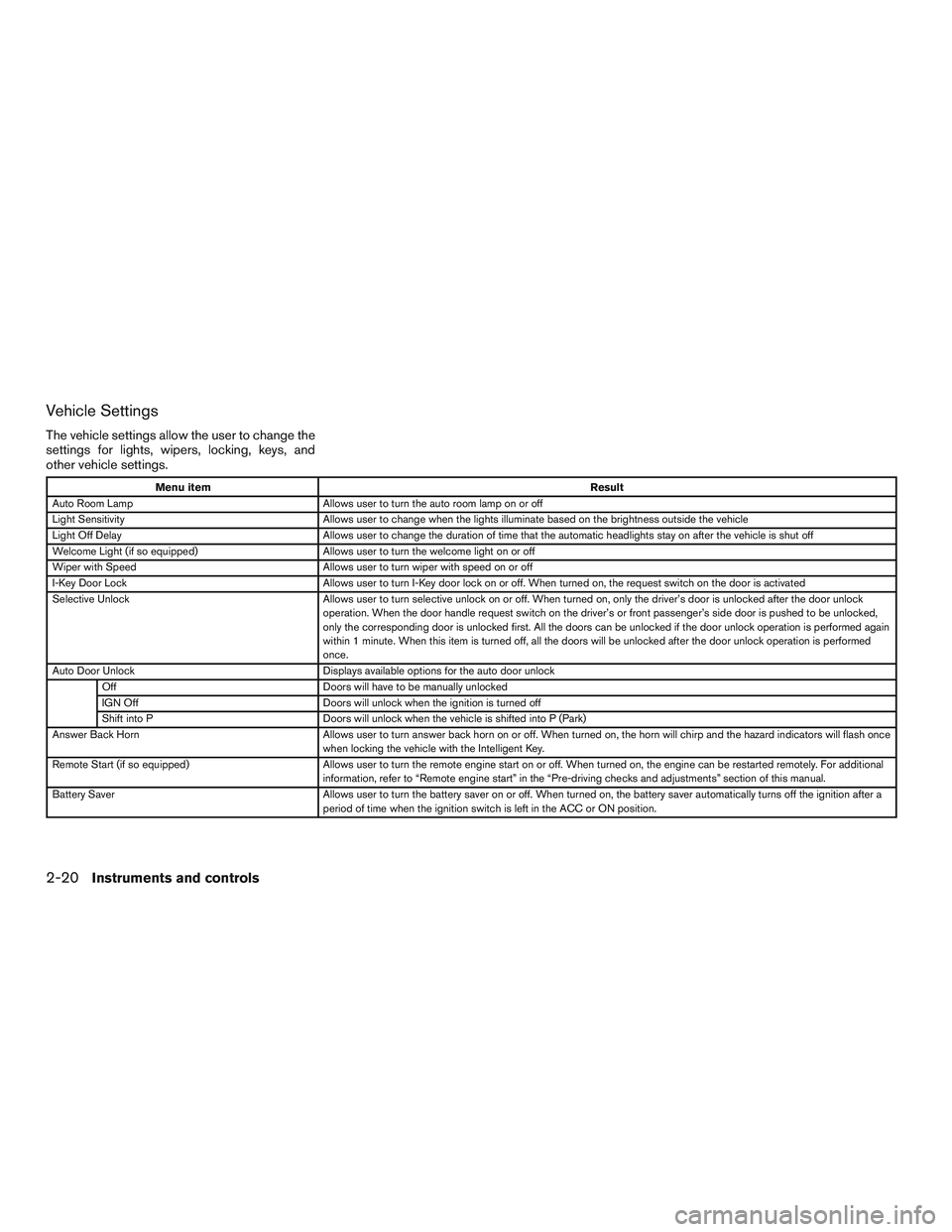
Vehicle Settings
The vehicle settings allow the user to change the
settings for lights, wipers, locking, keys, and
other vehicle settings.
Menu itemResult
Auto Room Lamp Allows user to turn the auto room lamp on or off
Light Sensitivity Allows user to change when the lights illuminate based on the brightness outside the vehicle
Light Off Delay Allows user to change the duration of time that the automatic headlights stay on after the vehicle is shut off
Welcome Light (if so equipped) Allows user to turn the welcome light on or off
Wiper with Speed Allows user to turn wiper with speed on or off
I-Key Door Lock Allows user to turn I-Key door lock on or off. When turned on, the request switch on the door is activated
Selective Unlock Allows user to turn selective unlock on or off. When turned on, only the driver’s door is unlocked after the door unlock
operation. When the door handle request switch on the driver’s or front passenger’s side door is pushed to be unlocked,
only the corresponding door is unlocked first. All the doors can be unlocked if the door unlock operation is performed again
within 1 minute. When this item is turned off, all the doors will be unlocked after the door unlock operation is performed
once.
Auto Door Unlock Displays available options for the auto door unlock
Off Doors will have to be manually unlocked
IGN Off Doors will unlock when the ignition is turned off
Shift into P Doors will unlock when the vehicle is shifted into P (Park)
Answer Back Horn Allows user to turn answer back horn on or off. When turned on, the horn will chirp and the hazard indicators will flash once
when locking the vehicle with the Intelligent Key.
Remote Start (if so equipped) Allows user to turn the remote engine start on or off. When turned on, the engine can be restarted remotely. For additional
information, refer to “Remote engine start” in the “Pre-driving checks and adjustments” section of this manual.
Battery Saver Allows user to turn the battery saver on or off. When turned on, the battery saver automatically turns off the ignition after a
period of time when the ignition switch is left in the ACC or ON position.
2-20Instruments and controls
Page 101 of 497
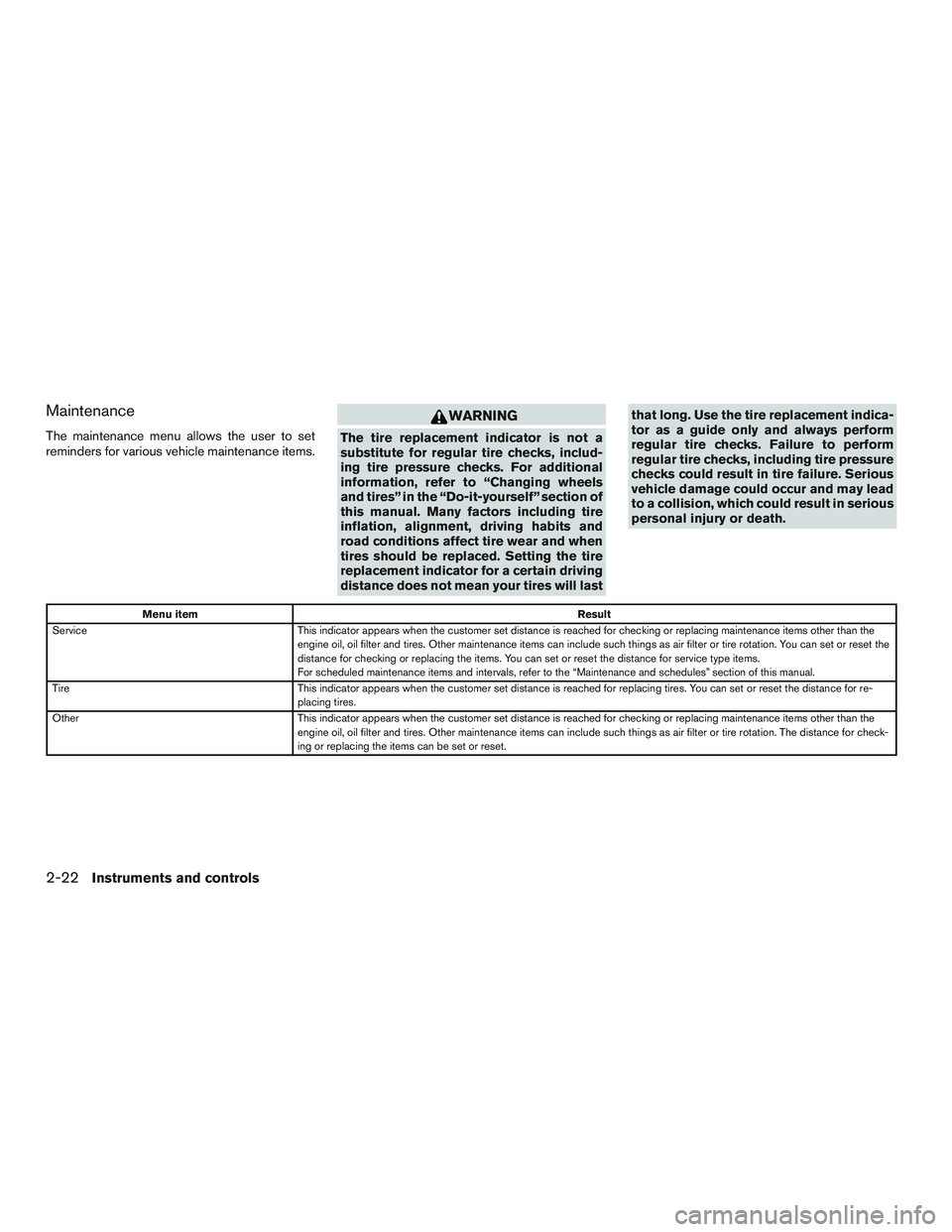
Maintenance
The maintenance menu allows the user to set
reminders for various vehicle maintenance items.
WARNING
The tire replacement indicator is not a
substitute for regular tire checks, includ-
ing tire pressure checks. For additional
information, refer to “Changing wheels
and tires” in the “Do-it-yourself” section of
this manual. Many factors including tire
inflation, alignment, driving habits and
road conditions affect tire wear and when
tires should be replaced. Setting the tire
replacement indicator for a certain driving
distance does not mean your tires will lastthat long. Use the tire replacement indica-
tor as a guide only and always perform
regular tire checks. Failure to perform
regular tire checks, including tire pressure
checks could result in tire failure. Serious
vehicle damage could occur and may lead
to a collision, which could result in serious
personal injury or death.
Menu item
Result
Service This indicator appears when the customer set distance is reached for checking or replacing maintenance items other than the
engine oil, oil filter and tires. Other maintenance items can include such things as air filter or tire rotation. You can set or reset the
distance for checking or replacing the items. You can set or reset the distance for service type items.
For scheduled maintenance items and intervals, refer to the “Maintenance and schedules” section of this manual.
Tire This indicator appears when the customer set distance is reached for replacing tires. You can set or reset the distance for re-
placing tires.
Other This indicator appears when the customer set distance is reached for checking or replacing maintenance items other than the
engine oil, oil filter and tires. Other maintenance items can include such things as air filter or tire rotation. The distance for check-
ing or replacing the items can be set or reset.
2-22Instruments and controls
Page 105 of 497
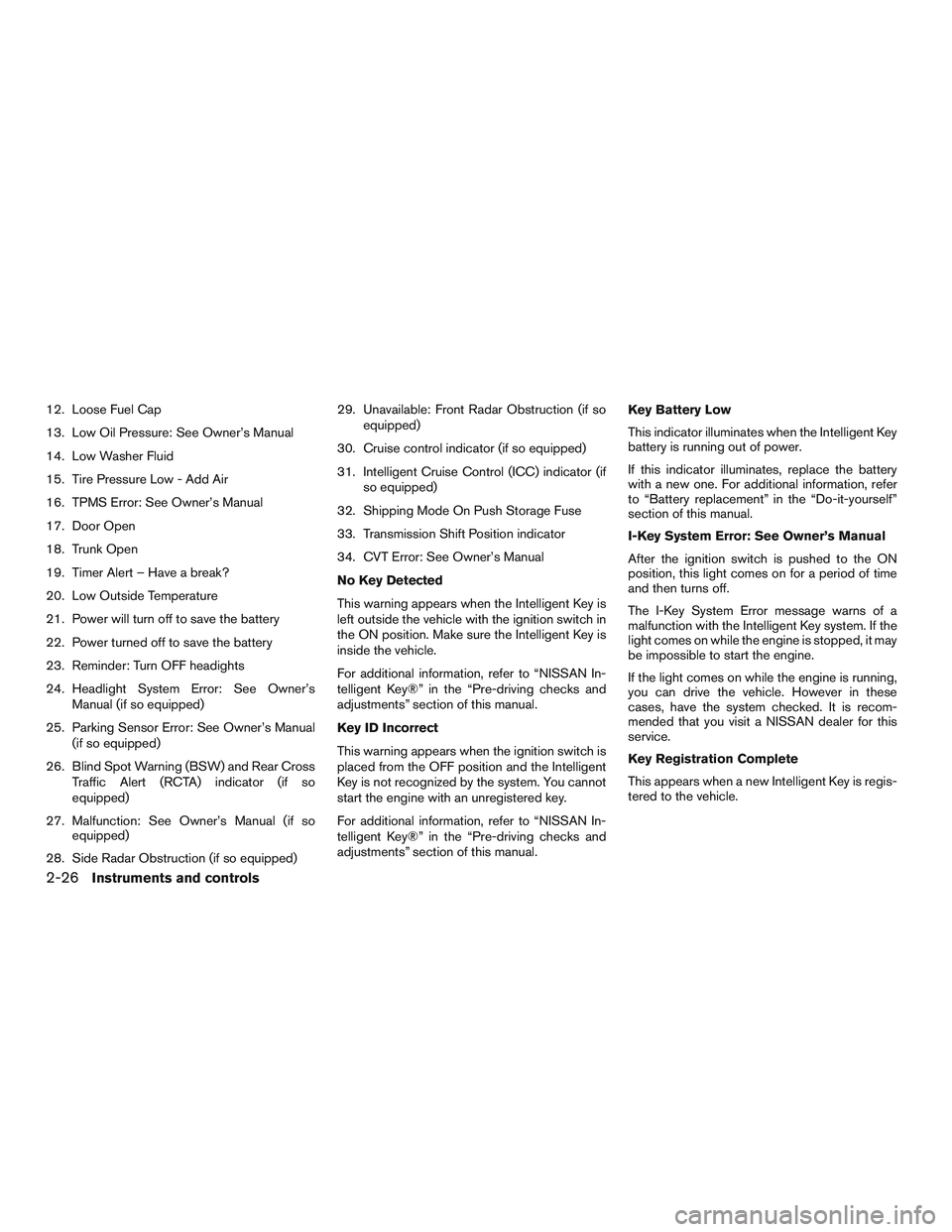
12. Loose Fuel Cap
13. Low Oil Pressure: See Owner’s Manual
14. Low Washer Fluid
15. Tire Pressure Low - Add Air
16. TPMS Error: See Owner’s Manual
17. Door Open
18. Trunk Open
19. Timer Alert – Have a break?
20. Low Outside Temperature
21. Power will turn off to save the battery
22. Power turned off to save the battery
23. Reminder: Turn OFF headights
24. Headlight System Error: See Owner’sManual (if so equipped)
25. Parking Sensor Error: See Owner’s Manual (if so equipped)
26. Blind Spot Warning (BSW) and Rear Cross Traffic Alert (RCTA) indicator (if so
equipped)
27. Malfunction: See Owner’s Manual (if so equipped)
28. Side Radar Obstruction (if so equipped) 29. Unavailable: Front Radar Obstruction (if so
equipped)
30. Cruise control indicator (if so equipped)
31. Intelligent Cruise Control (ICC) indicator (if so equipped)
32. Shipping Mode On Push Storage Fuse
33. Transmission Shift Position indicator
34. CVT Error: See Owner’s Manual
No Key Detected
This warning appears when the Intelligent Key is
left outside the vehicle with the ignition switch in
the ON position. Make sure the Intelligent Key is
inside the vehicle.
For additional information, refer to “NISSAN In-
telligent Key®” in the “Pre-driving checks and
adjustments” section of this manual.
Key ID Incorrect
This warning appears when the ignition switch is
placed from the OFF position and the Intelligent
Key is not recognized by the system. You cannot
start the engine with an unregistered key.
For additional information, refer to “NISSAN In-
telligent Key®” in the “Pre-driving checks and
adjustments” section of this manual. Key Battery Low
This indicator illuminates when the Intelligent Key
battery is running out of power.
If this indicator illuminates, replace the battery
with a new one. For additional information, refer
to “Battery replacement” in the “Do-it-yourself”
section of this manual.
I-Key System Error: See Owner’s Manual
After the ignition switch is pushed to the ON
position, this light comes on for a period of time
and then turns off.
The I-Key System Error message warns of a
malfunction with the Intelligent Key system. If the
light comes on while the engine is stopped, it may
be impossible to start the engine.
If the light comes on while the engine is running,
you can drive the vehicle. However in these
cases, have the system checked. It is recom-
mended that you visit a NISSAN dealer for this
service.
Key Registration Complete
This appears when a new Intelligent Key is regis-
tered to the vehicle.
2-26Instruments and controls
Page 106 of 497
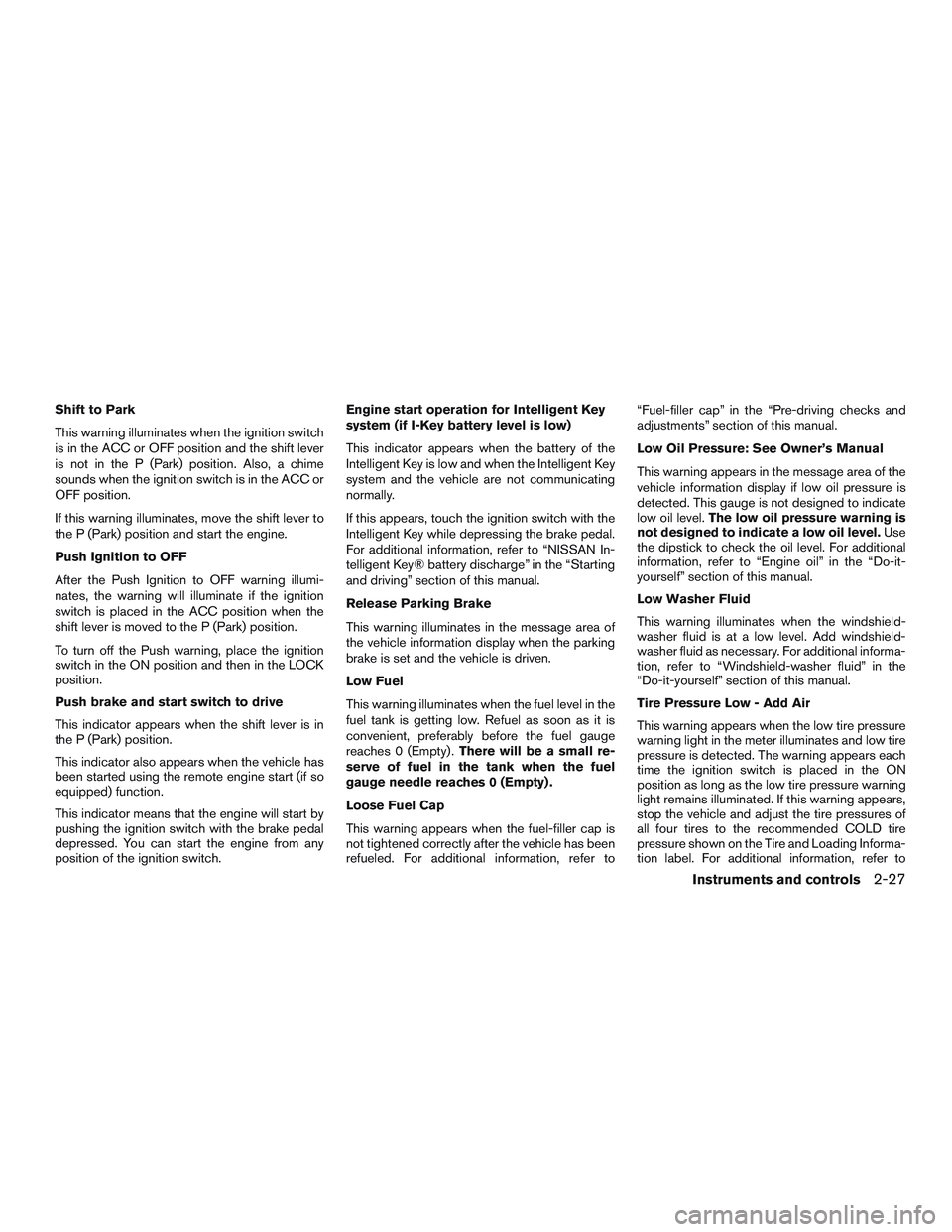
Shift to Park
This warning illuminates when the ignition switch
is in the ACC or OFF position and the shift lever
is not in the P (Park) position. Also, a chime
sounds when the ignition switch is in the ACC or
OFF position.
If this warning illuminates, move the shift lever to
the P (Park) position and start the engine.
Push Ignition to OFF
After the Push Ignition to OFF warning illumi-
nates, the warning will illuminate if the ignition
switch is placed in the ACC position when the
shift lever is moved to the P (Park) position.
To turn off the Push warning, place the ignition
switch in the ON position and then in the LOCK
position.
Push brake and start switch to drive
This indicator appears when the shift lever is in
the P (Park) position.
This indicator also appears when the vehicle has
been started using the remote engine start (if so
equipped) function.
This indicator means that the engine will start by
pushing the ignition switch with the brake pedal
depressed. You can start the engine from any
position of the ignition switch.Engine start operation for Intelligent Key
system (if I-Key battery level is low)
This indicator appears when the battery of the
Intelligent Key is low and when the Intelligent Key
system and the vehicle are not communicating
normally.
If this appears, touch the ignition switch with the
Intelligent Key while depressing the brake pedal.
For additional information, refer to “NISSAN In-
telligent Key® battery discharge” in the “Starting
and driving” section of this manual.
Release Parking Brake
This warning illuminates in the message area of
the vehicle information display when the parking
brake is set and the vehicle is driven.
Low Fuel
This warning illuminates when the fuel level in the
fuel tank is getting low. Refuel as soon as it is
convenient, preferably before the fuel gauge
reaches 0 (Empty) .
There will be a small re-
serve of fuel in the tank when the fuel
gauge needle reaches 0 (Empty) .
Loose Fuel Cap
This warning appears when the fuel-filler cap is
not tightened correctly after the vehicle has been
refueled. For additional information, refer to “Fuel-filler cap” in the “Pre-driving checks and
adjustments” section of this manual.
Low Oil Pressure: See Owner’s Manual
This warning appears in the message area of the
vehicle information display if low oil pressure is
detected. This gauge is not designed to indicate
low oil level.
The low oil pressure warning is
not designed to indicate a low oil level. Use
the dipstick to check the oil level. For additional
information, refer to “Engine oil” in the “Do-it-
yourself” section of this manual.
Low Washer Fluid
This warning illuminates when the windshield-
washer fluid is at a low level. Add windshield-
washer fluid as necessary. For additional informa-
tion, refer to “Windshield-washer fluid” in the
“Do-it-yourself” section of this manual.
Tire Pressure Low - Add Air
This warning appears when the low tire pressure
warning light in the meter illuminates and low tire
pressure is detected. The warning appears each
time the ignition switch is placed in the ON
position as long as the low tire pressure warning
light remains illuminated. If this warning appears,
stop the vehicle and adjust the tire pressures of
all four tires to the recommended COLD tire
pressure shown on the Tire and Loading Informa-
tion label. For additional information, refer to
Instruments and controls2-27
Page 118 of 497
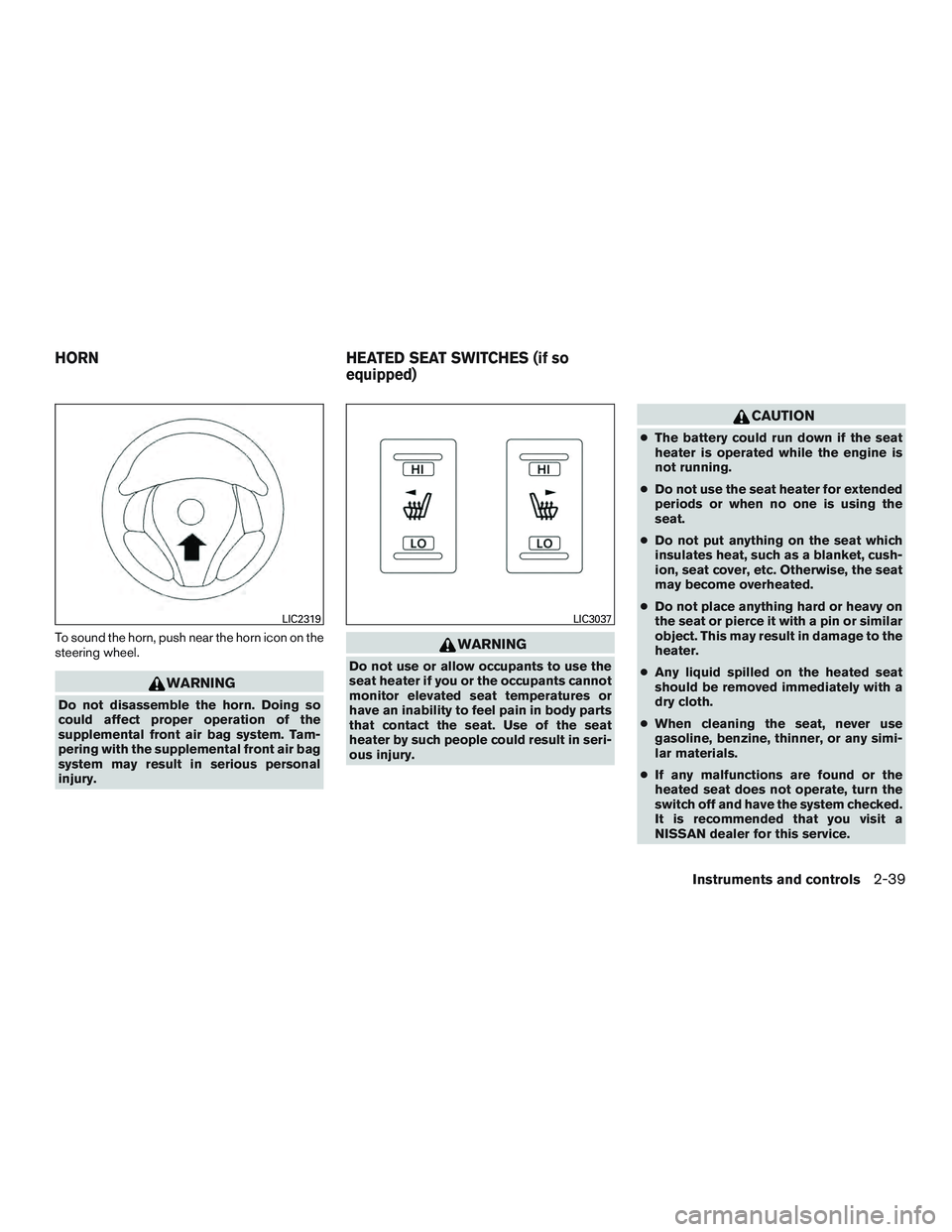
To sound the horn, push near the horn icon on the
steering wheel.
WARNING
Do not disassemble the horn. Doing so
could affect proper operation of the
supplemental front air bag system. Tam-
pering with the supplemental front air bag
system may result in serious personal
injury.
WARNING
Do not use or allow occupants to use the
seat heater if you or the occupants cannot
monitor elevated seat temperatures or
have an inability to feel pain in body parts
that contact the seat. Use of the seat
heater by such people could result in seri-
ous injury.
CAUTION
●The battery could run down if the seat
heater is operated while the engine is
not running.
● Do not use the seat heater for extended
periods or when no one is using the
seat.
● Do not put anything on the seat which
insulates heat, such as a blanket, cush-
ion, seat cover, etc. Otherwise, the seat
may become overheated.
● Do not place anything hard or heavy on
the seat or pierce it with a pin or similar
object. This may result in damage to the
heater.
● Any liquid spilled on the heated seat
should be removed immediately with a
dry cloth.
● When cleaning the seat, never use
gasoline, benzine, thinner, or any simi-
lar materials.
● If any malfunctions are found or the
heated seat does not operate, turn the
switch off and have the system checked.
It is recommended that you visit a
NISSAN dealer for this service.
LIC2319LIC3037
HORN HEATED SEAT SWITCHES (if so
equipped)
Instruments and controls2-39
Page 139 of 497
3 Pre-driving checks and adjustments
Keys .............................................3-2NISSAN Intelligent Key® . .......................3-2
NISSAN Vehicle Immobilizer System keys .........3-4
Doors ............................................3-4
Locking with key ................................3-5
Locking with inside lock knob ....................3-6
Locking with power door lock switch . . . ..........3-6
Automatic door locks ...........................3-6
Child safety rear door lock .......................3-7
NISSAN Intelligent Key® With Door and Trunk
Request Switches .................................3-7
Operating range ................................3-9
Door locks/unlocks precaution ...................3-9
NISSAN Intelligent Key® operation ..............3-10
How to use the remote keyless entry
function ...................................... 3-13
Warning signals ............................... 3-17
Troubleshooting guide ......................... 3-18
NISSAN Intelligent Key® Without Door and Trunk
Request Switches ................................ 3-20
Operating range ............................... 3-21
How to use the remote keyless entry
function ...................................... 3-21
Warning signals ............................... 3-25Troubleshooting guide
......................... 3-25
Remote Engine Start (if so equipped) . . .............3-27
Remote engine start operating range ............3-27
Remote starting the vehicle .....................3-28
Extending engine run time ......................3-28
Canceling a remote start .......................3-28
Conditions the remote start will not work .........3-29
Hood ........................................... 3-30
Trunk lid ......................................... 3-30
Opener operation .............................. 3-30
Interior trunk lid release ........................ 3-32
Interior trunk access ........................... 3-32
Fuel-filler door ................................... 3-33
Opener operation .............................. 3-33
Fuel-filler cap ................................. 3-33
Steering wheel ................................... 3-35
Tilt operation .................................. 3-35
T
elescopic operation ........................... 3-35
Sun visors ....................................... 3-36
Vanity mirrors ................................. 3-36
Mirrors .......................................... 3-37
Manual anti-glare rearview mirror
(if so equipped) ............................... 3-37
Page 157 of 497
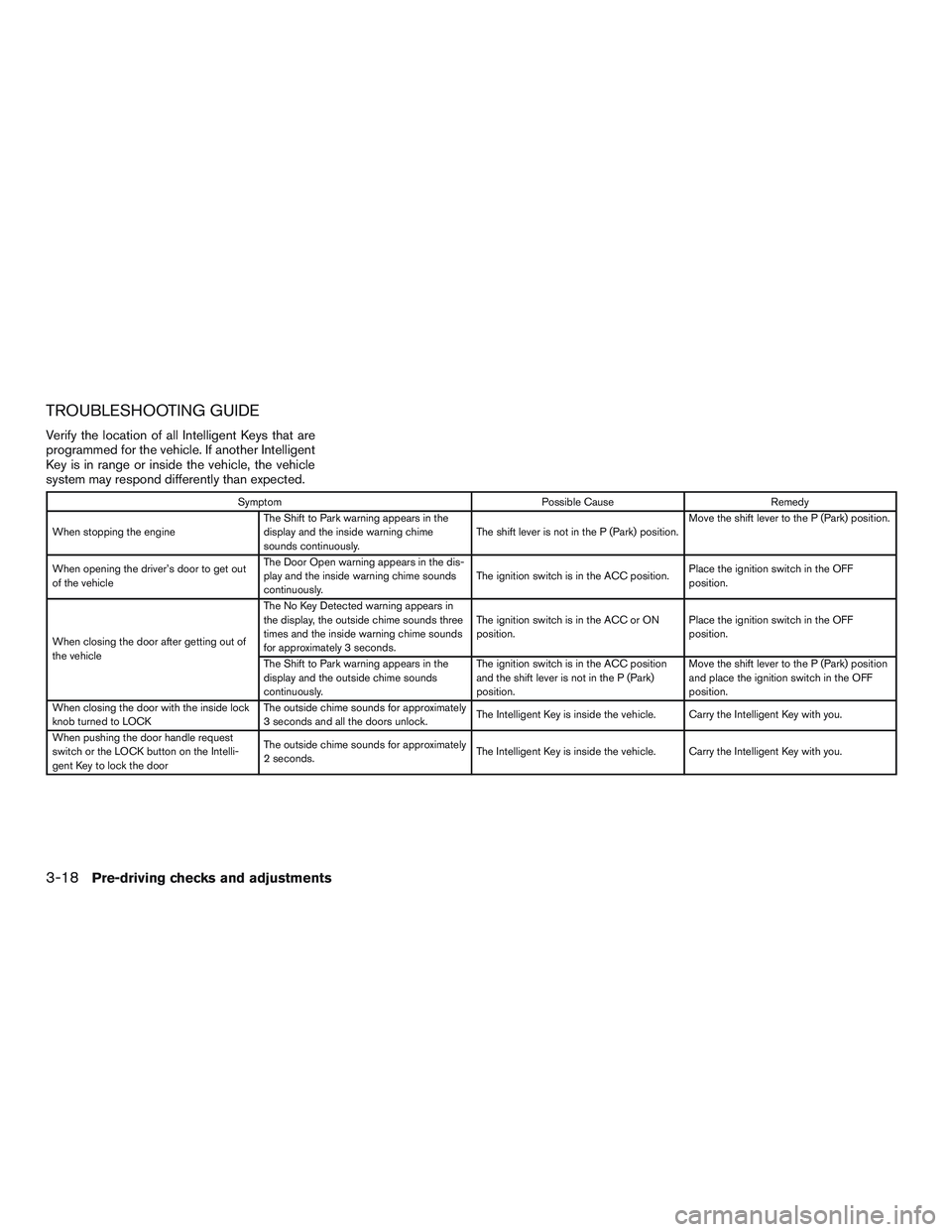
TROUBLESHOOTING GUIDE
Verify the location of all Intelligent Keys that are
programmed for the vehicle. If another Intelligent
Key is in range or inside the vehicle, the vehicle
system may respond differently than expected.
SymptomPossible CauseRemedy
When stopping the engine The Shift to Park warning appears in the
display and the inside warning chime
sounds continuously. The shift lever is not in the P (Park) position.Move the shift lever to the P (Park) position.
When opening the driver’s door to get out
of the vehicle The Door Open warning appears in the dis-
play and the inside warning chime sounds
continuously.
The ignition switch is in the ACC position.
Place the ignition switch in the OFF
position.
When closing the door after getting out of
the vehicle The No Key Detected warning appears in
the display, the outside chime sounds three
times and the inside warning chime sounds
for approximately 3 seconds.
The ignition switch is in the ACC or ON
position.
Place the ignition switch in the OFF
position.
The Shift to Park warning appears in the
display and the outside chime sounds
continuously. The ignition switch is in the ACC position
and the shift lever is not in the P (Park)
position.Move the shift lever to the P (Park) position
and place the ignition switch in the OFF
position.
When closing the door with the inside lock
knob turned to LOCK The outside chime sounds for approximately
3 seconds and all the doors unlock.
The Intelligent Key is inside the vehicle. Carry the Intelligent Key with you.
When pushing the door handle request
switch or the LOCK button on the Intelli-
gent Key to lock the door The outside chime sounds for approximately
2 seconds.
The Intelligent Key is inside the vehicle. Carry the Intelligent Key with you.
3-18Pre-driving checks and adjustments
Page 158 of 497
SymptomPossible CauseRemedy
When pushing the ignition switch to start
the engine The Key low battery indicator appears in the
display.
The battery charge is low.Replace the battery with a new one. For
additional information, refer to “Battery” in
the “Do-it-yourself” section of this manual.
The KEY ID Incorrect warning appears in
the display, the outside chime sounds three
times and the inside warning chime sounds
for approximately 3 seconds. The Intelligent Key is not in the vehicle. Carry the Intelligent Key with you.
When pressing the ignition switch The Intelligent Key system warning light in
the meter illuminates in yellow. It warns of a malfunction with the Intelligent
Key system.It is recommended that you visit a NISSAN
dealer.
Pre-driving checks and adjustments3-19
Page 164 of 497
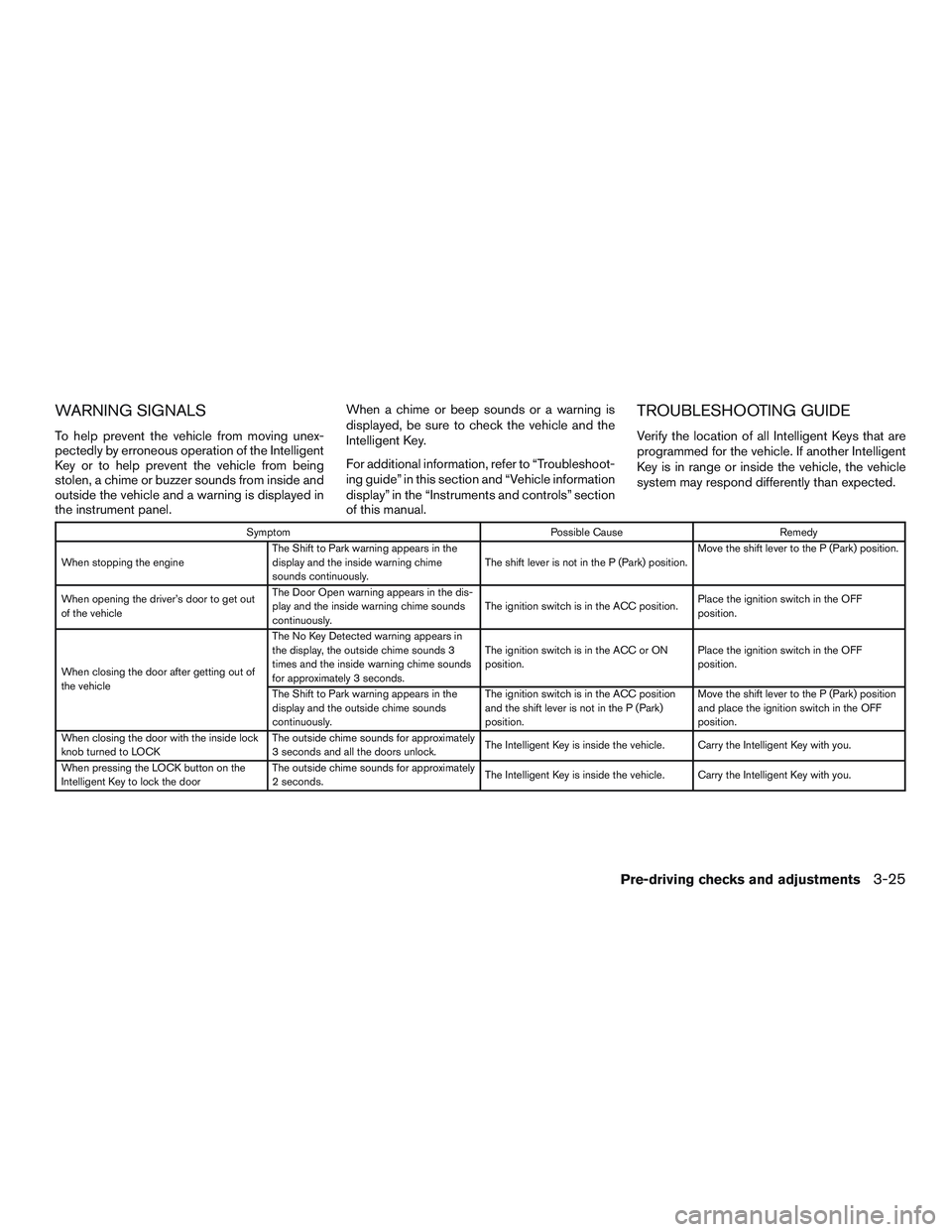
WARNING SIGNALS
To help prevent the vehicle from moving unex-
pectedly by erroneous operation of the Intelligent
Key or to help prevent the vehicle from being
stolen, a chime or buzzer sounds from inside and
outside the vehicle and a warning is displayed in
the instrument panel.When a chime or beep sounds or a warning is
displayed, be sure to check the vehicle and the
Intelligent Key.
For additional information, refer to “Troubleshoot-
ing guide” in this section and “Vehicle information
display” in the “Instruments and controls” section
of this manual.
TROUBLESHOOTING GUIDE
Verify the location of all Intelligent Keys that are
programmed for the vehicle. If another Intelligent
Key is in range or inside the vehicle, the vehicle
system may respond differently than expected.
Symptom
Possible CauseRemedy
When stopping the engine The Shift to Park warning appears in the
display and the inside warning chime
sounds continuously. The shift lever is not in the P (Park) position.Move the shift lever to the P (Park) position.
When opening the driver’s door to get out
of the vehicle The Door Open warning appears in the dis-
play and the inside warning chime sounds
continuously.
The ignition switch is in the ACC position.
Place the ignition switch in the OFF
position.
When closing the door after getting out of
the vehicle The No Key Detected warning appears in
the display, the outside chime sounds 3
times and the inside warning chime sounds
for approximately 3 seconds.
The ignition switch is in the ACC or ON
position.
Place the ignition switch in the OFF
position.
The Shift to Park warning appears in the
display and the outside chime sounds
continuously. The ignition switch is in the ACC position
and the shift lever is not in the P (Park)
position.Move the shift lever to the P (Park) position
and place the ignition switch in the OFF
position.
When closing the door with the inside lock
knob turned to LOCK The outside chime sounds for approximately
3 seconds and all the doors unlock.
The Intelligent Key is inside the vehicle. Carry the Intelligent Key with you.
When pressing the LOCK button on the
Intelligent Key to lock the door The outside chime sounds for approximately
2 seconds.
The Intelligent Key is inside the vehicle. Carry the Intelligent Key with you.
Pre-driving checks and adjustments3-25
Page 165 of 497
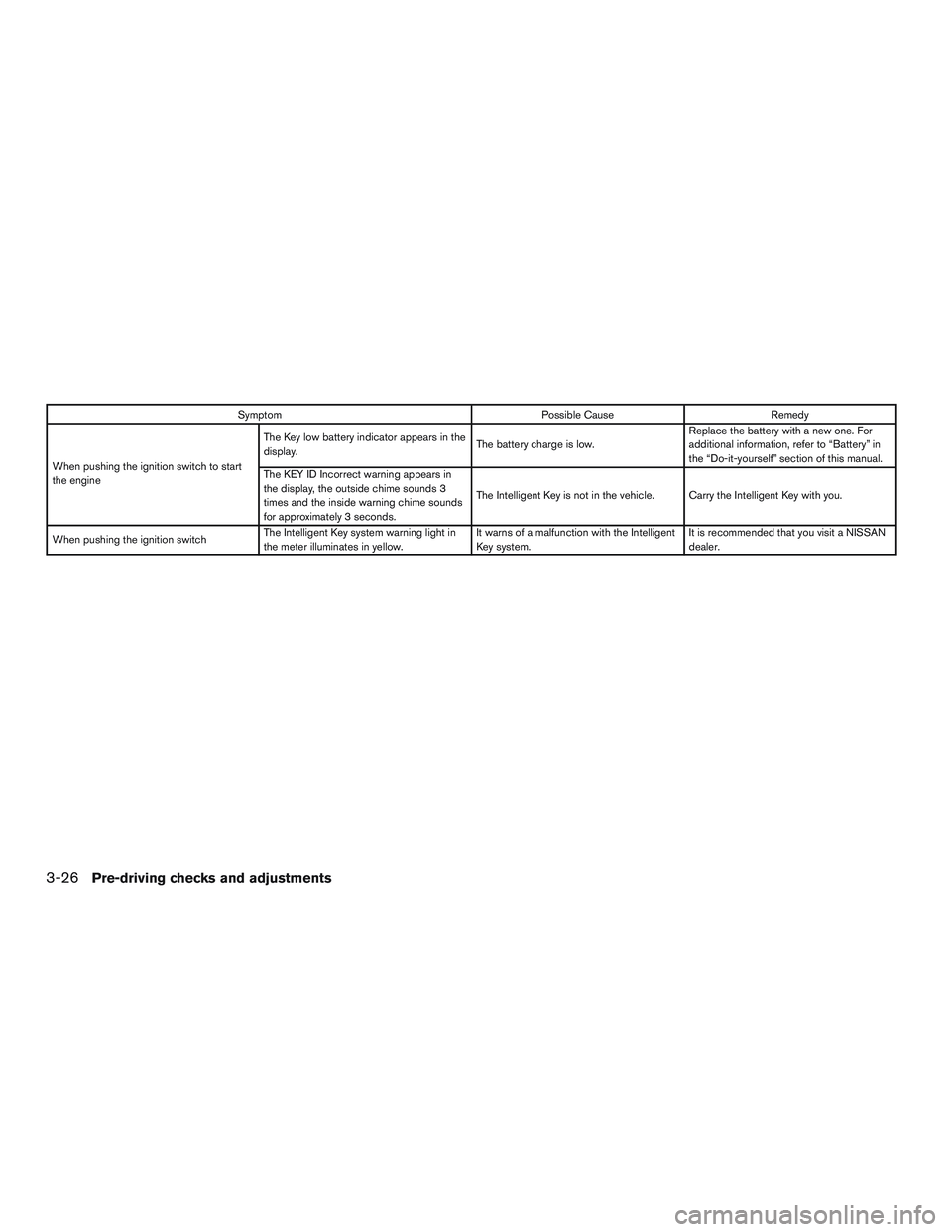
SymptomPossible CauseRemedy
When pushing the ignition switch to start
the engine The Key low battery indicator appears in the
display.
The battery charge is low.Replace the battery with a new one. For
additional information, refer to “Battery” in
the “Do-it-yourself” section of this manual.
The KEY ID Incorrect warning appears in
the display, the outside chime sounds 3
times and the inside warning chime sounds
for approximately 3 seconds. The Intelligent Key is not in the vehicle. Carry the Intelligent Key with you.
When pushing the ignition switch The Intelligent Key system warning light in
the meter illuminates in yellow. It warns of a malfunction with the Intelligent
Key system.It is recommended that you visit a NISSAN
dealer.
3-26Pre-driving checks and adjustments