warning NISSAN ARMADA 2005 1.G Owners Manual
[x] Cancel search | Manufacturer: NISSAN, Model Year: 2005, Model line: ARMADA, Model: NISSAN ARMADA 2005 1.GPages: 352, PDF Size: 6.46 MB
Page 327 of 352
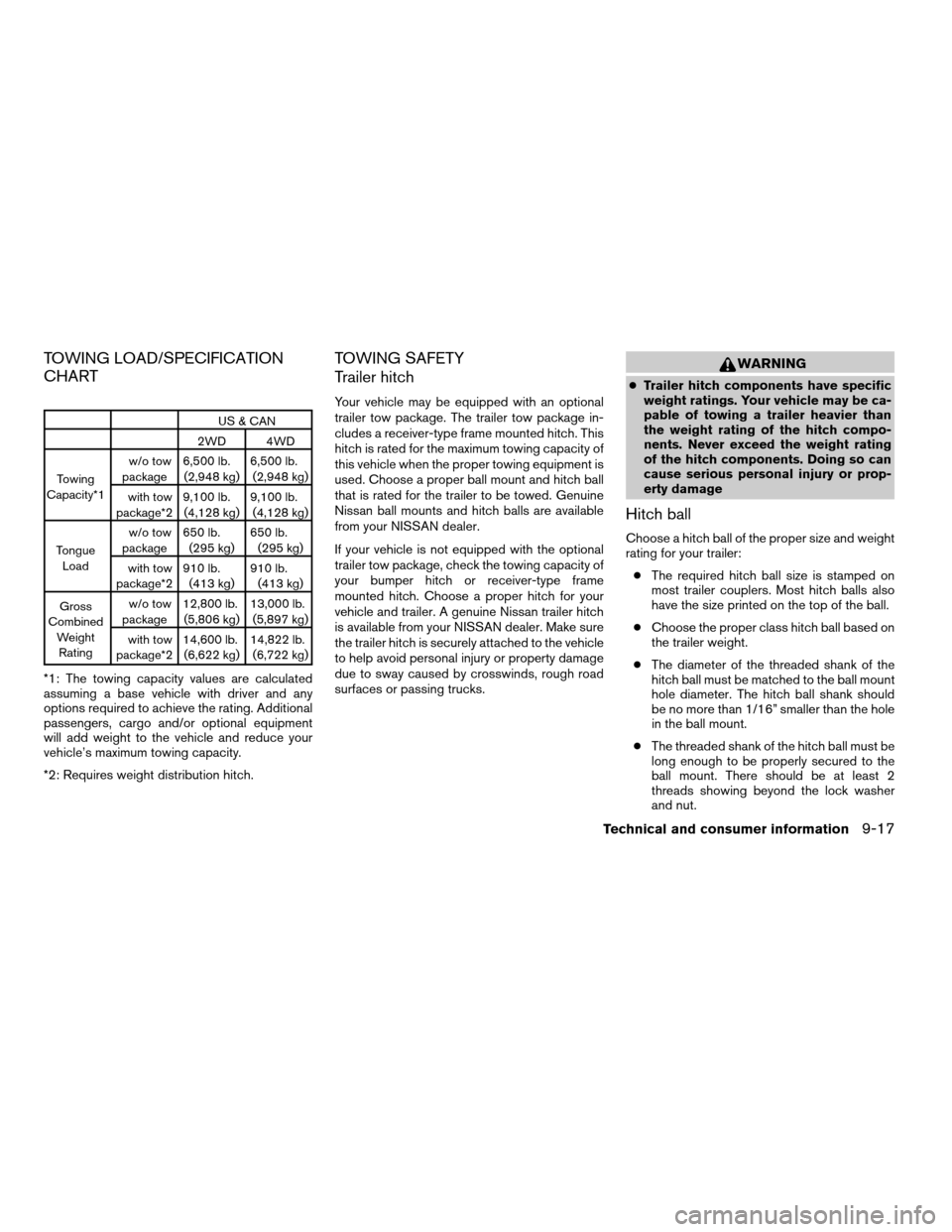
TOWING LOAD/SPECIFICATION
CHART
US & CAN
2WD 4WD
Towing
Capacity*1w/o tow
package6,500 lb.
(2,948 kg)6,500 lb.
(2,948 kg)
with tow
package*29,100 lb.
(4,128 kg)9,100 lb.
(4,128 kg)
Tongue
Loadw/o tow
package650 lb.
(295 kg)650 lb.
(295 kg)
with tow
package*2910 lb.
(413 kg)910 lb.
(413 kg)
Gross
Combined
Weight
Ratingw/o tow
package12,800 lb.
(5,806 kg)13,000 lb.
(5,897 kg)
with tow
package*214,600 lb.
(6,622 kg)14,822 lb.
(6,722 kg)
*1: The towing capacity values are calculated
assuming a base vehicle with driver and any
options required to achieve the rating. Additional
passengers, cargo and/or optional equipment
will add weight to the vehicle and reduce your
vehicle’s maximum towing capacity.
*2: Requires weight distribution hitch.
TOWING SAFETY
Trailer hitch
Your vehicle may be equipped with an optional
trailer tow package. The trailer tow package in-
cludes a receiver-type frame mounted hitch. This
hitch is rated for the maximum towing capacity of
this vehicle when the proper towing equipment is
used. Choose a proper ball mount and hitch ball
that is rated for the trailer to be towed. Genuine
Nissan ball mounts and hitch balls are available
from your NISSAN dealer.
If your vehicle is not equipped with the optional
trailer tow package, check the towing capacity of
your bumper hitch or receiver-type frame
mounted hitch. Choose a proper hitch for your
vehicle and trailer. A genuine Nissan trailer hitch
is available from your NISSAN dealer. Make sure
the trailer hitch is securely attached to the vehicle
to help avoid personal injury or property damage
due to sway caused by crosswinds, rough road
surfaces or passing trucks.
WARNING
cTrailer hitch components have specific
weight ratings. Your vehicle may be ca-
pable of towing a trailer heavier than
the weight rating of the hitch compo-
nents. Never exceed the weight rating
of the hitch components. Doing so can
cause serious personal injury or prop-
erty damage
Hitch ball
Choose a hitch ball of the proper size and weight
rating for your trailer:
cThe required hitch ball size is stamped on
most trailer couplers. Most hitch balls also
have the size printed on the top of the ball.
cChoose the proper class hitch ball based on
the trailer weight.
cThe diameter of the threaded shank of the
hitch ball must be matched to the ball mount
hole diameter. The hitch ball shank should
be no more than 1/16” smaller than the hole
in the ball mount.
cThe threaded shank of the hitch ball must be
long enough to be properly secured to the
ball mount. There should be at least 2
threads showing beyond the lock washer
and nut.
Technical and consumer information9-17
ZREVIEW COPYÐ2005 Armada(wzw)
Owners ManualÐUSA_English(nna)
11/18/04Ðtbrooks
X
Page 328 of 352
Ball mount
The hitch ball is attached to the ball mount and
the ball mount is inserted into the hitch receiver.
Choose a proper class ball mount based on the
trailer weight. Additionally, the ball mount should
be chosen to keep the trailer tongue level with the
ground.
Weight carrying hitches
A weight carrying or9dead weight9ball mount is
one that is designed to carry the whole amount of
tongue weight and gross weight directly on the
ball mount and on the receiver.
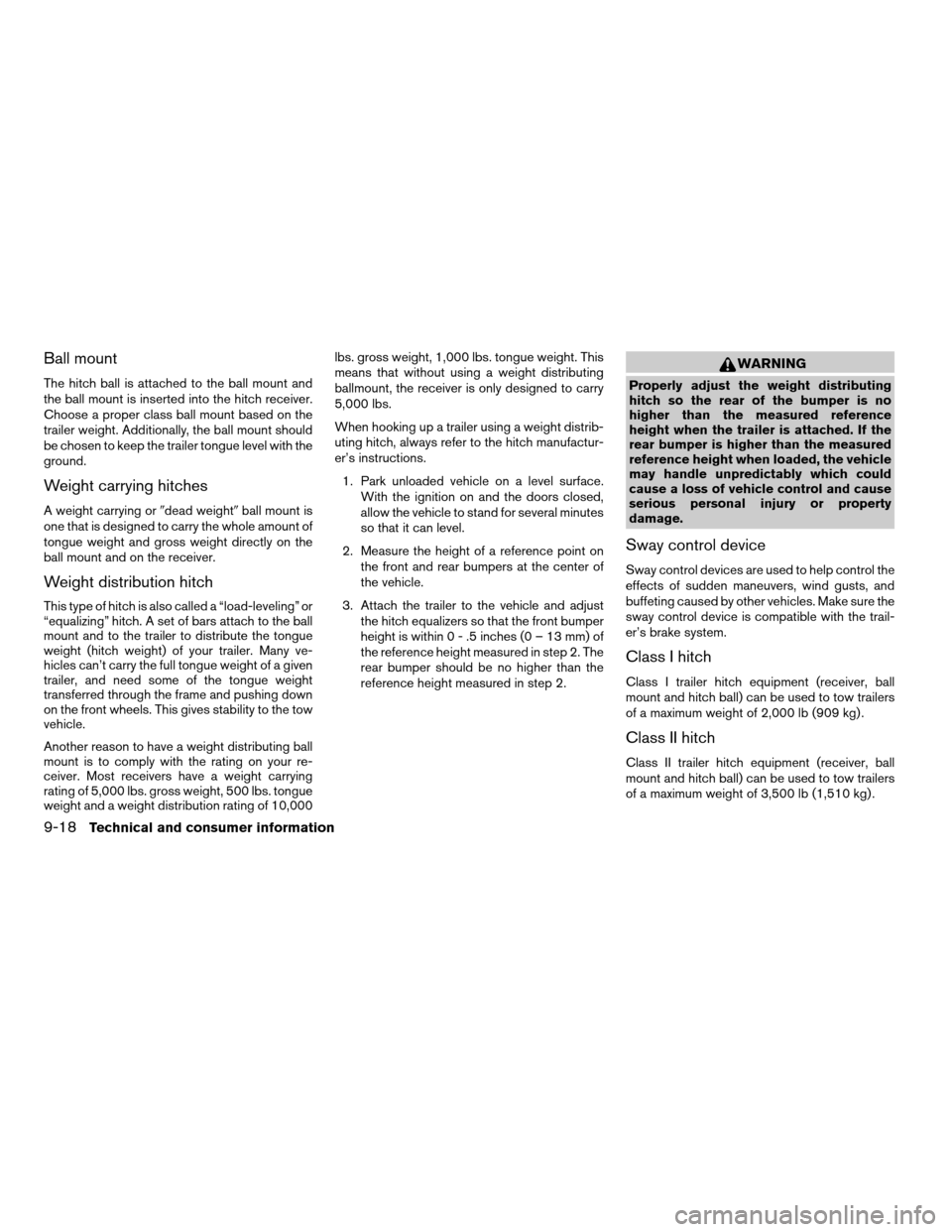
Weight distribution hitch
This type of hitch is also called a “load-leveling” or
“equalizing” hitch. A set of bars attach to the ball
mount and to the trailer to distribute the tongue
weight (hitch weight) of your trailer. Many ve-
hicles can’t carry the full tongue weight of a given
trailer, and need some of the tongue weight
transferred through the frame and pushing down
on the front wheels. This gives stability to the tow
vehicle.
Another reason to have a weight distributing ball
mount is to comply with the rating on your re-
ceiver. Most receivers have a weight carrying
rating of 5,000 lbs. gross weight, 500 lbs. tongue
weight and a weight distribution rating of 10,000lbs. gross weight, 1,000 lbs. tongue weight. This
means that without using a weight distributing
ballmount, the receiver is only designed to carry
5,000 lbs.
When hooking up a trailer using a weight distrib-
uting hitch, always refer to the hitch manufactur-
er’s instructions.
1. Park unloaded vehicle on a level surface.
With the ignition on and the doors closed,
allow the vehicle to stand for several minutes
so that it can level.
2. Measure the height of a reference point on
the front and rear bumpers at the center of
the vehicle.
3. Attach the trailer to the vehicle and adjust
the hitch equalizers so that the front bumper
height is within0-.5inches (0 – 13 mm) of
the reference height measured in step 2. The
rear bumper should be no higher than the
reference height measured in step 2.
WARNING
Properly adjust the weight distributing
hitch so the rear of the bumper is no
higher than the measured reference
height when the trailer is attached. If the
rear bumper is higher than the measured
reference height when loaded, the vehicle
may handle unpredictably which could
cause a loss of vehicle control and cause
serious personal injury or property
damage.
Sway control device
Sway control devices are used to help control the
effects of sudden maneuvers, wind gusts, and
buffeting caused by other vehicles. Make sure the
sway control device is compatible with the trail-
er’s brake system.
Class I hitch
Class I trailer hitch equipment (receiver, ball
mount and hitch ball) can be used to tow trailers
of a maximum weight of 2,000 lb (909 kg) .
Class II hitch
Class II trailer hitch equipment (receiver, ball
mount and hitch ball) can be used to tow trailers
of a maximum weight of 3,500 lb (1,510 kg) .
9-18Technical and consumer information
ZREVIEW COPYÐ2005 Armada(wzw)
Owners ManualÐUSA_English(nna)
11/18/04Ðtbrooks
X
Page 330 of 352
Trailer lights
CAUTION
When splicing into the vehicle electrical
system, a commercially available power-
type module/converter must be used to
provide power for all trailer lighting. This
unit uses the vehicle battery as a direct
power source for all trailer lights while
using the vehicle tail light, stoplight and
turn signal circuits as a signal source. The
module/converter must draw no more
that 15 milliamps from the stop and tail
lamp circuits. Using a module/converter
that exceeds these power requirements
may damage the vehicle’s electrical sys-
tem. See a reputable trailer dealer to ob-
tain the proper equipment and to have it
installed.
Trailer lights should comply with federal and/or
local regulations. For assistance in hooking up
trailer lights, contact a NISSAN dealer or repu-
table trailer dealer. Vehicles equipped with the
optional trailer tow package are equipped with a
7-pin trailer harness connector. If your trailer is
equipped with a flat 4-pin connector, an adapter
will be needed to connect the trailer lights to the
vehicle. Adapters are available at auto parts
stores and hitch retailers.
Trailer brakes
If your trailer is equipped with a braking system,
make sure it conforms to federal and/or local
regulations and that it is properly installed.
WARNING
Never connect a trailer brake system di-
rectly to the vehicle brake system.
Electric trailer brake controller
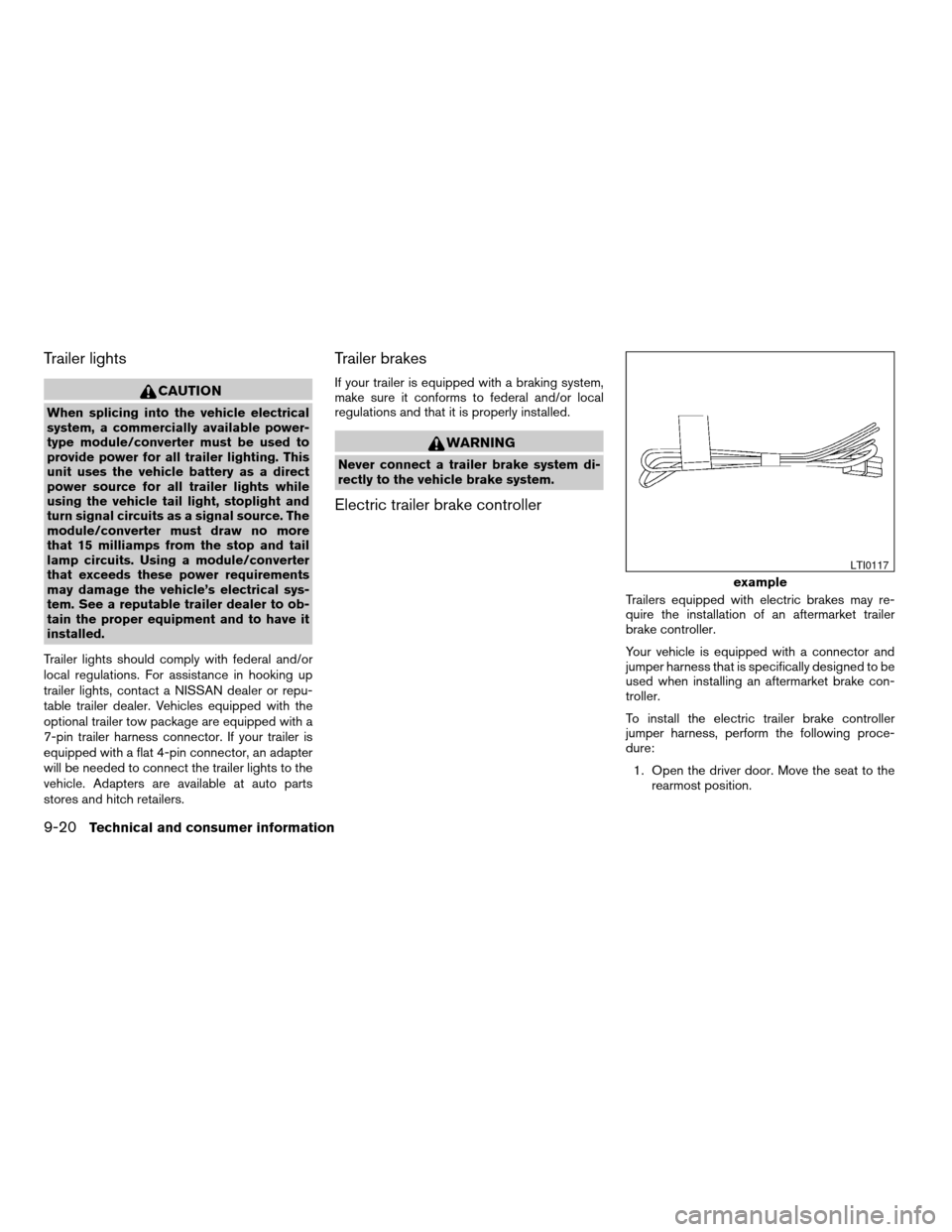
Trailers equipped with electric brakes may re-
quire the installation of an aftermarket trailer
brake controller.
Your vehicle is equipped with a connector and
jumper harness that is specifically designed to be
used when installing an aftermarket brake con-
troller.
To install the electric trailer brake controller
jumper harness, perform the following proce-
dure:
1. Open the driver door. Move the seat to the
rearmost position.
example
LTI0117
9-20Technical and consumer information
ZREVIEW COPYÐ2005 Armada(wzw)
Owners ManualÐUSA_English(nna)
11/18/04Ðtbrooks
X
Page 334 of 352
The Tow mode should be used when the vehicle
and trailer weight is at least 75% of the vehicle’s
GCWR. Tow mode is most useful in the following
driving conditions when towing a heavy trailer or
hauling a heavy load:
cRolling terrain.
cStop and go traffic.
cBusy parking lots.
Driving the vehicle in the Tow mode with no
trailer/load or light trailer/light load will not cause
any damage. However, fuel economy may be
reduced and the transmission/engine driving
characteristics may feel unusual.
When towing a trailer, final drive gear oil
should be replaced and transmission
oil/fluid should be changed more fre-
quently. For additional information, see the
“Maintenance and do-it-yourself” section
earlier in this manual.
FLAT TOWING
Towing your vehicle with all four wheels on the
ground is sometimes called flat towing. This
method is sometimes used when towing a vehicle
behind a recreational vehicle, such as a motor
home.
CAUTION
cFailure to follow these guidelines can
result in severe transmission damage.
cWhenever flat towing your vehicle, al-
ways tow forward, never backward.
cDO NOT tow any automatic transmis-
sion vehicle with all four wheels on the
ground (flat towing) . Doing so WILL
DAMAGE internal transmission parts
due to lack of transmission lubrication.
cFor emergency towing procedures refer
to “Towing recommended by NISSAN”
in the “In case of emergency” section of
this manual.
Automatic Transmission
To tow a vehicle equipped with an automatic
transmission, an appropriate vehicle dollyMUST
be placed under the towed vehicle’s drive
wheels.Alwaysfollow the dolly manufacturer’s
recommendations when using their product.
WARNING
Do not use this vehicle for snowplowing.
Installing a snowplow may affect vehicle
handling. This may cause the driver to lose
control of the vehicle and could result in
serious vehicle damage or personal injury.
SNOW PLOW
9-24Technical and consumer information
ZREVIEW COPYÐ2005 Armada(wzw)
Owners ManualÐUSA_English(nna)
11/18/04Ðtbrooks
X
Page 335 of 352
DOT (Department of Transportation) Quality
Grades: All passenger car tires must conform to
federal safety requirements in addition to these
grades.
Quality grades can be found where applicable on
the tire sidewall between tread shoulder and
maximum section width. For example:
Treadwear 200 Traction AA Temperature A
Treadwear
Treadwear grade is a comparative rating based
on tire wear rate when tested under controlled
conditions on specified government test courses.
For example, a tire graded 150 would wear one
and a half (1-1/2) times as well on the govern-
ment course as a tire graded 100. However,
relative tire performance depends on actual driv-
ing conditions, and may vary significantly due to
variations in driving habits, service practices and
differences in road characteristics and climate.
Traction AA, A, B and C
The traction grades, from highest to lowest, are
AA, A, B, and C. Those grades represent the
tire’s ability to stop on wet pavement as mea-
sured under controlled conditions on specified
government test surfaces of asphalt and con-
crete. A tire marked C may have poor traction
performance.WARNING
The traction grade assigned to your ve-
hicle tires is based on straight-ahead
braking traction tests and does not in-
clude acceleration, cornering, hydroplan-
ing or peak traction characteristics.
Temperature A, B and C
Temperature grades are A (the highest) , B, and
C. They represent a tire’s resistance to heat
build-up, and its ability to dissipate heat when
tested under controlled conditions on a specified
indoor laboratory test wheel. Sustained high tem-
perature can cause tire material to degenerate,
reducing tire life. Excessive temperatures can
lead to sudden tire failure. Grade C corresponds
to a performance level which all passenger car
tires must meet under the Federal Motor Vehicle
Safety Standard No. 109. Grades A and B rep-
resent higher levels of performance on laboratory
test wheels than the minimum required by law.
WARNING
The temperature grade for this tire is es-
tablished for a tire that is properly inflated
and not overloaded. Excessive speed,
under-inflation, or excessive loading, ei-
ther separately or in combination, can
cause heat build-up and possible tire
failure.
UNIFORM TIRE QUALITY GRADING
Technical and consumer information9-25
ZREVIEW COPYÐ2005 Armada(wzw)
Owners ManualÐUSA_English(nna)
11/18/04Ðtbrooks
X
Page 337 of 352
WARNING
Always drive the vehicle in a safe and
prudent manner according to traffic con-
ditions and obey all traffic laws.
1. Start the engine when the engine coolant
temperature gauge needle points to C. Al-
low the engine to idle until the gauge needle
points between the C and H (normal oper-
ating temperature) .
2. Accelerate the vehicle to 55 MPH (88
km/h) , then quickly release the accelerator
pedal completely and keep it released for at
least 10 seconds.
3. Quickly depress the accelerator pedal for a
moment, then drive the vehicle at a speed of
53 - 60 MPH (86 - 96 km/h) for at least 9
minutes.
4. Stop the vehicle.
5. Accelerate the vehicle to 35 MPH (55 km/h)
and maintain the speed for 20 seconds.
6. Repeat steps 4 through 5 at least 10 times.
7. Accelerate the vehicle to 55 MPH (88 km/h)
and maintain the speed for at least 3 min-
utes.8. Stop the vehicle. Place the transmission se-
lector lever in the P (Park) or N (Neutral)
position.
9. Turn the engine off.
10. Repeat steps1-8atleast one more time.
If steps 1 through 7 are interrupted, repeat the
preceding step. Any safe driving mode is accept-
able between steps. Do not stop the engine until
step 7 is completed.Your vehicle is equipped with a variety of comput-
ers that monitor and control a number of systems
to optimize performance and help service techni-
cians with diagnosis and repair. Depending on
the equipment on your vehicle, some of the com-
puters monitor emission control systems, braking
systems and air bag systems, just to name a few.
Some data about vehicle operation may be
stored in the computers for use during servicing.
Other data may be stored if a crash event occurs.
For example, air bag readiness, air bag perfor-
mance, and seat belt use by the driver or passen-
ger may be recorded, depending on vehicle
equipment. These types of systems are some-
times called Event Data Recorders.
Special equipment can be used to access the
electronic data that may be stored in the vehicle’s
computers (sounds are not recorded) . NISSAN
and NISSAN dealers have equipment to access
some of this data; others may also have this
equipment. The data may be retrieved during
routine vehicle servicing or for special research. It
might also be accessed with the consent of the
vehicle owner or lessee, in response to a request
by law enforcement, or as otherwise required or
permitted by law.
EVENT DATA RECORDERS
Technical and consumer information9-27
ZREVIEW COPYÐ2005 Armada(wzw)
Owners ManualÐUSA_English(nna)
11/18/04Ðtbrooks
X
Page 341 of 352

10 Index
4WD warning light...............2-15
A
Active head restraint...............1-9
Adjusting pedal position............3-16
Air bag (See supplemental restraint
system).....................1-56
Air bag system
Front (See supplemental front impact
air bag system)...............1-63
Air bag warning labels.............1-70
Air bag warning light...........1-71, 2-16
Air cleaner housing filter............8-16
Air conditioner
Air conditioner operation..........4-18
Air conditioner service...........4-27
Air conditioner specification label.....9-11
Air conditioner system refrigerant and
lubrication recommendations........9-6
Heater and air conditioner
controls................4-15, 4-24
Rear seat air conditioner..........4-27
Servicing air conditioner..........4-27
Air flow charts..................4-19
Alarm system
(See vehicle security system).........2-20
Anchor point locations.............1-45
Antenna.....................4-40
Anti-lock brake system (ABS).........5-25
Anti-lock brake warning light..........2-13Audible reminders................2-19
Audio system..................4-28
AM-FM-SAT radio with compact disc (CD)
changer...................4-31
Compact Disc (CD) changer.......4-34
Radio....................4-28
Rear audio controls.............4-39
Steering wheel audio control switch. . . .4-37
Autolight switch.................2-25
Automatic
Automatic drive positioner.........3-19
Automatic power window switch.....2-46
Automatic transmission position indicator
light.....................2-17
Driving with automatic transmission.....5-9
Transmission selector lever lock release. .5-13
Automatic anti-glare inside mirror.......3-18
Automatic transmission fluid temperature
gauge.......................2-7
AUX jack.....................4-36
B
Back door.....................3-9
Back door release...............3-12
Battery......................8-13
Charge warning light............2-14
Battery replacement
(See remote keyless entry system)......8-24
Before starting the engine............5-8
Belts (See drive belts).............8-14Booster seats..................1-50
Brake
Anti-lock brake system (ABS).......5-25
Brake booster................8-21
Brake fluid..................8-11
Brake light (See stop light).........8-27
Brake pedal.................8-20
Brake system................5-24
Brake warning light.............2-13
Brake wear indicators........2-19, 8-20
Parking brake check............8-20
Parking brake operation..........5-14
Self-adjusting brakes............8-20
Break-in schedule................5-16
Brightness control
Instrument panel..............2-27
Brightness/Contrast button..........4-12
Control panel buttons...........4-12
Bulb check/instrument panel..........2-12
Bulb replacement................8-27
C
Capacities and recommended
fuel/lubricants...................9-2
Captain’s chair adjustment (2nd row)......1-5
Car phone or CB radio.............4-50
Cargo light...................2-52
Cargo net....................2-43
Cargo (See vehicle loading information) . . .9-12
CD care and cleaning.............4-37
ZREVIEW COPYÐ2005 Armada(wzw)
Owners ManualÐUSA_English(nna)
12/02/04Ðdebbie
X
Page 342 of 352

CD changer (See audio system)........4-34
Check engine indicator light
(See malfunction indicator lamp).......2-17
Child restraint with top tether strap......1-44
Child restraints.......1-17, 1-18, 1-25, 1-42
Precautions on child restraints . . .1-25, 1-50
Top tether strap anchor point locations . .1-45
Child safety rear door lock............3-5
Chimes, audible reminders...........2-19
Cigarette lighter.................2-32
Cleaning exterior and interior..........7-2
Clock......................4-32
(models with navigation system)......4-10
Clock set
Control panel buttons...........4-10
Cold weather driving..............5-28
Compass display.................2-8
Console box...............2-34, 2-40
Control panel buttons..............4-2
Controls
Audio controls (steering wheel)......4-37
Heater and air conditioner
controls................4-15, 4-24
Rear audio controls.............4-39
Rear seat air conditioner..........4-27
Coolant
Capacities and recommended
fuel/lubricants.................9-2
Changing engine coolant..........8-8
Checking engine coolant level........8-7
Engine coolant temperature gauge.....2-5
Corrosion protection...............7-5
Cruise control..................5-14
Cup holders...................2-38
Curtain side-impact and rollover air bag . . .1-68D
Daytime running light system
(Canada only)..................2-26
Defroster switch
Rear window and outside mirror defroster
switch....................2-24
Digital video disc DVD.............4-40
Dimensions and weights.............9-8
Display controls (see control panel buttons) . .4-2
Door locks....................3-3
Door open warning light............2-14
Drive belts....................8-14
Drive positioner, Automatic...........3-19
Driving
Cold weather driving............5-28
Driving with automatic transmission.....5-9
Precautions when starting and driving . . .5-2
E
Economy - fuel.................5-16
Emission control information label.......9-10
Emission control system warranty.......9-26
Engine
Before starting the engine..........5-8
Capacities and recommended
fuel/lubricants.................9-2
Changing engine coolant..........8-8
Changing engine oil.............8-9
Changing engine oil filter..........8-10
Checking engine coolant level........8-7
Checking engine oil level..........8-8
Engine compartment check locations. . . .8-7Engine coolant temperature gauge.....2-5
Engine cooling system............8-7
Engine oil...................8-8
Engine oil and oil filter recommendation . .9-4
Engine oil viscosity..............9-5
Engine serial number............9-10
Engine specifications.............9-7
Starting the engine..............5-9
Engine oil pressure gauge............2-6
English/Metric button..............4-10
Control panel buttons...........4-10
ENTER button..................4-2
Enter button
Control panel buttons............4-2
Event data recorders..............9-27
Exhaust gas (Carbon monoxide)........5-2
Eyeglass case..................2-35
F
Flashers
(See hazard warning flasher switch)......2-28
Flat tire......................6-2
Floor mat positioning aid.............7-4
Fluid
Brake fluid..................8-11
Capacities and recommended
fuel/lubricants.................9-2
Engine coolant................8-7
Engine oil...................8-8
Power steering fluid.............8-11
Window washer fluid............8-12
F.M.V.S.S. certification label..........9-10
Fog light switch.................2-28
10-2
ZREVIEW COPYÐ2005 Armada(wzw)
Owners ManualÐUSA_English(nna)
12/02/04Ðdebbie
X
Page 343 of 352

Front air bag system
(See supplemental restraint system).....1-63
Front seats....................1-2
Fuel
Capacities and recommended
fuel/lubricants.................9-2
Fuel economy................5-16
Fuel filler cap................3-14
Fuel filler lid.................3-14
Fuel filler lid and cap............3-14
Fuel gauge..................2-6
Fuel octane rating..............9-3
Fuel recommendation............9-3
FUEL ECON button...............4-4
Fuel Econ button
Control panel buttons............4-4
Fuses......................8-21
Fusible links...................8-23
G
Garage door opener, HomeLinkTUniversal
Transceiver...................2-52
Gascap.....................3-14
Gauge
Automatic transmission fluid temperature
gauge.....................2-7
Engine coolant temperature gauge.....2-5
Engine oil pressure gauge..........2-6
Fuel gauge..................2-6
Odometer...................2-4
Speedometer.................2-4
Tachometer..................2-5
Trip odometer.................2-4
Voltmeter...................2-7General maintenance..............8-2
Glass hatch...................3-14
Glove box....................2-35
H
Hazard warning flasher switch.........2-28
Head restraints..................1-8
Active head restraint.............1-9
Headlight and turn signal switch........2-24
Headphones (See NISSAN mobile
entertainment system).............4-43
Heated seats..................2-29
Heater
Heater and air conditioner
controls................4-15, 4-24
Heater operation...........4-16, 4-25
Rear seat air conditioner..........4-27
HomeLinkTUniversal Transceiver.......2-52
Hood release...................3-9
Hook
Luggage hook................2-42
Horn.......................2-29
I
Ignition switch..................5-7
Immobilizer system..........2-21, 3-2, 5-8
Important vehicle information label.......9-10
In-cabin microfilter...............8-16
Increasing fuel economy............5-16
Indicator lights and audible reminders
(See warning/indicator lights and audible
reminders)....................2-12Inside automatic anti-glare mirror.......3-18
Instrument brightness control.........2-27
Instrument panel..............0-6, 2-2
Interior light...................2-50
ISOFIX child restraints.............1-42
J
Jump starting...................6-7
K
Key ........................3-2
Keyless entry system
(See remote keyless entry system).......3-5
L
Labels
Air conditioner specification label.....9-11
Emission control information label.....9-10
Engine serial number............9-10
F.M.V.S.S. certification label........9-10
Vehicle identification number (VIN) plate . .9-9
Warning labels (for SRS)..........1-70
LATCH (Lower Anchors and Tethers for CHildren)
System......................1-42
License plate
Installing the license plate.........9-11
Light
Air bag warning light.........1-71, 2-16
Brake light (See stop light).........8-27
Bulb check/instrument panel........2-12
10-3
ZREVIEW COPYÐ2005 Armada(wzw)
Owners ManualÐUSA_English(nna)
12/02/04Ðdebbie
X
Page 344 of 352

Bulb replacement..............8-27
Charge warning light............2-14
Fog light switch...............2-28
Headlight and turn signal switch......2-24
Interior light.................2-50
Light bulbs..................8-25
Low tire pressure warning light......2-15
Low washer fluid warning light.......2-16
Passenger air bag and status light .1-65, 2-18
Personal lights...............2-51
Security indicator light........1-65, 2-18
Warning/indicator lights and audible
reminders..................2-12
Lights
Map lights..................2-51
Lock
Back door release.............3-12
Child safety rear door lock..........3-5
Door locks..................3-3
Power door locks...............3-4
Low fuel warning light.............2-15
Low tire pressure warning light........2-15
Low tire pressure warning system........5-3
Low washer fluid warning light.........2-16
Luggage hook..................2-42
Luggage rack (see roof rack).........2-44
Luggage (See vehicle loading information) . .9-12
Luggage storage
(see vehicle loading information)........2-41
M
Maint (maintenance) button
Control panel buttons............4-4Maint (Maintenance) button, control panel
display.......................4-4
Maintenance
General maintenance............8-2
Inside the vehicle...............8-3
Maintenance precautions..........8-5
Outside the vehicle..............8-2
Seat belt maintenance...........1-25
Under the hood and vehicle.........8-4
Malfunction indicator lamp (MIL)........2-17
Manual front seat adjustment..........1-2
Manual vent windows..............2-48
Map lights....................2-51
Map pocket...................2-36
Meters and gauges................2-3
Instrument brightness control.......2-27
Mirror
Automatic anti-glare inside mirror.....3-18
Outside mirror control...........3-18
Outside mirrors...............3-18
Vanity mirror.................3-17
N
NISSAN mobile entertainment system
(MES)......................4-40
Nissan vehicle immobilizer system
(NVIS).................2-21, 3-2, 5-8
O
Octane rating (See fuel octane rating).....9-3
Odometer.....................2-4Oil
Capacities and recommended
fuel/lubricants.................9-2
Changing engine oil.............8-9
Changing engine oil filter..........8-10
Checking engine oil level..........8-8
Engine oil...................8-8
Engine oil and oil filter recommendation . .9-4
Engine oil viscosity..............9-5
Outside mirror control.............3-18
Outside mirrors.................3-18
Overheat
If your vehicle overheats...........6-9
Owner’s manual order form..........9-28
Owner’s manual/service manual order
information....................9-28
P
Parking
Parking brake check............8-20
Parking brake operation..........5-14
Parking/parking on hills...........5-23
Pedal position adjustment...........3-16
Personal lights.................2-51
Power
Power door locks...............3-4
Power outlet.................2-31
Power rear windows............2-46
Power steering fluid.............8-11
Power steering system...........5-24
Power vent windows............2-47
Power windows...............2-45
Rear power windows............2-46
10-4
ZREVIEW COPYÐ2005 Armada(wzw)
Owners ManualÐUSA_English(nna)
12/02/04Ðdebbie
X