climate control NISSAN ARMADA 2015 1.G Owner's Guide
[x] Cancel search | Manufacturer: NISSAN, Model Year: 2015, Model line: ARMADA, Model: NISSAN ARMADA 2015 1.GPages: 510, PDF Size: 4.18 MB
Page 239 of 510
USB (Universal Serial Bus)
Connection Port (if so equipped)
WARNING
Do not connect, disconnect, or operate the
USB device while driving. Doing so can be
a distraction. If distracted you could lose
control of your vehicle and cause an acci-
dent or serious injury.
CAUTION
●Do not force the USB device into the
USB port. Inserting the USB device
tilted or up-side-down into the port may
damage the port. Make sure that the
USB device is connected correctly into
the USB port.
● Do not grab the USB port cover (if so
equipped) when pulling the USB device
out of the port. This could damage the
port and the cover.
● Do not leave the USB cable in a place
where it can be pulled unintentionally.
Pulling the cable may damage the port.
The vehicle is not equipped with a USB device.
USB devices should be purchased separately as
necessary. This system cannot be used to format USB de-
vices. To format a USB device, use a personal
computer.
In some jurisdictions, the USB device for the front
seats plays only sound without images for regu-
latory reasons, even when the vehicle is parked.
This system supports various USB connection
port devices, USB hard drives and iPod® play-
ers. Some USB devices may not be supported by
this system.
● Partitioned USB devices may not play cor-
rectly.
● Some characters used in other languages
(Chinese, Japanese, etc.) may not appear
properly in the display. Using English lan-
guage characters with a USB device is rec-
ommended.
General notes for USB use ● Refer to your device manufacturer’s owner
information regarding the proper use and
care of the device. Notes for iPod® use
iPod® is a trademark of Apple Inc., registered in
the U.S. and other countries.
● Improperly plugging in the iPod® may cause
a checkmark to be displayed on and off
(flickering) . Always make sure that the
iPod® is connected properly.
● An iPod® nano (1st Generation) may remain
in fast forward or rewind mode if it is con-
nected during a seek operation. In this case,
please manually reset the iPod®.
● An iPod® nano (2nd Generation) will con-
tinue to fast-forward or rewind if it is discon-
nected during a seek operation.
● An incorrect song title may appear when the
Play Mode is changed while using an iPod®
nano (2nd Generation) .
● Audiobooks may not play in the same order
as they appear on an iPod®.
● Large video files cause slow responses in an
iPod®. The vehicle center display may mo-
mentarily black out, but will soon recover.
● If an iPod® automatically selects large video
files while in the shuffle mode, the vehicle
center display may momentarily black out,
but will soon recover.
4-38Monitor, climate, audio, phone and voice recognition systems
Page 251 of 510
7. RPT (repeat) button
8. RDM (random) button
9. AUDIO button / TUNE/FLDR knob
10. AUX button
11. XM button*
12. Station select (1 - 6) buttons
13.
CD eject button
14. ON·OFF button / VOL (volume) control knob
15. FLDR
button
16.
TUNE button
*No satellite radio reception is available when the
XM button is pressed to access satellite radio
stations unless optional satellite receiver and an-
tenna are installed and a SiriusXM® Satellite
Radio service subscription is active. Satellite ra-
dio is not available in Alaska, Hawaii and Guam.
Audio main operation
ON·OFF button / VOL (volume) control
knob
Place the ignition switch in the ACC or ON
position and push the ON·OFF button while the
system is off to call up the mode that was playing
immediately before the system was turned off. To turn the system off, press the ON·OFF button.
Turn the VOL (volume) control knob to adjust the
volume.
This vehicle has Speed Sensitive Volume (SSV)
for audio. The audio volume changes as the driv-
ing speed changes.
AUDIO button/ TUNE/FLDR (folder) knob
Press the AUDIO button to change the mode as
follows:
Bass
→Treble →Balance →Fade
To adjust Bass, Treble, Balance and Fade, press
the AUDIO button until the desired mode ap-
pears in the display. Turn the TUNE/FLDR (folder)
knob to adjust Bass and Treble to the desired
level. You can also use the TUNE/FLDR (folder)
knob to adjust Fade and Balance modes. Fade
adjusts the sound level between the front and
rear speakers and Balance adjusts the sound
between the right and left speakers.
Once you have adjusted the sound quality to the
desired level, press the AUDIO button repeatedly
until the radio or CD display reappears. If the
AUDIO button is not pressed for approximately
10 seconds, the radio or CD display will auto-
matically reappear. Speed Sensitive Volume (SSV)
To change the SSV mode from OFF to 5, press
the SETTING button. Then select the “Audio” key
using the NISSAN controller; the audio settings
screen will be displayed. Select the “–” key or “+”
key to change the SSV.
While in this screen you can also adjust the other
audio settings by selecting the corresponding
key.
Once you have adjusted the sound quality to the
desired level, press the BACK button.
For additional information, refer to “How to use
the NISSAN controller” in this section regarding
how to use the NISSAN controller.
Clock operation
For additional information, refer to “How to use
the setting button” regarding setting the clock in
this section.
4-50Monitor, climate, audio, phone and voice recognition systems
Page 252 of 510
CD/MP3 display mode
While listening to a CD or an MP3/WMA CD,
certain text might be able to be displayed (when
CD encoded with text is being used) .
Depending on how the CD or MP3/WMA CD is
encoded, the following text might be able to be
displayed by selecting the “Text” key:● Folder displays the name of the current
folder being accessed.
● File displays the name of the file currently
playing.
● Song displays the ID3 encoded tag of the
song name. ●
Album displays the ID3 encoded tag of the
album name.
● Artist displays the ID3 encoded tag of the
artist’s name.
● Disc displays the disc name of the CD cur-
rently playing.
● Track displays the name of the song on the
CD currently playing.
Some of this text or modes might not display
while playing a regular CD. Select the “Menu” key
with the NISSAN controller, then select the “Text”
key to display the text for the CD. Press the BACK button to exit the CD text display
screen.
FM/AM/SAT radio operation
AM/FM band select
Press the AM/FM button to change the band as
follows:
AM
→FM1 →FM2 →AM
When the FM·AM button is pressed with the
ignition switch in the ACC or ON position, the
radio will come on at the station last played.
The last station played will also come on when
the ON·OFF button is pressed ON.
If a compact disc is playing when the AM/FM
button is pressed, the compact disc will auto-
matically be turned off and the last radio station
played will come on.
The FM stereo indicator (ST) will illuminate during
FM stereo reception. When the stereo broadcast
signal is weak, the radio will automatically change
from stereo to monaural reception.
XM band select
Press the XM button to change the band as
follows:
XM1* →XM2* →XM3* →XM1*
WHA0949WHA0950
Monitor, climate, audio, phone and voice recognition systems4-51
Page 253 of 510
When the XM button is pressed with the ignition
switch in the ACC or ON position, the radio will
come on at the station last played.
The last station played will also come on when
the ON·OFF button is pressed ON.
*When the XM button is pressed, the satellite
radio mode will not be available unless an op-
tional satellite receiver and antenna are installed
and a SiriusXM® Satellite Radio service sub-
scription is active. Satellite radio is not available
in Alaska, Hawaii and Guam.
If a compact disc is playing when the XM button
is pressed, the compact disc will automatically be
turned off and the last radio station played will
come on.
Manual tuning
To manually tune the radio, turn the TUNE/FLDR
knob to the right or left or use the
TUNE
and FLDR
buttons.
SEEK/CAT and TRACK
tuning buttons
Press the SEEK/CAT
button or the
TRACK
button to tune from high to low or
low to high frequencies and stop at the next
broadcasting station. SCAN tuning
Press the SCAN button to stop at each broad-
casting station for 5 seconds. Pressing the
SCAN button again during this 5 second period
will stop scan tuning and the radio will remain
tuned to that station. If the SCAN button is not
pressed within 5 seconds, scan tuning moves to
the next station.
1 to 6 Station memory operations
Six stations can be set for the AM band. Twelve
stations can be set for the FM band (six for FM1,
six for FM2) . Eighteen stations can be set for the
XM band (six for XM1, six for XM2, six for XM3) .
1. Choose the radio band AM, FM1 or FM2 using the AM or FM buttons or choose the
satellite band XM1, XM2 or XM3 using the
XM button.
2. Tune to the desired station using manual, SEEK or SCAN tuning. Press and hold any
of the desired station memory buttons (1 –
6) until a beep sound is heard.
3. The channel indicator will then come on and the sound will resume. Programming is now
complete.
4. Other buttons can be set in the same man- ner. If the battery cable is disconnected, or if the fuse
opens, the radio memory will be canceled. In that
case, reset the desired stations.
Radio data system (RDS)
RDS stands for Radio Data System, and is a data
information service transmitted by some radio
stations on the FM band (not AM band) . Cur-
rently, most RDS stations are in large cities, but
many stations are now considering broadcasting
RDS data.
RDS can display:
● Station call sign, such as “WHFR 98.3”.
● Station name, such as “The Groove”.
● Music or programming type such as “Clas-
sical”, “Country”, or “Rock”.
When the “Text” key is selected with the NISSAN
controller on the display while the radio is playing,
additional information is displayed on the screen.
If the station broadcasts RDS information, the
RDS icon is displayed.
4-52Monitor, climate, audio, phone and voice recognition systems
Page 254 of 510
Compact disc (CD) player operation
Place the ignition in the ACC or ON position and
insert the compact disc into the slot with the label
side facing up. The compact disc will be guided
automatically into the slot and start playing.
If the radio is already operating, it will automati-
cally turn off and the compact disc will play.
If the system has been turned off while the com-
pact disc was playing, pressing the ON·OFF
button will start the compact disc.
DISC button
When the DISC button is pressed with the sys-
tem off and a compact disc loaded, the system
will turn on and the compact disc will start to play.
When the DISC button is pressed with a com-
pact disc loaded with the radio playing, the radio
will automatically be turned off and the compact
disc will start to play.
SEEK/CAT and TRACKbuttons
When the SEEK/CAT
button is pressed
while a compact disc is playing, the track being
played returns to its beginning. Press several
times to skip back through tracks. The compact
disc will go back the number of times the button
is pressed. When the TRACK
button is pressed while
a compact disc is playing, the next track will start
to play from its beginning. Press several times to
skip through tracks. The compact disc will ad-
vance the number of times the button is pressed.
(When the last track on the compact disc is
skipped through, the first track will be played.)
The NISSAN controller can also be used to se-
lect tracks when a CD is playing.
SEEK/CAT and TRACK
(Rewind and Fast For-
ward) buttons
Press and hold the SEEK/CAT
(rewind)
button or the TRACK
(fast forward) button
while a compact disc is playing; the compact disc
will play while rewinding or fast forwarding. When
the button is released, the compact disc will
return to normal play speed.
TUNE/FLDR (folder) knob
While playing an MP3/WMA CD, turn the
TUNE/FLDR knob right or left to scan forward or
backward through available folders. This can also
be performed using the
TUNE and
FLDR
buttons.
RPT (repeat) button
Press the RPT button to change the play pattern
as follows: CD
Repeat All
←→1 Track Repeat
CD with compressed audio files
Repeat All →1 Folder Repeat →1 Track Repeat
→ Repeat All
Repeat All: Normal play mode. All tracks will
constantly play in sequential order.
1 Folder Repeat: The folder that is currently being
accessed will be repeated.
1 Track Repeat: The track that is currently playing
will be repeated.
RDM (random) button
Press the RDM button to change the play pattern
as follows:
CD
Repeat All ←→1 Disc Random
CD with compressed audio files
Repeat All →1 Disc Random →1 Folder Ran-
dom →Repeat All
Repeat All: Normal play mode. All tracks will
constantly play in sequential order.
1 Disc Random: The tracks on the disc that is
currently playing will be played in a mixed order.
1 Folder Random: The tracks in the folder that is
currently playing will be played in a mixed order.
Monitor, climate, audio, phone and voice recognition systems4-53
Page 257 of 510
9. DISC/AUX button
10. Station select (1 - 6) buttons
11.
CD eject button
12. ON·OFF button / VOL (volume) control knob
13. FLDR
button
14.
TUNE button
*No satellite radio reception is available when the
XM button is pressed to access satellite radio
stations unless optional satellite receiver and an-
tenna are installed and a SiriusXM® Satellite
Radio service subscription is active. Satellite ra-
dio is not available in Alaska, Hawaii and Guam.
Audio main operation
ON·OFF button / VOL (volume) control
knob
Place the ignition switch in the ACC or ON
position and push the ON·OFF button while the
system is off to call up the mode that was playing
immediately before the system was turned off.
To turn the system off, press the ON·OFF button.
Turn the VOL (volume) control knob to adjust the
volume. This vehicle has Speed Sensitive Volume (SSV)
for audio. The audio volume changes as the driv-
ing speed changes.
AUDIO button/ TUNE/FLDR (folder) knob
Press the AUDIO button to change the mode as
follows:
Bass
→Treble →Balance →Fade
To adjust Bass, Treble, Balance and Fade, press
the AUDIO button until the desired mode ap-
pears in the display. Turn the TUNE/FLDR (folder)
knob to adjust Bass and Treble to the desired
level. You can also use the TUNE/FLDR (folder)
knob to adjust Fade and Balance modes. Fade
adjusts the sound level between the front and
rear speakers and Balance adjusts the sound
between the right and left speakers.
Once you have adjusted the sound quality to the
desired level, press the AUDIO button repeatedly
until the radio or CD display reappears. If the
AUDIO button is not pressed for approximately
10 seconds, the radio or CD display will auto-
matically reappear. Speed Sensitive Volume (SSV)
To change the SSV mode from OFF to 5, press
the SETTING button. Then select the “Audio” key
using the NISSAN controller; the audio settings
screen will be displayed. Select the “–” key or “+”
key to change the SSV.
While in this screen you can also adjust the other
audio settings by selecting the corresponding
key.
Once you have adjusted the sound quality to the
desired level, press the BACK button.
For additional information, refer to “How to use
the NISSAN controller” in this section regarding
how to use the NISSAN controller.
4-56Monitor, climate, audio, phone and voice recognition systems
Page 259 of 510
XM band select
Press the XM button to change the band as
follows:
XM1*→XM2* →XM3* →XM1*
When the XM button is pressed with the ignition
switch in the ACC or ON position, the radio will
come on at the station last played.
The last station played will also come on when
the ON·OFF button is pressed ON.
*When the XM button is pressed, the satellite
radio mode will not be available unless an op-
tional satellite receiver and antenna are installed
and a SiriusXM® Satellite Radio service sub-
scription is active. Satellite radio is not available
in Alaska, Hawaii and Guam.
If a compact disc is playing when the XM button
is pressed, the compact disc will automatically be
turned off and the last radio station played will
come on.
Manual tuning
To manually tune the radio, turn the TUNE/FLDR
knob to the right or left or use the
TUNE
and FLDR
buttons.
SEEK/CAT and TRACK
tuning buttons
For AM or FM:
Press the SEEK/CAT
button or the
TRACK
button to tune from high to low or
low to high frequencies and stop at the next
broadcasting station.
For XM:
Press the SEEK/CAT
button or the
TRACK
button to go to the first channel of
the previous or next category.
SCAN tuning
Press the SCAN button to stop at each broad-
casting station for 5 seconds. Pressing the
SCAN button again during this 5 second period
will stop scan tuning and the radio will remain
tuned to that station. If the SCAN button is not
pressed within 5 seconds, scan tuning moves to
the next station.
1 to 6 Station memory operations
Six stations can be set for the AM band. Twelve
stations can be set for the FM band (six for FM1,
six for FM2) . Eighteen channels can be set for the
SAT radio (six for XM1, six for XM2, six for XM3 –
if so equipped) . 1. Choose the radio band AM, FM1 or FM2
using the AM·FM button, or choose the sat-
ellite band XM1, XM2 or XM3 using the SAT
button.
2. Tune to the desired station using manual, SEEK or SCAN tuning. Press and hold any
of the desired station memory buttons (1 –
6) until the preset number is updated on the
display and the sound is briefly muted.
3. The channel indicator will then come on and the sound will resume. Programming is now
complete.
4. Other buttons can be set in the same man- ner.
If the battery cable is disconnected, or if the fuse
opens, the radio memory will be canceled. In that
case, reset the desired stations.
List (AM and FM)
Select the “List” key using the NISSAN controller
or touch-screen to see a list of the presets in the
AM, FM1 or FM2 preset banks.
4-58Monitor, climate, audio, phone and voice recognition systems
Page 260 of 510
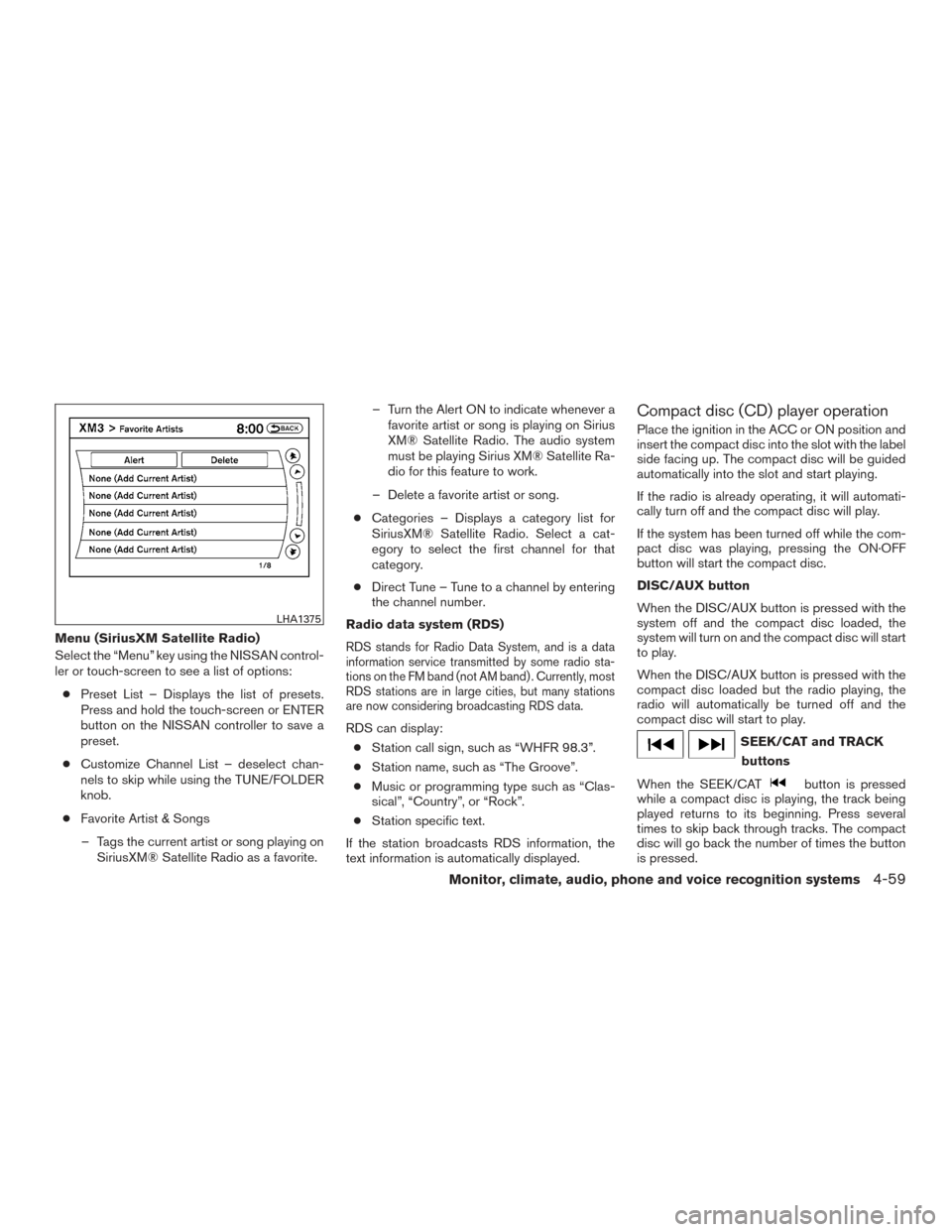
Menu (SiriusXM Satellite Radio)
Select the “Menu” key using the NISSAN control-
ler or touch-screen to see a list of options:● Preset List – Displays the list of presets.
Press and hold the touch-screen or ENTER
button on the NISSAN controller to save a
preset.
● Customize Channel List – deselect chan-
nels to skip while using the TUNE/FOLDER
knob.
● Favorite Artist & Songs
– Tags the current artist or song playing on SiriusXM® Satellite Radio as a favorite. – Turn the Alert ON to indicate whenever a
favorite artist or song is playing on Sirius
XM® Satellite Radio. The audio system
must be playing Sirius XM® Satellite Ra-
dio for this feature to work.
– Delete a favorite artist or song.
● Categories – Displays a category list for
SiriusXM® Satellite Radio. Select a cat-
egory to select the first channel for that
category.
● Direct Tune – Tune to a channel by entering
the channel number.
Radio data system (RDS)RDS stands for Radio Data System, and is a data
information service transmitted by some radio sta-
tions on the FM band (not AM band) . Currently, most
RDS stations are in large cities, but many stations
are now considering broadcasting RDS data.
RDS can display: ● Station call sign, such as “WHFR 98.3”.
● Station name, such as “The Groove”.
● Music or programming type such as “Clas-
sical”, “Country”, or “Rock”.
● Station specific text.
If the station broadcasts RDS information, the
text information is automatically displayed.
Compact disc (CD) player operation
Place the ignition in the ACC or ON position and
insert the compact disc into the slot with the label
side facing up. The compact disc will be guided
automatically into the slot and start playing.
If the radio is already operating, it will automati-
cally turn off and the compact disc will play.
If the system has been turned off while the com-
pact disc was playing, pressing the ON·OFF
button will start the compact disc.
DISC/AUX button
When the DISC/AUX button is pressed with the
system off and the compact disc loaded, the
system will turn on and the compact disc will start
to play.
When the DISC/AUX button is pressed with the
compact disc loaded but the radio playing, the
radio will automatically be turned off and the
compact disc will start to play.
SEEK/CAT and TRACK buttons
When the SEEK/CAT
button is pressed
while a compact disc is playing, the track being
played returns to its beginning. Press several
times to skip back through tracks. The compact
disc will go back the number of times the button
is pressed.
LHA1375
Monitor, climate, audio, phone and voice recognition systems4-59
Page 261 of 510
When the TRACKbutton is pressed while
the compact disc is playing, the next track will
start to play from its beginning. Press several
times to skip through tracks. The compact disc
will advance the number of times the button is
pressed. (When the last track on the compact
disc is skipped through, the first track will be
played.)
The NISSAN controller can also be used to se-
lect tracks when a CD is being played.
SEEK/CAT and TRACK
(Rewind and Fast For-
ward) buttons
Press and hold the SEEK/CAT
(rewind)
button or the TRACK
(fast forward) button
while a compact disc is playing; the compact disc
will play while rewinding or fast forwarding. When
the button is released, the compact disc will
return to normal play speed.
TUNE/FLDR (folder) knob
While playing an MP3/WMA CD, turn the
TUNE/FLDR knob right or left to scan forward or
backward through available folders. This can also
be performed using the
TUNE and
FLDR
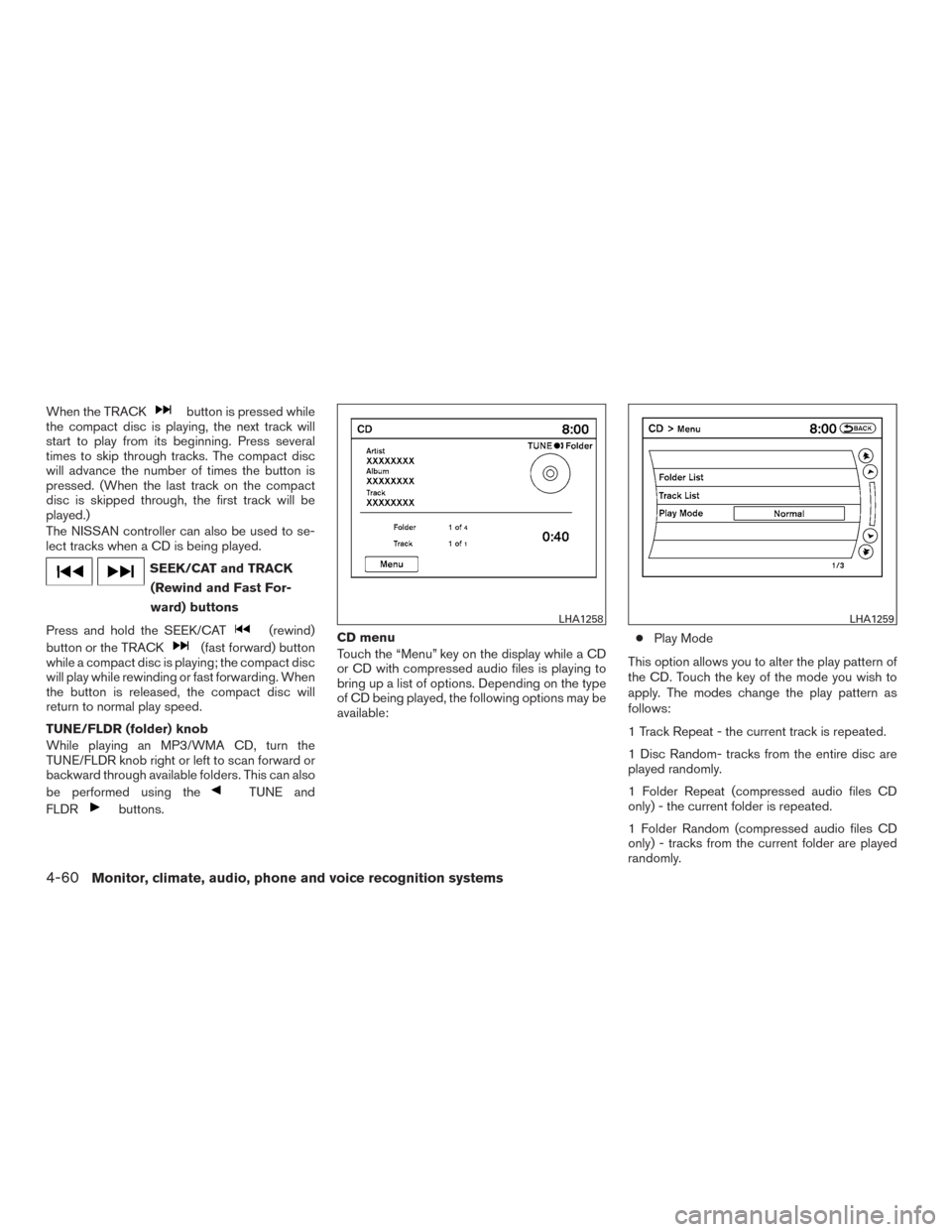
buttons. CD menu
Touch the “Menu” key on the display while a CD
or CD with compressed audio files is playing to
bring up a list of options. Depending on the type
of CD being played, the following options may be
available:
●
Play Mode
This option allows you to alter the play pattern of
the CD. Touch the key of the mode you wish to
apply. The modes change the play pattern as
follows:
1 Track Repeat - the current track is repeated.
1 Disc Random- tracks from the entire disc are
played randomly.
1 Folder Repeat (compressed audio files CD
only) - the current folder is repeated.
1 Folder Random (compressed audio files CD
only) - tracks from the current folder are played
randomly.
LHA1258LHA1259
4-60Monitor, climate, audio, phone and voice recognition systems
Page 265 of 510
Playing a DVD
DISC·AUX button
Park the vehicle in a safe location for the front
seat occupants to operate the DVD drive while
watching the images.
Press the DISC·AUX button until the DVD mode
is active on the display.
When a DVD is loaded, it will be replayed auto-
matically.
The operation screen will be turned on when the
DISC·AUX button is pressed while a DVD is
playing. The operation screen will turn off auto-matically after a period of time. To turn it on again,
press the DISC·AUX button.
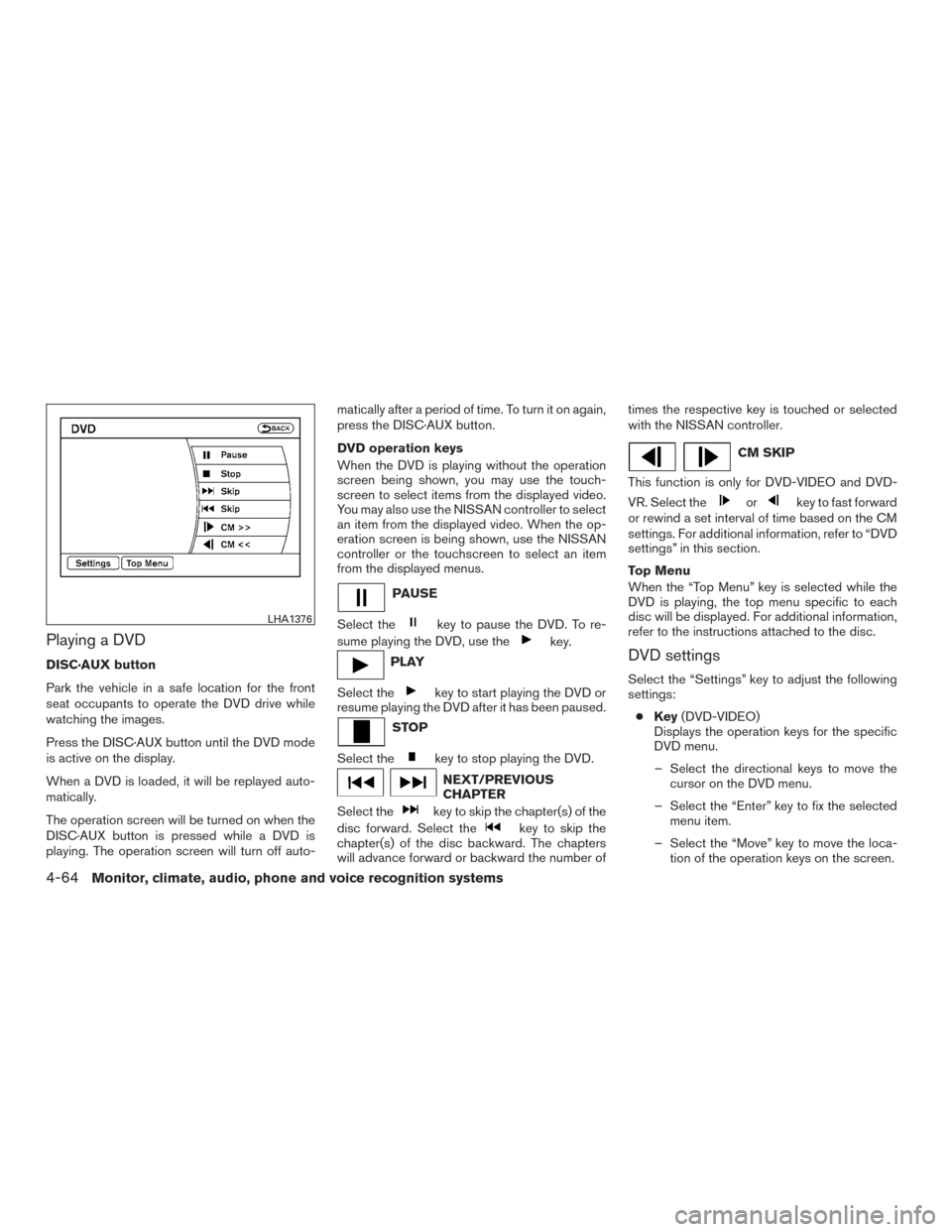
DVD operation keys
When the DVD is playing without the operation
screen being shown, you may use the touch-
screen to select items from the displayed video.
You may also use the NISSAN controller to select
an item from the displayed video. When the op-
eration screen is being shown, use the NISSAN
controller or the touchscreen to select an item
from the displayed menus.
PAUSE
Select the
key to pause the DVD. To re-
sume playing the DVD, use the
key.
PLAY
Select the
key to start playing the DVD or
resume playing the DVD after it has been paused.
STOP
Select the
key to stop playing the DVD.
NEXT/PREVIOUS
CHAPTER
Select the
key to skip the chapter(s) of the
disc forward. Select the
key to skip the
chapter(s) of the disc backward. The chapters
will advance forward or backward the number of times the respective key is touched or selected
with the NISSAN controller.
CM SKIP
This function is only for DVD-VIDEO and DVD-
VR. Select the
orkey to fast forward
or rewind a set interval of time based on the CM
settings. For additional information, refer to “DVD
settings” in this section.
Top Menu
When the “Top Menu” key is selected while the
DVD is playing, the top menu specific to each
disc will be displayed. For additional information,
refer to the instructions attached to the disc.
DVD settings
Select the “Settings” key to adjust the following
settings:
● Key (DVD-VIDEO)
Displays the operation keys for the specific
DVD menu.
– Select the directional keys to move the cursor on the DVD menu.
– Select the “Enter” key to fix the selected menu item.
– Select the “Move” key to move the loca- tion of the operation keys on the screen.
LHA1376
4-64Monitor, climate, audio, phone and voice recognition systems