warning NISSAN ARMADA 2015 1.G Workshop Manual
[x] Cancel search | Manufacturer: NISSAN, Model Year: 2015, Model line: ARMADA, Model: NISSAN ARMADA 2015 1.GPages: 510, PDF Size: 4.18 MB
Page 93 of 510
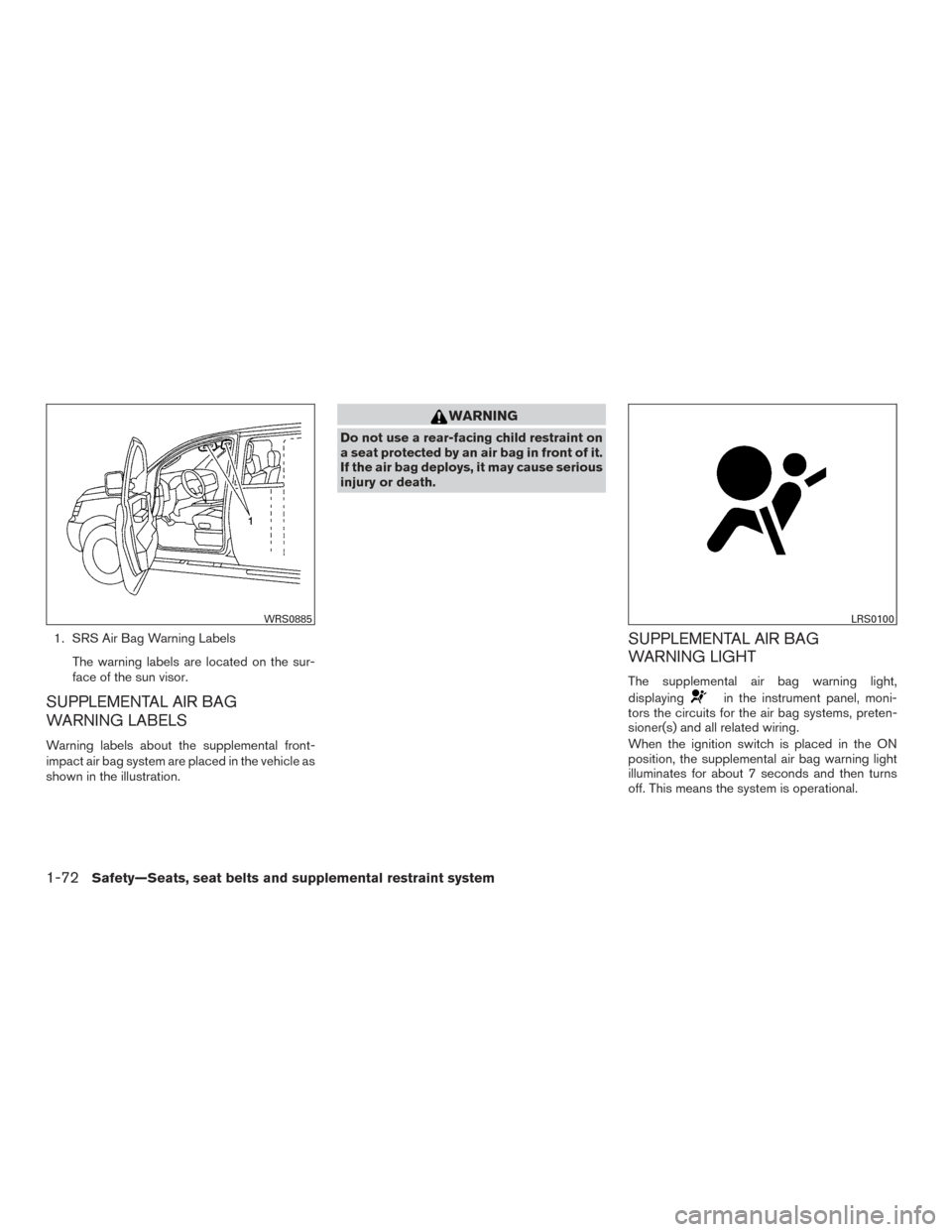
1. SRS Air Bag Warning LabelsThe warning labels are located on the sur-
face of the sun visor.
SUPPLEMENTAL AIR BAG
WARNING LABELS
Warning labels about the supplemental front-
impact air bag system are placed in the vehicle as
shown in the illustration.
WARNING
Do not use a rear-facing child restraint on
a seat protected by an air bag in front of it.
If the air bag deploys, it may cause serious
injury or death.
SUPPLEMENTAL AIR BAG
WARNING LIGHT
The supplemental air bag warning light,
displaying
in the instrument panel, moni-
tors the circuits for the air bag systems, preten-
sioner(s) and all related wiring.
When the ignition switch is placed in the ON
position, the supplemental air bag warning light
illuminates for about 7 seconds and then turns
off. This means the system is operational.
WRS0885LRS0100
1-72Safety—Seats, seat belts and supplemental restraint system
Page 94 of 510
If any of the following conditions occur, the front
air bag, side air bag, curtain air bag and preten-
sioner systems need servicing:● The supplemental air bag warning light re-
mains on after approximately 7 seconds.
● The supplemental air bag warning light
flashes intermittently.
● The supplemental air bag warning light does
not come on at all.
Under these conditions, the front air bag, side air
bag, curtain air bag or pretensioner systems may
not operate properly. They must be checked and
repaired. It is recommended you visit a NISSAN
dealer for this service.
WARNING
If the supplemental air bag warning light
is on, it could mean that the front air bag,
side air bag, curtain air bag and/or preten-
sioner systems will not operate in an acci-
dent. To help avoid injury to yourself or
others, have your vehicle checked as soon
as possible. It is recommended you visit a
NISSAN dealer for this service.
Repair and replacement procedure
The front air bags, side air bags, curtain air bags
and pretensioner(s) are designed to inflate on a
one-time-only basis. As a reminder, unless it is
damaged, the supplemental air bag warning light
remains illuminated after inflation has occurred.
These systems should be repaired and/or re-
placed as soon as possible. It is recommended
you visit a NISSAN dealer for this service.
When maintenance work is required on the ve-
hicle, the front air bags, side air bags, curtain air
bags, pretensioner(s) and related parts should be
pointed out to the person performing the mainte-
nance. The ignition switch should always be
placed in the LOCK position when working under
the hood or inside the vehicle.
WARNING
● Once a front air bag, side air bag, or
curtain air bag has inflated, the air bag
module will not function again and
must be replaced. Additionally, the acti-
vated pretensioner(s) must also be re-
placed. The air bag module and preten-
sioner(s) should be replaced. It is
recommended you visit a NISSAN
dealer for this service. However, the air
bag module and pretensioner(s) cannot
be repaired. ●
The front air bag, side air bag, curtain
air bag systems and the pretensioner
system should be inspected if there is
any damage to the front end or side
portion of the vehicle. It is recom-
mended you visit a NISSAN dealer for
this service.
● If you need to dispose of the supple-
mental air bag or pretensioner systems
or scrap the vehicle, it is recommended
you visit a NISSAN dealer. Incorrect dis-
posal procedures could cause personal
injury.
● If there is an impact to your vehicle from
any direction, your Occupant Classifica-
tion Sensor (OCS) should be checked to
verify it is still functioning correctly. It is
recommended you visit a NISSAN
dealer for this service. The OCS should
be checked even if no air bags deploy as
a result of the impact. Failure to verify
proper OCS function may result in an
improper air bag deployment resulting
in injury or death.
Safety—Seats, seat belts and supplemental restraint system1-73
Page 95 of 510
2 Instruments and controls
Instrument panel...................................2-2
Meters and gauges ................................2-3
Speedometer and odometer .....................2-4
Tachometer ....................................2-5
Engine coolant temperature gauge ...............2-5
Fuel gauge ....................................2-6
Engine oil pressure gauge .......................2-7
Voltmeter ......................................2-7
Automatic transmission fluid temperature
gauge .........................................2-8
Compass display (if so equipped) ...................2-8
Compass display ...............................2-9
Warning/indicator lights and audible reminders ......2-12
Checking bulbs ............................... 2-13
Warning lights ................................ 2-13
Indicator lights ................................ 2-18
Audible reminders ............................. 2-20
Vehicle Information Display ........................2-21
How to use the Vehicle Information Display .......2-21
Security systems ................................. 2-29
Vehicle security system ......................... 2-29
NISSAN vehicle immobilizer system .............2-30
Windshield wiper and washer switch ...............2-32Switch operation
.............................. 2-32
Rear window wiper and washer switch ..............2-33
Rear window and outside mirror defroster switch .....2-34
Headlight and turn signal switch ....................2-34
Headlight control switch ........................ 2-35
Daytime running light system (Canada only) ......2-36
Instrument brightness control ...................2-37
Turn signal switch ............................. 2-37
Fog light switch (if so equipped) ................2-38
Horn ............................................ 2-38
Heated seats (if so equipped) ......................2-39
Heated rear seats (if so equipped) ..................2-40
Heated steering wheel (if so equipped) .............2-41
Vehicle Dynamic Control (VDC) off switch ...........2-41
Rear sonar system off switch (if so equipped) ........2-42
Front and rear sonar system off switch (if so
equipped) ....................................... 2-42
T
ow mode switch ................................. 2-43
Power outlet ..................................... 2-44
Storage ......................................... 2-45
Map pockets .................................. 2-45
Seatback pocket .............................. 2-45
Instrument panel storage trays ..................2-46
Page 97 of 510
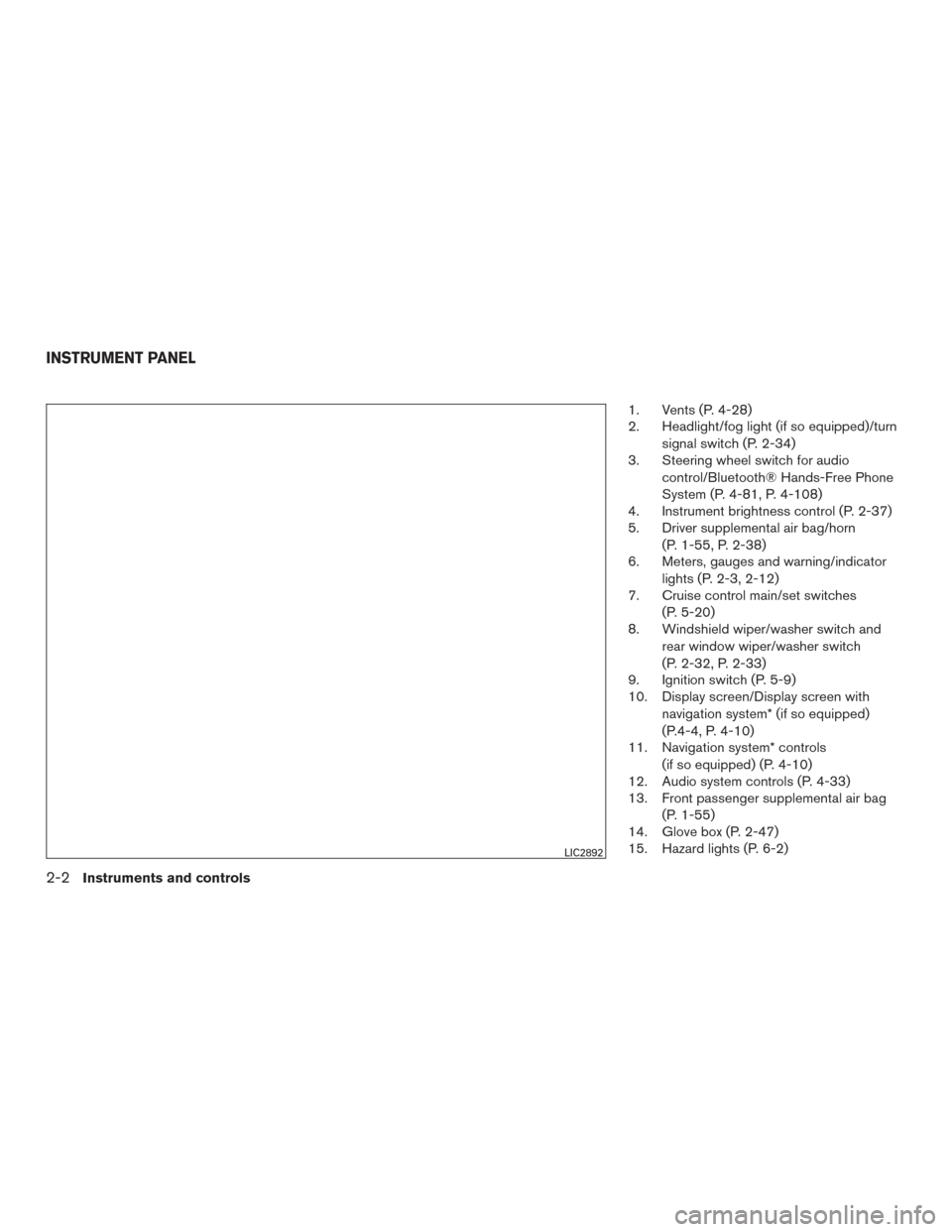
1. Vents (P. 4-28)
2. Headlight/fog light (if so equipped)/turnsignal switch (P. 2-34)
3. Steering wheel switch for audio
control/Bluetooth® Hands-Free Phone
System (P. 4-81, P. 4-108)
4. Instrument brightness control (P. 2-37)
5. Driver supplemental air bag/horn
(P. 1-55, P. 2-38)
6. Meters, gauges and warning/indicator
lights (P. 2-3, 2-12)
7. Cruise control main/set switches
(P. 5-20)
8. Windshield wiper/washer switch and
rear window wiper/washer switch
(P. 2-32, P. 2-33)
9. Ignition switch (P. 5-9)
10. Display screen/Display screen with
navigation system* (if so equipped)
(P.4-4, P. 4-10)
11. Navigation system* controls
(if so equipped) (P. 4-10)
12. Audio system controls (P. 4-33)
13. Front passenger supplemental air bag
(P. 1-55)
14. Glove box (P. 2-47)
15. Hazard lights (P. 6-2)
LIC2892
INSTRUMENT PANEL
2-2Instruments and controls
Page 98 of 510
16. Climate controls (P. 4-29)
17. Power outlet (P. 2-44)
18. Heated seat switch (if so equipped)(P. 2-39)
19. Vehicle Dynamic Control (VDC) off
switch (P. 2-41)
20. Shift lever (P. 5-15)
21. Front passenger air bag status light
(P. 1-55)
22. Power outlet (P. 2-44)
23. 4WD shift switch (if so equipped)
(P. 5-27)
24. Tilt steering wheel control (P. 3-30)
25. Rear or front and rear sonar system off
switch (if so equipped) (P. 5-36)
26. Pedal position adjustment switch
(P. 3-31)
27. Power vent window (if so equipped)
(P. 2-59)
28. Liftgate open/close switch
(if so equipped) (P. 3-23)
*: Refer to the separate Navigation System Own-
er’s Manual (if so equipped) .
See the page number indicated in paren-
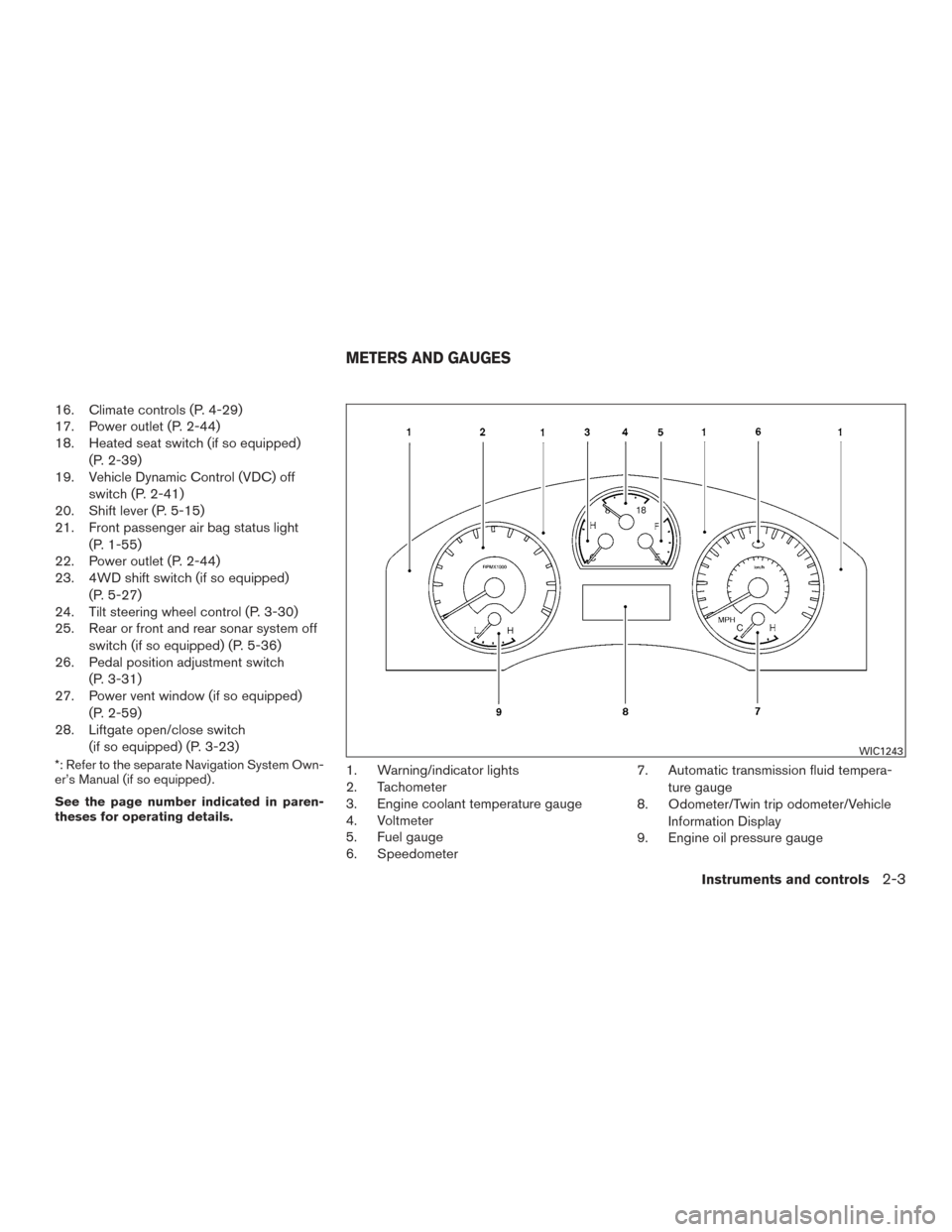
theses for operating details.1. Warning/indicator lights
2. Tachometer
3. Engine coolant temperature gauge
4. Voltmeter
5. Fuel gauge
6. Speedometer 7. Automatic transmission fluid tempera-
ture gauge
8. Odometer/Twin trip odometer/Vehicle
Information Display
9. Engine oil pressure gauge
WIC1243
METERS AND GAUGES
Instruments and controls2-3
Page 101 of 510
CAUTION
If the gauge indicates coolant tempera-
ture near the hot (H) end of the normal
range, reduce vehicle speed to decrease
temperature. If the gauge is over the nor-
mal range, stop the vehicle as soon as
safely possible. If the engine is over-
heated, continued operation of the vehicle
may seriously damage the engine. For ad-
ditional information, refer to “If your ve-
hicle overheats” in the “In case of emer-
gency” section of this manual for
immediate action required.
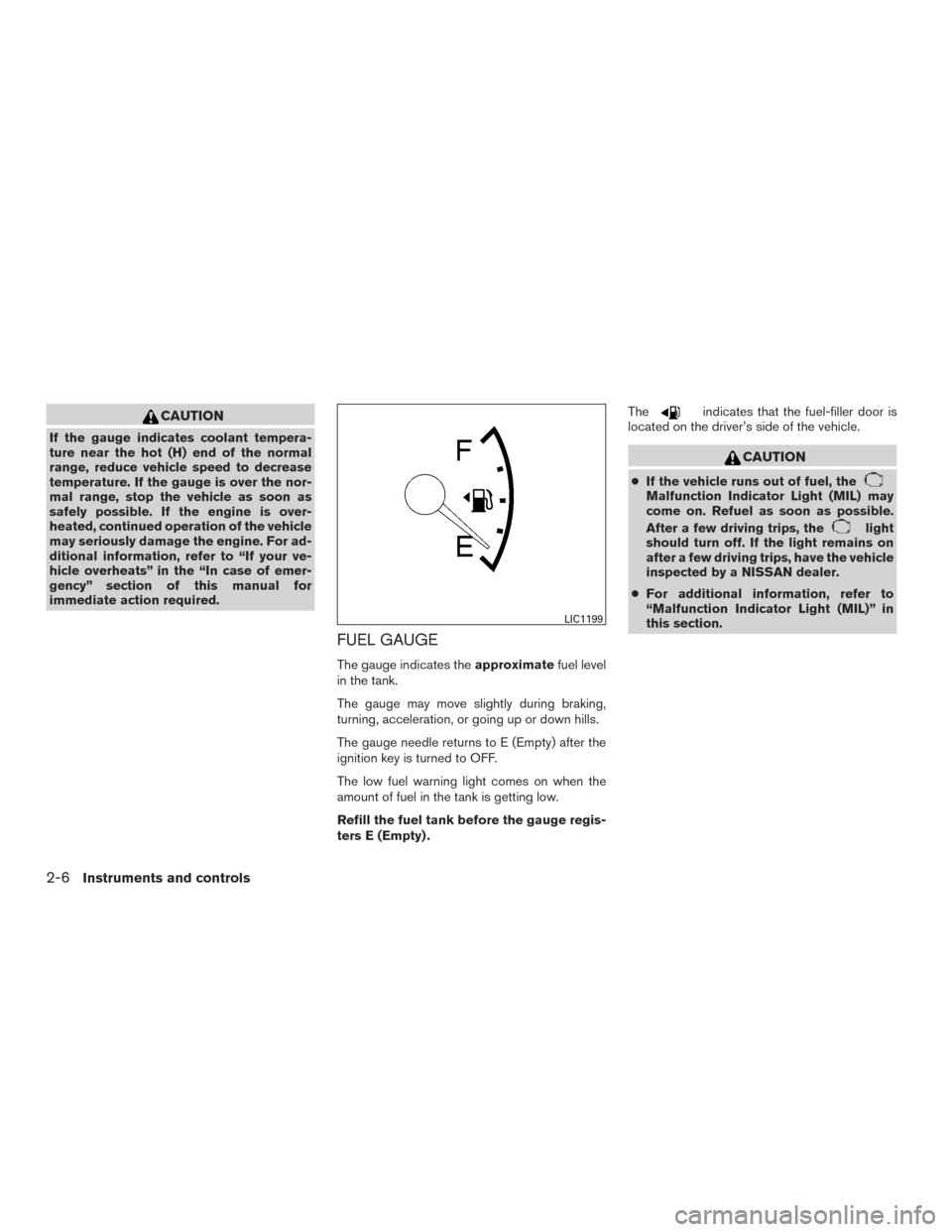
FUEL GAUGE
The gauge indicates theapproximatefuel level
in the tank.
The gauge may move slightly during braking,
turning, acceleration, or going up or down hills.
The gauge needle returns to E (Empty) after the
ignition key is turned to OFF.
The low fuel warning light comes on when the
amount of fuel in the tank is getting low.
Refill the fuel tank before the gauge regis-
ters E (Empty) . The
indicates that the fuel-filler door is
located on the driver’s side of the vehicle.
CAUTION
● If the vehicle runs out of fuel, theMalfunction Indicator Light (MIL) may
come on. Refuel as soon as possible.
After a few driving trips, the
light
should turn off. If the light remains on
after a few driving trips, have the vehicle
inspected by a NISSAN dealer.
● For additional information, refer to
“Malfunction Indicator Light (MIL)” in
this section.
LIC1199
2-6Instruments and controls
Page 107 of 510
orAnti-lock Braking System (ABS)
warning lightLow tire pressure warning lightCruise set switch indicator light
Automatic Transmission check warning lightLow windshield-washer fluid warning lightHigh beam indicator light (Blue)
Automatic transmission park warning light
(model)Master warning lightMalfunction Indicator Light (MIL)
orBrake warning lightNISSAN Intelligent Key® warning light
(if so equipped)Security indicator light
Charge warning lightSeat belt warning light and chimeSide light and headlight indicator light
(if so equipped)
Engine oil pressure low/engine coolant
temperature high warning lightSupplemental air bag warning lightSlip indicator light
4WD warning light (model)Front passenger air bag status lightTurn signal/hazard indicator lights
(if so equipped)
Low fuel warning lightCruise main switch indicator lightVehicle Dynamic Control (VDC) OFF indicator
light
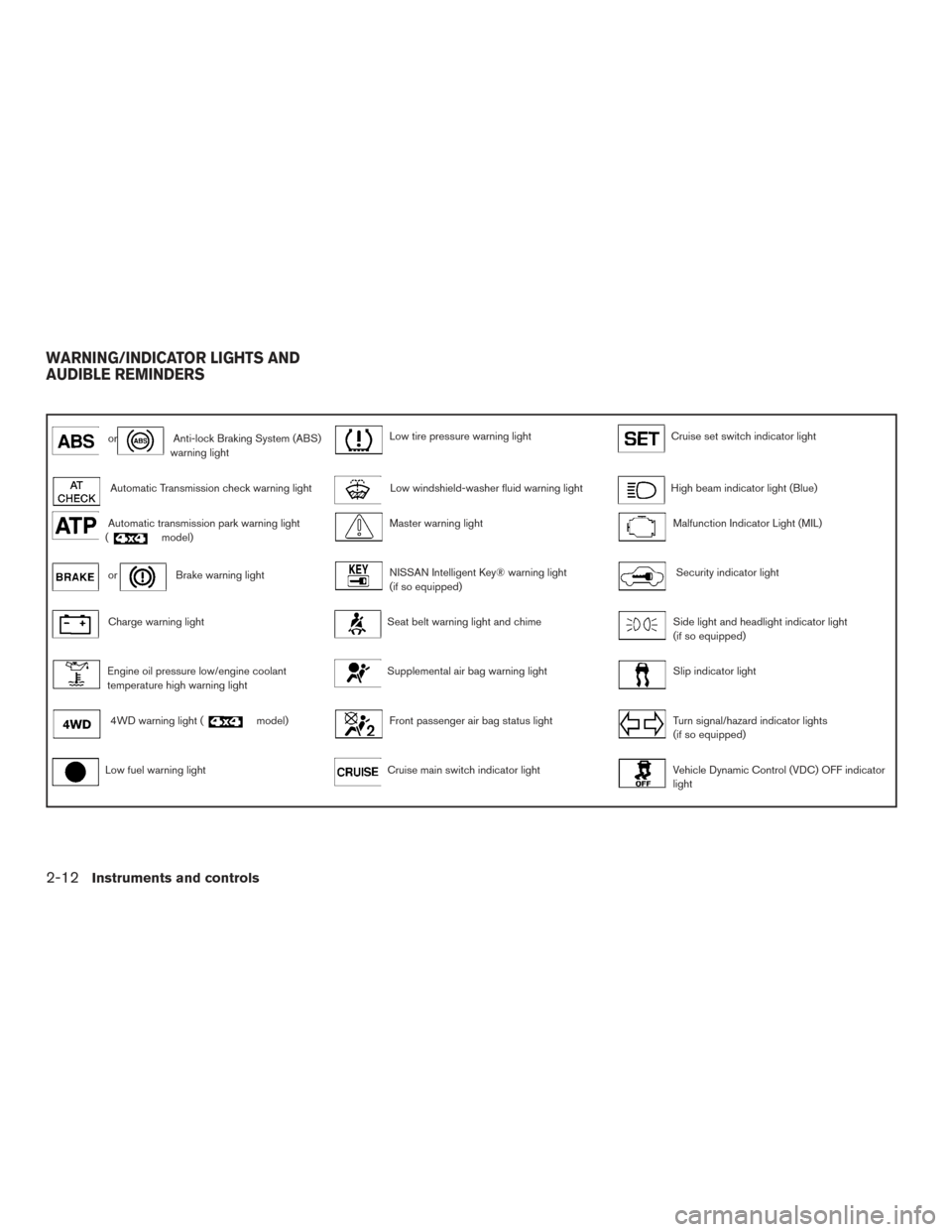
WARNING/INDICATOR LIGHTS AND
AUDIBLE REMINDERS
2-12Instruments and controls
Page 108 of 510
CHECKING BULBS
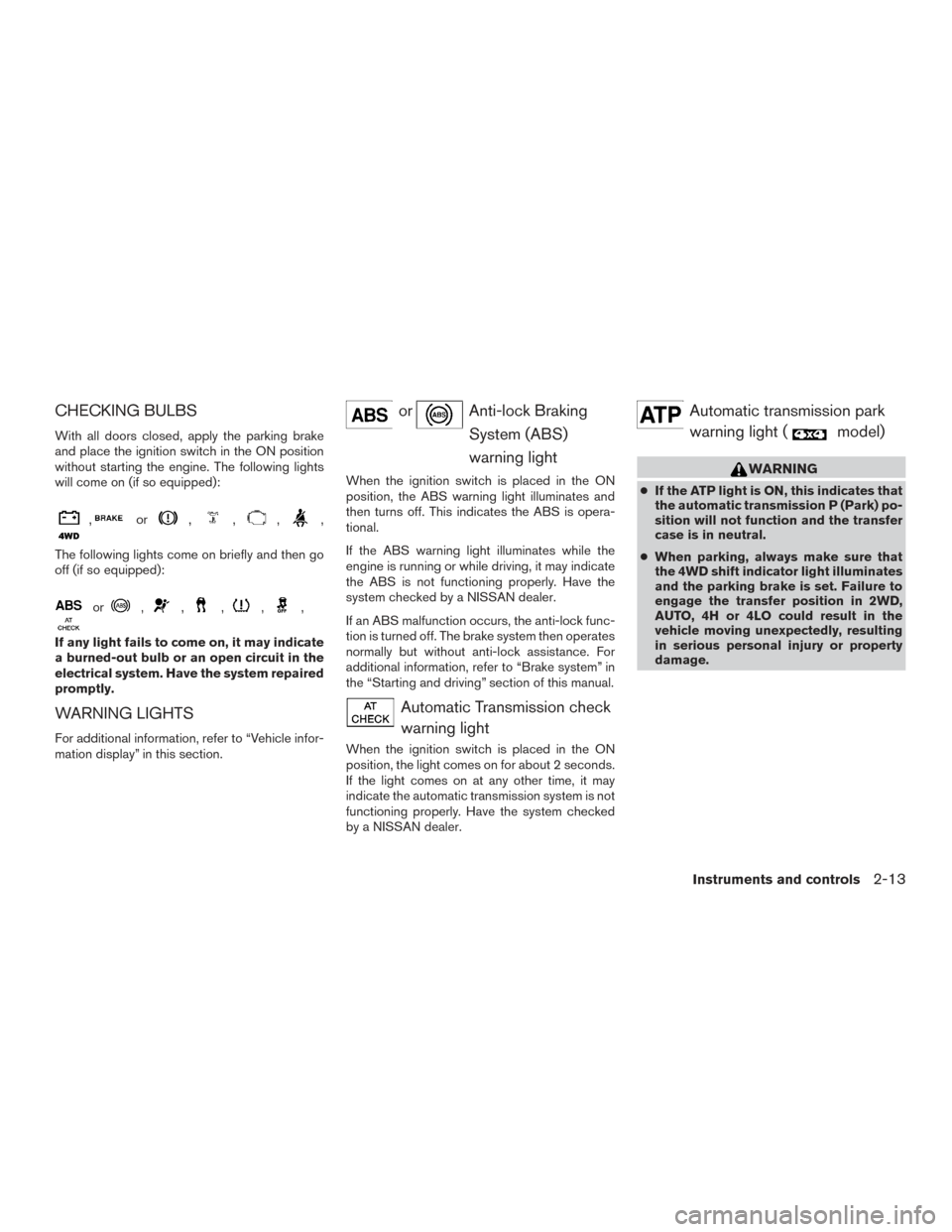
With all doors closed, apply the parking brake
and place the ignition switch in the ON position
without starting the engine. The following lights
will come on (if so equipped):
,or,,,,
The following lights come on briefly and then go
off (if so equipped):
or,,,,,
If any light fails to come on, it may indicate
a burned-out bulb or an open circuit in the
electrical system. Have the system repaired
promptly.
WARNING LIGHTS
For additional information, refer to “Vehicle infor-
mation display” in this section.
orAnti-lock BrakingSystem (ABS)
warning light
When the ignition switch is placed in the ON
position, the ABS warning light illuminates and
then turns off. This indicates the ABS is opera-
tional.
If the ABS warning light illuminates while the
engine is running or while driving, it may indicate
the ABS is not functioning properly. Have the
system checked by a NISSAN dealer.
If an ABS malfunction occurs, the anti-lock func-
tion is turned off. The brake system then operates
normally but without anti-lock assistance. For
additional information, refer to “Brake system” in
the “Starting and driving” section of this manual.
Automatic Transmission checkwarning light
When the ignition switch is placed in the ON
position, the light comes on for about 2 seconds.
If the light comes on at any other time, it may
indicate the automatic transmission system is not
functioning properly. Have the system checked
by a NISSAN dealer.
Automatic transmission parkwarning light (
model)
WARNING
● If the ATP light is ON, this indicates that
the automatic transmission P (Park) po-
sition will not function and the transfer
case is in neutral.
● When parking, always make sure that
the 4WD shift indicator light illuminates
and the parking brake is set. Failure to
engage the transfer position in 2WD,
AUTO, 4H or 4LO could result in the
vehicle moving unexpectedly, resulting
in serious personal injury or property
damage.
Instruments and controls2-13
Page 109 of 510
●The warning light may come on when
the ignition switch is ON and the shift
lever is placed in the P position while
shifting the transfer case between 4H
and 4LO. Shift the 4WD shift switch to
the 2WD, AUTO, 4H, or 4LO position
again to turn off the ATP warning light
when the warning light comes on. Be-
fore shifting the 4WD switch into the
4LO position or out of 4LO in the 4H
position, move the shift lever into the N
position. Shift the shift lever into the P
position and make sure that the 4WD
shift indicator light is ON and the ATP
warning light is OFF.
This light indicates that the automatic transmis-
sion parking function is not engaged. If the trans-
fer control is not secured in any drive position
while the shift lever is in the P (Park) position, the
transmission will disengage and the drive wheels
will not lock.
orBrake warning light
This light functions for both the parking brake and
the foot brake systems. Parking brake indicator
When the ignition switch is placed in the ON
position, the light comes on when the parking
brake is applied.
Low brake fluid warning light
When the ignition switch is placed in the ON
position, the light warns of a low brake fluid level.
If the light comes on while the engine is running,
with the parking brake not applied, stop the ve-
hicle and perform the following:
1. Check the brake fluid level. Add brake fluid as necessary. For additional information, re-
fer to “Brake fluid” in the “Maintenance and
do-it-yourself” section of this manual.
2. If the brake fluid level is correct, have the warning system checked by a NISSAN
dealer.
WARNING
●Your brake system may not be working
properly if the warning light is on. Driv-
ing could be dangerous. If you judge it
to be safe, drive carefully to the nearest
service station for repairs. Otherwise,
have your vehicle towed because driv-
ing it could be dangerous. ●
Pressing the brake pedal with the en-
gine stopped and/or a low brake fluid
level may increase your stopping dis-
tance and braking will require greater
pedal effort and pedal travel.
● If the brake fluid level is below the
MINIMUM or MIN mark on the brake
fluid reservoir, do not drive until the
brake system has been checked at a
NISSAN dealer.
Anti-lock Braking System (ABS) warning
indicator
When the parking brake is released and the
brake fluid level is sufficient, if both the brake
warning light and the ABS warning light illumi-
nates, it may indicate the ABS is not functioning
properly. Have the brake system checked and, if
necessary, repaired by a NISSAN dealer
promptly. Avoid high-speed driving and abrupt
braking. For additional information, refer to “Anti-
lock Braking System (ABS) warning light” in this
section.
2-14Instruments and controls
Page 110 of 510
Charge warning light
If this light comes on while the engine is running,
it may indicate the charging system is not func-
tioning properly. Turn the engine off and check
the generator belt. If the belt is loose, broken,
missing, or if the light remains on, see a NISSAN
dealer immediately.
CAUTION
●Do not ground electrical accessories di-
rectly to the battery terminal. Doing so
will bypass the variable control system
and the vehicle battery may not charge
completely. For additional information,
refer to “Variable voltage control sys-
tem” in the “Maintenance and do-it-
yourself” section of this manual.
● Do not continue driving if the generator
belt is loose, broken or missing
Engine oil pressure low/
Engine coolant temperature
high warning light
This light warns of low engine oil pressure or high
engine coolant temperature.
If the light flickers or comes on during normal
driving, pull off the road in a safe area, stop the engine and allow it to cool. If the light remains on
after checking the oil and coolant, stop the en-
gine
immediately and call a NISSAN dealer or
other authorized repair shop.
This light is not designed to indicate a low
oil or low coolant level. Check the oil level with
the dipstick and check the coolant level on the
reservoir. For additional information, refer to “If
your vehicle overheats” in the “In case of emer-
gency” section and “Engine oil” and “Checking
engine coolant level” in the “Maintenance and
do-it-yourself” section of this manual.
CAUTION
● Running the engine with the engine oil
pressure warning light on could cause
serious damage to the engine almost
immediately. Such damage is not cov-
ered by warranty. Turn off the engine as
soon as it is safe to do so.
●
If the gauge indicates engine coolant
temperature over the normal range, stop
the vehicle as soon as safely possible. If
the engine is overheated, continued op-
eration of the vehicle may seriously dam-
age the engine. For additional informa-
tion, refer to “If your vehicle overheats” in
the “In case of emergency” section for
immediate action required.
4WD warning light
(
model)
The 4WD warning light comes on when the igni-
tion switch is placed in the ON position. It turns
off soon after the engine is started.
If the engine or vehicle is not functioning properly,
the warning light will either remain illuminated or
blink. For additional information, refer to “4WD
warning light” in the “Starting and driving” section
of this manual.
CAUTION
● If the warning light comes on or blinks
during operation, have your vehicle
checked by a NISSAN dealer as soon as
possible.
● Do not drive on dry hard surface roads
in the 4H or 4LO position. If the 4WD
warning light turns on when you are
driving on dry hard surface roads:
– in the AUTO or 4H position, shift the 4WD shift switch to 2WD.
– in the 4LO position, stop the vehicle, move the shift lever to the N position
and shift the 4WD shift switch to
2WD.
Instruments and controls2-15