audio NISSAN ARMADA 2017 2.G Owners Manual
[x] Cancel search | Manufacturer: NISSAN, Model Year: 2017, Model line: ARMADA, Model: NISSAN ARMADA 2017 2.GPages: 614, PDF Size: 2.87 MB
Page 318 of 614
General rule
Only single digits 0 (zero) to 9 can be used. (For
example, if you would like to say 500, “five zero
zero” can be used, but “five hundred” cannot.)
Examples
.1-800-662-6200
— “One eight zero zero six six two six two
zero zero”
Improving Recognition of Phone numbers
You can improve the recognition of phone
numbers by saying the phone number in three
groups of numbers. For example, when you try to
call 800-662-6200, say “eight zero zero” first,
and the system will then ask you for the next
three digits. Then, say “six six two”. After
recognition, the system will then ask for the last
four digits. Say, “six two zero zero”. Using this
method of phone digit entry can improve
recognition performance.
When speaking a house number, speak the
number “0” as “zero”. If the letter “o (Oh)” is
included in the house number, it will not be
recognized as the number “0 (zero)” even if you
speak “oh” instead of “zero”. Please speak
“zero” for the number “0 (zero)”, “oh” for
the letter “o (oh)”. Send digits using dial tone:
.
Press the TALK
switch during a phone
call.
. The menu will be launched and you will be
provided with the following guidance:
"Please say the digits to dial".
. After guidance, say the digits of the number
you want to send. After this, the digits that
have been recognized will be read out.
. If you press the ENTER button on the
steering wheel or on the multi-function
controller, the selected digits will be sent.
Monitor, heater, air conditioner, audio, phone and voice recognition systems4-121
Page 319 of 614
4-122Monitor, heater, air conditioner, audio, phone and voice recognition systems
Command List
Category Command:
CommandAction
Call (Optional) Makes a call to a contact that is stored in either phonebook. Please say "Call" followed by a stored name.
Phone Operates the Phone function
Navigation Operates the Navigation function
Information Displays the vehicle Information function
Audio Operates the Audio function.
Help Displays User Guide
Page 320 of 614
Phone Command:
CommandAction
Dial Number Makes a call to a spoken phone number up to 10 digits.
Quick Dial Makes a call to a contact that is stored in the Quick Dial.
Phonebook Makes a call to a contact that is stored in the mobile phone.
Call history Incoming Calls Makes a call to the incoming call number.
Outgoing Calls Makes a call to the dialed number.
Missed Calls Makes a call to the Missed calls number.
International Call Makes an international call by allowing more than 10 digits to be spoken.
Change Number Corrects the recognized phone number (available during phone number entry) .
Navigation Command:
For details of the navigation commands, refer to the Navigation System Owner’s Manual.
Monitor, heater, air conditioner, audio, phone and voice recognition systems4-123
Page 321 of 614
4-124Monitor, heater, air conditioner, audio, phone and voice recognition systems
Information Command:
CommandAction
Fuel Economy Displays fuel economy information.
Maintenance Displays maintenance information.
Traffic Information Turns the traffic information system ON and OFF.
Where am I? Displays your current location.
Tire Pressure Displays tire pressure information
Page 322 of 614
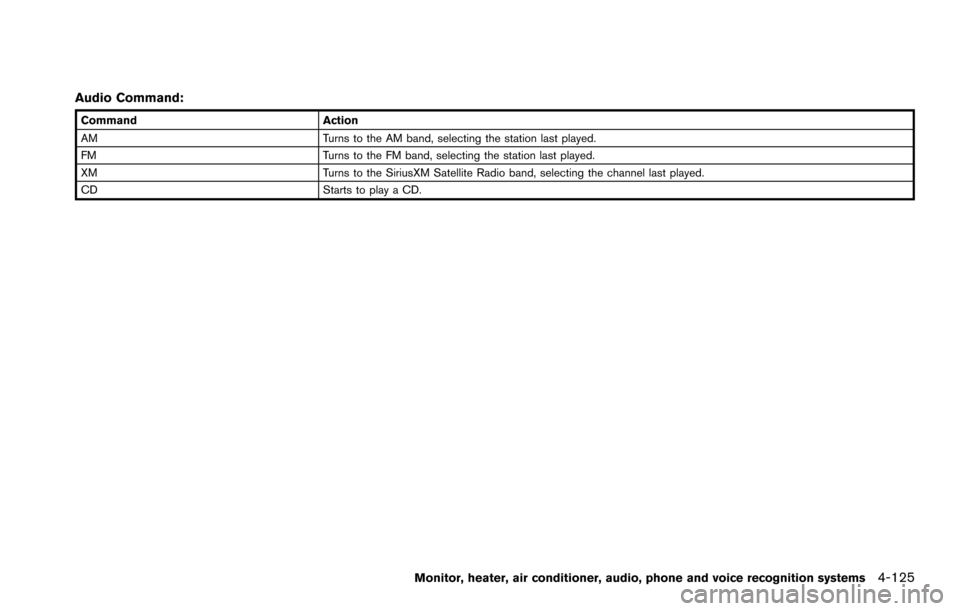
Audio Command:
CommandAction
AM Turns to the AM band, selecting the station last played.
FM Turns to the FM band, selecting the station last played.
XM Turns to the SiriusXM Satellite Radio band, selecting the channel last played.
CD Starts to play a CD.
Monitor, heater, air conditioner, audio, phone and voice recognition systems4-125
Page 323 of 614
4-126Monitor, heater, air conditioner, audio, phone and voice recognition systems
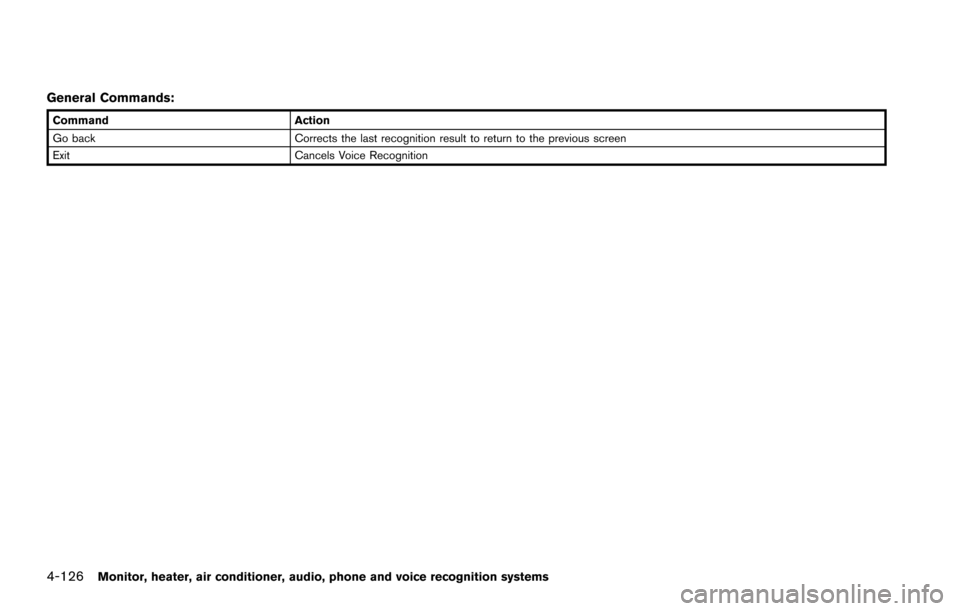
General Commands:
CommandAction
Go back Corrects the last recognition result to return to the previous screen
Exit Cancels Voice Recognition
Page 324 of 614
Voice command examples
To use the NISSAN Voice Recognition function,
speaking one command is sometimes sufficient,
but at other times it is necessary to speak two or
more commands. As examples, some additional
basic operations by voice commands are
described here.
For navigation system commands, see the
separate Navigation System Owner’s Manual.
JVH1253X
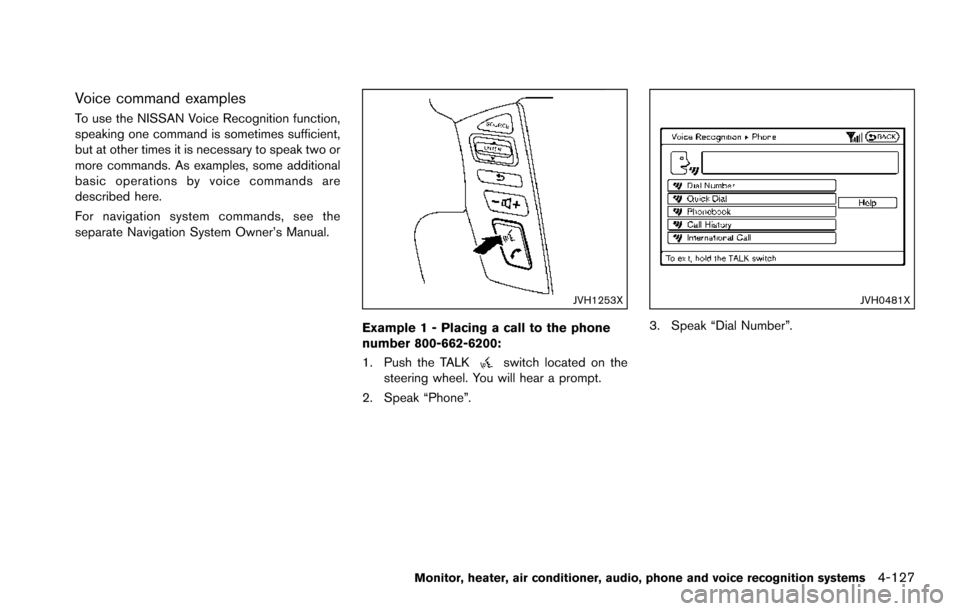
Example 1 - Placing a call to the phone
number 800-662-6200:
1. Push the TALK
switch located on the
steering wheel. You will hear a prompt.
2. Speak “Phone”.
JVH0481X
3. Speak “Dial Number”.
Monitor, heater, air conditioner, audio, phone and voice recognition systems4-127
Page 325 of 614
4-128Monitor, heater, air conditioner, audio, phone and voice recognition systems
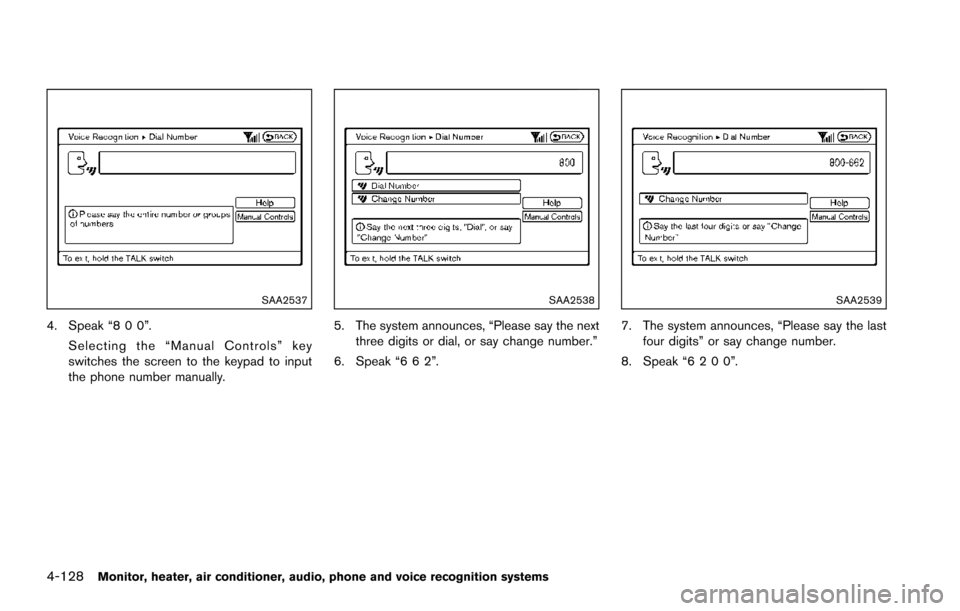
SAA2537
4. Speak “8 0 0”.Selecting the “Manual Controls” key
switches the screen to the keypad to input
the phone number manually.
SAA2538
5. The system announces, “Please say the nextthree digits or dial, or say change number.”
6. Speak “6 6 2”.
SAA2539
7. The system announces, “Please say the last four digits” or say change number.
8. Speak “6 2 0 0”.
Page 326 of 614
SAA2540
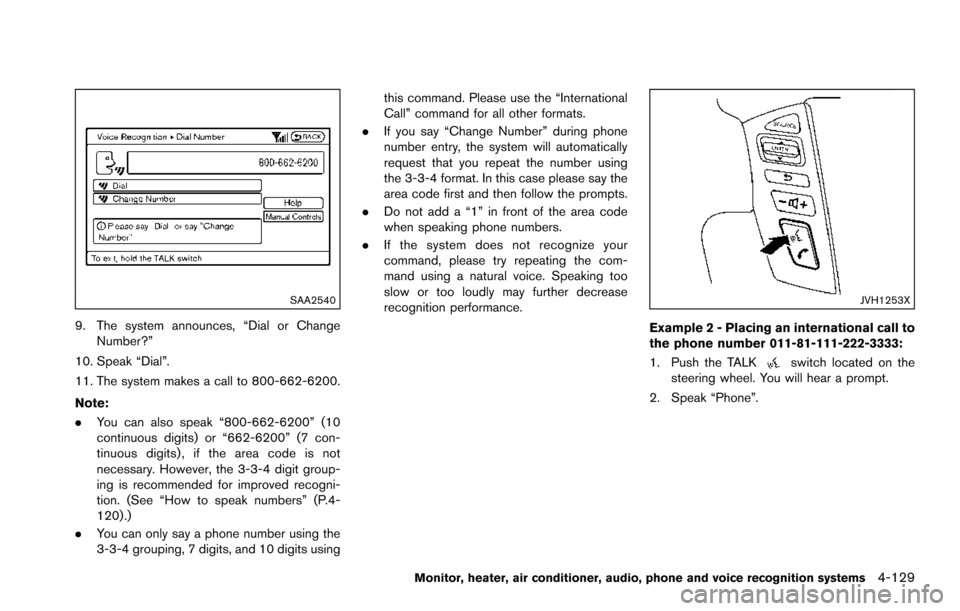
9. The system announces, “Dial or ChangeNumber?”
10. Speak “Dial”.
11. The system makes a call to 800-662-6200.
Note:
. You can also speak “800-662-6200” (10
continuous digits) or “662-6200” (7 con-
tinuous digits) , if the area code is not
necessary. However, the 3-3-4 digit group-
ing is recommended for improved recogni-
tion. (See “How to speak numbers” (P.4-
120) .)
. You can only say a phone number using the
3-3-4 grouping, 7 digits, and 10 digits using this command. Please use the “International
Call” command for all other formats.
. If you say “Change Number” during phone
number entry, the system will automatically
request that you repeat the number using
the 3-3-4 format. In this case please say the
area code first and then follow the prompts.
. Do not add a “1” in front of the area code
when speaking phone numbers.
. If the system does not recognize your
command, please try repeating the com-
mand using a natural voice. Speaking too
slow or too loudly may further decrease
recognition performance.
JVH1253X
Example 2 - Placing an international call to
the phone number 011-81-111-222-3333:
1. Push the TALK
switch located on the
steering wheel. You will hear a prompt.
2. Speak “Phone”.
Monitor, heater, air conditioner, audio, phone and voice recognition systems4-129
Page 327 of 614
4-130Monitor, heater, air conditioner, audio, phone and voice recognition systems
JVH0481X
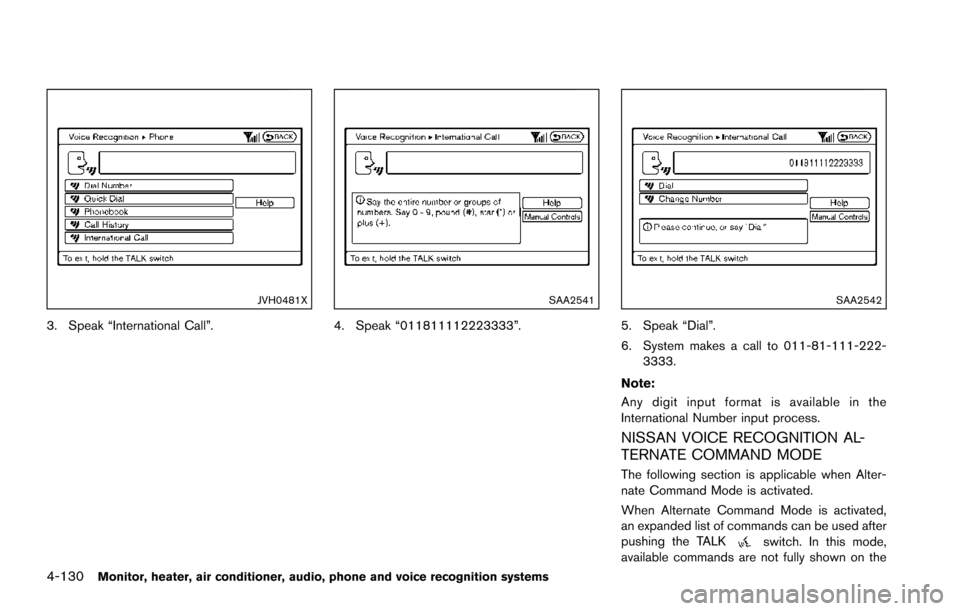
3. Speak “International Call”.
SAA2541
4. Speak “011811112223333”.
SAA2542
5. Speak “Dial”.
6. System makes a call to 011-81-111-222-3333.
Note:
Any digit input format is available in the
International Number input process.
NISSAN VOICE RECOGNITION AL-
TERNATE COMMAND MODE
The following section is applicable when Alter-
nate Command Mode is activated.
When Alternate Command Mode is activated,
an expanded list of commands can be used after
pushing the TALK
switch. In this mode,
available commands are not fully shown on the