AUX NISSAN ARMADA 2017 2.G User Guide
[x] Cancel search | Manufacturer: NISSAN, Model Year: 2017, Model line: ARMADA, Model: NISSAN ARMADA 2017 2.GPages: 614, PDF Size: 2.87 MB
Page 277 of 614
4-80Monitor, heater, air conditioner, audio, phone and voice recognition systems
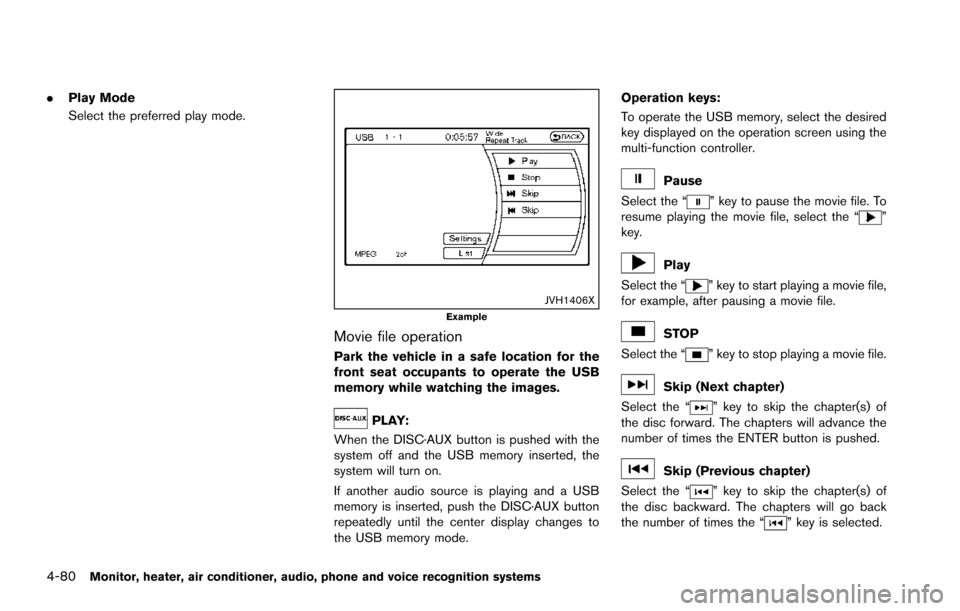
.Play Mode
Select the preferred play mode.
JVH1406XExample
Movie file operation
Park the vehicle in a safe location for the
front seat occupants to operate the USB
memory while watching the images.
PLAY:
When the DISC·AUX button is pushed with the
system off and the USB memory inserted, the
system will turn on.
If another audio source is playing and a USB
memory is inserted, push the DISC·AUX button
repeatedly until the center display changes to
the USB memory mode. Operation keys:
To operate the USB memory, select the desired
key displayed on the operation screen using the
multi-function controller.
Pause
Select the “
” key to pause the movie file. To
resume playing the movie file, select the “”
key.
Play
Select the “
” key to start playing a movie file,
for example, after pausing a movie file.
STOP
Select the “
” key to stop playing a movie file.
Skip (Next chapter)
Select the “
” key to skip the chapter(s) of
the disc forward. The chapters will advance the
number of times the ENTER button is pushed.
Skip (Previous chapter)
Select the “
” key to skip the chapter(s) of
the disc backward. The chapters will go back
the number of times the “
” key is selected.
Page 281 of 614
4-84Monitor, heater, air conditioner, audio, phone and voice recognition systems
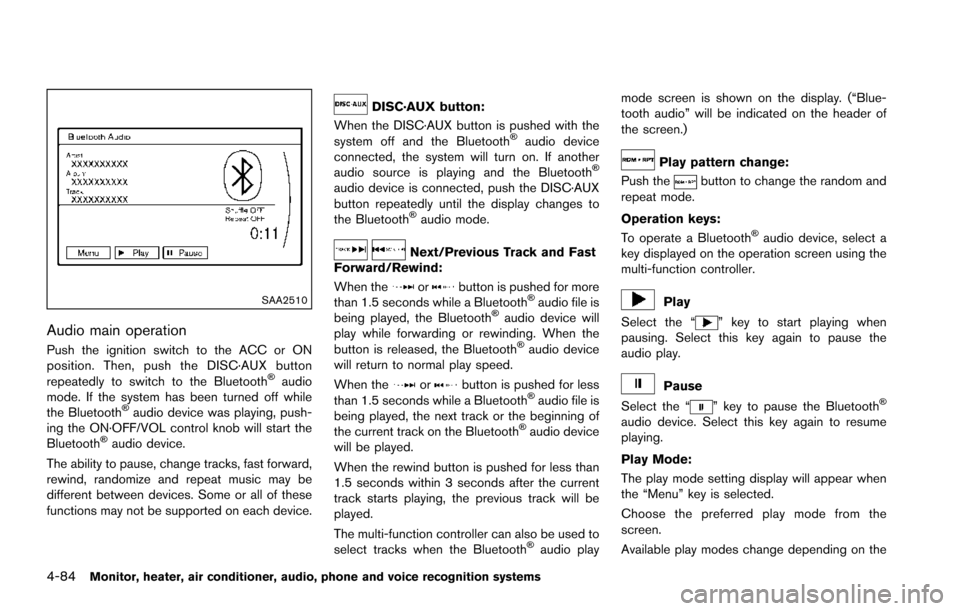
SAA2510
Audio main operation
Push the ignition switch to the ACC or ON
position. Then, push the DISC·AUX button
repeatedly to switch to the Bluetooth
Šaudio
mode. If the system has been turned off while
the Bluetooth
Šaudio device was playing, push-
ing the ON·OFF/VOL control knob will start the
Bluetooth
Šaudio device.
The ability to pause, change tracks, fast forward,
rewind, randomize and repeat music may be
different between devices. Some or all of these
functions may not be supported on each device.
DISC·AUX button:
When the DISC·AUX button is pushed with the
system off and the Bluetooth
Šaudio device
connected, the system will turn on. If another
audio source is playing and the Bluetooth
Š
audio device is connected, push the DISC·AUX
button repeatedly until the display changes to
the Bluetooth
Šaudio mode.
Next/Previous Track and Fast
Forward/Rewind:
When the
orbutton is pushed for more
than 1.5 seconds while a BluetoothŠaudio file is
being played, the BluetoothŠaudio device will
play while forwarding or rewinding. When the
button is released, the Bluetooth
Šaudio device
will return to normal play speed.
When the
orbutton is pushed for less
than 1.5 seconds while a BluetoothŠaudio file is
being played, the next track or the beginning of
the current track on the Bluetooth
Šaudio device
will be played.
When the rewind button is pushed for less than
1.5 seconds within 3 seconds after the current
track starts playing, the previous track will be
played.
The multi-function controller can also be used to
select tracks when the Bluetooth
Šaudio play mode screen is shown on the display. (“Blue-
tooth audio” will be indicated on the header of
the screen.)
Play pattern change:
Push the
button to change the random and
repeat mode.
Operation keys:
To operate a Bluetooth
Šaudio device, select a
key displayed on the operation screen using the
multi-function controller.
Play
Select the “
” key to start playing when
pausing. Select this key again to pause the
audio play.
Pause
Select the “
” key to pause the BluetoothŠ
audio device. Select this key again to resume
playing.
Play Mode:
The play mode setting display will appear when
the “Menu” key is selected.
Choose the preferred play mode from the
screen.
Available play modes change depending on the
Page 284 of 614
Audio main operation
Push the ignition switch to the ACC or ON
position. Then, push the DISC·AUX button
repeatedly to switch to the iPod
Šmode.
If the system has been turned off while the iPodŠ
was playing, pushing the ON·OFF button will
start the iPodŠ.
PLAY:
When the DISC·AUX button is pushed with the
system off and the iPod
Šconnected, the system
will turn on. If another audio source is playing
and the iPod
Šis connected, push the DISC·AUX
button repeatedly until the center display
changes to the iPod
Šmode.
Interface:
The interface for iPod
Šoperation shown on the
vehicle center display is similar to the iPodŠ
interface. Use the multi-function controller and
the ENTER or BACK button to play the iPodŠ
with your favorite settings.
The following items can be chosen from the
menu list screen. For further information about
each item, see the iPod
ŠOwner’s Manual.
. Now Playing
. Playlists .
Artists
. Albums
. Songs
. Podcasts
. Genres
. Composers
. Audiobooks
. Shuffle Songs
. Play Mode
The following touch-panel buttons shown on the
screen are also available:
.
: returns to the previous screen.
.
: plays/pauses the music selected.
Next/Previous Track and Fast
Forward/Rewind:
When the
orbutton is pushed for more
than 1.5 seconds while the iPodŠis playing, the
iPodŠwill play while fast forwarding or rewind-
ing. When the button is released, the iPodŠwill
return to the normal play speed.
When the
orbutton is pushed for less
than 1.5 seconds while the iPodŠis playing, the
next track or the beginning of the current track
on the iPod
Šwill be played.
When the rewind button is pushed for less than
1.5 seconds within 3 seconds after the current
track starts playing, the previous track will be played.
The multi-function controller can also be used to
select tracks when the iPod
Šis playing.
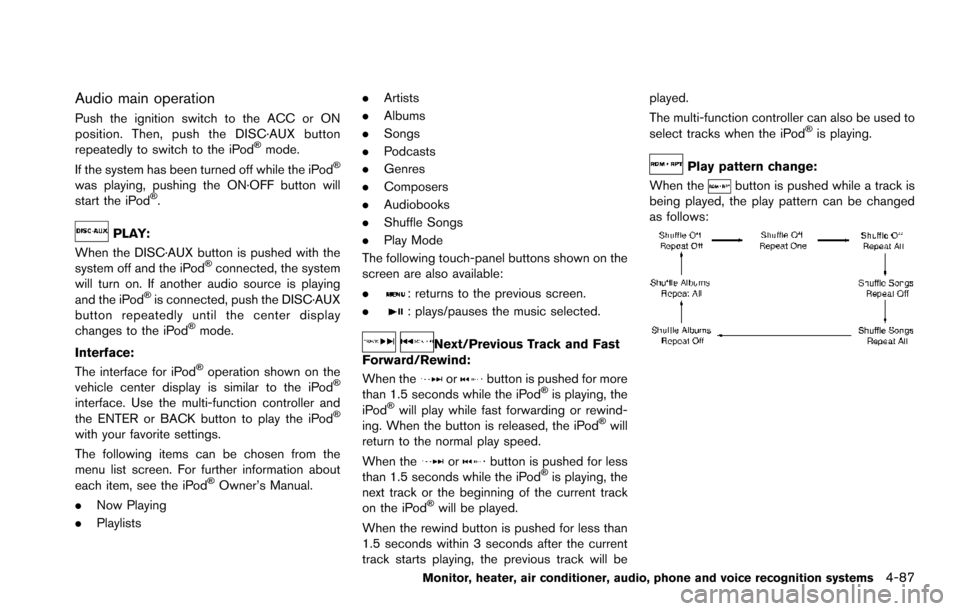
Play pattern change:
When the
button is pushed while a track is
being played, the play pattern can be changed
as follows:
Monitor, heater, air conditioner, audio, phone and voice recognition systems4-87
Page 285 of 614
4-88Monitor, heater, air conditioner, audio, phone and voice recognition systems
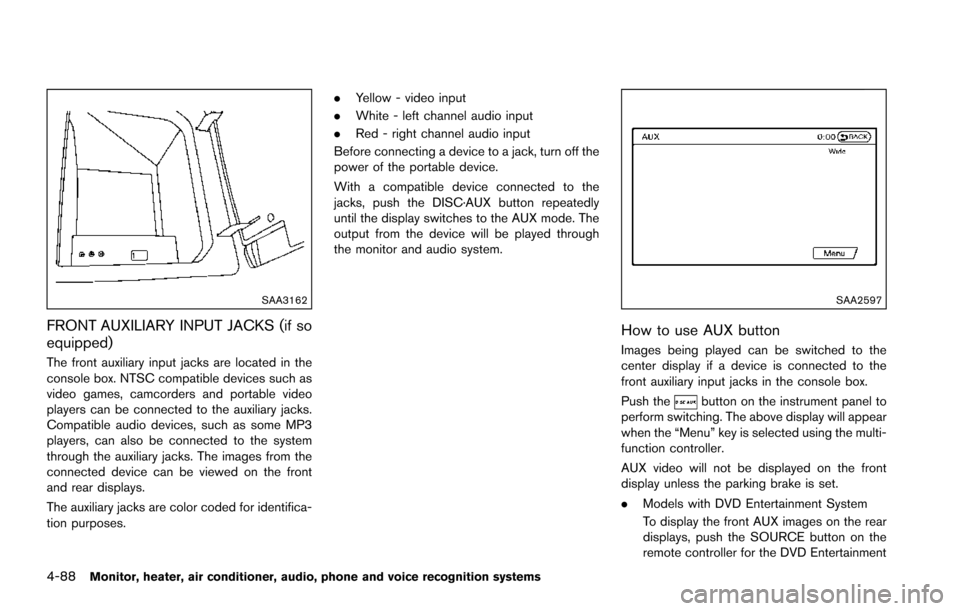
SAA3162
FRONT AUXILIARY INPUT JACKS (if so
equipped)
The front auxiliary input jacks are located in the
console box. NTSC compatible devices such as
video games, camcorders and portable video
players can be connected to the auxiliary jacks.
Compatible audio devices, such as some MP3
players, can also be connected to the system
through the auxiliary jacks. The images from the
connected device can be viewed on the front
and rear displays.
The auxiliary jacks are color coded for identifica-
tion purposes..
Yellow - video input
. White - left channel audio input
. Red - right channel audio input
Before connecting a device to a jack, turn off the
power of the portable device.
With a compatible device connected to the
jacks, push the DISC·AUX button repeatedly
until the display switches to the AUX mode. The
output from the device will be played through
the monitor and audio system.
SAA2597
How to use AUX button
Images being played can be switched to the
center display if a device is connected to the
front auxiliary input jacks in the console box.
Push the
button on the instrument panel to
perform switching. The above display will appear
when the “Menu” key is selected using the multi-
function controller.
AUX video will not be displayed on the front
display unless the parking brake is set.
. Models with DVD Entertainment System
To display the front AUX images on the rear
displays, push the SOURCE button on the
remote controller for the DVD Entertainment
Page 286 of 614
System. (See “DVD Entertainment System”
(P.4-92) .)
SAA2496
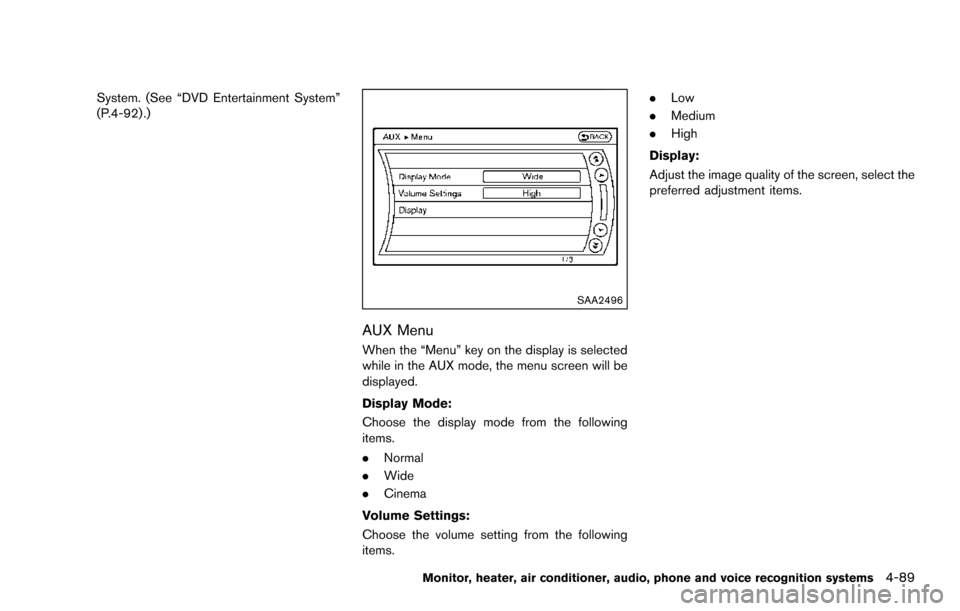
AUX Menu
When the “Menu” key on the display is selected
while in the AUX mode, the menu screen will be
displayed.
Display Mode:
Choose the display mode from the following
items.
.Normal
. Wide
. Cinema
Volume Settings:
Choose the volume setting from the following
items. .
Low
. Medium
. High
Display:
Adjust the image quality of the screen, select the
preferred adjustment items.
Monitor, heater, air conditioner, audio, phone and voice recognition systems4-89
Page 289 of 614
4-92Monitor, heater, air conditioner, audio, phone and voice recognition systems
ANTENNA
Window antenna
The antenna pattern is printed inside the rear
side glass.
CAUTION
.Do not place metalized film near the
3rd row seat window or attach any
metal parts to it. This may cause
poor reception or noise.
. When cleaning the inside of the rear
side window, be careful not to
scratch or damage the rear side
window antenna. Lightly wipe along
the antenna with a dampened soft
cloth.
SAA3602
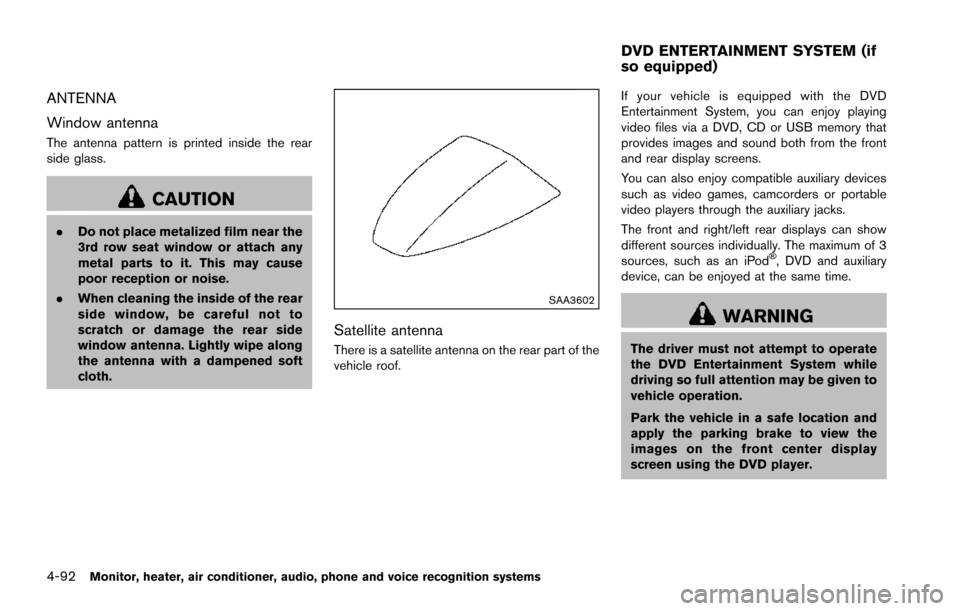
Satellite antenna
There is a satellite antenna on the rear part of the
vehicle roof. If your vehicle is equipped with the DVD
Entertainment System, you can enjoy playing
video files via a DVD, CD or USB memory that
provides images and sound both from the front
and rear display screens.
You can also enjoy compatible auxiliary devices
such as video games, camcorders or portable
video players through the auxiliary jacks.
The front and right/left rear displays can show
different sources individually. The maximum of 3
sources, such as an iPod
Š, DVD and auxiliary
device, can be enjoyed at the same time.
WARNING
The driver must not attempt to operate
the DVD Entertainment System while
driving so full attention may be given to
vehicle operation.
Park the vehicle in a safe location and
apply the parking brake to view the
images on the front center display
screen using the DVD player.
DVD ENTERTAINMENT SYSTEM (if
so equipped)
Page 291 of 614
4-94Monitor, heater, air conditioner, audio, phone and voice recognition systems
SAA3330
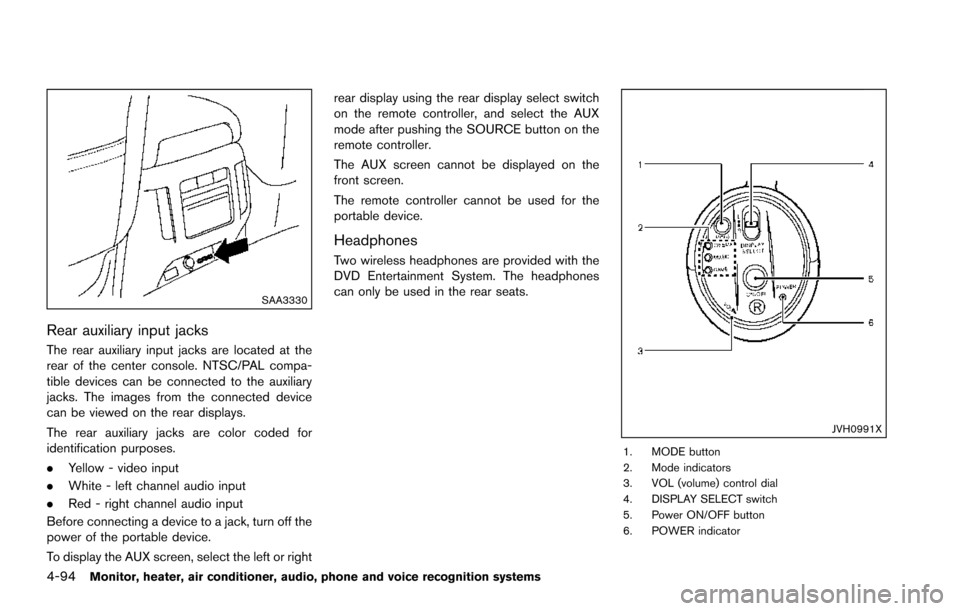
Rear auxiliary input jacks
The rear auxiliary input jacks are located at the
rear of the center console. NTSC/PAL compa-
tible devices can be connected to the auxiliary
jacks. The images from the connected device
can be viewed on the rear displays.
The rear auxiliary jacks are color coded for
identification purposes.
.Yellow - video input
. White - left channel audio input
. Red - right channel audio input
Before connecting a device to a jack, turn off the
power of the portable device.
To display the AUX screen, select the left or right rear display using the rear display select switch
on the remote controller, and select the AUX
mode after pushing the SOURCE button on the
remote controller.
The AUX screen cannot be displayed on the
front screen.
The remote controller cannot be used for the
portable device.
Headphones
Two wireless headphones are provided with the
DVD Entertainment System. The headphones
can only be used in the rear seats.
JVH0991X
1. MODE button
2. Mode indicators
3. VOL (volume) control dial
4. DISPLAY SELECT switch
5. Power ON/OFF button
6. POWER indicator
Page 297 of 614
4-100Monitor, heater, air conditioner, audio, phone and voice recognition systems
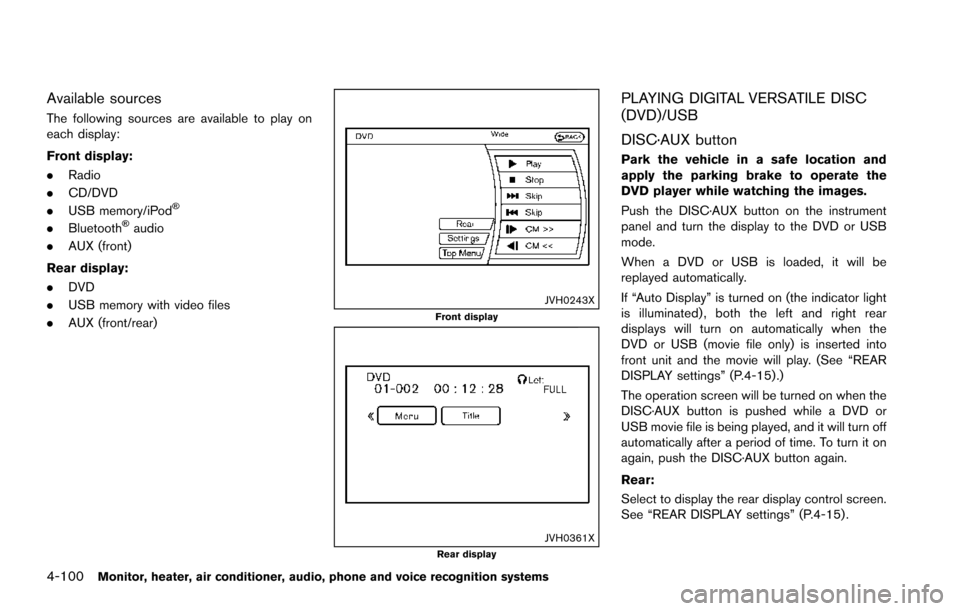
Available sources
The following sources are available to play on
each display:
Front display:
.Radio
. CD/DVD
. USB memory/iPod
Š
.BluetoothŠaudio
. AUX (front)
Rear display:
. DVD
. USB memory with video files
. AUX (front/rear)
JVH0243XFront display
JVH0361XRear display
PLAYING DIGITAL VERSATILE DISC
(DVD)/USB
DISC·AUX button
Park the vehicle in a safe location and
apply the parking brake to operate the
DVD player while watching the images.
Push the DISC·AUX button on the instrument
panel and turn the display to the DVD or USB
mode.
When a DVD or USB is loaded, it will be
replayed automatically.
If “Auto Display” is turned on (the indicator light
is illuminated) , both the left and right rear
displays will turn on automatically when the
DVD or USB (movie file only) is inserted into
front unit and the movie will play. (See “REAR
DISPLAY settings” (P.4-15) .)
The operation screen will be turned on when the
DISC·AUX button is pushed while a DVD or
USB movie file is being played, and it will turn off
automatically after a period of time. To turn it on
again, push the DISC·AUX button again.
Rear:
Select to display the rear display control screen.
See “REAR DISPLAY settings” (P.4-15) .
Page 301 of 614
4-104Monitor, heater, air conditioner, audio, phone and voice recognition systems
SETUP button:
Push the SETUP button to display the rear seat
display settings. (See “Rear display settings”
(P.4-104) .)
BACK button:
Push to go back to the previous screen or
cancel the selection.
Volume:
To adjust the speaker volume push
oron the volume control button.
This button is used to control the volume from
the vehicle speakers. To adjust the volume of the
headphones, use the volume knob that is
attached to the headphones.
Keypad:
: PLAY/PAUSE button
: STOP button
: FORWARD button
: REWIND button
: FORWARD button for commercial skip (forDVD-VIDEO and DVD-VR)
: REWIND button for commercial skip (forDVD-VIDEO and DVD-VR)
Key illumination button:
If the key illumination button is pushed, the
buttons on the remote controller will be lit up.
Rear display settings
Display mode adjustment of the rear seat
displays can be performed while a DVD or
USB movie is being played. Set the rear display
select switch on the remote controller to either L
or R according to the display you want to set,
and then push the SETUP button. It is not
possible to make display mode adjustments to
the left and right displays at the same time.
Aspect:
Select the display size from “FULL”, “NORMAL”,
“CINEMA” or “WIDE”.
Picture Mode:
Select the Picture Mode from “NORMAL”,
“DYNAMIC”, “CINEMA”, “GAME” .
To adjust the display brightness automatically,
select the “Brightness” key and then select from
“DARKER”, “NORMAL” or “BRIGHTER”. When
adjusting manually, select “OFF” and push
ENTER button on the remote controller.
To adjust tint, color or contrast, select a key
using the select button (
or) , push
ENTER on the remote controller.
Push the BACK button on the remote controller
to apply the settings and return to the previous
display.
To return the adjustment levels to the default
value, select “Execute” next to “Initialization” push the select button (
,) on the remote
controller and push the ENTER button. The
“Execute” key is deactivated when the picture
mode settings are already in the default value.
Color System:
To choose the color system, select from
“NTSC”, “PAL”, “PAL-60”, “PAL-M”, “PAL-N” or
“AUTO” .
3D Y/C filter:
Set to ON/OFF push the select button (
or) and push ENTER button on the remote
controller. When turned on, small characters
and an outline of the shapes will be displayed
more clearly than when turned off.
AUX Volume Setting:
This is only active when in the Rear AUX mode.
To set the AUX volume, select from “HIGH”,
“LOW” or “MIDDLE” .
Page 302 of 614
OPERATING TIPS
.The images from a device that is connected
to the rear auxiliary input jacks cannot be
viewed on the front displays.
. It is not possible to display different video
files, such as DVD or video files in the USB
memory, on the front and rear displays at the
same time.
. It is not possible to play an audio file and a
video file in the same USB memory at the
same time.
Multiple source display
It is possible to play different sources on each
display. The following example shows how to
operate multiple sources.
It is also possible to set in the front display. For
more details, see “REAR DISPLAY settings”
(P.4-15) .
1. Display a video file in the front display by
selecting the DVD mode.
2. Set the rear display select switch on the remote controller to the L side and push the
POWER button. The left rear display will
turn on and the DVD screen will be
displayed.
(If “Auto Display” is set to ON, the display
will turn on automatically.) 3. Set the rear display select switch on the
remote controller to the R side and push the
POWER button. The right rear display will
turn on and the DVD screen will be
displayed.
(If “Auto Display” is set to ON, the display
will turn on automatically.)
4. Switch the source on the front display to an audio source. The sound from the speakers
switches according to the front display. The
rear display continues to display the DVD.
5. Turn on a pair of headphones and listen to the DVD on the rear displays using the
headphones.
6. Connect an auxiliary device to the AUX jack, set the rear display select switch to the L or
R side and push the SOURCE button to
select “Rear AUX”. The selected side of the
rear display will switch to the AUX mode.
The other rear display will continue to
display the DVD.
7. Turn on the other pair of headphones. If the sound from the headphones is not from the
AUX jacks, switch the channel with the
channel select switch on the headphones.
CARE AND MAINTENANCE
Use a lightly dampened, lint free cloth to clean
the surfaces of your DVD Entertainment System
(DVD player face, screen, remote controller,
etc.) .
CAUTION
.Do not use any solvents or cleaning
solutions when cleaning the video
system.
. Do not use excessive force on the
monitor screen.
. Avoid touching or scratching the
monitor screen as it may become
dirty or damaged.
. Do not attempt to operate the
system in extreme temperature con-
ditions [below í48F( í208 C) and
above 1588F (708C)].
. Do not attempt to operate the
system in extreme humidity condi-
tions (less than 10% or more than
75%) .
Monitor, heater, air conditioner, audio, phone and voice recognition systems4-105