cruise control NISSAN ARMADA 2017 2.G User Guide
[x] Cancel search | Manufacturer: NISSAN, Model Year: 2017, Model line: ARMADA, Model: NISSAN ARMADA 2017 2.GPages: 614, PDF Size: 2.87 MB
Page 409 of 614
5-68Starting and driving
set speed.
.To pass another vehicle, depress the
accelerator pedal. When you release the
pedal, the vehicle will return to the previously
set speed.
. The vehicle may not maintain the set speed
on winding or hilly roads. If this happens,
drive without the cruise control.
To cancel the preset speed, follow any of
these methods:
1. Push the CANCEL switch.
2. Tap the brake pedal.
3. Move the shift lever to the N (Neutral) position.
4. Turn the MAIN switch off. The CRUISE indicator light will turn off.
. If you depress the brake pedal while pushing
the ACCELERATE/RESUME or COAST/
SET switch and reset at the cruising speed,
the cruise control will disengage. Turn the
MAIN switch off once and then turn it on
again.
. The cruise control will automatically cancel if
the vehicle slows more than 8 MPH (13
km/h) below the set speed.
. If you move the shift lever to N (Neutral)
position, the cruise control will be canceled.
To reset at a faster cruising speed, use oneof the following methods:
.
Depress the accelerator pedal. When the
vehicle attains the desired speed, push and
release the COAST/SET switch.
. Push and hold the ACCELERATE/RESUME
switch. When the vehicle attains the speed
you desire, release the switch.
. Push, then quickly release the ACCELER-
ATE/RESUME switch. Each time you do
this, the set speed will increase by about 1
MPH (1.6 km/h) .
To reset at a slower cruising speed, use one
of the following methods:
. Lightly tap the brake pedal. When the
vehicle attains the desired speed, push the
COAST/SET switch and release it.
. Push and hold the COAST/SET switch.
Release the switch when the vehicle slows
down to the desired speed.
. Push, then quickly release the COAST/SET
switch. Each time you do this, the set speed
will decrease by about 1 MPH (1.6 km/h) .
To resume the preset speed, push and
release the ACCELERATE/RESUME switch.
The vehicle will resume the last set cruising
speed when the vehicle speed is over 25 MPH
(40 km/h) .
Page 410 of 614
WARNING
Failure to follow the warnings and
instructions for proper use of the ICC
system could result in serious injury or
death.
.ICC is not a collision avoidance or
warning device. For highway use
only and it is not intended for
congested areas or city driving. Fail-
ure to apply the brakes could result
in an accident.
. Always observe posted speed limits
and do not set the speed over them.
. Always drive carefully and atten-
tively when using either cruise con-
trol mode. Read and understand the
Owner’s Manual thoroughly before
using the cruise control. To avoid
serious injury or death, do not rely
on the system to prevent accidents
or to control the vehicle’s speed in
emergency situations. Do not use
cruise control except in appropriate
road and traffic conditions.
. In the conventional (fixed speed)
cruise control mode, a warning chime will not sound to warn you if
you are too close to the vehicle
ahead. Pay special attention to the
distance between your vehicle and
the vehicle ahead of you or a
collision could occur.
The ICC system maintains a selected distance
from the vehicle in front of you within the speed
range of 0 to 90 MPH (0 to 144 km/h) up to the
set speed. The set speed can be selected by the
driver between 20 to 90 MPH (32 to 144 km/h) .
The vehicle travels at a set speed when the road
ahead is clear.
The ICC system can be set to one of two cruise
control modes.
. Vehicle-to-vehicle distance control mode:
For maintaining a selected distance be-
tween your vehicle and the vehicle in front
of you up to the preset speed.
. Conventional (fixed speed) cruise control
mode:
For cruising at a preset speed.
Starting and driving5-69
INTELLIGENT CRUISE CONTROL
(ICC) (if so equipped)
Page 411 of 614
5-70Starting and driving
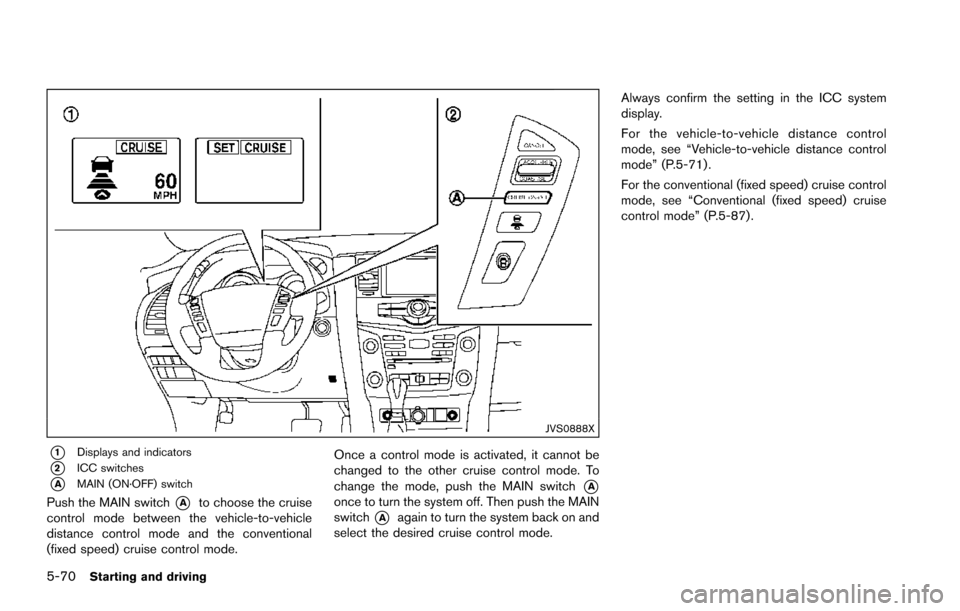
JVS0888X
*1Displays and indicators
*2ICC switches
*AMAIN (ON·OFF) switch
Push the MAIN switch*Ato choose the cruise
control mode between the vehicle-to-vehicle
distance control mode and the conventional
(fixed speed) cruise control mode. Once a control mode is activated, it cannot be
changed to the other cruise control mode. To
change the mode, push the MAIN switch*Aonce to turn the system off. Then push the MAIN
switch
*Aagain to turn the system back on and
select the desired cruise control mode. Always confirm the setting in the ICC system
display.
For the vehicle-to-vehicle distance control
mode, see “Vehicle-to-vehicle distance control
mode” (P.5-71) .
For the conventional (fixed speed) cruise control
mode, see “Conventional (fixed speed) cruise
control mode” (P.5-87).
Page 412 of 614
SSD1051
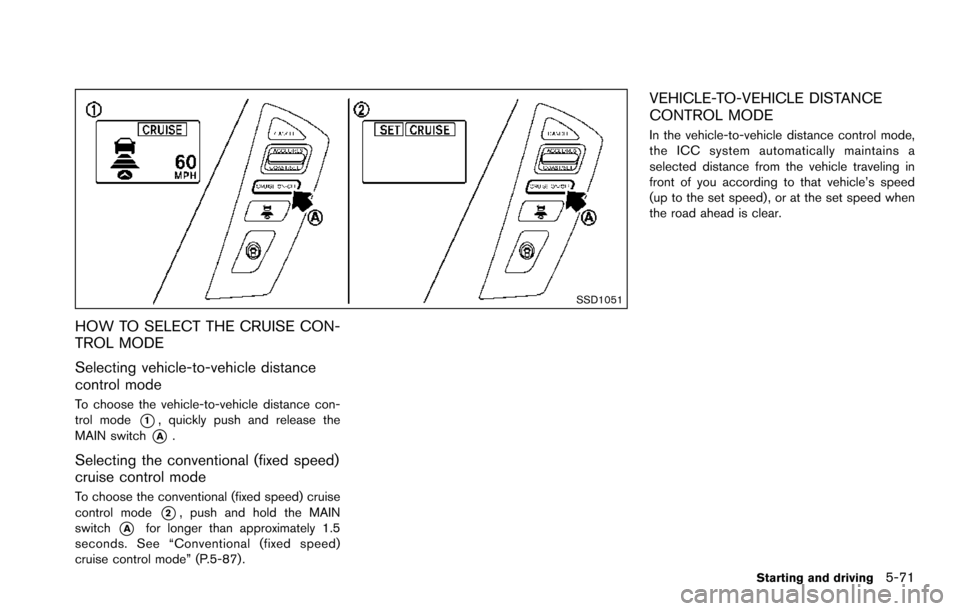
HOW TO SELECT THE CRUISE CON-
TROL MODE
Selecting vehicle-to-vehicle distance
control mode
To choose the vehicle-to-vehicle distance con-
trol mode
*1, quickly push and release the
MAIN switch
*A.
Selecting the conventional (fixed speed)
cruise control mode
To choose the conventional (fixed speed) cruise
control mode
*2, push and hold the MAIN
switch
*Afor longer than approximately 1.5
seconds. See “Conventional (fixed speed)
cruise control mode” (P.5-87) .
VEHICLE-TO-VEHICLE DISTANCE
CONTROL MODE
In the vehicle-to-vehicle distance control mode,
the ICC system automatically maintains a
selected distance from the vehicle traveling in
front of you according to that vehicle’s speed
(up to the set speed) , or at the set speed when
the road ahead is clear.
Starting and driving5-71
Page 414 of 614
SSD0254
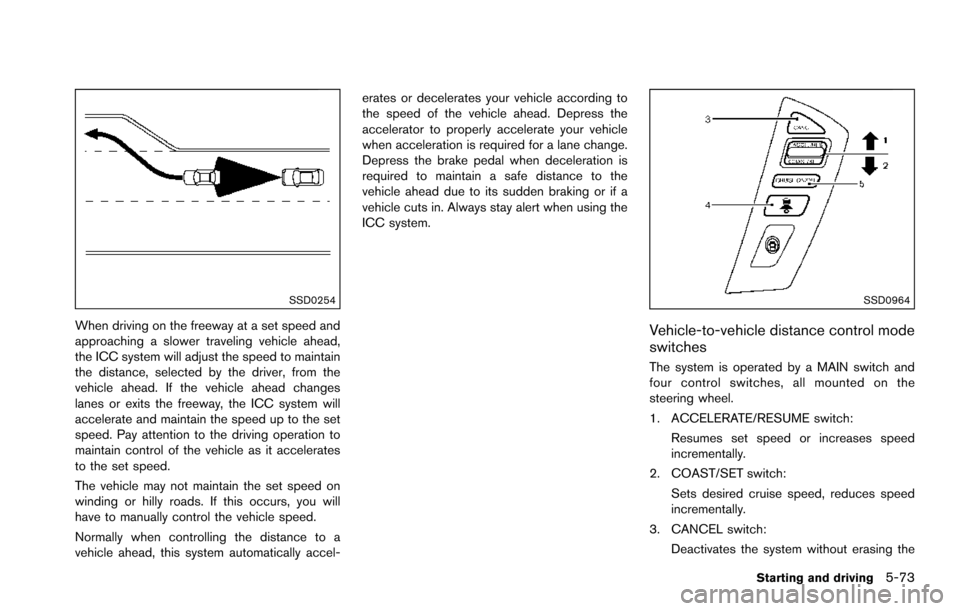
When driving on the freeway at a set speed and
approaching a slower traveling vehicle ahead,
the ICC system will adjust the speed to maintain
the distance, selected by the driver, from the
vehicle ahead. If the vehicle ahead changes
lanes or exits the freeway, the ICC system will
accelerate and maintain the speed up to the set
speed. Pay attention to the driving operation to
maintain control of the vehicle as it accelerates
to the set speed.
The vehicle may not maintain the set speed on
winding or hilly roads. If this occurs, you will
have to manually control the vehicle speed.
Normally when controlling the distance to a
vehicle ahead, this system automatically accel-erates or decelerates your vehicle according to
the speed of the vehicle ahead. Depress the
accelerator to properly accelerate your vehicle
when acceleration is required for a lane change.
Depress the brake pedal when deceleration is
required to maintain a safe distance to the
vehicle ahead due to its sudden braking or if a
vehicle cuts in. Always stay alert when using the
ICC system.
SSD0964
Vehicle-to-vehicle distance control mode
switches
The system is operated by a MAIN switch and
four control switches, all mounted on the
steering wheel.
1. ACCELERATE/RESUME switch:
Resumes set speed or increases speed
incrementally.
2. COAST/SET switch:
Sets desired cruise speed, reduces speed
incrementally.
3. CANCEL switch: Deactivates the system without erasing the
Starting and driving5-73
Page 416 of 614
SSD0979
When the ignition switch is pushed to the ON
position, the indicators come on as illustrated to
check for a burned-out bulb, and it turns off
when the engine is started.
SSD1052
Operating vehicle-to-vehicle distance
control mode
To turn on the cruise control,quickly push
and release the MAIN switch
*Aon. The MAIN
switch indicator, set distance indicator and set
vehicle speed indicator come on and in a
standby state for setting.
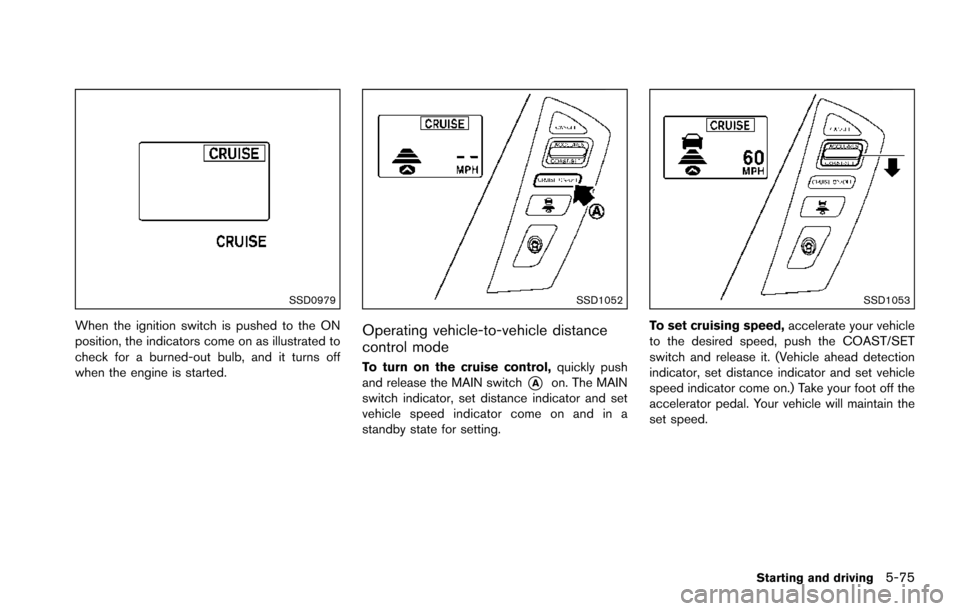
SSD1053
To set cruising speed, accelerate your vehicle
to the desired speed, push the COAST/SET
switch and release it. (Vehicle ahead detection
indicator, set distance indicator and set vehicle
speed indicator come on.) Take your foot off the
accelerator pedal. Your vehicle will maintain the
set speed.
Starting and driving5-75
Page 418 of 614
SSD1107
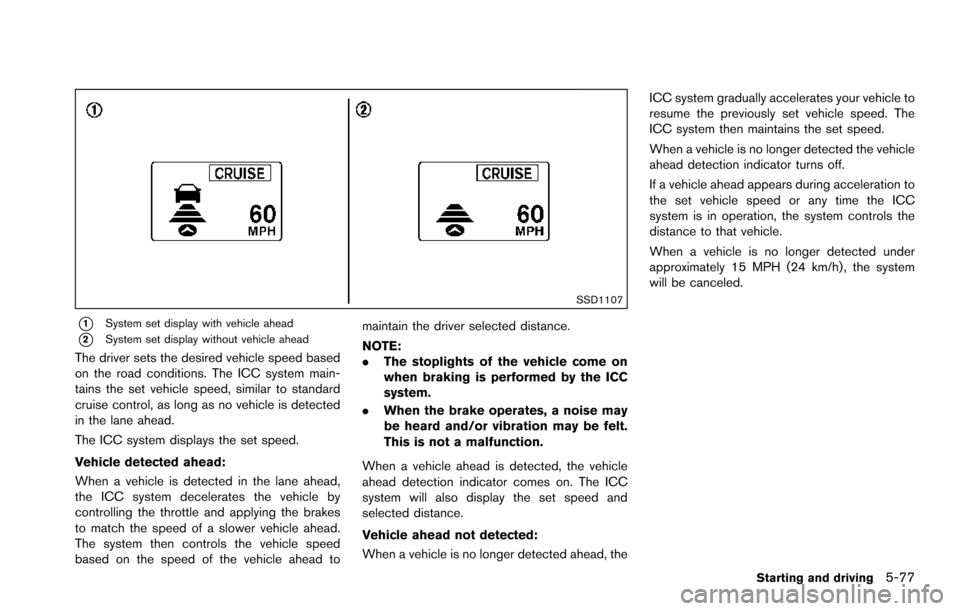
*1System set display with vehicle ahead
*2System set display without vehicle ahead
The driver sets the desired vehicle speed based
on the road conditions. The ICC system main-
tains the set vehicle speed, similar to standard
cruise control, as long as no vehicle is detected
in the lane ahead.
The ICC system displays the set speed.
Vehicle detected ahead:
When a vehicle is detected in the lane ahead,
the ICC system decelerates the vehicle by
controlling the throttle and applying the brakes
to match the speed of a slower vehicle ahead.
The system then controls the vehicle speed
based on the speed of the vehicle ahead tomaintain the driver selected distance.
NOTE:
.
The stoplights of the vehicle come on
when braking is performed by the ICC
system.
. When the brake operates, a noise may
be heard and/or vibration may be felt.
This is not a malfunction.
When a vehicle ahead is detected, the vehicle
ahead detection indicator comes on. The ICC
system will also display the set speed and
selected distance.
Vehicle ahead not detected:
When a vehicle is no longer detected ahead, the ICC system gradually accelerates your vehicle to
resume the previously set vehicle speed. The
ICC system then maintains the set speed.
When a vehicle is no longer detected the vehicle
ahead detection indicator turns off.
If a vehicle ahead appears during acceleration to
the set vehicle speed or any time the ICC
system is in operation, the system controls the
distance to that vehicle.
When a vehicle is no longer detected under
approximately 15 MPH (24 km/h) , the system
will be canceled.
Starting and driving5-77
Page 428 of 614
cause failure or malfunction.
. Do not alter, remove or paint the front
bumper. It is recommended you contact a
NISSAN dealer before customizing or re-
storing the front bumper.
FCC Notice:
For USA:
This device complies with Part 15 of the
FCC Rules. Operation is subject to the
following two conditions:
1. This device may not cause harmful
interference, and
2. This device must accept any interfer-
ence received, including interference
that may cause undesired operation.
FCC Warning
Changes or modification not expressly
approved by the party responsible for
compliance could void the user’s authority
to operate the equipment.
For Canada:
This device complies with Industry Canada
licence-exempt RSS standard(s) . Opera-
tion is subject to the following two condi-
tions:
1. This device may not cause interference,
and 2.
This device must accept any interfer-
ence, including interference that may
cause undesired operation of the de-
vice.
CONVENTIONAL (fixed speed) CRUISE
CONTROL MODE
This mode allows driving at a speed between 25
to 90 MPH (40 to 144 km/h) without keeping
your foot on the accelerator pedal.
WARNING
.In the conventional (fixed speed)
cruise control mode, a warning
chime does not sound to warn you
if you are too close to the vehicle
ahead, as neither the presence of
the vehicle ahead nor the vehicle-to-
vehicle distance is detected.
. Pay special attention to the distance
between your vehicle and the vehi-
cle ahead of you or a collision could
occur.
. Always confirm the setting in the
ICC system display.
. Do not use the conventional (fixed
speed) cruise control mode when
driving under the following condi- tions.
— when it is not possible to keep
the vehicle at a set speed
— in heavy traffic or in traffic that varies in speed
— on winding or hilly roads
— on slippery roads (rain, snow, ice, etc.)
— in very windy areas
Doing so could cause a loss of vehicle
control and result in an accident.
Starting and driving5-87
Page 429 of 614
5-88Starting and driving
SSD0968
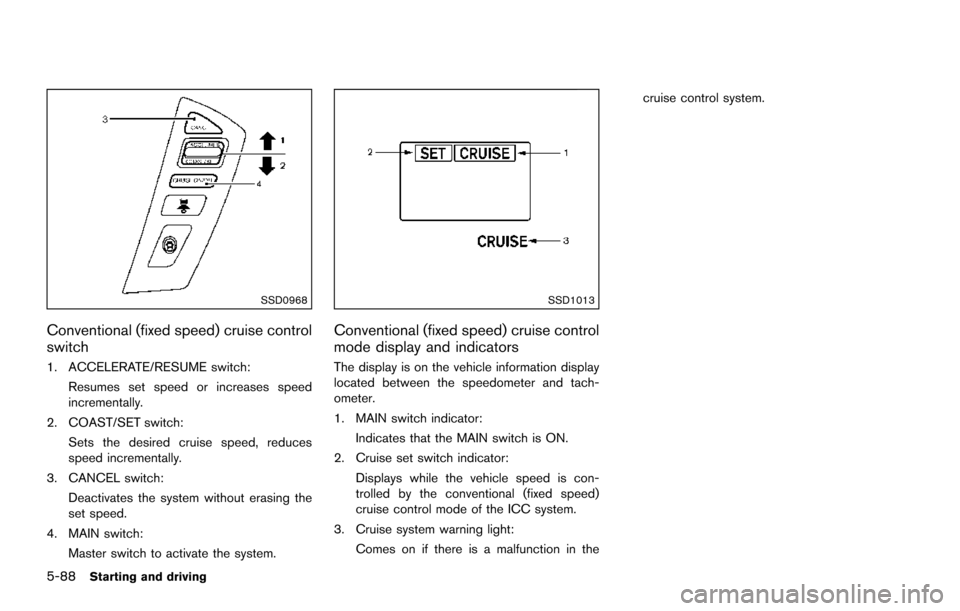
Conventional (fixed speed) cruise control
switch
1. ACCELERATE/RESUME switch:Resumes set speed or increases speed
incrementally.
2. COAST/SET switch: Sets the desired cruise speed, reduces
speed incrementally.
3. CANCEL switch:
Deactivates the system without erasing the
set speed.
4. MAIN switch: Master switch to activate the system.
SSD1013
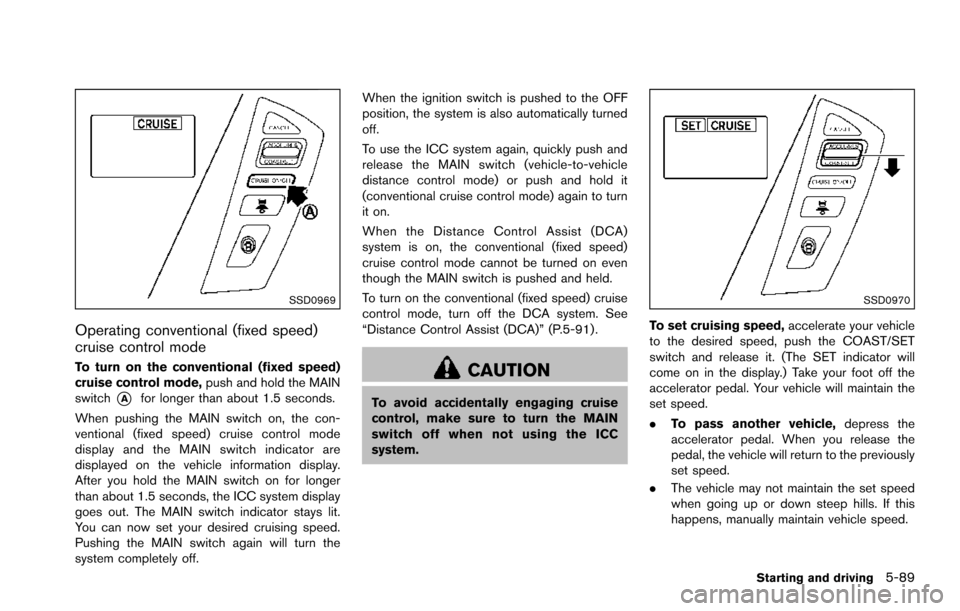
Conventional (fixed speed) cruise control
mode display and indicators
The display is on the vehicle information display
located between the speedometer and tach-
ometer.
1. MAIN switch indicator:Indicates that the MAIN switch is ON.
2. Cruise set switch indicator: Displays while the vehicle speed is con-
trolled by the conventional (fixed speed)
cruise control mode of the ICC system.
3. Cruise system warning light: Comes on if there is a malfunction in the cruise control system.
Page 430 of 614
SSD0969
Operating conventional (fixed speed)
cruise control mode
To turn on the conventional (fixed speed)
cruise control mode,push and hold the MAIN
switch
*Afor longer than about 1.5 seconds.
When pushing the MAIN switch on, the con-
ventional (fixed speed) cruise control mode
display and the MAIN switch indicator are
displayed on the vehicle information display.
After you hold the MAIN switch on for longer
than about 1.5 seconds, the ICC system display
goes out. The MAIN switch indicator stays lit.
You can now set your desired cruising speed.
Pushing the MAIN switch again will turn the
system completely off. When the ignition switch is pushed to the OFF
position, the system is also automatically turned
off.
To use the ICC system again, quickly push and
release the MAIN switch (vehicle-to-vehicle
distance control mode) or push and hold it
(conventional cruise control mode) again to turn
it on.
When the Distance Control Assist (DCA)
system is on, the conventional (fixed speed)
cruise control mode cannot be turned on even
though the MAIN switch is pushed and held.
To turn on the conventional (fixed speed) cruise
control mode, turn off the DCA system. See
“Distance Control Assist (DCA)” (P.5-91) .
CAUTION
To avoid accidentally engaging cruise
control, make sure to turn the MAIN
switch off when not using the ICC
system.
SSD0970
To set cruising speed,
accelerate your vehicle
to the desired speed, push the COAST/SET
switch and release it. (The SET indicator will
come on in the display.) Take your foot off the
accelerator pedal. Your vehicle will maintain the
set speed.
. To pass another vehicle, depress the
accelerator pedal. When you release the
pedal, the vehicle will return to the previously
set speed.
. The vehicle may not maintain the set speed
when going up or down steep hills. If this
happens, manually maintain vehicle speed.
Starting and driving5-89