roof NISSAN ARMADA 2017 2.G User Guide
[x] Cancel search | Manufacturer: NISSAN, Model Year: 2017, Model line: ARMADA, Model: NISSAN ARMADA 2017 2.GPages: 614, PDF Size: 2.87 MB
Page 91 of 614
 OFF switch ................. 2-48
Power outlet ........................................................................\
.... 2-48
Storage ...............................")
Vehicle Dynamic Control (VDC) OFF switch ................. 2-48
Power outlet ........................................................................\
.... 2-48
Storage ........................................................................\
............. 2-50Cup holders ....................................................................... 2-50
Sunglasses holder ........................................................... 2-52
Glove box ........................................................................\
... 2-53
Console box ....................................................................... 2-54
Tray ........................................................................\
............... 2-55
Coat hooks ........................................................................\
2-55
Luggage hooks ................................................................. 2-56
Cargo floor box ................................................................. 2-56
Roof rack ........................................................................\
.... 2-57
Rear bumper cover .......................................................... 2-58
Windows ........................................................................\
.......... 2-59
Power windows ................................................................ 2-59
Moonroof (if so equipped) ................................................... 2-62 Power moonroof ............................................................... 2-62 Welcome light (if so equipped) ......................................... 2-64
Battery saver system ................................................... 2-64
Interior lights ........................................................................\
... 2-65 Map lights ........................................................................\
2-65
Rear personal lights ...................................................... 2-65
Interior light control switch .......................................... 2-65
Vanity mirror lights ................................................................. 2-66
Cargo light ........................................................................\
...... 2-67
HomeLink
ŠUniversal Transceiver (if so equipped) ...... 2-67
Programming HomeLinkŠ............................................. 2-68
Programming HomeLinkŠfor Canadian customers
and gate openers ........................................................... 2-69
Operating the HomeLink
Š
Universal Transceiver .................................................... 2-69
Programming troubleshooting ..................................... 2-70
Clearing the programmed information ...................... 2-70
Reprogramming a single HomeLink
Šbutton .......... 2-70
If your vehicle is stolen ................................................. 2-70
Page 146 of 614
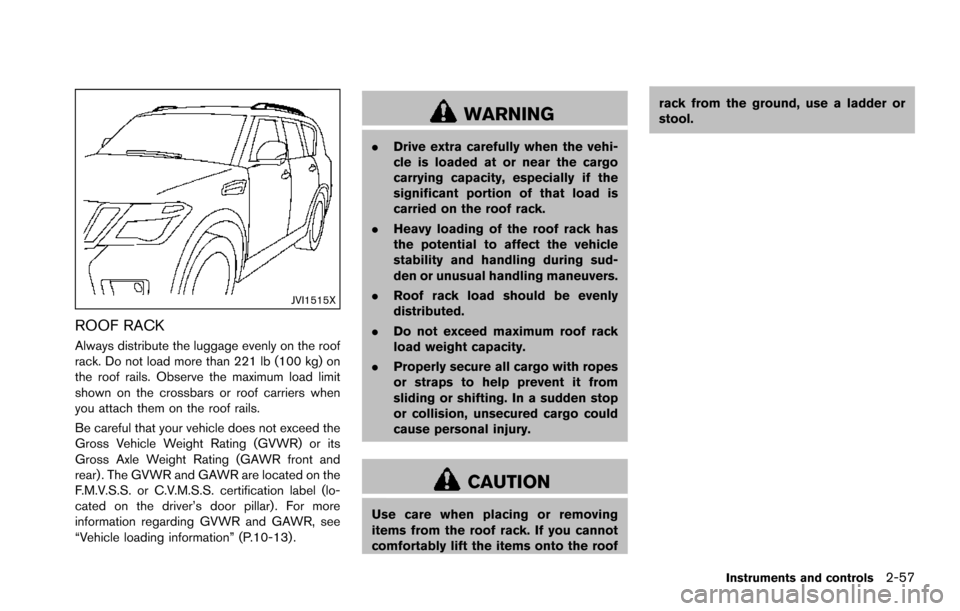
JVI1515X
ROOF RACK
Always distribute the luggage evenly on the roof
rack. Do not load more than 221 lb (100 kg) on
the roof rails. Observe the maximum load limit
shown on the crossbars or roof carriers when
you attach them on the roof rails.
Be careful that your vehicle does not exceed the
Gross Vehicle Weight Rating (GVWR) or its
Gross Axle Weight Rating (GAWR front and
rear) . The GVWR and GAWR are located on the
F.M.V.S.S. or C.V.M.S.S. certification label (lo-
cated on the driver’s door pillar). For more
information regarding GVWR and GAWR, see
“Vehicle loading information” (P.10-13) .
WARNING
.Drive extra carefully when the vehi-
cle is loaded at or near the cargo
carrying capacity, especially if the
significant portion of that load is
carried on the roof rack.
. Heavy loading of the roof rack has
the potential to affect the vehicle
stability and handling during sud-
den or unusual handling maneuvers.
. Roof rack load should be evenly
distributed.
. Do not exceed maximum roof rack
load weight capacity.
. Properly secure all cargo with ropes
or straps to help prevent it from
sliding or shifting. In a sudden stop
or collision, unsecured cargo could
cause personal injury.
CAUTION
Use care when placing or removing
items from the roof rack. If you cannot
comfortably lift the items onto the roof rack from the ground, use a ladder or
stool.
Instruments and controls2-57
Page 151 of 614
2-62Instruments and controls
If the windows do not close automatically
If the power window automatic function (closing
only) does not operate properly, perform the
following procedure to initialize the power
window system.
1. Place the ignition switch in the ON position.
2. Close the door.
3. Open the window completely by operatingthe power window switch.
4. Pull the power window switch and hold it to close the window, and then hold the switch
more than 3 seconds after the window is
closed completely.
5. Release the power window switch. Operate the window by the automatic function to
confirm the initialization is complete.
6. Perform steps 2 through 5 above for other windows.
If the power window automatic function does
not operate properly after performing the pro-
cedure above, have your vehicle checked. It is
recommended you visit a NISSAN dealer for this
service.WARNING
. In an accident you could be thrown
from the vehicle through an open
moonroof. Always use seat belts
and child restraints.
. Do not allow anyone to stand up or
extend any portion of their body out
of the moonroof opening while the
vehicle is in motion or while the
moonroof is closing.
CAUTION
.Remove water drops, snow, ice or
sand from the moonroof before
opening.
. Do not place any heavy object on
the moonroof or surrounding area.
POWER MOONROOF
The moonroof only operates when the ignition
switch is in the ON position.
The moonroof is operational for about 45
seconds, even if the ignition switch is pushed
to the OFF position. If the driver’s door or the passenger’s door is opened during this period of
about 45 seconds, power to the moonroof is
canceled.
MOONROOF (if so equipped)
Page 152 of 614
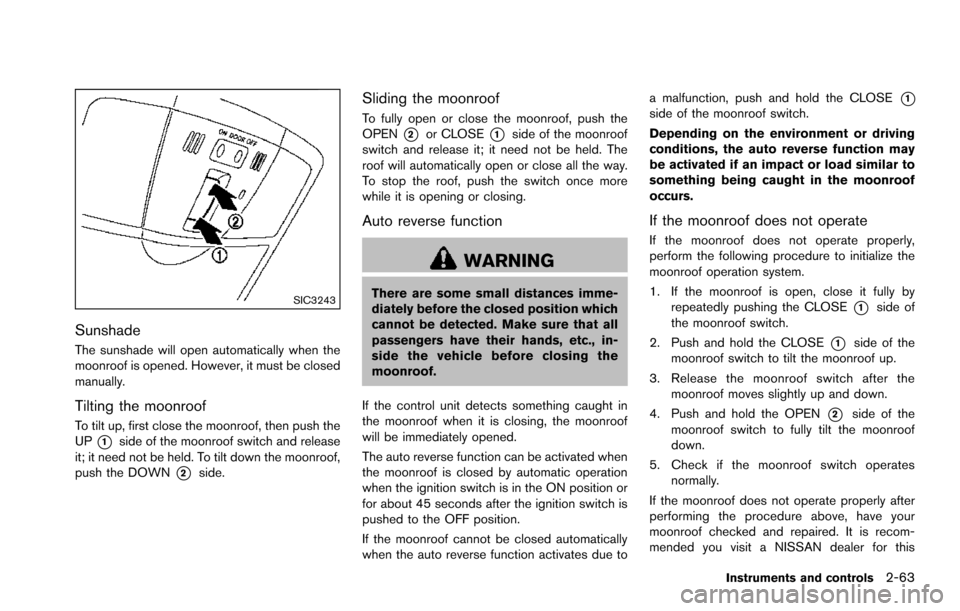
SIC3243
Sunshade
The sunshade will open automatically when the
moonroof is opened. However, it must be closed
manually.
Tilting the moonroof
To tilt up, first close the moonroof, then push the
UP
*1side of the moonroof switch and release
it; it need not be held. To tilt down the moonroof,
push the DOWN
*2side.
Sliding the moonroof
To fully open or close the moonroof, push the
OPEN
*2or CLOSE*1side of the moonroof
switch and release it; it need not be held. The
roof will automatically open or close all the way.
To stop the roof, push the switch once more
while it is opening or closing.
Auto reverse function
WARNING
There are some small distances imme-
diately before the closed position which
cannot be detected. Make sure that all
passengers have their hands, etc., in-
side the vehicle before closing the
moonroof.
If the control unit detects something caught in
the moonroof when it is closing, the moonroof
will be immediately opened.
The auto reverse function can be activated when
the moonroof is closed by automatic operation
when the ignition switch is in the ON position or
for about 45 seconds after the ignition switch is
pushed to the OFF position.
If the moonroof cannot be closed automatically
when the auto reverse function activates due to a malfunction, push and hold the CLOSE
*1side of the moonroof switch.
Depending on the environment or driving
conditions, the auto reverse function may
be activated if an impact or load similar to
something being caught in the moonroof
occurs.
If the moonroof does not operate
If the moonroof does not operate properly,
perform the following procedure to initialize the
moonroof operation system.
1. If the moonroof is open, close it fully by
repeatedly pushing the CLOSE
*1side of
the moonroof switch.
2. Push and hold the CLOSE
*1side of the
moonroof switch to tilt the moonroof up.
3. Release the moonroof switch after the moonroof moves slightly up and down.
4. Push and hold the OPEN
*2side of the
moonroof switch to fully tilt the moonroof
down.
5. Check if the moonroof switch operates normally.
If the moonroof does not operate properly after
performing the procedure above, have your
moonroof checked and repaired. It is recom-
mended you visit a NISSAN dealer for this
Instruments and controls2-63
Page 257 of 614
4-60Monitor, heater, air conditioner, audio, phone and voice recognition systems
Static and flutter: During signal interference from
buildings, large hills or due to antenna position,
usually in conjunction with increased distance
from the station transmitter, static or flutter can
be heard. This can be reduced by lowering the
treble setting to reduce the treble response.
Multipath reception: Because of the reflective
characteristics of FM signals, direct and re-
flected signals reach the receiver at the same
time. The signals may cancel each other,
resulting in momentary flutter or loss of sound.
AM radio reception:
AM signals, because of their low frequency, can
bend around objects and skip along the ground.
In addition, the signals can be bounced off the
ionosphere and bent back to earth. Because of
these characteristics. AM signals are also
subject to interference as they travel from
transmitter to receiver.
Fading: Occurs while the vehicle is passing
through freeway underpasses or in areas with
many tall buildings. It can also occur for several
seconds during ionospheric turbulence even in
areas where no obstacles exist.
Static: Caused by thunderstorms, electrical
power lines, electric signs and even traffic lights.Satellite radio reception:
When the satellite radio is used for the first time
or the battery has been replaced, the satellite
radio may not work properly. This is not a
malfunction. Wait more than 10 minutes with the
satellite radio ON and the vehicle outside of any
metal or large building for the satellite radio to
receive all of the necessary data.
The satellite radio mode requires an active
SiriusXM Satellite Radio subscription. The sa-
tellite radio is not available in Alaska, Hawaii and
Guam.
The satellite radio performance may be affected
if cargo carried on the roof blocks the satellite
radio signal.
If possible, do not put cargo near the satellite
antenna.
A build up of ice on the satellite radio antenna
can affect satellite radio performance. Remove
the ice to restore satellite radio reception.
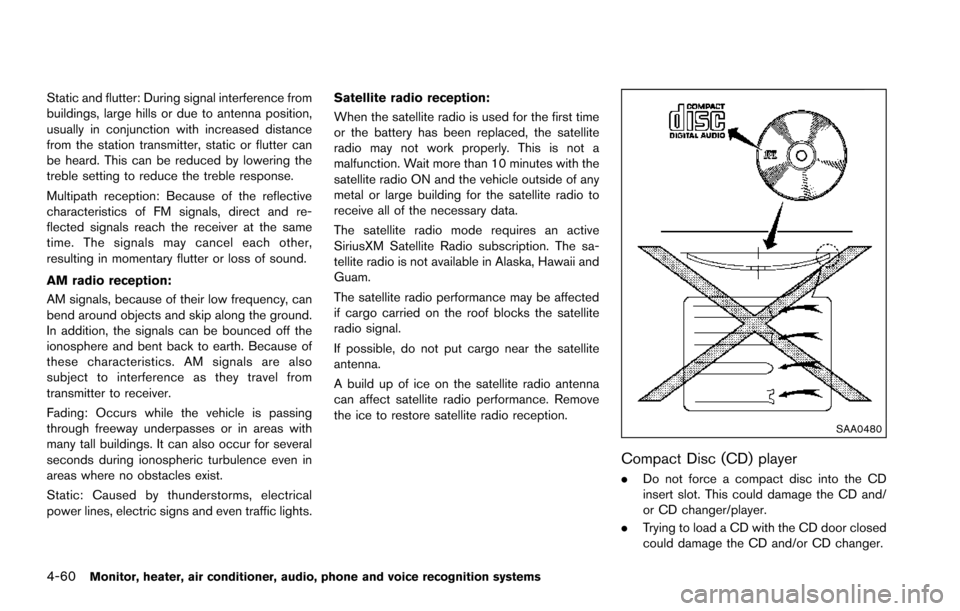
SAA0480
Compact Disc (CD) player
.
Do not force a compact disc into the CD
insert slot. This could damage the CD and/
or CD changer/player.
. Trying to load a CD with the CD door closed
could damage the CD and/or CD changer.
Page 289 of 614
4-92Monitor, heater, air conditioner, audio, phone and voice recognition systems
ANTENNA
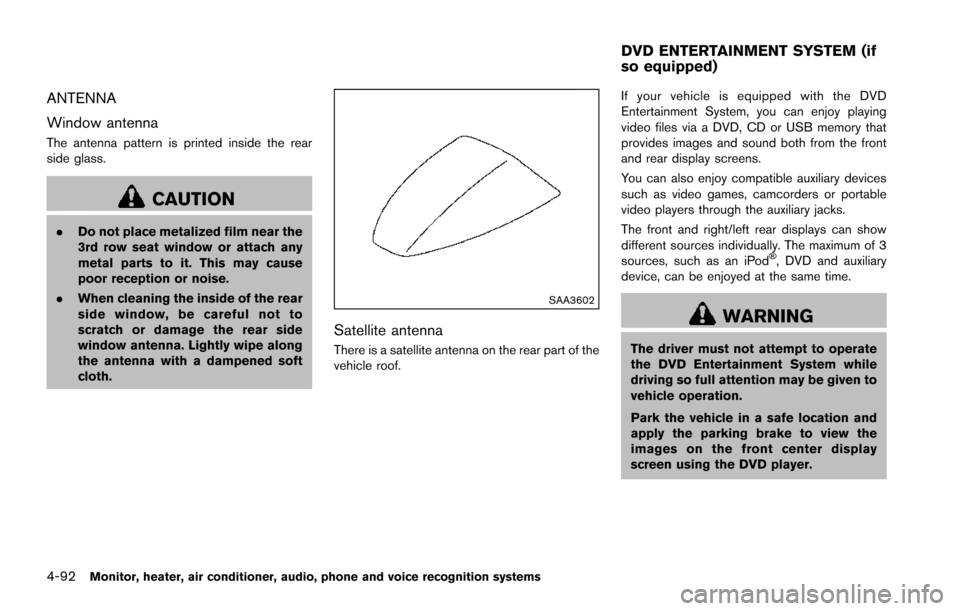
Window antenna
The antenna pattern is printed inside the rear
side glass.
CAUTION
.Do not place metalized film near the
3rd row seat window or attach any
metal parts to it. This may cause
poor reception or noise.
. When cleaning the inside of the rear
side window, be careful not to
scratch or damage the rear side
window antenna. Lightly wipe along
the antenna with a dampened soft
cloth.
SAA3602
Satellite antenna
There is a satellite antenna on the rear part of the
vehicle roof. If your vehicle is equipped with the DVD
Entertainment System, you can enjoy playing
video files via a DVD, CD or USB memory that
provides images and sound both from the front
and rear display screens.
You can also enjoy compatible auxiliary devices
such as video games, camcorders or portable
video players through the auxiliary jacks.
The front and right/left rear displays can show
different sources individually. The maximum of 3
sources, such as an iPod
Š, DVD and auxiliary
device, can be enjoyed at the same time.
WARNING
The driver must not attempt to operate
the DVD Entertainment System while
driving so full attention may be given to
vehicle operation.
Park the vehicle in a safe location and
apply the parking brake to view the
images on the front center display
screen using the DVD player.
DVD ENTERTAINMENT SYSTEM (if
so equipped)
Page 352 of 614
.Do not drive across steep slopes.
Instead drive either straight up or
straight down the slopes. Off-road
vehicles can tip over sideways much
more easily than they can forward or
backward.
. Many hills are too steep for any
vehicle. If you drive up them, you
may stall. If you drive down them,
you may not be able to control your
speed. If you drive across them, you
may roll over.
. Do not shift ranges while driving on
downhill grades as this could cause
loss of control of the vehicle.
. Stay alert when driving to the top of
a hill. At the top there could be a
drop-off or other hazard that could
cause an accident.
. If your engine stalls or you cannot
make it to the top of a steep hill,
never attempt to turn around. Your
vehicle could tip or roll over. Always
back straight down in R (Reverse)
range. Never back down in N (Neu-
tral) , using only the brake, as this
could cause loss of control. .
Heavy braking going down a hill
could cause your brakes to overheat
and fade, resulting in loss of control
and an accident. Apply brakes
lightly and use a low range to
control your speed.
. Unsecured cargo can be thrown
around when driving over rough
terrain. Properly secure all cargo
so it will not be thrown forward
and cause injury to you or your
passengers.
. To avoid raising the center of gravity
excessively, do not exceed the rated
capacity of the roof rack (if so
equipped) and evenly distribute the
load. Secure heavy loads in the
cargo area as far forward and as
low as possible. Do not equip the
vehicle with tires larger than speci-
fied in this manual. This could cause
your vehicle to roll over.
. Do not grip the inside or spokes of
the steering wheel when driving off-
road. The steering wheel could
move suddenly and injure your
hands. Instead drive with your fin-
gers and thumbs on the outside of
the rim. .
Before operating the vehicle, ensure
that the driver and all passengers
have their seat belts fastened.
. Always drive with the floor mats in
place as the floor may became hot.
. Lower your speed when encounter-
ing strong crosswinds. With a higher
center of gravity, your NISSAN is
more affected by strong side winds.
Slower speeds ensure better vehicle
control.
. Do not drive beyond the perfor-
mance capability of the tires, even
with 4WD engaged.
. For 4WD equipped vehicles, do not
attempt to raise two wheels off the
ground and shift the transmission to
any drive or reverse position with
the engine running. Doing so may
result in drivetrain damage or un-
expected vehicle movement which
could result in serious vehicle da-
mage or personal injury.
. Do not attempt to test a 4WD
equipped vehicle on a 2-wheel dy-
namometer (such as the dynam-
ometers used by some states for
emissions testing) , or similar equip-
Starting and driving5-11
Page 606 of 614
11 Index
A
ABS (Anti-lock Braking System) ......................... 5-137
Advanced Air Bag System ....................................... 1-58
Aiming controlHeadlights ............................................................. 2-39
Air bag system Advanced Air Bag System ................................ 1-58
Front passenger air bag and status light ...... 1-60
Front-seat mounted side-impact
supplemental air bag system ............................ 1-65
Roof-mounted curtain side-impact and
rollover supplemental air bag system ............. 1-65
Air bag warning labels .............................................. 1-68
Air bag warning light ..................................... 1-68, 2-16
Air cleaner housing filter ........................................... 8-15
Air conditioner Air conditioner operation ................................... 4-52
Air conditioner service ....................................... 4-58
Air conditioner specification label ................. 10-12
Air conditioning system refrigerant and
lubricant recommendations .................... 4-58, 10-7
Automatic air conditioner .................................. 4-54
In-cabin microfilter ............................................... 4-58
Alarm, How to stop alarm (see vehicle
security system) .......................................................... 2-31
Alcohol, drugs and driving ....................................... 5-10
Antenna ......................................................................... 4-92
Anti-lock Braking System (ABS) ......................... 5-137
Anti-lock Braking System (ABS) warning light .... 2-11
Appearance care Exterior appearance care ..................................... 7-2
Interior appearance care ....................................... 7-4
Armrest .......................................................................... 1-10
Around View
ŠMonitor .............................................. 4-29 Audible reminders ...................................................... 2-20
Audio operation precautions ................................... 4-59
Audio system ............................................................... 4-59
Steering wheel audio controls ......................... 4-91
Auto closure ................................................................. 3-25
Autolight system ......................................................... 2-37
Automatic Air conditioner ...................................................... 4-54
Automatic Transmission Fluid (ATF) .................. 8-8
Door locks ................................................................ 3-6
Drive positioner .................................................... 3-33
Driving with automatic transmission ............... 5-18
Seat positioner ..................................................... 3-33
Average fuel consumption and speed .................. 2-28
Avoiding collision and rollover .................................. 5-8
B
Back door (See liftgate) ........................................... 3-22
Back-up Collision Intervention (BCI) ..................... 5-56
Battery ........................................................................... 8-11 Battery saver system ............................... 2-39, 2-64
Intelligent Key ....................................................... 8-21
Variable voltage control system ....................... 8-13
Before starting the engine ....................................... 5-15
Belts (See drive belts) .............................................. 8-13
Blind Spot Intervention
Š(BSI) ................................ 5-43
Blind Spot Intervention (BSI) ON
indicator light ............................................................... 2-17
Blind Spot Warning (BSW) .................................... 5-33
Blind Spot Warning (BSW)/Blind Spot
Intervention (BSI) system warning light ................ 2-12
Bluetooth
ŠHands-Free Phone System ............. 4-106
BluetoothŠstreaming audio ..................................... 4-81
Booster seats .............................................................. 1-48 Brake
Anti-lock Braking System (ABS) ................... 5-137
Brake booster ....................................................... 8-18
Brake fluid ................................................................ 8-9
Brake system ...................................................... 5-136
Parking brake operation ..................................... 5-22
Warning light ........................................................ 2-12
Break-in schedule .................................................... 5-121
Brightness control Display ON/OFF button ........................................ 4-8
Instrument panel .................................................. 2-40
Bulb check/instrument panel ................................... 2-11
Bulb replacement ....................................................... 8-24
C
Cabin air filter .............................................................. 4-58
CAMERA button ........................................................... 4-8
Capacities and
recommended fluids/lubricants ............................... 10-2
Car phone or CB radio .......................................... 4-106
Cargo floor box ........................................................... 2-56
Cargo light ................................................................... 2-67
Catalytic converter, Three way catalyst .................. 5-4
CD/DVD/USB memory care and cleaning .......... 4-90
Center multi-function control panel ......................... 4-4
Chassis and body maintenance ............................. 9-11
Child restraints ............................................................ 1-31 Booster seats ....................................................... 1-48
LATCH system ..................................................... 1-33
Precautions on child restraints ........................ 1-31
Top tether strap ................................................... 1-36
Child safety .................................................................. 1-28
Child safety rear door lock ........................................ 3-6
Chimes
Audible reminders ............................................... 2-20
Page 609 of 614
11-4
F.M.V.S.S./C.M.V.S.S. certification label ...... 10-11
Tire and Loading information label .... 8-31, 10-12
Vehicle identification number (VIN) .............. 10-10
Lane Departure Prevention (LDP) ON indicator
light (green) ................................................................. 2-18
Lane Departure Warning (LDW) indicator
light (orange) ............................................................... 2-14
Lane Departure Warning (LDW)/Lane Departure
Prevention (LDP) ........................................................ 5-23
LATCH system ............................................................ 1-33
License plate, Installing front license plate ....... 10-12
Liftgate .......................................................................... 3-22
Light Air bag warning light .......................................... 1-68
Bulb replacement ................................................ 8-24
Cargo light ............................................................ 2-67
Fog light switch ................................................... 2-42
Headlight switch .................................................. 2-37
Headlights bulb replacement ........................... 8-25
Indicator lights ...................................................... 2-17
Interior light control switch ............................... 2-65
Interior lights ......................................................... 2-65
Map lights .............................................................. 2-65
Replacement ......................................................... 8-24
Vanity mirror lights ............................................... 2-66
Warning/indicator lights and
audible reminders ................................................ 2-11
Lights, Exterior and interior light replacement .... 8-26
Linking Intelligent Key (air conditioner) ................. 4-58
Loading information (See vehicle
loading information) ................................................ 10-13
Lock Automatic door locks ............................................ 3-6
Door locks ................................................................ 3-4
Liftgate lock .......................................................... 3-22
Power door lock ..................................................... 3-4
Locking with mechanical key ..................................... 3-4 Loose fuel cap warning ............................................ 3-26
Low outside temperature warning ......................... 2-25
Low tire pressure warning light .............................. 2-15
Low tire pressure warning system (See Tire Pressure
Monitoring System (TPMS)) ...................................... 5-5
Luggage hooks ........................................................... 2-56
M
Maintenance
Battery .................................................................... 8-11
General maintenance ............................................ 9-2
Inside the vehicle .................................................... 9-3
Maintenance indicators ...................................... 2-26
Maintenance log .................................................. 9-14
Maintenance precautions ..................................... 8-2
Maintenance requirements ................................... 9-2
Maintenance schedules ........................................ 9-6
Maintenance under severe
driving conditions ................................................ 9-13
Outside the vehicle ................................................ 9-2
Seat belt maintenance ....................................... 1-27
Standard maintenance .......................................... 9-7
Maintenance schedules .............................................. 9-6
Malfunction Indicator Light (MIL) ........................... 2-18
Map lights ..................................................................... 2-65
Master warning light .................................................. 2-16
Mechanical key (Intelligent Key system) ................. 3-3
Memory storage, Automatic drive positioner ....... 3-34
Meter Trip computer ....................................................... 2-27
Meters and gauges ...................................................... 2-5 Instrument brightness control ........................... 2-40
Mirror Inside mirror .......................................................... 3-30
Outside mirrors .................................................... 3-31
Vanity mirror .......................................................... 3-33 Monitor
Around View
ŠMonitor ....................................... 4-29
Monitor, RearView Monitor ...................................... 4-21
Moonroof ...................................................................... 2-62
Moving Object Detection (MOD) ........................... 4-46
N
New vehicle break-in .............................................. 5-121
NISSAN Vehicle Immobilizer System .................... 2-31
NISSAN voice recognition system ...................... 4-117
O
Odometer ....................................................................... 2-6
Off-road recovery ......................................................... 5-9
Oil Capacities and
recommended fluids/lubricants ........................ 10-2
Changing engine oil and filter ............................. 8-6
Checking engine oil level ..................................... 8-6
Engine oil .................................................................. 8-6
Engine oil pressure gauge ................................... 2-8
Engine oil viscosity .............................................. 10-7
Oil filter replacement indicator ......................... 2-26
Operation, operational indicators ........................... 2-23
Outside air temperature ............................................ 2-28
Outside mirrors ........................................................... 3-31
Overheat, If your vehicle overheats ....................... 6-14
Owner’s Manual/Service Manual
order information ...................................................... 10-33
P
Panic alarm .................................................................. 3-17
Parking Brake break-in .................................................... 5-136
Page 610 of 614
Parking brake operation ..................................... 5-22
Parking on hills ................................................... 5-131
Phone Bluetooth
ŠHands-Free Phone System ....... 4-106
Car phone or CB radio .................................... 4-106
Pocket ........................................................................... 2-55
Power Front seat adjustment ............................................ 1-3
Moonroof ............................................................... 2-62
Power door lock ..................................................... 3-4
Power outlet .......................................................... 2-48
Power steering ................................................... 5-135
Power steering fluid ............................................... 8-8
Power windows .................................................... 2-59
Precautions Audio operation .................................................... 4-59
Braking precautions .......................................... 5-136
Child restraints ..................................................... 1-31
Cruise control ....................................................... 5-67
Driving safety ........................................................ 5-10
Maintenance ............................................................. 8-2
On-pavement and off-road driving ..................... 5-9
Seat belt usage .................................................... 1-18
Supplemental restraint system ......................... 1-52
When starting and driving .................................... 5-4
Predictive Forward Collision
Warning (PFCW) .................................................... 5-112
Push starting ................................................................ 6-14
Push-button ignition switch ..................................... 5-12
R
Radio ............................................................................. 4-59 Car phone or CB radio .................................... 4-106
FM-AM-SAT radio with Compact Disc
(CD) player ............................................................ 4-70
Rain-sensing auto wiper system ............................ 2-34 Rapid air pressure loss ............................................... 5-9
Readiness for Inspection/Maintenance
(I/M) test .................................................................... 10-32
Rear bumper cover .................................................... 2-58
Rear door lock, Child safety rear door lock .......... 3-6
Rear personal lights ................................................... 2-65
Rear window wiper and washer switch ............... 2-35
Rear window wiper blades ...................................... 8-17
RearView Monitor ....................................................... 4-21
RearView Monitor system operation ...................... 4-22
Recorders, Event data ............................................ 10-33
Registering your vehicle in another country ..... 10-10
Remote controller (DVD) ....................................... 4-103
Remote engine start .................................................. 3-19
Remote keyless entry system .................................. 3-15
Reporting safety defects ....................................... 10-31
Roadside assistance program ................................... 6-2
Rollover ........................................................................... 5-8
Roof
Moonroof ............................................................... 2-63
Roof rack ............................................................... 2-57
S
SafetyChild seat belts .................................................... 1-28
Towing safety ...................................................... 10-21
Satellite radio operation ............................................ 4-71
Seat adjustment Front power seat adjustment .............................. 1-3
Front seats ................................................... 1-3, 1-10
Seat belt(s) Child safety ........................................................... 1-28
Infants ..................................................................... 1-29
Injured persons .................................................... 1-21
Larger children ..................................................... 1-29
Precautions on seat belt usage ....................... 1-18 Pregnant women .................................................. 1-21
Seat belt cleaning .................................................. 7-6
Seat belt extenders ............................................. 1-27
Seat belt maintenance ....................................... 1-27
Seat belt warning light and chime .................. 2-16
Seat belts .............................................................. 1-18
Seat belts with pretensioners .......................... 1-67
Small children ....................................................... 1-29
Three-point type .................................................. 1-21
Seat(s) Climate controlled seats .................................... 2-45
Driver-side memory ............................................. 3-33
Heated seats ........................................................ 2-43
Seats .......................................................................... 1-2
Security system (NISSAN Vehicle Immobilizer
System) , Engine start ................................................ 2-31
Security system, Vehicle security system ............. 2-30
Servicing air conditioner ........................................... 4-58
SETTING button ......................................................... 4-13
Setting memory function, Automatic
drive positioner ............................................................ 3-35
Shift lever, Shift lock release ................................... 5-21
Shift lock release Transmission ......................................................... 5-21
Shifting, Automatic transmission ............................ 5-18
SNOW mode ........................................................... 5-132
SNOW mode switch ................................................. 2-47
Sonar system ............................................................ 5-133
Spare tire .......................................................... 8-40, 10-9
Spark plugs .................................................................. 8-14
Speedometer ................................................................. 2-6
Standard maintenance ................................................ 9-7
Starting Before starting the engine ................................ 5-15
Jump starting ........................................................ 6-12
Precautions when starting and driving ............. 5-4
Push starting ......................................................... 6-14
11-5