trailer NISSAN ARMADA 2017 2.G User Guide
[x] Cancel search | Manufacturer: NISSAN, Model Year: 2017, Model line: ARMADA, Model: NISSAN ARMADA 2017 2.GPages: 614, PDF Size: 2.87 MB
Page 422 of 614
.As there is a performance limit to
the distance control function, never
rely solely on the ICC system. This
system does not correct careless,
inattentive or absent-minded driv-
ing, or overcome poor visibility in
rain, fog, or other bad weather.
Decelerate the vehicle speed by
depressing the brake pedal, de-
pending on the distance to the
vehicle ahead and the surrounding
circumstances in order to maintain a
safe distance between vehicles.
. If the vehicle ahead comes to a stop,
the vehicle decelerates to a stand-
still within the limitations of the
system. The system will cancel once
it judges that the vehicle has come
to a standstill and sound a warning
chime. To prevent the vehicle from
moving, the driver must depress the
brake pedal.
. Always pay attention to the opera-
tion of the vehicle and be ready to
manually control the proper follow-
ing distance. The vehicle-to-vehicle
distance control mode of the ICC
system may not be able to maintain
the selected distance between ve- hicles (following distance) or se-
lected vehicle speed under some
circumstances.
. The system may not detect the
vehicle in front of you in certain
road or weather conditions. To avoid
accidents, never use the ICC system
under the following conditions:
— On roads where the traffic is
heavy or there are sharp curves
— On slippery road surfaces such as on ice or snow, etc.
— During bad weather (rain, fog, snow, etc.)
— When rain, snow or dirt adhere to the system sensor
— On steep downhill roads (the vehicle may go beyond the set
vehicle speed and frequent
braking may result in overheat-
ing the brakes)
— On repeated uphill and downhill roads
— When traffic conditions make it difficult to keep a proper dis-
tance between vehicles because
of frequent acceleration or de- celeration
. Do not use the ICC system if you are
towing a trailer. The system may not
detect a vehicle ahead.
. In some road or traffic conditions, a
vehicle or object can unexpectedly
come into the sensor detection
zone and cause automatic braking.
You may need to control the dis-
tance from other vehicles using the
accelerator pedal. Always stay alert
and avoid using the ICC system
when it is not recommended in this
section.
The radar sensor will not detect the following
objects:
. Stationary and slow moving vehicles
. Pedestrians or objects in the roadway
. Oncoming vehicles in the same lane
. Motorcycles traveling offset in the travel lane
The sensor generally detects the signals re-
turned from the vehicle ahead. Therefore, if the
sensor cannot detect the reflection from the
vehicle ahead, the ICC system may not maintain
the selected distance.
Starting and driving5-81
Page 423 of 614
5-82Starting and driving
The following are some conditions in which the
sensor cannot detect the signals:
.When the snow or road spray from traveling
vehicles reduces the sensor’s visibility
. When excessively heavy baggage is loaded
in the rear seat or the luggage area of your
vehicle
. When your vehicle is towing a trailer, etc.
The ICC system is designed to automatically
check the sensor’s operation within the limitation
of the system. When the sensor is covered with
dirt or is obstructed, the system will automati-
cally be canceled. If the sensor is covered with
ice, a transparent or translucent vinyl bag, etc.,
the ICC system may not detect them. In these
instances, the vehicle-to-vehicle distance con-
trol mode may not cancel and may not be able to
maintain the selected following distance from
the vehicle ahead. Be sure to check and clean
the sensor regularly.
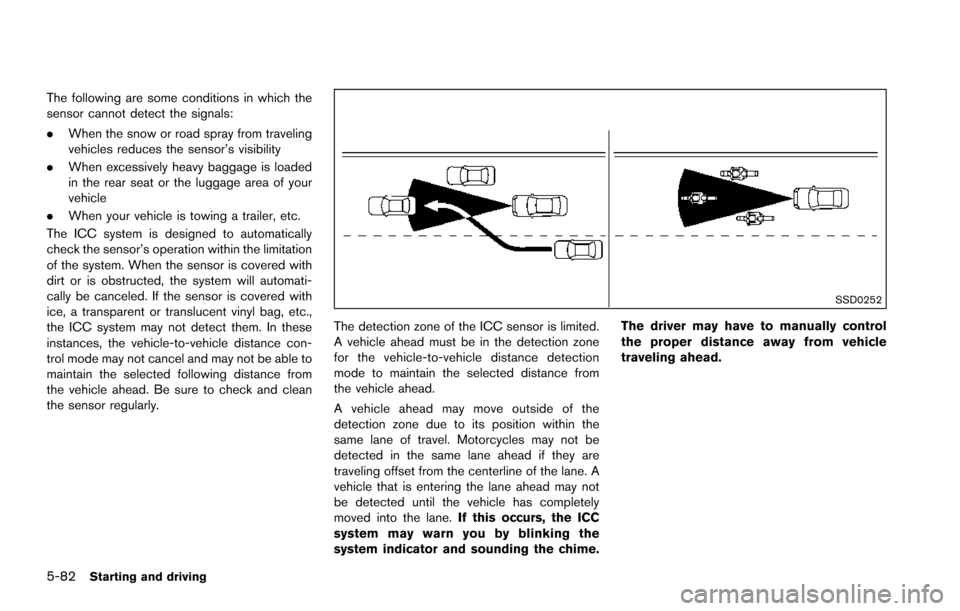
SSD0252
The detection zone of the ICC sensor is limited.
A vehicle ahead must be in the detection zone
for the vehicle-to-vehicle distance detection
mode to maintain the selected distance from
the vehicle ahead.
A vehicle ahead may move outside of the
detection zone due to its position within the
same lane of travel. Motorcycles may not be
detected in the same lane ahead if they are
traveling offset from the centerline of the lane. A
vehicle that is entering the lane ahead may not
be detected until the vehicle has completely
moved into the lane. If this occurs, the ICC
system may warn you by blinking the
system indicator and sounding the chime. The driver may have to manually control
the proper distance away from vehicle
traveling ahead.
Page 440 of 614
safe distance between vehicles.
. The system may not detect the
vehicle in front of you in certain
road or weather conditions. To avoid
accidents, never use the DCA sys-
tem under the following conditions:
— On roads with sharp curves
— On slippery road surfaces such
as on ice or snow, etc.
— On off-road surfaces such as on sand or rock, etc.
— During bad weather (rain, fog, snow, etc.)
— When rain, snow or dirt adhere to the system sensor
— On steep downhill roads (fre- quent braking may result in
overheating the brakes)
— On repeated uphill and downhill roads
— When towing a trailer or other vehicle
. In some road or traffic conditions, a
vehicle or object can unexpectedly
come into the sensor detection
zone and cause automatic braking. You may need to control the dis-
tance from other vehicles using the
accelerator pedal. Always stay alert
and avoid using the DCA system
when it is not recommended in this
section.
The radar sensor will not detect the following
objects:
. Stationary and slow moving vehicles
. Pedestrians or objects in the roadway
. Oncoming vehicles in the same lane
. Motorcycles traveling offset in the travel lane
The following are some conditions in which the
sensor cannot detect the signals:
. When the snow or road spray from traveling
vehicles reduces the sensor’s visibility
. When excessively heavy baggage is loaded
in the rear seat or the luggage room of your
vehicle
Starting and driving5-99
Page 450 of 614
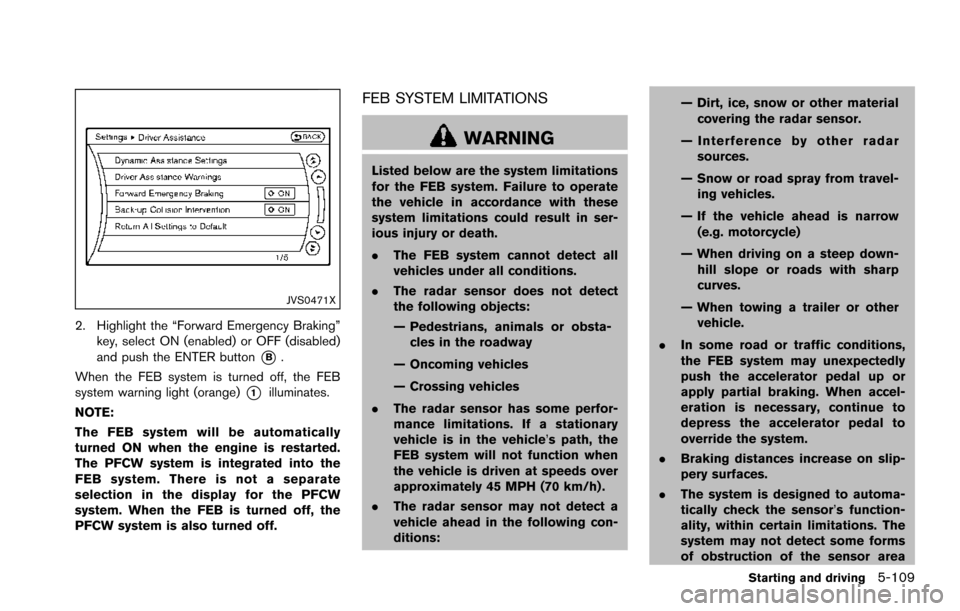
JVS0471X
2. Highlight the “Forward Emergency Braking”key, select ON (enabled) or OFF (disabled)
and push the ENTER button
*B.
When the FEB system is turned off, the FEB
system warning light (orange)
*1illuminates.
NOTE:
The FEB system will be automatically
turned ON when the engine is restarted.
The PFCW system is integrated into the
FEB system. There is not a separate
selection in the display for the PFCW
system. When the FEB is turned off, the
PFCW system is also turned off.
FEB SYSTEM LIMITATIONS
WARNING
Listed below are the system limitations
for the FEB system. Failure to operate
the vehicle in accordance with these
system limitations could result in ser-
ious injury or death.
. The FEB system cannot detect all
vehicles under all conditions.
. The radar sensor does not detect
the following objects:
— Pedestrians, animals or obsta-
cles in the roadway
— Oncoming vehicles
— Crossing vehicles
. The radar sensor has some perfor-
mance limitations. If a stationary
vehicle is in the vehicle’s path, the
FEB system will not function when
the vehicle is driven at speeds over
approximately 45 MPH (70 km/h) .
. The radar sensor may not detect a
vehicle ahead in the following con-
ditions: — Dirt, ice, snow or other material
covering the radar sensor.
— Interference by other radar sources.
— Snow or road spray from travel- ing vehicles.
— If the vehicle ahead is narrow (e.g. motorcycle)
— When driving on a steep down- hill slope or roads with sharp
curves.
— When towing a trailer or other vehicle.
. In some road or traffic conditions,
the FEB system may unexpectedly
push the accelerator pedal up or
apply partial braking. When accel-
eration is necessary, continue to
depress the accelerator pedal to
override the system.
. Braking distances increase on slip-
pery surfaces.
. The system is designed to automa-
tically check the sensor’s function-
ality, within certain limitations. The
system may not detect some forms
of obstruction of the sensor area
Starting and driving5-109
Page 459 of 614
5-118Starting and driving
JVS0298XIllustration D
PFCW SYSTEM LIMITATIONS
WARNING
Listed below are the system limitations
for the PFCW system. Failure to operate
the vehicle in accordance with these
system limitations could result in ser-
ious injury or death.
.The PFCW system cannot detect all
vehicles under all conditions.
. The radar sensor does not detect
the following objects: — Pedestrians, animals or obsta-
cles in the roadway
— Oncoming vehicles
— Crossing vehicles
. (Illustration A) The PFCW system
does not function when a vehicle
ahead is a narrow vehicle, such as a
motorcycle.
. The radar sensor may not detect a
vehicle ahead in the following con-
ditions:
— Snow or heavy rain — Dirt, ice, snow or other material
covering the radar sensor
— Interference by other radar sources
— Snow or road spray from travel- ling vehicles.
— Driving in a tunnel
— Towing a trailer or other vehicle
. (Illustration B) When the vehicle
ahead is being towed.
. (Illustration C) When the distance to
the vehicle ahead is too close, the
beam of the radar sensor is ob-
structed.
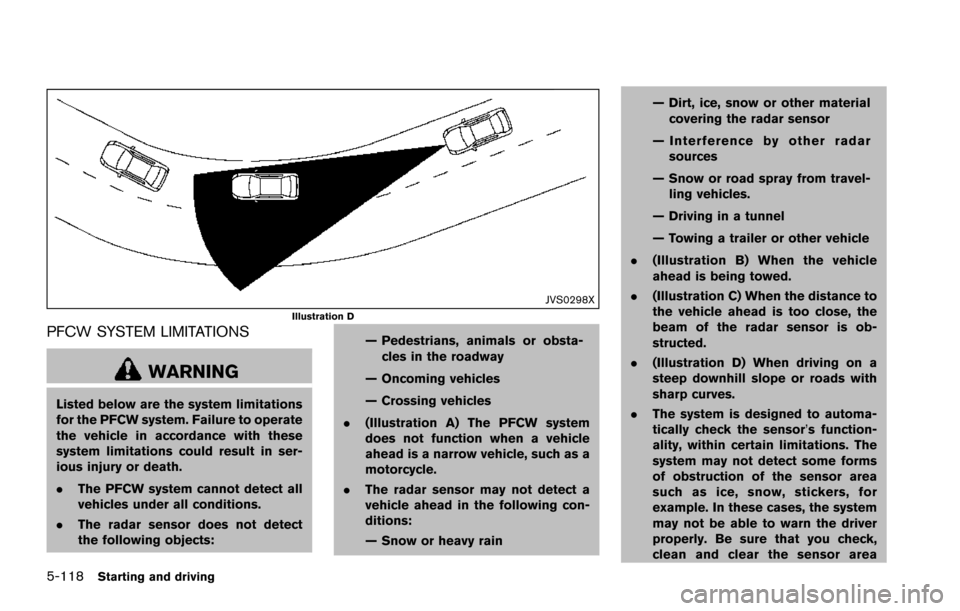
. (Illustration D) When driving on a
steep downhill slope or roads with
sharp curves.
. The system is designed to automa-
tically check the sensor’s function-
ality, within certain limitations. The
system may not detect some forms
of obstruction of the sensor area
such as ice, snow, stickers, for
example. In these cases, the system
may not be able to warn the driver
properly. Be sure that you check,
clean and clear the sensor area
Page 462 of 614
2.This device must accept any interfer-
ence, including interference that may
cause undesired operation of the de-
vice.
CAUTION
During the first 1,200 miles (2,000 km) ,
follow these recommendations to ob-
tain maximum engine performance and
ensure the future reliability and econo-
my of your new vehicle.
Failure to follow these recommenda-
tions may result in shortened engine
life and reduced engine performance.
. Avoid driving for long periods at constant
speed, either fast or slow. Do not run the
engine over 4,000 rpm.
. Do not accelerate at full throttle in any gear.
. Avoid quick starts.
. Avoid hard braking as much as possible.
. Do not tow a trailer for the first 500 miles
(805 km) . Follow these easy-to-use Fuel Efficient Driving
Tips to help you achieve the most fuel economy
from your vehicle.
1. Use smooth accelerator and brake pedal
application.
.Avoid rapid starts and stops..Use smooth, gentle accelerator andbrake application whenever possible.
.Maintain constant speed while commut-
ing and coast whenever possible.
2. Maintain constant speed.
.Look ahead to try and anticipate and minimize stops.
.Synchronizing your speed with traffic
lights allows you to reduce your number
of stops.
.Maintaining a steady speed can minimize red light stops and improve fuel effi-
ciency.
3. Use air conditioning (A/C) at higher vehicle speeds.
.Below 40 MPH (64 km/h) , it is moreefficient to open windows to cool the
vehicle due to reduced engine load.
.Above 40 MPH (64 km/h) , it is moreefficient to use A/C to cool the vehicle
due to increased aerodynamic drag.
Starting and driving5-121
BREAK-IN SCHEDULE FUEL EFFICIENT DRIVING TIPS
Page 473 of 614
5-132Starting and driving
so the vehicle will move away from the
center of the road if it moves.
4. Push the ignition switch to the OFF position.
SIC4474
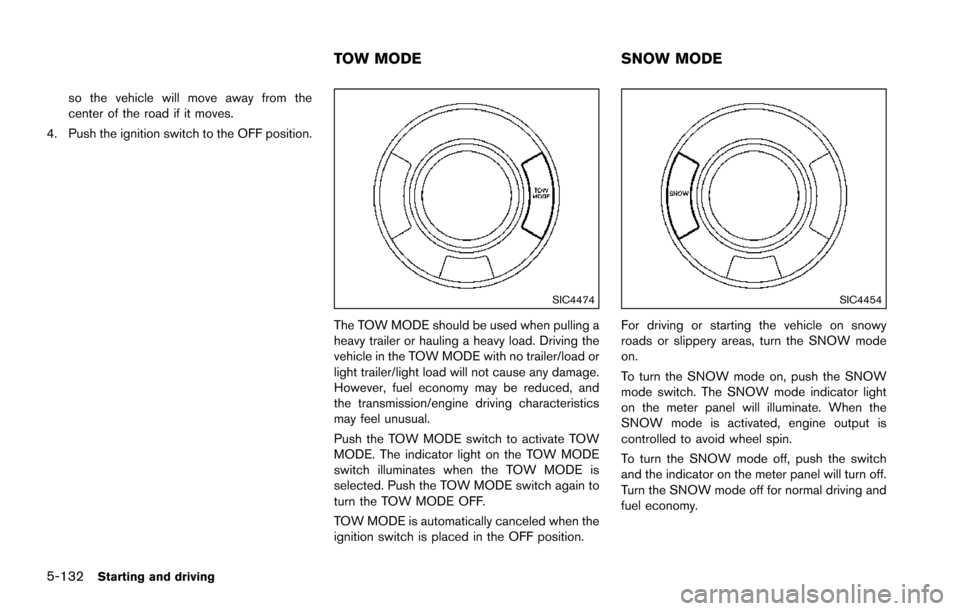
The TOW MODE should be used when pulling a
heavy trailer or hauling a heavy load. Driving the
vehicle in the TOW MODE with no trailer/load or
light trailer/light load will not cause any damage.
However, fuel economy may be reduced, and
the transmission/engine driving characteristics
may feel unusual.
Push the TOW MODE switch to activate TOW
MODE. The indicator light on the TOW MODE
switch illuminates when the TOW MODE is
selected. Push the TOW MODE switch again to
turn the TOW MODE OFF.
TOW MODE is automatically canceled when the
ignition switch is placed in the OFF position.
SIC4454
For driving or starting the vehicle on snowy
roads or slippery areas, turn the SNOW mode
on.
To turn the SNOW mode on, push the SNOW
mode switch. The SNOW mode indicator light
on the meter panel will illuminate. When the
SNOW mode is activated, engine output is
controlled to avoid wheel spin.
To turn the SNOW mode off, push the switch
and the indicator on the meter panel will turn off.
Turn the SNOW mode off for normal driving and
fuel economy.
TOW MODE SNOW MODE
Page 562 of 614
.Operating in hot weather in stop-and-go
“rush hour” traffic.
. Extensive idling and/or low speed driving for
long distances, such as police, taxi or door-
to-door delivery use.
. Driving in dusty conditions.
. Driving on rough, muddy or salt spread
roads.
. Towing a trailer, or using a camper or car-
top carrier.
NOTE:
For vehicles operated in Canada, both
standard and severe maintenance items
should be performed at every interval. The following tables show the standard main-
tenance schedule. Depending upon weather
and atmospheric conditions, varying road sur-
faces, individual driving habits and vehicle
usage, additional or more frequent maintenance
may be required.
After 120,000 miles (192,000 km)/144
months, continue maintenance at the
same mileage/time intervals.
Maintenance and schedules9-7
STANDARD MAINTENANCE
Page 567 of 614
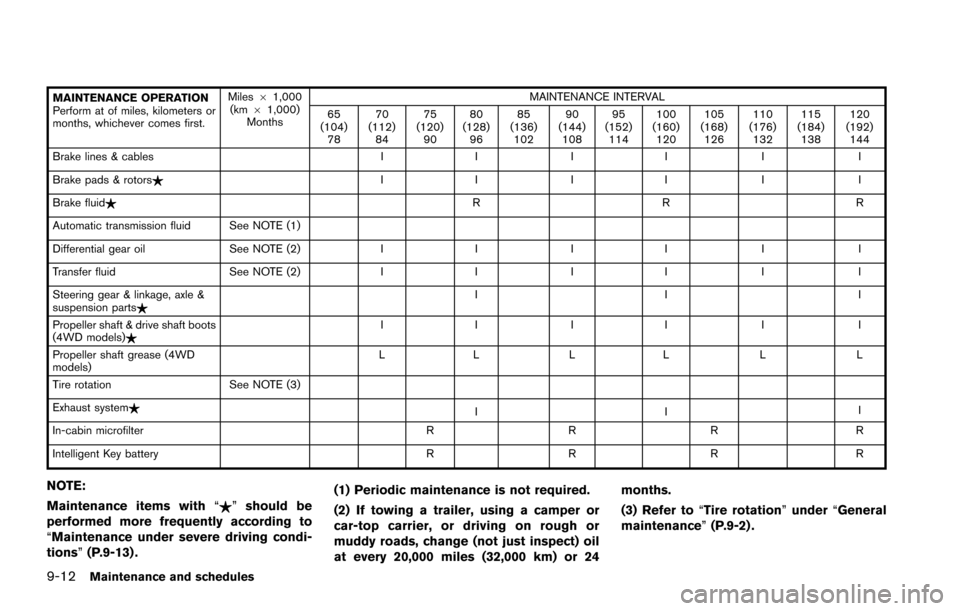
9-12Maintenance and schedules
MAINTENANCE OPERATION
Perform at of miles, kilometers or
months, whichever comes first.Miles
61,000
(km 61,000)
Months MAINTENANCE INTERVAL
65
(104) 78 70
(112) 84 75
(120) 90 80
(128) 96 85
(136) 102 90
(144) 108 95
(152) 114 100
(160) 120 105
(168) 126 110
(176) 132 115
(184) 138 120
(192) 144
Brake lines & cables II II I I
Brake pads & rotors$ II II I I
Brake fluid$ RR R
Automatic transmission fluid See NOTE (1)
Differential gear oil See NOTE (2)II II I I
Transfer fluid See NOTE (2)II II I I
Steering gear & linkage, axle &
suspension parts$ II I
Propeller shaft & drive shaft boots
(4WD models)$ II II I I
Propeller shaft grease (4WD
models) LL LL L L
Tire rotation See NOTE (3)
Exhaust system$ III
In-cabin microfilter RRR R
Intelligent Key battery RRR R
NOTE:
Maintenance items with “$”should be
performed more frequently according to
“Maintenance under severe driving condi-
tions” (P.9-13) . (1) Periodic maintenance is not required.
(2) If towing a trailer, using a camper or
car-top carrier, or driving on rough or
muddy roads, change (not just inspect) oil
at every 20,000 miles (32,000 km) or 24 months.
(3) Refer to
“Tire rotation” under“General
maintenance” (P.9-2) .
Page 568 of 614
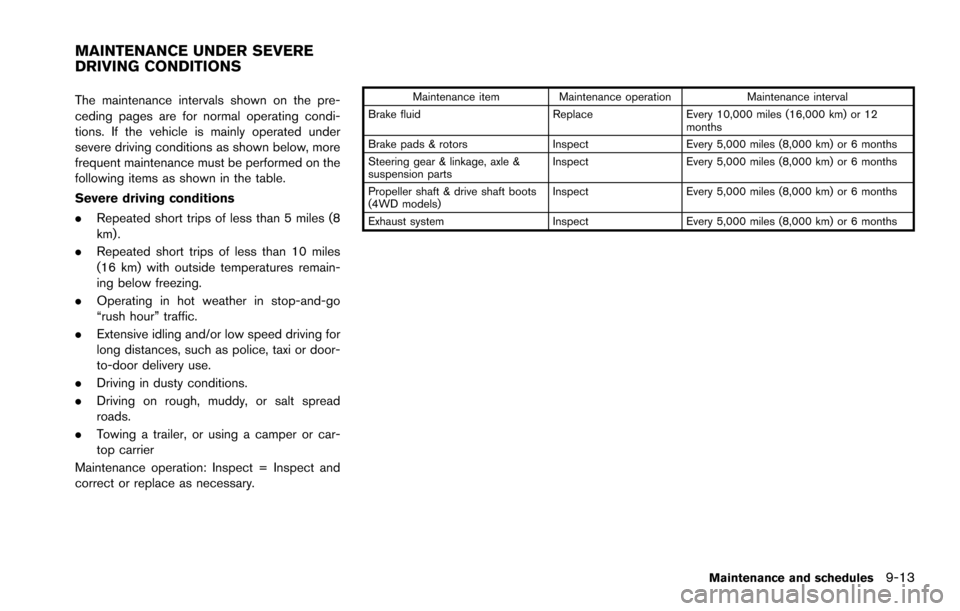
The maintenance intervals shown on the pre-
ceding pages are for normal operating condi-
tions. If the vehicle is mainly operated under
severe driving conditions as shown below, more
frequent maintenance must be performed on the
following items as shown in the table.
Severe driving conditions
.Repeated short trips of less than 5 miles (8
km) .
. Repeated short trips of less than 10 miles
(16 km) with outside temperatures remain-
ing below freezing.
. Operating in hot weather in stop-and-go
“rush hour” traffic.
. Extensive idling and/or low speed driving for
long distances, such as police, taxi or door-
to-door delivery use.
. Driving in dusty conditions.
. Driving on rough, muddy, or salt spread
roads.
. Towing a trailer, or using a camper or car-
top carrier
Maintenance operation: Inspect = Inspect and
correct or replace as necessary.Maintenance item Maintenance operation Maintenance interval
Brake fluid ReplaceEvery 10,000 miles (16,000 km) or 12
months
Brake pads & rotors InspectEvery 5,000 miles (8,000 km) or 6 months
Steering gear & linkage, axle &
suspension parts Inspect
Every 5,000 miles (8,000 km) or 6 months
Propeller shaft & drive shaft boots
(4WD models) Inspect
Every 5,000 miles (8,000 km) or 6 months
Exhaust system InspectEvery 5,000 miles (8,000 km) or 6 months
Maintenance and schedules9-13
MAINTENANCE UNDER SEVERE
DRIVING CONDITIONS