4WD NISSAN ARMADA 2017 2.G Owner's Manual
[x] Cancel search | Manufacturer: NISSAN, Model Year: 2017, Model line: ARMADA, Model: NISSAN ARMADA 2017 2.GPages: 614, PDF Size: 2.87 MB
Page 465 of 614
5-124Starting and driving
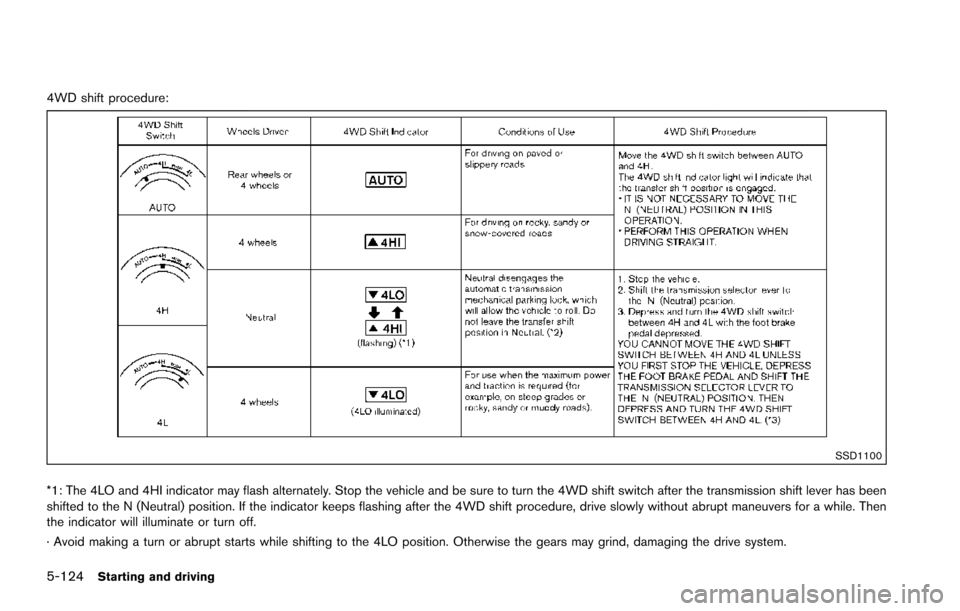
4WD shift procedure:
SSD1100
*1: The 4LO and 4HI indicator may flash alternately. Stop the vehicle and be sure to turn the 4WD shift switch after the transmission shift lever has been
shifted to the N (Neutral) position. If the indicator keeps flashing after the 4WD shift procedure, drive slowly without abrupt maneuvers for a while. Then
the indicator will illuminate or turn off.
· Avoid making a turn or abrupt starts while shifting to the 4LO position. Otherwise the gears may grind, damaging the drive system.
Page 466 of 614
*2: While changing in and out of the 4LO position, the engine must be running. Otherwise, the shift will not take place and the 4LO indicator will not be on
or flashing.
*3: Make sure that the 4LO indicator turns on when shifting the 4WD shift switch to the 4L position. The Vehicle Dynamic Control (VDC) off indicator light
will also turn on when 4L is selected. (See “Vehicle Dynamic Control (VDC) system” (P.5-138) .)
Starting and driving5-125
Page 467 of 614
5-126Starting and driving
The 4WD shift switch is used to select the 4WD
mode depending on the driving conditions.
There are 3 types of drive modes available,
AUTO, 4HI and 4LO.
The 4WD shift switch electronically controls the
transfer case operation. Rotate the switch to
move between each mode, AUTO, 4H and 4L.
You must depress the 4WD shift switch to
select 4L, and the vehicle MUST be sta-
tionary and the shift lever in the N (Neutral)
position when changing into or out of 4L.
WARNING
.When parking, apply the parking
brake before stopping the engine
and make sure that the 4WD shift
indicator is on and the ATP warning
light turns off. Otherwise, the vehi-
cle could unexpectedly move even if
the automatic transmission is in the
P (Park) position.
. The 4LO and 4HI indicators must
stop blinking and the 4LO or 4HI
indicator must remain illuminated or
turn off before shifting the trans-
mission into gear. If the shift lever is
shifted from the N (Neutral) position
to any other gear while the 4LO and 4HI indicators are blinking alter-
nately, the vehicle may move unex-
pectedly.
CAUTION
.
Never shift the 4WD shift switch
between 4L and 4H while driving.
. The 4HI position provides greater
traction. Avoid excessive speed, as
it will cause increased fuel con-
sumption and higher oil tempera-
tures, and could damage drivetrain
component. Speeds over 62 MPH
(100 km/h) in 4HI is not recom-
mended.
. The 4LO position provides maxi-
mum traction. Avoid raising vehicle
speed excessively, as the maximum
speed is approximately 31 MPH (50
km/h) .
. When driving straight, shift the 4WD
shift switch to the AUTO or 4H
position. Do not move the 4WD shift
switch when making a turn or rever-
sing. .
Do not shift the 4WD shift switch
(between AUTO and 4H) while driv-
ing on steep downhill grades. Use
the engine brake and low automatic
transmission gears for engine brak-
ing.
. Do not operate the 4WD shift switch
(between AUTO and 4H) with the
rear wheels spinning.
. Do not drive on dry hard surface
roads in the 4HI or 4LO position.
Driving on dry hard surfaces in 4HI
or 4LO may cause unnecessary
noise and tire wear. NISSAN recom-
mends driving in the AUTO position
under these conditions.
. The 4WD transfer case may not be
shifted between 4HI and 4LO at low
ambient temperatures and the 4LO
and 4HI indicators may blink even
when the 4WD shift switch is
shifted. After driving for a while
you can change the 4WD shift
switch between 4H and 4L.
Page 468 of 614
When driving on rough roads,
.Drive carefully according to the road surface
conditions.
When the vehicle is stuck,
. Place stones or wooden blocks under the
tires to free the vehicle.
. Set the 4WD shift switch to 4H or 4L.
. If it is difficult to free the vehicle, repeat
forward and backward movement to in-
crease the movement.
. If the vehicle is stuck deep in mud, tire
chains may be effective.
CAUTION
.Do not spin the tires excessively.
Tires will sink deep into the mud,
making it difficult to free the vehi-
cle.
. Avoid shifting gears with the engine
running at high speeds as this may
cause malfunction.
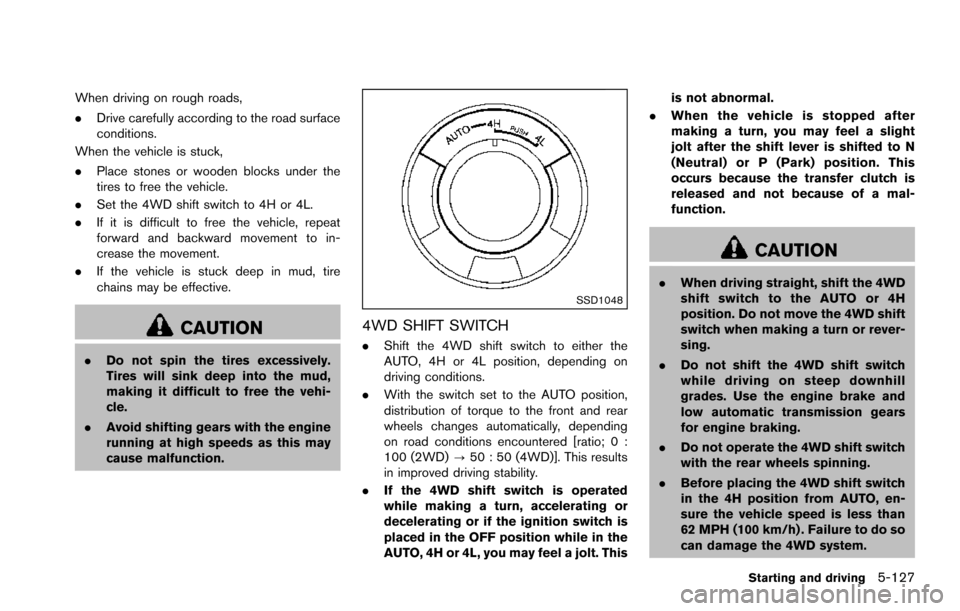
SSD1048
4WD SHIFT SWITCH
.Shift the 4WD shift switch to either the
AUTO, 4H or 4L position, depending on
driving conditions.
. With the switch set to the AUTO position,
distribution of torque to the front and rear
wheels changes automatically, depending
on road conditions encountered [ratio; 0 :
100 (2WD) ?50 : 50 (4WD)]. This results
in improved driving stability.
. If the 4WD shift switch is operated
while making a turn, accelerating or
decelerating or if the ignition switch is
placed in the OFF position while in the
AUTO, 4H or 4L, you may feel a jolt. This is not abnormal.
. When the vehicle is stopped after
making a turn, you may feel a slight
jolt after the shift lever is shifted to N
(Neutral) or P (Park) position. This
occurs because the transfer clutch is
released and not because of a mal-
function.
CAUTION
.When driving straight, shift the 4WD
shift switch to the AUTO or 4H
position. Do not move the 4WD shift
switch when making a turn or rever-
sing.
. Do not shift the 4WD shift switch
while driving on steep downhill
grades. Use the engine brake and
low automatic transmission gears
for engine braking.
. Do not operate the 4WD shift switch
with the rear wheels spinning.
. Before placing the 4WD shift switch
in the 4H position from AUTO, en-
sure the vehicle speed is less than
62 MPH (100 km/h) . Failure to do so
can damage the 4WD system.
Starting and driving5-127
Page 469 of 614
5-128Starting and driving
.Never shift the 4WD shift switch
between 4L and 4H while driving.
. Engine idling speed is high while
warming up the engine. Be espe-
cially careful when starting or driv-
ing on slippery surfaces with the
4WD shift switch in AUTO.
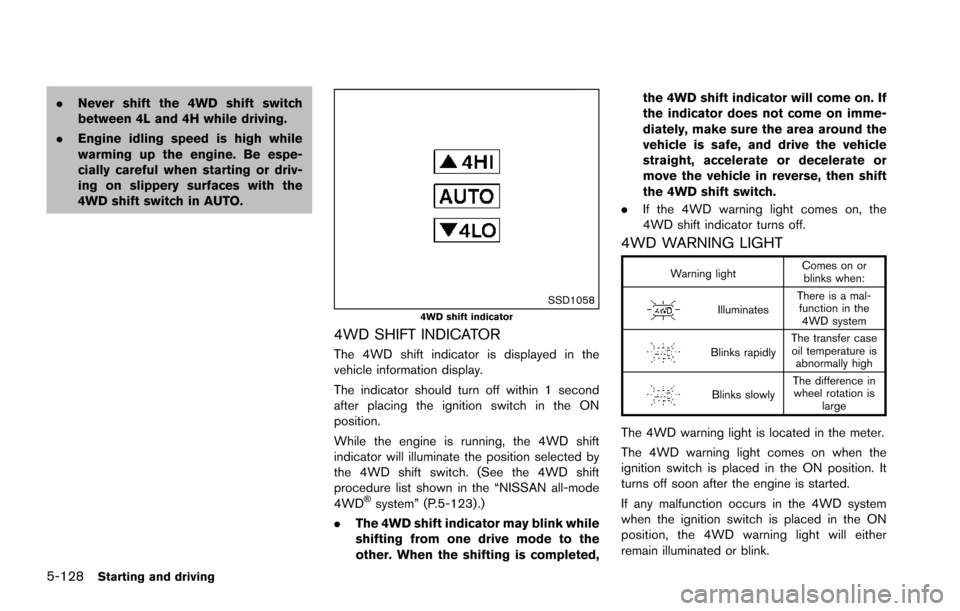
SSD10584WD shift indicator
4WD SHIFT INDICATOR
The 4WD shift indicator is displayed in the
vehicle information display.
The indicator should turn off within 1 second
after placing the ignition switch in the ON
position.
While the engine is running, the 4WD shift
indicator will illuminate the position selected by
the 4WD shift switch. (See the 4WD shift
procedure list shown in the “NISSAN all-mode
4WD
Šsystem” (P.5-123) .)
. The 4WD shift indicator may blink while
shifting from one drive mode to the
other. When the shifting is completed, the 4WD shift indicator will come on. If
the indicator does not come on imme-
diately, make sure the area around the
vehicle is safe, and drive the vehicle
straight, accelerate or decelerate or
move the vehicle in reverse, then shift
the 4WD shift switch.
. If the 4WD warning light comes on, the
4WD shift indicator turns off.
4WD WARNING LIGHT
Warning light Comes on or
blinks when:
Illuminates There is a mal-
function in the 4WD system
Blinks rapidly The transfer case
oil temperature is abnormally high
Blinks slowly The difference in
wheel rotation is large
The 4WD warning light is located in the meter.
The 4WD warning light comes on when the
ignition switch is placed in the ON position. It
turns off soon after the engine is started.
If any malfunction occurs in the 4WD system
when the ignition switch is placed in the ON
position, the 4WD warning light will either
remain illuminated or blink.
Page 470 of 614
If the 4WD warning light comes on, the 4WD
shift indicator turns off.
High-temperature transfer case oil makes the
4WD warning light blink rapidly (about twice per
second) . If the warning light blinks rapidly during
operation, stop the vehicle in a safe place
immediately. Then if the light turns off after a
while, you can continue driving.
A large difference between the diameters of
front and rear wheels will make the 4WD
warning light blink slowly (about once per two
seconds) . Change the 4WD shift switch to
AUTO and do not drive fast.
CAUTION
.If the 4WD warning light comes on
or blinks slowly during operation or
rapidly after stopping the vehicle for
a while, have your vehicle checked
as soon as possible. It is recom-
mended you visit a NISSAN dealer
for this service.
. Shifting between 4HI and 4LO is not
recommended when the 4WD warn-
ing light turns on.
. When the 4WD warning light comes
on, the 2WD mode may be engaged even if the 4WD shift switch is in
AUTO or 4H. Be especially careful
when driving. If corresponding parts
are malfunctioning, the 4WD mode
will not be engaged even if the 4WD
shift switch is shifted.
. Do not drive the vehicle in the 4HI or
4LO position on dry hard surface
roads. Driving on dry, hard surfaces
in 4HI or 4LO may cause unneces-
sary noise, tire wear and increased
fuel consumption.
If the 4WD warning light turns on
when driving on dry hard surface
roads:
— in the AUTO or 4HI position, shift
the 4WD shift switch to AUTO.
— in the 4LO position, stop the vehicle and shift the transmis-
sion shift lever to the N (Neutral)
position and shift the 4WD shift
switch to AUTO.
. If the 4WD warning light is still on
after the above operation, have your
vehicle checked as soon as possi-
ble. It is recommended you visit a
NISSAN dealer for this service. .
The transfer case may be damaged
if you continue driving with the
warning light blinking.
Starting and driving5-129
Page 479 of 614
5-138Starting and driving
illuminates the ABS warning light on the
instrument panel. The brake system then oper-
ates normally, but without anti-lock assistance.
If the ABS warning light illuminates during the
self-test or while driving, have the vehicle
checked. It is recommended you visit a NISSAN
dealer for this service.
Normal operation
The ABS operates at speeds above 3 to 6 MPH
(5 to 10 km/h) . The speed varies according to
road conditions.
When the ABS senses that one or more wheels
are close to locking up, the actuator rapidly
applies and releases hydraulic pressure. This
action is similar to pumping the brakes very
quickly. You may feel a pulsation in the brake
pedal and hear a noise from under the hood or
feel a vibration from the actuator when it is
operating. This is normal and indicates that the
ABS is operating properly. However, the pulsa-
tion may indicate that road conditions are
hazardous and extra care is required while
driving.The Vehicle Dynamic Control (VDC) system
uses various sensors to monitor driver inputs
and vehicle motion. Under certain driving con-
ditions, the VDC system helps to perform the
following functions.
.
Controls brake pressure to reduce wheel
slip on one slipping drive wheel so power is
transferred to a non slipping drive wheel on
the same axle.
. Controls brake pressure and engine output
to reduce drive wheel slip based on vehicle
speed (traction control function) .
. Controls brake pressure at individual wheels
and engine output to help the driver maintain
control of the vehicle in the following
conditions:
— understeer (vehicle tends to not follow
the steered path despite increased
steering input)
— oversteer (vehicle tends to spin due to certain road or driving conditions) .
The VDC system can help the driver to maintain
control of the vehicle, but it cannot prevent loss
of vehicle control in all driving situations.
When the VDC system operates, the VDC
warning light
in the instrument panel flashes
so note the following:
. The road may be slippery or the system may
determine some action is required to help keep the vehicle on the steered path.
. You may feel a pulsation in the brake pedal
and hear a noise or vibration from under the
hood. This is normal and indicates that the
VDC system is working properly.
. Adjust your speed and driving to the road
conditions.
If a malfunction occurs in the system, the VDC
warning light
illuminates in the instrument
panel. The VDC system automatically turns off.
The VDC OFF switch is used to turn off the VDC
system. The VDC off indicator
illuminates to
indicate the VDC system is off. When the VDC
switch is used to turn off the system, the VDC
system still operates to prevent one drive wheel
from slipping by transferring power to a non
slipping drive wheel. The VDC warning light
flashes if this occurs. All other VDC functions
are off, and the VDC warning lightwill not
flash. The VDC system is automatically reset to
on when the ignition switch is placed in the OFF
position then back to the ON position.
When the 4L position is selected with the 4WD
shift switch, the VDC system is disabled and the
VDC off indicator light illuminates (for 4WD
models) .
See “Vehicle Dynamic Control (VDC) warning
light” (P.2-17) and “Vehicle Dynamic Control
(VDC) off indicator light” (P.2-20).
VEHICLE DYNAMIC CONTROL (VDC)
SYSTEM
Page 484 of 614
6 In case of emergency
Hazard warning flasher switch .............................................. 6-2
Roadside assistance program ............................................... 6-2
Emergency engine shut off ..................................................... 6-3
Flat tire ........................................................................\
................. 6-3Tire Pressure Monitoring System (TPMS) .................. 6-3
Changing a flat tire ............................................................. 6-4
Jump starting ........................................................................\
... 6-12
Push starting ........................................................................\
... 6-14 If your vehicle overheats ...................................................... 6-14
Towing your vehicle .............................................................. 6-16
Towing recommended by NISSAN ........................... 6-17
Vehicle recovery (freeing a stuck vehicle) ............... 6-19
Four-Wheel Drive (4WD) manual shifting
(4WD models) ....................................................................... 6-20
When 4WD warning light illuminates ....................... 6-20
Operating procedure ..................................................... 6-21
Page 501 of 614
6-18In case of emergency
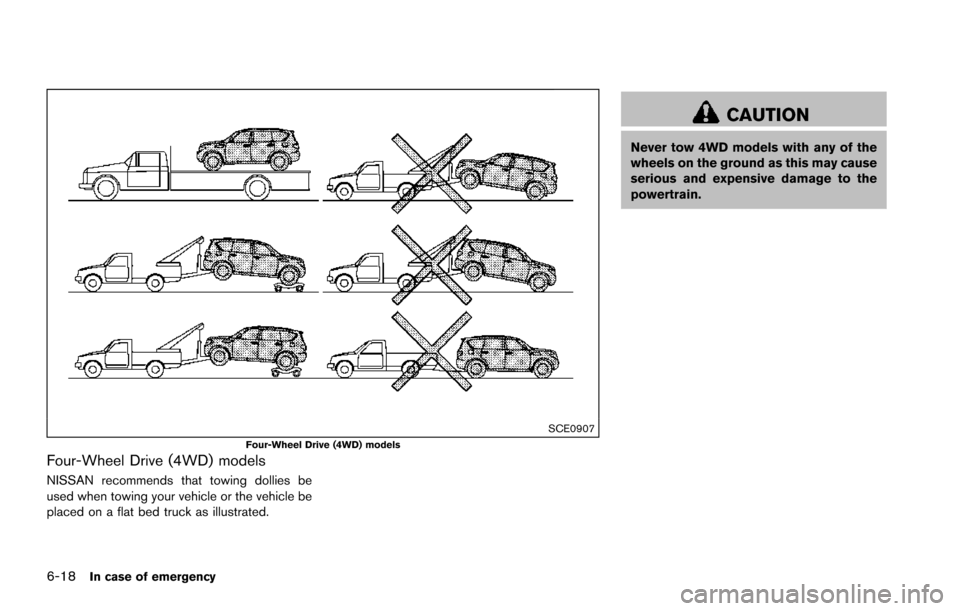
SCE0907Four-Wheel Drive (4WD) models
Four-Wheel Drive (4WD) models
NISSAN recommends that towing dollies be
used when towing your vehicle or the vehicle be
placed on a flat bed truck as illustrated.
CAUTION
Never tow 4WD models with any of the
wheels on the ground as this may cause
serious and expensive damage to the
powertrain.
Page 503 of 614
6-20In case of emergency
Rocking a stuck vehicle
If your vehicle is stuck in sand, snow, mud, etc.,
use the following procedure:
1. Turn off the Vehicle Dynamic Control (VDC)system.
2. Make sure the area in front and behind the vehicle is clear of obstructions.
3. Turn the steering wheel right and left to clear an area around the front tires.
4. Slowly rock the vehicle forward and back- ward.
.Shift back and forth between R (Reverse)and D (Drive) .
.Apply the accelerator as little as possibleto maintain the rocking motion.
.Release the accelerator pedal before
shifting between R and D.
.Do not spin the tires above 35 MPH (55 km/h) .
5. If the vehicle cannot be freed after a few tries, contact a professional towing service
to remove the vehicle. This section describes the procedure for manu-
ally shifting the vehicle into the 4WD mode (4L
position) in case of an emergency.
WHEN 4WD WARNING LIGHT ILLU-
MINATES
If the 4WD warning light illuminates while
driving, there may be a malfunction in the
4WD system. Stop the vehicle and have the
vehicle checked as soon as possible. It is
recommended you contact a NISSAN dealer
for this service. (See “NISSAN all-mode 4WD
Š”
(P.5-123) .)
When the vehicle is stuck on an uneven road
(desert, mud, etc.) and the 4WD warning light is
illuminated, be sure to place the 4WD shift
switch in the 4L position. If only the rear wheels
are spinning, this means that the transfer has not
switched to the 4L position electrically.
If this situation occurs, contact a dealer or road
assistance service for help. If an immediate
service is not available, perform the following
procedure to switch to the 4L position manually
and free the vehicle.
CAUTION
Only perform this procedure in an
emergency. If the vehicle is driven for a long period
of time over a long distance with a
component detached, foreign material
such as water, sand, etc. may enter from
the opening and this may cause a
malfunction in the drivetrain system.
After freeing a vehicle that has become
stuck, it is recommended you contact a
NISSAN dealer for inspection and re-
pair.
WARNING
.
Ensure your safety before perform-
ing the operations. The vehicle may
move unexpectedly.
. Place the ignition switch in the OFF
position, apply the parking brake
and let the vehicle cool down.
. Do not perform the following proce-
dure immediately after driving the
vehicle. Parts such as exhaust com-
ponents, the transmission, etc. are
very hot and may cause a burn
injury.
. Make sure that the parts that will be
operated as well as related parts
FOUR-WHEEL DRIVE (4WD)
MANUAL SHIFTING (4WD models)