Center display NISSAN ARMADA 2017 2.G Owner's Manual
[x] Cancel search | Manufacturer: NISSAN, Model Year: 2017, Model line: ARMADA, Model: NISSAN ARMADA 2017 2.GPages: 614, PDF Size: 2.87 MB
Page 284 of 614
Audio main operation
Push the ignition switch to the ACC or ON
position. Then, push the DISC·AUX button
repeatedly to switch to the iPod
Šmode.
If the system has been turned off while the iPodŠ
was playing, pushing the ON·OFF button will
start the iPodŠ.
PLAY:
When the DISC·AUX button is pushed with the
system off and the iPod
Šconnected, the system
will turn on. If another audio source is playing
and the iPod
Šis connected, push the DISC·AUX
button repeatedly until the center display
changes to the iPod
Šmode.
Interface:
The interface for iPod
Šoperation shown on the
vehicle center display is similar to the iPodŠ
interface. Use the multi-function controller and
the ENTER or BACK button to play the iPodŠ
with your favorite settings.
The following items can be chosen from the
menu list screen. For further information about
each item, see the iPod
ŠOwner’s Manual.
. Now Playing
. Playlists .
Artists
. Albums
. Songs
. Podcasts
. Genres
. Composers
. Audiobooks
. Shuffle Songs
. Play Mode
The following touch-panel buttons shown on the
screen are also available:
.
: returns to the previous screen.
.
: plays/pauses the music selected.
Next/Previous Track and Fast
Forward/Rewind:
When the
orbutton is pushed for more
than 1.5 seconds while the iPodŠis playing, the
iPodŠwill play while fast forwarding or rewind-
ing. When the button is released, the iPodŠwill
return to the normal play speed.
When the
orbutton is pushed for less
than 1.5 seconds while the iPodŠis playing, the
next track or the beginning of the current track
on the iPod
Šwill be played.
When the rewind button is pushed for less than
1.5 seconds within 3 seconds after the current
track starts playing, the previous track will be played.
The multi-function controller can also be used to
select tracks when the iPod
Šis playing.
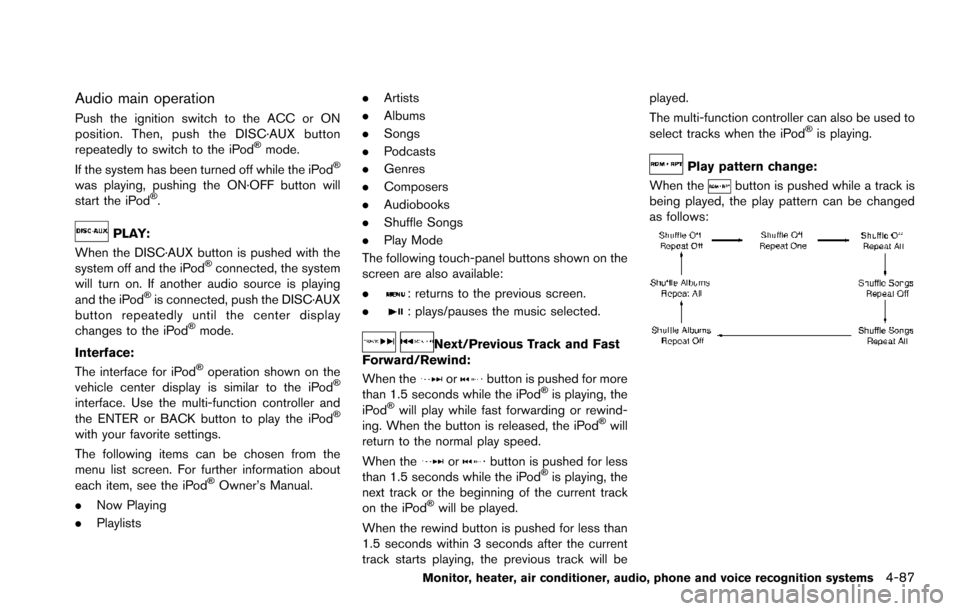
Play pattern change:
When the
button is pushed while a track is
being played, the play pattern can be changed
as follows:
Monitor, heater, air conditioner, audio, phone and voice recognition systems4-87
Page 285 of 614
4-88Monitor, heater, air conditioner, audio, phone and voice recognition systems
SAA3162
FRONT AUXILIARY INPUT JACKS (if so
equipped)
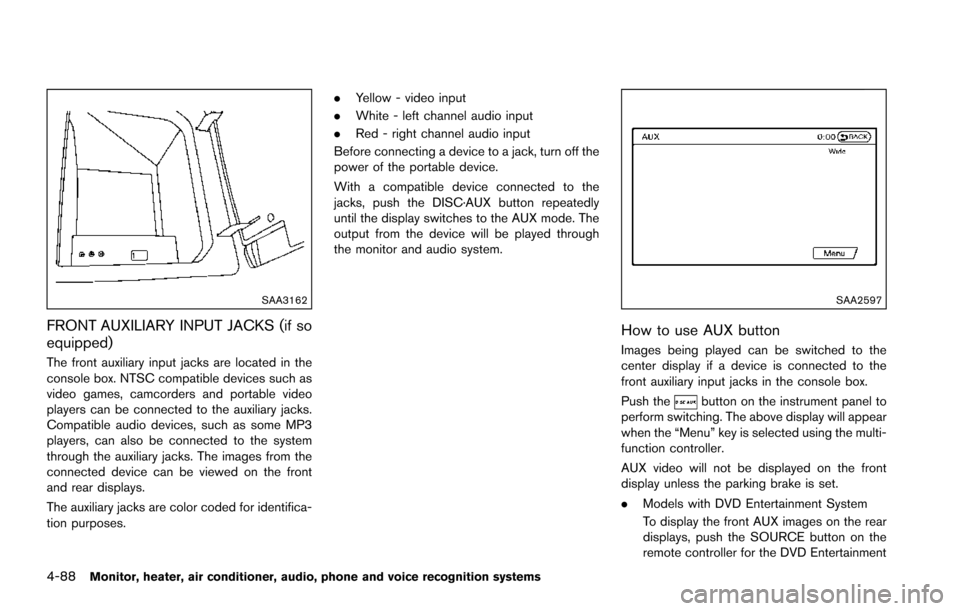
The front auxiliary input jacks are located in the
console box. NTSC compatible devices such as
video games, camcorders and portable video
players can be connected to the auxiliary jacks.
Compatible audio devices, such as some MP3
players, can also be connected to the system
through the auxiliary jacks. The images from the
connected device can be viewed on the front
and rear displays.
The auxiliary jacks are color coded for identifica-
tion purposes..
Yellow - video input
. White - left channel audio input
. Red - right channel audio input
Before connecting a device to a jack, turn off the
power of the portable device.
With a compatible device connected to the
jacks, push the DISC·AUX button repeatedly
until the display switches to the AUX mode. The
output from the device will be played through
the monitor and audio system.
SAA2597
How to use AUX button
Images being played can be switched to the
center display if a device is connected to the
front auxiliary input jacks in the console box.
Push the
button on the instrument panel to
perform switching. The above display will appear
when the “Menu” key is selected using the multi-
function controller.
AUX video will not be displayed on the front
display unless the parking brake is set.
. Models with DVD Entertainment System
To display the front AUX images on the rear
displays, push the SOURCE button on the
remote controller for the DVD Entertainment
Page 289 of 614
4-92Monitor, heater, air conditioner, audio, phone and voice recognition systems
ANTENNA
Window antenna
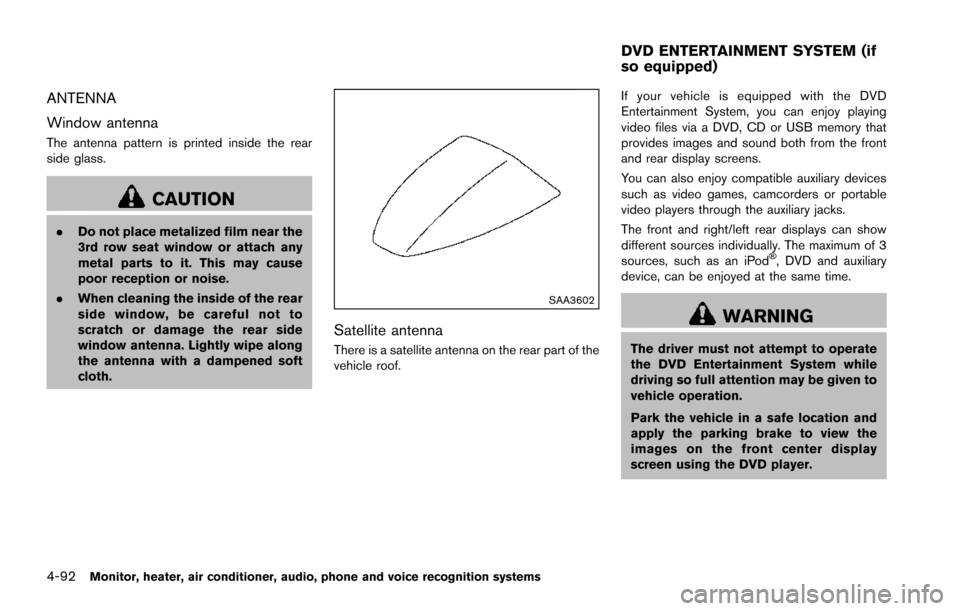
The antenna pattern is printed inside the rear
side glass.
CAUTION
.Do not place metalized film near the
3rd row seat window or attach any
metal parts to it. This may cause
poor reception or noise.
. When cleaning the inside of the rear
side window, be careful not to
scratch or damage the rear side
window antenna. Lightly wipe along
the antenna with a dampened soft
cloth.
SAA3602
Satellite antenna
There is a satellite antenna on the rear part of the
vehicle roof. If your vehicle is equipped with the DVD
Entertainment System, you can enjoy playing
video files via a DVD, CD or USB memory that
provides images and sound both from the front
and rear display screens.
You can also enjoy compatible auxiliary devices
such as video games, camcorders or portable
video players through the auxiliary jacks.
The front and right/left rear displays can show
different sources individually. The maximum of 3
sources, such as an iPod
Š, DVD and auxiliary
device, can be enjoyed at the same time.
WARNING
The driver must not attempt to operate
the DVD Entertainment System while
driving so full attention may be given to
vehicle operation.
Park the vehicle in a safe location and
apply the parking brake to view the
images on the front center display
screen using the DVD player.
DVD ENTERTAINMENT SYSTEM (if
so equipped)
Page 291 of 614
4-94Monitor, heater, air conditioner, audio, phone and voice recognition systems
SAA3330
Rear auxiliary input jacks
The rear auxiliary input jacks are located at the
rear of the center console. NTSC/PAL compa-
tible devices can be connected to the auxiliary
jacks. The images from the connected device
can be viewed on the rear displays.
The rear auxiliary jacks are color coded for
identification purposes.
.Yellow - video input
. White - left channel audio input
. Red - right channel audio input
Before connecting a device to a jack, turn off the
power of the portable device.
To display the AUX screen, select the left or right rear display using the rear display select switch
on the remote controller, and select the AUX
mode after pushing the SOURCE button on the
remote controller.
The AUX screen cannot be displayed on the
front screen.
The remote controller cannot be used for the
portable device.
Headphones
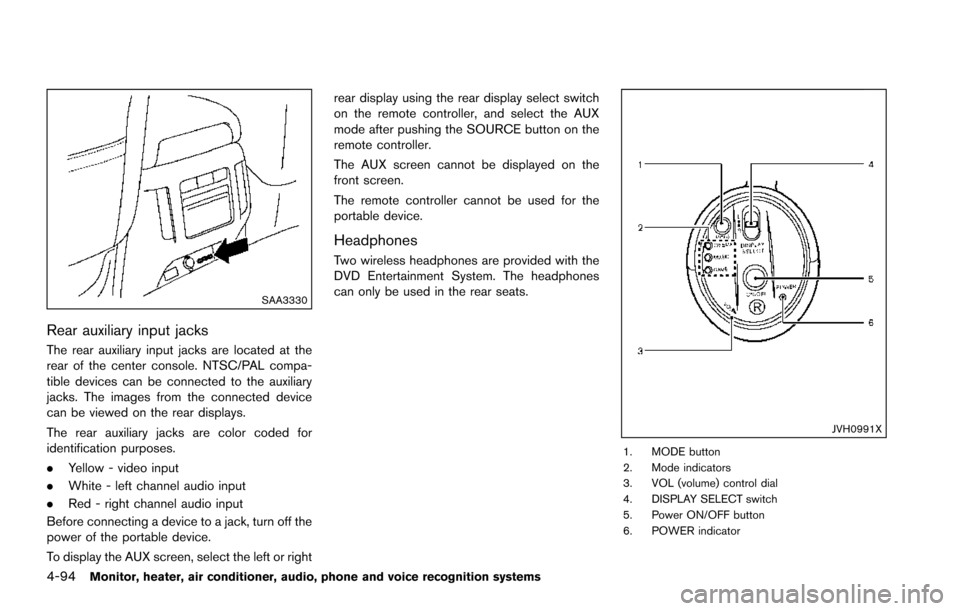
Two wireless headphones are provided with the
DVD Entertainment System. The headphones
can only be used in the rear seats.
JVH0991X
1. MODE button
2. Mode indicators
3. VOL (volume) control dial
4. DISPLAY SELECT switch
5. Power ON/OFF button
6. POWER indicator
Page 354 of 614
SSD0436
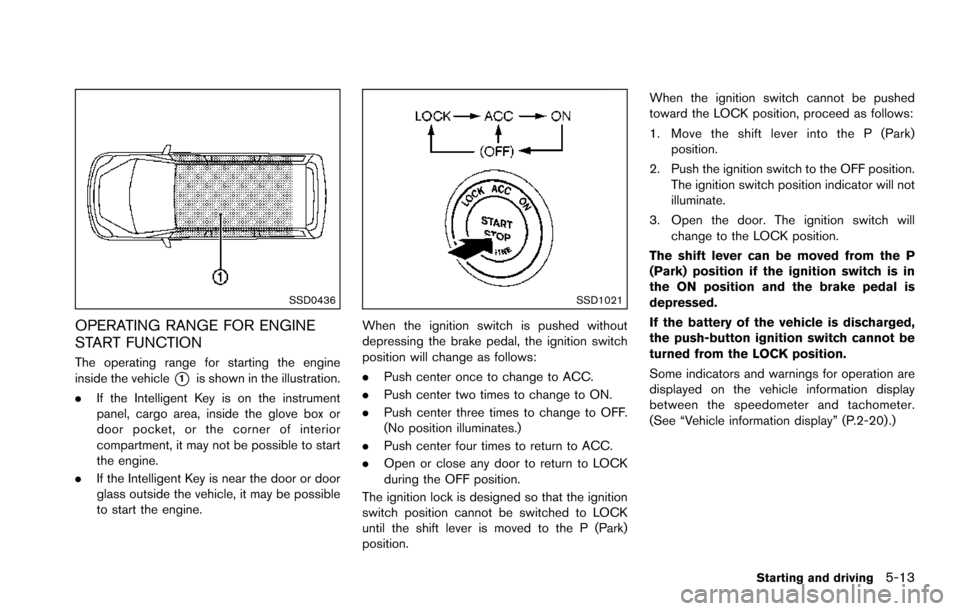
OPERATING RANGE FOR ENGINE
START FUNCTION
The operating range for starting the engine
inside the vehicle
*1is shown in the illustration.
. If the Intelligent Key is on the instrument
panel, cargo area, inside the glove box or
door pocket, or the corner of interior
compartment, it may not be possible to start
the engine.
. If the Intelligent Key is near the door or door
glass outside the vehicle, it may be possible
to start the engine.
SSD1021
When the ignition switch is pushed without
depressing the brake pedal, the ignition switch
position will change as follows:
.Push center once to change to ACC.
. Push center two times to change to ON.
. Push center three times to change to OFF.
(No position illuminates.)
. Push center four times to return to ACC.
. Open or close any door to return to LOCK
during the OFF position.
The ignition lock is designed so that the ignition
switch position cannot be switched to LOCK
until the shift lever is moved to the P (Park)
position. When the ignition switch cannot be pushed
toward the LOCK position, proceed as follows:
1. Move the shift lever into the P (Park)
position.
2. Push the ignition switch to the OFF position. The ignition switch position indicator will not
illuminate.
3. Open the door. The ignition switch will change to the LOCK position.
The shift lever can be moved from the P
(Park) position if the ignition switch is in
the ON position and the brake pedal is
depressed.
If the battery of the vehicle is discharged,
the push-button ignition switch cannot be
turned from the LOCK position.
Some indicators and warnings for operation are
displayed on the vehicle information display
between the speedometer and tachometer.
(See “Vehicle information display” (P.2-20) .)
Starting and driving5-13
Page 365 of 614
5-24Starting and driving
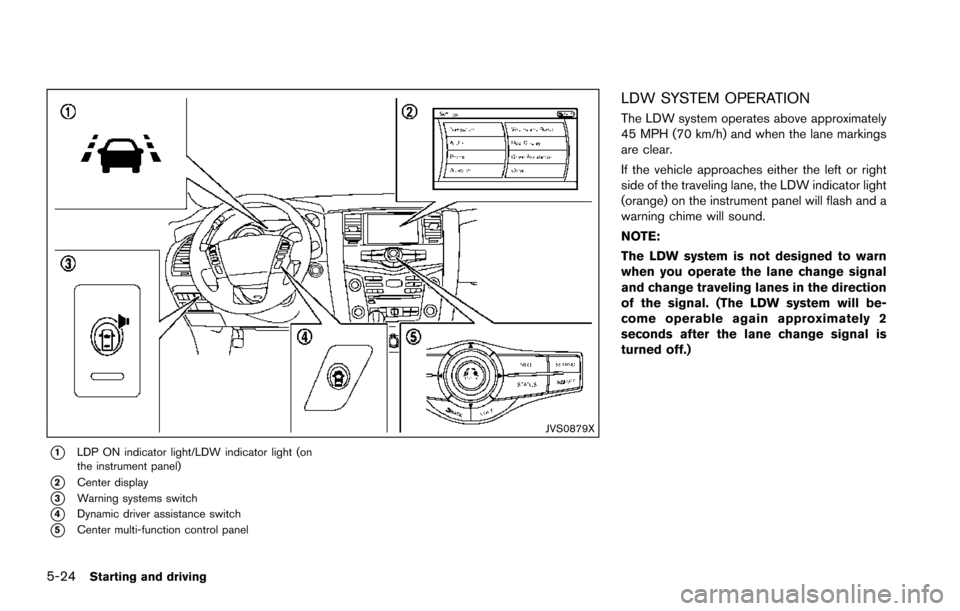
JVS0879X
*1LDP ON indicator light/LDW indicator light (on
the instrument panel)
*2Center display
*3Warning systems switch
*4Dynamic driver assistance switch
*5Center multi-function control panel
LDW SYSTEM OPERATION
The LDW system operates above approximately
45 MPH (70 km/h) and when the lane markings
are clear.
If the vehicle approaches either the left or right
side of the traveling lane, the LDW indicator light
(orange) on the instrument panel will flash and a
warning chime will sound.
NOTE:
The LDW system is not designed to warn
when you operate the lane change signal
and change traveling lanes in the direction
of the signal. (The LDW system will be-
come operable again approximately 2
seconds after the lane change signal is
turned off.)
Page 366 of 614
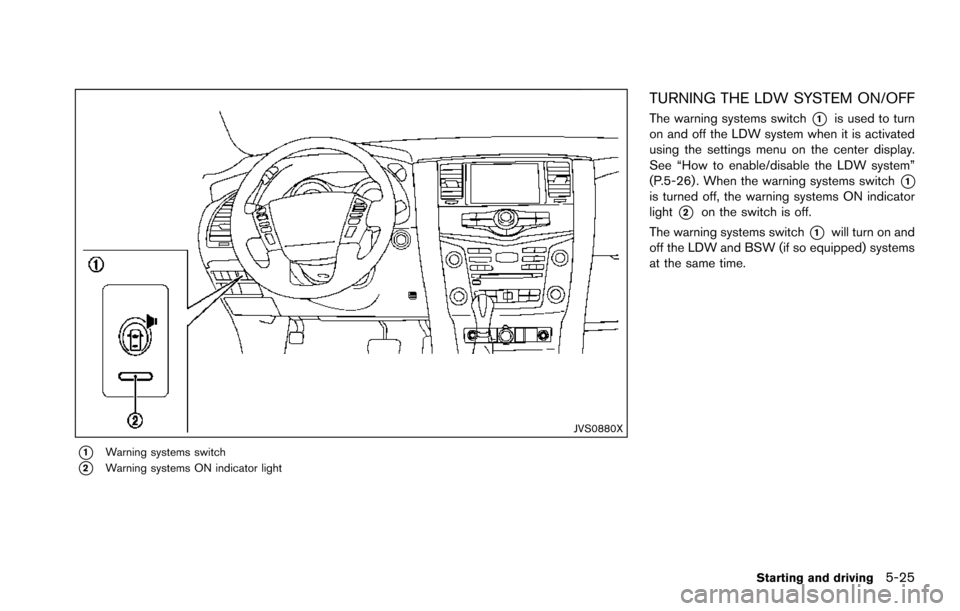
JVS0880X
*1Warning systems switch
*2Warning systems ON indicator light
TURNING THE LDW SYSTEM ON/OFF
The warning systems switch*1is used to turn
on and off the LDW system when it is activated
using the settings menu on the center display.
See “How to enable/disable the LDW system”
(P.5-26) . When the warning systems switch
*1is turned off, the warning systems ON indicator
light
*2on the switch is off.
The warning systems switch
*1will turn on and
off the LDW and BSW (if so equipped) systems
at the same time.
Starting and driving5-25
Page 367 of 614
5-26Starting and driving
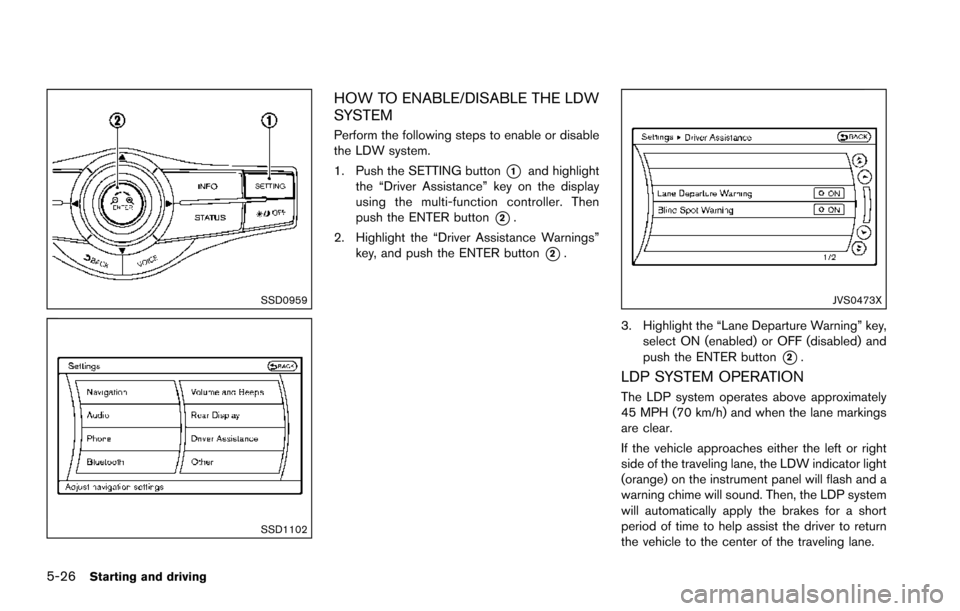
SSD0959
SSD1102
HOW TO ENABLE/DISABLE THE LDW
SYSTEM
Perform the following steps to enable or disable
the LDW system.
1. Push the SETTING button
*1and highlight
the “Driver Assistance” key on the display
using the multi-function controller. Then
push the ENTER button
*2.
2. Highlight the “Driver Assistance Warnings” key, and push the ENTER button
*2.
JVS0473X
3. Highlight the “Lane Departure Warning” key,
select ON (enabled) or OFF (disabled) and
push the ENTER button
*2.
LDP SYSTEM OPERATION
The LDP system operates above approximately
45 MPH (70 km/h) and when the lane markings
are clear.
If the vehicle approaches either the left or right
side of the traveling lane, the LDW indicator light
(orange) on the instrument panel will flash and a
warning chime will sound. Then, the LDP system
will automatically apply the brakes for a short
period of time to help assist the driver to return
the vehicle to the center of the traveling lane.
Page 368 of 614
NOTE:
.The LDP system is not designed to
work when you operate the lane
change signal and change traveling
lanes in the direction of the signal.
(The LDP system will become operable
again approximately 2 seconds after
the lane change signal is turned off.)
. The LDP braking assist will not operate
or will stop operating and only a
warning chime will sound under the
following conditions.
—When the brake pedal is depressed.
— When the steering wheel is turned
as far as necessary for the vehicle to
change lanes.
— When the accelerator pedal is de-
pressed while brake control assist is
provided.
— When the ICC, DCA, BSI, BSW,
PFCW or FEB warnings sound.
— When the hazard warning flashers
are operated.
— When driving on a curve at a high
speed.
. While the LDP system is operating, you
may hear a sound of brake operation.
This is normal and indicates that the
LDP system is operating properly.
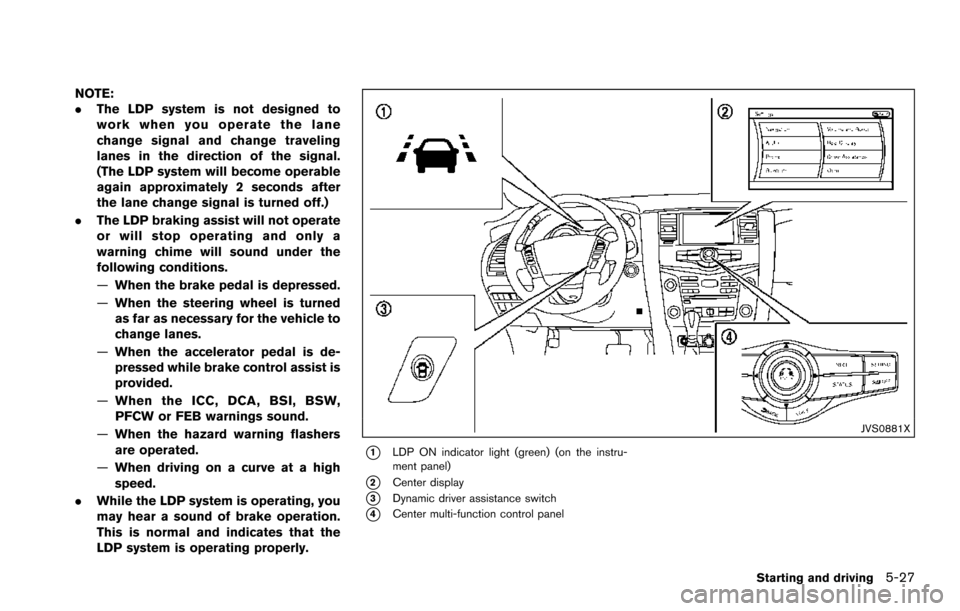
JVS0881X
*1LDP ON indicator light (green) (on the instru-
ment panel)
*2Center display
*3Dynamic driver assistance switch
*4Center multi-function control panel
Starting and driving5-27
Page 369 of 614
5-28Starting and driving
TURNING THE LDP SYSTEM ON/OFF
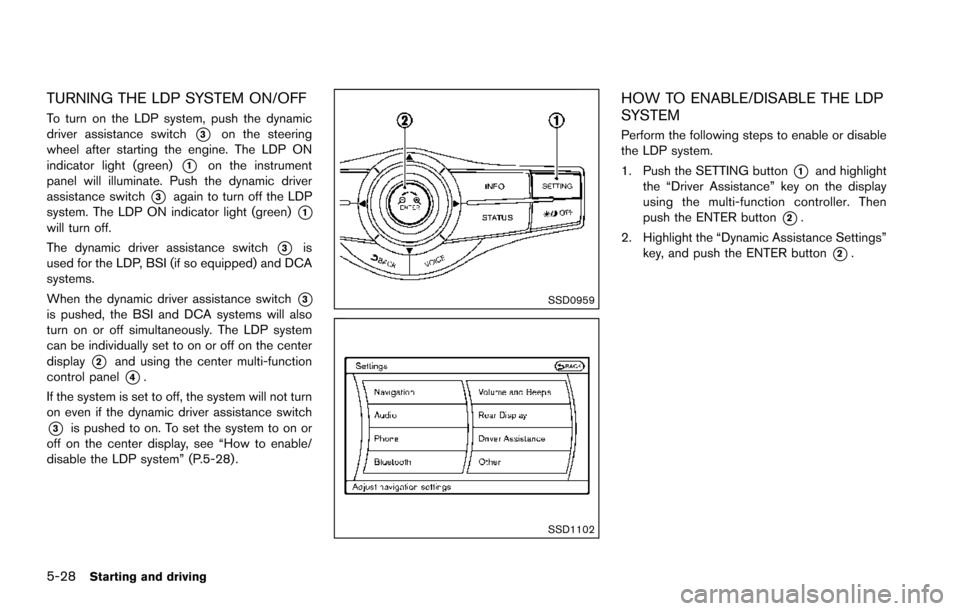
To turn on the LDP system, push the dynamic
driver assistance switch
*3on the steering
wheel after starting the engine. The LDP ON
indicator light (green)
*1on the instrument
panel will illuminate. Push the dynamic driver
assistance switch
*3again to turn off the LDP
system. The LDP ON indicator light (green)
*1will turn off.
The dynamic driver assistance switch
*3is
used for the LDP, BSI (if so equipped) and DCA
systems.
When the dynamic driver assistance switch
*3is pushed, the BSI and DCA systems will also
turn on or off simultaneously. The LDP system
can be individually set to on or off on the center
display
*2and using the center multi-function
control panel
*4.
If the system is set to off, the system will not turn
on even if the dynamic driver assistance switch
*3is pushed to on. To set the system to on or
off on the center display, see “How to enable/
disable the LDP system” (P.5-28) .
SSD0959
SSD1102
HOW TO ENABLE/DISABLE THE LDP
SYSTEM
Perform the following steps to enable or disable
the LDP system.
1. Push the SETTING button
*1and highlight
the “Driver Assistance” key on the display
using the multi-function controller. Then
push the ENTER button
*2.
2. Highlight the “Dynamic Assistance Settings” key, and push the ENTER button
*2.