Vdc NISSAN ARMADA 2017 2.G Owner's Manual
[x] Cancel search | Manufacturer: NISSAN, Model Year: 2017, Model line: ARMADA, Model: NISSAN ARMADA 2017 2.GPages: 614, PDF Size: 2.87 MB
Page 471 of 614
5-130Starting and driving
WARNING
.Never rely solely on the hill start
assist system to prevent the vehicle
from moving backward on a hill.
Always drive carefully and atten-
tively. Depress the brake pedal
when the vehicle is stopped on a
steep hill. Be especially careful
when stopped on a hill on frozen
or muddy roads. Failure to prevent
the vehicle from rolling backwards
may result in a loss of control of the
vehicle and possible serious injury
or death.
. The hill start assist system is not
designed to hold the vehicle at a
standstill on a hill. Depress the
brake pedal when the vehicle is
stopped on a steep hill. Failure to
do so may cause the vehicle to roll
backwards and may result in a
collision or serious personal injury.
. The hill start assist system may not
prevent the vehicle from rolling
backwards on a hill under all load
or road conditions. Always be pre-
pared to depress the brake pedal to prevent the vehicle from rolling
backwards. Failure to do so may
result in a collision or serious per-
sonal injury.
The hill start assist system automatically keeps
the brakes applied to help prevent the vehicle
from rolling backwards in the time it takes the
driver to release the brake pedal and apply the
accelerator when the vehicle is stopped on a hill.
The hill start assist system will operate auto-
matically under the following conditions:
. The transmission is shifted to a forward or
reverse gear.
. The vehicle is stopped completely on a hill
by applying the brake.
The maximum holding time is 2 seconds. After 2
seconds the vehicle will begin to roll back and
the hill start assist system will stop operating
completely.
The hill start assist system will not operate when
the transmission is shifted to the N (Neutral) or P
(Park) position or on a flat and level road.
When the Vehicle Dynamic Control (VDC)
warning light illuminates in the meter, the hill
start assist system will not operate. (See
“Warning lights, indicator lights and audible
reminders” (P.2-10).)
HILL START ASSIST SYSTEM
Page 479 of 614
5-138Starting and driving
illuminates the ABS warning light on the
instrument panel. The brake system then oper-
ates normally, but without anti-lock assistance.
If the ABS warning light illuminates during the
self-test or while driving, have the vehicle
checked. It is recommended you visit a NISSAN
dealer for this service.
Normal operation
The ABS operates at speeds above 3 to 6 MPH
(5 to 10 km/h) . The speed varies according to
road conditions.
When the ABS senses that one or more wheels
are close to locking up, the actuator rapidly
applies and releases hydraulic pressure. This
action is similar to pumping the brakes very
quickly. You may feel a pulsation in the brake
pedal and hear a noise from under the hood or
feel a vibration from the actuator when it is
operating. This is normal and indicates that the
ABS is operating properly. However, the pulsa-
tion may indicate that road conditions are
hazardous and extra care is required while
driving.The Vehicle Dynamic Control (VDC) system
uses various sensors to monitor driver inputs
and vehicle motion. Under certain driving con-
ditions, the VDC system helps to perform the
following functions.
.
Controls brake pressure to reduce wheel
slip on one slipping drive wheel so power is
transferred to a non slipping drive wheel on
the same axle.
. Controls brake pressure and engine output
to reduce drive wheel slip based on vehicle
speed (traction control function) .
. Controls brake pressure at individual wheels
and engine output to help the driver maintain
control of the vehicle in the following
conditions:
— understeer (vehicle tends to not follow
the steered path despite increased
steering input)
— oversteer (vehicle tends to spin due to certain road or driving conditions) .
The VDC system can help the driver to maintain
control of the vehicle, but it cannot prevent loss
of vehicle control in all driving situations.
When the VDC system operates, the VDC
warning light
in the instrument panel flashes
so note the following:
. The road may be slippery or the system may
determine some action is required to help keep the vehicle on the steered path.
. You may feel a pulsation in the brake pedal
and hear a noise or vibration from under the
hood. This is normal and indicates that the
VDC system is working properly.
. Adjust your speed and driving to the road
conditions.
If a malfunction occurs in the system, the VDC
warning light
illuminates in the instrument
panel. The VDC system automatically turns off.
The VDC OFF switch is used to turn off the VDC
system. The VDC off indicator
illuminates to
indicate the VDC system is off. When the VDC
switch is used to turn off the system, the VDC
system still operates to prevent one drive wheel
from slipping by transferring power to a non
slipping drive wheel. The VDC warning light
flashes if this occurs. All other VDC functions
are off, and the VDC warning lightwill not
flash. The VDC system is automatically reset to
on when the ignition switch is placed in the OFF
position then back to the ON position.
When the 4L position is selected with the 4WD
shift switch, the VDC system is disabled and the
VDC off indicator light illuminates (for 4WD
models) .
See “Vehicle Dynamic Control (VDC) warning
light” (P.2-17) and “Vehicle Dynamic Control
(VDC) off indicator light” (P.2-20).
VEHICLE DYNAMIC CONTROL (VDC)
SYSTEM
Page 480 of 614
The computer has a built-in diagnostic feature
that tests the system each time you start the
engine and move the vehicle forward or in
reverse at a slow speed. When the self-test
occurs, you may hear a “clunk” noise and/or feel
a pulsation in the brake pedal. This is normal and
is not an indication of a malfunction.
WARNING
.The VDC system is designed to help
improve driving stability but does
not prevent accidents due to abrupt
steering operation at high speeds or
by careless or dangerous driving
techniques. Reduce vehicle speed
and be especially careful when driv-
ing and cornering on slippery sur-
faces and always drive carefully.
. Do not modify the vehicle’s suspen-
sion. If suspension parts such as
shock absorbers, struts, springs,
stabilizer bars, bushings and
wheels are not NISSAN recom-
mended for your vehicle or are
extremely deteriorated, the VDC
system may not operate properly.
This could adversely affect vehicle
handling performance, and the VDC warning light
may illuminate.
. If brake related parts such as brake
pads, rotors and calipers are not
NISSAN recommended or are extre-
mely deteriorated, the VDC system
may not operate properly and the
VDC warning light
may illumi-
nate.
. If engine control related parts are
not NISSAN recommended or are
extremely deteriorated, the VDC
warning light
may illuminate.
. When driving on extremely inclined
surfaces such as higher banked
corners, the VDC system may not
operate properly and the VDC warn-
ing light
may illuminate. Do not
drive on these types of roads.
. When driving on an unstable sur-
face such as a turntable, ferry,
elevator or ramp, the VDC warning
light
may illuminate. This is not
a malfunction. Restart the engine
after driving onto a stable surface.
. If wheels or tires other than the
NISSAN recommended ones are
used, the VDC system may not
operate properly and the VDC warn- ing light
may illuminate.
. The VDC system is not a substitute
for winter tires or tire chains on a
snow covered road.
Starting and driving5-139
Page 481 of 614
5-140Starting and driving
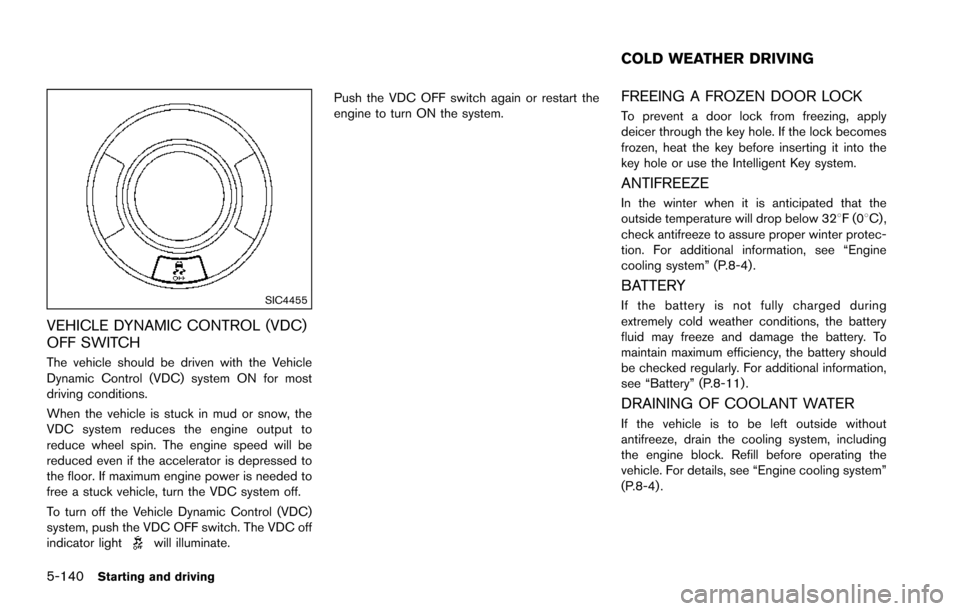
SIC4455
VEHICLE DYNAMIC CONTROL (VDC)
OFF SWITCH
The vehicle should be driven with the Vehicle
Dynamic Control (VDC) system ON for most
driving conditions.
When the vehicle is stuck in mud or snow, the
VDC system reduces the engine output to
reduce wheel spin. The engine speed will be
reduced even if the accelerator is depressed to
the floor. If maximum engine power is needed to
free a stuck vehicle, turn the VDC system off.
To turn off the Vehicle Dynamic Control (VDC)
system, push the VDC OFF switch. The VDC off
indicator light
will illuminate.Push the VDC OFF switch again or restart the
engine to turn ON the system.
FREEING A FROZEN DOOR LOCK
To prevent a door lock from freezing, apply
deicer through the key hole. If the lock becomes
frozen, heat the key before inserting it into the
key hole or use the Intelligent Key system.
ANTIFREEZE
In the winter when it is anticipated that the
outside temperature will drop below 328F(0
8C) ,
check antifreeze to assure proper winter protec-
tion. For additional information, see “Engine
cooling system” (P.8-4).
BATTERY
If the battery is not fully charged during
extremely cold weather conditions, the battery
fluid may freeze and damage the battery. To
maintain maximum efficiency, the battery should
be checked regularly. For additional information,
see “Battery” (P.8-11) .
DRAINING OF COOLANT WATER
If the vehicle is to be left outside without
antifreeze, drain the cooling system, including
the engine block. Refill before operating the
vehicle. For details, see “Engine cooling system”
(P.8-4) .
COLD WEATHER DRIVING
Page 503 of 614
6-20In case of emergency
Rocking a stuck vehicle
If your vehicle is stuck in sand, snow, mud, etc.,
use the following procedure:
1. Turn off the Vehicle Dynamic Control (VDC)system.
2. Make sure the area in front and behind the vehicle is clear of obstructions.
3. Turn the steering wheel right and left to clear an area around the front tires.
4. Slowly rock the vehicle forward and back- ward.
.Shift back and forth between R (Reverse)and D (Drive) .
.Apply the accelerator as little as possibleto maintain the rocking motion.
.Release the accelerator pedal before
shifting between R and D.
.Do not spin the tires above 35 MPH (55 km/h) .
5. If the vehicle cannot be freed after a few tries, contact a professional towing service
to remove the vehicle. This section describes the procedure for manu-
ally shifting the vehicle into the 4WD mode (4L
position) in case of an emergency.
WHEN 4WD WARNING LIGHT ILLU-
MINATES
If the 4WD warning light illuminates while
driving, there may be a malfunction in the
4WD system. Stop the vehicle and have the
vehicle checked as soon as possible. It is
recommended you contact a NISSAN dealer
for this service. (See “NISSAN all-mode 4WD
Š”
(P.5-123) .)
When the vehicle is stuck on an uneven road
(desert, mud, etc.) and the 4WD warning light is
illuminated, be sure to place the 4WD shift
switch in the 4L position. If only the rear wheels
are spinning, this means that the transfer has not
switched to the 4L position electrically.
If this situation occurs, contact a dealer or road
assistance service for help. If an immediate
service is not available, perform the following
procedure to switch to the 4L position manually
and free the vehicle.
CAUTION
Only perform this procedure in an
emergency. If the vehicle is driven for a long period
of time over a long distance with a
component detached, foreign material
such as water, sand, etc. may enter from
the opening and this may cause a
malfunction in the drivetrain system.
After freeing a vehicle that has become
stuck, it is recommended you contact a
NISSAN dealer for inspection and re-
pair.
WARNING
.
Ensure your safety before perform-
ing the operations. The vehicle may
move unexpectedly.
. Place the ignition switch in the OFF
position, apply the parking brake
and let the vehicle cool down.
. Do not perform the following proce-
dure immediately after driving the
vehicle. Parts such as exhaust com-
ponents, the transmission, etc. are
very hot and may cause a burn
injury.
. Make sure that the parts that will be
operated as well as related parts
FOUR-WHEEL DRIVE (4WD)
MANUAL SHIFTING (4WD models)
Page 611 of 614
11-6
Starting the engine ............................................. 5-16
STATUS button ............................................................. 4-8
Status light, Front passenger air bag .................... 1-60
Steering Heated steering wheel ....................................... 2-42
Power steering ................................................... 5-135
Power steering fluid ............................................... 8-8
Steering-wheel-mounted controls
for audio ................................................................. 4-91
Tilt/telescopic steering ....................................... 3-29
Storage ......................................................................... 2-50
Sun visors ..................................................................... 3-29
Sunglasses holder ...................................................... 2-52
Supplemental air bag warning labels .................... 1-68
Supplemental air bag warning light ........... 1-68, 2-16
Supplemental restraint system ................................ 1-52 Precautions on supplemental
restraint system .................................................... 1-52
Switch Autolight switch ................................................... 2-37
Fog light switch ................................................... 2-42
Hazard warning flasher switch ............................ 6-2
Headlight aiming control .................................... 2-39
Headlight switch .................................................. 2-37
Ignition switch ...................................................... 5-18
Power door lock switch ........................................ 3-5
SNOW mode switch .......................................... 2-47
Turn signal switch ................................................ 2-41
Vehicle Dynamic Control (VDC)
OFF switch ............................................................ 2-48
T
Tachometer ..................................................................... 2-7
Temperature gauge, Engine coolant
temperature gauge ....................................................... 2-7 Theft (NISSAN Vehicle Immobilizer System) ,
Engine start .................................................................. 2-31
Three-way catalyst ....................................................... 5-4
Tilt/telescopic steering .............................................. 3-29
Tire
Pressure, Low tire pressure warning light .... 2-15
Tire replacement indicator ................................. 2-26
Tires Flat tire ...................................................................... 6-3
Tire and Loading information label .... 8-31, 10-12
Tire chains ............................................................. 8-36
Tire dressing ............................................................ 7-4
Tire pressure ......................................................... 8-30
Tire pressure information (display) ................. 4-10
Tire Pressure Monitoring
System (TPMS) ............................................. 5-5, 6-3
Tire rotation ........................................................... 8-37
Types of tires ........................................................ 8-36
Uniform tire quality grading ............................. 10-29
Wheel/tire size ..................................................... 10-9
Wheels and tires ................................................. 8-30
To p Tether strap child restraints .............................. 1-36
Touch screen ................................................................. 4-5
TOW mode ............................................................... 5-132
TOW mode switch ..................................................... 2-47
Towing Flat towing ........................................................... 10-29
Tow truck towing ................................................. 6-16
Towing a trailer ................................................... 10-17
Towing safety ...................................................... 10-21
TPMS, Tire Pressure Monitoring System ...... 5-5, 6-3 TPMS with Easy Fill Tire Alert ............................ 5-8
Trailer towing ............................................................ 10-17
Transceiver HomeLink
ŠUniversal Transceiver ................... 2-67 Transmission
Automatic Transmission Fluid (ATF) .................. 8-8
Driving with automatic transmission ............... 5-18
Transmission shift lever lock release .............. 5-21
Transmitter (See remote keyless
entry system) ............................................................... 3-15
Traveling or registering your vehicle in
another country ........................................................ 10-10
Trip computer .............................................................. 2-27
Trip odometer .............................................................. 2-28
Turn signal switch ....................................................... 2-41
U
Underbody cleaning ..................................................... 7-3
Uniform tire quality grading ................................... 10-29
USB (Universal Serial Bus) connection port ....... 4-77
V
Vanity mirror ................................................................. 3-33
Vanity mirror lights ...................................................... 2-66
Variable voltage control system .............................. 8-13
Vehicle Dimensions ............................................................ 10-9
Identification number (VIN) ............................. 10-10
Loading information .......................................... 10-13
Recovery (freeing a stuck vehicle) .................. 6-19
Security system .................................................... 2-30
Vehicle Dynamic Control (VDC)
OFF switch ............................................................ 2-48
Vehicle Dynamic Control (VDC) system ...... 5-138
Vehicle Dynamic Control (VDC)
warning light ......................................................... 2-17
Vehicle information and settings (display) ....... 4-8
Vehicle information display ....................................... 2-20
Ventilators ..................................................................... 4-51