service NISSAN ARMADA 2017 2.G Owner's Manual
[x] Cancel search | Manufacturer: NISSAN, Model Year: 2017, Model line: ARMADA, Model: NISSAN ARMADA 2017 2.GPages: 614, PDF Size: 2.87 MB
Page 106 of 614
If any of the following conditions occur, the air
bag and/or pretensioner systems needs servi-
cing.
.The supplemental air bag warning light
remains on after approximately 7 seconds.
. The supplemental air bag warning light
flashes intermittently.
. The supplemental air bag warning light does
not come on at all.
It is recommended you visit a NISSAN dealer for
these services.
Unless checked and repaired, the supplemental
restraint system (air bag system) and/or the
pretensioners may not function properly.
For additional information, see “Supplemental
restraint system” (P.1-52) .
WARNING
If the supplemental air bag warning
light is on, it could mean that the front
air bag, side air bag, curtain air bag
systems and/or pretensioner systems
will not operate in an accident. To help
avoid injury to yourself or others, have
your vehicle checked. It is recom-
mended you visit a NISSAN dealer for
this service.
Vehicle Dynamic Control (VDC)
warning light
When the ignition switch is in the ON position,
the Vehicle Dynamic Control (VDC) warning
light illuminates and then turns off.
The light will blink when the VDC system or the
traction control system is operating, thus alerting
the driver that the vehicle is nearing its traction
limits. The road surface may be slippery.
When the VDC warning light illuminates when
the VDC system is turned on, this light alerts the
driver to the fact that the VDC system’s fail-safe
mode is operating, for example the VDC or hill
start assist system may not be functioning
properly. Have the system checked. It is
recommended you visit a NISSAN dealer for
this service. If a malfunction occurs in the
system, the VDC system function will be
canceled but the vehicle is still driveable. For
additional information, see “Vehicle Dynamic
Control (VDC) system” (P.5-138) .
INDICATOR LIGHTS
Automatic Transmission (AT) posi-
tion indicator light
When the ignition switch is placed in the ON
position, the indicator shows the shift lever
position.
In the manual shift mode, when the transmission
does not shift to the selected gear due to a
transmission protection mode, the AT position
indicator light will blink and a buzzer will sound.
See “Automatic transmission” (P.5-18) for
further details.
Blind Spot Intervention (BSI) ON
indicator light (green; if so equipped)
The light comes on in green when the Blind Spot
Intervention (BSI) system is turned on. The light
turns off when the system is turned off.
NOTE:
This light is common with the BSW/BSI
system warning light (orange) . (See “Blind
Spot Warning (BSW)/Blind Spot Interven-
tion (BSI) system warning light” (P.2-12) .)
For more details, see “Blind Spot Intervention
Š
(BSI)” (P.5-43) .
Instruments and controls2-17
Page 107 of 614
2-18Instruments and controls
Check suspension indicator light
When the ignition switch is placed in the ON
position, the light comes on for 2 seconds.
Cruise indicator light (if so
equipped)
Cruise main switch indicator:
This light illuminates when the cruise control
main switch is pushed. The light turns off when
the main switch is pushed again. When the
cruise main switch indicator light illuminates, the
cruise control system is operational. (See
“Cruise control” (P.5-67).)
Cruise malfunction:
If the cruise indicator light blinks while the
engine is running, it may indicate the cruise
control system is not functioning properly. Have
the system checked. It is recommended you visit
a NISSAN dealer for this service. (See “Cruise
control” (P.5-67) .)
Exterior light indicator
This indicator illuminates when the headlight
switch is turned to the AUTO,orposition and the front parking lights, instrument
panel lights, rear combination lights, license
plate lights or headlights are on. The indicator turns off when these lights are turned off.
Front fog light indicator light (if so
equipped)
The front fog light indicator light illuminates
when the front fog lights are on. (See “Fog light
switch” (P.2-42) .)
Front passenger air bag status light
The front passenger air bag status light ()
located on the instrument panel will be lit and
the passenger front air bag will be OFF
depending on how the front passenger seat is
being used.
For front passenger air bag status light opera-
tion, see “NISSAN Advanced Air Bag System
(front seats)” (P.1-58) .
High beam indicator light
This light comes on when the headlight high
beam is on and goes out when the low beam is
selected.
Lane Departure Prevention (LDP)
ON indicator light (green; if so equipped)
The light comes on in green when the Lane
Departure Prevention (LDP) system is turned on.
The light turns off when the system is turned off.
NOTE:
This light is common with the Lane Depar-
ture Warning (LDW) indicator light (or-
ange) . (See “Lane Departure Warning
(LDW) indicator light” (P.2-14) .)
For more details, see “Lane Departure Warning
(LDW)/Lane Departure Prevention (LDP)” (P.5-
23) .
Malfunction Indicator Light (MIL)
If the malfunction indicator light comes on
steady or blinks while the engine is running, it
may indicate a potential emission control mal-
function.
The malfunction indicator light may also come on
steady if the fuel-filler cap is loose or missing, or
if the vehicle runs out of fuel. Check to make
sure the fuel-filler cap is installed and closed
tightly, and that the vehicle has at least 3 US
gallons (14 liters) of fuel in the fuel tank.
After a few driving trips, the
light should
turn off if no other potential emission control
Page 108 of 614
system malfunction exists.
If this indicator light remains on for 20 seconds
and then blinks for 10 seconds when the engine
is not running, it indicates that the vehicle is not
ready for an emission control system inspection/
maintenance test. (See “Readiness for Inspec-
tion/Maintenance (I/M) test” (P.10-32) .)
Operation:
The malfunction indicator light will come on in
one of two ways:
.Malfunction indicator light on steady — An
emission control system malfunction has
been detected. Check the fuel-filler cap if
the LOOSE FUEL CAP warning appears in
the vehicle information display. If the fuel-
filler cap is loose or missing, tighten or install
the cap and continue to drive the vehicle.
The
light should turn off after a few
driving trips. If thelight does not turn off
after a few driving trips, have the vehicle
inspected. It is recommended you visit a
NISSAN dealer for this service. You do not
need to have your vehicle towed to the
dealer.
. Malfunction indicator light blinking — An
engine misfire has been detected which may
damage the emission control system. To reduce or avoid emission control system
damage:
1) Do not drive at speeds above 45 MPH
(72 km/h) .
2) Avoid hard acceleration or deceleration.
3) Avoid steep uphill grades.
4) If possible, reduce the amount of cargo being hauled or towed.
The malfunction indicator light may stop
blinking and remain on.
Have the vehicle inspected. It is recom-
mended you visit a NISSAN dealer for this
service. You do not need to have your
vehicle towed to the dealer.
CAUTION
Continued vehicle operation without
having the emission control system
checked and repaired as necessary
could lead to poor driveability, reduced
fuel economy, and possible damage to
the emission control system.
Security indicator light
The light blinks when the ignition switch is in the
ACC, OFF and LOCK position. This function
indicates the security system equipped on the
vehicle is operational.
If the security system is malfunctioning, this light
will remain on while the ignition switch is in the
ON position. For additional information, see
“Security systems” (P.2-30) .
SNOW mode indicator light
When selecting SNOW mode while the engine
is running, this light will illuminate. (See “SNOW
mode” (P.5-132) .)
TOW mode indicator light
This light will illuminate when the TOW MODE is
selected while the engine is running. (See
“TOW mode” (P.5-132) .)
Turn signal/hazard indicator lights
The light flashes when the turn signal switch
lever or hazard switch is turned on.
Instruments and controls2-19
Page 121 of 614
2-32Instruments and controls
SIC2045
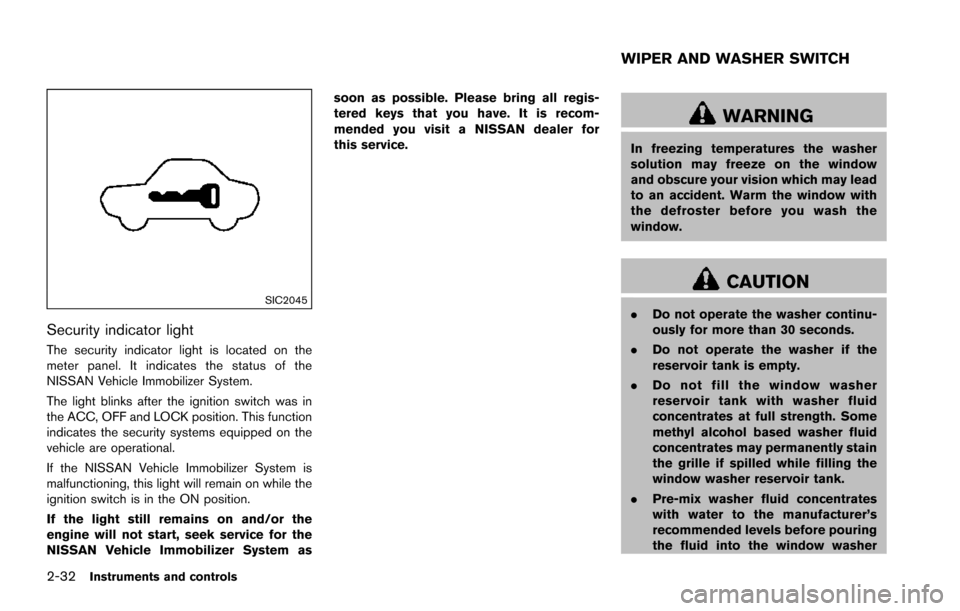
Security indicator light
The security indicator light is located on the
meter panel. It indicates the status of the
NISSAN Vehicle Immobilizer System.
The light blinks after the ignition switch was in
the ACC, OFF and LOCK position. This function
indicates the security systems equipped on the
vehicle are operational.
If the NISSAN Vehicle Immobilizer System is
malfunctioning, this light will remain on while the
ignition switch is in the ON position.
If the light still remains on and/or the
engine will not start, seek service for the
NISSAN Vehicle Immobilizer System assoon as possible. Please bring all regis-
tered keys that you have. It is recom-
mended you visit a NISSAN dealer for
this service.
WARNING
In freezing temperatures the washer
solution may freeze on the window
and obscure your vision which may lead
to an accident. Warm the window with
the defroster before you wash the
window.
CAUTION
.
Do not operate the washer continu-
ously for more than 30 seconds.
. Do not operate the washer if the
reservoir tank is empty.
. Do not fill the window washer
reservoir tank with washer fluid
concentrates at full strength. Some
methyl alcohol based washer fluid
concentrates may permanently stain
the grille if spilled while filling the
window washer reservoir tank.
. Pre-mix washer fluid concentrates
with water to the manufacturer’s
recommended levels before pouring
the fluid into the window washer
WIPER AND WASHER SWITCH
Page 135 of 614
2-46Instruments and controls
no one is using the seat.
. Do not put anything on the seat
which insulates heat, such as a
blanket, cushion, seat cover, etc.
Otherwise, the seat may become
overheated.
. Do not place anything hard or heavy
on the seat or pierce it with a pin or
similar object. This may result in
damage to the climate controlled
seat.
. Any liquid spilled on the seat should
be removed immediately with a dry
cloth.
. The climate controlled seat has an
air filter. Do not operate climate
controlled seat without an air filter.
This may result in damage to the
system.
. When cleaning the seat, never use
gasoline, thinner, or any similar
materials.
. If any malfunctions are found or the
climate controlled seat does not
operate, turn the switch off and
have the system checked. It is
recommended you visit a NISSAN
dealer for this service.
SSD0956
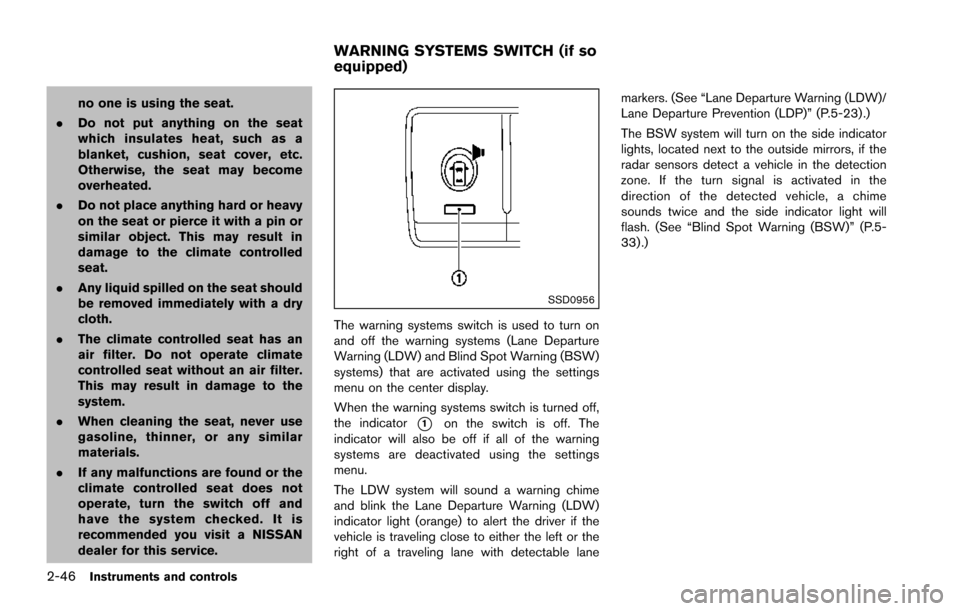
The warning systems switch is used to turn on
and off the warning systems (Lane Departure
Warning (LDW) and Blind Spot Warning (BSW)
systems) that are activated using the settings
menu on the center display.
When the warning systems switch is turned off,
the indicator
*1on the switch is off. The
indicator will also be off if all of the warning
systems are deactivated using the settings
menu.
The LDW system will sound a warning chime
and blink the Lane Departure Warning (LDW)
indicator light (orange) to alert the driver if the
vehicle is traveling close to either the left or the
right of a traveling lane with detectable lane markers. (See “Lane Departure Warning (LDW)/
Lane Departure Prevention (LDP)” (P.5-23).)
The BSW system will turn on the side indicator
lights, located next to the outside mirrors, if the
radar sensors detect a vehicle in the detection
zone. If the turn signal is activated in the
direction of the detected vehicle, a chime
sounds twice and the side indicator light will
flash. (See “Blind Spot Warning (BSW)” (P.5-
33) .)
WARNING SYSTEMS SWITCH (if so
equipped)
Page 151 of 614
2-62Instruments and controls
If the windows do not close automatically
If the power window automatic function (closing
only) does not operate properly, perform the
following procedure to initialize the power
window system.
1. Place the ignition switch in the ON position.
2. Close the door.
3. Open the window completely by operatingthe power window switch.
4. Pull the power window switch and hold it to close the window, and then hold the switch
more than 3 seconds after the window is
closed completely.
5. Release the power window switch. Operate the window by the automatic function to
confirm the initialization is complete.
6. Perform steps 2 through 5 above for other windows.
If the power window automatic function does
not operate properly after performing the pro-
cedure above, have your vehicle checked. It is
recommended you visit a NISSAN dealer for this
service.WARNING
. In an accident you could be thrown
from the vehicle through an open
moonroof. Always use seat belts
and child restraints.
. Do not allow anyone to stand up or
extend any portion of their body out
of the moonroof opening while the
vehicle is in motion or while the
moonroof is closing.
CAUTION
.Remove water drops, snow, ice or
sand from the moonroof before
opening.
. Do not place any heavy object on
the moonroof or surrounding area.
POWER MOONROOF
The moonroof only operates when the ignition
switch is in the ON position.
The moonroof is operational for about 45
seconds, even if the ignition switch is pushed
to the OFF position. If the driver’s door or the passenger’s door is opened during this period of
about 45 seconds, power to the moonroof is
canceled.
MOONROOF (if so equipped)
Page 153 of 614
2-64Instruments and controls
service.
SIC3642
To activate or deactivate the welcome light
function, perform the following procedure.
1. Place the ignition switch in the ON position.
2. Open the driver’s side door.
3. Within 20 seconds after the ignition switchis placed in the ON position, push the door
open request switch on the driver’s side
door handle for more than 5 seconds with
the driver’s door open.
4. A chime sounds when the setting is completed.
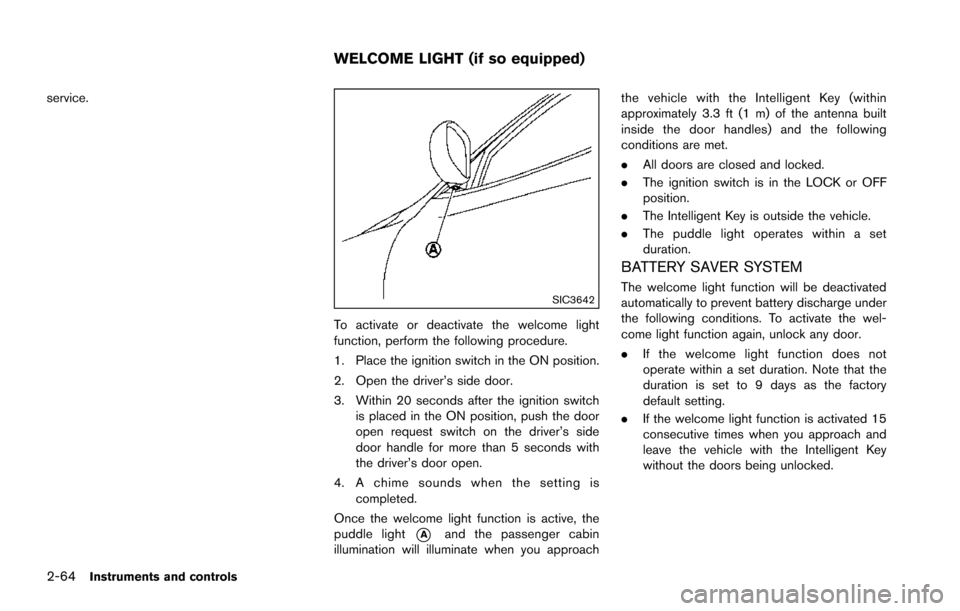
Once the welcome light function is active, the
puddle light
*Aand the passenger cabin
illumination will illuminate when you approach the vehicle with the Intelligent Key (within
approximately 3.3 ft (1 m) of the antenna built
inside the door handles) and the following
conditions are met.
.
All doors are closed and locked.
. The ignition switch is in the LOCK or OFF
position.
. The Intelligent Key is outside the vehicle.
. The puddle light operates within a set
duration.
BATTERY SAVER SYSTEM
The welcome light function will be deactivated
automatically to prevent battery discharge under
the following conditions. To activate the wel-
come light function again, unlock any door.
.If the welcome light function does not
operate within a set duration. Note that the
duration is set to 9 days as the factory
default setting.
. If the welcome light function is activated 15
consecutive times when you approach and
leave the vehicle with the Intelligent Key
without the doors being unlocked.
WELCOME LIGHT (if so equipped)
Page 186 of 614
JVP0466X
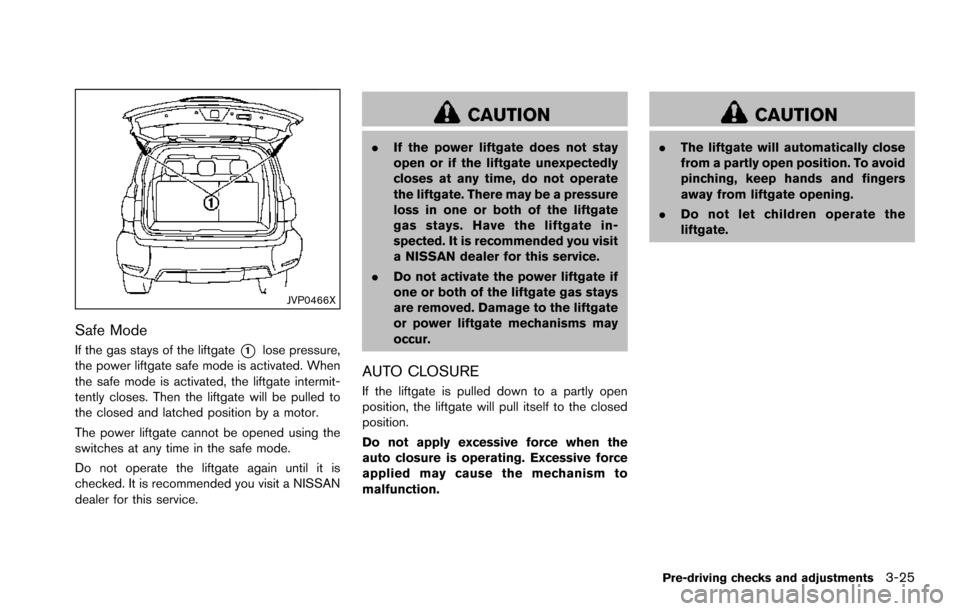
Safe Mode
If the gas stays of the liftgate*1lose pressure,
the power liftgate safe mode is activated. When
the safe mode is activated, the liftgate intermit-
tently closes. Then the liftgate will be pulled to
the closed and latched position by a motor.
The power liftgate cannot be opened using the
switches at any time in the safe mode.
Do not operate the liftgate again until it is
checked. It is recommended you visit a NISSAN
dealer for this service.
CAUTION
. If the power liftgate does not stay
open or if the liftgate unexpectedly
closes at any time, do not operate
the liftgate. There may be a pressure
loss in one or both of the liftgate
gas stays. Have the liftgate in-
spected. It is recommended you visit
a NISSAN dealer for this service.
. Do not activate the power liftgate if
one or both of the liftgate gas stays
are removed. Damage to the liftgate
or power liftgate mechanisms may
occur.
AUTO CLOSURE
If the liftgate is pulled down to a partly open
position, the liftgate will pull itself to the closed
position.
Do not apply excessive force when the
auto closure is operating. Excessive force
applied may cause the mechanism to
malfunction.
CAUTION
. The liftgate will automatically close
from a partly open position. To avoid
pinching, keep hands and fingers
away from liftgate opening.
. Do not let children operate the
liftgate.
Pre-driving checks and adjustments3-25
Page 188 of 614
.Push the power door lock switch to the
UNLOCK position.
To lock, close the fuel-filler door securely and
lock all doors by operating the door handle
request switch, the LOCK button on the
Intelligent Key, the mechanical key or the power
door lock switch.
FUEL-FILLER CAP
WARNING
. Gasoline is extremely flammable
and highly explosive under certain
conditions. You could be burned or
seriously injured if it is misused or
mishandled. Always stop engine
and do not smoke or allow open
flames or sparks near the vehicle
when refueling.
. Do not attempt to top off the fuel
tank after the fuel pump nozzle
shuts off automatically. Continued
refueling may cause fuel overflow,
resulting in fuel spray and possibly
a fire.
. Use only an original equipment type
fuel-filler cap as a replacement. It
has a built-in safety valve needed
for proper operation of the fuel system and emission control sys-
tem. An incorrect cap can result in a
serious malfunction and possible
injury. It could also cause the mal-
function indicator light to come on.
. Never pour fuel into the throttle
body to attempt to start your vehi-
cle.
. Do not fill a portable fuel container
in the vehicle or trailer. Static elec-
tricity can cause an explosion of
flammable liquid, vapor or gas in
any vehicle or trailer. To reduce the
risk of serious injury or death when
filling portable fuel containers:
— Always place the container on
the ground when filling.
— Do not use electronic devices when filling.
— Keep the pump nozzle in contact with the container while you are
filling it.
— Use only approved portable fuel containers for flammable liquid.
CAUTION
. If fuel is spilled on the vehicle body,
flush it away with water to avoid
paint damage.
. Insert the cap straight into the fuel-
filler tube, then tighten until the
fuel-filler cap clicks. Failure to tight-
en the fuel-filler cap properly may
cause the
malfunction indicator
light (MIL) to illuminate. If the
light illuminates because the fuel-
filler cap is loose or missing, tighten
or install the cap and continue to
drive the vehicle. The
light
should turn off after a few driving
trips. If the
light does not turn
off after a few driving trips, have the
vehicle inspected. It is recom-
mended you visit a NISSAN dealer
for this service.
. The LOOSE FUEL CAP warning will
appear if the fuel-filler cap is not
properly tightened. It may take a few
driving trips for the message to be
displayed. Failure to tighten the
fuel-filler cap properly after the
LOOSE FUEL CAP warning appears
Pre-driving checks and adjustments3-27
Page 208 of 614
visit a NISSAN dealer for these
services.
. Replacing tires with those not ori-
ginally specified by NISSAN could
affect the proper operation of the
TPMS.
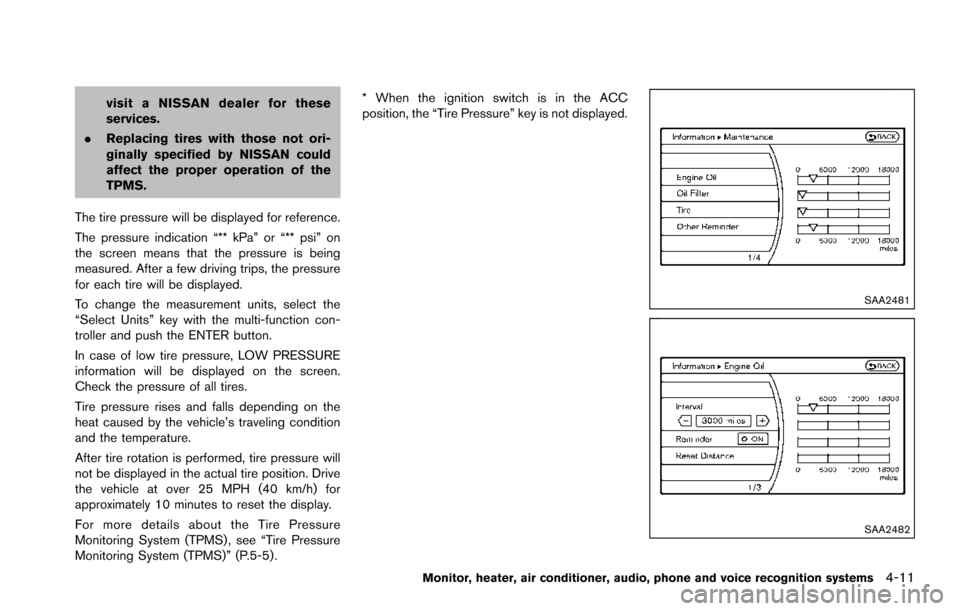
The tire pressure will be displayed for reference.
The pressure indication “** kPa” or “** psi” on
the screen means that the pressure is being
measured. After a few driving trips, the pressure
for each tire will be displayed.
To change the measurement units, select the
“Select Units” key with the multi-function con-
troller and push the ENTER button.
In case of low tire pressure, LOW PRESSURE
information will be displayed on the screen.
Check the pressure of all tires.
Tire pressure rises and falls depending on the
heat caused by the vehicle’s traveling condition
and the temperature.
After tire rotation is performed, tire pressure will
not be displayed in the actual tire position. Drive
the vehicle at over 25 MPH (40 km/h) for
approximately 10 minutes to reset the display.
For more details about the Tire Pressure
Monitoring System (TPMS) , see “Tire Pressure
Monitoring System (TPMS)” (P.5-5) . * When the ignition switch is in the ACC
position, the “Tire Pressure” key is not displayed.
SAA2481
SAA2482
Monitor, heater, air conditioner, audio, phone and voice recognition systems4-11