service NISSAN ARMADA 2017 2.G Workshop Manual
[x] Cancel search | Manufacturer: NISSAN, Model Year: 2017, Model line: ARMADA, Model: NISSAN ARMADA 2017 2.GPages: 614, PDF Size: 2.87 MB
Page 444 of 614
.When the VDC or ABS (including the
traction control system) operates
. When the SNOW mode switch is ON (To
use the DCA system, turn off the SNOW
mode switch, then turn on the dynamic
driver assistance switch
*2.)
For details about the SNOW mode switch,
see “SNOW mode switch” (P.2-47).
. When the 4WD shift switch is in the 4H or
4L position (for 4WD models)
. When the radar signal is temporarily inter-
rupted
Action to take:
When the conditions listed above are no longer
present, turn the system off with the dynamic
driver assistance switch
*2. Turn the DCA
system back on to use the system.
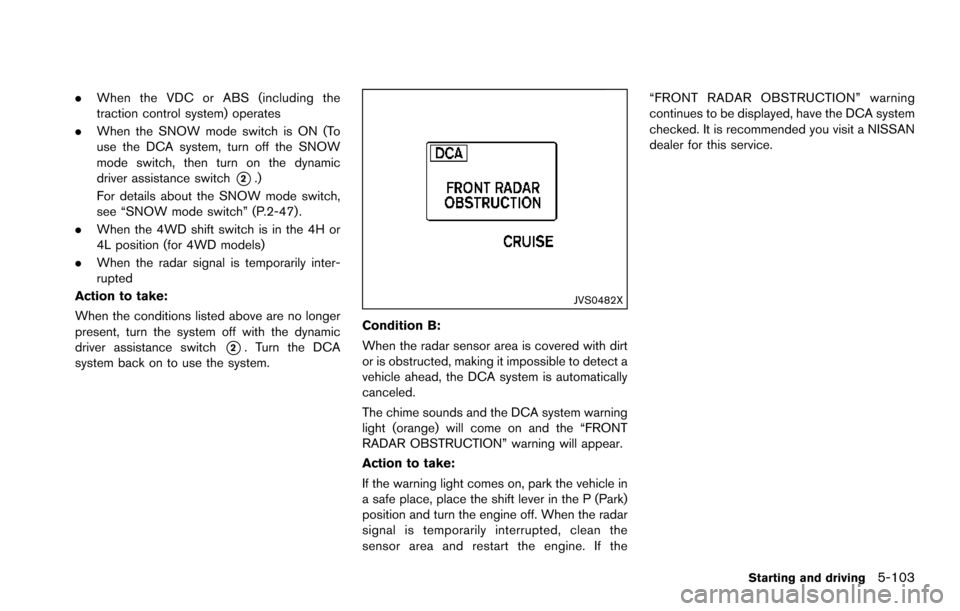
JVS0482X
Condition B:
When the radar sensor area is covered with dirt
or is obstructed, making it impossible to detect a
vehicle ahead, the DCA system is automatically
canceled.
The chime sounds and the DCA system warning
light (orange) will come on and the “FRONT
RADAR OBSTRUCTION” warning will appear.
Action to take:
If the warning light comes on, park the vehicle in
a safe place, place the shift lever in the P (Park)
position and turn the engine off. When the radar
signal is temporarily interrupted, clean the
sensor area and restart the engine. If the “FRONT RADAR OBSTRUCTION” warning
continues to be displayed, have the DCA system
checked. It is recommended you visit a NISSAN
dealer for this service.
Starting and driving5-103
Page 445 of 614
5-104Starting and driving
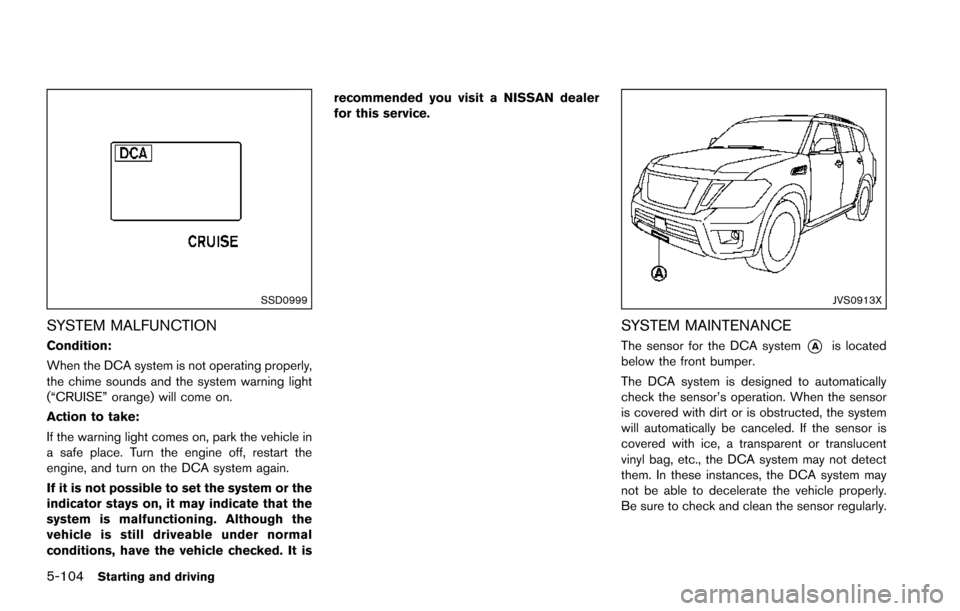
SSD0999
SYSTEM MALFUNCTION
Condition:
When the DCA system is not operating properly,
the chime sounds and the system warning light
(“CRUISE” orange) will come on.
Action to take:
If the warning light comes on, park the vehicle in
a safe place. Turn the engine off, restart the
engine, and turn on the DCA system again.
If it is not possible to set the system or the
indicator stays on, it may indicate that the
system is malfunctioning. Although the
vehicle is still driveable under normal
conditions, have the vehicle checked. It isrecommended you visit a NISSAN dealer
for this service.
JVS0913X
SYSTEM MAINTENANCE
The sensor for the DCA system*Ais located
below the front bumper.
The DCA system is designed to automatically
check the sensor’s operation. When the sensor
is covered with dirt or is obstructed, the system
will automatically be canceled. If the sensor is
covered with ice, a transparent or translucent
vinyl bag, etc., the DCA system may not detect
them. In these instances, the DCA system may
not be able to decelerate the vehicle properly.
Be sure to check and clean the sensor regularly.
Page 451 of 614
5-110Starting and driving
such as ice, snow, stickers, for
example. In these cases, the system
may not be able to warn the driver
properly. Be sure that you check,
clean and clear the sensor area
regularly.
. Excessive noise will interfere with
the warning chime sound, and the
chime may not be heard.
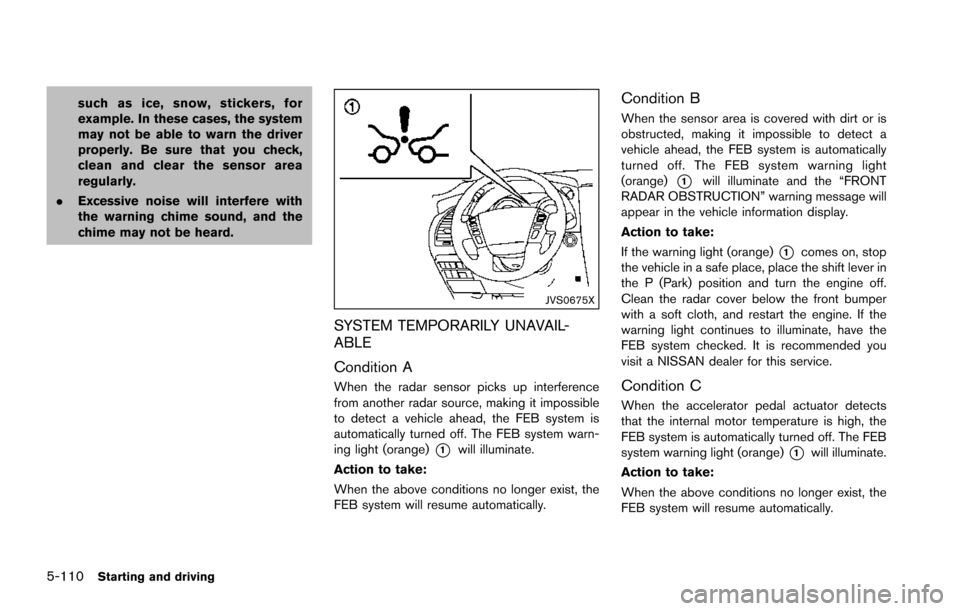
JVS0675X
SYSTEM TEMPORARILY UNAVAIL-
ABLE
Condition A
When the radar sensor picks up interference
from another radar source, making it impossible
to detect a vehicle ahead, the FEB system is
automatically turned off. The FEB system warn-
ing light (orange)
*1will illuminate.
Action to take:
When the above conditions no longer exist, the
FEB system will resume automatically.
Condition B
When the sensor area is covered with dirt or is
obstructed, making it impossible to detect a
vehicle ahead, the FEB system is automatically
turned off. The FEB system warning light
(orange)
*1will illuminate and the “FRONT
RADAR OBSTRUCTION” warning message will
appear in the vehicle information display.
Action to take:
If the warning light (orange)
*1comes on, stop
the vehicle in a safe place, place the shift lever in
the P (Park) position and turn the engine off.
Clean the radar cover below the front bumper
with a soft cloth, and restart the engine. If the
warning light continues to illuminate, have the
FEB system checked. It is recommended you
visit a NISSAN dealer for this service.
Condition C
When the accelerator pedal actuator detects
that the internal motor temperature is high, the
FEB system is automatically turned off. The FEB
system warning light (orange)
*1will illuminate.
Action to take:
When the above conditions no longer exist, the
FEB system will resume automatically.
Page 452 of 614
Condition D
When VDC system is OFF, the FEB brake will
not operate. In this case only visible and audible
warning operates. The FEB system warning light
(orange) will illuminate.
Action to take:
When the above conditions no longer exist, the
FEB system will resume automatically.
SYSTEM MALFUNCTION
If the FEB system malfunctions, it will be turned
off automatically, a chime will sound, the FEB
system warning light (orange)
*1will illuminate.
Action to take:
If the warning light (orange)
*1comes on, stop
the vehicle in a safe location and place the shift
lever in the P (Park) position. Turn the engine off
and restart the engine. If the warning light
continues to illuminate, have the FEB system
checked. It is recommended you visit a NISSAN
dealer for this service.
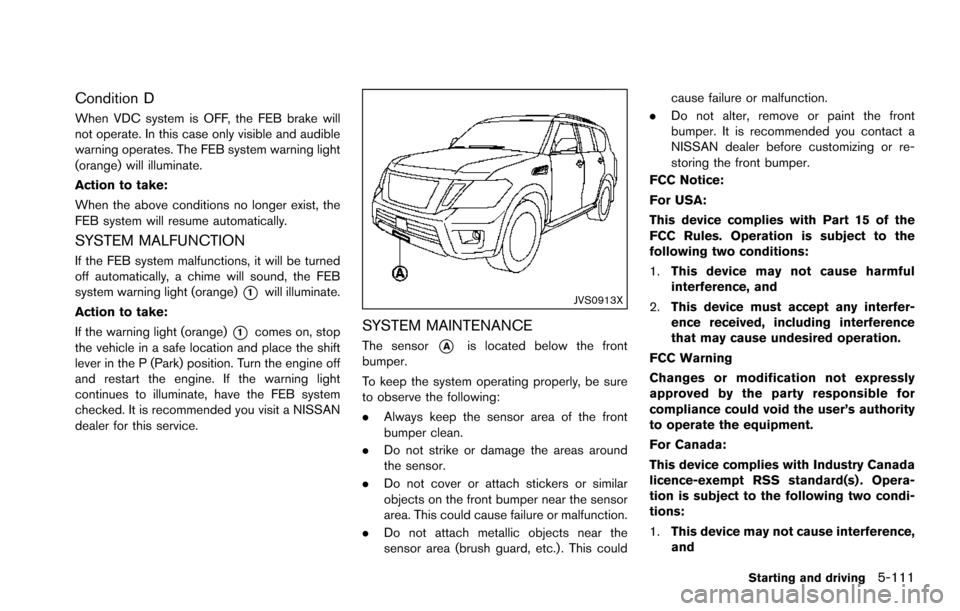
JVS0913X
SYSTEM MAINTENANCE
The sensor*Ais located below the front
bumper.
To keep the system operating properly, be sure
to observe the following:
. Always keep the sensor area of the front
bumper clean.
. Do not strike or damage the areas around
the sensor.
. Do not cover or attach stickers or similar
objects on the front bumper near the sensor
area. This could cause failure or malfunction.
. Do not attach metallic objects near the
sensor area (brush guard, etc.) . This could cause failure or malfunction.
. Do not alter, remove or paint the front
bumper. It is recommended you contact a
NISSAN dealer before customizing or re-
storing the front bumper.
FCC Notice:
For USA:
This device complies with Part 15 of the
FCC Rules. Operation is subject to the
following two conditions:
1. This device may not cause harmful
interference, and
2. This device must accept any interfer-
ence received, including interference
that may cause undesired operation.
FCC Warning
Changes or modification not expressly
approved by the party responsible for
compliance could void the user’s authority
to operate the equipment.
For Canada:
This device complies with Industry Canada
licence-exempt RSS standard(s) . Opera-
tion is subject to the following two condi-
tions:
1. This device may not cause interference,
and
Starting and driving5-111
Page 460 of 614
regularly.
. Excessive noise will interfere with
the warning chime sound, and the
chime may not be heard.
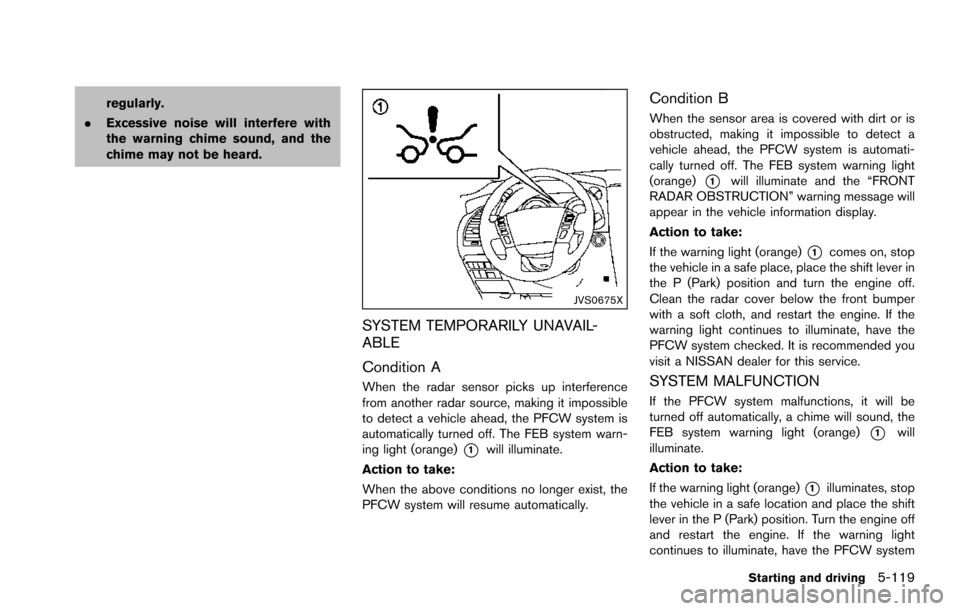
JVS0675X
SYSTEM TEMPORARILY UNAVAIL-
ABLE
Condition A
When the radar sensor picks up interference
from another radar source, making it impossible
to detect a vehicle ahead, the PFCW system is
automatically turned off. The FEB system warn-
ing light (orange)
*1will illuminate.
Action to take:
When the above conditions no longer exist, the
PFCW system will resume automatically.
Condition B
When the sensor area is covered with dirt or is
obstructed, making it impossible to detect a
vehicle ahead, the PFCW system is automati-
cally turned off. The FEB system warning light
(orange)
*1will illuminate and the “FRONT
RADAR OBSTRUCTION” warning message will
appear in the vehicle information display.
Action to take:
If the warning light (orange)
*1comes on, stop
the vehicle in a safe place, place the shift lever in
the P (Park) position and turn the engine off.
Clean the radar cover below the front bumper
with a soft cloth, and restart the engine. If the
warning light continues to illuminate, have the
PFCW system checked. It is recommended you
visit a NISSAN dealer for this service.
SYSTEM MALFUNCTION
If the PFCW system malfunctions, it will be
turned off automatically, a chime will sound, the
FEB system warning light (orange)
*1will
illuminate.
Action to take:
If the warning light (orange)
*1illuminates, stop
the vehicle in a safe location and place the shift
lever in the P (Park) position. Turn the engine off
and restart the engine. If the warning light
continues to illuminate, have the PFCW system
Starting and driving5-119
Page 461 of 614
5-120Starting and driving
checked. It is recommended you visit a NISSAN
dealer for this service.
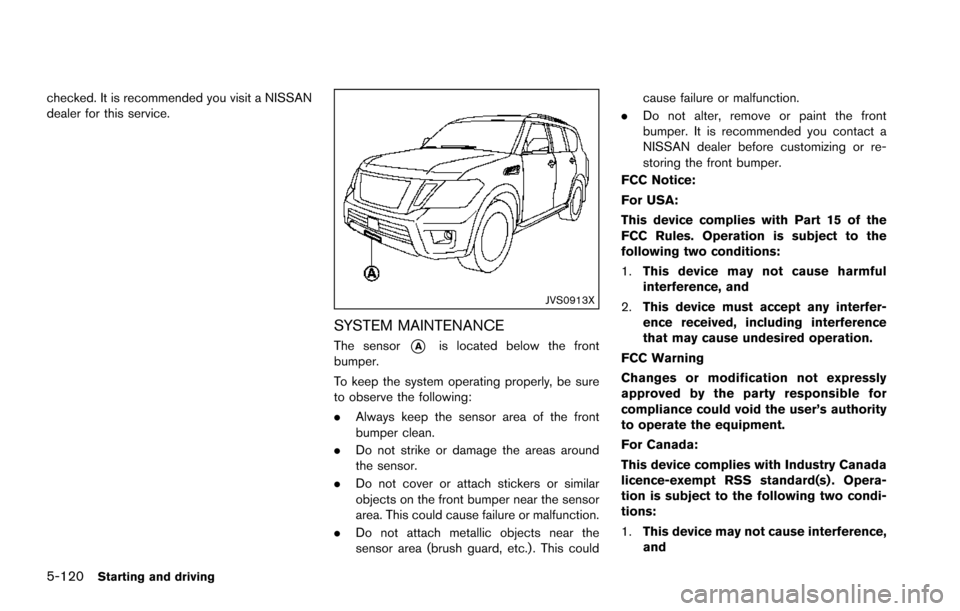
JVS0913X
SYSTEM MAINTENANCE
The sensor*Ais located below the front
bumper.
To keep the system operating properly, be sure
to observe the following:
. Always keep the sensor area of the front
bumper clean.
. Do not strike or damage the areas around
the sensor.
. Do not cover or attach stickers or similar
objects on the front bumper near the sensor
area. This could cause failure or malfunction.
. Do not attach metallic objects near the
sensor area (brush guard, etc.) . This could cause failure or malfunction.
. Do not alter, remove or paint the front
bumper. It is recommended you contact a
NISSAN dealer before customizing or re-
storing the front bumper.
FCC Notice:
For USA:
This device complies with Part 15 of the
FCC Rules. Operation is subject to the
following two conditions:
1. This device may not cause harmful
interference, and
2. This device must accept any interfer-
ence received, including interference
that may cause undesired operation.
FCC Warning
Changes or modification not expressly
approved by the party responsible for
compliance could void the user’s authority
to operate the equipment.
For Canada:
This device complies with Industry Canada
licence-exempt RSS standard(s) . Opera-
tion is subject to the following two condi-
tions:
1. This device may not cause interference,
and
Page 464 of 614
WARNING
.Do not attempt to raise two wheels
off the ground and shift the trans-
mission to any drive or reverse
position with the engine running.
Doing so may result in drivetrain
damage or unexpected vehicle
movement which could result in
serious vehicle damage or personal
injury.
. Do not attempt to test a 4WD
equipped vehicle on a 2-wheel dy-
namometer or similar equipment
even if the other two wheels are
raised off the ground. Make sure
you inform test facility personnel
that your vehicle is equipped with
4WD before it is placed on a dy-
namometer. Using the wrong test
equipment may result in drivetrain
damage or unexpected vehicle
movement which could result in
serious vehicle damage or personal
injury.
CAUTION
.Do not drive the vehicle in the 4HI or
4LO position on dry hard surface
roads. Driving on dry, hard surfaces
in 4HI or 4LO may cause unneces-
sary noise, tire wear and increased
fuel consumption.
If the Four-Wheel Drive (4WD) warn-
ing light turns on when driving on
dry hard surface roads:
— in the 4HI position, shift the
4WD shift switch to AUTO.
— in the 4LO position, stop the vehicle and shift the transmis-
sion lever to the N (Neutral)
position with the brake pedal
depressed and shift the 4WD
shift switch to AUTO.
If the 4WD warning light is still
on after the above operation,
have your vehicle checked as
soon as possible. It is recom-
mended you visit a NISSAN
dealer for this service.
. The transfer case may be damaged
if you continue driving with the 4WD warning light blinking.
See “On-pavement and off-road driving precau-
tions” (P.5-9) for other precautions for offroad
driving.
NISSAN ALL-MODE 4WDŠSYSTEM
The all mode 4WD system provides 3 positions
(AUTO, 4HI and 4LO) , so you can select the
desired drive mode according to the driving
conditions.
Starting and driving5-123
NISSAN ALL-MODE 4WDŠ(if so
equipped)
Page 470 of 614
If the 4WD warning light comes on, the 4WD
shift indicator turns off.
High-temperature transfer case oil makes the
4WD warning light blink rapidly (about twice per
second) . If the warning light blinks rapidly during
operation, stop the vehicle in a safe place
immediately. Then if the light turns off after a
while, you can continue driving.
A large difference between the diameters of
front and rear wheels will make the 4WD
warning light blink slowly (about once per two
seconds) . Change the 4WD shift switch to
AUTO and do not drive fast.
CAUTION
.If the 4WD warning light comes on
or blinks slowly during operation or
rapidly after stopping the vehicle for
a while, have your vehicle checked
as soon as possible. It is recom-
mended you visit a NISSAN dealer
for this service.
. Shifting between 4HI and 4LO is not
recommended when the 4WD warn-
ing light turns on.
. When the 4WD warning light comes
on, the 2WD mode may be engaged even if the 4WD shift switch is in
AUTO or 4H. Be especially careful
when driving. If corresponding parts
are malfunctioning, the 4WD mode
will not be engaged even if the 4WD
shift switch is shifted.
. Do not drive the vehicle in the 4HI or
4LO position on dry hard surface
roads. Driving on dry, hard surfaces
in 4HI or 4LO may cause unneces-
sary noise, tire wear and increased
fuel consumption.
If the 4WD warning light turns on
when driving on dry hard surface
roads:
— in the AUTO or 4HI position, shift
the 4WD shift switch to AUTO.
— in the 4LO position, stop the vehicle and shift the transmis-
sion shift lever to the N (Neutral)
position and shift the 4WD shift
switch to AUTO.
. If the 4WD warning light is still on
after the above operation, have your
vehicle checked as soon as possi-
ble. It is recommended you visit a
NISSAN dealer for this service. .
The transfer case may be damaged
if you continue driving with the
warning light blinking.
Starting and driving5-129
Page 477 of 614
5-136Starting and driving
BRAKING PRECAUTIONS
The brake system has two separate hydraulic
circuits. If one circuit malfunctions, you will still
have braking ability at two wheels.
You may feel a small click and hear a sound
when the brake pedal is fully depressed slowly.
This is not a malfunction and indicates that the
brake assist mechanism is operating properly.
Hydraulically-assisted brakes
The hydraulically-assisted brake system is de-
signed to use a hydraulic pump driven electri-
cally, to assist braking. If the engine stops, you
can stop the vehicle by depressing the foot
brake pedal. However, greater foot pressure on
the foot brake pedal will be required to stop the
vehicle. The stopping distance will be longer.
Wet brakes
When the vehicle is washed or driven through
water, the brakes may get wet. As a result, your
braking distance will be longer and the vehicle
may pull to one side during braking.
To dry brakes, drive the vehicle at a safe speed
while lightly tapping the brake pedal to heat-up
the brakes. Do this until the brakes return to
normal. Avoid driving the vehicle at high speeds
until the brakes function correctly.
PARKING BRAKE BREAK-IN
Break in the parking brake shoes whenever the
stopping effect of the parking brake is weakened
or whenever the parking brake shoes and/or
drums/rotors are replaced, in order to assure the
best braking performance.
This procedure is described in the vehicle
service manual. It is recommended you visit a
NISSAN dealer for this service.
Using the brakes
Avoid resting your foot on the brake pedal while
driving. This will cause overheating of the
brakes, wearing out the brake and pads faster
and reduce gas mileage.
To help save the brakes and to prevent the
brakes from overheating, reduce speed and
downshift to a lower gear before going down a
slope or long grade. Overheated brakes may
reduce braking performance and could result in
loss of vehicle control.
WARNING
.While driving on a slippery surface,
be careful when braking, accelerat-
ing or downshifting. Abrupt braking
or accelerating could cause the
wheels to skid and result in an accident.
. If the engine is not running or is
turned off while driving, the power
assist for the brakes will not work.
Braking will be harder.
BRAKE SYSTEM
Page 479 of 614
5-138Starting and driving
illuminates the ABS warning light on the
instrument panel. The brake system then oper-
ates normally, but without anti-lock assistance.
If the ABS warning light illuminates during the
self-test or while driving, have the vehicle
checked. It is recommended you visit a NISSAN
dealer for this service.
Normal operation
The ABS operates at speeds above 3 to 6 MPH
(5 to 10 km/h) . The speed varies according to
road conditions.
When the ABS senses that one or more wheels
are close to locking up, the actuator rapidly
applies and releases hydraulic pressure. This
action is similar to pumping the brakes very
quickly. You may feel a pulsation in the brake
pedal and hear a noise from under the hood or
feel a vibration from the actuator when it is
operating. This is normal and indicates that the
ABS is operating properly. However, the pulsa-
tion may indicate that road conditions are
hazardous and extra care is required while
driving.The Vehicle Dynamic Control (VDC) system
uses various sensors to monitor driver inputs
and vehicle motion. Under certain driving con-
ditions, the VDC system helps to perform the
following functions.
.
Controls brake pressure to reduce wheel
slip on one slipping drive wheel so power is
transferred to a non slipping drive wheel on
the same axle.
. Controls brake pressure and engine output
to reduce drive wheel slip based on vehicle
speed (traction control function) .
. Controls brake pressure at individual wheels
and engine output to help the driver maintain
control of the vehicle in the following
conditions:
— understeer (vehicle tends to not follow
the steered path despite increased
steering input)
— oversteer (vehicle tends to spin due to certain road or driving conditions) .
The VDC system can help the driver to maintain
control of the vehicle, but it cannot prevent loss
of vehicle control in all driving situations.
When the VDC system operates, the VDC
warning light
in the instrument panel flashes
so note the following:
. The road may be slippery or the system may
determine some action is required to help keep the vehicle on the steered path.
. You may feel a pulsation in the brake pedal
and hear a noise or vibration from under the
hood. This is normal and indicates that the
VDC system is working properly.
. Adjust your speed and driving to the road
conditions.
If a malfunction occurs in the system, the VDC
warning light
illuminates in the instrument
panel. The VDC system automatically turns off.
The VDC OFF switch is used to turn off the VDC
system. The VDC off indicator
illuminates to
indicate the VDC system is off. When the VDC
switch is used to turn off the system, the VDC
system still operates to prevent one drive wheel
from slipping by transferring power to a non
slipping drive wheel. The VDC warning light
flashes if this occurs. All other VDC functions
are off, and the VDC warning lightwill not
flash. The VDC system is automatically reset to
on when the ignition switch is placed in the OFF
position then back to the ON position.
When the 4L position is selected with the 4WD
shift switch, the VDC system is disabled and the
VDC off indicator light illuminates (for 4WD
models) .
See “Vehicle Dynamic Control (VDC) warning
light” (P.2-17) and “Vehicle Dynamic Control
(VDC) off indicator light” (P.2-20).
VEHICLE DYNAMIC CONTROL (VDC)
SYSTEM