battery NISSAN ARMADA 2017 2.G Owner's Guide
[x] Cancel search | Manufacturer: NISSAN, Model Year: 2017, Model line: ARMADA, Model: NISSAN ARMADA 2017 2.GPages: 614, PDF Size: 2.87 MB
Page 257 of 614
4-60Monitor, heater, air conditioner, audio, phone and voice recognition systems
Static and flutter: During signal interference from
buildings, large hills or due to antenna position,
usually in conjunction with increased distance
from the station transmitter, static or flutter can
be heard. This can be reduced by lowering the
treble setting to reduce the treble response.
Multipath reception: Because of the reflective
characteristics of FM signals, direct and re-
flected signals reach the receiver at the same
time. The signals may cancel each other,
resulting in momentary flutter or loss of sound.
AM radio reception:
AM signals, because of their low frequency, can
bend around objects and skip along the ground.
In addition, the signals can be bounced off the
ionosphere and bent back to earth. Because of
these characteristics. AM signals are also
subject to interference as they travel from
transmitter to receiver.
Fading: Occurs while the vehicle is passing
through freeway underpasses or in areas with
many tall buildings. It can also occur for several
seconds during ionospheric turbulence even in
areas where no obstacles exist.
Static: Caused by thunderstorms, electrical
power lines, electric signs and even traffic lights.Satellite radio reception:
When the satellite radio is used for the first time
or the battery has been replaced, the satellite
radio may not work properly. This is not a
malfunction. Wait more than 10 minutes with the
satellite radio ON and the vehicle outside of any
metal or large building for the satellite radio to
receive all of the necessary data.
The satellite radio mode requires an active
SiriusXM Satellite Radio subscription. The sa-
tellite radio is not available in Alaska, Hawaii and
Guam.
The satellite radio performance may be affected
if cargo carried on the roof blocks the satellite
radio signal.
If possible, do not put cargo near the satellite
antenna.
A build up of ice on the satellite radio antenna
can affect satellite radio performance. Remove
the ice to restore satellite radio reception.
SAA0480
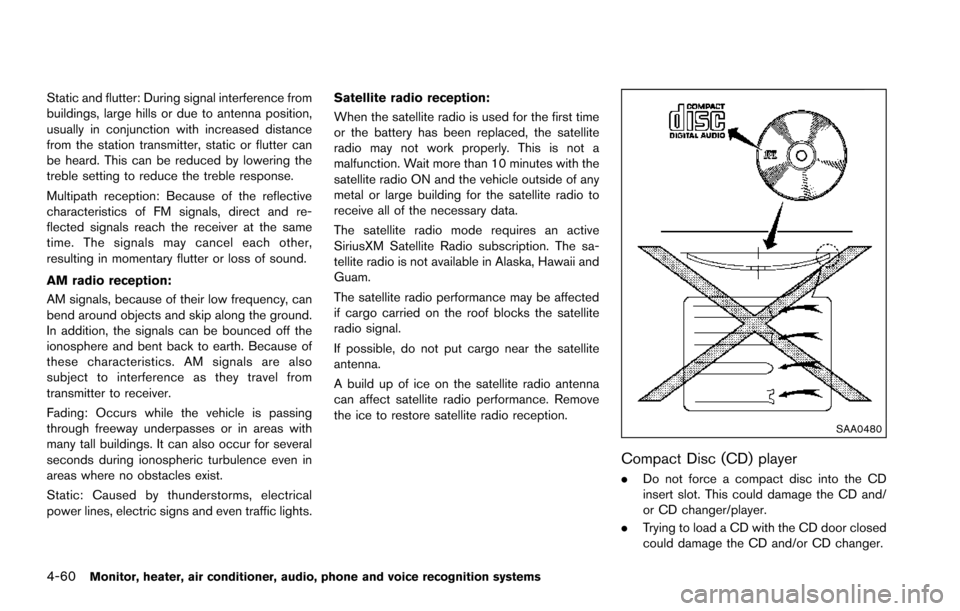
Compact Disc (CD) player
.
Do not force a compact disc into the CD
insert slot. This could damage the CD and/
or CD changer/player.
. Trying to load a CD with the CD door closed
could damage the CD and/or CD changer.
Page 269 of 614
4-72Monitor, heater, air conditioner, audio, phone and voice recognition systems
tions.
.NO SIGNAL (No signal is received while the
SAT tuner is connected.)
. OFF AIR (Broadcasting signed off)
. CHECK ANTENNA (Antenna connection
error)
. LOADING (When the initial setting is
performed)
. UPDATING (When the satellite radio sub-
scription is not active)
. INVALID CH (Invalid channel is received.)
SCAN tuning:
Push the SCAN tuning button to tune from low
to high frequencies and stop at each broad-
casting station/channel for 5 seconds. Pushing
the button again during this 10 seconds period
will stop SCAN tuning and the radio will remain
tuned to that station/channel.
If the SCAN tuning button is not pushed within 5
seconds, SCAN tuning moves to the next
station/channel.
*1to*6Station memory operations:
12 stations/channels can be set for the FM band
(6 each for FM1 and FM2) , 18 for SiriusXM
Satellite Radio (6 each for XM1, XM2 and XM3)
and 6 stations can be set for the AM band. 1. Choose the radio band using the radio band
select button.
2. Tune to the desired station/channel using the SEEK·CAT, TRACK, SCAN button or the
radio TUNE knob.
3. Push and hold the desired station preset button
*1to*6until the radio mutes.
4. The station indicator will then come on and the sound will resume. Memorizing is now
complete.
5. Other buttons can be set in the same manner.
If the battery cable is disconnected, or if the fuse
opens, the radio memory will be erased. In that
case, reset the desired stations/channels.
Menu (SiriusXM Satellite Radio):
When the “Menu” key on the display is selected
while the SiriusXM Satellite Radio is being
played, the menu list will be displayed.
The following items are available.
. Preset List
Displays the preset channel list. If 1 of the 6
preset stations listed is touched and held,
the current station will be stored as the new
preset.
. Customize Channel List
Selects specific channels to skip while using the TUNE, SEEK·CAT or Menu-Categories
feature.
. Favorite Artists & Songs
Stores the current artist or song that is being
played. Touch the “Alert” key to be reminded
when the stored artist or song is playing on a
station while listening to SiriusXM Satellite
Radio.
. Categories
Selecting a category will go to the first
channel in that category as defined by
SiriusXM Satellite Radio.
. Direct Tune
Inputs the channel number by using a
keypad.
Compact Disc (CD) player operation
Push the ignition switch to the ACC or ON
position and insert the Compact Disc (CD) into
the slot with the label side facing up. The CD will
be guided automatically into the slot and start
playing.
After loading the CD, the number of tracks on
the CD and the play time will appear on the
display.
If the radio is already operating, it will auto-
matically turn off and the CD will play.
If the system has been turned off while the CD
was playing, pushing the ON·OFF button will
Page 271 of 614
4-74Monitor, heater, air conditioner, audio, phone and voice recognition systems
DVD (Digital Versatile Disc) PLAYER
OPERATION
Precautions
Start the engine when using the DVD entertain-
ment system.
Movies will not be shown on the front display
while the vehicle is in any drive position to
reduce driver distraction. Audio is available
when a movie is played. To view movies in the
front display, stop the vehicle in a safe location,
move the shift lever to the P (Park) position and
apply the parking brake.
WARNING
.The driver must not attempt to
operate the DVD system or wear
the headphones while the vehicle is
in motion so that full attention may
be given to vehicle operation.
. Do not attempt to modify the system
to display a movie on the front
screen while the vehicle is being
driven. Doing so may distract the
driver and may cause a collision and
serious personal injury or death.
CAUTION
.Only operate the DVD while the
vehicle engine is running. Operating
the DVD for extended periods of
time with the engine OFF can dis-
charge the vehicle battery.
. Do not allow the system to get wet.
Excessive moisture such as spilled
liquids may cause the system to
malfunction.
. While playing VIDEO-CD media, this
DVD player does not guarantee
complete functionality of all VI-
DEO-CD formats.
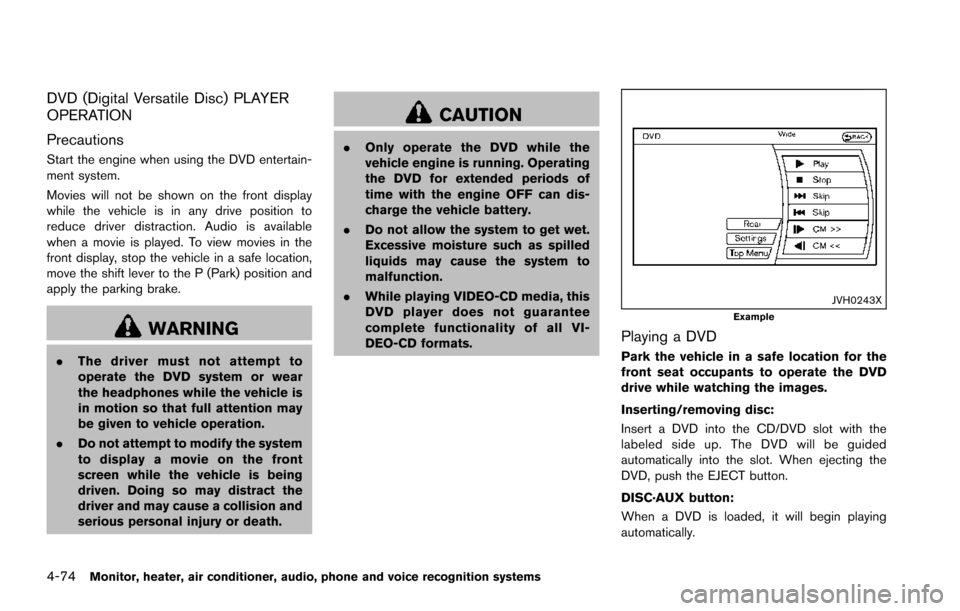
JVH0243XExample
Playing a DVD
Park the vehicle in a safe location for the
front seat occupants to operate the DVD
drive while watching the images.
Inserting/removing disc:
Insert a DVD into the CD/DVD slot with the
labeled side up. The DVD will be guided
automatically into the slot. When ejecting the
DVD, push the EJECT button.
DISC·AUX button:
When a DVD is loaded, it will begin playing
automatically.
Page 283 of 614
4-86Monitor, heater, air conditioner, audio, phone and voice recognition systems
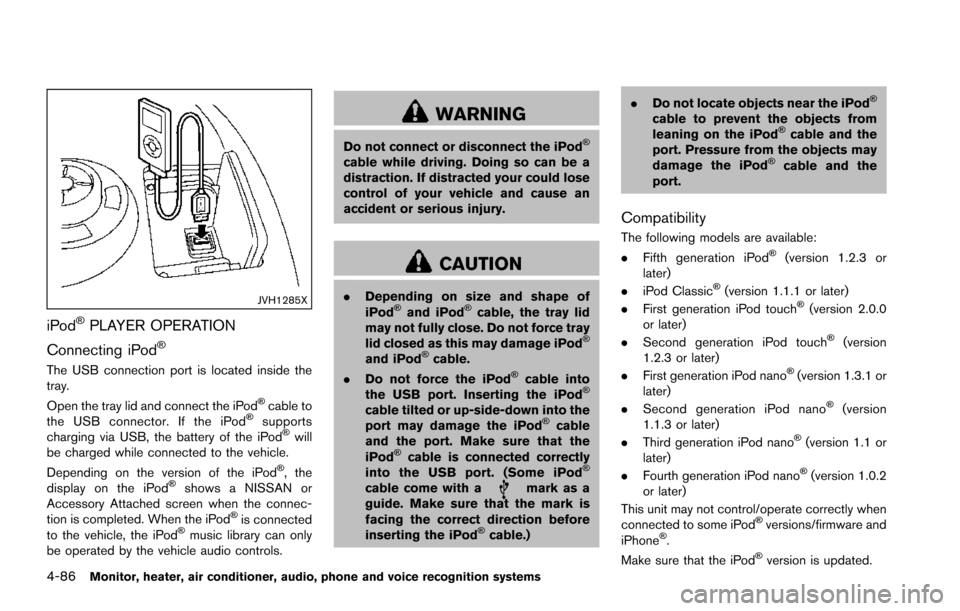
JVH1285X
iPodŠPLAYER OPERATION
Connecting iPod
Š
The USB connection port is located inside the
tray.
Open the tray lid and connect the iPod
Šcable to
the USB connector. If the iPodŠsupports
charging via USB, the battery of the iPodŠwill
be charged while connected to the vehicle.
Depending on the version of the iPod
Š, the
display on the iPodŠshows a NISSAN or
Accessory Attached screen when the connec-
tion is completed. When the iPod
Šis connected
to the vehicle, the iPodŠmusic library can only
be operated by the vehicle audio controls.
WARNING
Do not connect or disconnect the iPodŠ
cable while driving. Doing so can be a
distraction. If distracted your could lose
control of your vehicle and cause an
accident or serious injury.
CAUTION
. Depending on size and shape of
iPodŠand iPodŠcable, the tray lid
may not fully close. Do not force tray
lid closed as this may damage iPod
Š
and iPodŠcable.
. Do not force the iPodŠcable into
the USB port. Inserting the iPodŠ
cable tilted or up-side-down into the
port may damage the iPodŠcable
and the port. Make sure that the
iPod
Šcable is connected correctly
into the USB port. (Some iPodŠ
cable come with amark as a
guide. Make sure that the mark is
facing the correct direction before
inserting the iPod
Šcable.) .
Do not locate objects near the iPod
Š
cable to prevent the objects from
leaning on the iPodŠcable and the
port. Pressure from the objects may
damage the iPod
Šcable and the
port.
Compatibility
The following models are available:
. Fifth generation iPodŠ(version 1.2.3 or
later)
. iPod Classic
Š(version 1.1.1 or later)
. First generation iPod touchŠ(version 2.0.0
or later)
. Second generation iPod touch
Š(version
1.2.3 or later)
. First generation iPod nano
Š(version 1.3.1 or
later)
. Second generation iPod nano
Š(version
1.1.3 or later)
. Third generation iPod nano
Š(version 1.1 or
later)
. Fourth generation iPod nano
Š(version 1.0.2
or later)
This unit may not control/operate correctly when
connected to some iPod
Šversions/firmware and
iPhoneŠ.
Make sure that the iPodŠversion is updated.
Page 292 of 614
How to use headphones:
Control buttons for the headphones are located
on the back of the right headphone speaker.
.Turning power on/off:
Push the power ON/OFF button to turn the
headphones on or off. The POWER indica-
tor will illuminate when the headphones are
on.
. Selecting display (L/R):
When the rear displays are playing different
sources, sliding the DISPLAY SELECT
switch selects which of the audio sources
to listen to.
— L: the headphone will play audio from the
source playing on the left display.
— R: the headphone will play audio from the source playing on the right display.
JVH0360X
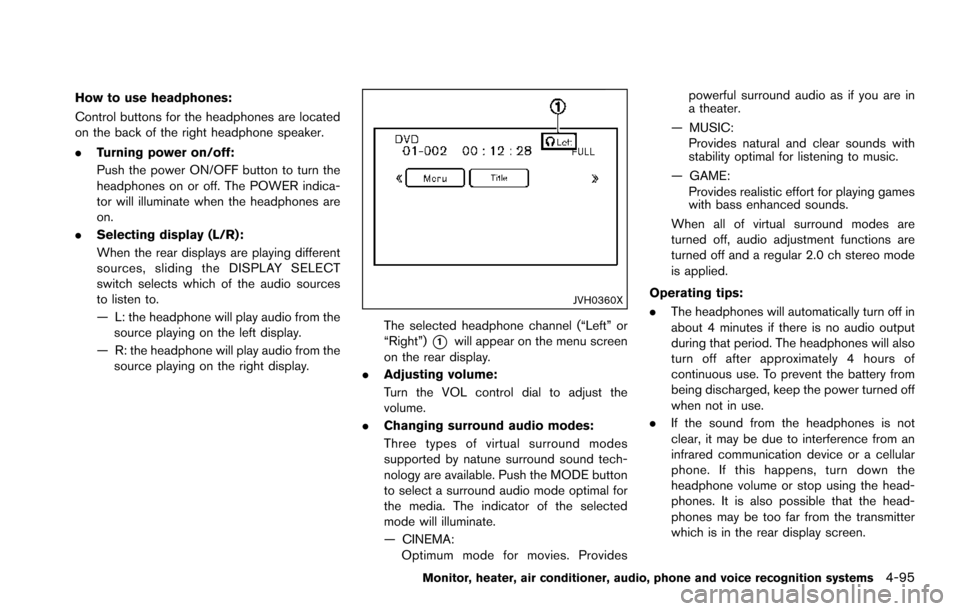
The selected headphone channel (“Left” or
“Right”)
*1will appear on the menu screen
on the rear display.
. Adjusting volume:
Turn the VOL control dial to adjust the
volume.
. Changing surround audio modes:
Three types of virtual surround modes
supported by natune surround sound tech-
nology are available. Push the MODE button
to select a surround audio mode optimal for
the media. The indicator of the selected
mode will illuminate.
— CINEMA:
Optimum mode for movies. Provides powerful surround audio as if you are in
a theater.
— MUSIC: Provides natural and clear sounds with
stability optimal for listening to music.
— GAME: Provides realistic effort for playing games
with bass enhanced sounds.
When all of virtual surround modes are
turned off, audio adjustment functions are
turned off and a regular 2.0 ch stereo mode
is applied.
Operating tips:
. The headphones will automatically turn off in
about 4 minutes if there is no audio output
during that period. The headphones will also
turn off after approximately 4 hours of
continuous use. To prevent the battery from
being discharged, keep the power turned off
when not in use.
. If the sound from the headphones is not
clear, it may be due to interference from an
infrared communication device or a cellular
phone. If this happens, turn down the
headphone volume or stop using the head-
phones. It is also possible that the head-
phones may be too far from the transmitter
which is in the rear display screen.
Monitor, heater, air conditioner, audio, phone and voice recognition systems4-95
Page 295 of 614
4-98Monitor, heater, air conditioner, audio, phone and voice recognition systems
JVH0246X
JVH1042X
Remote controller and headphones bat-
tery replacement
CAUTION
.An improperly disposed battery can
harm the environment. Always con-
firm local regulations for battery
disposal.
. When changing batteries, do not let
dust or oil get on the components.
NOTE:
. Change the batteries of the remote
controller when it does not function
properly.
. Change the batteries of the head-
phones when it stops functioning while
playing or when it produces noise.
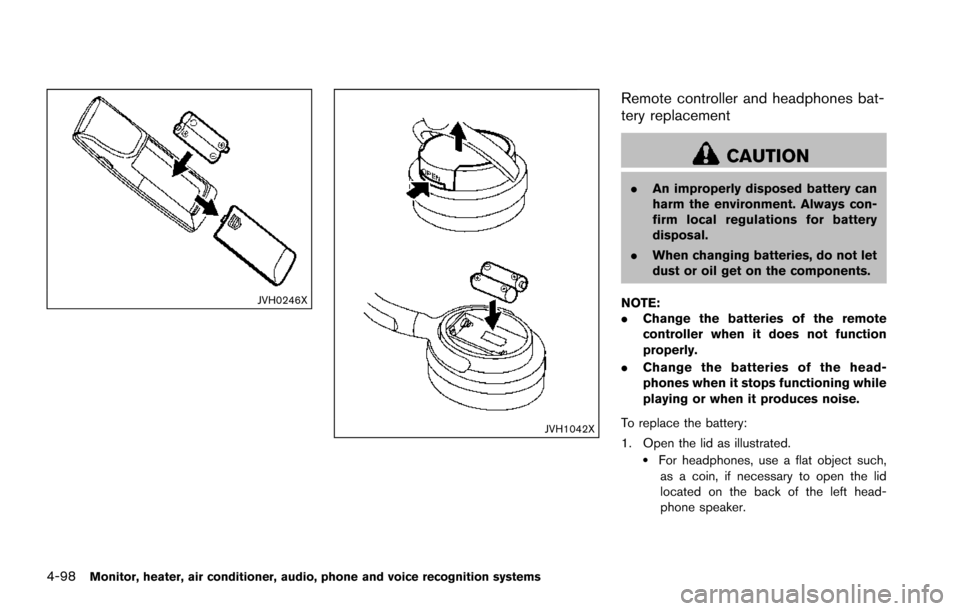
To replace the battery:
1. Open the lid as illustrated.
.For headphones, use a flat object such, as a coin, if necessary to open the lid
located on the back of the left head-
phone speaker.
Page 296 of 614
2. Replace both batteries with new ones..Recommended battery:Size AA 62 (remote controller)
Size AAA 62 (headphones)
.Be careful not to touch the battery
terminal.
.Make sure that the +and 7ends on the
batteries match the markings inside the
compartment.
3. Close the lid securely.
.If you will not be using the remote controller for long periods of time,
remove the batteries.
.Replacement of the batteries is needed when the remote controller only functions
at extremely close distances to the DVD
Entertainment System or when it does
not function at all.
FCC Notice:
Changes or modifications not expressly
approved by the party responsible for
compliance could void the user’s authority
to operate the equipment. This device
complies with Part 15 of the FCC Rules
and RSS-210 of Industry Canada. Opera-
tion is subject to the following two condi-
tions: (1) This device may not cause
harmful interference, and (2) this device must accept any interference received,
including interference that may cause un-
desired operation of the device.
BEFORE OPERATING DVD ENTER-
TAINMENT SYSTEM
Precautions
Start the engine when using the DVD Entertain-
ment System.
WARNING
The driver must not attempt to operate
the DVD Entertainment System or wear
the headphones while the vehicle is in
motion so that full attention may be
given to vehicle operation.
CAUTION
.
Only operate the DVD Entertain-
ment System while the vehicle en-
gine is running. Operating the DVD
Entertainment System for extended
periods of time with the engine OFF
can discharge the vehicle battery. .
Do not allow the system to get wet.
Excessive moisture such as spilled
liquids may cause the system to
malfunction.
. While playing VIDEO-CD media, this
DVD player does not guarantee
complete functionality of all VI-
DEO-CD formats.
Parental level (parental control)
Video data with the parental control setting can
be played with this system. Please use your own
judgement to set the parental control with the
system.
Disc selection
You can play the following disc formats with the
DVD player:
.DVD-VIDEO
. VIDEO-CD
. DTS-CD
Use DVDs with the region code “ALL” or the
code applicable to your country. (The region
code is displayed as a small symbol printed on
the top of the DVD.) This vehicle-installed DVD
player can only play DVDs with an applicable
region code.
Monitor, heater, air conditioner, audio, phone and voice recognition systems4-99
Page 303 of 614
4-106Monitor, heater, air conditioner, audio, phone and voice recognition systems
When installing a car phone or a CB radio in
your vehicle, be sure to observe the following
cautions, otherwise the new equipment may
adversely affect the electronic control modules
and electronic control system harness.
WARNING
.A cellular phone should not be used
for any purpose while driving so full
attention may be given to vehicle
operation. Some jurisdictions prohi-
bit the use of cellular phones while
driving.
. If you must make a call while your
vehicle is in motion, the hands-free
cellular phone operational mode (if
so equipped) is highly recom-
mended. Exercise extreme caution
at all times so full attention may be
given to vehicle operation.
. If a conversation in a moving vehicle
requires you to take notes, pull off
the road to a safe location and stop
your vehicle before doing so.
CAUTION
.Keep the antenna as far away as
possible from the electronic control
modules.
. Keep the antenna wire more than 8
in (20 cm) away from the electronic
control system harness. Do not
route the antenna wire next to any
harness.
. Adjust the antenna standing-wave
ratio as recommended by the man-
ufacturer.
. Connect the ground wire from the
CB radio chassis to the body.
. For details, it is recommended you
visit a NISSAN dealer.
WARNING
.Use a phone after stopping your
vehicle in a safe location. If you
have to use a phone while driving,
exercise extreme caution at all
times so full attention may be given
to vehicle operation.
. If you find yourself unable to devote
full attention to vehicle operation
while talking on the phone, pull off
the road to a safe location and stop
your vehicle before doing so.
CAUTION
To avoid draining the vehicle battery,
use a phone after starting the engine.
Your vehicle is equipped with Bluetooth
Š
Hands-Free Phone System. If you are an owner
of a compatible BluetoothŠenabled cellular
phone, you can set up the wireless connection
between your cellular phone and the in-vehicle
phone module. With Bluetooth
Šwireless tech-
nology, you can make or receive a telephone call
with your cellular phone in your pocket.
CAR PHONE OR CB RADIO BluetoothŠHANDS-FREE PHONE
SYSTEM
Page 304 of 614
Once a cellular phone is connected to the in-
vehicle phone module, no phone connecting
procedure is required anymore. Your phone is
automatically connected with the in-vehicle
phone module when the ignition switch is
pushed to the ON position with the registered
cellular phone turned on and carried in the
vehicle.
You can register up to 5 different Bluetooth
Š
cellular phones in the in-vehicle phone module.
However, you can talk on only one cellular phone
at a time.
The NISSAN Voice Recognition system sup-
ports the phone commands, so dialing a phone
number using your voice is possible. For more
details, see “NISSAN Voice Recognition sys-
tem” (P.4-117).
Before using the Bluetooth
ŠHands-Free Phone
System, refer to the following notes.
. Wireless LAN (Wi-Fi) and the Bluetooth
Š
functions share the same frequency band
(2.4 GHz) . Using the BluetoothŠand the
wireless LAN functions at the same time may
slow down or disconnect the communica-
tion and cause undesired noise. It is
recommended that you turn off the wireless
LAN (Wi-Fi) when using the Bluetooth
Š
functions. .
Set up the wireless connection between a
compatible cellular phone and the in-vehicle
phone module before using the Bluetooth
Š
Hands-Free Phone System.
. Some BluetoothŠenabled cellular phones
may not be recognized by the in-vehicle
phone module. Please visit
www.nissanusa.com/bluetooth for a recom-
mended phone list.
. You will not be able to use a hands-free
phone under the following conditions:
— Your vehicle is outside of the telephone
service area.
— Your vehicle is in an area where it is difficult to receive radio waves; such as in
a tunnel, in an underground parking
garage, behind a tall building or in a
mountainous area.
— Your cellular phone is locked in order not to be dialed.
. When the radio wave condition is not ideal
or ambient sound is too loud, it may be
difficult to hear the other person’s voice
during a call.
. Immediately after the ignition switch is
pushed to the ON position, it may be
impossible to receive a call for a short
period of time. .
Do not place the cellular phone in an area
surrounded by metal or far away from the in-
vehicle phone module to prevent tone quality
degradation and wireless connection dis-
ruption.
. While a cellular phone is connected through
the Bluetooth
Šwireless connection, the
battery power of the cellular phone may
discharge quicker than usual.
. If the Bluetooth
ŠHands-Free Phone System
seems to be malfunctioning, please visit
www.nissanusa.com/bluetooth for trouble-
shooting help.
. Some cellular phones or other devices may
cause interference or a buzzing noise to
come from the audio system speakers.
Storing the device in a different location
may reduce or eliminate the noise.
. Refer to the cellular phone Owner’s Manual
regarding the telephone pairing procedure
specific to your phone, battery charging,
cellular phone antenna, etc.
. The antenna display on the monitor will not
coincide with the antenna display of some
cellular phones.
. Keep the interior of the vehicle as quiet as
possible to hear the caller’s voice clearly as
well as to minimize its echoes.
Monitor, heater, air conditioner, audio, phone and voice recognition systems4-107
Page 342 of 614
5 Starting and driving
Precautions when starting and driving ................................ 5-4Exhaust gas (carbon monoxide) ...................................... 5-4
Three-way catalyst .............................................................. 5-4
Tire Pressure Monitoring System (TPMS) .................... 5-5
Avoiding collision and rollover ......................................... 5-8
On-pavement and off-road driving precautions .......... 5-9
Off-road recovery ................................................................ 5-9
Rapid air pressure loss ...................................................... 5-9
Drinking alcohol/drugs and driving .............................. 5-10
Driving safety precautions .............................................. 5-10
Push-button ignition switch ................................................. 5-12 Operating range for engine start function ................. 5-13
Push-button ignition switch positions ......................... 5-14
Emergency engine shut off ............................................ 5-14
Intelligent Key battery discharge .................................. 5-15
Before starting the engine ................................................... 5-15
Starting the engine ................................................................ 5-16 Remote start (if so equipped) ....................................... 5-16
Driving the vehicle ................................................................. 5-17 Engine protection mode ................................................. 5-17
Automatic transmission ................................................... 5-18
Parking brake ........................................................................\
.. 5-22
Lane Departure Warning (LDW)/Lane Departure
Prevention (LDP) (if so equipped) .................................... 5-23 LDW system operation ................................................... 5-24 Turning the LDW system ON/OFF ............................ 5-25
How to enable/disable the LDW system ................. 5-26
LDP system operation .................................................. 5-26
Turning the LDP system ON/OFF ............................. 5-28
How to enable/disable the LDP system .................. 5-28
LDW/LDP system limitations ...................................... 5-29
System temporarily unavailable .................................. 5-31
System malfunction ....................................................... 5-32
System maintenance ..................................................... 5-32
Blind Spot Warning (BSW) (if so equipped) ................ 5-33
BSW system operation ................................................ 5-35
Turning the BSW system ON/OFF ........................... 5-36
How to enable/disable the BSW system ................ 5-36
BSW system limitations ............................................... 5-37
BSW driving situations ................................................. 5-38
System temporarily unavailable .................................. 5-41
System malfunction ....................................................... 5-41
System maintenance ..................................................... 5-42
Blind Spot Intervention
Š(BSI) (if so equipped) ........... 5-43
BSI system operation .................................................... 5-45
Turning the BSI system ON/OFF ............................... 5-46
How to enable/disable the BSI system ................... 5-47
BSI system limitations ................................................... 5-47
BSI driving situations .................................................... 5-49
System temporarily unavailable .................................. 5-54