ECU NISSAN ARMADA 2017 2.G Service Manual
[x] Cancel search | Manufacturer: NISSAN, Model Year: 2017, Model line: ARMADA, Model: NISSAN ARMADA 2017 2.GPages: 614, PDF Size: 2.87 MB
Page 121 of 614
2-32Instruments and controls
SIC2045
Security indicator light
The security indicator light is located on the
meter panel. It indicates the status of the
NISSAN Vehicle Immobilizer System.
The light blinks after the ignition switch was in
the ACC, OFF and LOCK position. This function
indicates the security systems equipped on the
vehicle are operational.
If the NISSAN Vehicle Immobilizer System is
malfunctioning, this light will remain on while the
ignition switch is in the ON position.
If the light still remains on and/or the
engine will not start, seek service for the
NISSAN Vehicle Immobilizer System assoon as possible. Please bring all regis-
tered keys that you have. It is recom-
mended you visit a NISSAN dealer for
this service.
WARNING
In freezing temperatures the washer
solution may freeze on the window
and obscure your vision which may lead
to an accident. Warm the window with
the defroster before you wash the
window.
CAUTION
.
Do not operate the washer continu-
ously for more than 30 seconds.
. Do not operate the washer if the
reservoir tank is empty.
. Do not fill the window washer
reservoir tank with washer fluid
concentrates at full strength. Some
methyl alcohol based washer fluid
concentrates may permanently stain
the grille if spilled while filling the
window washer reservoir tank.
. Pre-mix washer fluid concentrates
with water to the manufacturer’s
recommended levels before pouring
the fluid into the window washer
WIPER AND WASHER SWITCH
Page 145 of 614
2-56Instruments and controls
SIC4446
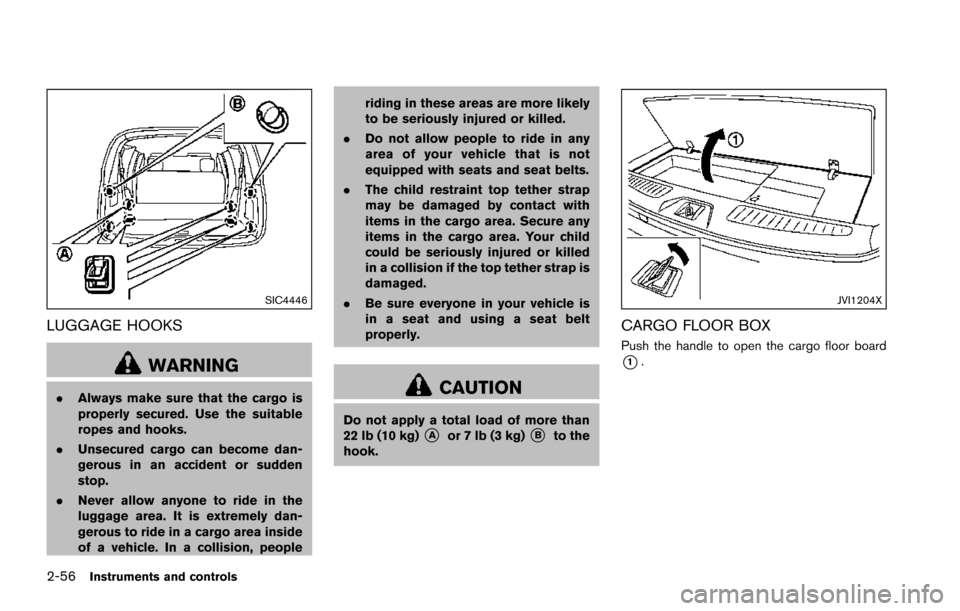
LUGGAGE HOOKS
WARNING
.Always make sure that the cargo is
properly secured. Use the suitable
ropes and hooks.
. Unsecured cargo can become dan-
gerous in an accident or sudden
stop.
. Never allow anyone to ride in the
luggage area. It is extremely dan-
gerous to ride in a cargo area inside
of a vehicle. In a collision, people riding in these areas are more likely
to be seriously injured or killed.
. Do not allow people to ride in any
area of your vehicle that is not
equipped with seats and seat belts.
. The child restraint top tether strap
may be damaged by contact with
items in the cargo area. Secure any
items in the cargo area. Your child
could be seriously injured or killed
in a collision if the top tether strap is
damaged.
. Be sure everyone in your vehicle is
in a seat and using a seat belt
properly.CAUTION
Do not apply a total load of more than
22 lb (10 kg)*Aor 7 lb (3 kg)*Bto the
hook.
JVI1204X
CARGO FLOOR BOX
Push the handle to open the cargo floor board
*1.
Page 146 of 614
JVI1515X
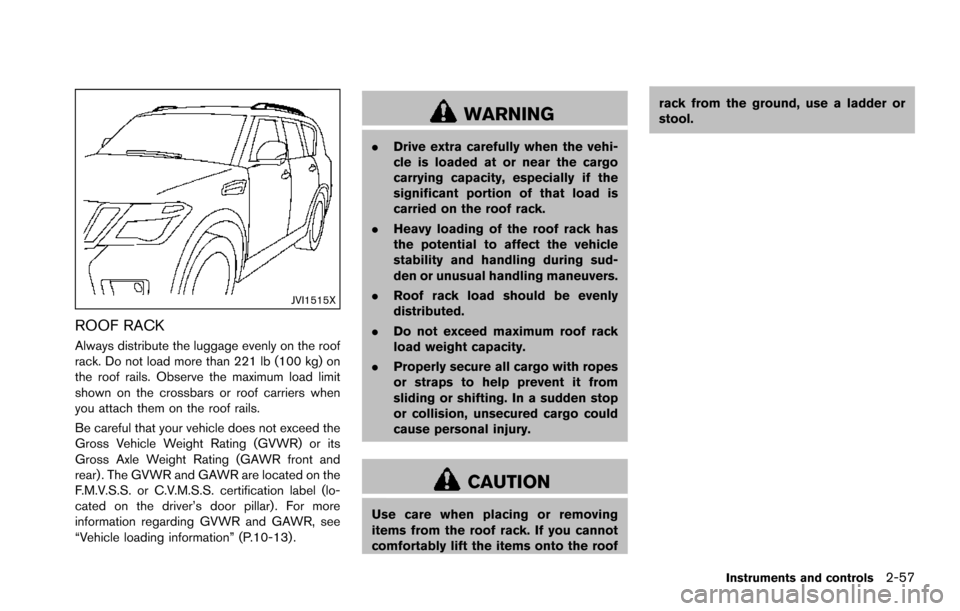
ROOF RACK
Always distribute the luggage evenly on the roof
rack. Do not load more than 221 lb (100 kg) on
the roof rails. Observe the maximum load limit
shown on the crossbars or roof carriers when
you attach them on the roof rails.
Be careful that your vehicle does not exceed the
Gross Vehicle Weight Rating (GVWR) or its
Gross Axle Weight Rating (GAWR front and
rear) . The GVWR and GAWR are located on the
F.M.V.S.S. or C.V.M.S.S. certification label (lo-
cated on the driver’s door pillar). For more
information regarding GVWR and GAWR, see
“Vehicle loading information” (P.10-13) .
WARNING
.Drive extra carefully when the vehi-
cle is loaded at or near the cargo
carrying capacity, especially if the
significant portion of that load is
carried on the roof rack.
. Heavy loading of the roof rack has
the potential to affect the vehicle
stability and handling during sud-
den or unusual handling maneuvers.
. Roof rack load should be evenly
distributed.
. Do not exceed maximum roof rack
load weight capacity.
. Properly secure all cargo with ropes
or straps to help prevent it from
sliding or shifting. In a sudden stop
or collision, unsecured cargo could
cause personal injury.
CAUTION
Use care when placing or removing
items from the roof rack. If you cannot
comfortably lift the items onto the roof rack from the ground, use a ladder or
stool.
Instruments and controls2-57
Page 147 of 614
2-58Instruments and controls
JVE0219X
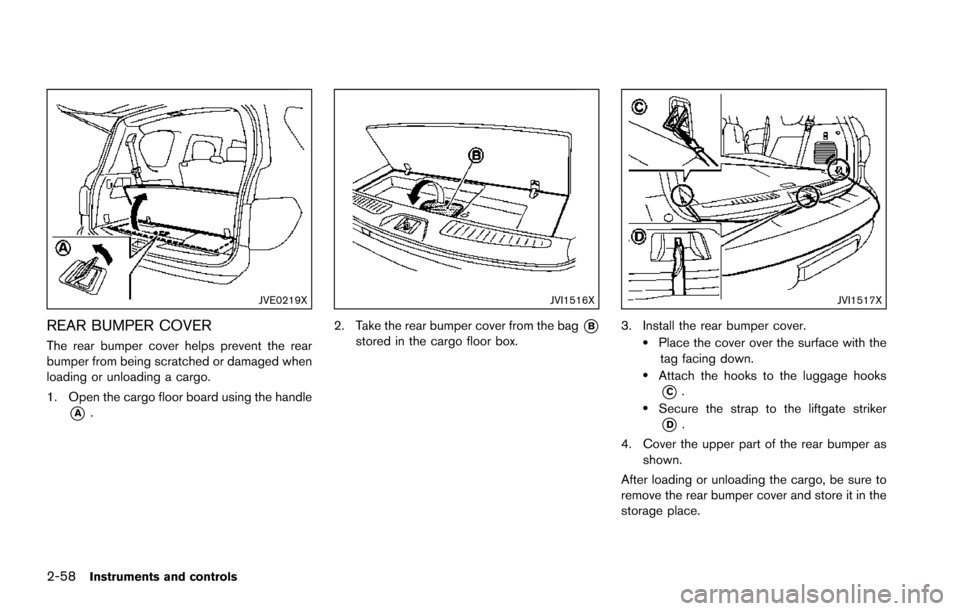
REAR BUMPER COVER
The rear bumper cover helps prevent the rear
bumper from being scratched or damaged when
loading or unloading a cargo.
1. Open the cargo floor board using the handle
*A.
JVI1516X
2. Take the rear bumper cover from the bag*Bstored in the cargo floor box.
JVI1517X
3. Install the rear bumper cover..Place the cover over the surface with thetag facing down.
.Attach the hooks to the luggage hooks
*C..Secure the strap to the liftgate striker
*D.
4. Cover the upper part of the rear bumper as shown.
After loading or unloading the cargo, be sure to
remove the rear bumper cover and store it in the
storage place.
Page 153 of 614
2-64Instruments and controls
service.
SIC3642
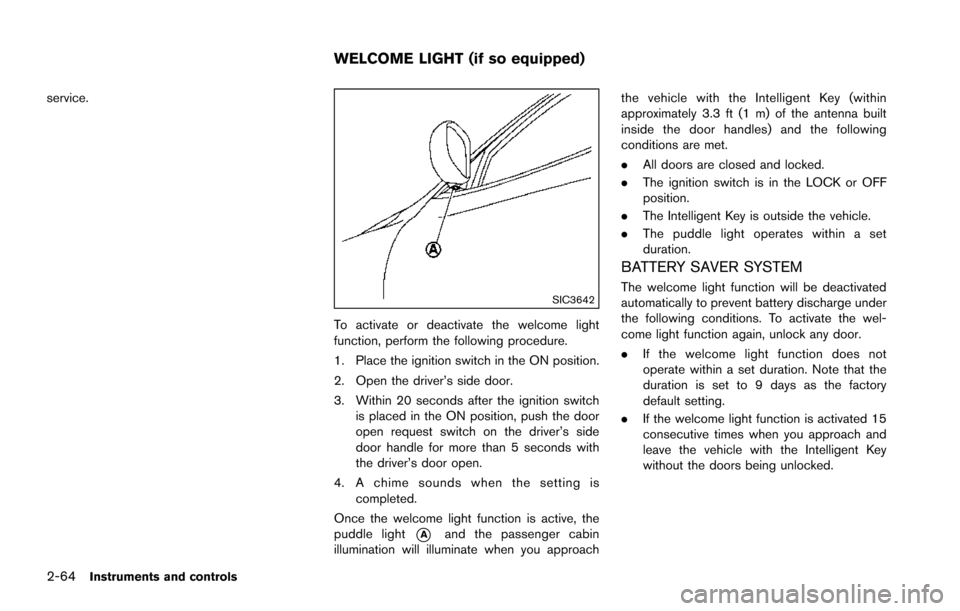
To activate or deactivate the welcome light
function, perform the following procedure.
1. Place the ignition switch in the ON position.
2. Open the driver’s side door.
3. Within 20 seconds after the ignition switchis placed in the ON position, push the door
open request switch on the driver’s side
door handle for more than 5 seconds with
the driver’s door open.
4. A chime sounds when the setting is completed.
Once the welcome light function is active, the
puddle light
*Aand the passenger cabin
illumination will illuminate when you approach the vehicle with the Intelligent Key (within
approximately 3.3 ft (1 m) of the antenna built
inside the door handles) and the following
conditions are met.
.
All doors are closed and locked.
. The ignition switch is in the LOCK or OFF
position.
. The Intelligent Key is outside the vehicle.
. The puddle light operates within a set
duration.
BATTERY SAVER SYSTEM
The welcome light function will be deactivated
automatically to prevent battery discharge under
the following conditions. To activate the wel-
come light function again, unlock any door.
.If the welcome light function does not
operate within a set duration. Note that the
duration is set to 9 days as the factory
default setting.
. If the welcome light function is activated 15
consecutive times when you approach and
leave the vehicle with the Intelligent Key
without the doors being unlocked.
WELCOME LIGHT (if so equipped)
Page 156 of 614
SIC4418
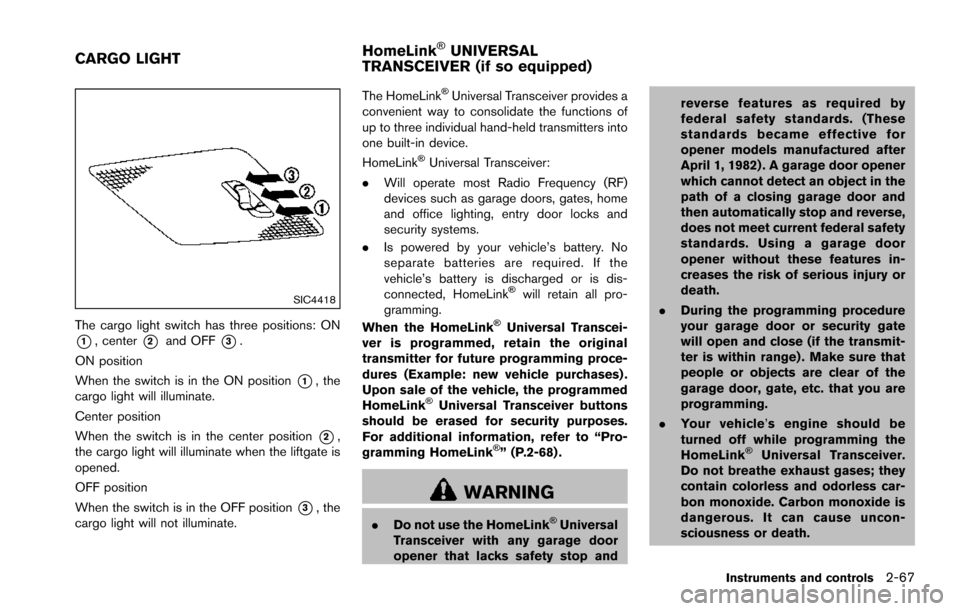
The cargo light switch has three positions: ON
*1, center*2and OFF*3.
ON position
When the switch is in the ON position
*1, the
cargo light will illuminate.
Center position
When the switch is in the center position
*2,
the cargo light will illuminate when the liftgate is
opened.
OFF position
When the switch is in the OFF position
*3, the
cargo light will not illuminate. The HomeLink
ŠUniversal Transceiver provides a
convenient way to consolidate the functions of
up to three individual hand-held transmitters into
one built-in device.
HomeLink
ŠUniversal Transceiver:
. Will operate most Radio Frequency (RF)
devices such as garage doors, gates, home
and office lighting, entry door locks and
security systems.
. Is powered by your vehicle’s battery. No
separate batteries are required. If the
vehicle’s battery is discharged or is dis-
connected, HomeLink
Šwill retain all pro-
gramming.
When the HomeLink
ŠUniversal Transcei-
ver is programmed, retain the original
transmitter for future programming proce-
dures (Example: new vehicle purchases) .
Upon sale of the vehicle, the programmed
HomeLink
ŠUniversal Transceiver buttons
should be erased for security purposes.
For additional information, refer to “Pro-
gramming HomeLink
Š” (P.2-68) .
WARNING
. Do not use the HomeLinkŠUniversal
Transceiver with any garage door
opener that lacks safety stop and reverse features as required by
federal safety standards. (These
standards became effective for
opener models manufactured after
April 1, 1982) . A garage door opener
which cannot detect an object in the
path of a closing garage door and
then automatically stop and reverse,
does not meet current federal safety
standards. Using a garage door
opener without these features in-
creases the risk of serious injury or
death.
. During the programming procedure
your garage door or security gate
will open and close (if the transmit-
ter is within range) . Make sure that
people or objects are clear of the
garage door, gate, etc. that you are
programming.
. Your vehicle’ s engine should be
turned off while programming the
HomeLink
ŠUniversal Transceiver.
Do not breathe exhaust gases; they
contain colorless and odorless car-
bon monoxide. Carbon monoxide is
dangerous. It can cause uncon-
sciousness or death.
Instruments and controls2-67
CARGO LIGHT HomeLinkŠUNIVERSAL
TRANSCEIVER (if so equipped)
Page 170 of 614
SPA2074
INTELLIGENT KEY OPERATING
RANGE
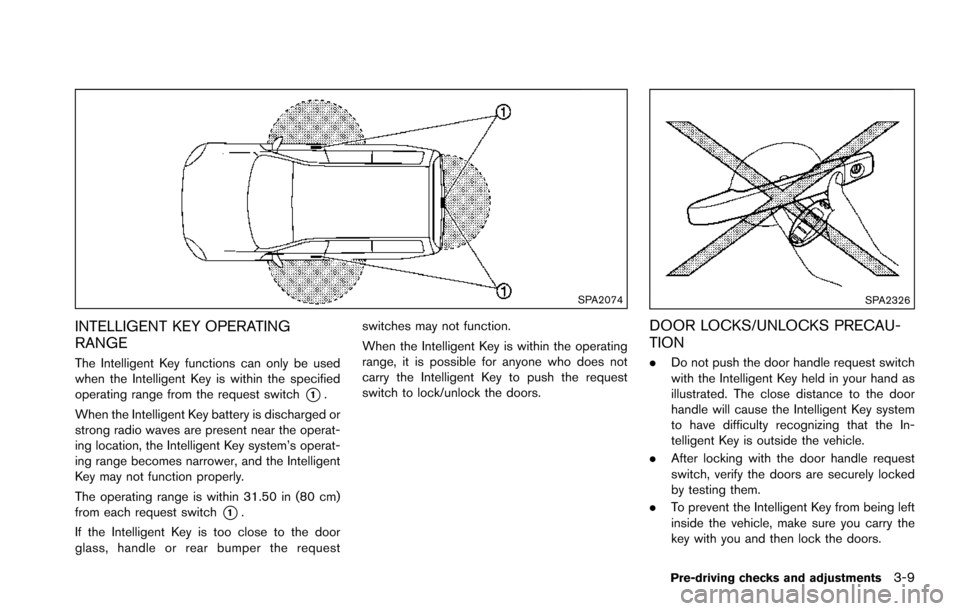
The Intelligent Key functions can only be used
when the Intelligent Key is within the specified
operating range from the request switch
*1.
When the Intelligent Key battery is discharged or
strong radio waves are present near the operat-
ing location, the Intelligent Key system’s operat-
ing range becomes narrower, and the Intelligent
Key may not function properly.
The operating range is within 31.50 in (80 cm)
from each request switch
*1.
If the Intelligent Key is too close to the door
glass, handle or rear bumper the request switches may not function.
When the Intelligent Key is within the operating
range, it is possible for anyone who does not
carry the Intelligent Key to push the request
switch to lock/unlock the doors.
SPA2326
DOOR LOCKS/UNLOCKS PRECAU-
TION
.
Do not push the door handle request switch
with the Intelligent Key held in your hand as
illustrated. The close distance to the door
handle will cause the Intelligent Key system
to have difficulty recognizing that the In-
telligent Key is outside the vehicle.
. After locking with the door handle request
switch, verify the doors are securely locked
by testing them.
. To prevent the Intelligent Key from being left
inside the vehicle, make sure you carry the
key with you and then lock the doors.
Pre-driving checks and adjustments3-9
Page 172 of 614
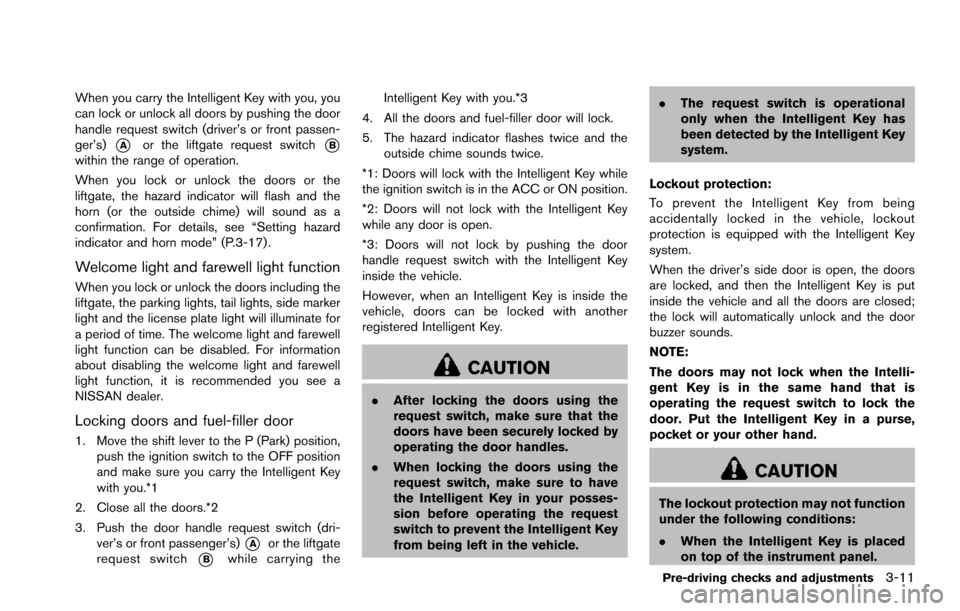
When you carry the Intelligent Key with you, you
can lock or unlock all doors by pushing the door
handle request switch (driver’s or front passen-
ger’s)
*Aor the liftgate request switch*Bwithin the range of operation.
When you lock or unlock the doors or the
liftgate, the hazard indicator will flash and the
horn (or the outside chime) will sound as a
confirmation. For details, see “Setting hazard
indicator and horn mode” (P.3-17) .
Welcome light and farewell light function
When you lock or unlock the doors including the
liftgate, the parking lights, tail lights, side marker
light and the license plate light will illuminate for
a period of time. The welcome light and farewell
light function can be disabled. For information
about disabling the welcome light and farewell
light function, it is recommended you see a
NISSAN dealer.
Locking doors and fuel-filler door
1. Move the shift lever to the P (Park) position,push the ignition switch to the OFF position
and make sure you carry the Intelligent Key
with you.*1
2. Close all the doors.*2
3. Push the door handle request switch (dri- ver’s or front passenger’s)
*Aor the liftgate
request switch
*Bwhile carrying the Intelligent Key with you.*3
4. All the doors and fuel-filler door will lock.
5. The hazard indicator flashes twice and the outside chime sounds twice.
*1: Doors will lock with the Intelligent Key while
the ignition switch is in the ACC or ON position.
*2: Doors will not lock with the Intelligent Key
while any door is open.
*3: Doors will not lock by pushing the door
handle request switch with the Intelligent Key
inside the vehicle.
However, when an Intelligent Key is inside the
vehicle, doors can be locked with another
registered Intelligent Key.
CAUTION
. After locking the doors using the
request switch, make sure that the
doors have been securely locked by
operating the door handles.
. When locking the doors using the
request switch, make sure to have
the Intelligent Key in your posses-
sion before operating the request
switch to prevent the Intelligent Key
from being left in the vehicle. .
The request switch is operational
only when the Intelligent Key has
been detected by the Intelligent Key
system.
Lockout protection:
To prevent the Intelligent Key from being
accidentally locked in the vehicle, lockout
protection is equipped with the Intelligent Key
system.
When the driver’s side door is open, the doors
are locked, and then the Intelligent Key is put
inside the vehicle and all the doors are closed;
the lock will automatically unlock and the door
buzzer sounds.
NOTE:
The doors may not lock when the Intelli-
gent Key is in the same hand that is
operating the request switch to lock the
door. Put the Intelligent Key in a purse,
pocket or your other hand.
CAUTION
The lockout protection may not function
under the following conditions:
. When the Intelligent Key is placed
on top of the instrument panel.
Pre-driving checks and adjustments3-11
Page 174 of 614
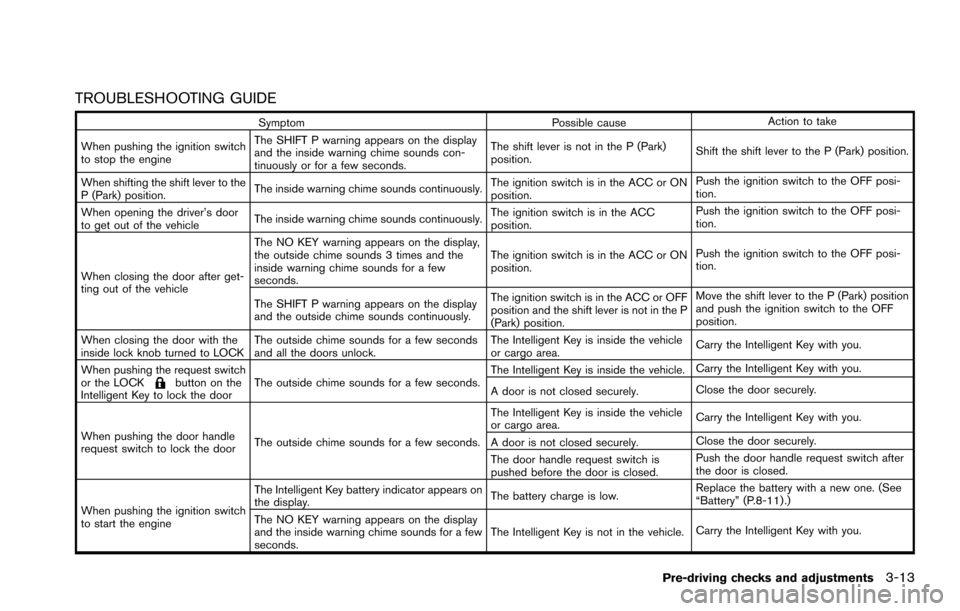
TROUBLESHOOTING GUIDE
SymptomPossible causeAction to take
When pushing the ignition switch
to stop the engine The SHIFT P warning appears on the display
and the inside warning chime sounds con-
tinuously or for a few seconds.
The shift lever is not in the P (Park)
position.
Shift the shift lever to the P (Park) position.
When shifting the shift lever to the
P (Park) position. The inside warning chime sounds continuously.
The ignition switch is in the ACC or ON
position.Push the ignition switch to the OFF posi-
tion.
When opening the driver’s door
to get out of the vehicle The inside warning chime sounds continuously. The ignition switch is in the ACC
position.Push the ignition switch to the OFF posi-
tion.
When closing the door after get-
ting out of the vehicle The NO KEY warning appears on the display,
the outside chime sounds 3 times and the
inside warning chime sounds for a few
seconds.
The ignition switch is in the ACC or ON
position.
Push the ignition switch to the OFF posi-
tion.
The SHIFT P warning appears on the display
and the outside chime sounds continuously. The ignition switch is in the ACC or OFF
position and the shift lever is not in the P
(Park) position.Move the shift lever to the P (Park) position
and push the ignition switch to the OFF
position.
When closing the door with the
inside lock knob turned to LOCK The outside chime sounds for a few seconds
and all the doors unlock. The Intelligent Key is inside the vehicle
or cargo area.
Carry the Intelligent Key with you.
When pushing the request switch
or the LOCK
button on the
Intelligent Key to lock the door The outside chime sounds for a few seconds. The Intelligent Key is inside the vehicle.
Carry the Intelligent Key with you.
A door is not closed securely. Close the door securely.
When pushing the door handle
request switch to lock the door The outside chime sounds for a few seconds. The Intelligent Key is inside the vehicle
or cargo area.
Carry the Intelligent Key with you.
A door is not closed securely. Close the door securely.
The door handle request switch is
pushed before the door is closed. Push the door handle request switch after
the door is closed.
When pushing the ignition switch
to start the engine The Intelligent Key battery indicator appears on
the display.
The battery charge is low.Replace the battery with a new one. (See
“Battery” (P.8-11) .)
The NO KEY warning appears on the display
and the inside warning chime sounds for a few
seconds. The Intelligent Key is not in the vehicle.
Carry the Intelligent Key with you.
Pre-driving checks and adjustments3-13
Page 176 of 614
WARNING
The Intelligent Key transmits radio
waves when the buttons are pushed.
The FAA advises that radio waves may
affect aircraft navigation and commu-
nication systems. Do not operate the
Intelligent Key while on an airplane.
Make sure the buttons are not operated
unintentionally when the unit is stored
for a flight.
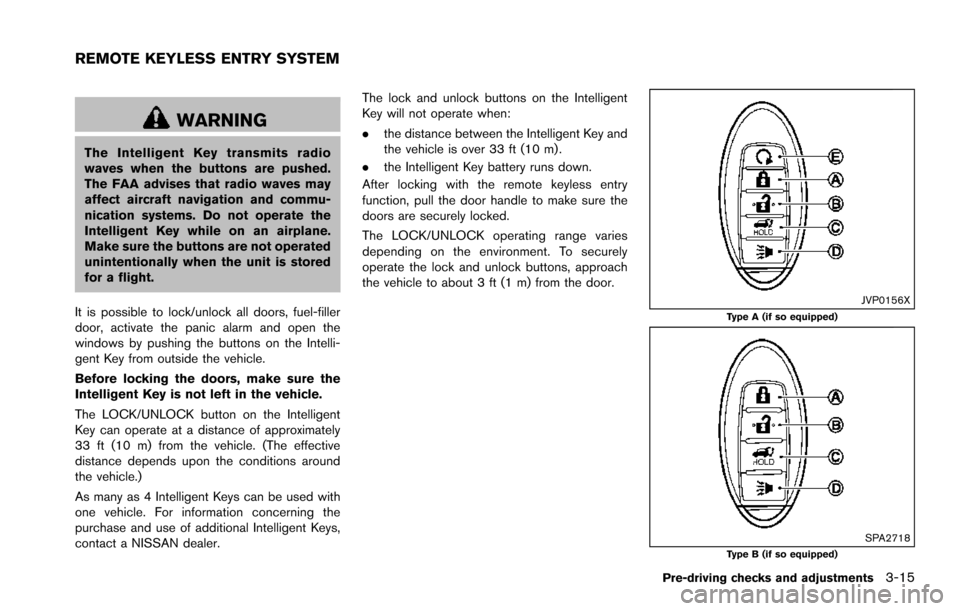
It is possible to lock/unlock all doors, fuel-filler
door, activate the panic alarm and open the
windows by pushing the buttons on the Intelli-
gent Key from outside the vehicle.
Before locking the doors, make sure the
Intelligent Key is not left in the vehicle.
The LOCK/UNLOCK button on the Intelligent
Key can operate at a distance of approximately
33 ft (10 m) from the vehicle. (The effective
distance depends upon the conditions around
the vehicle.)
As many as 4 Intelligent Keys can be used with
one vehicle. For information concerning the
purchase and use of additional Intelligent Keys,
contact a NISSAN dealer. The lock and unlock buttons on the Intelligent
Key will not operate when:
.
the distance between the Intelligent Key and
the vehicle is over 33 ft (10 m) .
. the Intelligent Key battery runs down.
After locking with the remote keyless entry
function, pull the door handle to make sure the
doors are securely locked.
The LOCK/UNLOCK operating range varies
depending on the environment. To securely
operate the lock and unlock buttons, approach
the vehicle to about 3 ft (1 m) from the door.
JVP0156XType A (if so equipped)
SPA2718Type B (if so equipped)
Pre-driving checks and adjustments3-15
REMOTE KEYLESS ENTRY SYSTEM