stop start NISSAN ARMADA 2017 2.G Workshop Manual
[x] Cancel search | Manufacturer: NISSAN, Model Year: 2017, Model line: ARMADA, Model: NISSAN ARMADA 2017 2.GPages: 614, PDF Size: 2.87 MB
Page 448 of 614
FEB SYSTEM OPERATION
The FEB system operates at speeds above
approximately 3 MPH (5 km/h) .
If a risk of a forward collision is detected, the
FEB system will provide the first warning to the
driver by illuminating the warning in the vehicle
information display and providing an audible
warning. In addition, the FEB system pushes the
accelerator pedal up. If the driver releases the
accelerator pedal, then the system applies
partial braking.
If the driver applies the brakes quickly and
forcefully after the warning, and the FEB system
detects that there is still the possibility of a
forward collision, the system will automatically
increase the braking force.
If a forward collision is imminent and the driver
does not take action, the FEB system issues the
second visual (flashing) and audible warning and
automatically applies harder braking.
NOTE:
The vehicle’s stop lights come on when
braking is performed by the FEB system.
Depending on vehicle speed and distance to the
vehicle ahead, as well as driving and roadway
conditions, the system may help the driver avoid
a forward collision or may help mitigate the
consequences of a collision should one beunavoidable.
If the driver is handling the steering wheel,
accelerating or braking, the FEB system will
function later or will not function.
The automatic braking will cease under the
following conditions:
.
When the steering wheel is turned as far as
necessary to avoid a collision.
. When the accelerator pedal is depressed.
. When there is no longer a vehicle detected
ahead.
If the FEB system has stopped the vehicle, the
vehicle will remain at a standstill for approxi-
mately 2 seconds before the brakes are
released.
Starting and driving5-107
Page 451 of 614
5-110Starting and driving
such as ice, snow, stickers, for
example. In these cases, the system
may not be able to warn the driver
properly. Be sure that you check,
clean and clear the sensor area
regularly.
. Excessive noise will interfere with
the warning chime sound, and the
chime may not be heard.
JVS0675X
SYSTEM TEMPORARILY UNAVAIL-
ABLE
Condition A
When the radar sensor picks up interference
from another radar source, making it impossible
to detect a vehicle ahead, the FEB system is
automatically turned off. The FEB system warn-
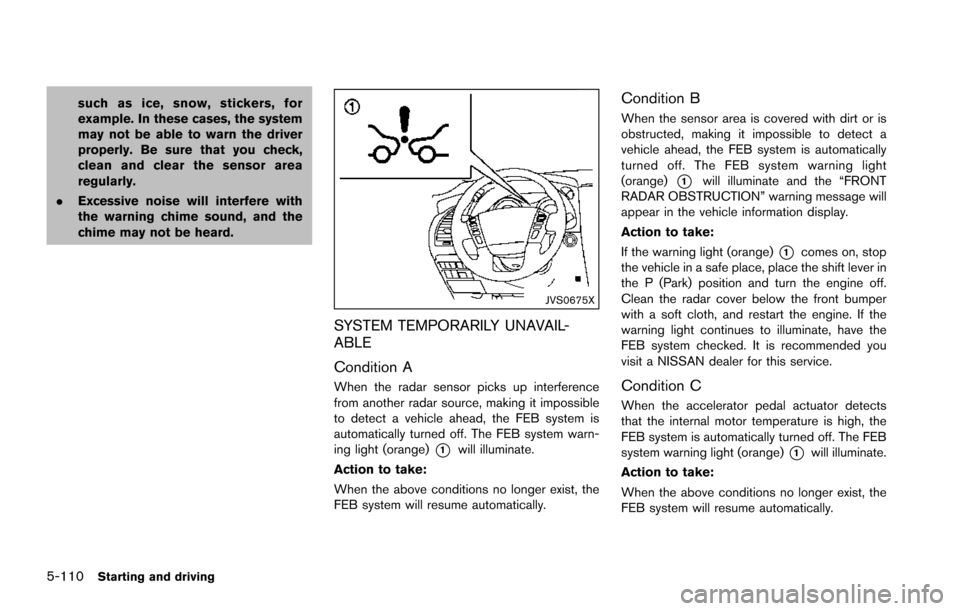
ing light (orange)
*1will illuminate.
Action to take:
When the above conditions no longer exist, the
FEB system will resume automatically.
Condition B
When the sensor area is covered with dirt or is
obstructed, making it impossible to detect a
vehicle ahead, the FEB system is automatically
turned off. The FEB system warning light
(orange)
*1will illuminate and the “FRONT
RADAR OBSTRUCTION” warning message will
appear in the vehicle information display.
Action to take:
If the warning light (orange)
*1comes on, stop
the vehicle in a safe place, place the shift lever in
the P (Park) position and turn the engine off.
Clean the radar cover below the front bumper
with a soft cloth, and restart the engine. If the
warning light continues to illuminate, have the
FEB system checked. It is recommended you
visit a NISSAN dealer for this service.
Condition C
When the accelerator pedal actuator detects
that the internal motor temperature is high, the
FEB system is automatically turned off. The FEB
system warning light (orange)
*1will illuminate.
Action to take:
When the above conditions no longer exist, the
FEB system will resume automatically.
Page 452 of 614
Condition D
When VDC system is OFF, the FEB brake will
not operate. In this case only visible and audible
warning operates. The FEB system warning light
(orange) will illuminate.
Action to take:
When the above conditions no longer exist, the
FEB system will resume automatically.
SYSTEM MALFUNCTION
If the FEB system malfunctions, it will be turned
off automatically, a chime will sound, the FEB
system warning light (orange)
*1will illuminate.
Action to take:
If the warning light (orange)
*1comes on, stop
the vehicle in a safe location and place the shift
lever in the P (Park) position. Turn the engine off
and restart the engine. If the warning light
continues to illuminate, have the FEB system
checked. It is recommended you visit a NISSAN
dealer for this service.
JVS0913X
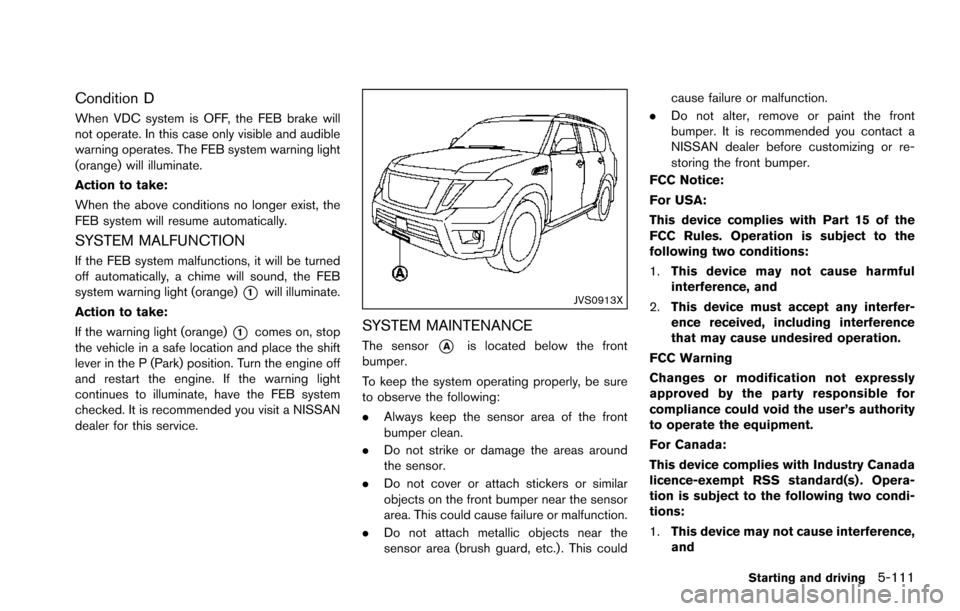
SYSTEM MAINTENANCE
The sensor*Ais located below the front
bumper.
To keep the system operating properly, be sure
to observe the following:
. Always keep the sensor area of the front
bumper clean.
. Do not strike or damage the areas around
the sensor.
. Do not cover or attach stickers or similar
objects on the front bumper near the sensor
area. This could cause failure or malfunction.
. Do not attach metallic objects near the
sensor area (brush guard, etc.) . This could cause failure or malfunction.
. Do not alter, remove or paint the front
bumper. It is recommended you contact a
NISSAN dealer before customizing or re-
storing the front bumper.
FCC Notice:
For USA:
This device complies with Part 15 of the
FCC Rules. Operation is subject to the
following two conditions:
1. This device may not cause harmful
interference, and
2. This device must accept any interfer-
ence received, including interference
that may cause undesired operation.
FCC Warning
Changes or modification not expressly
approved by the party responsible for
compliance could void the user’s authority
to operate the equipment.
For Canada:
This device complies with Industry Canada
licence-exempt RSS standard(s) . Opera-
tion is subject to the following two condi-
tions:
1. This device may not cause interference,
and
Starting and driving5-111
Page 460 of 614
regularly.
. Excessive noise will interfere with
the warning chime sound, and the
chime may not be heard.
JVS0675X
SYSTEM TEMPORARILY UNAVAIL-
ABLE
Condition A
When the radar sensor picks up interference
from another radar source, making it impossible
to detect a vehicle ahead, the PFCW system is
automatically turned off. The FEB system warn-
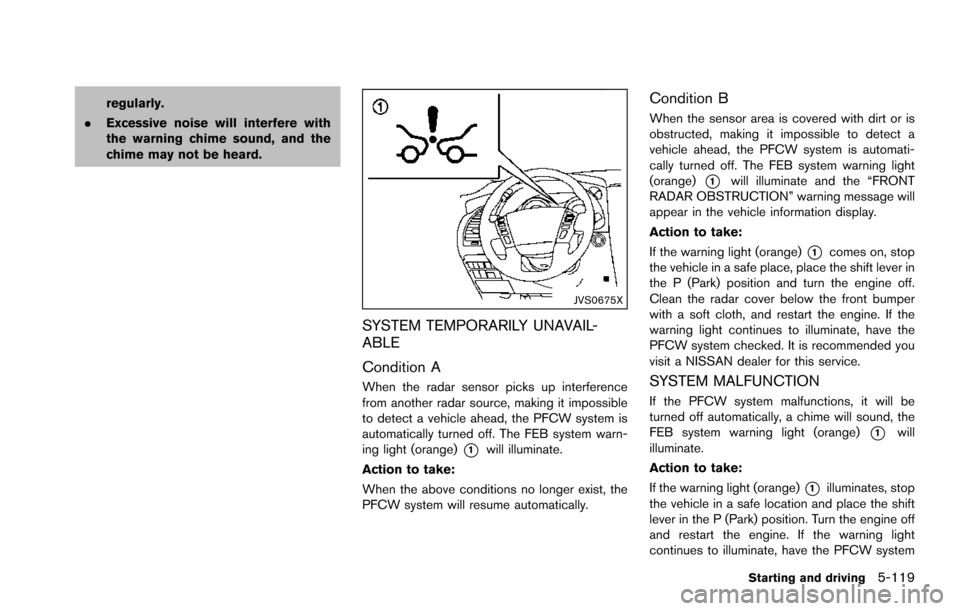
ing light (orange)
*1will illuminate.
Action to take:
When the above conditions no longer exist, the
PFCW system will resume automatically.
Condition B
When the sensor area is covered with dirt or is
obstructed, making it impossible to detect a
vehicle ahead, the PFCW system is automati-
cally turned off. The FEB system warning light
(orange)
*1will illuminate and the “FRONT
RADAR OBSTRUCTION” warning message will
appear in the vehicle information display.
Action to take:
If the warning light (orange)
*1comes on, stop
the vehicle in a safe place, place the shift lever in
the P (Park) position and turn the engine off.
Clean the radar cover below the front bumper
with a soft cloth, and restart the engine. If the
warning light continues to illuminate, have the
PFCW system checked. It is recommended you
visit a NISSAN dealer for this service.
SYSTEM MALFUNCTION
If the PFCW system malfunctions, it will be
turned off automatically, a chime will sound, the
FEB system warning light (orange)
*1will
illuminate.
Action to take:
If the warning light (orange)
*1illuminates, stop
the vehicle in a safe location and place the shift
lever in the P (Park) position. Turn the engine off
and restart the engine. If the warning light
continues to illuminate, have the PFCW system
Starting and driving5-119
Page 462 of 614
2.This device must accept any interfer-
ence, including interference that may
cause undesired operation of the de-
vice.
CAUTION
During the first 1,200 miles (2,000 km) ,
follow these recommendations to ob-
tain maximum engine performance and
ensure the future reliability and econo-
my of your new vehicle.
Failure to follow these recommenda-
tions may result in shortened engine
life and reduced engine performance.
. Avoid driving for long periods at constant
speed, either fast or slow. Do not run the
engine over 4,000 rpm.
. Do not accelerate at full throttle in any gear.
. Avoid quick starts.
. Avoid hard braking as much as possible.
. Do not tow a trailer for the first 500 miles
(805 km) . Follow these easy-to-use Fuel Efficient Driving
Tips to help you achieve the most fuel economy
from your vehicle.
1. Use smooth accelerator and brake pedal
application.
.Avoid rapid starts and stops..Use smooth, gentle accelerator andbrake application whenever possible.
.Maintain constant speed while commut-
ing and coast whenever possible.
2. Maintain constant speed.
.Look ahead to try and anticipate and minimize stops.
.Synchronizing your speed with traffic
lights allows you to reduce your number
of stops.
.Maintaining a steady speed can minimize red light stops and improve fuel effi-
ciency.
3. Use air conditioning (A/C) at higher vehicle speeds.
.Below 40 MPH (64 km/h) , it is moreefficient to open windows to cool the
vehicle due to reduced engine load.
.Above 40 MPH (64 km/h) , it is moreefficient to use A/C to cool the vehicle
due to increased aerodynamic drag.
Starting and driving5-121
BREAK-IN SCHEDULE FUEL EFFICIENT DRIVING TIPS
Page 463 of 614
5-122Starting and driving
.Recirculating the cool air in the cabinwhen the A/C is on reduces cooling load.
4. Drive at economical speeds and distances.
.Observing the speed limit and not ex- ceeding 60 MPH (97 km/h) (where
legally allowed) can improve fuel effi-
ciency due to reduced aerodynamic
drag.
.Maintaining a safe following distancebehind other vehicles reduces unneces-
sary braking.
.Safely monitoring traffic to anticipatechanges in speed permits reduced brak-
ing and smooth acceleration changes.
.Select a gear range suitable to road conditions.
5. Use cruise control.
.Using cruise control during highway driving helps maintain a steady speed.
.Cruise control is particularly effective in providing fuel savings when driving on
flat terrains.
6. Plan for the shortest route.
.Utilize a map or navigation system to determine the best route to save time.
7. Avoid idling.
.Shutting off your engine when safe for stops exceeding 30-60 seconds saves fuel and reduces emissions.
8. Buy an automated pass for toll roads.
.Automated passes permit drivers to use special lanes to maintain cruising speed
through the toll and avoid stopping and
starting.
9. Winter warm up.
.Limit idling time to minimize impact to fuel economy.
.Vehicles typically need no more than 30seconds of idling at start-up to effectively
circulate the engine oil before driving.
.Your vehicle will reach its ideal operatingtemperature more quickly while driving
versus idling.
10. Keeping your vehicle cool.
.Park your vehicle in a covered parking area or in the shade whenever possible.
.When entering a hot vehicle, opening thewindows will help to reduce the inside
temperature faster, resulting in reduced
demand on your A/C system. .
Keep your engine tuned up.
. Follow the recommended scheduled main-
tenance.
. Keep the tires inflated to the correct
pressure. Low tire pressure increases tire
wear and lowers fuel economy.
. Keep the wheels in correct alignment.
Improper alignment increases tire wear and
lowers fuel economy.
. Use the recommended viscosity engine oil.
(See “Engine oil and oil filter recommenda-
tion” (P.10-6) .)
INCREASING FUEL ECONOMY
Page 464 of 614
WARNING
.Do not attempt to raise two wheels
off the ground and shift the trans-
mission to any drive or reverse
position with the engine running.
Doing so may result in drivetrain
damage or unexpected vehicle
movement which could result in
serious vehicle damage or personal
injury.
. Do not attempt to test a 4WD
equipped vehicle on a 2-wheel dy-
namometer or similar equipment
even if the other two wheels are
raised off the ground. Make sure
you inform test facility personnel
that your vehicle is equipped with
4WD before it is placed on a dy-
namometer. Using the wrong test
equipment may result in drivetrain
damage or unexpected vehicle
movement which could result in
serious vehicle damage or personal
injury.
CAUTION
.Do not drive the vehicle in the 4HI or
4LO position on dry hard surface
roads. Driving on dry, hard surfaces
in 4HI or 4LO may cause unneces-
sary noise, tire wear and increased
fuel consumption.
If the Four-Wheel Drive (4WD) warn-
ing light turns on when driving on
dry hard surface roads:
— in the 4HI position, shift the
4WD shift switch to AUTO.
— in the 4LO position, stop the vehicle and shift the transmis-
sion lever to the N (Neutral)
position with the brake pedal
depressed and shift the 4WD
shift switch to AUTO.
If the 4WD warning light is still
on after the above operation,
have your vehicle checked as
soon as possible. It is recom-
mended you visit a NISSAN
dealer for this service.
. The transfer case may be damaged
if you continue driving with the 4WD warning light blinking.
See “On-pavement and off-road driving precau-
tions” (P.5-9) for other precautions for offroad
driving.
NISSAN ALL-MODE 4WDŠSYSTEM
The all mode 4WD system provides 3 positions
(AUTO, 4HI and 4LO) , so you can select the
desired drive mode according to the driving
conditions.
Starting and driving5-123
NISSAN ALL-MODE 4WDŠ(if so
equipped)
Page 465 of 614
5-124Starting and driving
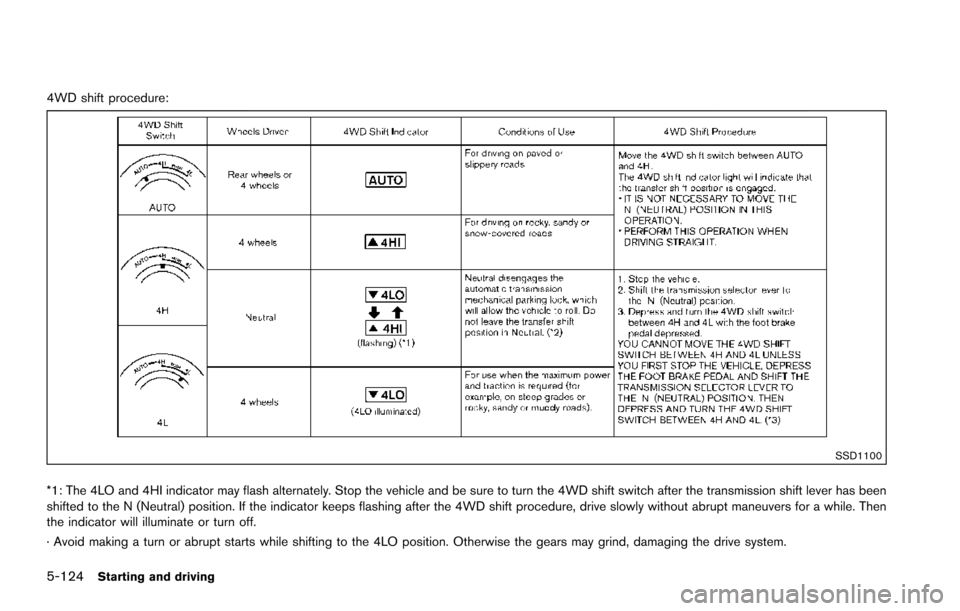
4WD shift procedure:
SSD1100
*1: The 4LO and 4HI indicator may flash alternately. Stop the vehicle and be sure to turn the 4WD shift switch after the transmission shift lever has been
shifted to the N (Neutral) position. If the indicator keeps flashing after the 4WD shift procedure, drive slowly without abrupt maneuvers for a while. Then
the indicator will illuminate or turn off.
· Avoid making a turn or abrupt starts while shifting to the 4LO position. Otherwise the gears may grind, damaging the drive system.
Page 467 of 614
5-126Starting and driving
The 4WD shift switch is used to select the 4WD
mode depending on the driving conditions.
There are 3 types of drive modes available,
AUTO, 4HI and 4LO.
The 4WD shift switch electronically controls the
transfer case operation. Rotate the switch to
move between each mode, AUTO, 4H and 4L.
You must depress the 4WD shift switch to
select 4L, and the vehicle MUST be sta-
tionary and the shift lever in the N (Neutral)
position when changing into or out of 4L.
WARNING
.When parking, apply the parking
brake before stopping the engine
and make sure that the 4WD shift
indicator is on and the ATP warning
light turns off. Otherwise, the vehi-
cle could unexpectedly move even if
the automatic transmission is in the
P (Park) position.
. The 4LO and 4HI indicators must
stop blinking and the 4LO or 4HI
indicator must remain illuminated or
turn off before shifting the trans-
mission into gear. If the shift lever is
shifted from the N (Neutral) position
to any other gear while the 4LO and 4HI indicators are blinking alter-
nately, the vehicle may move unex-
pectedly.
CAUTION
.
Never shift the 4WD shift switch
between 4L and 4H while driving.
. The 4HI position provides greater
traction. Avoid excessive speed, as
it will cause increased fuel con-
sumption and higher oil tempera-
tures, and could damage drivetrain
component. Speeds over 62 MPH
(100 km/h) in 4HI is not recom-
mended.
. The 4LO position provides maxi-
mum traction. Avoid raising vehicle
speed excessively, as the maximum
speed is approximately 31 MPH (50
km/h) .
. When driving straight, shift the 4WD
shift switch to the AUTO or 4H
position. Do not move the 4WD shift
switch when making a turn or rever-
sing. .
Do not shift the 4WD shift switch
(between AUTO and 4H) while driv-
ing on steep downhill grades. Use
the engine brake and low automatic
transmission gears for engine brak-
ing.
. Do not operate the 4WD shift switch
(between AUTO and 4H) with the
rear wheels spinning.
. Do not drive on dry hard surface
roads in the 4HI or 4LO position.
Driving on dry hard surfaces in 4HI
or 4LO may cause unnecessary
noise and tire wear. NISSAN recom-
mends driving in the AUTO position
under these conditions.
. The 4WD transfer case may not be
shifted between 4HI and 4LO at low
ambient temperatures and the 4LO
and 4HI indicators may blink even
when the 4WD shift switch is
shifted. After driving for a while
you can change the 4WD shift
switch between 4H and 4L.
Page 468 of 614
When driving on rough roads,
.Drive carefully according to the road surface
conditions.
When the vehicle is stuck,
. Place stones or wooden blocks under the
tires to free the vehicle.
. Set the 4WD shift switch to 4H or 4L.
. If it is difficult to free the vehicle, repeat
forward and backward movement to in-
crease the movement.
. If the vehicle is stuck deep in mud, tire
chains may be effective.
CAUTION
.Do not spin the tires excessively.
Tires will sink deep into the mud,
making it difficult to free the vehi-
cle.
. Avoid shifting gears with the engine
running at high speeds as this may
cause malfunction.
SSD1048
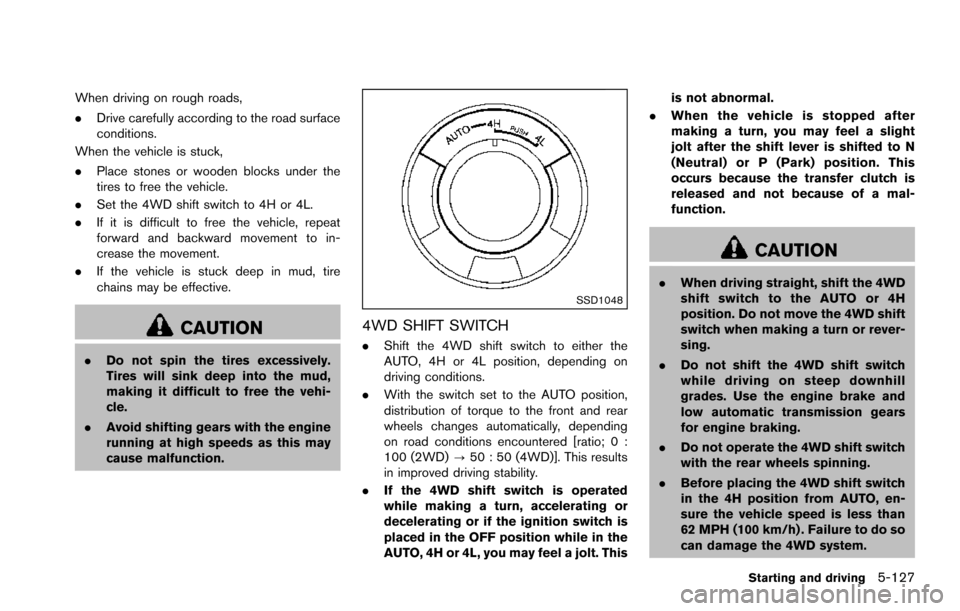
4WD SHIFT SWITCH
.Shift the 4WD shift switch to either the
AUTO, 4H or 4L position, depending on
driving conditions.
. With the switch set to the AUTO position,
distribution of torque to the front and rear
wheels changes automatically, depending
on road conditions encountered [ratio; 0 :
100 (2WD) ?50 : 50 (4WD)]. This results
in improved driving stability.
. If the 4WD shift switch is operated
while making a turn, accelerating or
decelerating or if the ignition switch is
placed in the OFF position while in the
AUTO, 4H or 4L, you may feel a jolt. This is not abnormal.
. When the vehicle is stopped after
making a turn, you may feel a slight
jolt after the shift lever is shifted to N
(Neutral) or P (Park) position. This
occurs because the transfer clutch is
released and not because of a mal-
function.
CAUTION
.When driving straight, shift the 4WD
shift switch to the AUTO or 4H
position. Do not move the 4WD shift
switch when making a turn or rever-
sing.
. Do not shift the 4WD shift switch
while driving on steep downhill
grades. Use the engine brake and
low automatic transmission gears
for engine braking.
. Do not operate the 4WD shift switch
with the rear wheels spinning.
. Before placing the 4WD shift switch
in the 4H position from AUTO, en-
sure the vehicle speed is less than
62 MPH (100 km/h) . Failure to do so
can damage the 4WD system.
Starting and driving5-127