sensor NISSAN ARMADA 2017 2.G Manual PDF
[x] Cancel search | Manufacturer: NISSAN, Model Year: 2017, Model line: ARMADA, Model: NISSAN ARMADA 2017 2.GPages: 614, PDF Size: 2.87 MB
Page 475 of 614
5-134Starting and driving
the obstacle is less than 11.8 in (30 cm) away,
the tone will sound continuously.
Keep the corner/center sensors (located on the
bumper fascia) free from snow, ice and large
accumulations of dirt (do not clean the sensors
with sharp objects) . If the sensors are covered, it
will affect the accuracy of the sonar system.
The sensitivity level of the corner/center sensors
can be adjusted (higher or lower) in the Sonar
setting display. (See “Sonar settings” (P.4-27) .)
The intermittent tone will stop in 3 seconds
when an obstacle is detected by only the corner
sensor and the distance does not change.
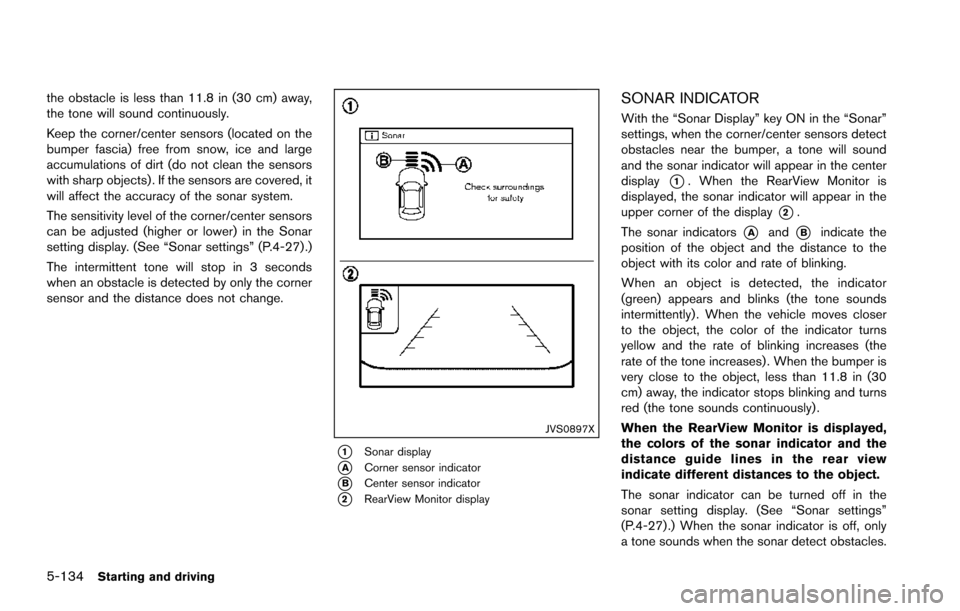
JVS0897X
*1Sonar display
*ACorner sensor indicator
*BCenter sensor indicator
*2RearView Monitor display
SONAR INDICATOR
With the “Sonar Display” key ON in the “Sonar”
settings, when the corner/center sensors detect
obstacles near the bumper, a tone will sound
and the sonar indicator will appear in the center
display
*1. When the RearView Monitor is
displayed, the sonar indicator will appear in the
upper corner of the display
*2.
The sonar indicators
*Aand*Bindicate the
position of the object and the distance to the
object with its color and rate of blinking.
When an object is detected, the indicator
(green) appears and blinks (the tone sounds
intermittently) . When the vehicle moves closer
to the object, the color of the indicator turns
yellow and the rate of blinking increases (the
rate of the tone increases) . When the bumper is
very close to the object, less than 11.8 in (30
cm) away, the indicator stops blinking and turns
red (the tone sounds continuously) .
When the RearView Monitor is displayed,
the colors of the sonar indicator and the
distance guide lines in the rear view
indicate different distances to the object.
The sonar indicator can be turned off in the
sonar setting display. (See “Sonar settings”
(P.4-27) .) When the sonar indicator is off, only
a tone sounds when the sonar detect obstacles.
Page 478 of 614
BRAKE ASSIST
When the force applied to the brake pedal
exceeds a certain level, the Brake Assist is
activated generating greater braking force than a
conventional brake booster even with light pedal
force.
WARNING
The Brake Assist is only an aid to assist
braking operation and is not a collision
warning or avoidance device. It is the
driver’s responsibility to stay alert, drive
safely and be in control of the vehicle at
all times.
ANTI-LOCK BRAKING SYSTEM (ABS)
WARNING
.The Anti-lock Braking System (ABS)
is a sophisticated device, but it
cannot prevent accidents resulting
from careless or dangerous driving
techniques. It can help maintain
vehicle control during braking on
slippery surfaces. Remember that
stopping distances on slippery sur-
faces will be longer than on normal surfaces even with ABS. Stopping
distances may also be longer on
rough, gravel or snow covered
roads, or if you are using tire chains.
Always maintain a safe distance
from the vehicle in front of you.
Ultimately, the driver is responsible
for safety.
. Tire type and condition may also
affect braking effectiveness.
— When replacing tires, install the
specified size of tires on all four
wheels.
— When installing a spare tire, make sure that it is the proper
size and type as specified on the
Tire and Loading Information
label. See “Tire and loading
information label” (P.10-12) .
— For detailed information, see “Wheels and tires” (P.8-30) .
The Anti-lock Braking System (ABS) controls
the brakes so the wheels do not lock during hard
braking or when braking on slippery surfaces.
The system detects the rotation speed at each
wheel and varies the brake fluid pressure to
prevent each wheel from locking and sliding. By preventing each wheel from locking, the system
helps the driver maintain steering control and
helps to minimize swerving and spinning on
slippery surfaces.
Using the system
Depress the brake pedal and hold it down.
Depress the brake pedal with firm steady
pressure, but do not pump the brakes. The
ABS will operate to prevent the wheels from
locking up. Steer the vehicle to avoid obstacles.
WARNING
Do not pump the brake pedal. Doing so
may result in increased stopping dis-
tances.
Self-test feature
The ABS includes electronic sensors, electric
pumps, hydraulic solenoids and a computer. The
computer has a built-in diagnostic feature that
tests the system each time you start the engine
and move the vehicle at a low speed in forward
or reverse. When the self-test occurs, you may
hear a “clunk” noise and/or feel a pulsation in the
brake pedal. This is normal and does not
indicate a malfunction. If the computer senses
a malfunction, it switches the ABS off and
Starting and driving5-137
BRAKE ASSIST
Page 479 of 614
5-138Starting and driving
illuminates the ABS warning light on the
instrument panel. The brake system then oper-
ates normally, but without anti-lock assistance.
If the ABS warning light illuminates during the
self-test or while driving, have the vehicle
checked. It is recommended you visit a NISSAN
dealer for this service.
Normal operation
The ABS operates at speeds above 3 to 6 MPH
(5 to 10 km/h) . The speed varies according to
road conditions.
When the ABS senses that one or more wheels
are close to locking up, the actuator rapidly
applies and releases hydraulic pressure. This
action is similar to pumping the brakes very
quickly. You may feel a pulsation in the brake
pedal and hear a noise from under the hood or
feel a vibration from the actuator when it is
operating. This is normal and indicates that the
ABS is operating properly. However, the pulsa-
tion may indicate that road conditions are
hazardous and extra care is required while
driving.The Vehicle Dynamic Control (VDC) system
uses various sensors to monitor driver inputs
and vehicle motion. Under certain driving con-
ditions, the VDC system helps to perform the
following functions.
.
Controls brake pressure to reduce wheel
slip on one slipping drive wheel so power is
transferred to a non slipping drive wheel on
the same axle.
. Controls brake pressure and engine output
to reduce drive wheel slip based on vehicle
speed (traction control function) .
. Controls brake pressure at individual wheels
and engine output to help the driver maintain
control of the vehicle in the following
conditions:
— understeer (vehicle tends to not follow
the steered path despite increased
steering input)
— oversteer (vehicle tends to spin due to certain road or driving conditions) .
The VDC system can help the driver to maintain
control of the vehicle, but it cannot prevent loss
of vehicle control in all driving situations.
When the VDC system operates, the VDC
warning light
in the instrument panel flashes
so note the following:
. The road may be slippery or the system may
determine some action is required to help keep the vehicle on the steered path.
. You may feel a pulsation in the brake pedal
and hear a noise or vibration from under the
hood. This is normal and indicates that the
VDC system is working properly.
. Adjust your speed and driving to the road
conditions.
If a malfunction occurs in the system, the VDC
warning light
illuminates in the instrument
panel. The VDC system automatically turns off.
The VDC OFF switch is used to turn off the VDC
system. The VDC off indicator
illuminates to
indicate the VDC system is off. When the VDC
switch is used to turn off the system, the VDC
system still operates to prevent one drive wheel
from slipping by transferring power to a non
slipping drive wheel. The VDC warning light
flashes if this occurs. All other VDC functions
are off, and the VDC warning lightwill not
flash. The VDC system is automatically reset to
on when the ignition switch is placed in the OFF
position then back to the ON position.
When the 4L position is selected with the 4WD
shift switch, the VDC system is disabled and the
VDC off indicator light illuminates (for 4WD
models) .
See “Vehicle Dynamic Control (VDC) warning
light” (P.2-17) and “Vehicle Dynamic Control
(VDC) off indicator light” (P.2-20).
VEHICLE DYNAMIC CONTROL (VDC)
SYSTEM
Page 487 of 614
6-4In case of emergency
.Replacing tires with those not ori-
ginally specified by NISSAN could
affect the proper operation of the
TPMS.
. Do not inject any tire liquid or
aerosol tire sealant into the tires,
as this may cause a malfunction of
the tire pressure sensors.
CHANGING A FLAT TIRE
If you have a flat tire, follow the instructions
below.
Stopping the vehicle
1. Safely move the vehicle off the road and
away from traffic.
2. Turn on the hazard warning flashers.
3. Park on a level surface and apply the parking brake. Move the shift lever to the P (Park)
position.
4. Turn off the engine.
5. Raise the hood to warn other traffic, and to signal professional road assistance person-
nel that you need assistance.
6. Have all passengers get out of the vehicle and stand in a safe place, away from traffic
and clear of the vehicle.
WARNING
.Make sure the parking brake is
securely applied and the automatic
transmission is in the P (Park)
position.
. Never change tires when the vehicle
is on a slope, ice or slippery areas.
This is hazardous.
. Never change tires if oncoming
traffic is close to your vehicle. Wait
for professional road assistance.
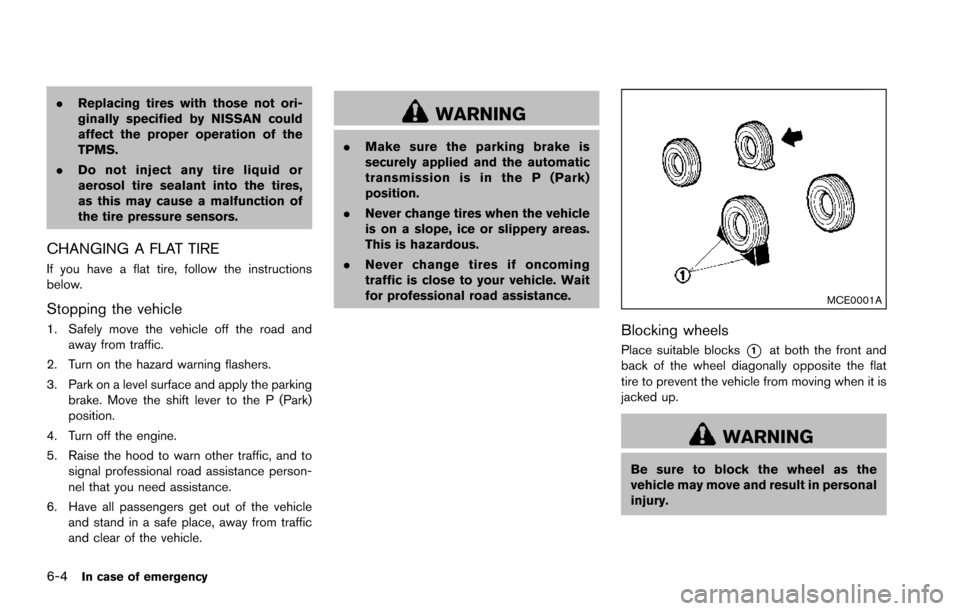
MCE0001A
Blocking wheels
Place suitable blocks*1at both the front and
back of the wheel diagonally opposite the flat
tire to prevent the vehicle from moving when it is
jacked up.
WARNING
Be sure to block the wheel as the
vehicle may move and result in personal
injury.
Page 511 of 614
7-4Appearance and care
washing with water, wipe clean with a dry, soft
cloth and dry completely. When there is
chemical or tire wax, or dirt such as an antifreeze
agent on the surface, wash them with water as
soon as possible.
CAUTION
.The surfaces of the wheels use a
different coating process than typi-
cal aluminum alloy wheels. Do not
use aluminum alloy wheel cleaners
or abrasive cleaners to clean the
wheels. Using such cleaners could
damage the wheel surfaces.
. Do not use an automatic car wash if
the vehicle is equipped with bright
wheels. The wheel coating may be
damaged.
. Do not use a brush to wash the
wheels if the vehicle is equipped
with bright wheels. The wheel coat-
ing may be damaged.
CHROME PARTS
Clean chrome parts regularly with a non-
abrasive chrome polish to maintain the finish.
TIRE DRESSING
NISSAN does not recommend the use of tire
dressings. Tire manufacturers apply a coating to
the tires to help reduce discoloration of the
rubber. If a tire dressing is applied to the tires, it
may react with the coating and form a com-
pound. This compound may come off the tire
while driving and stain the vehicle paint.
If you choose to use a tire dressing, take the
following precautions:
.Use a water-based tire dressing. The coat-
ing on the tire dissolves more easily with an
oil-based tire dressing.
. Apply a light coat of tire dressing to help
prevent it from entering the tire tread/
grooves (where it would be difficult to
remove) .
. Wipe off excess tire dressing using a dry
towel. Make sure the tire dressing is
completely removed from the tire tread/
grooves.
. Allow the tire dressing to dry as recom-
mended by tire dressing manufacturer. Occasionally remove loose dust from the interior
trim, plastic parts and seats using a vacuum
cleaner or soft bristled brush. Wipe the vinyl and
leather surfaces with a clean, soft cloth dam-
pened in mild soap solution, then wipe clean
with a dry soft cloth.
Regular care and cleaning is required in order to
maintain the appearance of the leather.
Before using any fabric protector, read the
manufacturer’s recommendations. Some fabric
protectors contain chemicals that may stain or
bleach the seat material.
Use a cloth dampened only with water, to clean
the meter and gauge lens.
WARNING
Do not use water or acidic cleaners (hot
steam cleaners) on the seat. This can
damage the seat or occupant classifica-
tion sensors. This can also affect the
operation of the air bag system and
result in serious personal injury.
CLEANING INTERIOR
Page 554 of 614
tires on the rear axle. Placing new
tires on the front axle may cause
loss of vehicle control in some
driving conditions and cause an
accident and personal injury.
. If the wheels are changed for any
reason, always replace with wheels
which have the same off-set dimen-
sion. Wheels of a different off-set
could cause premature tire wear,
degrade vehicle handling character-
istics and/or interference with the
brake discs/drums. Such interfer-
ence can lead to decreased braking
efficiency and/or early brake pad/
shoe wear. See “Wheels and tires”
(P.10-9) for wheel off-set dimen-
sions.
. Since the spare tire is not equipped
with the TPMS, when a spare tire is
mounted or a wheel is replaced, the
TPMS will not function and the low
tire pressure warning light will flash
for approximately 1 minute. The
light will remain on after 1 minute.
Have your tires replaced and/or
TPMS system reset as soon as
possible. It is recommended you
visit a NISSAN dealer for these services.
. Replacing tires with those not ori-
ginally specified by NISSAN could
affect the proper operation of the
TPMS.
. The TPMS sensor may be damaged
if it is not handled correctly. Be
careful when handling the TPMS
sensor.
. When replacing the TPMS sensor,
the ID registration may be required.
It is recommended you visit a
NISSAN dealer for ID registration.
. Do not use a valve stem cap that is
not specified by NISSAN. The valve
stem cap may become stuck.
. Be sure that the valve stem caps are
correctly fitted. Otherwise the valve
may be clogged up with dirt and
cause a malfunction or loss of
pressure.
. Do not install a damaged or de-
formed wheel or tire even if it has
been repaired. Such wheels or tires
could have structural damage and
could fail without warning.
. The use of retread tire is not re-
commended. .
For additional information regard-
ing tires, refer to “Important Tire
Safety Information” (US) or“Tire
Safety Information” (Canada) in the
Warranty Information Booklet.
Four-Wheel Drive (4WD) models
CAUTION
. Always use tires of the same type,
size, brand, construction (bias, bias-
belted or radial) , and tread pattern
on all four wheels. Failure to do so
may result in a circumference differ-
ence between tires on the front and
rear axles which will cause exces-
sive tire wear and may damage the
transmission, transfer case and dif-
ferential gears.
. ONLY use spare tires specified for
the 4WD model.
If excessive tire wear is found, it is recom-
mended that all four tires be replaced with tires
of the same size, brand, construction and tread
pattern. The tire pressure and wheel alignment
should also be checked and corrected as
Do-it-yourself8-39