5-138 NISSAN ARMADA 2017 2.G Owners Manual
[x] Cancel search | Manufacturer: NISSAN, Model Year: 2017, Model line: ARMADA, Model: NISSAN ARMADA 2017 2.GPages: 614, PDF Size: 2.87 MB
Page 13 of 614
0-6Illustrated table of contents
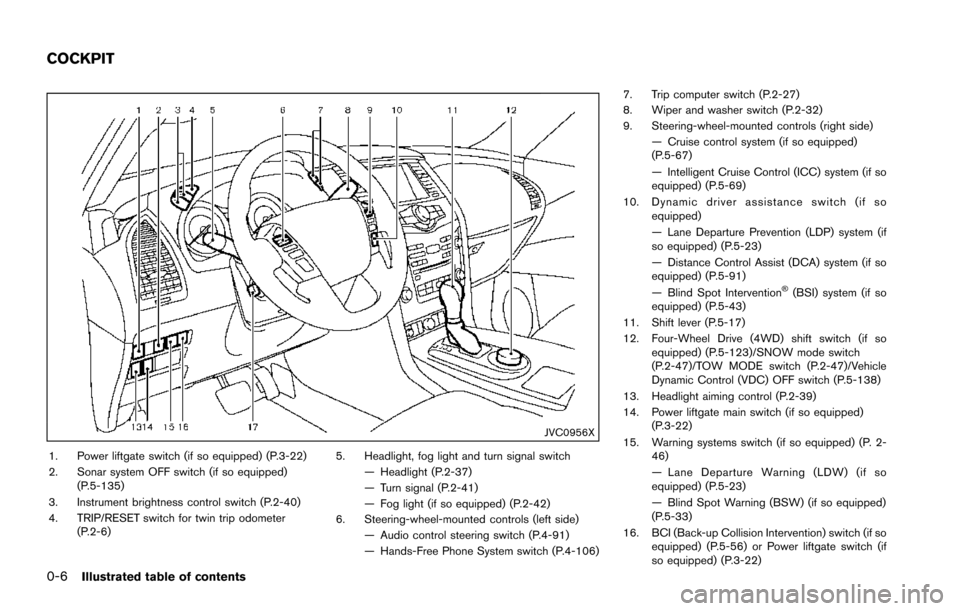
JVC0956X
1. Power liftgate switch (if so equipped) (P.3-22)
2. Sonar system OFF switch (if so equipped)(P.5-135)
3. Instrument brightness control switch (P.2-40)
4. TRIP/RESET switch for twin trip odometer (P.2-6) 5. Headlight, fog light and turn signal switch
— Headlight (P.2-37)
— Turn signal (P.2-41)
— Fog light (if so equipped) (P.2-42)
6. Steering-wheel-mounted controls (left side) — Audio control steering switch (P.4-91)
— Hands-Free Phone System switch (P.4-106) 7. Trip computer switch (P.2-27)
8. Wiper and washer switch (P.2-32)
9. Steering-wheel-mounted controls (right side)
— Cruise control system (if so equipped)
(P.5-67)
— Intelligent Cruise Control (ICC) system (if so
equipped) (P.5-69)
10. Dynamic driver assistance switch (if so equipped)
— Lane Departure Prevention (LDP) system (if
so equipped) (P.5-23)
— Distance Control Assist (DCA) system (if so
equipped) (P.5-91)
— Blind Spot Intervention
Š(BSI) system (if so
equipped) (P.5-43)
11. Shift lever (P.5-17)
12. Four-Wheel Drive (4WD) shift switch (if so equipped) (P.5-123)/SNOW mode switch
(P.2-47)/TOW MODE switch (P.2-47)/Vehicle
Dynamic Control (VDC) OFF switch (P.5-138)
13. Headlight aiming control (P.2-39)
14. Power liftgate main switch (if so equipped) (P.3-22)
15. Warning systems switch (if so equipped) (P. 2- 46)
— Lane Departure Warning (LDW) (if so
equipped) (P.5-23)
— Blind Spot Warning (BSW) (if so equipped)
(P.5-33)
16. BCI (Back-up Collision Intervention) switch (if so equipped) (P.5-56) or Power liftgate switch (if
so equipped) (P.3-22)
COCKPIT
Page 106 of 614
If any of the following conditions occur, the air
bag and/or pretensioner systems needs servi-
cing.
.The supplemental air bag warning light
remains on after approximately 7 seconds.
. The supplemental air bag warning light
flashes intermittently.
. The supplemental air bag warning light does
not come on at all.
It is recommended you visit a NISSAN dealer for
these services.
Unless checked and repaired, the supplemental
restraint system (air bag system) and/or the
pretensioners may not function properly.
For additional information, see “Supplemental
restraint system” (P.1-52) .
WARNING
If the supplemental air bag warning
light is on, it could mean that the front
air bag, side air bag, curtain air bag
systems and/or pretensioner systems
will not operate in an accident. To help
avoid injury to yourself or others, have
your vehicle checked. It is recom-
mended you visit a NISSAN dealer for
this service.
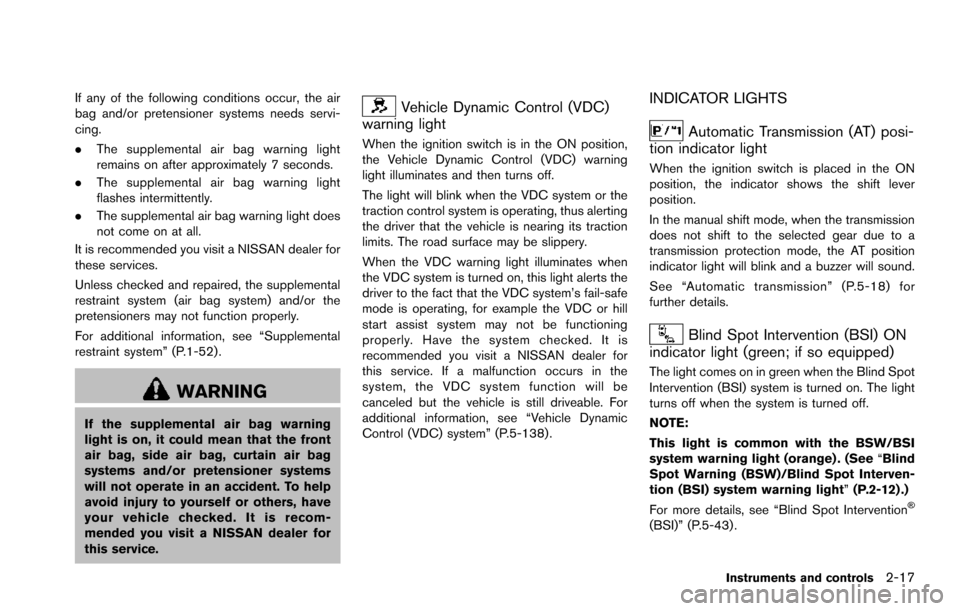
Vehicle Dynamic Control (VDC)
warning light
When the ignition switch is in the ON position,
the Vehicle Dynamic Control (VDC) warning
light illuminates and then turns off.
The light will blink when the VDC system or the
traction control system is operating, thus alerting
the driver that the vehicle is nearing its traction
limits. The road surface may be slippery.
When the VDC warning light illuminates when
the VDC system is turned on, this light alerts the
driver to the fact that the VDC system’s fail-safe
mode is operating, for example the VDC or hill
start assist system may not be functioning
properly. Have the system checked. It is
recommended you visit a NISSAN dealer for
this service. If a malfunction occurs in the
system, the VDC system function will be
canceled but the vehicle is still driveable. For
additional information, see “Vehicle Dynamic
Control (VDC) system” (P.5-138) .
INDICATOR LIGHTS
Automatic Transmission (AT) posi-
tion indicator light
When the ignition switch is placed in the ON
position, the indicator shows the shift lever
position.
In the manual shift mode, when the transmission
does not shift to the selected gear due to a
transmission protection mode, the AT position
indicator light will blink and a buzzer will sound.
See “Automatic transmission” (P.5-18) for
further details.
Blind Spot Intervention (BSI) ON
indicator light (green; if so equipped)
The light comes on in green when the Blind Spot
Intervention (BSI) system is turned on. The light
turns off when the system is turned off.
NOTE:
This light is common with the BSW/BSI
system warning light (orange) . (See “Blind
Spot Warning (BSW)/Blind Spot Interven-
tion (BSI) system warning light” (P.2-12) .)
For more details, see “Blind Spot Intervention
Š
(BSI)” (P.5-43) .
Instruments and controls2-17
Page 109 of 614
2-20Instruments and controls
Vehicle Dynamic Control (VDC) off
indicator light
When the ignition switch is in the ON position,
the Vehicle Dynamic Control (VDC) off indicator
light illuminates and then turns off.
The light comes on when the VDC off switch is
pushed to OFF. This indicates that the VDC
system is not operating.
When the 4L position is selected with the Four-
Wheel Drive (4WD) shift switch, the VDC
system is disabled and the VDC off indicator
light illuminates. (4WD models)
For additional information, see “Vehicle Dynamic
Control (VDC) system” (P.5-138) .
AUDIBLE REMINDERS
Key reminder chime
A chime will sound if the driver side door is
opened while the ignition switch is placed in the
ACC position. Make sure the ignition switch is
placed in the OFF position, and take the
Intelligent Key with you when leaving the vehicle.
Light reminder chime
A chime will sound when the driver side door is
opened with the light switch in theorposition and the ignition switch in the ACC, OFF
or LOCK position.
Turn the light switch off when you leave the
vehicle.
Parking brake reminder chime
The chime will sound if the vehicle is driven at
more than 4 MPH (7 km/h) with the parking
brake applied. Stop the vehicle and release the
parking brake.
Brake pad wear warning
The disc brake pads have audible wear warn-
ings. When a brake pad requires replacement, it
will make a high pitched scraping sound when
the vehicle is in motion. This scraping sound will
first occur only when the brake pedal is
depressed. After more wear of the brake pad,
the sound will always be heard even if the brake
pedal is not depressed. Have the brakes
checked as soon as possible if the warning
sound is heard.
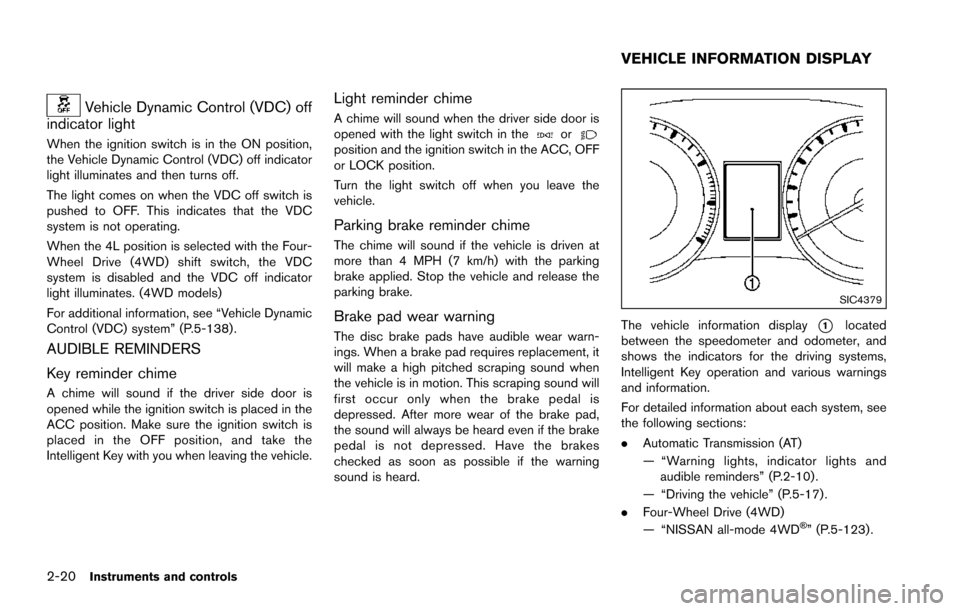
SIC4379
The vehicle information display*1located
between the speedometer and odometer, and
shows the indicators for the driving systems,
Intelligent Key operation and various warnings
and information.
For detailed information about each system, see
the following sections:
. Automatic Transmission (AT)
— “Warning lights, indicator lights and
audible reminders” (P.2-10) .
— “Driving the vehicle” (P.5-17) .
. Four-Wheel Drive (4WD)
— “NISSAN all-mode 4WD
Š” (P.5-123).
VEHICLE INFORMATION DISPLAY
Page 137 of 614
2-48Instruments and controls
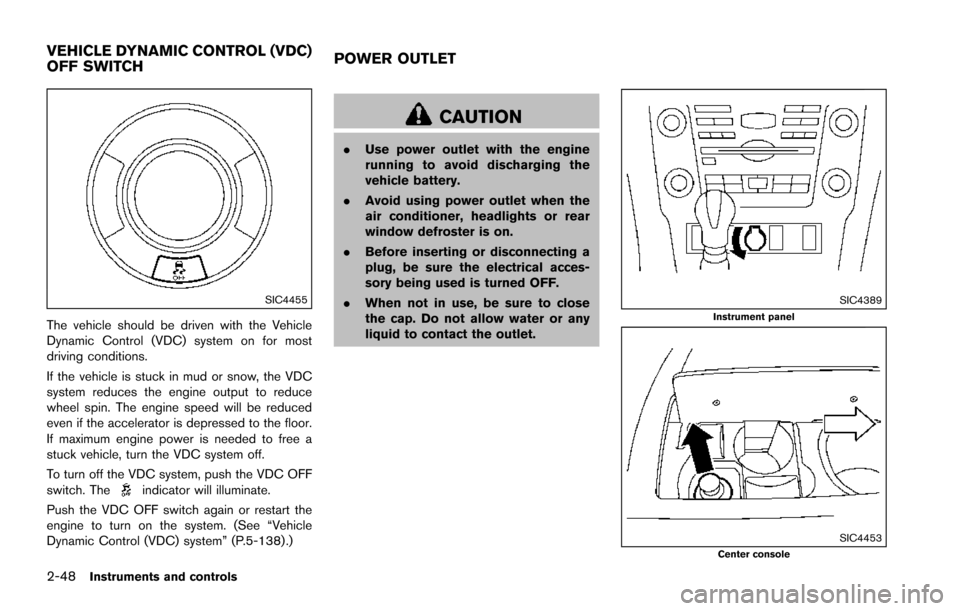
SIC4455
The vehicle should be driven with the Vehicle
Dynamic Control (VDC) system on for most
driving conditions.
If the vehicle is stuck in mud or snow, the VDC
system reduces the engine output to reduce
wheel spin. The engine speed will be reduced
even if the accelerator is depressed to the floor.
If maximum engine power is needed to free a
stuck vehicle, turn the VDC system off.
To turn off the VDC system, push the VDC OFF
switch. The
indicator will illuminate.
Push the VDC OFF switch again or restart the
engine to turn on the system. (See “Vehicle
Dynamic Control (VDC) system” (P.5-138) .)
CAUTION
. Use power outlet with the engine
running to avoid discharging the
vehicle battery.
. Avoid using power outlet when the
air conditioner, headlights or rear
window defroster is on.
. Before inserting or disconnecting a
plug, be sure the electrical acces-
sory being used is turned OFF.
. When not in use, be sure to close
the cap. Do not allow water or any
liquid to contact the outlet.
SIC4389Instrument panel
SIC4453Center console
VEHICLE DYNAMIC CONTROL (VDC)
OFF SWITCH POWER OUTLET
Page 344 of 614
SNOW mode ....................................................................... 5-132
Sonar system (if so equipped) ........................................ 5-133Sonar indicator ............................................................... 5-134
Sonar system OFF switch .......................................... 5-135
Power steering ..................................................................... 5-135
Brake system ........................................................................\
5-136 Braking precautions ...................................................... 5-136
Parking brake break-in ................................................. 5-136
Brake assist ........................................................................\
.. 5-137 Brake assist .................................................................... 5-137
Anti-lock Braking System (ABS) ............................... 5-137 Vehicle Dynamic Control (VDC) system ...................... 5-138
Vehicle Dynamic Control (VDC) OFF switch ...... 5-140
Cold weather driving ......................................................... 5-140 Freeing a frozen door lock ........................................ 5-140
Antifreeze ...................................................................... 5-140
Battery ........................................................................\
.... 5-140
Draining of coolant water .......................................... 5-140
Tire equipment ............................................................. 5-141
Special winter equipment ......................................... 5-141
Driving on snow or ice .............................................. 5-141
Engine block heater (if so equipped) .................... 5-141
Page 417 of 614
5-76Starting and driving
SSD1105
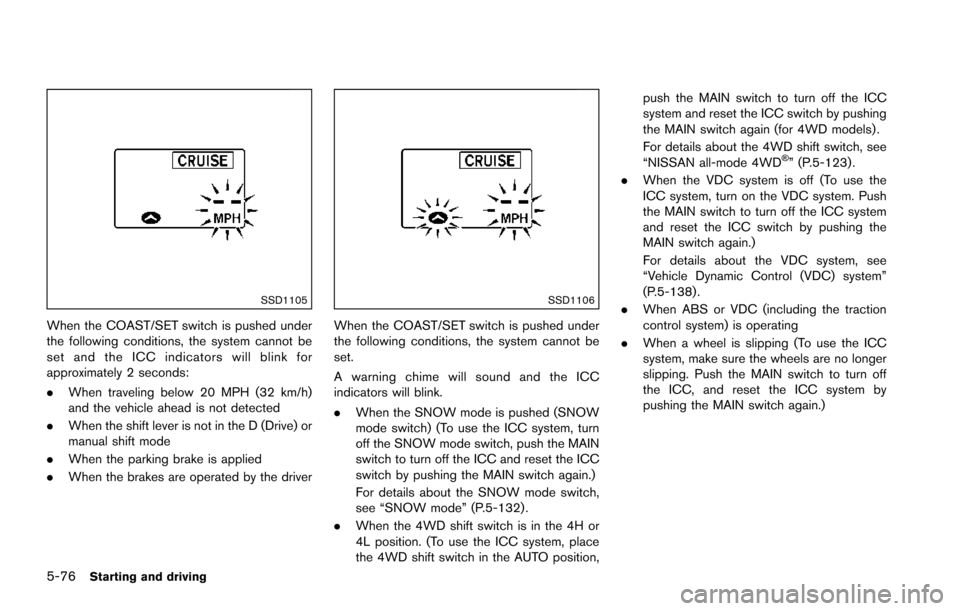
When the COAST/SET switch is pushed under
the following conditions, the system cannot be
set and the ICC indicators will blink for
approximately 2 seconds:
.When traveling below 20 MPH (32 km/h)
and the vehicle ahead is not detected
. When the shift lever is not in the D (Drive) or
manual shift mode
. When the parking brake is applied
. When the brakes are operated by the driver
SSD1106
When the COAST/SET switch is pushed under
the following conditions, the system cannot be
set.
A warning chime will sound and the ICC
indicators will blink.
.When the SNOW mode is pushed (SNOW
mode switch) (To use the ICC system, turn
off the SNOW mode switch, push the MAIN
switch to turn off the ICC and reset the ICC
switch by pushing the MAIN switch again.)
For details about the SNOW mode switch,
see “SNOW mode” (P.5-132) .
. When the 4WD shift switch is in the 4H or
4L position. (To use the ICC system, place
the 4WD shift switch in the AUTO position, push the MAIN switch to turn off the ICC
system and reset the ICC switch by pushing
the MAIN switch again (for 4WD models) .
For details about the 4WD shift switch, see
“NISSAN all-mode 4WD
Š” (P.5-123) .
. When the VDC system is off (To use the
ICC system, turn on the VDC system. Push
the MAIN switch to turn off the ICC system
and reset the ICC switch by pushing the
MAIN switch again.)
For details about the VDC system, see
“Vehicle Dynamic Control (VDC) system”
(P.5-138) .
. When ABS or VDC (including the traction
control system) is operating
. When a wheel is slipping (To use the ICC
system, make sure the wheels are no longer
slipping. Push the MAIN switch to turn off
the ICC, and reset the ICC system by
pushing the MAIN switch again.)
Page 443 of 614
5-102Starting and driving
JVS0892X
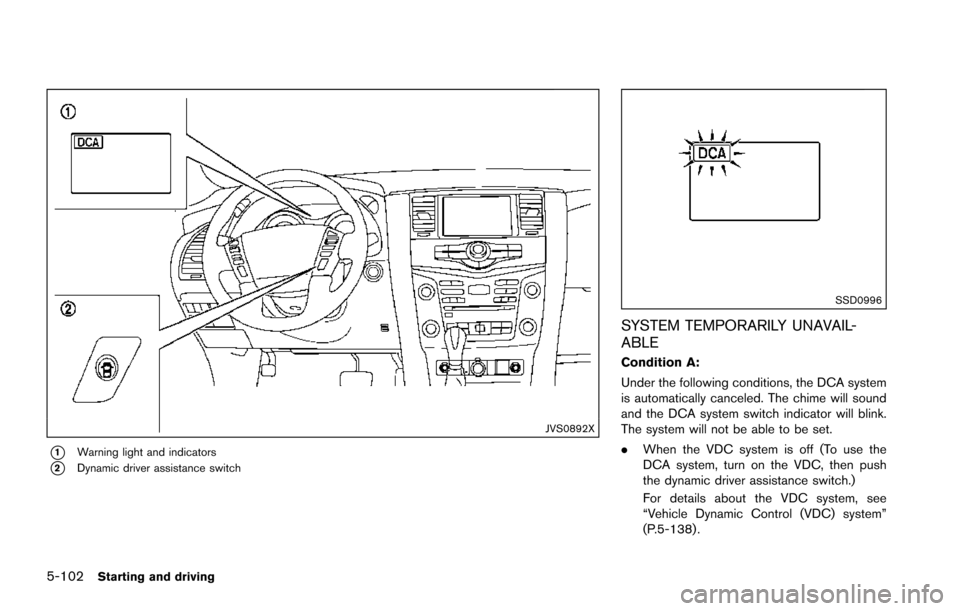
*1Warning light and indicators
*2Dynamic driver assistance switch
SSD0996
SYSTEM TEMPORARILY UNAVAIL-
ABLE
Condition A:
Under the following conditions, the DCA system
is automatically canceled. The chime will sound
and the DCA system switch indicator will blink.
The system will not be able to be set.
.When the VDC system is off (To use the
DCA system, turn on the VDC, then push
the dynamic driver assistance switch.)
For details about the VDC system, see
“Vehicle Dynamic Control (VDC) system”
(P.5-138) .
Page 466 of 614
*2: While changing in and out of the 4LO position, the engine must be running. Otherwise, the shift will not take place and the 4LO indicator will not be on
or flashing.
*3: Make sure that the 4LO indicator turns on when shifting the 4WD shift switch to the 4L position. The Vehicle Dynamic Control (VDC) off indicator light
will also turn on when 4L is selected. (See “Vehicle Dynamic Control (VDC) system” (P.5-138) .)
Starting and driving5-125
Page 479 of 614
5-138Starting and driving
illuminates the ABS warning light on the
instrument panel. The brake system then oper-
ates normally, but without anti-lock assistance.
If the ABS warning light illuminates during the
self-test or while driving, have the vehicle
checked. It is recommended you visit a NISSAN
dealer for this service.
Normal operation
The ABS operates at speeds above 3 to 6 MPH
(5 to 10 km/h) . The speed varies according to
road conditions.
When the ABS senses that one or more wheels
are close to locking up, the actuator rapidly
applies and releases hydraulic pressure. This
action is similar to pumping the brakes very
quickly. You may feel a pulsation in the brake
pedal and hear a noise from under the hood or
feel a vibration from the actuator when it is
operating. This is normal and indicates that the
ABS is operating properly. However, the pulsa-
tion may indicate that road conditions are
hazardous and extra care is required while
driving.The Vehicle Dynamic Control (VDC) system
uses various sensors to monitor driver inputs
and vehicle motion. Under certain driving con-
ditions, the VDC system helps to perform the
following functions.
.
Controls brake pressure to reduce wheel
slip on one slipping drive wheel so power is
transferred to a non slipping drive wheel on
the same axle.
. Controls brake pressure and engine output
to reduce drive wheel slip based on vehicle
speed (traction control function) .
. Controls brake pressure at individual wheels
and engine output to help the driver maintain
control of the vehicle in the following
conditions:
— understeer (vehicle tends to not follow
the steered path despite increased
steering input)
— oversteer (vehicle tends to spin due to certain road or driving conditions) .
The VDC system can help the driver to maintain
control of the vehicle, but it cannot prevent loss
of vehicle control in all driving situations.
When the VDC system operates, the VDC
warning light
in the instrument panel flashes
so note the following:
. The road may be slippery or the system may
determine some action is required to help keep the vehicle on the steered path.
. You may feel a pulsation in the brake pedal
and hear a noise or vibration from under the
hood. This is normal and indicates that the
VDC system is working properly.
. Adjust your speed and driving to the road
conditions.
If a malfunction occurs in the system, the VDC
warning light
illuminates in the instrument
panel. The VDC system automatically turns off.
The VDC OFF switch is used to turn off the VDC
system. The VDC off indicator
illuminates to
indicate the VDC system is off. When the VDC
switch is used to turn off the system, the VDC
system still operates to prevent one drive wheel
from slipping by transferring power to a non
slipping drive wheel. The VDC warning light
flashes if this occurs. All other VDC functions
are off, and the VDC warning lightwill not
flash. The VDC system is automatically reset to
on when the ignition switch is placed in the OFF
position then back to the ON position.
When the 4L position is selected with the 4WD
shift switch, the VDC system is disabled and the
VDC off indicator light illuminates (for 4WD
models) .
See “Vehicle Dynamic Control (VDC) warning
light” (P.2-17) and “Vehicle Dynamic Control
(VDC) off indicator light” (P.2-20).
VEHICLE DYNAMIC CONTROL (VDC)
SYSTEM
Page 611 of 614
11-6
Starting the engine ............................................. 5-16
STATUS button ............................................................. 4-8
Status light, Front passenger air bag .................... 1-60
Steering Heated steering wheel ....................................... 2-42
Power steering ................................................... 5-135
Power steering fluid ............................................... 8-8
Steering-wheel-mounted controls
for audio ................................................................. 4-91
Tilt/telescopic steering ....................................... 3-29
Storage ......................................................................... 2-50
Sun visors ..................................................................... 3-29
Sunglasses holder ...................................................... 2-52
Supplemental air bag warning labels .................... 1-68
Supplemental air bag warning light ........... 1-68, 2-16
Supplemental restraint system ................................ 1-52 Precautions on supplemental
restraint system .................................................... 1-52
Switch Autolight switch ................................................... 2-37
Fog light switch ................................................... 2-42
Hazard warning flasher switch ............................ 6-2
Headlight aiming control .................................... 2-39
Headlight switch .................................................. 2-37
Ignition switch ...................................................... 5-18
Power door lock switch ........................................ 3-5
SNOW mode switch .......................................... 2-47
Turn signal switch ................................................ 2-41
Vehicle Dynamic Control (VDC)
OFF switch ............................................................ 2-48
T
Tachometer ..................................................................... 2-7
Temperature gauge, Engine coolant
temperature gauge ....................................................... 2-7 Theft (NISSAN Vehicle Immobilizer System) ,
Engine start .................................................................. 2-31
Three-way catalyst ....................................................... 5-4
Tilt/telescopic steering .............................................. 3-29
Tire
Pressure, Low tire pressure warning light .... 2-15
Tire replacement indicator ................................. 2-26
Tires Flat tire ...................................................................... 6-3
Tire and Loading information label .... 8-31, 10-12
Tire chains ............................................................. 8-36
Tire dressing ............................................................ 7-4
Tire pressure ......................................................... 8-30
Tire pressure information (display) ................. 4-10
Tire Pressure Monitoring
System (TPMS) ............................................. 5-5, 6-3
Tire rotation ........................................................... 8-37
Types of tires ........................................................ 8-36
Uniform tire quality grading ............................. 10-29
Wheel/tire size ..................................................... 10-9
Wheels and tires ................................................. 8-30
To p Tether strap child restraints .............................. 1-36
Touch screen ................................................................. 4-5
TOW mode ............................................................... 5-132
TOW mode switch ..................................................... 2-47
Towing Flat towing ........................................................... 10-29
Tow truck towing ................................................. 6-16
Towing a trailer ................................................... 10-17
Towing safety ...................................................... 10-21
TPMS, Tire Pressure Monitoring System ...... 5-5, 6-3 TPMS with Easy Fill Tire Alert ............................ 5-8
Trailer towing ............................................................ 10-17
Transceiver HomeLink
ŠUniversal Transceiver ................... 2-67 Transmission
Automatic Transmission Fluid (ATF) .................. 8-8
Driving with automatic transmission ............... 5-18
Transmission shift lever lock release .............. 5-21
Transmitter (See remote keyless
entry system) ............................................................... 3-15
Traveling or registering your vehicle in
another country ........................................................ 10-10
Trip computer .............................................................. 2-27
Trip odometer .............................................................. 2-28
Turn signal switch ....................................................... 2-41
U
Underbody cleaning ..................................................... 7-3
Uniform tire quality grading ................................... 10-29
USB (Universal Serial Bus) connection port ....... 4-77
V
Vanity mirror ................................................................. 3-33
Vanity mirror lights ...................................................... 2-66
Variable voltage control system .............................. 8-13
Vehicle Dimensions ............................................................ 10-9
Identification number (VIN) ............................. 10-10
Loading information .......................................... 10-13
Recovery (freeing a stuck vehicle) .................. 6-19
Security system .................................................... 2-30
Vehicle Dynamic Control (VDC)
OFF switch ............................................................ 2-48
Vehicle Dynamic Control (VDC) system ...... 5-138
Vehicle Dynamic Control (VDC)
warning light ......................................................... 2-17
Vehicle information and settings (display) ....... 4-8
Vehicle information display ....................................... 2-20
Ventilators ..................................................................... 4-51