Tow lights NISSAN ARMADA 2017 2.G Owners Manual
[x] Cancel search | Manufacturer: NISSAN, Model Year: 2017, Model line: ARMADA, Model: NISSAN ARMADA 2017 2.GPages: 614, PDF Size: 2.87 MB
Page 10 of 614
JVC0953X
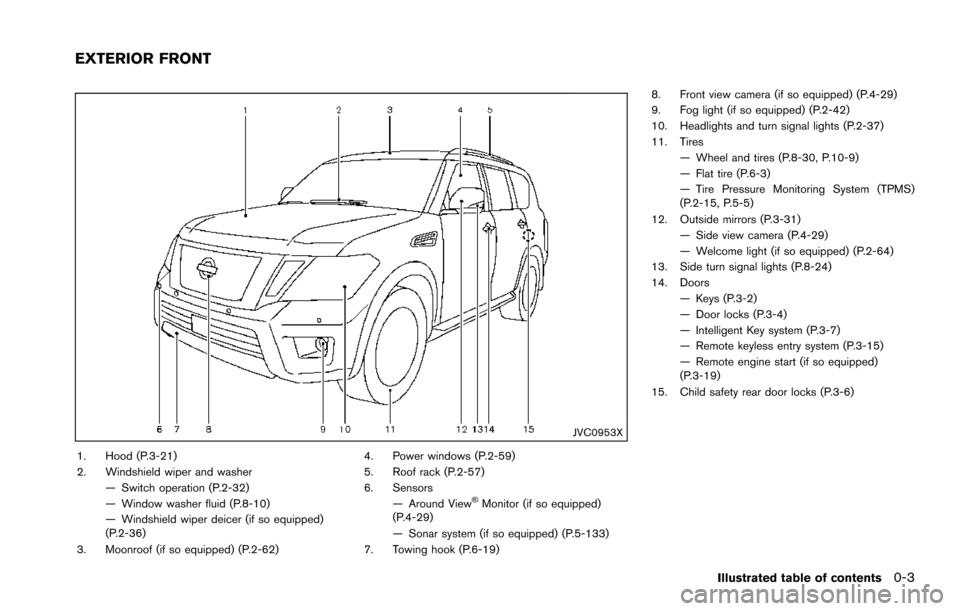
1. Hood (P.3-21)
2. Windshield wiper and washer— Switch operation (P.2-32)
— Window washer fluid (P.8-10)
— Windshield wiper deicer (if so equipped)
(P.2-36)
3. Moonroof (if so equipped) (P.2-62) 4. Power windows (P.2-59)
5. Roof rack (P.2-57)
6. Sensors
— Around View
ŠMonitor (if so equipped)
(P.4-29)
— Sonar system (if so equipped) (P.5-133)
7. Towing hook (P.6-19) 8. Front view camera (if so equipped) (P.4-29)
9. Fog light (if so equipped) (P.2-42)
10. Headlights and turn signal lights (P.2-37)
11. Tires
— Wheel and tires (P.8-30, P.10-9)
— Flat tire (P.6-3)
— Tire Pressure Monitoring System (TPMS)
(P.2-15, P.5-5)
12. Outside mirrors (P.3-31) — Side view camera (P.4-29)
— Welcome light (if so equipped) (P.2-64)
13. Side turn signal lights (P.8-24)
14. Doors
— Keys (P.3-2)
— Door locks (P.3-4)
— Intelligent Key system (P.3-7)
— Remote keyless entry system (P.3-15)
— Remote engine start (if so equipped)
(P.3-19)
15. Child safety rear door locks (P.3-6)
Illustrated table of contents0-3
EXTERIOR FRONT
Page 18 of 614
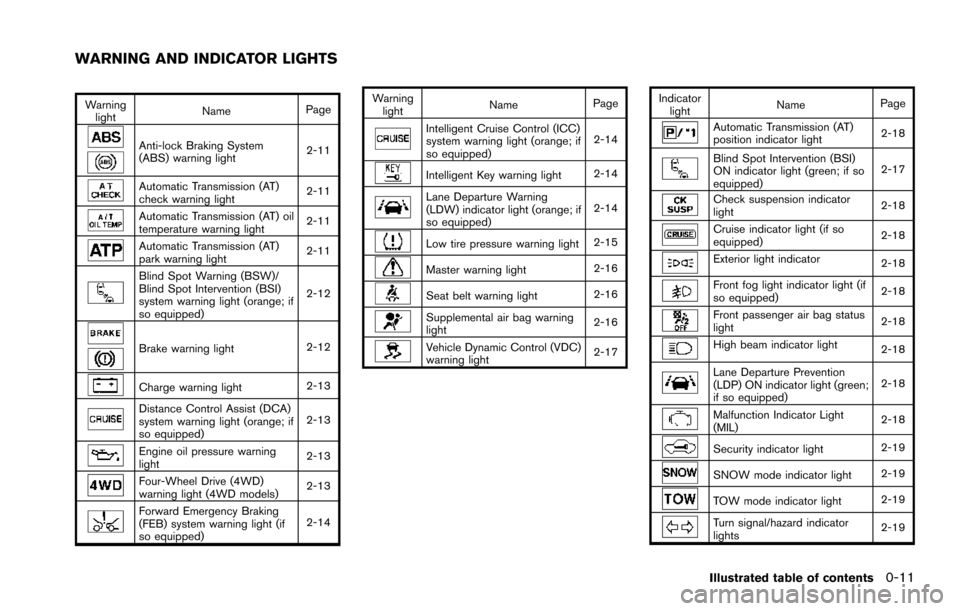
Warninglight Name
Page
Anti-lock Braking System
(ABS) warning light 2-11
Automatic Transmission (AT)
check warning light2-11
Automatic Transmission (AT) oil
temperature warning light
2-11
Automatic Transmission (AT)
park warning light2-11
Blind Spot Warning (BSW)/
Blind Spot Intervention (BSI)
system warning light (orange; if
so equipped)2-12
Brake warning light
2-12
Charge warning light2-13
Distance Control Assist (DCA)
system warning light (orange; if
so equipped)2-13
Engine oil pressure warning
light
2-13
Four-Wheel Drive (4WD)
warning light (4WD models)
2-13
Forward Emergency Braking
(FEB) system warning light (if
so equipped)2-14Warning
light Name
Page
Intelligent Cruise Control (ICC)
system warning light (orange; if
so equipped) 2-14
Intelligent Key warning light
2-14
Lane Departure Warning
(LDW) indicator light (orange; if
so equipped)2-14
Low tire pressure warning light
2-15
Master warning light2-16
Seat belt warning light
2-16
Supplemental air bag warning
light2-16
Vehicle Dynamic Control (VDC)
warning light2-17Indicator
light Name
Page
Automatic Transmission (AT)
position indicator light 2-18
Blind Spot Intervention (BSI)
ON indicator light (green; if so
equipped)2-17
Check suspension indicator
light
2-18
Cruise indicator light (if so
equipped)2-18
Exterior light indicator
2-18
Front fog light indicator light (if
so equipped)2-18
Front passenger air bag status
light
2-18
High beam indicator light
2-18
Lane Departure Prevention
(LDP) ON indicator light (green;
if so equipped)2-18
Malfunction Indicator Light
(MIL)
2-18
Security indicator light
2-19
SNOW mode indicator light2-19
TOW mode indicator light2-19
Turn signal/hazard indicator
lights2-19
Illustrated table of contents0-11
WARNING AND INDICATOR LIGHTS
Page 90 of 614

2 Instruments and controls
Cockpit ........................................................................\
................ 2-3
Instrument panel ........................................................................\
2-4
Meters and gauges ................................................................... 2-5Speedometer and odometer ............................................ 2-6
Tachometer ........................................................................\
... 2-7
Engine coolant temperature gauge ................................ 2-7
Fuel gauge ........................................................................\
.... 2-8
Engine oil pressure gauge ................................................ 2-8
Voltmeter ........................................................................\
........ 2-9
Meter/ring illumination and needle sweep .................... 2-9
Warning lights, indicator lights and
audible reminders ................................................................... 2-10 Checking lights ................................................................. 2-11
Warning lights ................................................................... 2-11
Indicator lights ................................................................... 2-17
Audible reminders ............................................................ 2-20
Vehicle information display .................................................. 2-20 Operational indicators ..................................................... 2-23
Maintenance indicators ................................................... 2-26
Trip computer .................................................................... 2-27
Security systems .................................................................... 2-30 Vehicle Security System ................................................. 2-30
NISSAN Vehicle Immobilizer System .......................... 2-31 Wiper and washer switch ................................................... 2-32
Windshield wiper and washer operation ................. 2-33
Rain-sensing auto wiper system (if
so equipped) ................................................................... 2-34
Rear window wiper and washer operation .............. 2-35
Rear window and outside mirror (if so equipped)
defroster switch ..................................................................... 2-36
Windshield deicer switch (if so equipped) .................... 2-36
Headlight and turn signal switch ....................................... 2-37 Headlight switch ............................................................ 2-37
Instrument brightness control ..................................... 2-40
Turn signal switch .......................................................... 2-41
Fog light switch (if so equipped) .............................. 2-42
Heated steering wheel (if so equipped) ......................... 2-42
Horn ........................................................................\
.................. 2-43
Heated seats ........................................................................\
.. 2-43 Front (if so equipped) ................................................... 2-44
Rear (if so equipped) .................................................... 2-44
Climate controlled seats (if so equipped) ...................... 2-45
Warning systems switch (if so equipped) ...................... 2-46
Sonar system OFF switch (if so equipped) ................... 2-47
SNOW mode switch ............................................................ 2-47
TOW mode switch ................................................................ 2-47
Page 94 of 614
SIC4368
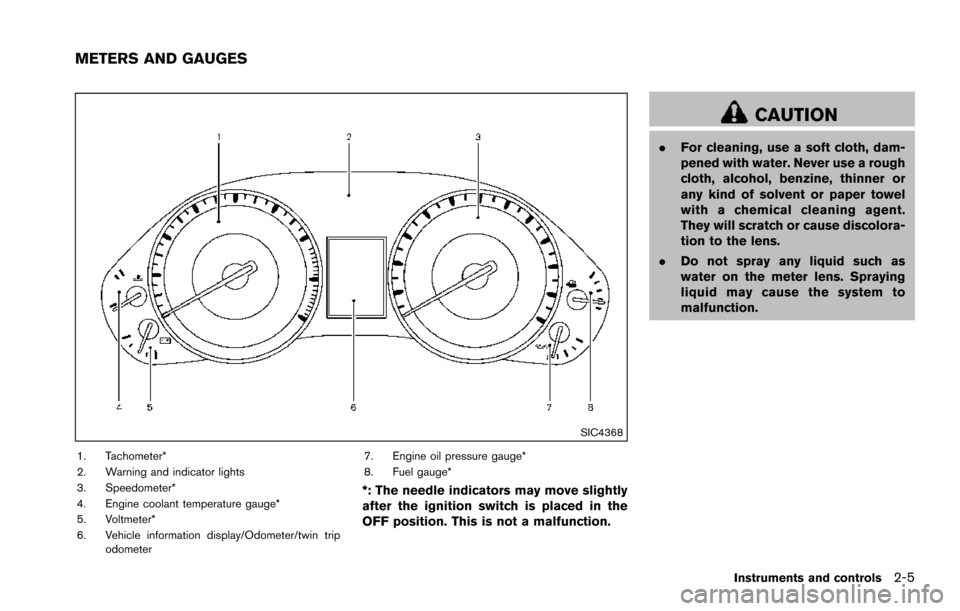
1. Tachometer*
2. Warning and indicator lights
3. Speedometer*
4. Engine coolant temperature gauge*
5. Voltmeter*
6. Vehicle information display/Odometer/twin tripodometer 7. Engine oil pressure gauge*
8. Fuel gauge*
*: The needle indicators may move slightly
after the ignition switch is placed in the
OFF position. This is not a malfunction.
CAUTION
.
For cleaning, use a soft cloth, dam-
pened with water. Never use a rough
cloth, alcohol, benzine, thinner or
any kind of solvent or paper towel
with a chemical cleaning agent.
They will scratch or cause discolora-
tion to the lens.
. Do not spray any liquid such as
water on the meter lens. Spraying
liquid may cause the system to
malfunction.
Instruments and controls2-5
METERS AND GAUGES
Page 99 of 614
2-10Instruments and controls
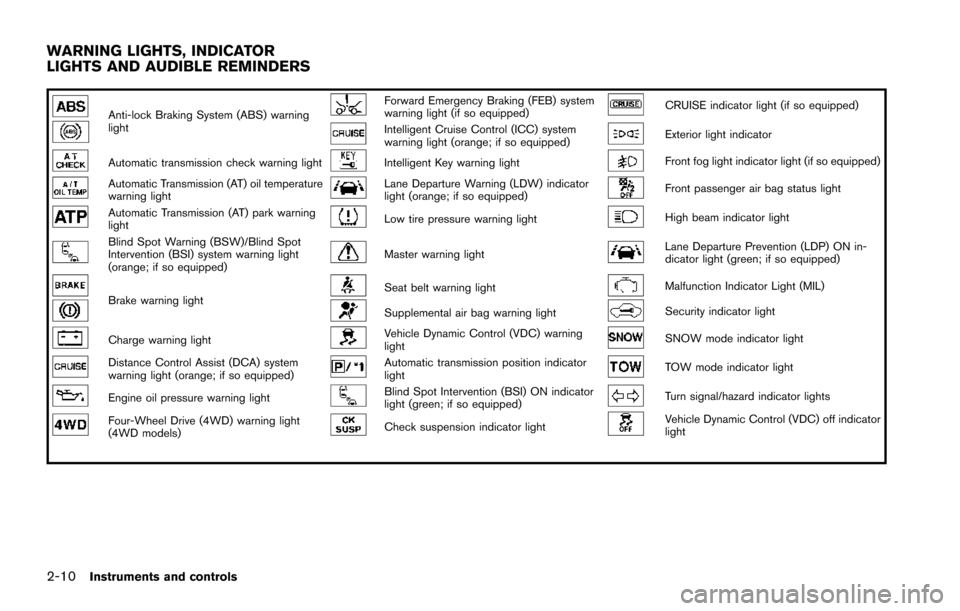
Anti-lock Braking System (ABS) warning
lightForward Emergency Braking (FEB) system
warning light (if so equipped)CRUISE indicator light (if so equipped)
Intelligent Cruise Control (ICC) system
warning light (orange; if so equipped)Exterior light indicator
Automatic transmission check warning lightIntelligent Key warning lightFront fog light indicator light (if so equipped)
Automatic Transmission (AT) oil temperature
warning lightLane Departure Warning (LDW) indicator
light (orange; if so equipped)Front passenger air bag status light
Automatic Transmission (AT) park warning
lightLow tire pressure warning lightHigh beam indicator light
Blind Spot Warning (BSW)/Blind Spot
Intervention (BSI) system warning light
(orange; if so equipped)Master warning lightLane Departure Prevention (LDP) ON in-
dicator light (green; if so equipped)
Brake warning lightSeat belt warning lightMalfunction Indicator Light (MIL)
Supplemental air bag warning lightSecurity indicator light
Charge warning lightVehicle Dynamic Control (VDC) warning
lightSNOW mode indicator light
Distance Control Assist (DCA) system
warning light (orange; if so equipped)Automatic transmission position indicator
lightTOW mode indicator light
Engine oil pressure warning lightBlind Spot Intervention (BSI) ON indicator
light (green; if so equipped)Turn signal/hazard indicator lights
Four-Wheel Drive (4WD) warning light
(4WD models)Check suspension indicator lightVehicle Dynamic Control (VDC) off indicator
light
WARNING LIGHTS, INDICATOR
LIGHTS AND AUDIBLE REMINDERS
Page 108 of 614
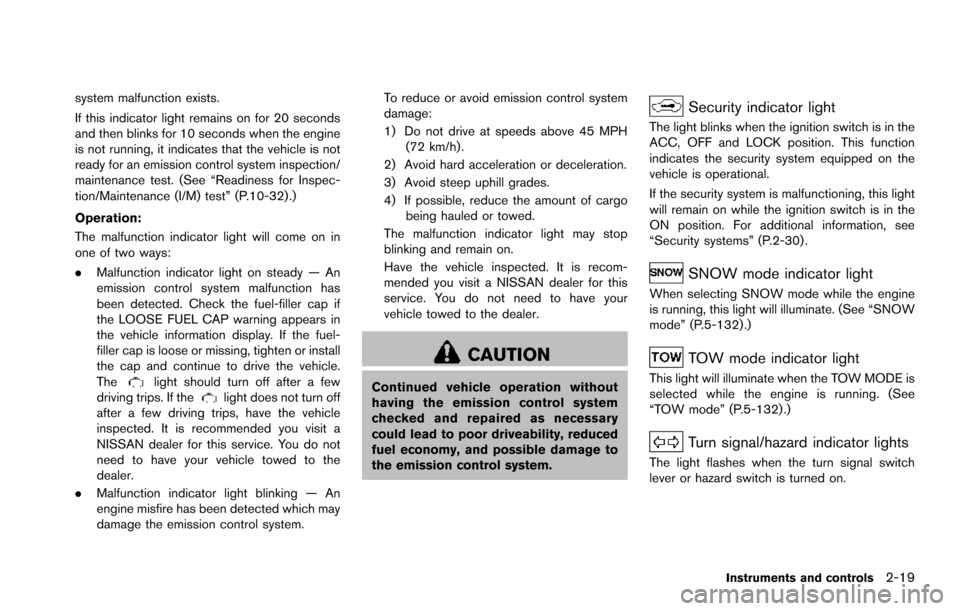
system malfunction exists.
If this indicator light remains on for 20 seconds
and then blinks for 10 seconds when the engine
is not running, it indicates that the vehicle is not
ready for an emission control system inspection/
maintenance test. (See “Readiness for Inspec-
tion/Maintenance (I/M) test” (P.10-32) .)
Operation:
The malfunction indicator light will come on in
one of two ways:
.Malfunction indicator light on steady — An
emission control system malfunction has
been detected. Check the fuel-filler cap if
the LOOSE FUEL CAP warning appears in
the vehicle information display. If the fuel-
filler cap is loose or missing, tighten or install
the cap and continue to drive the vehicle.
The
light should turn off after a few
driving trips. If thelight does not turn off
after a few driving trips, have the vehicle
inspected. It is recommended you visit a
NISSAN dealer for this service. You do not
need to have your vehicle towed to the
dealer.
. Malfunction indicator light blinking — An
engine misfire has been detected which may
damage the emission control system. To reduce or avoid emission control system
damage:
1) Do not drive at speeds above 45 MPH
(72 km/h) .
2) Avoid hard acceleration or deceleration.
3) Avoid steep uphill grades.
4) If possible, reduce the amount of cargo being hauled or towed.
The malfunction indicator light may stop
blinking and remain on.
Have the vehicle inspected. It is recom-
mended you visit a NISSAN dealer for this
service. You do not need to have your
vehicle towed to the dealer.
CAUTION
Continued vehicle operation without
having the emission control system
checked and repaired as necessary
could lead to poor driveability, reduced
fuel economy, and possible damage to
the emission control system.
Security indicator light
The light blinks when the ignition switch is in the
ACC, OFF and LOCK position. This function
indicates the security system equipped on the
vehicle is operational.
If the security system is malfunctioning, this light
will remain on while the ignition switch is in the
ON position. For additional information, see
“Security systems” (P.2-30) .
SNOW mode indicator light
When selecting SNOW mode while the engine
is running, this light will illuminate. (See “SNOW
mode” (P.5-132) .)
TOW mode indicator light
This light will illuminate when the TOW MODE is
selected while the engine is running. (See
“TOW mode” (P.5-132) .)
Turn signal/hazard indicator lights
The light flashes when the turn signal switch
lever or hazard switch is turned on.
Instruments and controls2-19
Page 127 of 614
2-38Instruments and controls
headlights when it is light.
The headlights will also be turned on automa-
tically at twilight or in rainy weather (when the
windshield wiper is operated continuously) .
If the ignition switch is placed in the OFF
position and one of the doors is opened and this
condition is continued, the headlights remain on
for 5 minutes.
Automatic headlights off delay:
You can keep the headlights on for up to 180
seconds after you place the ignition switch in the
OFF position and open any door then close all
the doors.
You can adjust the period of the automatic
headlights off delay from 0 seconds (OFF) to
180 seconds. The factory default setting is 45
seconds.
For automatic headlights off delay setting, see
“How to use SETTING button” (P.4-13) .
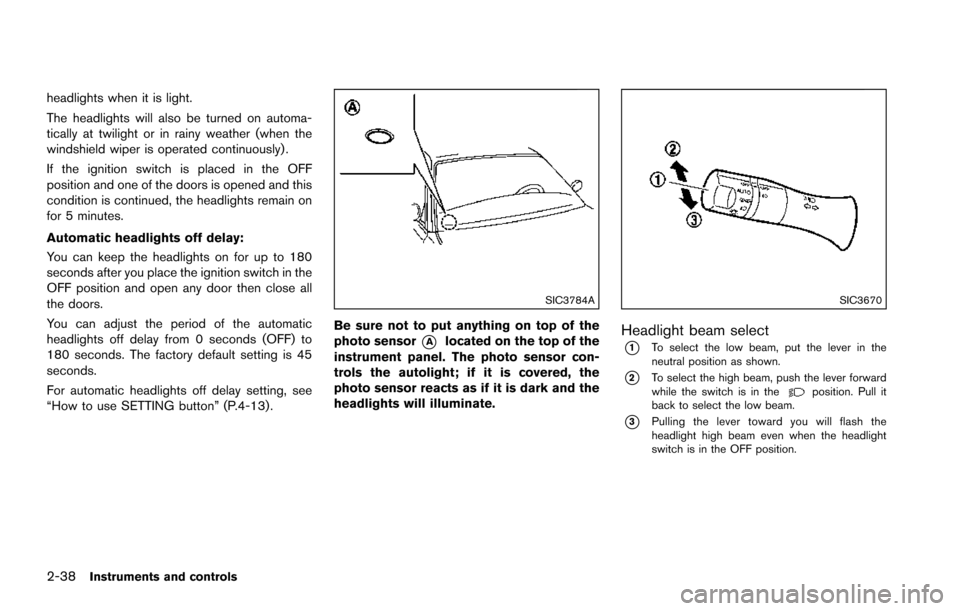
SIC3784A
Be sure not to put anything on top of the
photo sensor
*Alocated on the top of the
instrument panel. The photo sensor con-
trols the autolight; if it is covered, the
photo sensor reacts as if it is dark and the
headlights will illuminate.
SIC3670
Headlight beam select
*1To select the low beam, put the lever in the
neutral position as shown.
*2To select the high beam, push the lever forward
while the switch is in theposition. Pull it
back to select the low beam.
*3Pulling the lever toward you will flash the
headlight high beam even when the headlight
switch is in the OFF position.
Page 358 of 614
1. Make sure that the Intelligent Key is on you.
2. Depress the brake pedal.
3. Push the ignition switch once to the ONposition.
For additional information about the remote
engine start function, see “Remote engine start”
(P.3-19) .ENGINE PROTECTION MODE
The engine has an engine protection mode to
reduce the chance of damage if the coolant
temperature becomes too high (for example,
when climbing steep grades in high temperature
with heavy loads, such as when towing a trailer) .
When the engine temperature reaches a certain
level:
. The engine coolant temperature gauge will
move toward the H position.
. Engine power may be reduced.
. The air conditioning cooling function may be
automatically turned OFF for a short time
(the blower will continue to operate) .
Engine power and, under some conditions,
vehicle speed will decrease. Vehicle speed can
be controlled with the accelerator pedal, but the
vehicle may not accelerate at the desired speed.
The transmission will downshift or upshift as it
reaches prescribed shift points. You can also
shift manually.
As driving conditions change and engine cool-
ant temperature is reduced, vehicle speed can
be increased using the accelerator pedal, and
air conditioning cooling function will automati-
cally be turned back ON. If:
1. The engine coolant temperature is not
reduced.
2. The air conditioning cooling function does not turn back ON.
3. The engine oil pressure warning light
illuminates or engine coolant temperature
gauge does not return to the normal range
from the H position, this may indicate a
malfunction. Move the vehicle off the road to
a safe area and allow the engine to cool. If
after checking the oil and coolant, the
remains on or engine coolant temperature
does not return to the normal range, do not
continue to drive. It is recommended you
contact a NISSAN dealer.
The Malfunction Indicator Light (MIL)
may
also come ON. You do not need to have your
vehicle towed, unless it remains on, but have it
inspected soon. It is recommended you contact
a NISSAN dealer for this service. See “Warning
lights, indicator lights and audible reminders”
(P.2-10) .
WARNING
Overheating can result in reduced en-
gine power and vehicle speed. The
Starting and driving5-17
DRIVING THE VEHICLE
Page 462 of 614
2.This device must accept any interfer-
ence, including interference that may
cause undesired operation of the de-
vice.
CAUTION
During the first 1,200 miles (2,000 km) ,
follow these recommendations to ob-
tain maximum engine performance and
ensure the future reliability and econo-
my of your new vehicle.
Failure to follow these recommenda-
tions may result in shortened engine
life and reduced engine performance.
. Avoid driving for long periods at constant
speed, either fast or slow. Do not run the
engine over 4,000 rpm.
. Do not accelerate at full throttle in any gear.
. Avoid quick starts.
. Avoid hard braking as much as possible.
. Do not tow a trailer for the first 500 miles
(805 km) . Follow these easy-to-use Fuel Efficient Driving
Tips to help you achieve the most fuel economy
from your vehicle.
1. Use smooth accelerator and brake pedal
application.
.Avoid rapid starts and stops..Use smooth, gentle accelerator andbrake application whenever possible.
.Maintain constant speed while commut-
ing and coast whenever possible.
2. Maintain constant speed.
.Look ahead to try and anticipate and minimize stops.
.Synchronizing your speed with traffic
lights allows you to reduce your number
of stops.
.Maintaining a steady speed can minimize red light stops and improve fuel effi-
ciency.
3. Use air conditioning (A/C) at higher vehicle speeds.
.Below 40 MPH (64 km/h) , it is moreefficient to open windows to cool the
vehicle due to reduced engine load.
.Above 40 MPH (64 km/h) , it is moreefficient to use A/C to cool the vehicle
due to increased aerodynamic drag.
Starting and driving5-121
BREAK-IN SCHEDULE FUEL EFFICIENT DRIVING TIPS
Page 596 of 614
turning corners.
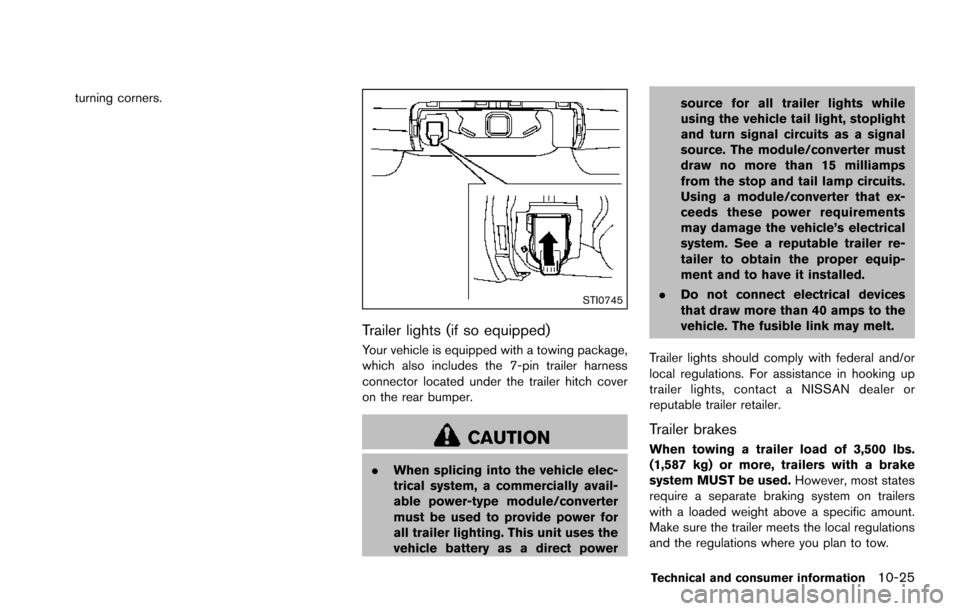
STI0745
Trailer lights (if so equipped)
Your vehicle is equipped with a towing package,
which also includes the 7-pin trailer harness
connector located under the trailer hitch cover
on the rear bumper.
CAUTION
.When splicing into the vehicle elec-
trical system, a commercially avail-
able power-type module/converter
must be used to provide power for
all trailer lighting. This unit uses the
vehicle battery as a direct power source for all trailer lights while
using the vehicle tail light, stoplight
and turn signal circuits as a signal
source. The module/converter must
draw no more than 15 milliamps
from the stop and tail lamp circuits.
Using a module/converter that ex-
ceeds these power requirements
may damage the vehicle’s electrical
system. See a reputable trailer re-
tailer to obtain the proper equip-
ment and to have it installed.
. Do not connect electrical devices
that draw more than 40 amps to the
vehicle. The fusible link may melt.
Trailer lights should comply with federal and/or
local regulations. For assistance in hooking up
trailer lights, contact a NISSAN dealer or
reputable trailer retailer.
Trailer brakes
When towing a trailer load of 3,500 lbs.
(1,587 kg) or more, trailers with a brake
system MUST be used. However, most states
require a separate braking system on trailers
with a loaded weight above a specific amount.
Make sure the trailer meets the local regulations
and the regulations where you plan to tow.
Technical and consumer information10-25