ECO mode NISSAN ARMADA 2018 Owner´s Manual
[x] Cancel search | Manufacturer: NISSAN, Model Year: 2018, Model line: ARMADA, Model: NISSAN ARMADA 2018Pages: 532, PDF Size: 2.3 MB
Page 385 of 532
5-130Starting and driving
will either remain illuminated or blink.
If the 4WD warning light comes on, the
4WD shift indicator turns off.
High-temperature transfer case oil makes
the 4WD warning light blink rapidly (about
twice per second). If the warning light
blinks rapidly during operation, stop the
vehicle in a safe place immediately. Then
if the light turns off after a while, you can
continue driving.
A large difference between the diameters
of front and rear wheels will make the
4WD warning light blink slowly (about
once per two seconds). Change the 4WD
shift switch to AUTO and do not drive fast.
CAUTION
.If the 4WD warning light comes
on or blinks slowly during opera-
tion or rapidly after stopping the
vehicle for a while, have your
vehicle checked as soon as pos-
sible. It is recommended you visit
a NISSAN dealer for this service.
. Shifting between 4HI and 4LO is
not recommended when the 4WD
warning light turns on.
. When the 4WD warning light
comes on, the 2WD mode may be engaged even if the 4WD shift
switch is in AUTO or 4H. Be
especially careful when driving. If
corresponding parts are malfunc-
tioning, the 4WD mode will not be
engaged even if the 4WD shift
switch is shifted.
. Do not drive the vehicle in the 4HI
or 4LO position on dry hard sur-
face roads. Driving on dry, hard
surfaces in 4HI or 4LO may cause
unnecessary noise, tire wear and
increased fuel consumption.
If the 4WD warning light turns on
when driving on dry hard surface
roads:
— in the AUTO or 4HI position,
shift the 4WD shift switch to
AUTO.
— in the 4LO position, stop the vehicle and shift the transmis-
sion shift lever to the N (Neu-
tral) position and shift the
4WD shift switch to AUTO.
. If the 4WD warning light is still on
after the above operation, have
your vehicle checked as soon as
possible. It is recommended you
visit a NISSAN dealer for this
service. .
The transfer case may be da-
maged if you continue driving
with the warning light blinking.
Page 388 of 532
Turn the wheels toward the side of
the road so the vehicle will move away
from the center of the road if it moves.
4. Push the ignition switch to the OFF position.
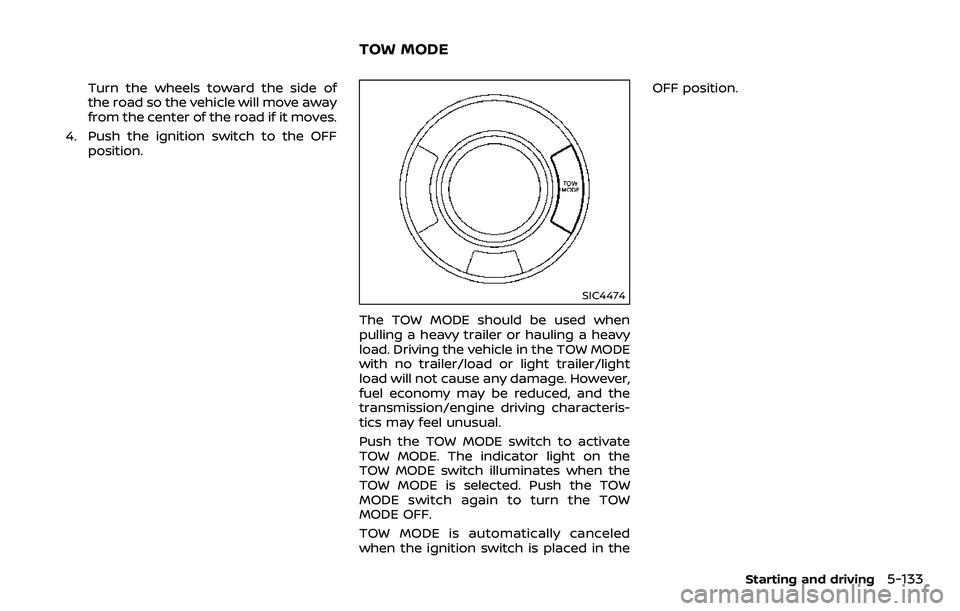
SIC4474
The TOW MODE should be used when
pulling a heavy trailer or hauling a heavy
load. Driving the vehicle in the TOW MODE
with no trailer/load or light trailer/light
load will not cause any damage. However,
fuel economy may be reduced, and the
transmission/engine driving characteris-
tics may feel unusual.
Push the TOW MODE switch to activate
TOW MODE. The indicator light on the
TOW MODE switch illuminates when the
TOW MODE is selected. Push the TOW
MODE switch again to turn the TOW
MODE OFF.
TOW MODE is automatically canceled
when the ignition switch is placed in the OFF position.
Starting and driving5-133
TOW MODE
Page 389 of 532
5-134Starting and driving
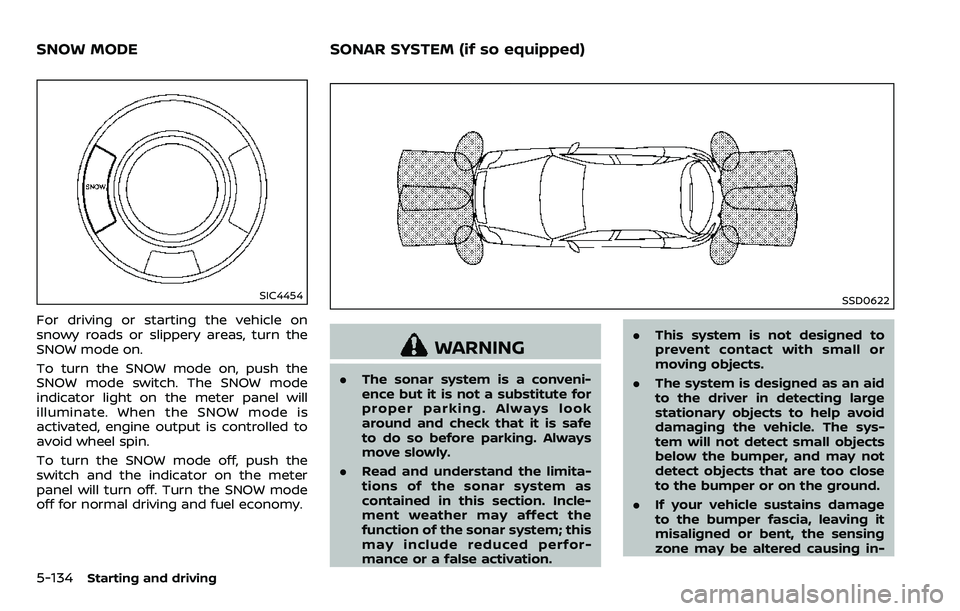
SIC4454
For driving or starting the vehicle on
snowy roads or slippery areas, turn the
SNOW mode on.
To turn the SNOW mode on, push the
SNOW mode switch. The SNOW mode
indicator light on the meter panel will
illuminate. When the SNOW mode is
activated, engine output is controlled to
avoid wheel spin.
To turn the SNOW mode off, push the
switch and the indicator on the meter
panel will turn off. Turn the SNOW mode
off for normal driving and fuel economy.
SSD0622
WARNING
.The sonar system is a conveni-
ence but it is not a substitute for
proper parking. Always look
around and check that it is safe
to do so before parking. Always
move slowly.
. Read and understand the limita-
tions of the sonar system as
contained in this section. Incle-
ment weather may affect the
function of the sonar system; this
may include reduced perfor-
mance or a false activation. .
This system is not designed to
prevent contact with small or
moving objects.
. The system is designed as an aid
to the driver in detecting large
stationary objects to help avoid
damaging the vehicle. The sys-
tem will not detect small objects
below the bumper, and may not
detect objects that are too close
to the bumper or on the ground.
. If your vehicle sustains damage
to the bumper fascia, leaving it
misaligned or bent, the sensing
zone may be altered causing in-
SNOW MODE SONAR SYSTEM (if so equipped)
Page 400 of 532
6 In case of emergency
Hazard warning flasher switch ......................................... 6-2
Roadside assistance program ........................................... 6-2
Emergency engine shut off .................................................. 6-3
Flat tire ........................................................................\
.......................... 6-3Tire Pressure Monitoring System (TPMS) .......... 6-3
Changing a flat tire .............................................................. 6-4
Jump starting ........................................................................\
....... 6-12
Push starting ........................................................................\
......... 6-14 If your vehicle overheats .................................................... 6-14
Towing your vehicle ............................................................... 6-16
Towing recommended by NISSAN ..................... 6-17
Vehicle recovery (freeing a stuck vehicle) ...... 6-19
Four-Wheel Drive (4WD) manual shifting
(4WD models) ........................................................................\
....... 6-20
When 4WD warning light illuminates ............... 6-20
Operating procedure ..................................................... 6-21
Page 416 of 532
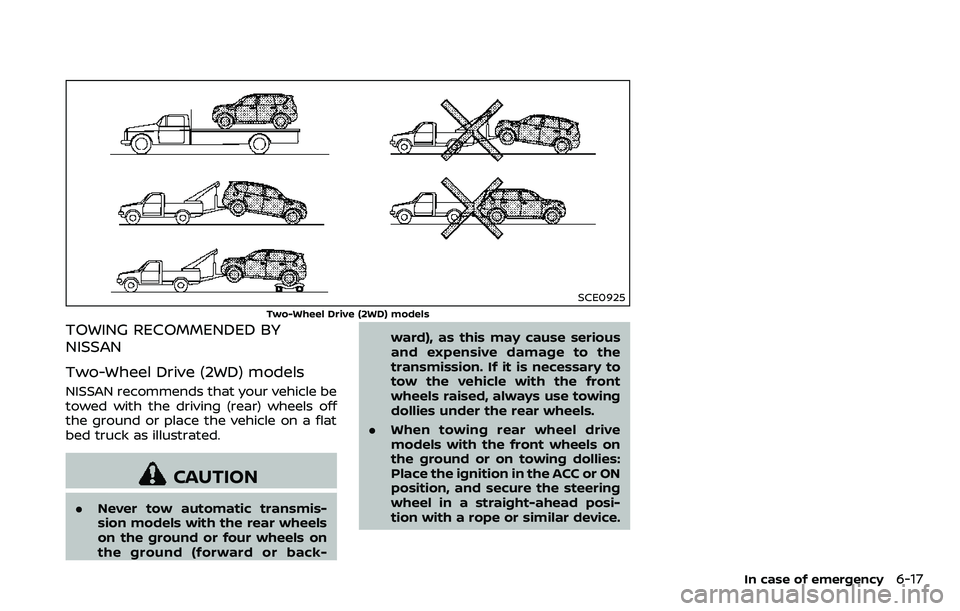
SCE0925
Two-Wheel Drive (2WD) models
TOWING RECOMMENDED BY
NISSAN
Two-Wheel Drive (2WD) models
NISSAN recommends that your vehicle be
towed with the driving (rear) wheels off
the ground or place the vehicle on a flat
bed truck as illustrated.
CAUTION
.Never tow automatic transmis-
sion models with the rear wheels
on the ground or four wheels on
the ground (forward or back- ward), as this may cause serious
and expensive damage to the
transmission. If it is necessary to
tow the vehicle with the front
wheels raised, always use towing
dollies under the rear wheels.
. When towing rear wheel drive
models with the front wheels on
the ground or on towing dollies:
Place the ignition in the ACC or ON
position, and secure the steering
wheel in a straight-ahead posi-
tion with a rope or similar device.
In case of emergency6-17
Page 417 of 532
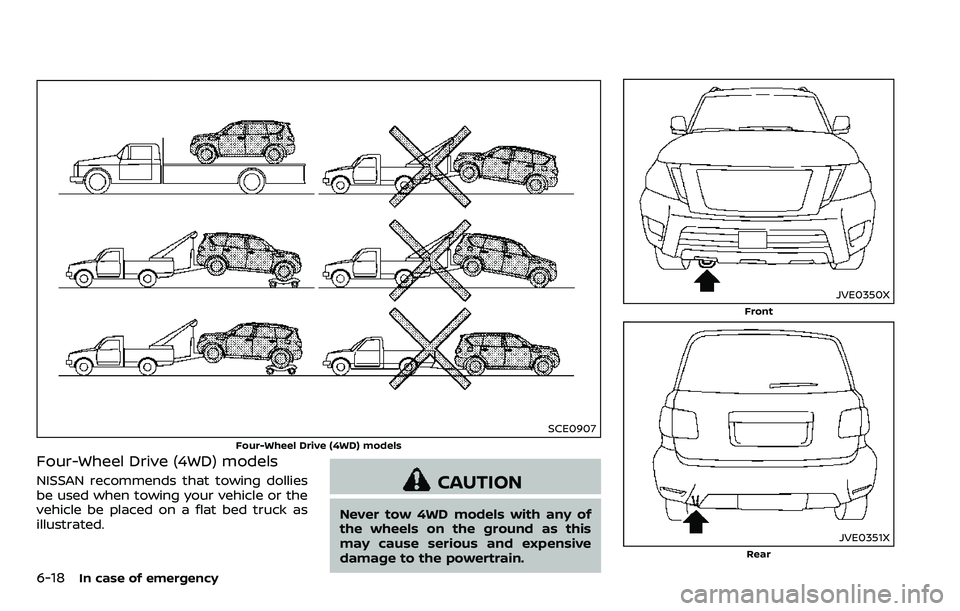
6-18In case of emergency
SCE0907
Four-Wheel Drive (4WD) models
Four-Wheel Drive (4WD) models
NISSAN recommends that towing dollies
be used when towing your vehicle or the
vehicle be placed on a flat bed truck as
illustrated.CAUTION
Never tow 4WD models with any of
the wheels on the ground as this
may cause serious and expensive
damage to the powertrain.
JVE0350X
Front
JVE0351X
Rear
Page 419 of 532
6-20In case of emergency
This section describes the procedure for
manually shifting the vehicle into the 4WD
mode (4L position) in case of an emer-
gency.
WHEN 4WD WARNING LIGHT ILLU-
MINATES
If the 4WD warning light illuminates while
driving, there may be a malfunction in the
4WD system. Stop the vehicle and have
the vehicle checked as soon as possible. It
is recommended you contact a NISSAN
dealer for this service. (See “NISSAN all-
mode 4WD®” (P.5-123).)
When the vehicle is stuck on an uneven
road (desert, mud, etc.) and the 4WD
warning light is illuminated, be sure to
place the 4WD shift switch in the 4L
position. If only the rear wheels are
spinning, this means that the transfer
has not switched to the 4L position
electrically.
If this situation occurs, contact a dealer or
road assistance service for help. If an
immediate service is not available, per-
form the following procedure to switch to
the 4L position manually and free the
vehicle.
CAUTION
Only perform this procedure in an
emergency.
If the vehicle is driven for a long
period of time over a long distance
with a component detached, foreign
material such as water, sand, etc.
may enter from the opening and this
may cause a malfunction in the
drivetrain system. After freeing a
vehicle that has become stuck, it is
recommended you contact a NISSAN
dealer for inspection and repair.
WARNING
.Ensure your safety before per-
forming the operations. The ve-
hicle may move unexpectedly.
. Place the ignition switch in the
OFF position, apply the parking
brake and let the vehicle cool
down.
. Do not perform the following
procedure immediately after
driving the vehicle. Parts such as
exhaust components, the trans- mission, etc. are very hot and
may cause a burn injury.
. Make sure that the parts that will
be operated as well as related
parts cool down before perform-
ing the operation.
. Burrs or projecting portions of
metal components may cause
unexpected injury to your fingers
or arms. Pay special attention in
regard to your safety while re-
moving and installing these
parts. Wear work gloves and pro-
tective arm covers.
CAUTION
While removing and installing the
parts, prevent the removed parts
from getting dirty with water, dirt or
sand. Protect the parts using a cover
such as a clean cloth, etc.
FOUR-WHEEL DRIVE (4WD)
MANUAL SHIFTING (4WD models)
Page 429 of 532
7-6Appearance and care
.Use only genuine NISSAN floor
mats or equivalent floor mats
that are specifically designed for
use in your vehicle model and
model year.
. Properly position the mats in the
floorwell using the floor mat po-
sitioning hooks. See “Floor mat
installation” (P.7-6).
. Make sure the floor mat does not
interfere with pedal operation.
. Periodically check the floor mats
to make sure they are properly
installed.
. After cleaning the vehicle interior,
check the floor mats to make
sure they are properly installed.
The use of genuine NISSAN floor mats can
extend the life of your vehicle carpet and
make it easier to clean the interior. Mats
should be maintained with regular clean-
ing and replaced if they become exces-
sively worn.
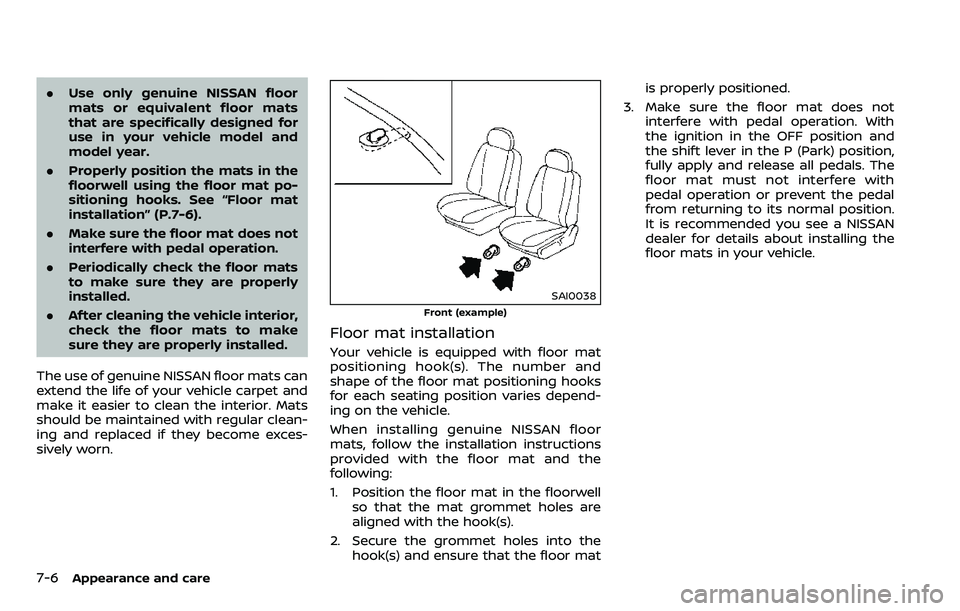
SAI0038
Front (example)
Floor mat installation
Your vehicle is equipped with floor mat
positioning hook(s). The number and
shape of the floor mat positioning hooks
for each seating position varies depend-
ing on the vehicle.
When installing genuine NISSAN floor
mats, follow the installation instructions
provided with the floor mat and the
following:
1. Position the floor mat in the floorwell so that the mat grommet holes are
aligned with the hook(s).
2. Secure the grommet holes into the hook(s) and ensure that the floor mat is properly positioned.
3. Make sure the floor mat does not interfere with pedal operation. With
the ignition in the OFF position and
the shift lever in the P (Park) position,
fully apply and release all pedals. The
floor mat must not interfere with
pedal operation or prevent the pedal
from returning to its normal position.
It is recommended you see a NISSAN
dealer for details about installing the
floor mats in your vehicle.
Page 448 of 532
It is recommended you visit a NISSAN
dealer if checking or replacement is
required.If the brakes do not operate properly,
have the brakes checked. It is recom-
mended that you visit a NISSAN dealer for
this service.
SELF-ADJUSTING BRAKES
Your vehicle is equipped with self-adjust-
ing brakes.
The disc-type brakes self-adjust every
time the brake pedal is applied.
WARNING
Have your brake system checked if
the brake pedal height does not
return to normal. It is recommended
you visit a NISSAN dealer for this
service.
BRAKE PAD WEAR WARNING
The disc brake pads have audible wear
warnings. When a brake pad requires
replacement, it will make a high pitched
scraping sound when the vehicle is in
motion. This scraping sound will first
occur only when the brake pedal is
depressed. After more wear of the brake
pad, the sound will always be heard even
if the brake pedal is not depressed. Have
the brakes checked as soon as possible if
the wear warning sound is heard.Under some driving or climate conditions,
occasional brake squeak, squeal or other
noise may be heard. Occasional brake
noise during light to moderate stops is
normal and does not affect the function
or performance of the brake system.
Proper brake inspection intervals
should be followed.
For additional infor-
mation, see the maintenance schedule
shown in the “9. Maintenance and sche-
dules” section.
BRAKE BOOSTER
Check the brake booster function as
follows:
1. With the engine off, depress and release the foot brake pedal more
than 20 times. When the foot brake
pedal movement (distance of travel)
remains the same from one pedal
application to the next, continue on
to the next step.
2. While depressing the foot brake pedal, start the engine.
3. With the foot brake pedal depressed, stop the engine. Keep the pedal de-
pressed for about 30 seconds.
4. Run the engine for 1 minute without depressing the foot brake pedal, then
turn it off. Depress the foot brake
pedal several times. The pedal travel
distance will decrease gradually with
Do-it-yourself8-17
REAR WINDOW WIPER BLADES BRAKES
Page 461 of 532
8-30Do-it-yourself
If you have a flat tire, see “Flat tire” (P.6-
3).
TIRE PRESSURE
Tire Pressure Monitoring System
(TPMS)
This vehicle is equipped with the Tire
Pressure Monitoring System (TPMS). It
monitors tire pressure of all tires except
the spare. When the low tire pressure
warning light is lit and the CHECK TIRE
PRESSURE warning appears in the vehicle
information display, one or more of your
tires is significantly under-inflated.
The TPMS will activate only when the
vehicle is driven at speeds above 16 MPH
(25 km/h). Also, this system may not
detect a sudden drop in tire pressure
(for example, a flat tire while driving).
For more details, see “Low tire pressure
warning light” (P.2-15), “Tire Pressure Mon-
itoring System (TPMS)” (P.5-5) and “Tire
Pressure Monitoring System (TPMS) ” (P.6-
3).
Tire inflation pressure
Check the pressure of the tires
(including the spare) often and al-
ways prior to long distance trips.
The recommended tire pressure
specifications are shown on the
Tire and Loading Information label
under the “Cold Tire Pressure”
heading. The Tire and Loading In-
formation label is affixed to the
driver side center pillar. Tire pres-
sures should be checked regularly
because:
.Most tires naturally lose air over
time.
. Tires can lose air suddenly when
driven over potholes or other
objects or if the vehicle strikes
a curb while parking.
The tire pressures should be
checked when the tires are cold.
The tires are considered COLD after
the vehicle has been parked for 3 or
more hours, or driven less than 1
mile (1.6 km) at moderate speeds.
TPMS with Easy Fill Tire Alert pro-
vides visual and audible signals outside the vehicle for inflating the
tires to the recommended COLD
tire pressure. (See “TPMS with Easy
Fill Tire Alert” (P.5-8).)
Incorrect tire pressure, including
under inflation, may adversely
affect tire life and vehicle hand-
ling.
WARNING
.
Improperly inflated tires can
fail suddenly and cause an
accident.
. The Gross Vehicle Weight
rating (GVWR) is located on
the F.M.V.S.S./C.M.V.S.S. cer-
tification label. The vehicle
weight capacity is indicated
on the Tire and Loading In-
formation label. Do not load
your vehicle beyond this ca-
pacity. Overloading your ve-
hicle may result in reduced
tire life, unsafe operating
conditions due to premature
tire failure, or unfavorable
WHEELS AND TIRES