fog light NISSAN ARMADA 2018 Owner´s Manual
[x] Cancel search | Manufacturer: NISSAN, Model Year: 2018, Model line: ARMADA, Model: NISSAN ARMADA 2018Pages: 532, PDF Size: 2.3 MB
Page 12 of 532
JVC0953X
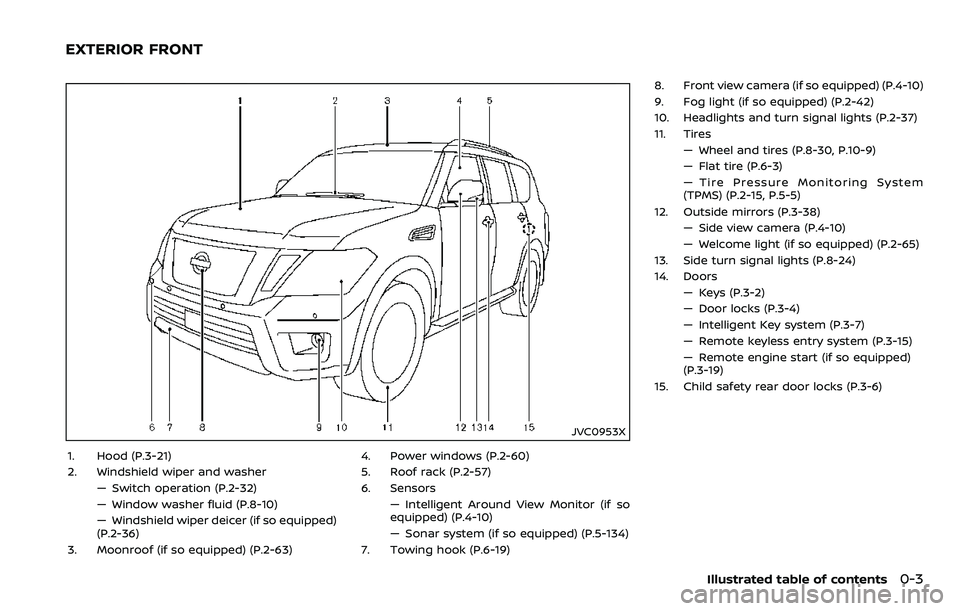
1. Hood (P.3-21)
2. Windshield wiper and washer— Switch operation (P.2-32)
— Window washer fluid (P.8-10)
— Windshield wiper deicer (if so equipped)
(P.2-36)
3. Moonroof (if so equipped) (P.2-63) 4. Power windows (P.2-60)
5. Roof rack (P.2-57)
6. Sensors
— Intelligent Around View Monitor (if so
equipped) (P.4-10)
— Sonar system (if so equipped) (P.5-134)
7. Towing hook (P.6-19) 8. Front view camera (if so equipped) (P.4-10)
9. Fog light (if so equipped) (P.2-42)
10. Headlights and turn signal lights (P.2-37)
11. Tires
— Wheel and tires (P.8-30, P.10-9)
— Flat tire (P.6-3)
— Tire Pressure Monitoring System
(TPMS) (P.2-15, P.5-5)
12. Outside mirrors (P.3-38) — Side view camera (P.4-10)
— Welcome light (if so equipped) (P.2-65)
13. Side turn signal lights (P.8-24)
14. Doors — Keys (P.3-2)
— Door locks (P.3-4)
— Intelligent Key system (P.3-7)
— Remote keyless entry system (P.3-15)
— Remote engine start (if so equipped)
(P.3-19)
15. Child safety rear door locks (P.3-6)
Illustrated table of contents0-3
EXTERIOR FRONT
Page 15 of 532
0-6Illustrated table of contents
JVC1105X
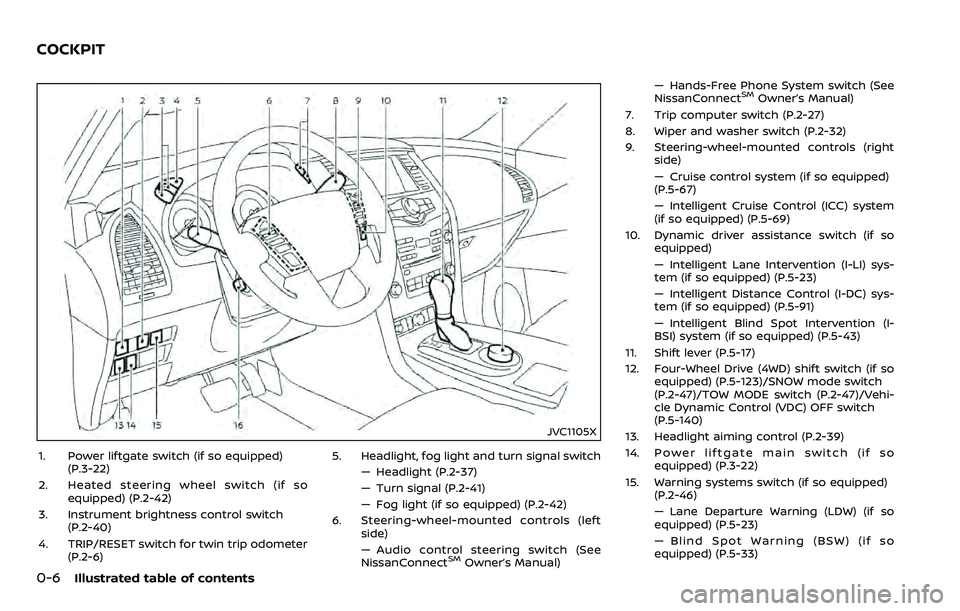
1. Power liftgate switch (if so equipped)(P.3-22)
2. Heated steering wheel switch (if so equipped) (P.2-42)
3. Instrument brightness control switch (P.2-40)
4. TRIP/RESET switch for twin trip odometer (P.2-6) 5. Headlight, fog light and turn signal switch
— Headlight (P.2-37)
— Turn signal (P.2-41)
— Fog light (if so equipped) (P.2-42)
6. Steering-wheel-mounted controls (left side)
— Audio control steering switch (See
NissanConnect
SMOwner’s Manual) — Hands-Free Phone System switch (See
NissanConnect
SMOwner’s Manual)
7. Trip computer switch (P.2-27)
8. Wiper and washer switch (P.2-32)
9. Steering-wheel-mounted controls (right side)
— Cruise control system (if so equipped)
(P.5-67)
— Intelligent Cruise Control (ICC) system
(if so equipped) (P.5-69)
10. Dynamic driver assistance switch (if so equipped)
— Intelligent Lane Intervention (I-LI) sys-
tem (if so equipped) (P.5-23)
— Intelligent Distance Control (I-DC) sys-
tem (if so equipped) (P.5-91)
— Intelligent Blind Spot Intervention (I-
BSI) system (if so equipped) (P.5-43)
11. Shift lever (P.5-17)
12. Four-Wheel Drive (4WD) shift switch (if so equipped) (P.5-123)/SNOW mode switch
(P.2-47)/TOW MODE switch (P.2-47)/Vehi-
cle Dynamic Control (VDC) OFF switch
(P.5-140)
13. Headlight aiming control (P.2-39)
14. Power liftgate main switch (if so equipped) (P.3-22)
15. Warning systems switch (if so equipped) (P.2-46)
— Lane Departure Warning (LDW) (if so
equipped) (P.5-23)
— Blind Spot Warning (BSW) (if so
equipped) (P.5-33)
COCKPIT
Page 20 of 532
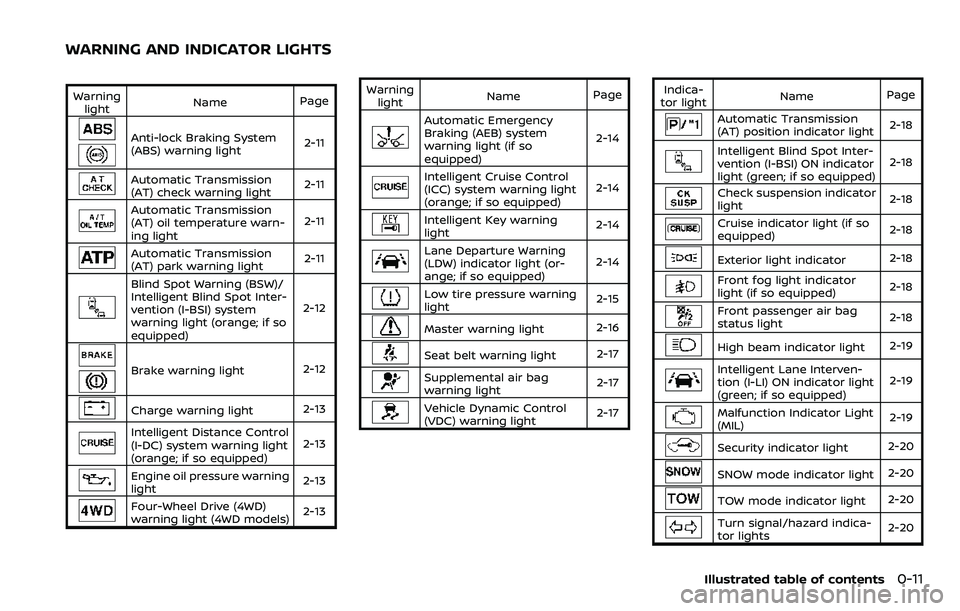
Warninglight Name
Page
Anti-lock Braking System
(ABS) warning light 2-11
Automatic Transmission
(AT) check warning light2-11
Automatic Transmission
(AT) oil temperature warn-
ing light2-11
Automatic Transmission
(AT) park warning light
2-11
Blind Spot Warning (BSW)/
Intelligent Blind Spot Inter-
vention (I-BSI) system
warning light (orange; if so
equipped)2-12
Brake warning light
2-12
Charge warning light2-13
Intelligent Distance Control
(I-DC) system warning light
(orange; if so equipped)2-13
Engine oil pressure warning
light
2-13
Four-Wheel Drive (4WD)
warning light (4WD models)
2-13Warning
light Name
Page
Automatic Emergency
Braking (AEB) system
warning light (if so
equipped) 2-14
Intelligent Cruise Control
(ICC) system warning light
(orange; if so equipped)
2-14
Intelligent Key warning
light
2-14
Lane Departure Warning
(LDW) indicator light (or-
ange; if so equipped)2-14
Low tire pressure warning
light
2-15
Master warning light
2-16
Seat belt warning light 2-17
Supplemental air bag
warning light2-17
Vehicle Dynamic Control
(VDC) warning light
2-17Indica-
tor light Name
Page
Automatic Transmission
(AT) position indicator light 2-18
Intelligent Blind Spot Inter-
vention (I-BSI) ON indicator
light (green; if so equipped)2-18
Check suspension indicator
light
2-18
Cruise indicator light (if so
equipped)2-18
Exterior light indicator
2-18
Front fog light indicator
light (if so equipped)2-18
Front passenger air bag
status light
2-18
High beam indicator light
2-19
Intelligent Lane Interven-
tion (I-LI) ON indicator light
(green; if so equipped)2-19
Malfunction Indicator Light
(MIL)
2-19
Security indicator light
2-20
SNOW mode indicator light2-20
TOW mode indicator light2-20
Turn signal/hazard indica-
tor lights2-20
Illustrated table of contents0-11
WARNING AND INDICATOR LIGHTS
Page 94 of 532

2 Instruments and controls
Cockpit ........................................................................\
.......................... 2-3
Instrument panel ........................................................................\
.. 2-4
Meters and gauges ..................................................................... 2-5Speedometer and odometer ........................................ 2-6
Tachometer ........................................................................\
........ 2-7
Engine coolant temperature gauge ....................... 2-7
Fuel gauge ........................................................................\
........... 2-8
Engine oil pressure gauge .............................................. 2-8
Voltmeter ........................................................................\
.............. 2-9
Meter/ring illumination and needle sweep ....... 2-9
Warning lights, indicator lights and
audible reminders ..................................................................... 2-10 Checking lights ..................................................................... 2-11
Warning lights ........................................................................\
2-11
Indicator lights ...................................................................... 2-18
Audible reminders .............................................................. 2-20
Vehicle information display ............................................... 2-21 Operational indicators .................................................... 2-23
Maintenance indicators ................................................. 2-26
Trip computer ........................................................................\
2-27
Security systems ........................................................................\
2-30 Vehicle Security System ................................................ 2-30
NISSAN Vehicle Immobilizer System .................... 2-31 Wiper and washer switch ................................................... 2-32
Windshield wiper and washer operation ...... 2-33
Rain-sensing auto wiper system (if
so equipped) ........................................................................\
. 2-34
Rear window wiper and
washer operation ............................................................. 2-35
Rear window and outside mirror
(if so equipped) defroster switch ................................. 2-36
Windshield deicer switch (if so equipped) ............. 2-36
Headlight and turn signal switch ................................ 2-37 Headlight switch ............................................................... 2-37
Instrument brightness control .............................. 2-40
Turn signal switch ........................................................... 2-41
Fog light switch (if so equipped) ......................... 2-42
Heated steering wheel (if so equipped) .................. 2-42
Horn ........................................................................\
............................. 2-43
Heated seats ........................................................................\
......... 2-43 Front (if so equipped) .................................................... 2-44
Rear (if so equipped) ...................................................... 2-44
Climate controlled seats (if so equipped) ............. 2-45
Warning systems switch (if so equipped) ............. 2-46
SNOW mode switch ................................................................ 2-47
TOW mode switch .................................................................... 2-47
Vehicle Dynamic Control (VDC) OFF switch ........ 2-47
Page 96 of 532
JVC1105X
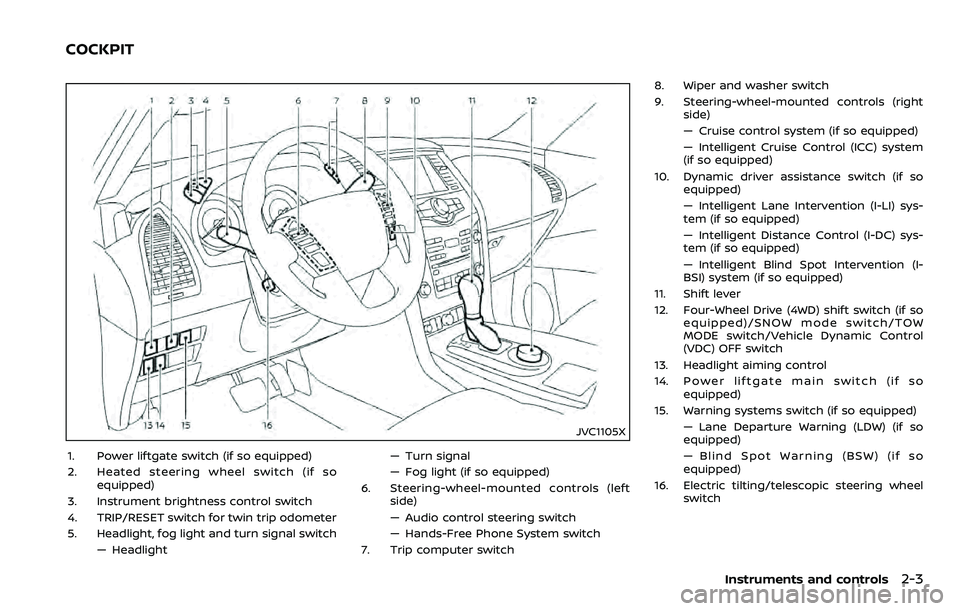
1. Power liftgate switch (if so equipped)
2. Heated steering wheel switch (if soequipped)
3. Instrument brightness control switch
4. TRIP/RESET switch for twin trip odometer
5. Headlight, fog light and turn signal switch — Headlight — Turn signal
— Fog light (if so equipped)
6. Steering-wheel-mounted controls (left side)
— Audio control steering switch
— Hands-Free Phone System switch
7. Trip computer switch 8. Wiper and washer switch
9. Steering-wheel-mounted controls (right
side)
— Cruise control system (if so equipped)
— Intelligent Cruise Control (ICC) system
(if so equipped)
10. Dynamic driver assistance switch (if so equipped)
— Intelligent Lane Intervention (I-LI) sys-
tem (if so equipped)
— Intelligent Distance Control (I-DC) sys-
tem (if so equipped)
— Intelligent Blind Spot Intervention (I-
BSI) system (if so equipped)
11. Shift lever
12. Four-Wheel Drive (4WD) shift switch (if so equipped)/SNOW mode switch/TOW
MODE switch/Vehicle Dynamic Control
(VDC) OFF switch
13. Headlight aiming control
14. Power liftgate main switch (if so equipped)
15. Warning systems switch (if so equipped) — Lane Departure Warning (LDW) (if so
equipped)
— Blind Spot Warning (BSW) (if so
equipped)
16. Electric tilting/telescopic steering wheel switch
Instruments and controls2-3
COCKPIT
Page 103 of 532
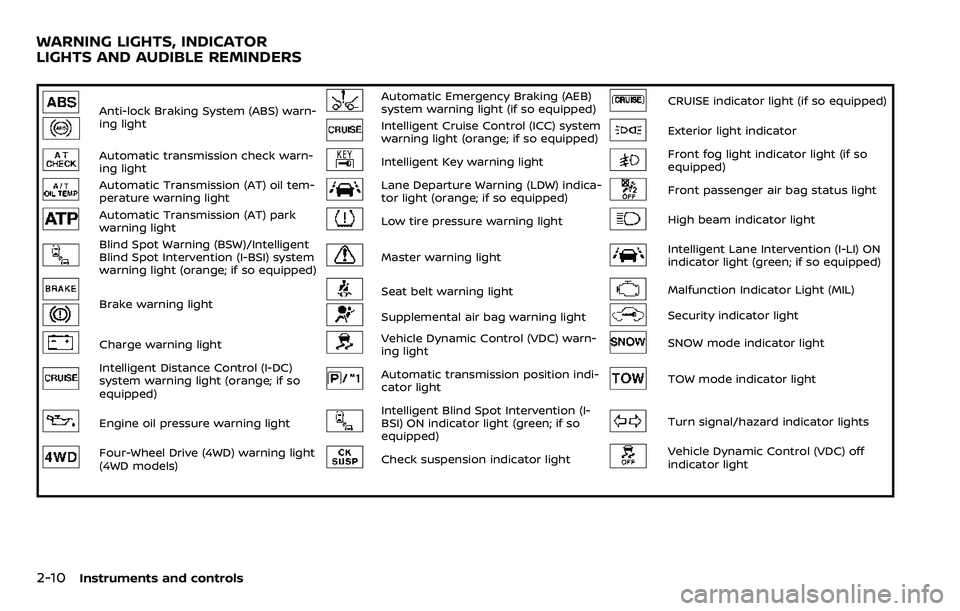
2-10Instruments and controls
Anti-lock Braking System (ABS) warn-
ing lightAutomatic Emergency Braking (AEB)
system warning light (if so equipped)CRUISE indicator light (if so equipped)
Intelligent Cruise Control (ICC) system
warning light (orange; if so equipped)Exterior light indicator
Automatic transmission check warn-
ing lightIntelligent Key warning lightFront fog light indicator light (if so
equipped)
Automatic Transmission (AT) oil tem-
perature warning lightLane Departure Warning (LDW) indica-
tor light (orange; if so equipped)Front passenger air bag status light
Automatic Transmission (AT) park
warning lightLow tire pressure warning lightHigh beam indicator light
Blind Spot Warning (BSW)/Intelligent
Blind Spot Intervention (I-BSI) system
warning light (orange; if so equipped)Master warning lightIntelligent Lane Intervention (I-LI) ON
indicator light (green; if so equipped)
Brake warning lightSeat belt warning lightMalfunction Indicator Light (MIL)
Supplemental air bag warning lightSecurity indicator light
Charge warning lightVehicle Dynamic Control (VDC) warn-
ing lightSNOW mode indicator light
Intelligent Distance Control (I-DC)
system warning light (orange; if so
equipped)Automatic transmission position indi-
cator lightTOW mode indicator light
Engine oil pressure warning lightIntelligent Blind Spot Intervention (I-
BSI) ON indicator light (green; if so
equipped)Turn signal/hazard indicator lights
Four-Wheel Drive (4WD) warning light
(4WD models)Check suspension indicator lightVehicle Dynamic Control (VDC) off
indicator light
WARNING LIGHTS, INDICATOR
LIGHTS AND AUDIBLE REMINDERS
Page 111 of 532
2-18Instruments and controls
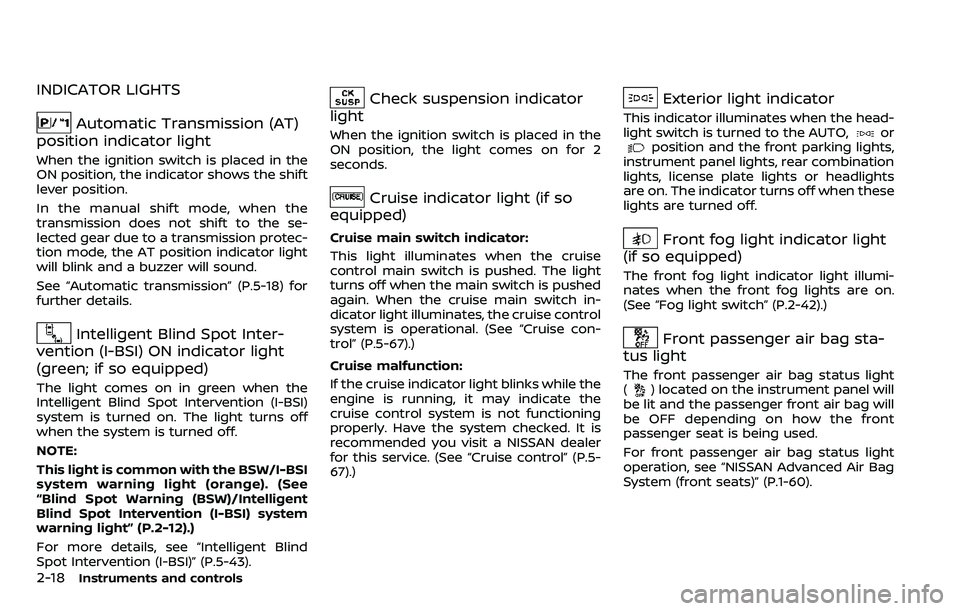
INDICATOR LIGHTS
Automatic Transmission (AT)
position indicator light
When the ignition switch is placed in the
ON position, the indicator shows the shift
lever position.
In the manual shift mode, when the
transmission does not shift to the se-
lected gear due to a transmission protec-
tion mode, the AT position indicator light
will blink and a buzzer will sound.
See “Automatic transmission” (P.5-18) for
further details.
Intelligent Blind Spot Inter-
vention (I-BSI) ON indicator light
(green; if so equipped)
The light comes on in green when the
Intelligent Blind Spot Intervention (I-BSI)
system is turned on. The light turns off
when the system is turned off.
NOTE:
This light is common with the BSW/I-BSI
system warning light (orange). (See
“Blind Spot Warning (BSW)/Intelligent
Blind Spot Intervention (I-BSI) system
warning light” (P.2-12).)
For more details, see “Intelligent Blind
Spot Intervention (I-BSI)” (P.5-43).
Check suspension indicator
light
When the ignition switch is placed in the
ON position, the light comes on for 2
seconds.
Cruise indicator light (if so
equipped)
Cruise main switch indicator:
This light illuminates when the cruise
control main switch is pushed. The light
turns off when the main switch is pushed
again. When the cruise main switch in-
dicator light illuminates, the cruise control
system is operational. (See “Cruise con-
trol” (P.5-67).)
Cruise malfunction:
If the cruise indicator light blinks while the
engine is running, it may indicate the
cruise control system is not functioning
properly. Have the system checked. It is
recommended you visit a NISSAN dealer
for this service. (See “Cruise control” (P.5-
67).)
Exterior light indicator
This indicator illuminates when the head-
light switch is turned to the AUTO,orposition and the front parking lights,
instrument panel lights, rear combination
lights, license plate lights or headlights
are on. The indicator turns off when these
lights are turned off.
Front fog light indicator light
(if so equipped)
The front fog light indicator light illumi-
nates when the front fog lights are on.
(See “Fog light switch” (P.2-42).)
Front passenger air bag sta-
tus light
The front passenger air bag status light
() located on the instrument panel will
be lit and the passenger front air bag will
be OFF depending on how the front
passenger seat is being used.
For front passenger air bag status light
operation, see “NISSAN Advanced Air Bag
System (front seats)” (P.1-60).
Page 129 of 532
2-36Instruments and controls
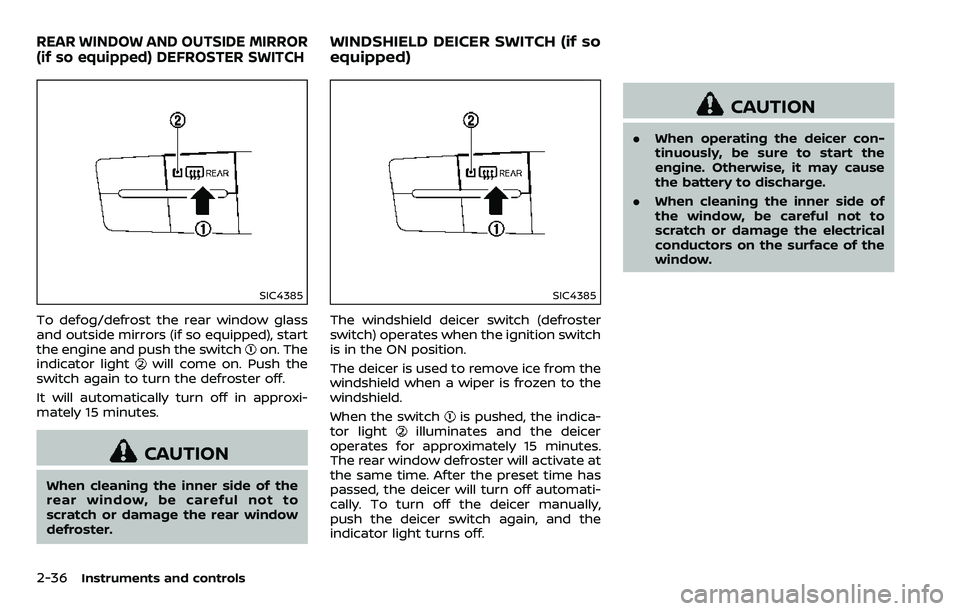
SIC4385
To defog/defrost the rear window glass
and outside mirrors (if so equipped), start
the engine and push the switch
on. The
indicator lightwill come on. Push the
switch again to turn the defroster off.
It will automatically turn off in approxi-
mately 15 minutes.
CAUTION
When cleaning the inner side of the
rear window, be careful not to
scratch or damage the rear window
defroster.
SIC4385
The windshield deicer switch (defroster
switch) operates when the ignition switch
is in the ON position.
The deicer is used to remove ice from the
windshield when a wiper is frozen to the
windshield.
When the switch
is pushed, the indica-
tor lightilluminates and the deicer
operates for approximately 15 minutes.
The rear window defroster will activate at
the same time. After the preset time has
passed, the deicer will turn off automati-
cally. To turn off the deicer manually,
push the deicer switch again, and the
indicator light turns off.
CAUTION
. When operating the deicer con-
tinuously, be sure to start the
engine. Otherwise, it may cause
the battery to discharge.
. When cleaning the inner side of
the window, be careful not to
scratch or damage the electrical
conductors on the surface of the
window.
REAR WINDOW AND OUTSIDE MIRROR
(if so equipped) DEFROSTER SWITCHWINDSHIELD DEICER SWITCH (if so
equipped)
Page 135 of 532
2-42Instruments and controls
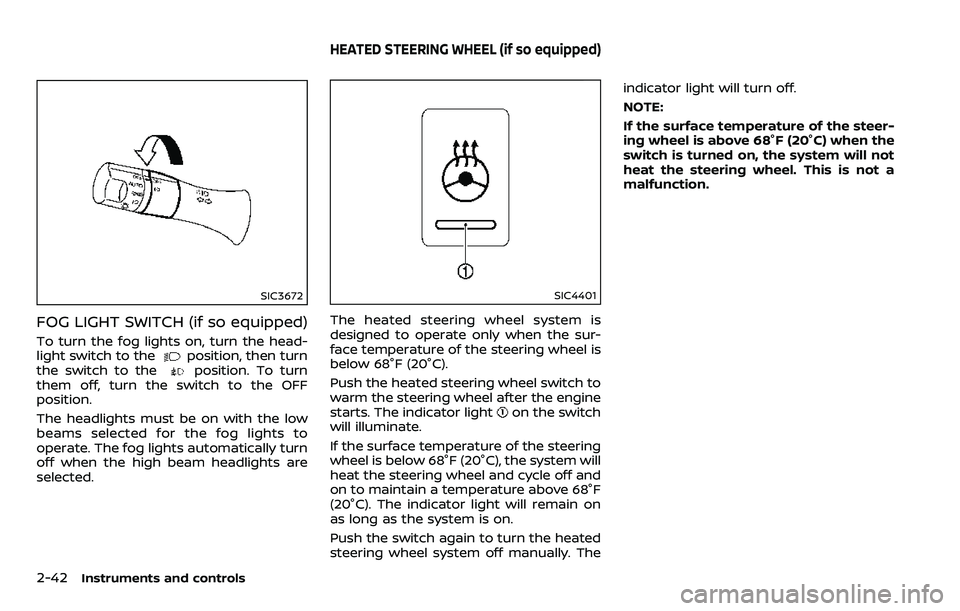
SIC3672
FOG LIGHT SWITCH (if so equipped)
To turn the fog lights on, turn the head-
light switch to theposition, then turn
the switch to theposition. To turn
them off, turn the switch to the OFF
position.
The headlights must be on with the low
beams selected for the fog lights to
operate. The fog lights automatically turn
off when the high beam headlights are
selected.
SIC4401
The heated steering wheel system is
designed to operate only when the sur-
face temperature of the steering wheel is
below 68°F (20°C).
Push the heated steering wheel switch to
warm the steering wheel after the engine
starts. The indicator light
on the switch
will illuminate.
If the surface temperature of the steering
wheel is below 68°F (20°C), the system will
heat the steering wheel and cycle off and
on to maintain a temperature above 68°F
(20°C). The indicator light will remain on
as long as the system is on.
Push the switch again to turn the heated
steering wheel system off manually. The indicator light will turn off.
NOTE:
If the surface temperature of the steer-
ing wheel is above 68°F (20°C) when the
switch is turned on, the system will not
heat the steering wheel. This is not a
malfunction.
HEATED STEERING WHEEL (if so equipped)
Page 206 of 532
.Do not attach an antenna of wireless
device near the Intelligent Rear View
Mirror. Electric wave from wireless
device may cause disturbed image
in Intelligent Rear View Mirror.
. Do not push buttons excessively or
operating the lever roughly may
cause a system failure or the Intelli-
gent Rear View Mirror itself to drop.
. Never turn the body of Intelligent
Rear View Mirror by 90° or more. It
may damage the Intelligent Rear
View Mirror.
. Do not apply strong shocks to the
body of Intelligent Rear View Mirror.
It may cause a system failure.
. Do not apply heavy load to the
camera and camera-cover on the
rear of the vehicle. It may cause the
camera to be removed or may cause
a system failure.
. If it is difficult to see the Intelligent
Rear View Mirror display screen be-
cause of a strong external light,
switch the mode to the conventional
rearview mirror mode for better use.
. Close the sunshade (if so equipped)
when the Intelligent Rear View Mir-
ror display screen is unclear due to
strong external light.
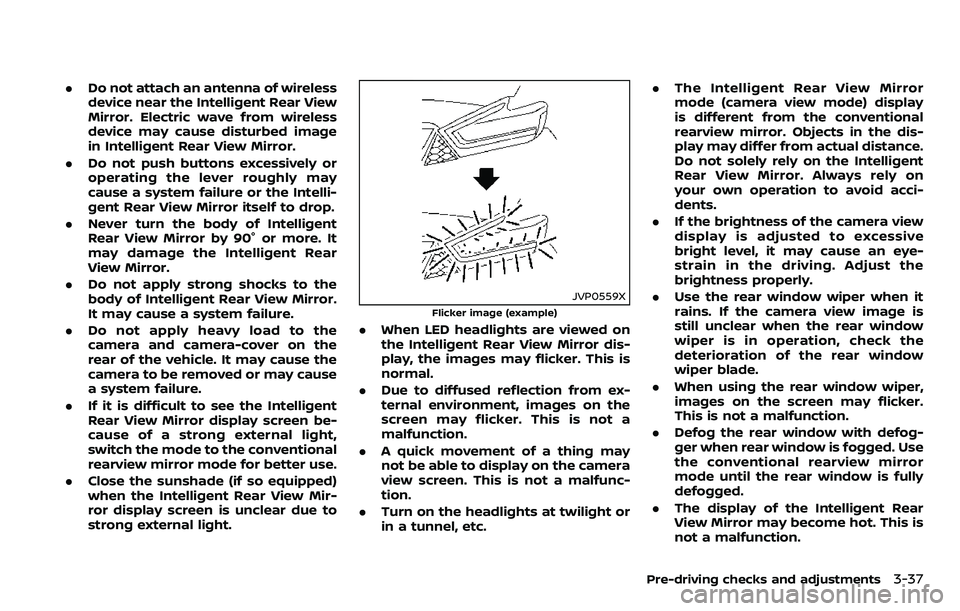
JVP0559X
Flicker image (example)
.When LED headlights are viewed on
the Intelligent Rear View Mirror dis-
play, the images may flicker. This is
normal.
. Due to diffused reflection from ex-
ternal environment, images on the
screen may flicker. This is not a
malfunction.
. A quick movement of a thing may
not be able to display on the camera
view screen. This is not a malfunc-
tion.
. Turn on the headlights at twilight or
in a tunnel, etc. .
The Intelligent Rear View Mirror
mode (camera view mode) display
is different from the conventional
rearview mirror. Objects in the dis-
play may differ from actual distance.
Do not solely rely on the Intelligent
Rear View Mirror. Always rely on
your own operation to avoid acci-
dents.
. If the brightness of the camera view
display is adjusted to excessive
bright level, it may cause an eye-
strain in the driving. Adjust the
brightness properly.
. Use the rear window wiper when it
rains. If the camera view image is
still unclear when the rear window
wiper is in operation, check the
deterioration of the rear window
wiper blade.
. When using the rear window wiper,
images on the screen may flicker.
This is not a malfunction.
. Defog the rear window with defog-
ger when rear window is fogged. Use
the conventional rearview mirror
mode until the rear window is fully
defogged.
. The display of the Intelligent Rear
View Mirror may become hot. This is
not a malfunction.
Pre-driving checks and adjustments3-37