vent NISSAN ARMADA 2019 Owner´s Manual
[x] Cancel search | Manufacturer: NISSAN, Model Year: 2019, Model line: ARMADA, Model: NISSAN ARMADA 2019Pages: 536, PDF Size: 2.56 MB
Page 244 of 536
4-28Monitor, heater, air conditioner, audio, phone and voice recognition systems
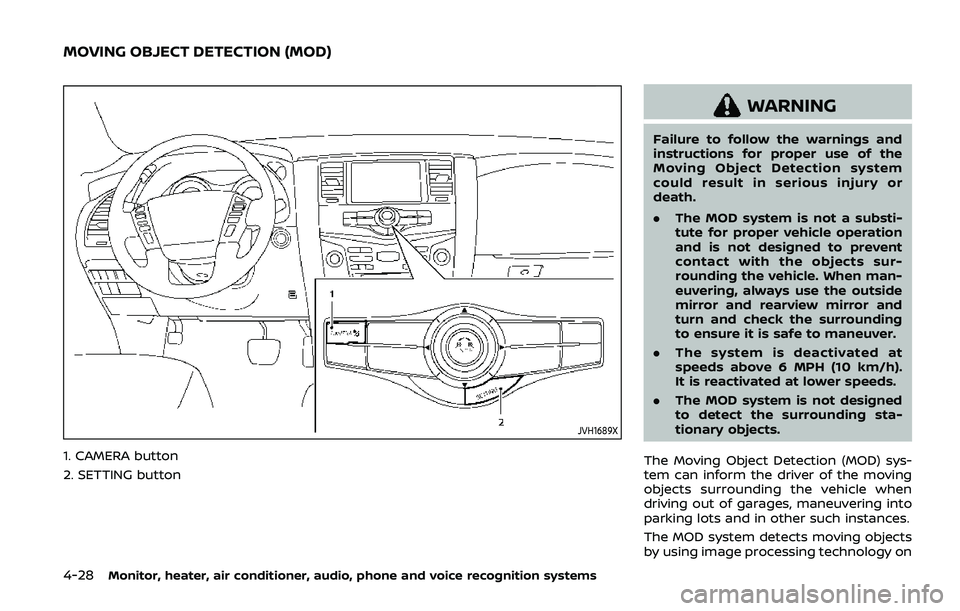
JVH1689X
1. CAMERA button
2. SETTING button
WARNING
Failure to follow the warnings and
instructions for proper use of the
Moving Object Detection system
could result in serious injury or
death.
.The MOD system is not a substi-
tute for proper vehicle operation
and is not designed to prevent
contact with the objects sur-
rounding the vehicle. When man-
euvering, always use the outside
mirror and rearview mirror and
turn and check the surrounding
to ensure it is safe to maneuver.
. The system is deactivated at
speeds above 6 MPH (10 km/h).
It is reactivated at lower speeds.
. The MOD system is not designed
to detect the surrounding sta-
tionary objects.
The Moving Object Detection (MOD) sys-
tem can inform the driver of the moving
objects surrounding the vehicle when
driving out of garages, maneuvering into
parking lots and in other such instances.
The MOD system detects moving objects
by using image processing technology on
MOVING OBJECT DETECTION (MOD)
Page 249 of 536
SAA3348
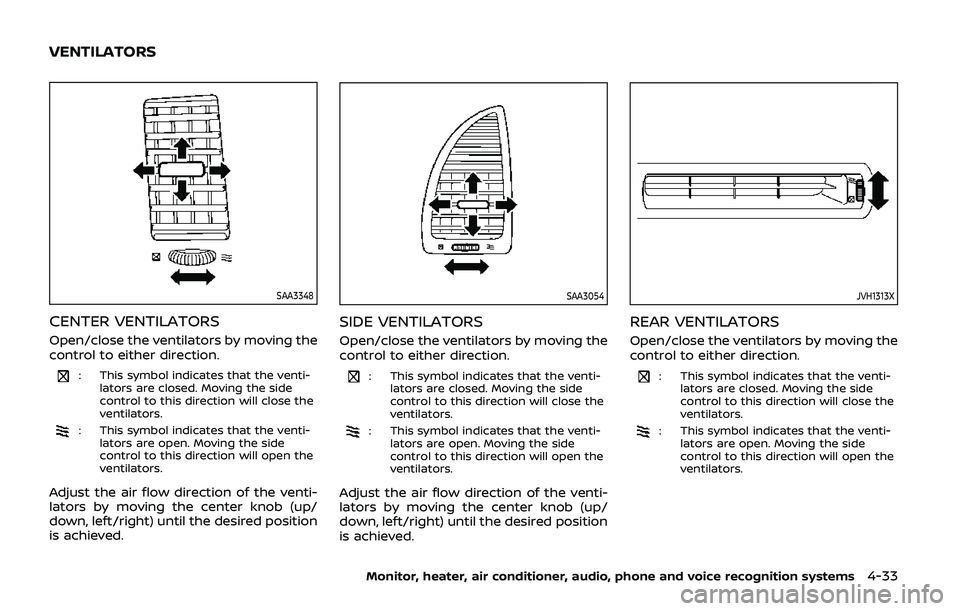
CENTER VENTILATORS
Open/close the ventilators by moving the
control to either direction.
: This symbol indicates that the venti-lators are closed. Moving the side
control to this direction will close the
ventilators.
: This symbol indicates that the venti-lators are open. Moving the side
control to this direction will open the
ventilators.
Adjust the air flow direction of the venti-
lators by moving the center knob (up/
down, left/right) until the desired position
is achieved.
SAA3054
SIDE VENTILATORS
Open/close the ventilators by moving the
control to either direction.
: This symbol indicates that the venti-lators are closed. Moving the side
control to this direction will close the
ventilators.
: This symbol indicates that the venti-lators are open. Moving the side
control to this direction will open the
ventilators.
Adjust the air flow direction of the venti-
lators by moving the center knob (up/
down, left/right) until the desired position
is achieved.
JVH1313X
REAR VENTILATORS
Open/close the ventilators by moving the
control to either direction.
: This symbol indicates that the venti-lators are closed. Moving the side
control to this direction will close the
ventilators.
: This symbol indicates that the venti-lators are open. Moving the side
control to this direction will open the
ventilators.
Monitor, heater, air conditioner, audio, phone and voice recognition systems4-33
VENTILATORS
Page 250 of 536
4-34Monitor, heater, air conditioner, audio, phone and voice recognition systems
SAA3055
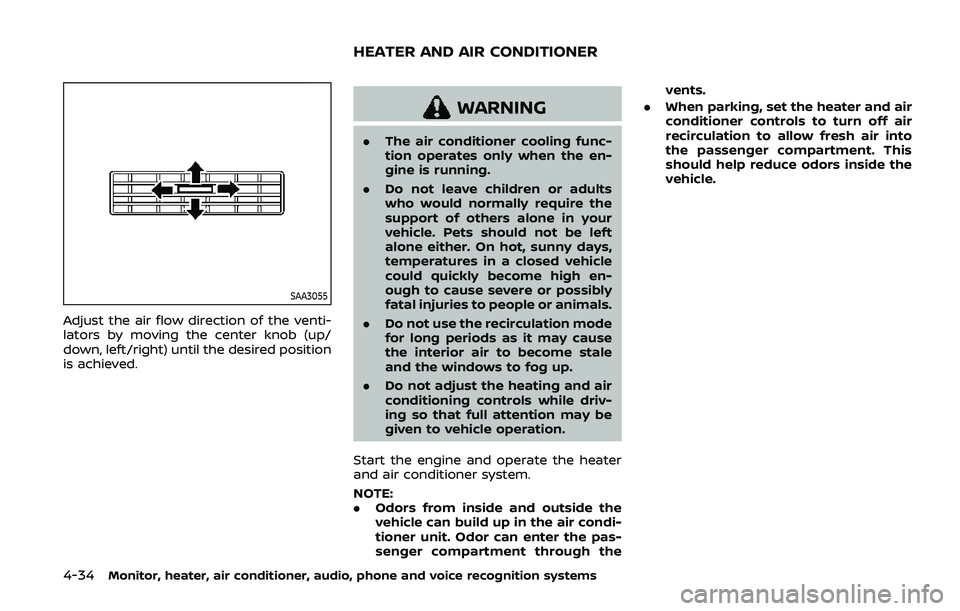
Adjust the air flow direction of the venti-
lators by moving the center knob (up/
down, left/right) until the desired position
is achieved.
WARNING
.The air conditioner cooling func-
tion operates only when the en-
gine is running.
. Do not leave children or adults
who would normally require the
support of others alone in your
vehicle. Pets should not be left
alone either. On hot, sunny days,
temperatures in a closed vehicle
could quickly become high en-
ough to cause severe or possibly
fatal injuries to people or animals.
. Do not use the recirculation mode
for long periods as it may cause
the interior air to become stale
and the windows to fog up.
. Do not adjust the heating and air
conditioning controls while driv-
ing so that full attention may be
given to vehicle operation.
Start the engine and operate the heater
and air conditioner system.
NOTE:
. Odors from inside and outside the
vehicle can build up in the air condi-
tioner unit. Odor can enter the pas-
senger compartment through the vents.
. When parking, set the heater and air
conditioner controls to turn off air
recirculation to allow fresh air into
the passenger compartment. This
should help reduce odors inside the
vehicle.
HEATER AND AIR CONDITIONER
Page 251 of 536
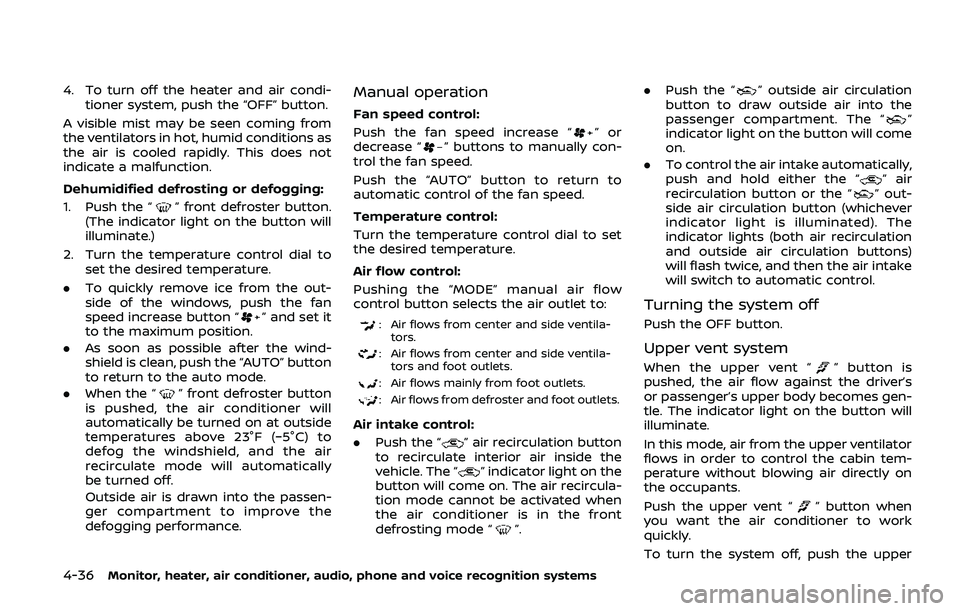
SAA3059
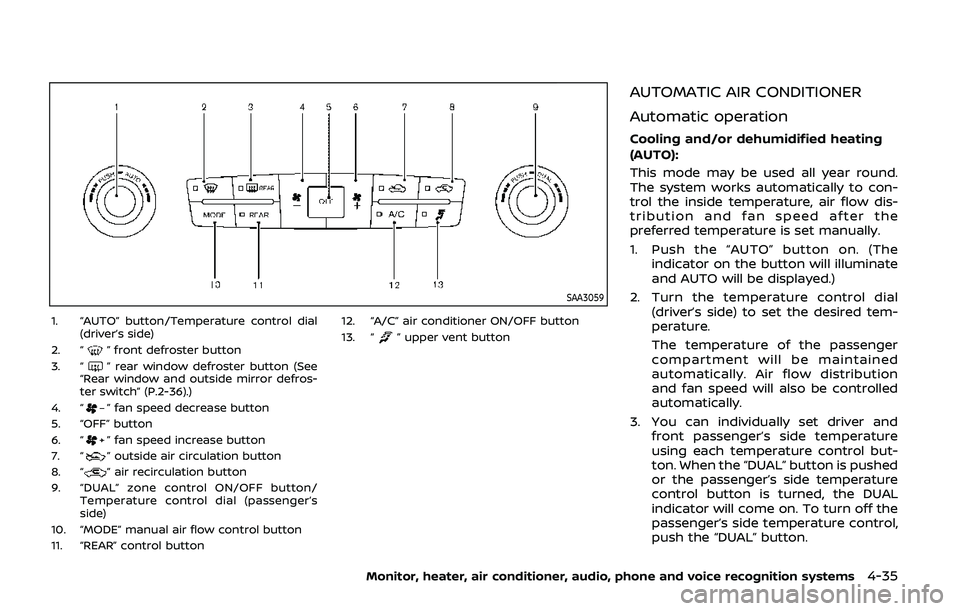
1. “AUTO” button/Temperature control dial(driver’s side)
2. “
” front defroster button
3. “” rear window defroster button (See
“Rear window and outside mirror defros-
ter switch” (P.2-36).)
4. “
” fan speed decrease button
5. “OFF” button
6. “
” fan speed increase button
7. “” outside air circulation button
8. “” air recirculation button
9. “DUAL” zone control ON/OFF button/ Temperature control dial (passenger’s
side)
10. “MODE” manual air flow control button
11. “REAR” control button 12. “A/C” air conditioner ON/OFF button
13. “
” upper vent button
AUTOMATIC AIR CONDITIONER
Automatic operation
Cooling and/or dehumidified heating
(AUTO):
This mode may be used all year round.
The system works automatically to con-
trol the inside temperature, air flow dis-
tribution and fan speed after the
preferred temperature is set manually.
1. Push the “AUTO” button on. (The
indicator on the button will illuminate
and AUTO will be displayed.)
2. Turn the temperature control dial (driver’s side) to set the desired tem-
perature.
The temperature of the passenger
compartment will be maintained
automatically. Air flow distribution
and fan speed will also be controlled
automatically.
3. You can individually set driver and front passenger’s side temperature
using each temperature control but-
ton. When the “DUAL” button is pushed
or the passenger’s side temperature
control button is turned, the DUAL
indicator will come on. To turn off the
passenger’s side temperature control,
push the “DUAL” button.
Monitor, heater, air conditioner, audio, phone and voice recognition systems4-35
Page 252 of 536
4-36Monitor, heater, air conditioner, audio, phone and voice recognition systems
4. To turn off the heater and air condi-tioner system, push the “OFF” button.
A visible mist may be seen coming from
the ventilators in hot, humid conditions as
the air is cooled rapidly. This does not
indicate a malfunction.
Dehumidified defrosting or defogging:
1. Push the “
” front defroster button.
(The indicator light on the button will
illuminate.)
2. Turn the temperature control dial to set the desired temperature.
. To quickly remove ice from the out-
side of the windows, push the fan
speed increase button “
” and set it
to the maximum position.
. As soon as possible after the wind-
shield is clean, push the “AUTO” button
to return to the auto mode.
. When the “
” front defroster button
is pushed, the air conditioner will
automatically be turned on at outside
temperatures above 23°F (−5°C) to
defog the windshield, and the air
recirculate mode will automatically
be turned off.
Outside air is drawn into the passen-
ger compartment to improve the
defogging performance.
Manual operation
Fan speed control:
Push the fan speed increase “
”or
decrease “” buttons to manually con-
trol the fan speed.
Push the “AUTO” button to return to
automatic control of the fan speed.
Temperature control:
Turn the temperature control dial to set
the desired temperature.
Air flow control:
Pushing the “MODE” manual air flow
control button selects the air outlet to:
: Air flows from center and side ventila-
tors.
: Air flows from center and side ventila-tors and foot outlets.
: Air flows mainly from foot outlets.
: Air flows from defroster and foot outlets.
Air intake control:
. Push the “
” air recirculation button
to recirculate interior air inside the
vehicle. The “
” indicator light on the
button will come on. The air recircula-
tion mode cannot be activated when
the air conditioner is in the front
defrosting mode “
”. .
Push the “
” outside air circulation
button to draw outside air into the
passenger compartment. The “
”
indicator light on the button will come
on.
. To control the air intake automatically,
push and hold either the “
” air
recirculation button or the “” out-
side air circulation button (whichever
indicator light is illuminated). The
indicator lights (both air recirculation
and outside air circulation buttons)
will flash twice, and then the air intake
will switch to automatic control.
Turning the system off
Push the OFF button.
Upper vent system
When the upper vent “” button is
pushed, the air flow against the driver’s
or passenger’s upper body becomes gen-
tle. The indicator light on the button will
illuminate.
In this mode, air from the upper ventilator
flows in order to control the cabin tem-
perature without blowing air directly on
the occupants.
Push the upper vent “
” button when
you want the air conditioner to work
quickly.
To turn the system off, push the upper
Page 253 of 536
vent “” button to turn the indicator
light off.
JVH1630X
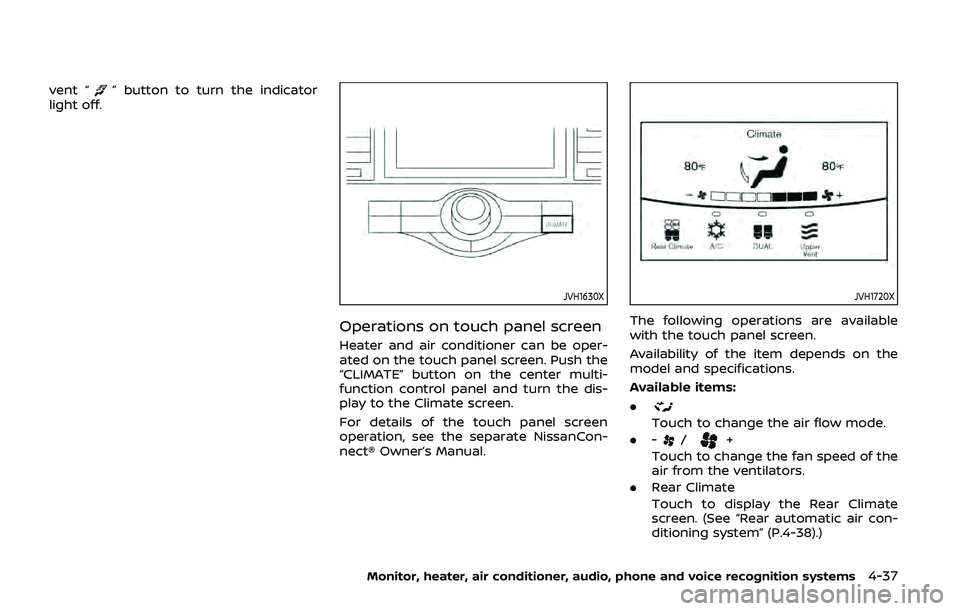
Operations on touch panel screen
Heater and air conditioner can be oper-
ated on the touch panel screen. Push the
“CLIMATE” button on the center multi-
function control panel and turn the dis-
play to the Climate screen.
For details of the touch panel screen
operation, see the separate NissanCon-
nect® Owner’s Manual.
JVH1720X
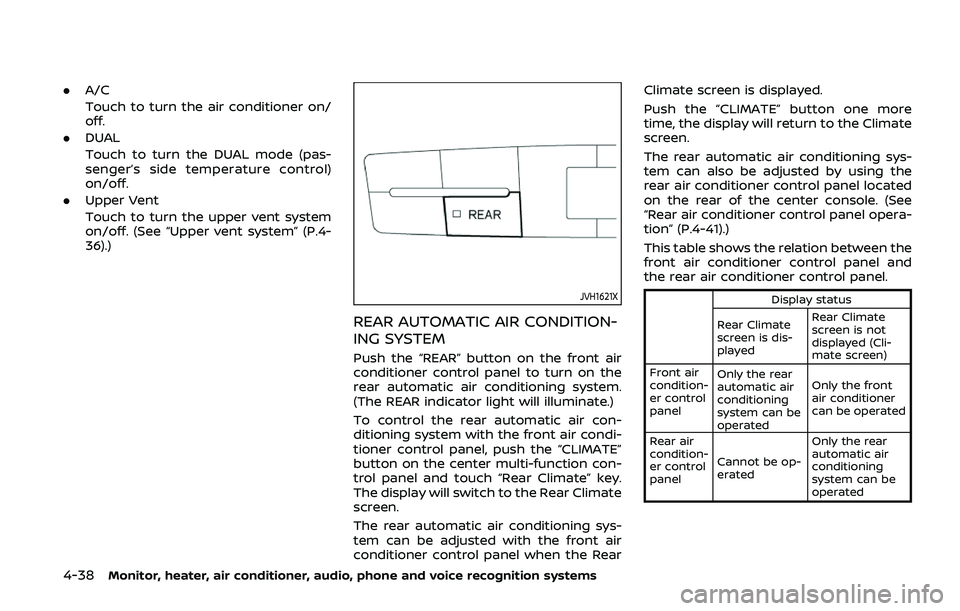
The following operations are available
with the touch panel screen.
Availability of the item depends on the
model and specifications.
Available items:
.
Touch to change the air flow mode.
. -
/+
Touch to change the fan speed of the
air from the ventilators.
. Rear Climate
Touch to display the Rear Climate
screen. (See “Rear automatic air con-
ditioning system” (P.4-38).)
Monitor, heater, air conditioner, audio, phone and voice recognition systems4-37
Page 254 of 536
4-38Monitor, heater, air conditioner, audio, phone and voice recognition systems
.A/C
Touch to turn the air conditioner on/
off.
. DUAL
Touch to turn the DUAL mode (pas-
senger’s side temperature control)
on/off.
. Upper Vent
Touch to turn the upper vent system
on/off. (See “Upper vent system” (P.4-
36).)
JVH1621X
REAR AUTOMATIC AIR CONDITION-
ING SYSTEM
Push the “REAR” button on the front air
conditioner control panel to turn on the
rear automatic air conditioning system.
(The REAR indicator light will illuminate.)
To control the rear automatic air con-
ditioning system with the front air condi-
tioner control panel, push the “CLIMATE”
button on the center multi-function con-
trol panel and touch “Rear Climate” key.
The display will switch to the Rear Climate
screen.
The rear automatic air conditioning sys-
tem can be adjusted with the front air
conditioner control panel when the Rear Climate screen is displayed.
Push the “CLIMATE” button one more
time, the display will return to the Climate
screen.
The rear automatic air conditioning sys-
tem can also be adjusted by using the
rear air conditioner control panel located
on the rear of the center console. (See
“Rear air conditioner control panel opera-
tion” (P.4-41).)
This table shows the relation between the
front air conditioner control panel and
the rear air conditioner control panel.
Display status
Rear Climate
screen is dis-
played Rear Climate
screen is not
displayed (Cli-
mate screen)
Front air
condition-
er control
panel Only the rear
automatic air
conditioning
system can be
operated Only the front
air conditioner
can be operated
Rear air
condition-
er control
panel Cannot be op-
erated Only the rear
automatic air
conditioning
system can be
operated
Page 256 of 536
4-40Monitor, heater, air conditioner, audio, phone and voice recognition systems
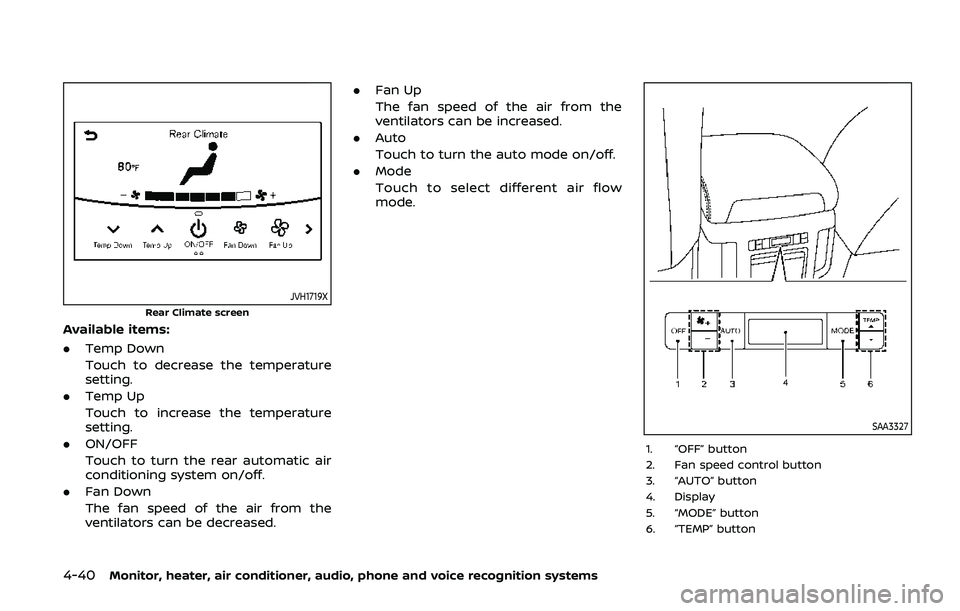
JVH1719X
Rear Climate screen
Available items:
.Temp Down
Touch to decrease the temperature
setting.
. Temp Up
Touch to increase the temperature
setting.
. ON/OFF
Touch to turn the rear automatic air
conditioning system on/off.
. Fan Down
The fan speed of the air from the
ventilators can be decreased. .
Fan Up
The fan speed of the air from the
ventilators can be increased.
. Auto
Touch to turn the auto mode on/off.
. Mode
Touch to select different air flow
mode.
SAA3327
1. “OFF” button
2. Fan speed control button
3. “AUTO” button
4. Display
5. “MODE” button
6. “TEMP” button
Page 258 of 536
4-42Monitor, heater, air conditioner, audio, phone and voice recognition systems
OPERATING TIPS
When the engine coolant temperature
and outside air temperature are low, the
air flow from the foot outlets may not
operate. However, this is not a malfunc-
tion. After the coolant temperature
warms up, the air flow from the foot
outlets will operate normally.
The sensors
andlocated on the
instrument panel help maintain a con-
stant temperature. Do not put anything
on or around the sensors.
LINKING INTELLIGENT KEY (if so
equipped)
The air conditioner system settings can
be memorized for each Intelligent Key.
For more details, see “Setting memory
function” (P.3-42).
IN-CABIN MICROFILTER
The air conditioner system is equipped
with an in-cabin microfilter which collects
dirt, pollen, dust, etc.
To make sure the air conditioner heats,
defogs, and ventilates efficiently, replace
the filter in accordance with the specified
maintenance intervals listed in the “9.
Maintenance and schedules” section. It is
recommended to see a NISSAN dealer to
replace the filter.
The filter should be replaced if the air flow decreases significantly or if win-
dows fog up easily when operating the
heater or air conditioner.
SERVICING AIR CONDITIONER
The air conditioner system in your NISSAN
is charged with a refrigerant designed
with the environment in mind.
This re-
frigerant will not harm the earth’s
ozone layer. However, special charging
equipment and lubricant are required
when servicing your NISSAN air condi-
tioner. Using improper refrigerants or
lubricants will cause severe damage to
your air conditioner system. (See “Capa-
cities and recommended fluids/lubri-
cants” (P.10-2) for air conditioner system
refrigerant and lubricant recommenda-
tions.)
Your NISSAN dealer will be able to service
your environmentally friendly air condi-
tioner system.
WARNING
The system contains refrigerant un-
der high pressure. To avoid personal
injury, any air conditioner service
should be done only by an experi-
enced technician with the proper
equipment.
WINDOW ANTENNA
The antenna pattern is printed inside the
rear side glass.
CAUTION
. Do not place metalized film near
the 3rd row seat window or at-
tach any metal parts to it. This
may cause poor reception or
noise.
. When cleaning the inside of the
rear side window, be careful not
to scratch or damage the rear
side window antenna. Lightly
wipe along the antenna with a
dampened soft cloth.
ANTENNA
Page 261 of 536
5 Starting and driving
Precautions when starting and driving ...................... 5-4Exhaust gas (carbon monoxide) ................................ 5-4
Three-way catalyst ............................................................... 5-4
Tire Pressure Monitoring System (TPMS) ........... 5-5
Avoiding collision and rollover .................................... 5-8
On-pavement and off-road
driving precautions .............................................................. 5-9
Off-road recovery .................................................................. 5-9
Rapid air pressure loss ...................................................... 5-9
Drinking alcohol/drugs and driving ..................... 5-10
Driving safety precautions .......................................... 5-10
Push-button ignition switch ............................................. 5-13 Operating range for engine start function ...... 5-13
Push-button ignition switch positions .............. 5-14
Emergency engine shut off ........................................ 5-15
Intelligent Key battery discharge ........................... 5-15
Before starting the engine ................................................. 5-16
Starting the engine .................................................................. 5-16 Remote engine start (if so equipped) ................. 5-17
Driving the vehicle .................................................................... 5-17
Engine protection mode ............................................... 5-17
Automatic transmission ................................................ 5-18 Parking brake ........................................................................\
....... 5-22
Lane Departure Warning (LDW)/Intelligent Lane
Intervention (I-LI) (if so equipped) ............................... 5-23
LDW system operation ................................................. 5-25
Turning the LDW system ON/OFF ...................... 5-26
How to enable/disable the LDW system ....... 5-27
I-LI system operation .................................................... 5-27
Turning the I-LI system ON/OFF .......................... 5-28
How to enable/disable the I-LI system .......... 5-29
LDW/I-LI system limitations ..................................... 5-29
System temporarily unavailable ........................... 5-31
System malfunction ....................................................... 5-32
System maintenance .................................................... 5-32
Blind Spot Warning (BSW) (if so equipped) ........... 5-33 BSW system operation ................................................. 5-35
Turning the BSW system ON/OFF ...................... 5-36
How to enable/disable the BSW system ....... 5-36
BSW system limitations ............................................... 5-37
BSW driving situations .................................................. 5-38
System temporarily unavailable ........................... 5-41
System malfunction ....................................................... 5-41
System maintenance .................................................... 5-42