warning NISSAN ARMADA 2020 Owner´s Manual
[x] Cancel search | Manufacturer: NISSAN, Model Year: 2020, Model line: ARMADA, Model: NISSAN ARMADA 2020Pages: 528, PDF Size: 2.1 MB
Page 342 of 528
5-86Starting and driving
.The I-DC system automatically
decelerates your vehicle to help
assist the driver to maintain a
following distance from the vehi-
cle ahead. Manually brake when
deceleration is required to main-
tain a safe distance upon sudden
braking by the vehicle ahead or
when a vehicle suddenly appears
in front of you. Always stay alert
when using the I-DC system.
. If the vehicle ahead comes to a
stop, the vehicle decelerates to a
standstill within the limitations of
the system. The system will can-
cel with a warning chime once it
judges that the vehicle has come
to a standstill. To prevent the
vehicle from moving, the driver
must depress the brake pedal.
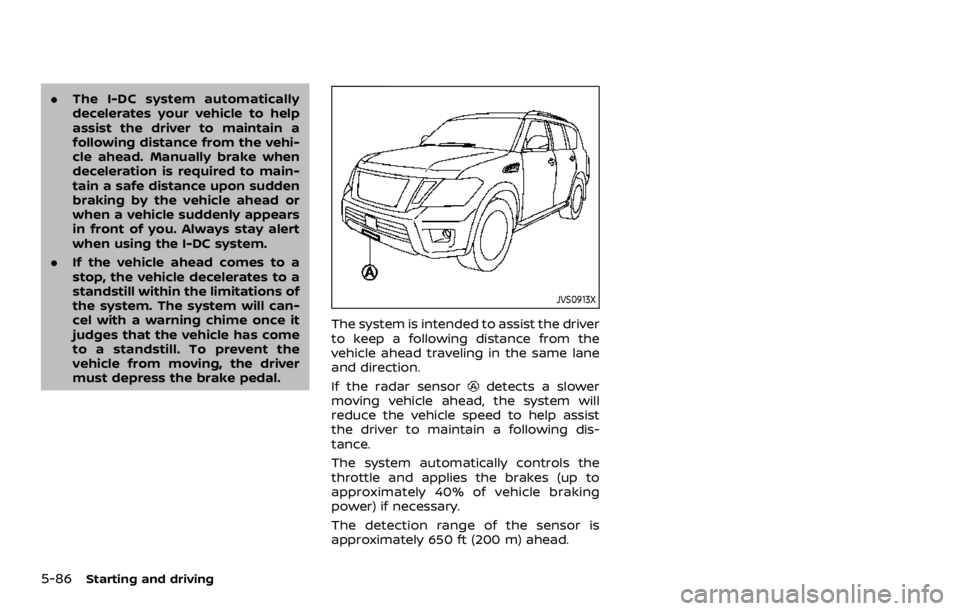
JVS0913X
The system is intended to assist the driver
to keep a following distance from the
vehicle ahead traveling in the same lane
and direction.
If the radar sensor
detects a slower
moving vehicle ahead, the system will
reduce the vehicle speed to help assist
the driver to maintain a following dis-
tance.
The system automatically controls the
throttle and applies the brakes (up to
approximately 40% of vehicle braking
power) if necessary.
The detection range of the sensor is
approximately 650 ft (200 m) ahead.
Page 343 of 528
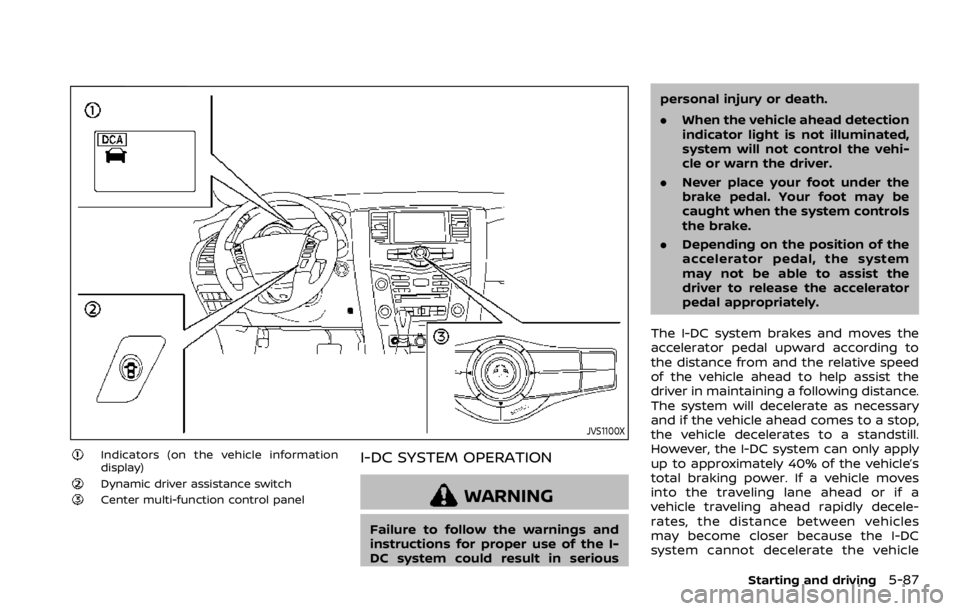
JVS1100X
Indicators (on the vehicle information
display)
Dynamic driver assistance switchCenter multi-function control panel
I-DC SYSTEM OPERATION
WARNING
Failure to follow the warnings and
instructions for proper use of the I-
DC system could result in seriouspersonal injury or death.
.
When the vehicle ahead detection
indicator light is not illuminated,
system will not control the vehi-
cle or warn the driver.
. Never place your foot under the
brake pedal. Your foot may be
caught when the system controls
the brake.
. Depending on the position of the
accelerator pedal, the system
may not be able to assist the
driver to release the accelerator
pedal appropriately.
The I-DC system brakes and moves the
accelerator pedal upward according to
the distance from and the relative speed
of the vehicle ahead to help assist the
driver in maintaining a following distance.
The system will decelerate as necessary
and if the vehicle ahead comes to a stop,
the vehicle decelerates to a standstill.
However, the I-DC system can only apply
up to approximately 40% of the vehicle’s
total braking power. If a vehicle moves
into the traveling lane ahead or if a
vehicle traveling ahead rapidly decele-
rates, the distance between vehicles
may become closer because the I-DC
system cannot decelerate the vehicle
Starting and driving5-87
Page 344 of 528

5-88Starting and driving
quickly enough. If this occurs, the I-DC
system will sound a warning chime and
blink the system display to notify the
driver to take necessary action.
See “Approach warning” (P.5-89).
SSD0997
System set display with a vehicle aheadSystem set display without a vehicle
ahead
The I-DC system helps assist the driver to
keep a following distance to the vehicle
ahead by braking and moving the accel-
erator pedal upward in the normal driving
condition.
When a vehicle ahead is detected:
The vehicle ahead detection indicator
comes on.
When the vehicle approaches a vehicle
ahead:
.If the driver’s foot is not on the
accelerator pedal, the system acti-
vates the brakes to decelerate smoothly as necessary. If the vehicle
ahead comes to a stop, the vehicle
decelerates to a standstill within the
limitations of the system.
. If the driver’s foot is on the accelerator
pedal, the system moves the accel-
erator pedal upward to assist the
driver to release the accelerator pedal.
When brake operation by the driver is
required:
The system alerts the driver by a warning
chime and blinking the vehicle ahead
detection indicator. If the driver’s foot is
on the accelerator pedal after the warn-
ing, the system moves the accelerator
pedal upward to assist the driver to
Page 345 of 528

switch to the brake pedal.
NOTE:
.The stop lights of the vehicle come
on when braking is performed by
the I-DC system.
. When the brake operates, a noise
may be heard and/or vibration may
be felt. This is not a malfunction.
Overriding the system:
The following driver’s operation overrides
the system operation.
. When the driver depresses the accel-
erator pedal even further while the
system is moving the accelerator
pedal upward, the I-DC system control
of the accelerator pedal is canceled.
. When the driver’s foot is on the accel-
erator pedal, the brake control by the
system is not operated.
. When the driver’s foot is on the brake
pedal, neither the brake control nor
the alert by the system operates.
. When the Intelligent Cruise Control
(ICC) system is set, the I-DC system
will be inactive.Approach warning
If your vehicle comes closer to the vehicle
ahead due to rapid deceleration of that
vehicle or if another vehicle cuts in, the
system warns the driver with the chime
and I-DC system display. Decelerate by
depressing the brake pedal to maintain a
safe vehicle distance if:
.The chime sounds.
. The vehicle ahead detection indicator
blinks.
The warning chime may not sound in
some cases when there is a short dis-
tance between vehicles. Some examples
are:
. When the vehicles are traveling at the
same speed and the distance be-
tween vehicles is not changing
. When the vehicle ahead is traveling
faster and the distance between ve-
hicles is increasing
. When a vehicle cuts in near your
vehicle
The warning chime will not sound when
your vehicle approaches vehicles that are
parked or moving slowly.
NOTE:
The approach warning chime may
sound and the system display may
blink when the radar sensor detects
objects on the side of the vehicle or on the side of the road. This may cause the
I-DC system to decelerate or accelerate
the vehicle. The radar sensor may de-
tect these objects when the vehicle is
driven on winding roads, narrow roads,
hilly roads or when entering or exiting a
curve. In these cases you will have to
manually control the proper distance
ahead of your vehicle.
Also, the sensor sensitivity can be af-
fected by vehicle operation (steering
maneuver or driving position in the lane)
or traffic or vehicle condition (for example,
if a vehicle is being driven with some
damage).
Starting and driving5-89
Page 347 of 528
![NISSAN ARMADA 2020 Owner´s Manual is automatically turned off.
JVS1043X
HOW TO ENABLE/DISABLE THE I-DC
SYSTEM
Perform the following steps to enable or
disable the I-DC system.
1. Push the SETTING button
.
2. Touch [Driver Assistance].](/img/5/40300/w960_40300-346.png "NISSAN ARMADA 2020 Owner´s Manual is automatically turned off.
JVS1043X
HOW TO ENABLE/DISABLE THE I-DC
SYSTEM
Perform the following steps to enable or
disable the I-DC system.
1. Push the SETTING button
.
2. Touch [Driver Assistance].")
is automatically turned off.
JVS1043X
HOW TO ENABLE/DISABLE THE I-DC
SYSTEM
Perform the following steps to enable or
disable the I-DC system.
1. Push the SETTING button
.
2. Touch [Driver Assistance].
3. Touch [Forward Assist].
4. Touch [Distance Control Assist] to turn the system ON/OFF.
SSD0994
I-DC SYSTEM DISPLAY AND INDICA-
TORS
The display is located between the speed-
ometer and tachometer.
1. I-DC system switch indicator:
Indicates that the dynamic driver
assistance switch is ON.
2. Vehicle ahead detection indicator:
Indicates whether it detects a vehicle
in front of you.
3. I-DC system warning light (orange): The light comes on if there is a
malfunction in the I-DC system.
Starting and driving5-91
Page 348 of 528
5-92Starting and driving
I-DC SYSTEM LIMITATIONS
WARNING
Listed below are the system limita-
tions of the I-DC system. Failure to
operate the vehicle in accordance
with these system limitations could
result in serious injury or death.
.This system will not adapt auto-
matically to road conditions. Do
not use the system on roads with
sharp curves, or on icy roads, in
heavy rain or in fog.
. The I-DC system will not apply
brake control while the driver’s
foot is on the accelerator pedal.
. As there is a performance limit to
the distance control function,
never rely solely on the I-DC
system. This system does not
correct careless, inattentive or
absent-minded driving, or over-
come poor visibility in rain, fog, or
other bad weather. Decelerate
the vehicle speed by depressing
the brake pedal, depending on
the distance to the vehicle ahead
and the surrounding circum-
stances in order to maintain a
safe distance between vehicles. .
The system may not detect the
vehicle in front of you in certain
road or weather conditions. To
avoid accidents, never use the I-
DC system under the following
conditions:
— On roads with sharp curves
— On slippery road surfaces
such as on ice or snow, etc.
— On off-road surfaces such as on sand or rock, etc.
— During bad weather (rain, fog, snow, etc.)
— When rain, snow or dirt adhere to the system sensor
— On steep downhill roads (fre- quent braking may result in
overheating the brakes)
— On repeated uphill and down- hill roads
— When towing a trailer or other vehicle
. In some road or traffic conditions,
a vehicle or object can unexpect-
edly come into the sensor detec-
tion zone and cause automatic
braking. You may need to control
the distance from other vehicles
using the accelerator pedal. Al- ways stay alert and avoid using
the I-DC system when it is not
recommended in this section.
The radar sensor will not detect the
following objects:
. Stationary and slow moving vehicles
. Pedestrians or objects in the roadway
. Oncoming vehicles in the same lane
. Motorcycles traveling offset in the
travel lane
The following are some conditions in
which the sensor cannot detect the
signals:
. When the snow or road spray from
traveling vehicles reduces the sensor’s
visibility
. When excessively heavy baggage is
loaded in the rear seat or the luggage
room of your vehicle
Page 351 of 528

JVS0892X
Warning light and indicatorsDynamic driver assistance switch
SSD0996
SYSTEM TEMPORARILY UNAVAIL-
ABLE
Condition A:
Under the following conditions, the I-DC
system is automatically canceled. The
chime will sound and the I-DC system
switch indicator will blink. The system will
not be able to be set.
.When the VDC system is off (To use
the I-DC system, turn on the VDC, then
push the dynamic driver assistance
switch.)
For details about the VDC system, see
“Vehicle Dynamic Control (VDC) sys-
tem” (P.5-133).
Starting and driving5-95
Page 352 of 528

5-96Starting and driving
.When the VDC or ABS (including the
traction control system) operates
. When the SNOW mode switch is ON
(To use the I-DC system, turn off the
SNOW mode switch, then turn on the
dynamic driver assistance switch
.)
For details about the SNOW mode
switch, see “SNOW mode switch” (P.2-
46).
. When the 4WD shift switch is in the 4H
or 4L position (for 4WD models)
. When the radar signal is temporarily
interrupted
Action to take:
When the conditions listed above are no
longer present, turn the system off with
the dynamic driver assistance switch
.
Turn the I-DC system back on to use the
system.
JVS0482X
Condition B:
Under the following conditions, making it
impossible to detect a vehicle ahead, the
I-DC system is automatically canceled.
The chime will sound, the I-DC system
warning light (orange) will come on and
the “FRONT RADAR OBSTRUCTION” warn-
ing message will appear in the vehicle
information display.
. When the radar sensor area of the
front bumper is covered with dirt or is
obstructed Action to take:
If the I-DC system warning light (orange)
comes on and the warning message
appears, stop the vehicle in a safe place,
place the shift lever in the P (Park)
position and turn the engine off. When
the radar signal is temporarily inter-
rupted, clean the sensor area of the front
bumper and restart the engine. If the
warning message continues to be dis-
played, have the I-DC system checked. It is
recommended you visit a NISSAN dealer
for this service.
.
When driving on roads with limited
road structures or buildings (for ex-
ample, long bridges, deserts, snow
fields, driving next to long walls)
Action to take:
When the above conditions no longer
exist, the I-DC system will resume auto-
matically.
Page 353 of 528

SSD0999
SYSTEM MALFUNCTION
Condition:
When the I-DC system is not operating
properly, the chime sounds and the
system warning light (“CRUISE” orange)
will come on.
Action to take:
If the warning light comes on, park the
vehicle in a safe place. Turn the engine off,
restart the engine, and turn on the I-DC
system again.
If it is not possible to set the system or
the indicator stays on, it may indicate
that the system is malfunctioning.
Although the vehicle is still driveableunder normal conditions, have the ve-
hicle checked. It is recommended you
visit a NISSAN dealer for this service.
JVS0913X
SYSTEM MAINTENANCE
The sensor for the I-DC systemis
located below the front bumper.
The I-DC system is designed to automa-
tically check the sensor’s operation. When
the sensor is covered with dirt or is
obstructed, the system will automatically
be canceled. If the sensor is covered with
ice, a transparent or translucent vinyl bag,
etc., the I-DC system may not detect
them. In these instances, the I-DC system
may not be able to decelerate the vehicle
properly. Be sure to check and clean the
sensor regularly.
To keep the I-DC system operating prop-
erly, be sure to observe the following:
Starting and driving5-97
Page 354 of 528

5-98Starting and driving
.Always keep the sensor area of the
front bumper clean.
. Do not strike or damage the areas
around the sensor.
. Do not cover or attach stickers or
similar objects on the front bumper
near the sensor area. This could cause
failure or malfunction.
. Do not attach metallic objects near
the sensor area (brush guard, etc.).
This could cause failure or malfunc-
tion.
. Do not alter, remove or paint the front
bumper. It is recommended you con-
tact a NISSAN dealer before customiz-
ing or restoring the front bumper.
FCC Notice:
For USA:
This device complies with Part 15 of the
FCC Rules. Operation is subject to the
following two conditions:
1. This device may not cause harmful
interference, and
2. This device must accept any inter-
ference received, including interfer-
ence that may cause undesired
operation.
FCC Warning
Changes or modification not expressly
approved by the party responsible for compliance could void the user’s
authority to operate the equipment.
For Canada:
This device complies with Industry Ca-
nada licence-exempt RSS standard(s).
Operation is subject to the following
two conditions:
1.
This device may not cause interfer-
ence, and
2. This device must accept any inter-
ference, including interference that
may cause undesired operation of
the device.
WARNING
Failure to follow the warnings and
instructions for proper use of the
AEB system could result in serious
injury or death.
.The AEB system is a supplemen-
tal aid to the driver. It is not a
replacement for the driver’s at-
tention to traffic conditions or
responsibility to drive safely. It
cannot prevent accidents due to
carelessness or dangerous driv-
ing techniques.
. The AEB system does not func-
tion in all driving, traffic, weather
and road conditions.
The AEB system can assist the driver
when there is a risk of a forward collision
with the vehicle ahead in the traveling
lane.
AUTOMATIC EMERGENCY BRAKING (AEB)