warning NISSAN ARMADA 2020 Owner´s Manual
[x] Cancel search | Manufacturer: NISSAN, Model Year: 2020, Model line: ARMADA, Model: NISSAN ARMADA 2020Pages: 528, PDF Size: 2.1 MB
Page 276 of 528
5-20Starting and driving
brake pedal and shift the shift lever from
P (Park) to R (Reverse), N (Neutral), D
(Drive) or Manual shift mode position.
Push the button to shift into P (Park) or R
(Reverse). All other positions can be
selected without pushing the button.
WARNING
Apply the parking brake if the shift
lever is in any position while the
engine is not running. Failure to do
so could cause the vehicle to move
unexpectedly or roll away and result
in serious personal injury or property
damage.
CAUTION
Make sure the vehicle is completely
stopped and the transmission is in
the P (Park) position.
P (Park) position:
Use this position when the vehicle is
parked or when starting the engine. Make
sure the vehicle is completely stopped.
The brake pedal must be depressed and
the shift lever button pushed in to move the shift lever from the N (Neutral)
position or any drive position to the P
(Park) position.
Apply the parking brake.
When parking on a hill, apply the parking
brake first, then move the shift lever to
the P (Park) position.
CAUTION
Use this position only when the
vehicle is completely stopped.
R (Reverse):
Use this position to back up. Always be
sure the vehicle is completely stopped
before selecting the R (Reverse) position.
The brake pedal must be depressed and
the shift lever button pushed in to move
the shift lever from the P (Park) posi-
tion, the N (Neutral) position or any
drive position to the R (Reverse) posi-
tion.
N (Neutral):
Neither forward nor reverse gear is en-
gaged. The engine can be started in this
position. You may shift to the N (Neutral)
position and restart a stalled engine while
the vehicle is moving. D (Drive):
Use this position for all normal forward
driving.
Manual shift mode
When the shift lever is in the manual shift
gate, the transmission is ready for the
manual shift mode. Shift ranges can be
selected manually by moving the shift
lever up or down.
When shifting up, move the shift lever to
the + (up) side. The transmission shifts to
the higher range.
When shifting down, move the shift lever
to the − (down) side. The transmission
shifts to the lower range.
When canceling the manual shift mode,
return the shift lever to the D (Drive)
position. The transmission returns to the
normal driving mode.
In the manual shift mode, the shift range
is displayed on the position indicator in
the meter.
Page 278 of 528
5-22Starting and driving
SSD0946
Shift lock release
If the battery charge is low or discharged,
the shift lever may not be moved from the
P (Park) position even with the brake
pedal depressed and the shift lever but-
ton pushed.
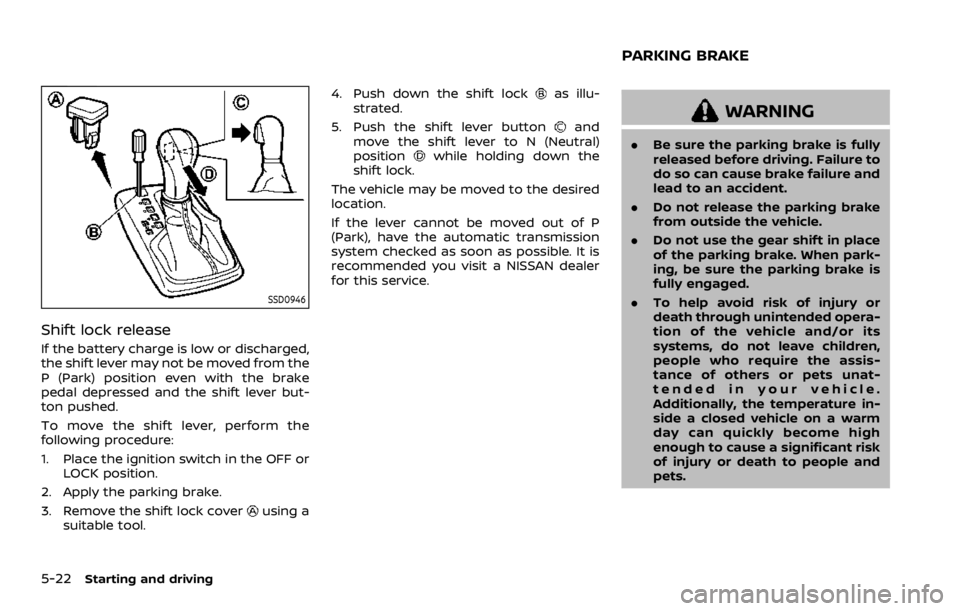
To move the shift lever, perform the
following procedure:
1. Place the ignition switch in the OFF orLOCK position.
2. Apply the parking brake.
3. Remove the shift lock cover
using a
suitable tool. 4. Push down the shift lock
as illu-
strated.
5. Push the shift lever button
and
move the shift lever to N (Neutral)
position
while holding down the
shift lock.
The vehicle may be moved to the desired
location.
If the lever cannot be moved out of P
(Park), have the automatic transmission
system checked as soon as possible. It is
recommended you visit a NISSAN dealer
for this service.
WARNING
. Be sure the parking brake is fully
released before driving. Failure to
do so can cause brake failure and
lead to an accident.
. Do not release the parking brake
from outside the vehicle.
. Do not use the gear shift in place
of the parking brake. When park-
ing, be sure the parking brake is
fully engaged.
. To help avoid risk of injury or
death through unintended opera-
tion of the vehicle and/or its
systems, do not leave children,
people who require the assis-
tance of others or pets unat-
tended in your vehicle.
Additionally, the temperature in-
side a closed vehicle on a warm
day can quickly become high
enough to cause a significant risk
of injury or death to people and
pets.
PARKING BRAKE
Page 279 of 528
SPA2331
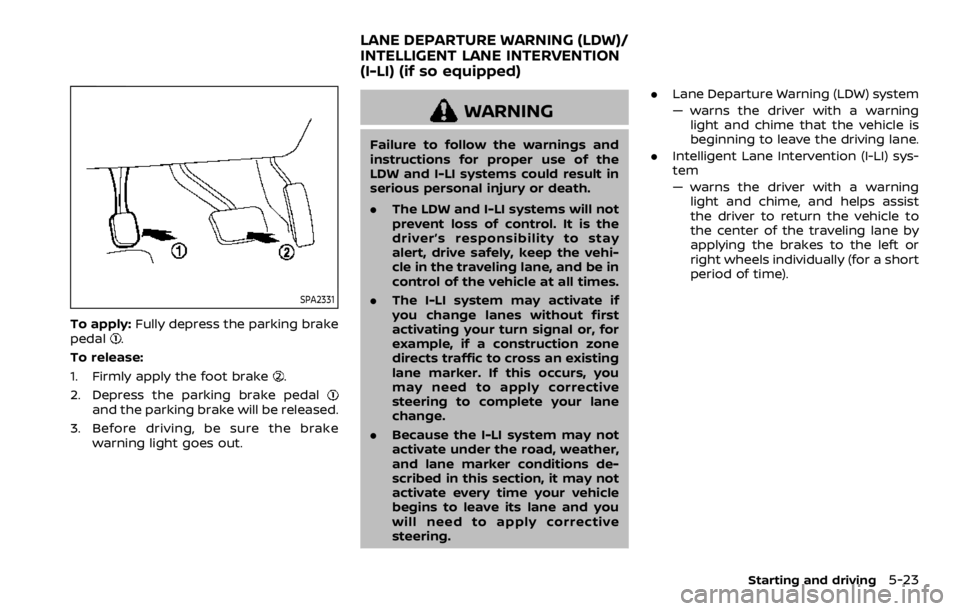
To apply:Fully depress the parking brake
pedal.
To release:
1. Firmly apply the foot brake
.
2. Depress the parking brake pedal
and the parking brake will be released.
3. Before driving, be sure the brake warning light goes out.
WARNING
Failure to follow the warnings and
instructions for proper use of the
LDW and I-LI systems could result in
serious personal injury or death.
.The LDW and I-LI systems will not
prevent loss of control. It is the
driver’s responsibility to stay
alert, drive safely, keep the vehi-
cle in the traveling lane, and be in
control of the vehicle at all times.
. The I-LI system may activate if
you change lanes without first
activating your turn signal or, for
example, if a construction zone
directs traffic to cross an existing
lane marker. If this occurs, you
may need to apply corrective
steering to complete your lane
change.
. Because the I-LI system may not
activate under the road, weather,
and lane marker conditions de-
scribed in this section, it may not
activate every time your vehicle
begins to leave its lane and you
will need to apply corrective
steering. .
Lane Departure Warning (LDW) system
— warns the driver with a warning
light and chime that the vehicle is
beginning to leave the driving lane.
. Intelligent Lane Intervention (I-LI) sys-
tem
— warns the driver with a warning
light and chime, and helps assist
the driver to return the vehicle to
the center of the traveling lane by
applying the brakes to the left or
right wheels individually (for a short
period of time).
Starting and driving5-23
LANE DEPARTURE WARNING (LDW)/
INTELLIGENT LANE INTERVENTION
(I-LI) (if so equipped)
Page 280 of 528

5-24Starting and driving
JVS0907X
The LDW and I-LI systems use a camerainstalled behind the windshield to moni-
tor the lane markers of your traveling
lane.
JVS1094X
I-LI ON indicator light/LDW indicator light
(on the instrument panel)
Warning systems switchDynamic driver assistance switchCenter multi-function control panel
LDW SYSTEM OPERATION
The LDW system operates above approxi-
mately 45 MPH (70 km/h) and when the
lane markings are clear.
If the vehicle approaches either the left or
right side of the traveling lane, the LDW
indicator light (orange) on the instrument
Page 281 of 528

panel will flash and a warning chime will
sound.
NOTE:
The LDW system is not designed to
warn when you operate the lane
change signal and change traveling
lanes in the direction of the signal.
(The LDW system will become operable
again approximately 2 seconds after
the lane change signal is turned off.)
JVS1130X
Warning systems switchWarning systems ON indicator lightCenter multi-function control panel
TURNING THE LDW SYSTEM ON/OFF
The warning systems switchis used to
turn on and off the LDW system when it is
activated on the center display using the
center multi-function control panel
. See
“How to enable/disable the LDW system”
(P.5-26). When the warning systems
Starting and driving5-25
Page 282 of 528

5-26Starting and driving
switchis turned off, the warning
systems ON indicator lighton the
switch is off.
The warning systems switch
will turn
on and off the LDW and BSW (if so
equipped) systems at the same time.
JVS1043X
HOW TO ENABLE/DISABLE THE LDW
SYSTEM
Perform the following steps to enable or
disable the LDW system.
1. Push the SETTING button
.
2. Touch [Driver Assistance].
3. Touch [Lane Assist].
4. Touch [Lane Departure Warning] to turn the system ON/OFF.
I-LI SYSTEM OPERATION
The I-LI system operates above approxi-
mately 45 MPH (70 km/h) and when the
lane markings are clear.
If the vehicle approaches either the left or
right side of the traveling lane, the LDW
indicator light (orange) on the instrument
panel will flash and a warning chime will
sound. Then, the I-LI system will auto-
matically apply the brakes for a short
period of time to help assist the driver to
return the vehicle to the center of the
traveling lane.
NOTE:
.The I-LI system is not designed to
work when you operate the lane
change signal and change traveling
lanes in the direction of the signal.
(The I-LI system will become oper-
able again approximately 2 seconds
after the lane change signal is
turned off.)
. The I-LI braking assist will not oper-
ate or will stop operating and only a
warning chime will sound under the
following conditions.
—When the brake pedal is de-
pressed.
— When the steering wheel is turned
as far as necessary for the vehicle
to change lanes.
Page 283 of 528

—When the accelerator pedal is
depressed while brake control
assist is provided.
— When the ICC, I-DC, I-BSI, BSW, I-
FCW or AEB warnings sound.
— When the hazard warning flashers
are operated.
— When driving on a curve at a high
speed.
. While the I-LI system is operating,
you may hear a sound of brake
operation. This is normal and indi-
cates that the I-LI system is operat-
ing properly.
JVS1095X
I-LI ON indicator light (green) (on the
instrument panel)
Dynamic driver assistance switchCenter multi-function control panel
TURNING THE I-LI SYSTEM ON/OFF
To turn on the I-LI system, push the
dynamic driver assistance switchon
the steering wheel after starting the
engine. The I-LI ON indicator light (green)
on the instrument panel will illuminate.
Push the dynamic driver assistance
Starting and driving5-27
Page 284 of 528
5-28Starting and driving
switchagain to turn off the I-LI system.
The I-LI ON indicator light (green)will
turn off.
The dynamic driver assistance switch
is
used for the I-LI, I-BSI (if so equipped) and
I-DC systems.
When the dynamic driver assistance
switch
is pushed, the I-BSI and I-DC
systems will also turn on or off simulta-
neously. The I-LI system can be individu-
ally set to on or off on the center display
using the center multi-function control
panel
.
If the system is set to off, the system will
not turn on even if the dynamic driver
assistance switch
is pushed to on. To
set the system to on or off on the center
display, see “How to enable/disable the I-
LI system” (P.5-28).
JVS1043X
HOW TO ENABLE/DISABLE THE I-LI
SYSTEM
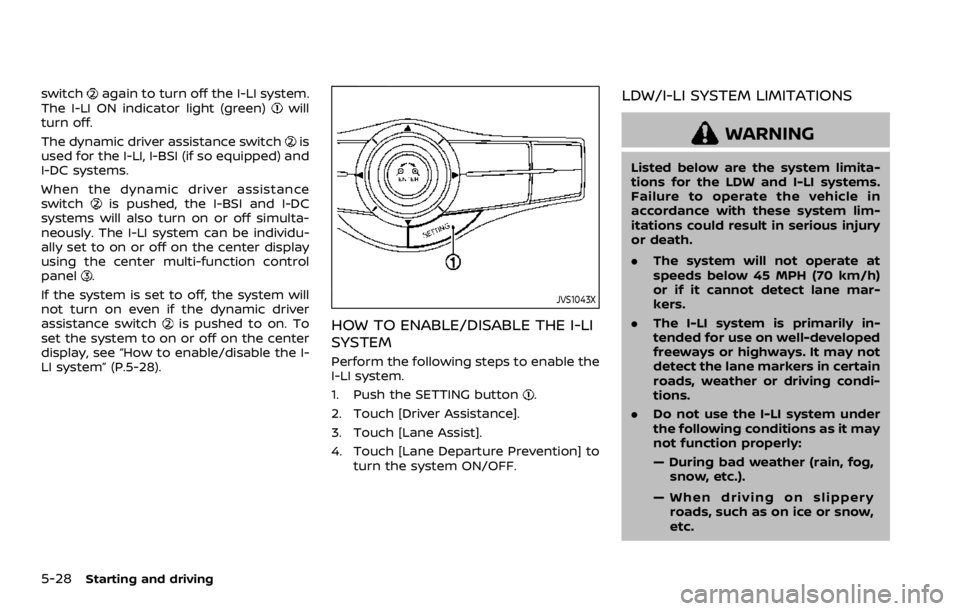
Perform the following steps to enable the
I-LI system.
1. Push the SETTING button
.
2. Touch [Driver Assistance].
3. Touch [Lane Assist].
4. Touch [Lane Departure Prevention] to turn the system ON/OFF.
LDW/I-LI SYSTEM LIMITATIONS
WARNING
Listed below are the system limita-
tions for the LDW and I-LI systems.
Failure to operate the vehicle in
accordance with these system lim-
itations could result in serious injury
or death.
.The system will not operate at
speeds below 45 MPH (70 km/h)
or if it cannot detect lane mar-
kers.
. The I-LI system is primarily in-
tended for use on well-developed
freeways or highways. It may not
detect the lane markers in certain
roads, weather or driving condi-
tions.
. Do not use the I-LI system under
the following conditions as it may
not function properly:
— During bad weather (rain, fog,
snow, etc.).
— When driving on slippery roads, such as on ice or snow,
etc.
Page 285 of 528
— When driving on winding oruneven roads.
— When there is a lane closure due to road repairs.
— When driving in a makeshift or temporary lane.
— When driving on roads where the lane width is too narrow.
— When driving without normal tire conditions (for example,
tire wear, low tire pressure,
installation of spare tire, tire
chains, non-standard wheels).
— When the vehicle is equipped with non-original brake parts
or suspension parts.
— When towing a trailer or other vehicle.
. The camera may not detect lane
markers in the following situa-
tions and the LDW and I-LI sys-
tems may not operate properly.
— On roads where there are
multiple parallel lane markers,
lane markers that are faded or
not painted clearly, yellow
painted lane markers, non-
standard lane markers, or
lane markers covered with water, dirt, snow, etc.
— On roads where the discontin- ued lane markers are still
detectable.
— On roads where there are sharp curves.
— On roads where there are sharply contrasting objects,
such as shadows, snow,
water, wheel ruts, seams or
lines remaining after road re-
pairs. (The LDW and I-LI sys-
tems could detect these items
as lane markers.)
— On roads where the traveling lane merges or separates.
— When the vehicle’s traveling direction does not align with
the lane marker.
— When traveling close to the vehicle in front of you, which
obstructs the lane camera
unit detection range.
— When rain, snow or dirt ad- heres to the windshield in
front of the lane camera unit.
— When the headlights are not bright due to dirt on the lens
or if the aiming is not adjusted properly.
— When strong light enters the lane camera unit. (For exam-
ple, the light directly shines on
the front of the vehicle at
sunrise or sunset.)
— When a sudden change in brightness occurs. (For exam-
ple, when the vehicle enters or
exits a tunnel or under a
bridge.)
. Excessive noise will interfere with
the warning chime sound, and
the chime may not be heard.
Starting and driving5-29
Page 286 of 528

5-30Starting and driving
JVS0882X
I-LI ON indicator light (green) (on the
instrument panel)
Warning systems ON indicator lightDynamic driver assistance switch
SYSTEM TEMPORARILY UNAVAIL-
ABLE
Condition A:
Under the following conditions, a beep
will sound and the I-LI system will be
canceled automatically. The I-LI ON in-
dicator light (green)
will blink, and the I-LI system cannot be activated:
.
When the VDC system (except TCS
function) or ABS operates.
. When the VDC system is turned off.
. When the SNOW mode switch is
turned on.
. When the 4WD shift switch is in the 4H
or 4L position (for 4WD models).
Action to take:
When the above conditions no longer
exist, turn off the I-LI system. Push the
dynamic driver assistance switch
again
to turn the I-LI system back on.
Condition B:
LDW system: If the vehicle is parked in
direct sunlight under high temperature
conditions (over approximately 104°F
(40°C)) and then the LDW system is turned
on, the LDW system may be deactivated
automatically, and the warning systems
ON indicator light
on the switch will
blink.
I-LI system: If the vehicle is parked in
direct sunlight under high temperature
conditions (over approximately 104°F
(40°C)) and then the I-LI system is turned
on, the I-LI system will be turned off
automatically, a beep will sound and the
I-LI ON indicator light (green)
will blink.
The LDW and I-LI systems are not avail-
able until the conditions no longer exist.