Rear door NISSAN ARMADA 2020 Owner´s Manual
[x] Cancel search | Manufacturer: NISSAN, Model Year: 2020, Model line: ARMADA, Model: NISSAN ARMADA 2020Pages: 528, PDF Size: 2.1 MB
Page 92 of 528

Rear door alert ........................................................................\
.... 2-48Turning the rear door alert system
ON/OFF ........................................................................\
............... 2-48
System operation ............................................................... 2-49
How to temporarily disable the rear door
alert system ........................................................................\
..... 2-49
Power outlet ........................................................................\
.......... 2-50 USB (Universal Serial Bus) charging
connector ........................................................................\
.......... 2-52
Storage ........................................................................\
...................... 2-53 Cup holders ........................................................................\
..... 2-53
Sunglasses holder .............................................................. 2-55
Glove box ........................................................................\
........... 2-56
Console box ........................................................................\
..... 2-56
Tray ........................................................................\
........................ 2-58
Coat hooks ........................................................................\
....... 2-59
Luggage hooks ..................................................................... 2-59
Cargo floor box .................................................................... 2-60
Roof rack ........................................................................\
........... 2-60
Rear bumper cover ........................................................... 2-61
Windows ........................................................................\
.................... 2-63
Power windows .................................................................... 2-63
Moonroof (if so equipped) .................................................. 2-65 Power moonroof ................................................................. 2-65
Welcome light (if so equipped) ....................................... 2-67 Battery saver system ..................................................... 2-67
Interior lights ........................................................................\
......... 2-68
Interior light switch ........................................................... 2-68
Console light ........................................................................\
... 2-69 Map lights ........................................................................\
....... 2-69
Rear personal lights ....................................................... 2-69
Vanity mirror lights ................................................................. 2-70
Cargo light ........................................................................\
............. 2-70
HomeLink® Universal Transceiver (Type A) (if
so equipped) ........................................................................\
......... 2-70 Programming HomeLink® ......................................... 2-71
Programming HomeLink® for Canadian
customers and gate openers ................................. 2-72
Operating the HomeLink® Universal
Transceiver ........................................................................\
.... 2-73
Programming troubleshooting ............................. 2-73
Clearing the programmed information .......... 2-73
Reprogramming a single HomeLink®
button ........................................................................\
................ 2-73
If your vehicle is stolen ................................................ 2-74
HomeLink® Universal Transceiver (Type B)
(if so equipped) ........................................................................\
... 2-74
Programming HomeLink® ......................................... 2-75
Using the garage door
two-way communication ........................................... 2-78
Programming HomeLink® for Canadian
customers and gate openers ................................. 2-78
Operating the HomeLink® Universal
Transceiver ........................................................................\
.... 2-79
Programming troubleshooting ............................. 2-79
Clearing the programmed information .......... 2-79
Reprogramming a single
HomeLink® button ........................................................... 2-79
If your vehicle is stolen ................................................ 2-80
Page 93 of 528

WAA0101X
1. Power liftgate switch (if so equipped)
2. Heated steering wheel switch (if soequipped)
3. Instrument brightness control switch
4. TRIP/RESET switch for twin trip odometer
5. Headlight, fog light and turn signal switch — Headlight — Turn signal
— Fog light (if so equipped)
6. Steering-wheel-mounted controls (left side)
— Audio control steering switch
— Hands-Free Phone System switch
7. Trip computer switch 8. Wiper and washer switch
9. Steering-wheel-mounted controls (right
side)
— Intelligent Cruise Control (ICC) system
10. Dynamic driver assistance switch (if so equipped)
— Intelligent Lane Intervention (I-LI) sys-
tem (if so equipped)
— Intelligent Distance Control (I-DC) sys-
tem (if so equipped)
— Intelligent Blind Spot Intervention (I-
BSI) system (if so equipped)
11. Shift lever
12. Four-Wheel Drive (4WD) shift switch (if so equipped)/SNOW mode switch/TOW
MODE switch/Vehicle Dynamic Control
(VDC) OFF switch
13. Power liftgate main switch (if so equipped)
14. Warning systems switch (if so equipped) — Lane Departure Warning (LDW) (if so
equipped)
— Blind Spot Warning (BSW) (if so
equipped)
15. Rear door alert switch
16. Electric tilting/telescopic steering wheel switch
Instruments and controls2-3
COCKPIT
Page 115 of 528

.Intelligent Cruise Control (ICC) system
. Intelligent Distance Control (I-DC) sys-
tem (if so equipped)
. Automatic Emergency Braking (AEB)
system
. Intelligent Forward Collision Warning
(I-FCW) system
For more details, see “Intelligent Cruise
Control (ICC)” (P.5-63), “Intelligent Distance
Control (I-DC)” (P.5-85), “Automatic Emer-
gency Braking (AEB)” (P.5-98) or “Intelli-
gent Forward Collision Warning (I-FCW)”
(P.5-106).
19. “TIMER” indicator
This indicator appears when the set
“TIMER” indicator activates. You can set
the time for up to 6 hours. (See “Trip
computer” (P.2-28).)
20. Low outside temperature
warning
This warning appears if the outside tem-
perature is below 37°F (3°C). The warning
can be set not to be displayed. (See “Trip
computer” (P.2-28).)
21. Four-Wheel Drive (4WD) shift
indicator (4WD models)
This indicator shows the Four-Wheel
Drive (4WD) driving mode (AUTO, 4HI or
4LO) that is selected by the 4WD shift
switch. (See “NISSAN all-mode 4WD®” (P.5-
116).)
22. Intelligent Cruise Control (ICC)
system MAIN switch indicator
The Intelligent Cruise Control (ICC) sys-
tem main switch indicator (CRUISE) is
displayed when the ICC main switch is
pushed. When the main switch is pushed
again, the indicator disappears. While the
CRUISE indicator is displayed, the ICC
system is operational.
The cruise control set indicator (SET) is
displayed while the vehicle is controlled
by the conventional (fixed speed) cruise
control mode of the ICC system.
For more details, see “Intelligent Cruise
Control (ICC)” (P.5-63).
23. Intelligent Distance Control (I-
DC) system switch indicator (if so
equipped)
The indicator is displayed when the
Intelligent Distance Control (I-DC) system
switch is pushed on. When the switch is
pushed again, the indicator disappears. While the indicator is displayed, the I-DC
system is operational. (See “Intelligent
Distance Control (I-DC)” (P.5-85).)
24. Intelligent Back-up Intervention
(I-BI) system indicator (if so
equipped)
The I-BI ON indicator (SYSTEM ON) ap-
pears when the shift lever is in the R
(Reverse) position with the Intelligent
Back-up Intervention (I-BI) system turned
on.
If the I-BI system is turned off, the I-BI OFF
indicator (SYSTEM OFF) appears.
For more details, see “Intelligent Back-up
Intervention (I-BI)” (P.5-53).
25. Rear door alert is activated
When the rear door alert system is
enabled, this message appears when the
rear door alert system is active and can
remind the driver to check the rear seat.
NOTE:
This system is disabled until a driver
enables it using the rear door alert
switch.
For more details, see “Rear door alert”
(P.2-48).
Instruments and controls2-25
Page 116 of 528

2-26Instruments and controls
26. Check back seat for all articles
When the rear door alert system is
enabled, this message appears when the
vehicle comes to a complete stop, the
shift lever is moved from the D (Drive) or R
(Reverse) position to P (Park) position, and
the driver exits the vehicle. This message
alerts the driver, after a period of time, to
check for items in the rear seat after the
audible alert has been provided.
NOTE:
This rear door alert system is disabled
until a driver enables it using the rear
door alert switch.
For more details, see “Rear door alert”
(P.2-48).
SIC4325
MAINTENANCE INDICATORS
1. Engine oil replacement indicator
This indicator appears when the custo-
mer set time comes for changing the
engine oil. You can set or reset the
distance for changing the engine oil.
(See “Trip computer” (P.2-28).)
2. Oil filter replacement indicator
This indicator appears when the custo-
mer set time comes for replacing the oil
filter. You can set or reset the distance for
replacing the oil filter. (See “Trip compu-
ter” (P.2-28).)
3. Tire replacement indicator
This indicator appears when the custo-
mer set distance comes for replacing
tires. You can set or reset the distance
for replacing tires. (See “Trip computer”
(P.2-28).)
WARNING
The tire replacement indicator is not
a substitute for regular tire checks,
including tire pressure checks. See
“Changing wheels and tires” (P.8-37).
Many factors including tire inflation,
alignment, driving habits and road
conditions affect tire wear and when
Page 138 of 528

2-48Instruments and controls
The rear door alert system functions
under certain conditions to indicate there
may be an object or passenger in the rear
seat(s). Check the seat(s) before exiting
the vehicle. The rear door alert system is
initially disabled. The driver can enable
the system using the rear door alert
switch. (See “Turning the rear door alert
system ON/OFF” (P.2-48).)
JVP0649X
Rear door alert switchRear door alert switch indicator lightswitchswitch
TURNING THE REAR DOOR ALERT
SYSTEM ON/OFF
To turn on the rear door alert system,
push the rear door alert switch. The
rear door alert switch indicator lightwill
illuminate.
To turn off the system, push the rear door
REAR DOOR ALERT
Page 139 of 528

alert switch again. The rear door alert
switch indicator light will go off.
When the system is turned ON:
.The system is activated when a rear
door is opened and closed within 10
minutes of the vehicle being driven.
For additional information, refer to
“System operation” (P.2-49).
. If a rear door is opened and closed but
the vehicle is not driven within ap-
proximately 10 minutes, the system
will not be activated. A rear door must
be opened and closed and the vehicle
driven within 10 minutes for the sys-
tem to be activated.
NOTE:
. When turning on or off the system,
the system will retain current set-
tings even if the engine is restarted.
. If the battery terminal is discon-
nected and connected after the sys-
tem is turned on, the system will be
turned off and initialized. To use the
rear door alert system after the
battery terminal is disconnected
and connected for servicing by the
customer or a NISSAN dealer, push
the rear door alert switch to turn on
the system.SYSTEM OPERATION
When the rear door alert system is
activated and the driver exits the vehicle
after arriving at a destination:
.When the driver places the vehicle in
the P (Park) position, a message ap-
pears in the vehicle information dis-
play for a driver to select “DISMISS
MESSAGE” or “DISABLE ALERT” if de-
sired.
. With the system enabled, when the
driver exits the vehicle, an audible alert
(horn sound) will occur unless a rear
door is opened and closed within a
short time to deactivate the alert.
. If the doors are locked before the alert
is deactivated by opening a rear door,
the horn will sound.
. If the system is activated but the
liftgate is opened before opening a
rear door, the audible horn alert will be
delayed until after the liftgate is
closed.
. If the audible horn alert occurs, a
message will also appear in the vehi-
cle information display that states,
“CHECK BACK SEAT FOR All ARTICLES”.
SIC4420
HOW TO TEMPORARILY DISABLE
THE REAR DOOR ALERT SYSTEM
Perform the following steps to tempora-
rily disable the rear door alert system.
1. When the driver places the vehicle in
the P (Park) position, a message ap-
pears in the vehicle information dis-
play for a driver to select “DISMISS
MESSAGE” or “DISABLE ALERT” if de-
sired.
2. Push the
switchto toggle
between “DISMISS MESSAGE” and “DIS-
ABLE ALERT”.
3. Push the
switchto enter.
Instruments and controls2-49
Page 140 of 528
2-50Instruments and controls
.Usingswitch, a driver can
select “DISMISS MESSAGE” to clear
the display for a period of time. If no
selection is made, this message
automatically turns off after a per-
iod of time.
.Usingswitch, a driver can
select “DISABLE ALERT” to disable
the horn alert for the remainder of
the current trip.
WARNING
. There may be times when there is
an object or passenger in the rear
seat(s) but the audible alert does
not sound. For example, this may
occur if rear seat passengers
enter or exit the vehicle during a
trip.
. The system does not directly
detect objects or passengers in
the rear seat(s). Instead, it can
detect when a rear door is
opened and closed, indicating
that there may be something in
the rear seat(s). NOTE:
There may be times when the horn
sounds but there are no objects or
passengers in the rear seat(s).
CAUTION
.
Use power outlet with the engine
running to avoid discharging the
vehicle battery.
. Avoid using power outlet when
the air conditioner, headlights or
rear window defroster is on.
. Before inserting or disconnecting
a plug, be sure the electrical
accessory being used is turned
OFF.
. When not in use, be sure to close
the cap. Do not allow water or any
liquid to contact the outlet.
POWER OUTLET
Page 150 of 528

2-60Instruments and controls
JVI1204X
CARGO FLOOR BOX
Push the handle to open the cargo floor
board.
JVI1515X
ROOF RACK
Do not apply any load directly to the roof
side rails. Cross bars must be installed
before applying load/cargo/luggage to
the roof of the vehicle. Genuine NISSAN
accessory cross bars are available
through a NISSAN dealer. It is recom-
mended that you visit a NISSAN dealer for
additional information.
The service load capacity for the roof side
rails is 221 lb (100 kg), however do not
exceed the accessory cross bars load
capacity.
Be careful that your vehicle does not
exceed the Gross Vehicle Weight Rating
(GVWR) or its Gross Axle Weight Rating(GAWR front and rear). The GVWR and
GAWR are located on the F.M.V.S.S. or C.V.
M.S.S. certification label (located on the
driver’s door pillar). For additional infor-
mation regarding GVWR and GAWR, refer
to “Vehicle loading information” (P.10-13).
WARNING
.
Always install the cross bars onto
the roof side rails before loading
cargo of any kind. Loading cargo
directly onto the roof side rails or
the vehicle’s roof may cause ve-
hicle damage.
. Drive extra carefully when the
vehicle is loaded at or near the
cargo carrying capacity, espe-
cially if the significant portion of
that load is carried on the roof
rack.
. Heavy loading of the roof rack
has the potential to affect the
vehicle stability and handling
during sudden or unusual hand-
ling maneuvers.
. Roof rack load should be evenly
distributed.
. Do not exceed maximum roof
rack load weight capacity.
Page 153 of 528
POWER WINDOWS
WARNING
.Make sure that all passengers
have their hands, etc. inside the
vehicle while it is in motion and
before closing the windows. Use
the window lock switch to pre-
vent unexpected use of the
power windows.
. To help avoid risk of injury or
death through unintended opera-
tion of the vehicle and or its
systems, including entrapment
in windows or inadvertent door
lock activation, do not leave chil-
dren, people who require the
assistance of others or pets un-
attended in your vehicle. Addi-
tionally, the temperature inside a
closed vehicle on a warm day can
quickly become high enough to
cause a significant risk of injury
or death to people and pets.
The power windows operate when the
ignition switch is in the ON position or for
about 45 seconds after the ignition
switch is pushed to the OFF position. If
the driver’s or front passenger’s door is
opened during this period of about 45 seconds, power to the windows is can-
celed.
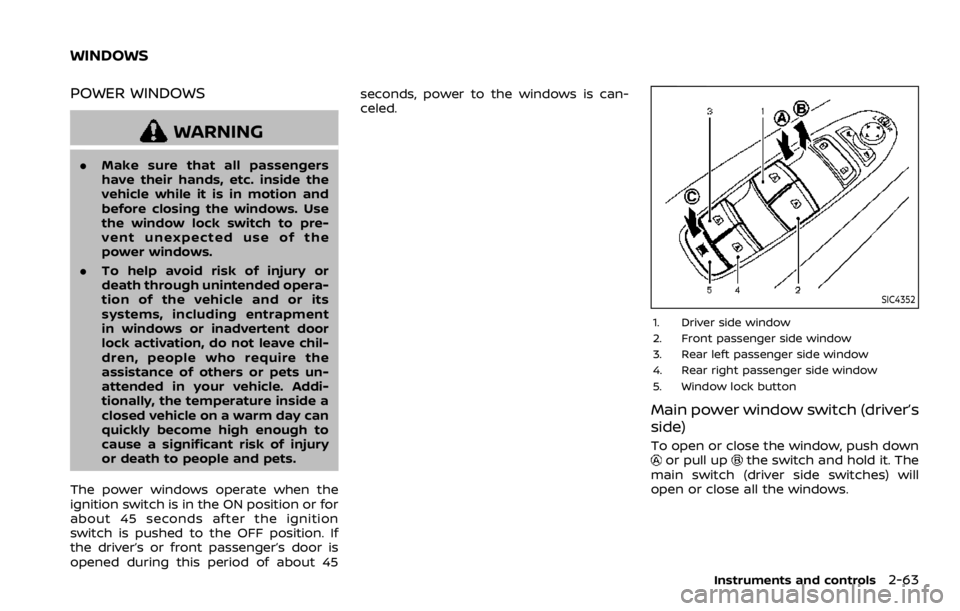
SIC4352
1. Driver side window
2. Front passenger side window
3. Rear left passenger side window
4. Rear right passenger side window
5. Window lock button
Main power window switch (driver’s
side)
To open or close the window, push downor pull upthe switch and hold it. The
main switch (driver side switches) will
open or close all the windows.
Instruments and controls2-63
WINDOWS
Page 158 of 528
2-68Instruments and controls
CAUTION
.Turn off the lights when you leave
the vehicle.
. Do not use the lights for extended
periods of time with the engine
stopped. This could result in a
discharged battery.
JVI0760X
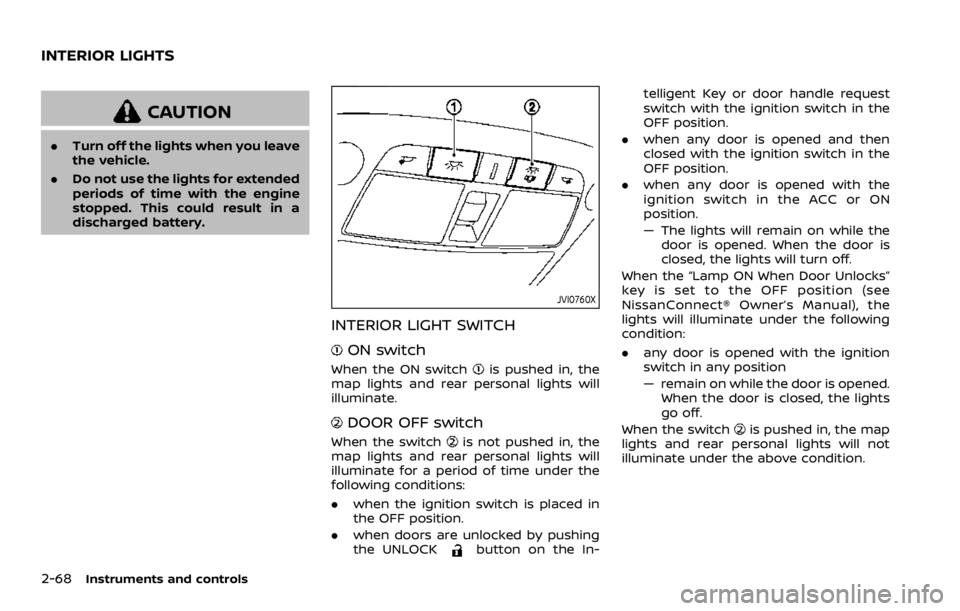
INTERIOR LIGHT SWITCH
ON switch
When the ON switchis pushed in, the
map lights and rear personal lights will
illuminate.
DOOR OFF switch
When the switchis not pushed in, the
map lights and rear personal lights will
illuminate for a period of time under the
following conditions:
. when the ignition switch is placed in
the OFF position.
. when doors are unlocked by pushing
the UNLOCK
button on the In- telligent Key or door handle request
switch with the ignition switch in the
OFF position.
. when any door is opened and then
closed with the ignition switch in the
OFF position.
. when any door is opened with the
ignition switch in the ACC or ON
position.
— The lights will remain on while the
door is opened. When the door is
closed, the lights will turn off.
When the “Lamp ON When Door Unlocks”
key is set to the OFF position (see
NissanConnect® Owner’s Manual), the
lights will illuminate under the following
condition:
. any door is opened with the ignition
switch in any position
— remain on while the door is opened.
When the door is closed, the lights
go off.
When the switch
is pushed in, the map
lights and rear personal lights will not
illuminate under the above condition.
INTERIOR LIGHTS