cruise control NISSAN ARMADA 2020 Owner´s Manual
[x] Cancel search | Manufacturer: NISSAN, Model Year: 2020, Model line: ARMADA, Model: NISSAN ARMADA 2020Pages: 528, PDF Size: 2.1 MB
Page 321 of 528

SSD1051
HOW TO SELECT THE CRUISE CON-
TROL MODE
Selecting vehicle-to-vehicle dis-
tance control mode
To choose the vehicle-to-vehicle distance
control mode, quickly push and release
the MAIN switch.
Selecting the conventional (fixed
speed) cruise control mode
To choose the conventional (fixed speed)
cruise control mode, push and hold the
MAIN switchfor longer than approxi-
mately 1.5 seconds. See “Conventional
(fixed speed) cruise control mode” (P.5-81).
VEHICLE-TO-VEHICLE DISTANCE
CONTROL MODE
In the vehicle-to-vehicle distance control
mode, the ICC system automatically
maintains a selected distance from the
vehicle traveling in front of you according
to that vehicle’s speed (up to the set
speed), or at the set speed when the road
ahead is clear.
JVS0913X
The system is intended to enhance the
operation of the vehicle when following a
vehicle traveling in the same lane and
direction.
If the radar sensor
detects a slower
moving vehicle ahead, the system will
reduce the vehicle speed so that your
vehicle follows the vehicle in front at the
selected distance.
The system automatically controls the
throttle and applies the brakes (up to
approximately 40% of vehicle braking
power) if necessary.
The detection range of the sensor is
approximately 650 ft (200 m) ahead.
Starting and driving5-65
Page 323 of 528

a vehicle ahead, this system automati-
cally accelerates or decelerates your ve-
hicle according to the speed of the
vehicle ahead. Depress the accelerator
to properly accelerate your vehicle when
acceleration is required for a lane change.
Depress the brake pedal when decelera-
tion is required to maintain a safe dis-
tance to the vehicle ahead due to its
sudden braking or if a vehicle cuts in.
Always stay alert when using the ICC
system.
SSD0964
Vehicle-to-vehicle distance control
mode switches
The system is operated by a MAIN switch
and four control switches, all mounted on
the steering wheel.
1. ACCELERATE/RESUME switch:Resumes set speed or increases speed
incrementally.
2. COAST/SET switch: Sets desired cruise speed, reduces
speed incrementally.
3. CANCEL switch:
Deactivates the system without eras-
ing the set speed. 4. DISTANCE switch:
Changes the vehicle’s following dis-
tance:
.Long.Middle.Short
5. MAIN switch:
Master switch to activate the system
Starting and driving5-67
Page 325 of 528

SSD1052
Operating vehicle-to-vehicle dis-
tance control mode
To turn on the cruise control,quickly
push and release the MAIN switchon.
The MAIN switch indicator, set distance
indicator and set vehicle speed indicator
come on and in a standby state for
setting.
SSD1053
To set cruising speed, accelerate your
vehicle to the desired speed, push the
COAST/SET switch and release it. (Vehicle
ahead detection indicator, set distance
indicator and set vehicle speed indicator
come on.) Take your foot off the accel-
erator pedal. Your vehicle will maintain
the set speed.
SSD1105
When the COAST/SET switch is pushed
under the following conditions, the sys-
tem cannot be set and the ICC indicators
will blink for approximately 2 seconds:
. When traveling below 20 MPH (32
km/h) and the vehicle ahead is not
detected
. When the shift lever is not in the D
(Drive) or manual shift mode
. When the parking brake is applied
. When the brakes are operated by the
driver
Starting and driving5-69
Page 327 of 528

SSD1107
System set display with vehicle aheadSystem set display without vehicle ahead
The driver sets the desired vehicle speed
based on the road conditions. The ICC
system maintains the set vehicle speed,
similar to standard cruise control, as long
as no vehicle is detected in the lane
ahead.
The ICC system displays the set speed.
Vehicle detected ahead:
When a vehicle is detected in the lane
ahead, the ICC system decelerates the
vehicle by controlling the throttle and
applying the brakes to match the speed
of a slower vehicle ahead. The system
then controls the vehicle speed based onthe speed of the vehicle ahead to main-
tain the driver selected distance.
NOTE:
.
The stoplights of the vehicle come
on when braking is performed by
the ICC system.
. When the brake operates, a noise
may be heard and/or vibration may
be felt. This is not a malfunction.
When a vehicle ahead is detected, the
vehicle ahead detection indicator comes
on. The ICC system will also display the
set speed and selected distance.
Vehicle ahead not detected:
When a vehicle is no longer detected ahead, the ICC system gradually acceler-
ates your vehicle to resume the pre-
viously set vehicle speed. The ICC
system then maintains the set speed.
When a vehicle is no longer detected the
vehicle ahead detection indicator turns
off.
If a vehicle ahead appears during accel-
eration to the set vehicle speed or any
time the ICC system is in operation, the
system controls the distance to that
vehicle.
When a vehicle is no longer detected
under approximately 15 MPH (24 km/h),
the system will be canceled.
Starting and driving5-71
Page 337 of 528
This could cause failure or malfunc-
tion.
. Do not alter, remove or paint the front
bumper. It is recommended you con-
tact a NISSAN dealer before customiz-
ing or restoring the front bumper.
FCC Notice:
For USA:
This device complies with Part 15 of the
FCC Rules. Operation is subject to the
following two conditions:
1. This device may not cause harmful
interference, and
2. This device must accept any inter-
ference received, including interfer-
ence that may cause undesired
operation.
FCC Warning
Changes or modification not expressly
approved by the party responsible for
compliance could void the user’s
authority to operate the equipment.
For Canada:
This device complies with Industry Ca-
nada licence-exempt RSS standard(s).
Operation is subject to the following
two conditions:
1. This device may not cause interfer-
ence, and 2.
This device must accept any inter-
ference, including interference that
may cause undesired operation of
the device.
CONVENTIONAL (fixed speed)
CRUISE CONTROL MODE
This mode allows driving at a speed
between 25 to 90 MPH (40 to 144 km/h)
without keeping your foot on the accel-
erator pedal.
WARNING
.In the conventional (fixed speed)
cruise control mode, a warning
chime does not sound to warn
you if you are too close to the
vehicle ahead, as neither the pre-
sence of the vehicle ahead nor
the vehicle-to-vehicle distance is
detected.
. Pay special attention to the dis-
tance between your vehicle and
the vehicle ahead of you or a
collision could occur.
. Always confirm the setting in the
ICC system display.
. Do not use the conventional
(fixed speed) cruise control mode
when driving under the following conditions.
— when it is not possible to keep
the vehicle at a set speed
— in heavy traffic or in traffic that varies in speed
— on winding or hilly roads
— on slippery roads (rain, snow, ice, etc.)
— in very windy areas
Doing so could cause a loss of
vehicle control and result in an acci-
dent.
Starting and driving5-81
Page 338 of 528

5-82Starting and driving
SSD0968
Conventional (fixed speed) cruise
control switch
1. ACCELERATE/RESUME switch:Resumes set speed or increases speed
incrementally.
2. COAST/SET switch: Sets the desired cruise speed, reduces
speed incrementally.
3. CANCEL switch: Deactivates the system without eras-
ing the set speed.
4. MAIN switch:
Master switch to activate the system.
SSD1013
Conventional (fixed speed) cruise
control mode display and indica-
tors
The display is on the vehicle information
display located between the speed-
ometer and tachometer.
1. MAIN switch indicator:Indicates that the MAIN switch is ON.
2. Cruise set switch indicator: Displays while the vehicle speed is
controlled by the conventional (fixed
speed) cruise control mode of the ICC
system. 3. Cruise system warning light:
Comes on if there is a malfunction in
the cruise control system.
Page 339 of 528
SSD0969
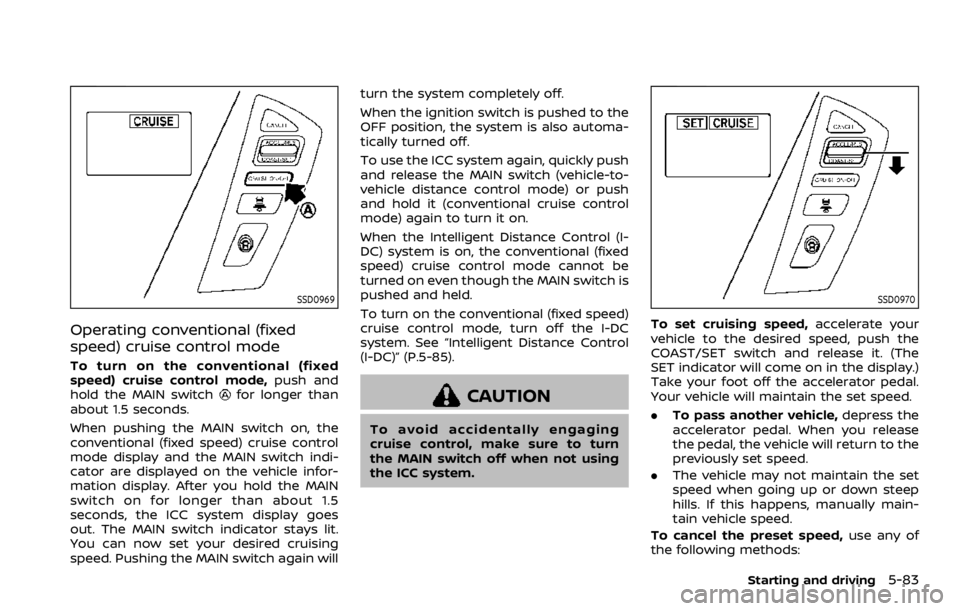
Operating conventional (fixed
speed) cruise control mode
To turn on the conventional (fixed
speed) cruise control mode,push and
hold the MAIN switch
for longer than
about 1.5 seconds.
When pushing the MAIN switch on, the
conventional (fixed speed) cruise control
mode display and the MAIN switch indi-
cator are displayed on the vehicle infor-
mation display. After you hold the MAIN
switch on for longer than about 1.5
seconds, the ICC system display goes
out. The MAIN switch indicator stays lit.
You can now set your desired cruising
speed. Pushing the MAIN switch again will turn the system completely off.
When the ignition switch is pushed to the
OFF position, the system is also automa-
tically turned off.
To use the ICC system again, quickly push
and release the MAIN switch (vehicle-to-
vehicle distance control mode) or push
and hold it (conventional cruise control
mode) again to turn it on.
When the Intelligent Distance Control (I-
DC) system is on, the conventional (fixed
speed) cruise control mode cannot be
turned on even though the MAIN switch is
pushed and held.
To turn on the conventional (fixed speed)
cruise control mode, turn off the I-DC
system. See “Intelligent Distance Control
(I-DC)” (P.5-85).CAUTION
To avoid accidentally engaging
cruise control, make sure to turn
the MAIN switch off when not using
the ICC system.
SSD0970
To set cruising speed,
accelerate your
vehicle to the desired speed, push the
COAST/SET switch and release it. (The
SET indicator will come on in the display.)
Take your foot off the accelerator pedal.
Your vehicle will maintain the set speed.
. To pass another vehicle, depress the
accelerator pedal. When you release
the pedal, the vehicle will return to the
previously set speed.
. The vehicle may not maintain the set
speed when going up or down steep
hills. If this happens, manually main-
tain vehicle speed.
To cancel the preset speed, use any of
the following methods:
Starting and driving5-83
Page 345 of 528

switch to the brake pedal.
NOTE:
.The stop lights of the vehicle come
on when braking is performed by
the I-DC system.
. When the brake operates, a noise
may be heard and/or vibration may
be felt. This is not a malfunction.
Overriding the system:
The following driver’s operation overrides
the system operation.
. When the driver depresses the accel-
erator pedal even further while the
system is moving the accelerator
pedal upward, the I-DC system control
of the accelerator pedal is canceled.
. When the driver’s foot is on the accel-
erator pedal, the brake control by the
system is not operated.
. When the driver’s foot is on the brake
pedal, neither the brake control nor
the alert by the system operates.
. When the Intelligent Cruise Control
(ICC) system is set, the I-DC system
will be inactive.Approach warning
If your vehicle comes closer to the vehicle
ahead due to rapid deceleration of that
vehicle or if another vehicle cuts in, the
system warns the driver with the chime
and I-DC system display. Decelerate by
depressing the brake pedal to maintain a
safe vehicle distance if:
.The chime sounds.
. The vehicle ahead detection indicator
blinks.
The warning chime may not sound in
some cases when there is a short dis-
tance between vehicles. Some examples
are:
. When the vehicles are traveling at the
same speed and the distance be-
tween vehicles is not changing
. When the vehicle ahead is traveling
faster and the distance between ve-
hicles is increasing
. When a vehicle cuts in near your
vehicle
The warning chime will not sound when
your vehicle approaches vehicles that are
parked or moving slowly.
NOTE:
The approach warning chime may
sound and the system display may
blink when the radar sensor detects
objects on the side of the vehicle or on the side of the road. This may cause the
I-DC system to decelerate or accelerate
the vehicle. The radar sensor may de-
tect these objects when the vehicle is
driven on winding roads, narrow roads,
hilly roads or when entering or exiting a
curve. In these cases you will have to
manually control the proper distance
ahead of your vehicle.
Also, the sensor sensitivity can be af-
fected by vehicle operation (steering
maneuver or driving position in the lane)
or traffic or vehicle condition (for example,
if a vehicle is being driven with some
damage).
Starting and driving5-89
Page 346 of 528

5-90Starting and driving
JVS1101X
I-DC system switch indicator (on the
vehicle information display)
Dynamic driver assistance switchCenter multi-function control panel
TURNING THE I-DC SYSTEM ON/OFF
To turn on the I-DC system, push the
dynamic driver assistance switchon
the steering wheel after starting the
engine. The I-DC system switch indicator
in the vehicle information display will
appear. Push the dynamic driver assis- tance switch
again to turn off the I-DC
system. The I-DC system switch indicator
will turn off.
The system will start to operate after the
vehicle speed is above approximately 3
MPH (5 km/h).
The dynamic driver assistance switch
is
used for the I-DC, I-LI (if so equipped) and
I-BSI (if so equipped) systems. When the
dynamic driver assistance switch
is
pushed, the I-LI and I-BSI systems will
also turn on or off simultaneously. The I-
DC system can be individually set to on or
off on the center display using the center
multi-function control panel
. If the
system is set to off, the system will not
turn on even if the dynamic driver assis-
tance switch
is pushed to on. To set the
system to on or off on the center display,
see “How to enable/disable the I-DC
system” (P.5-91).
When the conventional (fixed speed)
cruise control mode is operating, the I-
DC system will not operate. (To use the I-
DC system, turn the conventional (fixed
speed) cruise control mode off, then push
the dynamic driver assistance switch
.)
For details about the conventional (fixed
speed) cruise control mode, see “Intelli-
gent Cruise Control (ICC)” (P.5-63).
When the engine is turned off, the system
Page 371 of 528

CAUTION
During the first 1,200 miles (2,000
km), follow these recommendations
to obtain maximum engine perfor-
mance and ensure the future relia-
bility and economy of your new
vehicle.
Failure to follow these recommenda-
tions may result in shortened engine
life and reduced engine perfor-
mance.
. Avoid driving for long periods at con-
stant speed, either fast or slow. Do not
run the engine over 4,000 rpm.
. Do not accelerate at full throttle in any
gear.
. Avoid quick starts.
. Avoid hard braking as much as possi-
ble.
. Do not tow a trailer for the first 500
miles (805 km). Follow these easy-to-use Fuel Efficient
Driving Tips to help you achieve the most
fuel economy from your vehicle.
1. Use smooth accelerator and brake
pedal application.
.Avoid rapid starts and stops..Use smooth, gentle accelerator andbrake application whenever possi-
ble.
.Maintain constant speed whilecommuting and coast whenever
possible.
2. Maintain constant speed.
.Look ahead to try and anticipate and minimize stops.
.Synchronizing your speed with traf-fic lights allows you to reduce your
number of stops.
.Maintaining a steady speed canminimize red light stops and im-
prove fuel efficiency.
3. Use air conditioning (A/C) at higher vehicle speeds.
.Below 40 MPH (64 km/h), it is moreefficient to open windows to cool
the vehicle due to reduced engine
load.
.Above 40 MPH (64 km/h), it is more
efficient to use A/C to cool the
vehicle due to increased aerody-
namic drag.
.Recirculating the cool air in thecabin when the A/C is on reduces
cooling load.
4. Drive at economical speeds and dis- tances.
.Observing the speed limit and notexceeding 60 MPH (97 km/h)
(where legally allowed) can improve
fuel efficiency due to reduced aero-
dynamic drag.
.Maintaining a safe following dis-tance behind other vehicles re-
duces unnecessary braking.
.Safely monitoring traffic to antici- pate changes in speed permits
reduced braking and smooth accel-
eration changes.
.Select a gear range suitable to roadconditions.
5. Use cruise control.
.Using cruise control during highway driving helps maintain a steady
speed.
.Cruise control is particularly effec-tive in providing fuel savings when
driving on flat terrains.
6. Plan for the shortest route.
.Utilize a map or navigation system to determine the best route to save
time.
Starting and driving5-115
BREAK-IN SCHEDULE FUEL EFFICIENT DRIVING TIPS