disc NISSAN ARMADA 2020 Owner´s Manual
[x] Cancel search | Manufacturer: NISSAN, Model Year: 2020, Model line: ARMADA, Model: NISSAN ARMADA 2020Pages: 528, PDF Size: 2.1 MB
Page 2 of 528
WARNING
Operating, servicing and main-
taining a passenger vehicle or
off-highway motor vehicle can
expose you to chemicals in-
cluding engine exhaust, carbon
monoxide, phthalates, and
lead, which are known to the
State of California to cause
cancer and birth defects or
other reproductive harm. To
minimize exposure, avoid
breathing exhaust, do not idle
the engine except as neces-
sary, service your vehicle in a
well-ventilated area and wear
gloves or wash your hands
frequently when servicing your
vehicle. For more information
go to www.P65Warnings.ca.
gov/passenger-vehicle.
This manual was prepared to help you
understand the operation and mainte-
nance of your vehicle so that you may
enjoy many miles of driving pleasure.
Please read through this manual before
operating your vehicle.
A separate Warranty Information Book-
let explains details about the warranties
covering your vehicle. Additionally, a
separate Customer Care/Lemon Law
Booklet (U.S. only) will explain how to
resolve any concerns you may have
with your vehicle, as well as clarify your
rights under your state’s lemon law.
In addition to factory installed options,
your vehicle may also be equipped with
additional accessories installed by NISSAN
or by your NISSAN dealer prior to delivery.
It is important that you familiarize your-
self with all disclosures, warnings, cau-
tions and instructions concerning proper
use of such accessories prior to operating
the vehicle and/or accessory. It is recom-
mended that you see a NISSAN dealer for
details concerning the particular acces-
sories with which your vehicle is
equipped.
Your NISSAN dealer knows your vehicle
best. When you require any service or
have any questions, we will be glad to
assist you with the extensive resources
available to us.READ FIRST — THEN DRIVE SAFELY
Before driving your vehicle, read your
Owner’s Manual carefully. This will ensure
familiarity with controls and maintenance
requirements, assisting you in the safe
operation of your vehicle.
WARNING
IMPORTANT SAFETY INFORMATION
REMINDERS!
Follow these important driving rules
to help ensure a safe and comforta-
ble trip for you and your passengers!
.NEVER drive under the influence
of alcohol or drugs.
. ALWAYS observe posted speed
limits and never drive too fast
for conditions.
. ALWAYS give your full attention to
driving and avoid using vehicle
features or taking other actions
that could distract you.
. ALWAYS use your seat belts and
appropriate child restraint sys-
tems. Pre-teen children should
be seated in the rear seat.
. ALWAYS provide information
about the proper use of vehicle
CALIFORNIA PROPOSITION
65 WARNING
Foreword
Page 22 of 528
1-4Safety — seats, seat belts and supplemental restraint system
FRONT SEATS
Front power seat adjustment
Operating tips:
.The power seat motor has an auto-
reset overload protection circuit. If the
motor stops during operation, wait 30
seconds, then reactivate the switch.
. Do not operate the power seat switch
for a long period of time when the
engine is off. This will discharge the
battery.
See “Automatic drive positioner” (P.3-40)
for the seat position memory function.
CAUTION
When adjusting the seat positions,
be sure not to contact any moving
parts to avoid possible injuries and/
or damages.
SSS1051
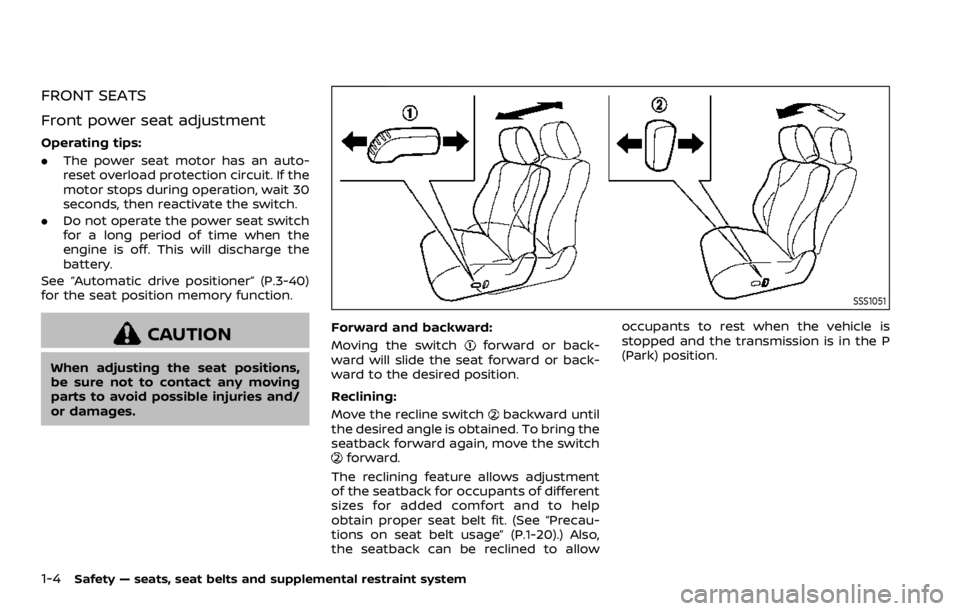
Forward and backward:
Moving the switch
forward or back-
ward will slide the seat forward or back-
ward to the desired position.
Reclining:
Move the recline switch
backward until
the desired angle is obtained. To bring the
seatback forward again, move the switch
forward.
The reclining feature allows adjustment
of the seatback for occupants of different
sizes for added comfort and to help
obtain proper seat belt fit. (See “Precau-
tions on seat belt usage” (P.1-20).) Also,
the seatback can be reclined to allow occupants to rest when the vehicle is
stopped and the transmission is in the P
(Park) position.
Page 27 of 528

SSS1116
Power seat adjustment (if so
equipped)
The 3rd row power folding seat controls
are located behind the 2nd row seat (both
the driver’s and front passenger’s side) on
the 3rd row cup holder console
. There
are also controls located on the rear
quarter trim panel behind the 3rd row
seats (passenger’s side)
.
Before operating the 3rd row seats:
. Make sure the 2nd row seatback is not
reclined.
. Lower the 3rd row head restraint to
the full down position. .
Disconnect and secure the center seat
belt and tongues into the retractor
base. See “3rd row center seat belt”
(P.1-26).
— Always reconnect the center seat
belt when the seat is returned to
the upright position
. Make sure that there are no objects
on the seatback cushion.
SSS1095
Reclining:
Push and hold the rear side of the switch
beside the 3rd row cup holders until the
desired seatback angle (up to 20 degrees)
is obtained. To move the seatback for-
ward again, push and hold the front side
of the switch
until the desired angle is
obtained.
WARNING
. After adjustment, check to be
sure the seat is securely locked.
. Do not ride in a moving vehicle
when the seatback is reclined.
Safety — seats, seat belts and supplemental restraint system1-9
Page 28 of 528
1-10Safety — seats, seat belts and supplemental restraint system
This can be dangerous. The
shoulder belt will not be against
your body. In an accident, you
could be thrown into it and re-
ceive neck or other serious inju-
ries. You could also slide under
the lap belt and receive serious
internal injuries.
. For the most effective protection
when the vehicle is in motion, the
seat should be upright. Always sit
well back and upright in the seat
with both feet on the floor and
adjust the seat belt properly. See
“Precautions on seat belt usage”
(P.1-20).
SSS1118
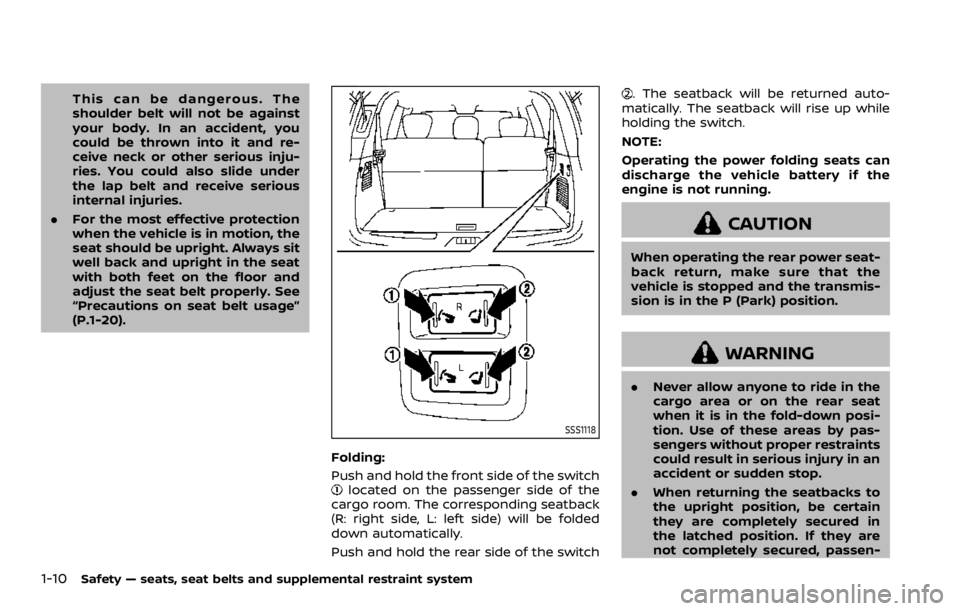
Folding:
Push and hold the front side of the switch
located on the passenger side of the
cargo room. The corresponding seatback
(R: right side, L: left side) will be folded
down automatically.
Push and hold the rear side of the switch
. The seatback will be returned auto-
matically. The seatback will rise up while
holding the switch.
NOTE:
Operating the power folding seats can
discharge the vehicle battery if the
engine is not running.
CAUTION
When operating the rear power seat-
back return, make sure that the
vehicle is stopped and the transmis-
sion is in the P (Park) position.
WARNING
. Never allow anyone to ride in the
cargo area or on the rear seat
when it is in the fold-down posi-
tion. Use of these areas by pas-
sengers without proper restraints
could result in serious injury in an
accident or sudden stop.
. When returning the seatbacks to
the upright position, be certain
they are completely secured in
the latched position. If they are
not completely secured, passen-
Page 45 of 528
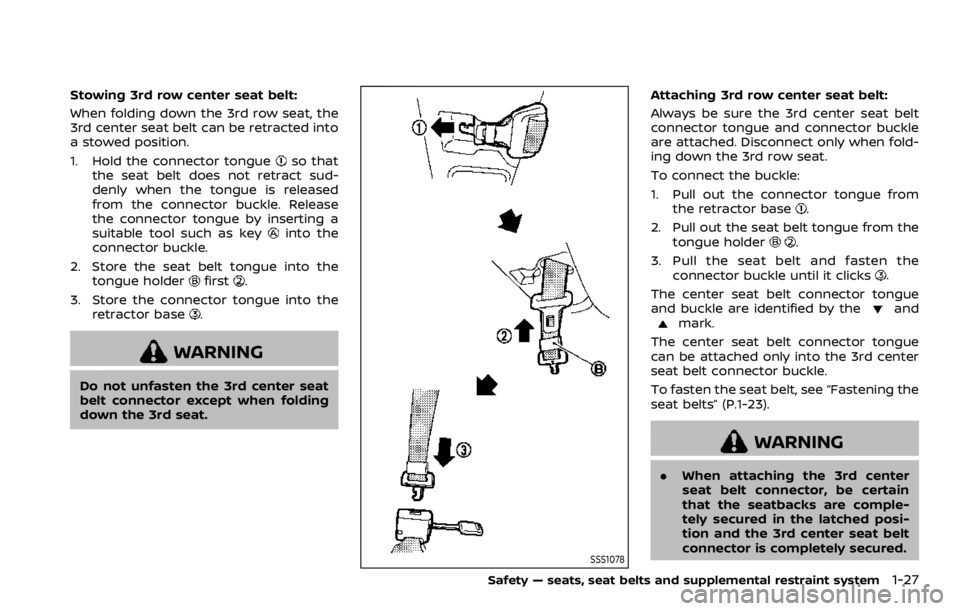
Stowing 3rd row center seat belt:
When folding down the 3rd row seat, the
3rd center seat belt can be retracted into
a stowed position.
1. Hold the connector tongue
so that
the seat belt does not retract sud-
denly when the tongue is released
from the connector buckle. Release
the connector tongue by inserting a
suitable tool such as key
into the
connector buckle.
2. Store the seat belt tongue into the tongue holder
first.
3. Store the connector tongue into the retractor base
.
WARNING
Do not unfasten the 3rd center seat
belt connector except when folding
down the 3rd seat.
SSS1078
Attaching 3rd row center seat belt:
Always be sure the 3rd center seat belt
connector tongue and connector buckle
are attached. Disconnect only when fold-
ing down the 3rd row seat.
To connect the buckle:
1. Pull out the connector tongue fromthe retractor base
.
2. Pull out the seat belt tongue from the tongue holder
.
3. Pull the seat belt and fasten the connector buckle until it clicks
.
The center seat belt connector tongue
and buckle are identified by the
andmark.
The center seat belt connector tongue
can be attached only into the 3rd center
seat belt connector buckle.
To fasten the seat belt, see “Fastening the
seat belts” (P.1-23).
WARNING
. When attaching the 3rd center
seat belt connector, be certain
that the seatbacks are comple-
tely secured in the latched posi-
tion and the 3rd center seat belt
connector is completely secured.
Safety — seats, seat belts and supplemental restraint system1-27
Page 85 of 528
nal injury. Tampering includes
changes to the steering wheel
and the instrument panel assem-
bly by placing material over the
steering wheel pad and above the
instrument panel or by installing
additional trim material around
the air bag system.
. Removing or modifying the front
passenger seat may affect the
function of the air bag system
and result in serious personal
injury.
. Modifying or tampering with the
front passenger seat may result
in serious personal injury. For
example, do not change the front
seats by placing material on the
seat cushion or by installing ad-
ditional trim material, such as
seat covers, on the seat that is
not specifically designed to as-
sure proper air bag operation.
Additionally, do not stow any
objects under the front passen-
ger seat or the seat cushion and
seatback. Such objects may inter-
fere with the proper operation of
the occupant classification sen-
sors. .
No unauthorized changes should
be made to any components or
wiring of the seat belt system.
This may affect the front air bag
system. Tampering with the seat
belt system may result in serious
personal injury.
. It is recommended you visit a
NISSAN dealer for work on and
around the front air bag. It is also
recommended you visit a NISSAN
dealer for installation of electrical
equipment. The Supplemental
Restraint System (SRS) wiring
harnesses* should not be modi-
fied or disconnected. Unauthor-
ized electrical test equipment
and probing devices should not
be used on the air bag system.
. A cracked windshield should be
replaced immediately by a quali-
fied repair facility. A cracked
windshield could affect the func-
tion of the supplemental air bag
system.
* The SRS wiring harness connectors are
yellow and orange for easy identifica-
tion.
When selling your vehicle, we request that
you inform the buyer about the front air
bag system and guide the buyer to the appropriate sections in this Owner’s Man-
ual.
Safety — seats, seat belts and supplemental restraint system1-67
Page 87 of 528
WARNING
.Do not place any objects near the
seatback of the front seats. Also,
do not place any objects (an
umbrella, bag, etc.) between the
front door finisher and the front
seat. Such objects may become
dangerous projectiles and cause
injury if side air bag inflates.
. Right after inflation, several side
air bags and curtain air bag sys-
tem components will be hot. Do
not touch them; you may severely
burn yourself.
. No unauthorized changes should
be made to any components or
wiring of side air bag and curtain
air bags. This is to prevent da-
mage to or accidental inflation of
the side air bag and curtain air
bag systems.
. Do not make unauthorized
changes to your vehicle’s electri-
cal system, suspension system or
side panel. This could affect prop-
er operation of the side air bag
and curtain air bag systems.
. Tampering with the air bag sys-
tem may result in serious perso- nal injury. For example, do not
change the front seats by placing
material near the seatback or by
installing additional trim materi-
al, such as seat covers, around
the side air bags.
. Removing or modifying the front
passenger seat may affect the
function of the air bag system
and result in serious personal
injury.
. It is recommended you visit a
NISSAN dealer for work on and
around the side air bag and
curtain air bag. It is also recom-
mended you visit a NISSAN dealer
for installation of electrical equip-
ment. The Supplemental Re-
straint System (SRS) wiring
harnesses* should not be modi-
fied or disconnected. Unauthor-
ized electrical test equipment
and probing devices should not
be used on the side-impact air
bag system.
* The SRS wiring harness connectors are
yellow and orange for easy identifica-
tion.
When selling your vehicle, we request that
you inform the buyer about the side air
bag and curtain air bag systems and guide the buyer to the appropriate sec-
tions in this Owner’s Manual.
SEAT BELTS WITH PRETENSIONERS
(front seats)
WARNING
.
The pretensioners cannot be re-
used after activation. They must
be replaced together with the
retractor and buckle as a unit.
. If the vehicle becomes involved in
a collision but a pretensioner is
not activated, be sure to have the
pretensioner system checked
and, if necessary, replaced. It is
recommended you visit a NISSAN
dealer for this service.
. No unauthorized changes should
be made to any components or
wiring of the pretensioner sys-
tem. This is to prevent damage to
or accidental activation of the
pretensioners. Tampering with
the pretensioner system may re-
sult in serious personal injury.
. It is recommended you visit a
NISSAN dealer for work on and
around the pretensioner system.
It is also recommended you visit a
NISSAN dealer for installation of
Safety — seats, seat belts and supplemental restraint system1-69
Page 95 of 528

SIC4368
1. Tachometer*
2. Warning and indicator lights
3. Speedometer*
4. Engine coolant temperature gauge*
5. Voltmeter*
6. Vehicle information display/Odometer/twin trip odometer 7. Engine oil pressure gauge*
8. Fuel gauge*
*: The needle indicators may move
slightly after the ignition switch is
placed in the OFF position. This is not
a malfunction.
CAUTION
.
For cleaning, use a soft cloth,
dampened with water. Never use
a rough cloth, alcohol, benzine,
thinner or any kind of solvent or
paper towel with a chemical
cleaning agent. They will scratch
or cause discoloration to the lens.
. Do not spray any liquid such as
water on the meter lens. Spraying
liquid may cause the system to
malfunction.
Instruments and controls2-5
METERS AND GAUGES
Page 110 of 528

2-20Instruments and controls
Vehicle Dynamic Control (VDC)
off indicator light
When the ignition switch is in the ON
position, the Vehicle Dynamic Control
(VDC) off indicator light illuminates and
then turns off.
The light comes on when the VDC off
switch is pushed to OFF. This indicates
that the VDC system is not operating.
When the 4L position is selected with the
Four-Wheel Drive (4WD) shift switch, the
VDC system is disabled and the VDC off
indicator light illuminates. (4WD models)
For additional information, see “Vehicle
Dynamic Control (VDC) system” (P.5-133).
AUDIBLE REMINDERS
Key reminder chime
A chime will sound if the driver side door
is opened while the ignition switch is
placed in the ACC position. Make sure
the ignition switch is placed in the OFF
position, and take the Intelligent Key with
you when leaving the vehicle.
Light reminder chime
A chime will sound when the driver side
door is opened with the light switch in the
orposition and the ignition
switch in the ACC, OFF or LOCK position.
Turn the light switch off when you leave
the vehicle.
Parking brake reminder chime
The chime will sound if the vehicle is
driven at more than 4 MPH (7 km/h) with
the parking brake applied. Stop the vehi-
cle and release the parking brake.
Brake pad wear warning
The disc brake pads have audible wear
warnings. When a brake pad requires
replacement, it will make a high pitched
scraping sound when the vehicle is in
motion. This scraping sound will first
occur only when the brake pedal is
depressed. After more wear of the brake
pad, the sound will always be heard even
if the brake pedal is not depressed. Have
the brakes checked as soon as possible if
the warning sound is heard.
SIC4379
The vehicle information displaylocated
between the speedometer and odometer,
and shows the indicators for the driving
systems, Intelligent Key operation and
various warnings and information.
For detailed information about each sys-
tem, see the following sections:
. Automatic Transmission (AT)
— “Warning lights, indicator lights and
audible reminders” (P.2-10).
— “Driving the vehicle” (P.5-17).
. Four-Wheel Drive (4WD)
— “NISSAN all-mode 4WD®” (P.5-116).
. Intelligent Back-up Intervention (I-BI)
VEHICLE INFORMATION DISPLAY
Page 113 of 528

OPERATIONAL INDICATORS
1. Engine start operation indicator
This indicator appears when the shift
lever is in the P (Park) position.
This indicator means that the engine will
start by pushing the ignition switch with
the brake pedal depressed.
2. NO KEY warning
This warning appears in either of the
following conditions.
No key inside the vehicle:
The warning appears when the door is
closed with the Intelligent Key left outside
the vehicle and the ignition switch in the
ACC or ON position. Make sure that the
Intelligent Key is inside the vehicle.
Unregistered Intelligent Key:
The warning appears when the ignition
switch is pushed from the LOCK position
and the Intelligent Key cannot be recog-
nized by the system. You cannot start the
engine with an unregistered key. Use the
registered Intelligent Key.
See “Intelligent Key system” (P.3-7) for
more details.
3. SHIFT “P” warning
This warning appears when the ignition
switch is pushed to stop the engine with
the shift lever in any position except the P
(Park) position.
If this warning appears, move the shift
lever to the P (Park) position or push the
ignition switch to the ON position.
An inside warning chime will also sound.
(See “Intelligent Key system” (P.3-7).)
4. “PUSH” warning
This warning appears when the shift lever
is moved to the P (Park) position with the
ignition switch in the ACC position after
the SHIFT “P” warning appears.
To push the ignition switch to the OFF
position, perform the following proce-
dure:
SHIFT “P” warning?(Move the shift lever
to “P”) ?PUSH warning ?(Push the
ignition switch ?ignition switch position
is turned to ON) ?PUSH warning ?
(Push the ignition switch ?ignition
switch position is turned to OFF)
5. Intelligent Key battery discharge
indicator
This indicator appears when the Intelli-
gent Key battery is running out of power.
If this indicator appears, replace the
battery with a new one. (See “Intelligent
Key battery replacement” (P.8-21).)
6. Engine start operation for Intelli-
gent Key system indicator
This indicator appears when the Intelli-
gent Key battery is running out of power
and when the Intelligent Key System and
vehicle are not communicating normally.
If this indicator appears, touch the igni-
tion switch with the Intelligent Key while
depressing the brake pedal. (See “Intelli-
gent Key battery discharge” (P.5-15).)
7. Remote engine start indicator (if
so equipped)
This indicator appears when the engine
has been started using the remote engine
start function. To start the vehicle, de-
press the brake pedal and place the
ignition switch in the ON position.
For more details, see “Remote engine
start” (P.3-19).
Instruments and controls2-23