instrument panel NISSAN ARMADA 2021 Owner´s Manual
[x] Cancel search | Manufacturer: NISSAN, Model Year: 2021, Model line: ARMADA, Model: NISSAN ARMADA 2021Pages: 603, PDF Size: 3.16 MB
Page 93 of 603

2 Instruments and controls
Cockpit ........................................................................\
.......................... 2-3
Instrument panel ........................................................................\
.. 2-4
Meters and gauges ..................................................................... 2-5Speedometer and odometer ........................................ 2-6
Tachometer ........................................................................\
........ 2-7
Engine coolant temperature gauge ....................... 2-7
Fuel gauge ........................................................................\
........... 2-8
Engine oil pressure gauge .............................................. 2-8
Voltmeter ........................................................................\
.............. 2-9
Meter illumination and needle sweep ................... 2-9
Warning lights, indicator lights and
audible reminders ..................................................................... 2-10 Checking lights ..................................................................... 2-11
Warning/indicator lights (red) ................................... 2-11
Warning/indicator lights (yellow) ........................... 2-14
Warning/indicator lights (other) ............................. 2-18
Audible reminders .............................................................. 2-19
Vehicle information display ............................................... 2-19 How to use the vehicle
information display ........................................................... 2-20
Startup display ...................................................................... 2-21
Settings ........................................................................\
............... 2-21
Operational indicators .................................................... 2-29
Trip computer ........................................................................\
2-36
Clock and outside air temperature ...................... 2-38 Security systems ....................................................................... 2-38
Vehicle Security System .............................................. 2-38
NISSAN Vehicle Immobilizer System ................. 2-40
Wiper and washer switch ................................................... 2-41 Windshield wiper and washer operation ...... 2-42
Rain-sensing auto wiper system (if
so equipped) ........................................................................\
. 2-43
Rear window wiper and
washer operation ............................................................. 2-44
Rear window and outside mirror
defroster switch ........................................................................\
. 2-44
Windshield deicer switch (if so equipped) ............. 2-45
Headlight and turn signal switch ................................ 2-45
Headlight switch ............................................................... 2-46
Instrument brightness control .............................. 2-50
Turn signal switch ........................................................... 2-51
Fog light switch (if so equipped) ......................... 2-52
Heated steering wheel (if so equipped) .................. 2-52
Horn ........................................................................\
............................. 2-53
Heated seats ........................................................................\
......... 2-53
Front (if so equipped) .................................................... 2-54
Rear (if so equipped) ...................................................... 2-54
Climate controlled seats (if so equipped) ............. 2-55
Warning systems switch (if so equipped) ............. 2-56
SNOW mode switch ................................................................ 2-57
Page 96 of 603
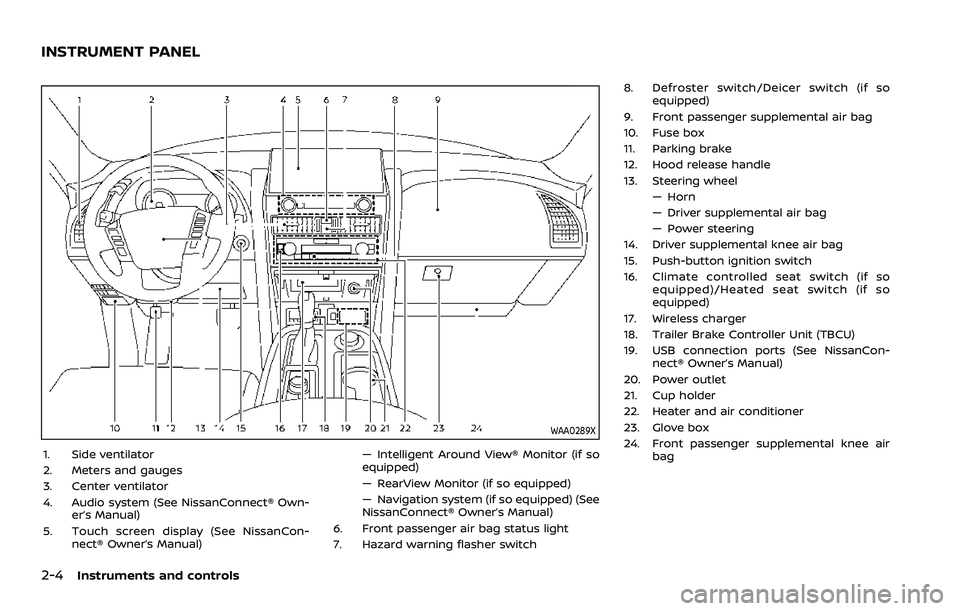
2-4Instruments and controls
WAA0289X
1. Side ventilator
2. Meters and gauges
3. Center ventilator
4. Audio system (See NissanConnect® Own-er’s Manual)
5. Touch screen display (See NissanCon- nect® Owner’s Manual) — Intelligent Around View® Monitor (if so
equipped)
— RearView Monitor (if so equipped)
— Navigation system (if so equipped) (See
NissanConnect® Owner’s Manual)
6. Front passenger air bag status light
7. Hazard warning flasher switch 8. Defroster switch/Deicer switch (if so
equipped)
9. Front passenger supplemental air bag
10. Fuse box
11. Parking brake
12. Hood release handle
13. Steering wheel — Horn
— Driver supplemental air bag
— Power steering
14. Driver supplemental knee air bag
15. Push-button ignition switch
16. Climate controlled seat switch (if so equipped)/Heated seat switch (if so
equipped)
17. Wireless charger
18. Trailer Brake Controller Unit (TBCU)
19. USB connection ports (See NissanCon- nect® Owner’s Manual)
20. Power outlet
21. Cup holder
22. Heater and air conditioner
23. Glove box
24. Front passenger supplemental knee air bag
INSTRUMENT PANEL
Page 98 of 603
2-6Instruments and controls
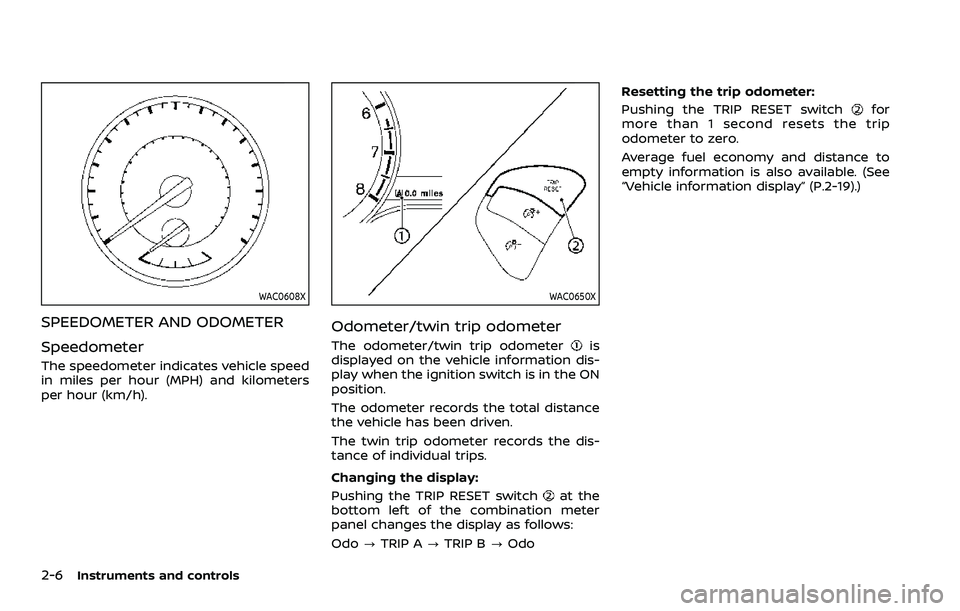
WAC0608X
SPEEDOMETER AND ODOMETER
Speedometer
The speedometer indicates vehicle speed
in miles per hour (MPH) and kilometers
per hour (km/h).
WAC0650X
Odometer/twin trip odometer
The odometer/twin trip odometeris
displayed on the vehicle information dis-
play when the ignition switch is in the ON
position.
The odometer records the total distance
the vehicle has been driven.
The twin trip odometer records the dis-
tance of individual trips.
Changing the display:
Pushing the TRIP RESET switch
at the
bottom left of the combination meter
panel changes the display as follows:
Odo ?TRIP A ?TRIP B ?Odo Resetting the trip odometer:
Pushing the TRIP RESET switch
for
more than 1 second resets the trip
odometer to zero.
Average fuel economy and distance to
empty information is also available. (See
“Vehicle information display” (P.2-19).)
Page 106 of 603
2-14Instruments and controls
dealer for these services.
Unless checked and repaired, the supple-
mental restraint system (air bag system)
and/or the pretensioners may not func-
tion properly.
For additional information, see “Supple-
mental restraint system” (P.1-54).
WARNING
If the supplemental air bag warning
light is on, it could mean that the
front air bag, side air bag, curtain air
bag systems and/or pretensioner
systems will not operate in an acci-
dent. To help avoid injury to yourself
or others, have your vehicle checked.
It is recommended you visit a NISSAN
dealer for this service.
WARNING/INDICATOR LIGHTS (yel-
low)
orAnti-lock Braking Sys-
tem (ABS) warning light
When the ignition switch is in the ON
position, the Anti-lock Braking System
(ABS) warning light illuminates and then
turns off. This indicates the ABS is opera-
tional.
If the ABS warning light illuminates while
the engine is running, or while driving, it
may indicate the ABS is not functioning
properly. Have the system checked. It is
recommended you visit a NISSAN dealer
for this service.
If an ABS malfunction occurs, the anti-
lock function is turned off. The brake
system then operates normally, but with-
out anti-lock assistance. (See “Brake sys-
tem” (P.5-142).)
Automatic Emergency Braking
(AEB) system warning light
This light comes on when the ignition
switch is placed in the ON position. It
turns off after the engine is started.
This light illuminates when the Automatic
Emergency Braking (AEB) system is set to
OFF in the vehicle information display. If the light illuminates when the AEB
system is ON, it may indicate that the
system is unavailable. See “Automatic
Emergency Braking (AEB) with pedestrian
detection system” (P.5-96) for more de-
tails.
Automatic Transmission (AT)
check warning light
When the ignition switch is placed in the
ON position, the light comes on for 2
seconds. If the light comes on at any
other time, it may indicate the transmis-
sion is not functioning properly. It is
recommended you visit a NISSAN dealer
to check and repair the transmission.
Check suspension indicator
light
When the ignition switch is placed in the
ON position, the light comes on for 2
seconds.
Front passenger air bag sta-
tus light
The front passenger air bag status light
() located on the instrument panel will
be lit and the passenger front air bag will
be OFF depending on how the front
passenger seat is being used.
Page 110 of 603
2-18Instruments and controls
If the light illuminates when the RAB
system is on, it may indicate that the
system is unavailable. (See “Rear Auto-
matic Braking (RAB)” (P.5-116).)
Vehicle Dynamic Control (VDC)
off indicator light
When the ignition switch is in the ON
position, the Vehicle Dynamic Control
(VDC) off indicator light illuminates and
then turns off.
The light comes on when the VDC off
switch is pushed to OFF. This indicates
that the VDC system is not operating.
When the 4L position is selected with the
Four-Wheel Drive (4WD) shift switch, the
VDC system is disabled and the VDC off
indicator light illuminates. (4WD models)
For additional information, see “Vehicle
Dynamic Control (VDC) system” (P.5-144).
Vehicle Dynamic Control (VDC)
warning light
When the ignition switch is in the ON
position, the Vehicle Dynamic Control
(VDC) warning light illuminates and then
turns off.
The light will blink when the VDC system
or the traction control system is operat-
ing, thus alerting the driver that the vehicle is nearing its traction limits. The
road surface may be slippery.
When the VDC warning light illuminates
when the VDC system is turned on, this
light alerts the driver to the fact that the
VDC system’s fail-safe mode is operating,
for example the VDC or hill start assist
system may not be functioning properly.
Have the system checked. It is recom-
mended you visit a NISSAN dealer for this
service. If a malfunction occurs in the
system, the VDC system function will be
canceled but the vehicle is still driveable.
For additional information, see “Vehicle
Dynamic Control (VDC) system” (P.5-144).
WARNING/INDICATOR LIGHTS
(other)
Exterior light indicator
This indicator illuminates when the head-
light switch is turned to the AUTO,orposition and the front parking lights,
instrument panel lights, rear combination
lights, license plate lights or headlights
are on. The indicator turns off when these
lights are turned off.
Front fog light indicator light
(if so equipped)
The front fog light indicator light illumi-
nates when the front fog lights are on.
(See “Fog light switch” (P.2-52).)
High beam assist indicator
light
The high beam assist indicator light
illuminates when the high beam assist
system is turned on and it is operational.
(See “High beam assist” (P.2-47).)
High beam indicator light
This light comes on when the headlight
high beam is on and goes out when the
low beam is selected.
TOW mode indicator light
This light will illuminate when the TOW
MODE is selected while the engine is
running. (See “TOW mode” (P.5-134).)
Turn signal/hazard indicator
lights
The light flashes when the turn signal
switch lever or hazard switch is turned on.
Page 112 of 603
2-20Instruments and controls
— “NISSAN all-mode 4WD®” (P.5-124).
. Intelligent Back-up Intervention (I-BI)
— “Intelligent Back-up Intervention (I-
BI)” (P.5-63).
. Intelligent Cruise Control (ICC)
— “Intelligent Cruise Control (ICC)”
(P.5-74).
. Intelligent Key system
— “Intelligent Key system” (P.3-7).
— “Push-button ignition switch” (P.5-
13).
. Automatic Emergency Braking (AEB)
with pedestrian detection
— “Automatic Emergency Braking
(AEB) with pedestrian detection
system” (P.5-96).
. Intelligent Forward Collision Warning
(I-FCW)
— “Intelligent Forward Collision Warn-
ing (I-FCW)” (P.5-106).
. Lane Departure Warning (LDW)
— “Lane Departure Warning (LDW)”
(P.5-26).
. Intelligent Lane Intervention (I-LI)
— “Intelligent Lane Intervention (I-LI)”
(P.5-31).
. Intelligent Blind Spot Intervention (I-
BSI)
— “Intelligent Blind Spot Intervention
(I-BSI)” (P.5-46). .
Blind Spot Warning (BSW)
— “Blind Spot Warning (BSW)” (P.5-38).
. Rear Automatic Braking (RAB)
— “Rear Automatic Braking (RAB)” (P.5-
116).
. Intelligent Driver Alertness (I-DA)
— “Intelligent Driver Alertness (I-DA)”
(P.5-114).
. Traffic Sign Recognition (TSR)
— “Traffic Sign Recognition (TSR)” (P.5-
23).
. Rear Cross Traffic Alert (RCTA)
— “Rear Cross Traffic Alert (RCTA)”
(P.5-57).
WAC0613X
HOW TO USE THE VEHICLE INFOR-
MATION DISPLAY
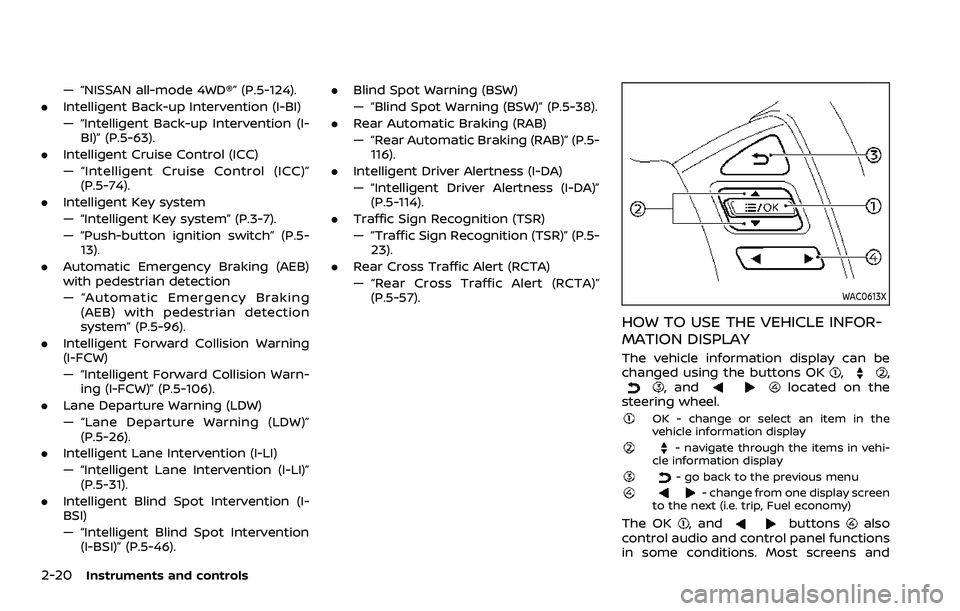
The vehicle information display can be
changed using the buttons OK,,, andlocated on the
steering wheel.
OK - change or select an item in the
vehicle information display
- navigate through the items in vehi-
cle information display
- go back to the previous menu- change from one display screen
to the next (i.e. trip, Fuel economy)
The OK, andbuttonsalso
control audio and control panel functions
in some conditions. Most screens and
Page 132 of 603
2-40Instruments and controls
.Unlocking the door or opening the
liftgate without using the button on
the Intelligent Key, the door handle
request switch or the mechanical key.
(Even if the door is opened by releas-
ing the door inside lock knob, the
alarm will activate.)
. Opening the hood.
How to stop an activated alarm
The alarm will stop when a door is
unlocked by pushing the unlock button
on the Intelligent Key, the door handle
request switch or using the mechanical
key, or when the ignition switch is pushed
to the ACC or ON position.
If the system does not operate as
described above, it is recommended
you have it checked by a NISSAN dealer.
NISSAN VEHICLE IMMOBILIZER SYS-
TEM
The NISSAN Vehicle Immobilizer System
will not allow the engine to start without
the use of the registered Intelligent Key.
Never leave these keys in the vehicle.
FCC Notice:
For USA:
This device complies with Part 15 of the
FCC Rules. Operation is subject to the
following two conditions: (1) This device
may not cause harmful interference, and (2) this device must accept any
interference received, including inter-
ference that may cause undesired op-
eration.
NOTE:
Changes or modifications not expressly
approved by the party responsible for
compliance could void the user’s
authority to operate the equipment.
For Canada:
This device complies with Industry Ca-
nada licence-exempt RSS standard(s).
Operation is subject to the following
two conditions: (1) this device may not
cause interference, and (2) this device
must accept any interference, including
interference that may cause undesired
operation of the device.
SIC2045
Security indicator light
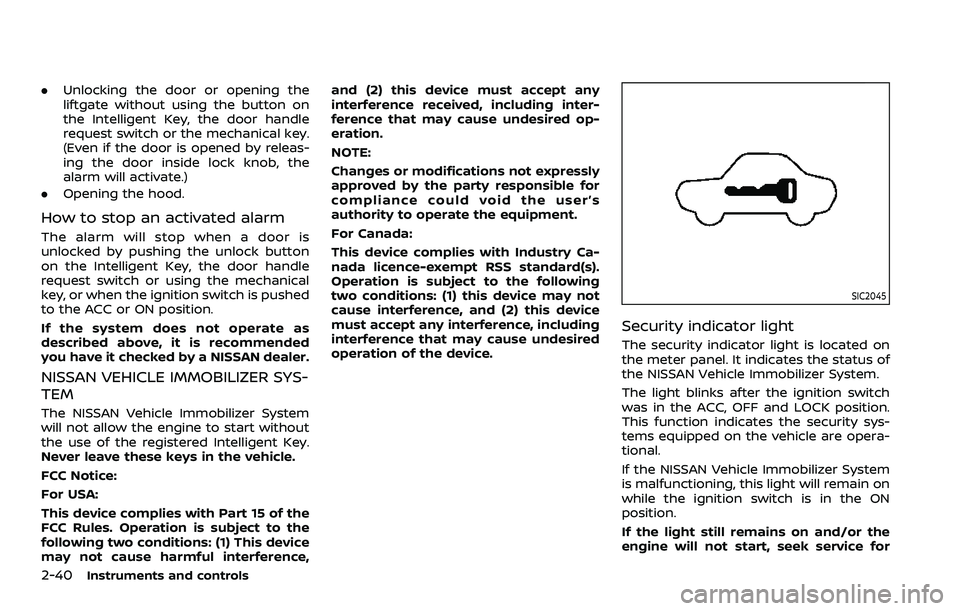
The security indicator light is located on
the meter panel. It indicates the status of
the NISSAN Vehicle Immobilizer System.
The light blinks after the ignition switch
was in the ACC, OFF and LOCK position.
This function indicates the security sys-
tems equipped on the vehicle are opera-
tional.
If the NISSAN Vehicle Immobilizer System
is malfunctioning, this light will remain on
while the ignition switch is in the ON
position.
If the light still remains on and/or the
engine will not start, seek service for
Page 139 of 603
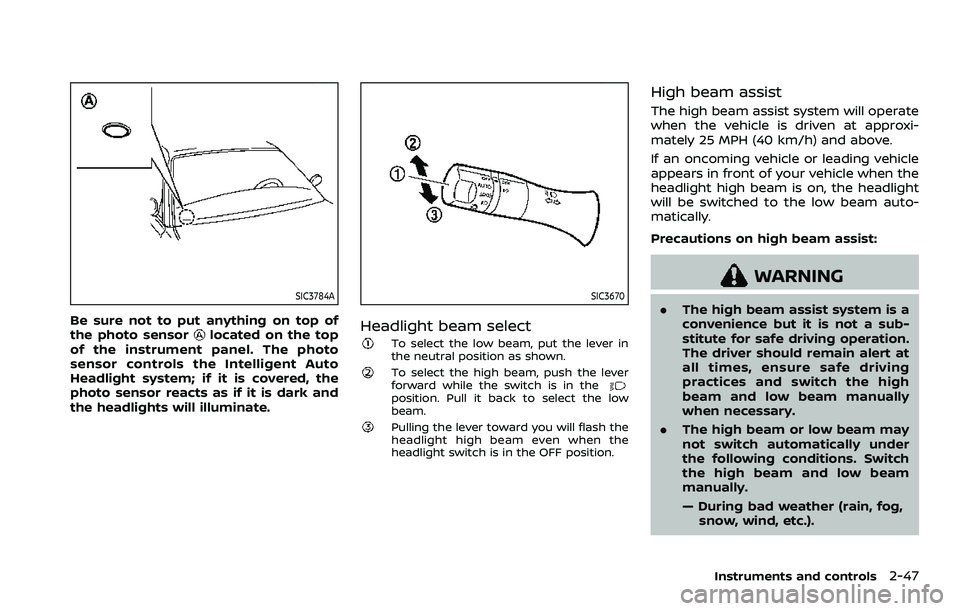
SIC3784A
Be sure not to put anything on top of
the photo sensorlocated on the top
of the instrument panel. The photo
sensor controls the Intelligent Auto
Headlight system; if it is covered, the
photo sensor reacts as if it is dark and
the headlights will illuminate.
SIC3670
Headlight beam select
To select the low beam, put the lever in
the neutral position as shown.
To select the high beam, push the lever
forward while the switch is in the
position. Pull it back to select the low
beam.
Pulling the lever toward you will flash the
headlight high beam even when the
headlight switch is in the OFF position.
High beam assist
The high beam assist system will operate
when the vehicle is driven at approxi-
mately 25 MPH (40 km/h) and above.
If an oncoming vehicle or leading vehicle
appears in front of your vehicle when the
headlight high beam is on, the headlight
will be switched to the low beam auto-
matically.
Precautions on high beam assist:
WARNING
. The high beam assist system is a
convenience but it is not a sub-
stitute for safe driving operation.
The driver should remain alert at
all times, ensure safe driving
practices and switch the high
beam and low beam manually
when necessary.
. The high beam or low beam may
not switch automatically under
the following conditions. Switch
the high beam and low beam
manually.
— During bad weather (rain, fog,
snow, wind, etc.).
Instruments and controls2-47
Page 143 of 603
WAC0256X
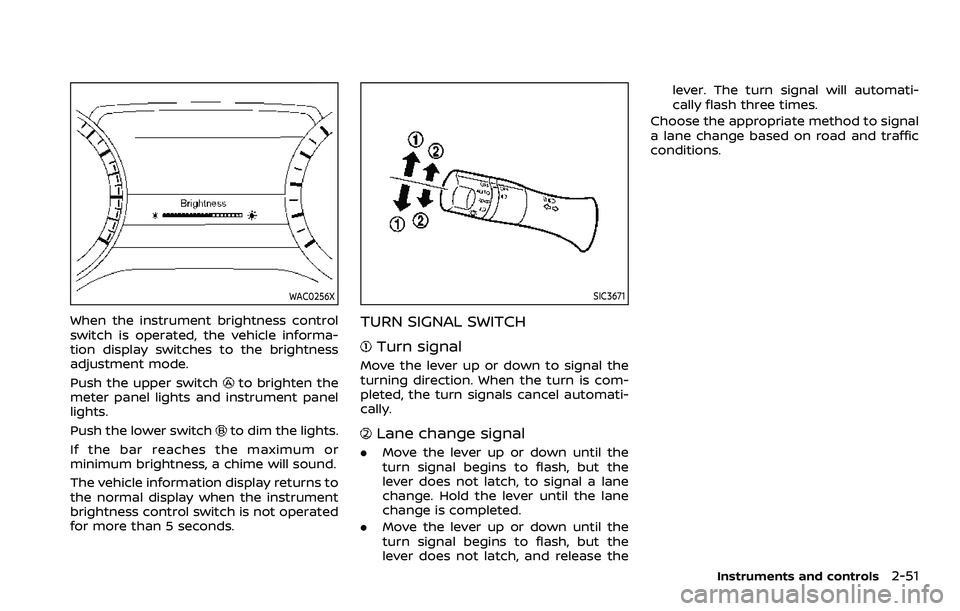
When the instrument brightness control
switch is operated, the vehicle informa-
tion display switches to the brightness
adjustment mode.
Push the upper switch
to brighten the
meter panel lights and instrument panel
lights.
Push the lower switch
to dim the lights.
If the bar reaches the maximum or
minimum brightness, a chime will sound.
The vehicle information display returns to
the normal display when the instrument
brightness control switch is not operated
for more than 5 seconds.
SIC3671
TURN SIGNAL SWITCH
Turn signal
Move the lever up or down to signal the
turning direction. When the turn is com-
pleted, the turn signals cancel automati-
cally.
Lane change signal
. Move the lever up or down until the
turn signal begins to flash, but the
lever does not latch, to signal a lane
change. Hold the lever until the lane
change is completed.
. Move the lever up or down until the
turn signal begins to flash, but the
lever does not latch, and release the lever. The turn signal will automati-
cally flash three times.
Choose the appropriate method to signal
a lane change based on road and traffic
conditions.
Instruments and controls2-51
Page 146 of 603
2-54Instruments and controls
WAC0524X
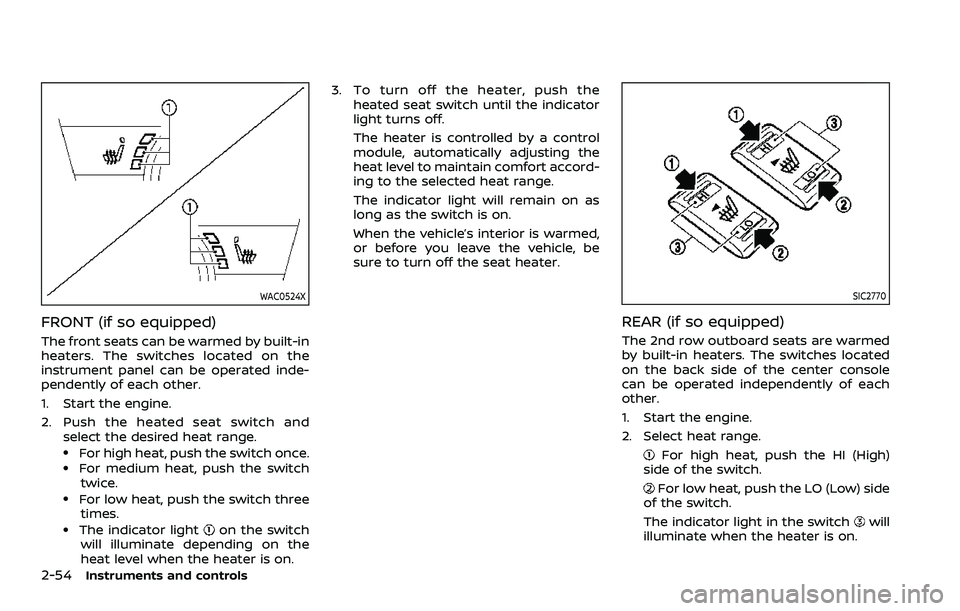
FRONT (if so equipped)
The front seats can be warmed by built-in
heaters. The switches located on the
instrument panel can be operated inde-
pendently of each other.
1. Start the engine.
2. Push the heated seat switch andselect the desired heat range.
.For high heat, push the switch once..For medium heat, push the switch
twice.
.For low heat, push the switch threetimes.
.The indicator lighton the switch
will illuminate depending on the
heat level when the heater is on. 3. To turn off the heater, push the
heated seat switch until the indicator
light turns off.
The heater is controlled by a control
module, automatically adjusting the
heat level to maintain comfort accord-
ing to the selected heat range.
The indicator light will remain on as
long as the switch is on.
When the vehicle’s interior is warmed,
or before you leave the vehicle, be
sure to turn off the seat heater.
SIC2770
REAR (if so equipped)
The 2nd row outboard seats are warmed
by built-in heaters. The switches located
on the back side of the center console
can be operated independently of each
other.
1. Start the engine.
2. Select heat range.
For high heat, push the HI (High)
side of the switch.
For low heat, push the LO (Low) side
of the switch.
The indicator light in the switch
will
illuminate when the heater is on.