mirror NISSAN ARMADA 2021 Owner´s Manual
[x] Cancel search | Manufacturer: NISSAN, Model Year: 2021, Model line: ARMADA, Model: NISSAN ARMADA 2021Pages: 603, PDF Size: 3.16 MB
Page 382 of 603
5-116Starting and driving
to select “Driver Assistance.” Then
push the OK.
2. Select “Driver Attention Alert” and push the OK to turn the system on
or off.
NOTE:
The setting will be retained even if the
engine is restarted.
I-DA SYSTEM LIMITATIONS
WARNING
Listed below are the system limita-
tions for the I–DA system. Failure to
operate the vehicle in accordance
with these system limitations could
result in serious injury or death.
. The I-DA system may not operate
properly and may not provide an
alert in the following conditions:
— Poor road conditions such as
an uneven road surface or pot
holes.
— Strong side wind.
— If you have adopted a sporty driving style with higher cor-
nering speeds or higher rates
of acceleration. — Frequent lane changes or
changes to vehicle speed.
. The I–DA system will not provide
an alert in the following condi-
tions:
— Vehicle speeds lower than 37
MPH (60 km/h).
— Short lapses of attention.
— Instantaneous distractions such as dropping an object.SYSTEM MALFUNCTION
If the I–DA system malfunctions, the
“Driver Attention Alert Malfunction” warn-
ing message will appear in the vehicle
information display and the function will
be stopped automatically.
Action to take
Stop the vehicle in a safe location, place
the vehicle in P (Park) position, turn the
engine off and restart the engine. If the
warning message continues to appear,
have the system checked. It is recom-
mended that you visit a NISSAN dealer for
this service.
WARNING
Failure to follow the warnings and
instructions for proper use of the
RAB system could result in serious
injury or death.
. The RAB system is a supplemen-
tal aid to the driver. It is not a
replacement for proper driving
procedures. Always use the side
and rear mirrors and turn and
look in the direction you will
move before and while backing
up. Never rely solely on the RAB
system. It is the driver’s respon-
sibility to stay alert, drive safely,
and be in control of the vehicle at
all times.
. There is a limitation to the RAB
system capability. The RAB sys-
tem is not effective in all situa-
tions.
The RAB system can assist the driver
when the vehicle is backing up and
approaching objects directly behind the
vehicle.
REAR AUTOMATIC BRAKING (RAB)
Page 472 of 603
8-26Do-it-yourself
HEADLIGHTS
Fog may temporarily form inside the lens
of the exterior lights in the rain or in a car
wash. A temperature difference between
the inside and the outside of the lens
causes the fog. This is not a malfunction.
If large drops of water collect inside the
lens, it is recommended you visit a NISSAN
dealer for this service.
Replacing
If LED headlight replacement is required,
it is recommended you visit a NISSAN
dealer for this service.
EXTERIOR AND INTERIOR LIGHTS
ItemWattage (W)Bulb No.
Headlight
High/Low beams* LED—
Front turn signal light LED—
Fog light (if so equipped) LED—
Front parking light* LED—
Front side marker light* LED—
Side turn signal light* LED—
Rear combination light
tail* LED—
back-up LED—
stop LED—
side marker* LED—
turn signal LED—
License plate light* 5W5W
Puddle light* (if so equipped) LED—
Map light* LED—
Rear personal light 8—
Cargo light 8—
Vanity mirror light 1.8—
Footwell light* (if so equipped) 1.4—
Glove box light* 1.4—
High-mounted stop light* LED—
*: It is recommended you visit a NISSAN dealer for replacement.
NOTE: Always check with the Parts Department at a NISSAN dealer for the latest information about parts.
Page 474 of 603
8-28Do-it-yourself
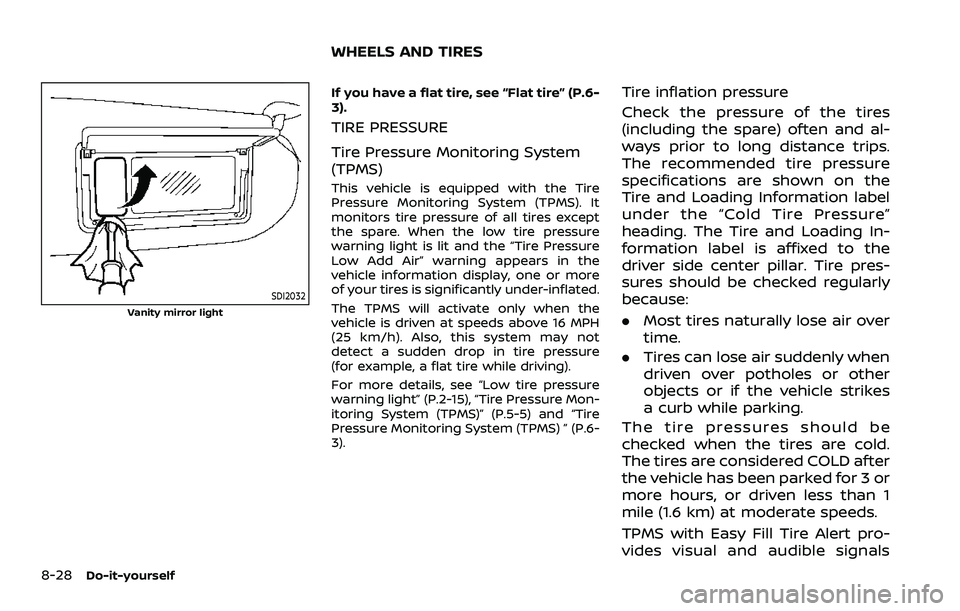
SDI2032
Vanity mirror light
If you have a flat tire, see “Flat tire” (P.6-
3).
TIRE PRESSURE
Tire Pressure Monitoring System
(TPMS)
This vehicle is equipped with the Tire
Pressure Monitoring System (TPMS). It
monitors tire pressure of all tires except
the spare. When the low tire pressure
warning light is lit and the “Tire Pressure
Low Add Air” warning appears in the
vehicle information display, one or more
of your tires is significantly under-inflated.
The TPMS will activate only when the
vehicle is driven at speeds above 16 MPH
(25 km/h). Also, this system may not
detect a sudden drop in tire pressure
(for example, a flat tire while driving).
For more details, see “Low tire pressure
warning light” (P.2-15), “Tire Pressure Mon-
itoring System (TPMS)” (P.5-5) and “Tire
Pressure Monitoring System (TPMS) ” (P.6-
3).
Tire inflation pressure
Check the pressure of the tires
(including the spare) often and al-
ways prior to long distance trips.
The recommended tire pressure
specifications are shown on the
Tire and Loading Information label
under the “Cold Tire Pressure”
heading. The Tire and Loading In-
formation label is affixed to the
driver side center pillar. Tire pres-
sures should be checked regularly
because:
.Most tires naturally lose air over
time.
. Tires can lose air suddenly when
driven over potholes or other
objects or if the vehicle strikes
a curb while parking.
The tire pressures should be
checked when the tires are cold.
The tires are considered COLD after
the vehicle has been parked for 3 or
more hours, or driven less than 1
mile (1.6 km) at moderate speeds.
TPMS with Easy Fill Tire Alert pro-
vides visual and audible signals
WHEELS AND TIRES
Page 540 of 603
10-32Technical and consumer information
Pre-towing tips
.Be certain your vehicle maintains a
level position when a loaded or un-
loaded trailer is hitched. Do not drive
the vehicle if it has an abnormal nose-
up or nose-down condition; check for
improper tongue load, overload, worn
suspension or other possible causes
of either condition.
. Always secure items in the trailer to
prevent load shift while driving.
. Keep the cargo load as low as possible
in the trailer to keep the trailer center
of gravity low.
. Load the trailer so approximately 60%
of the trailer load is in the front half
and 40% is in the back half. Also make
sure the load is balanced side to side.
. Check your hitch, trailer tire pressure,
vehicle tire pressure, trailer light op-
eration, and trailer wheel lug nuts
every time you attach a trailer to the
vehicle.
. Be certain your rearview mirrors con-
form to all federal, state or local
regulations. If not, install any mirrors
required for towing before driving the
vehicle.
. Determine the overall height of the
vehicle and trailer so the required
clearance is known.
Trailer towing tips
In order to gain skill and an understand-
ing of the vehicle’s behavior, you should
practice turning, stopping and backing up
in an area which is free from traffic.
Steering stability, and braking perfor-
mance will be somewhat different than
under normal driving conditions.
.Always secure items in the trailer to
prevent load shift while driving.
. Lock the trailer hitch coupler with a
pin or lock to prevent the coupler from
inadvertently becoming unlatched.
. Avoid abrupt starts, acceleration or
stops.
. Avoid sharp turns or lane changes.
. Always drive your vehicle at a moder-
ate speed. Some states or provinces
have specific speed limits for vehicles
that are towing trailers. Obey the local
speed limits.
. When backing up, hold the bottom of
the steering wheel with one hand.
Move your hand in the direction in
which you want the trailer to go. Make
small corrections and back up slowly.
If possible, have someone guide you
when you are backing up.
Always block the wheels on both vehicle
and trailer when parking. Parking on a
slope is not recommended; however, if you must do so:
CAUTION
If you move the shift lever to the P
(Park) position before blocking the
wheels and applying the parking
brake, transmission damage could
occur.
1. Apply and hold the brake pedal.
2. Have someone place blocks on the downhill side of the vehicle and trailer
wheels.
3. After the wheel blocks are in place, slowly release the brake pedal until
the blocks absorb the vehicle load.
4. Apply the parking brake.
5. Shift the transmission into P (Park).
6. Four-Wheel Drive (4WD) models:
Make sure that the 4WD shift switch is
engaged in the AUTO, 4HI or 4LO
position and the Automatic Transmis-
sion (AT) park warning light is turned
off.
7. Turn off the engine.
To drive away:
1. Apply and hold the brake pedal.
Page 553 of 603
Front seatFront seat adjustment ......................... 1-4, 1-11
Front-seat active head restraint..................... 1-19
Fuel Capacities and
recommended fluids/lubricants............... 10-2
Fuel economy...................................................... 5-124
Fuel information.................................................... 10-4
Fuel octane rating ............................................... 10-4
Fuel-filler cap............................................................ 3-26
Fuel-filler door......................................................... 3-26
Gauge........................................................................\
........ 2-8
Loose Fuel Cap warning................................. 3-28
Fuel efficient driving tips .................................... 5-123
Fuses........................................................................\
.............. 8-18
Fusible links...................................................................... 8-19
G
Garage door opener HomeLink®
Universal Transceiver ......................... 2-81, 2-85
Gas cap........................................................................\
........ 3-26
Gauge........................................................................\
................ 2-5 Engine coolant temperature gauge......... 2-7
Engine oil pressure gauge ............................... 2-8
Fuel gauge .................................................................... 2-8
Odometer....................................................................... 2-6
Speedometer .............................................................. 2-6
Tachometer.................................................................. 2-7
Trip computer ......................................................... 2-36
General maintenance................................................... 9-2
Glove box ........................................................................\
... 2-69
H
Hazard warning flasher switch ............................ 6-2
Head restraints/headrests................................... 1-14
Headlights Bulb replacement ................................................. 8-26
Headlight switch ................................................... 2-46
Heated seats ................................................................... 2-53
Heated steering wheel ............................................ 2-52
Heater Automatic air conditioner ............................. 4-36
Engine block heater ....................................... 5-148
Heater and air
conditioner operation....................................... 4-35
High beam assist ......................................................... 2-47
Hill start assist system ......................................... 5-132
HomeLink® Universal Transceiver ..... 2-81, 2-85
Hood release ................................................................... 3-21
Hook Coat hooks ................................................................ 2-70
Luggage hook ......................................................... 2-71
Horn........................................................................\
................ 2-53
I
Ignition switch (Push-button)............................ 5-13
Immobilizer system.................................................... 2-40
In-cabin microfilter ..................................................... 4-41
Indicator Lights..................................................................\
............ 2-14
Vehicle information display.......................... 2-19
Inside mirror .................................................................... 3-30
Inspection/Maintenance (I/M) test............. 10-38
Instrument brightness control ......................... 2-50
Instrument panel ............................................................. 2-4
Intelligent Around View® Monitor................... 4-10
Intelligent Auto Headlight system ................. 2-46 Intelligent Back-up Intervention (I-BI) ......... 5-63
Intelligent Blind Spot
Intervention (I-BSI) ...................................................... 5-46
Intelligent Cruise Control (ICC) ........................ 5-74
Intelligent Driver Alertness (I-DA) ................. 5-114
Intelligent Forward Collision
Warning (I-FCW).......................................................... 5-106
Intelligent Key..................................................................... 3-2
Intelligent Key system ................................................. 3-7
Battery replacement.......................................... 8-21
Key operating range ............................................. 3-9
Key operation .......................................................... 3-10
Warning signals...................................................... 3-12
Intelligent Lane Intervention (I-LI) .................. 5-31
Intelligent Rear View Mirror................................. 3-31
Interior light replacement..................................... 8-26
Interior light switch.................................................... 2-78
Interior lights................................................................... 2-78
ISOFIX child restraint ................................................ 1-35
J
Jump starting ................................................................. 6-12
K
Keyless entry (See remote keyless
entry system) .................................................................. 3-15
Keys ........................................................................\
.................... 3-2 For Intelligent Key system................................ 3-7
L
LabelsAir bag warning labels ..................................... 1-72
Air conditioner specification label....... 10-13
Emission control information label .... 10-12
11-3
Page 554 of 603
11-4
Engine serial number .................................... 10-12
F.M.V.S.S./C.M.V.S.S.
certification label .............................................. 10-12
Tire and Loading
information label................................ 8-30, 10-13
Vehicle identification number (VIN) .... 10-11
Lane Departure Warning (LDW) ........................ 5-26
LATCH system ................................................................ 1-35
License plate, Installing front
license plate.................................................................. 10-15
Liftgate........................................................................\
......... 3-22
Light Air bag warning light......................................... 1-73
Bulb replacement ................................................. 8-24
Cargo light ................................................................. 2-80
Fog light switch ..................................................... 2-52
Headlight switch ................................................... 2-46
Headlights bulb replacement ..................... 8-26
Indicator lights........................................................ 2-14
Interior light switch............................................. 2-78
Interior lights............................................................ 2-78
Map lights ................................................................... 2-79
Replacement ............................................................ 8-24
Vanity mirror lights ............................................. 2-80
Warning/indicator lights and
audible reminders ................................................ 2-11
Lights, Exterior and interior
light replacement ........................................................ 8-26
Linking Intelligent Key (air conditioner)..... 4-41
Loading information (See vehicle
loading information) .............................................. 10-15
Lock Automatic door locks........................................... 3-6
Door locks...................................................................... 3-4
Liftgate lock .............................................................. 3-22
Power door lock ....................................................... 3-4
Locking with mechanical key ................................ 3-4 Loose Fuel Cap warning........................................ 3-26
Low tire pressure warning light ...................... 2-15
Low tire pressure warning system
(See Tire Pressure Monitoring
System (TPMS)).................................................................. 5-5
Luggage hooks ............................................................. 2-71
M
Maintenance........................................................................\
9-2
Battery........................................................................\
... 8-11
General maintenance........................................... 9-2
Inside the vehicle..................................................... 9-3
Maintenance precautions................................. 8-2
Maintenance requirements ............................. 9-2
Maintenance schedules...................................... 9-7
Outside the vehicle ................................................ 9-2
Seat belt maintenance..................................... 1-29
Maintenance schedules.............................................. 9-7
Malfunction Indicator Light (MIL) .................... 2-17
Map lights ........................................................................\
.. 2-79
Master warning light.................................. 2-13, 2-17
Mechanical key (Intelligent Key system) ....... 3-3
Memory seat ................................................................... 3-40
Memory storage, memory seat........................ 3-41
Meter Trip computer ......................................................... 2-36
Meters and gauges ........................................................ 2-5 Instrument brightness control .................. 2-50
Mirror Inside mirror ............................................................. 3-30
Intelligent Rear View Mirror.......................... 3-31
Outside mirrors ...................................................... 3-38
Vanity mirror ............................................................ 3-40
Monitor Intelligent Around View® Monitor............ 4-10
Monitor, RearView Monitor ...................................... 4-3 Moonroof........................................................................\
.... 2-76
Moving Object Detection (MOD) ...................... 4-29
N
New vehicle break-in ............................................. 5-123
NISSAN all-mode 4WD®........................................ 5-124
NISSAN Vehicle Immobilizer System ............ 2-40
NissanConnect® Owner’s Manual....................... 4-2
O
Odometer........................................................................\
....... 2-6
Off-road recovery ............................................................ 5-9
Oil
Capacities and
recommended fluids/lubricants............... 10-2
Changing engine oil and filter ...................... 8-6
Checking engine oil level................................... 8-6
Engine oil.....................................................................\
... 8-6
Engine oil pressure gauge ............................... 2-8
Engine oil viscosity .............................................. 10-7
Operation, operational indicators .................. 2-29
Other lights....................................................................... 2-18
Outside air temperature ........................................ 2-38
Outside mirrors ............................................................. 3-38
Overheat, If your vehicle overheats.............. 6-14
Owner’s Manual/Service Manual
order information..................................................... 10-40
P
Panic alarm....................................................................... 3-17
Parking Brake break-in .................................................... 5-142
Parking brake operation................................. 5-22
Parking on hills................................................... 5-133
Page 556 of 603
11-6
Push starting............................................................ 6-14
Starting the engine............................................. 5-16
Status light, Front passenger air bag ......... 1-62
Steering Heated steering wheel ..................................... 2-52
Power steering ................................................... 5-141
Power steering fluid .............................................. 8-8
Tilt/telescopic steering .................................... 3-29
Storage ........................................................................\
........ 2-66
Sun visors ........................................................................\
.. 3-29
Sunglasses holder....................................................... 2-68
Supplemental air bag warning labels ......... 1-72
Supplemental air bag
warning light .................................................... 1-73, 2-13
Supplemental restraint system........................ 1-54 Precautions on supplemental
restraint system .................................................... 1-54
Switch Emergency Call (SOS) button ..................... 2-64
Fog light switch ..................................................... 2-52
Hazard warning flasher switch .................... 6-2
Headlight switch ................................................... 2-46
Ignition switch ........................................................ 5-18
Intelligent Auto Headlight switch ............ 2-46
Power door lock switch ..................................... 3-5
SNOW mode switch ............................................ 2-57
Turn signal switch ............................................... 2-51
Vehicle Dynamic Control (VDC)
OFF switch ................................................................. 2-57
T
Tachometer........................................................................\
.. 2-7
Temperature gauge, Engine coolant
temperature gauge ....................................................... 2-7
Theft (NISSAN Vehicle Immobilizer System),
Engine start...................................................................\
... 2-40 Three-way catalyst......................................................... 5-4
Tilt/telescopic steering ........................................... 3-29
Tire
Pressure, Low tire pressure
warning light ............................................................ 2-15
Tires Flat tire........................................................................\
..... 6-3
Tire and Loading
information label................................ 8-30, 10-13
Tire chains.................................................................. 8-35
Tire dressing................................................................ 7-4
Tire pressure ............................................................ 8-28
Tire Pressure Monitoring
System (TPMS) ................................................ 5-5, 6-3
Tire rotation.............................................................. 8-36
Types of tires ........................................................... 8-34
Uniform tire quality grading .................... 10-36
Wheel/tire size ........................................................ 10-9
Wheels and tires .................................................... 8-28
Top Tether strap child restraints........................ 1-37
TOW mode ..................................................................... 5-134
TOW mode switch....................................................... 2-57
Towing Flat towing............................................................. 10-35
Tow truck towing................................................. 6-16
Towing a trailer.................................................. 10-19
Towing safety...................................................... 10-24
TPMS, Tire Pressure
Monitoring System ............................................. 5-5, 6-3 TPMS with Easy Fill Tire Alert......................... 5-8
Traffic Sign Recognition (TSR)........................... 5-23
Trailer Brake Controller Unit (TBCU) ............ 2-58
Trailer towing .............................................................. 10-19
Transceiver HomeLink®
Universal Transceiver ......................... 2-81, 2-85 Transmission
Automatic Transmission Fluid (ATF) ........ 8-8
Driving with
automatic transmission .................................. 5-18
Transmission shift lever lock release ..... 5-22
Transmitter (See remote keyless
entry system) .................................................................. 3-15
Traveling or registering your vehicle in
another country ........................................................ 10-11
Trip computer ................................................................ 2-36
Trip odometer ................................................................ 2-36
Turn signal switch ...................................................... 2-51
U
Underbody cleaning ...................................................... 7-3
Uniform tire quality grading ............................ 10-36
USB (Universal Serial Bus)
charging connector................................................... 2-61
V
Vanity mirror ................................................................... 3-40
Vanity mirror lights .................................................... 2-80
Variable voltage control system ..................... 8-13
Vehicle Dimensions ............................................................ 10-10
Identification number (VIN)....................... 10-11
Loading information ...................................... 10-15
Recovery (freeing a stuck vehicle) .......... 6-19
Security system...................................................... 2-38
Vehicle Dynamic Control (VDC)
OFF switch ................................................................. 2-57
Vehicle Dynamic Control
(VDC) system ........................................................ 5-144
Vehicle Dynamic Control (VDC)
warning light ............................................................ 2-18
Page 575 of 603
CAUTION
•Always ensure that the batteries are
inserted with the positive and nega-
tive terminals in the correct direction
as shown in the battery
compartment.
•Different types of batteries have dif-
ferent characteristics. Do not mix dif-
ferent types.
•Do not mix old and new batteries.
Mixing old and new batteries will
shorten battery life and/or cause
chemical leaks from the old
batteries.
•When batteries fail to function, re-
place them immediately.
•Keep the batteries out of the reach of
children. In case the batteries are ac-
cidentally swallowed, immediately
consult a doctor. Also, when dispos-
ing of used batteries, please comply
with governmental regulations or
environmental public institution
rules that apply in your country/area.
•Remove the batteries if the head-
phones are not used for a month or
longer.
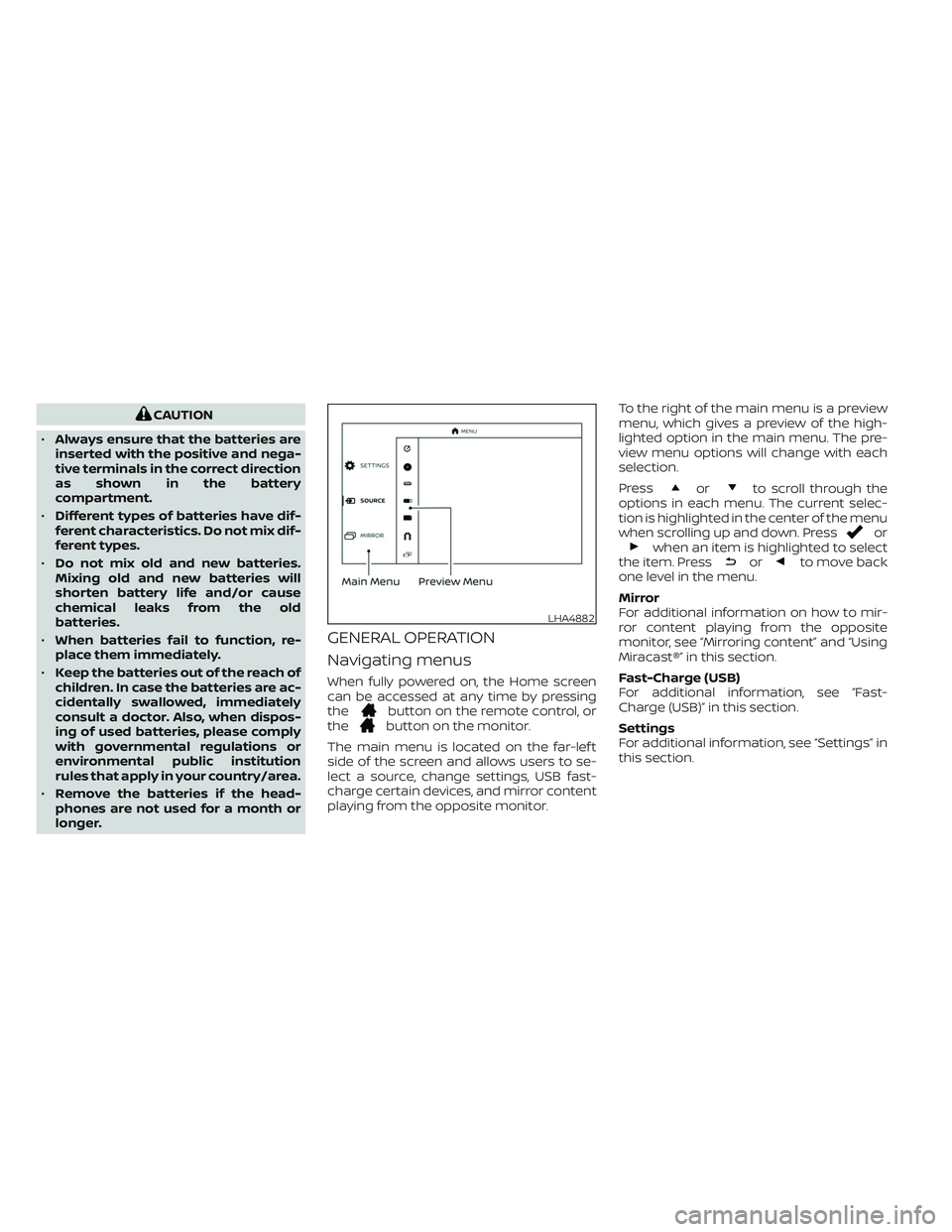
GENERAL OPERATION
Navigating menus
When fully powered on, the Home screen
can be accessed at any time by pressing
the
button on the remote control, or
thebutton on the monitor.
The main menu is located on the far-lef t
side of the screen and allows users to se-
lect a source, change settings, USB fast-
charge certain devices, and mirror content
playing from the opposite monitor.To the right of the main menu is a preview
menu, which gives a preview of the high-
lighted option in the main menu. The pre-
view menu options will change with each
selection.
Press
orto scroll through the
options in each menu. The current selec-
tion is highlighted in the center of the menu
when scrolling up and down. Press
orwhen an item is highlighted to select
the item. Pressorto move back
one level in the menu.
Mirror
For additional information on how to mir-
ror content playing from the opposite
monitor, see “Mirroring content” and “Using
Miracast®” in this section.
Fast-Charge (USB)
For additional information, see “Fast-
Charge (USB)” in this section.
Settings
For additional information, see “Settings” in
this section.
LHA4882
Page 577 of 603
NOTE:
For hearing protection, there is a
maximum volume setting to limit the
audio output of the front panel 3.5mm
headphone output. Using the direc-
tional pad on the remote navigate to
“SETTINGS” then “AUDIO” then “HEAD-
PHONES” to adjust the maximum vol-
ume. Once set, the maximum volume
is limited to this setting.
Mirroring content
To mirror the content of the opposite
monitor, using the directional pad on the
remote, select “MIRROR” from the Home
Screen. This will allow the identical content
to play on both monitors.
Multicast
Multicast (Off/On) provides the ability to
watch a video over the built-in Wi-Fi net-
work using an application installed on a
mobile device. When turned on, the video
content will be "cast" over the network to
allow users with multiple mobile devices to
enjoy the same movie. *Requires applica-
tion to be installed on the mobile device.
Bluetooth
Selecting “BLUETOOTH” allows the
Bluetooth® feature to be turned off/on, au-
dio source selection, and lip-sync adjust-
ments. For additional information, see
“Bluetooth® streaming” and “Lip-Sync ad-
justment” in this section.
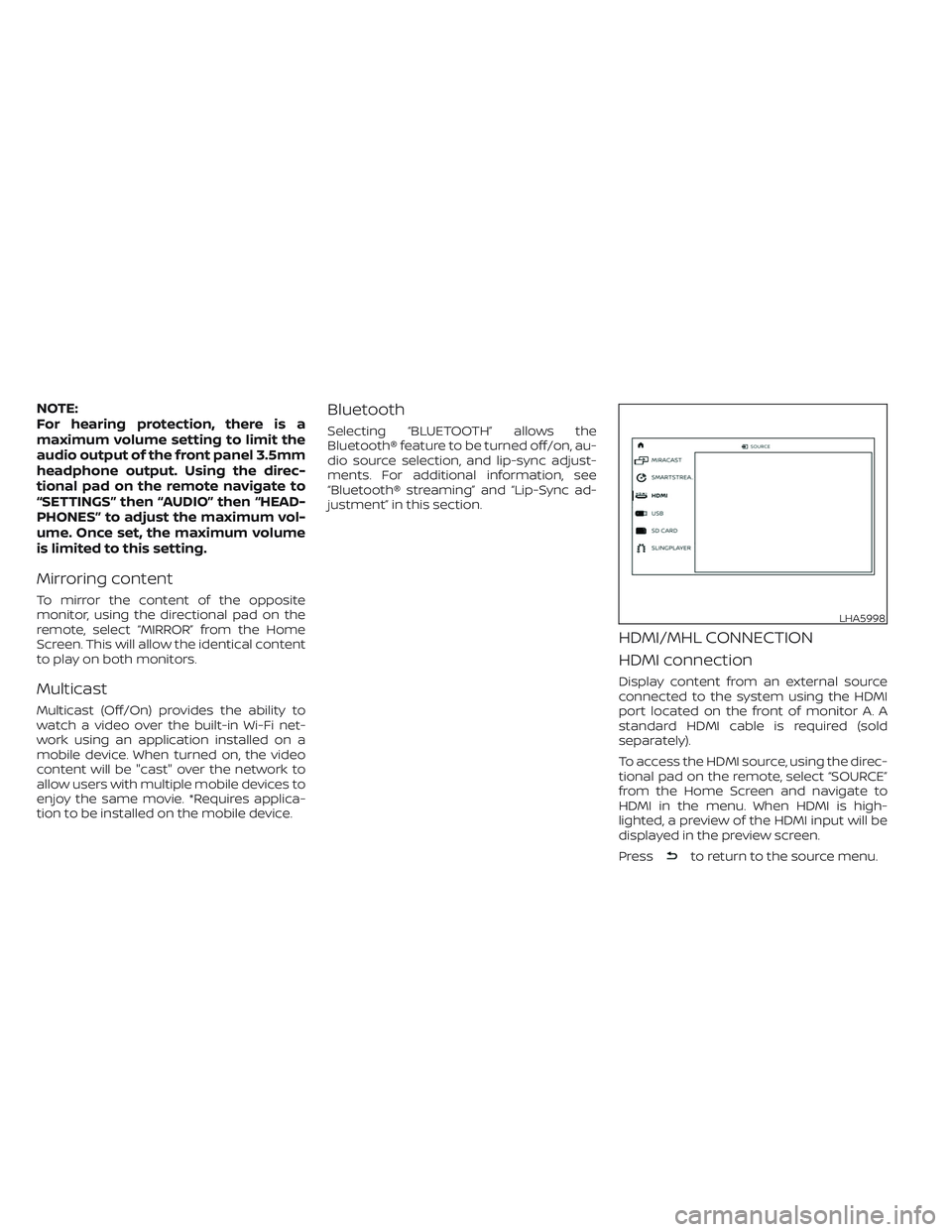
HDMI/MHL CONNECTION
HDMI connection
Display content from an external source
connected to the system using the HDMI
port located on the front of monitor A. A
standard HDMI cable is required (sold
separately).
To access the HDMI source, using the direc-
tional pad on the remote, select “SOURCE”
from the Home Screen and navigate to
HDMI in the menu. When HDMI is high-
lighted, a preview of the HDMI input will be
displayed in the preview screen.
Press
to return to the source menu.
LHA5998
Page 587 of 603
MIRACAST®
About Miracast®
Miracast® is a dedicated wireless connec-
tion technology that allows content
streaming between a mobile device and
the RSI system. The connection is made
without cables or a network connection. It
provides the ability to “cast” (display) con-
tent, such as images or videos from the
mobile device to the RSI system. There is no
need for an external internet connection
and the ability to connect is inside
Miracast-certified devices.
Using Miracast®
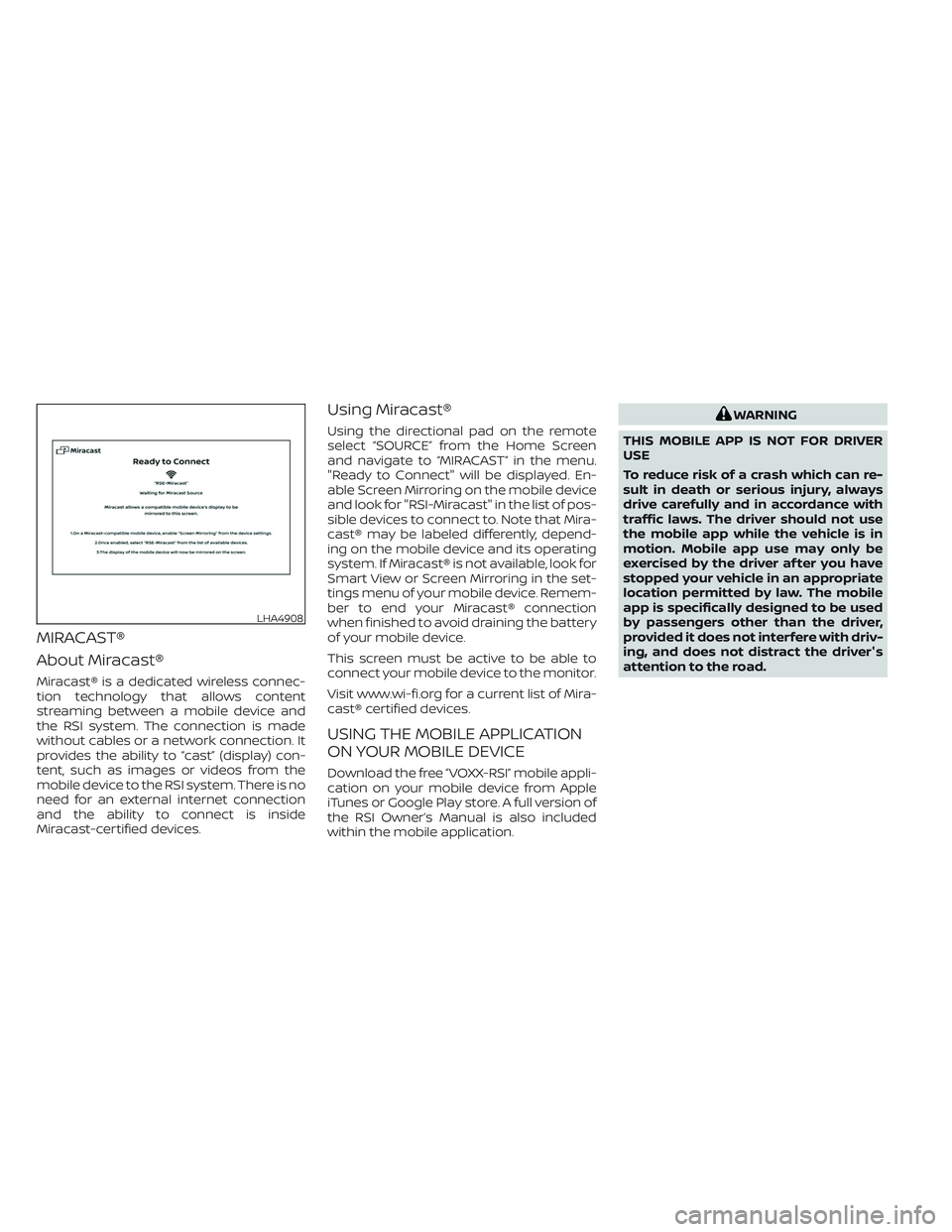
Using the directional pad on the remote
select “SOURCE” from the Home Screen
and navigate to “MIRACAST” in the menu.
"Ready to Connect" will be displayed. En-
able Screen Mirroring on the mobile device
and look for "RSI-Miracast" in the list of pos-
sible devices to connect to. Note that Mira-
cast® may be labeled differently, depend-
ing on the mobile device and its operating
system. If Miracast® is not available, look for
Smart View or Screen Mirroring in the set-
tings menu of your mobile device. Remem-
ber to end your Miracast® connection
when finished to avoid draining the battery
of your mobile device.
This screen must be active to be able to
connect your mobile device to the monitor.
Visit www.wi-fi.org for a current list of Mira-
cast® certified devices.
USING THE MOBILE APPLICATION
ON YOUR MOBILE DEVICE
Download the free ”VOXX-RSI” mobile appli-
cation on your mobile device from Apple
iTunes or Google Play store. A full version of
the RSI Owner’s Manual is also included
within the mobile application.
WARNING
THIS MOBILE APP IS NOT FOR DRIVER
USE
To reduce risk of a crash which can re-
sult in death or serious injury, always
drive carefully and in accordance with
traffic laws. The driver should not use
the mobile app while the vehicle is in
motion. Mobile app use may only be
exercised by the driver af ter you have
stopped your vehicle in an appropriate
location permitted by law. The mobile
app is specifically designed to be used
by passengers other than the driver,
provided it does not interfere with driv-
ing, and does not distract the driver's
attention to the road.
LHA4908