fog light NISSAN ARMADA 2021 Owner´s Manual
[x] Cancel search | Manufacturer: NISSAN, Model Year: 2021, Model line: ARMADA, Model: NISSAN ARMADA 2021Pages: 603, PDF Size: 3.16 MB
Page 11 of 603
WAA0285X
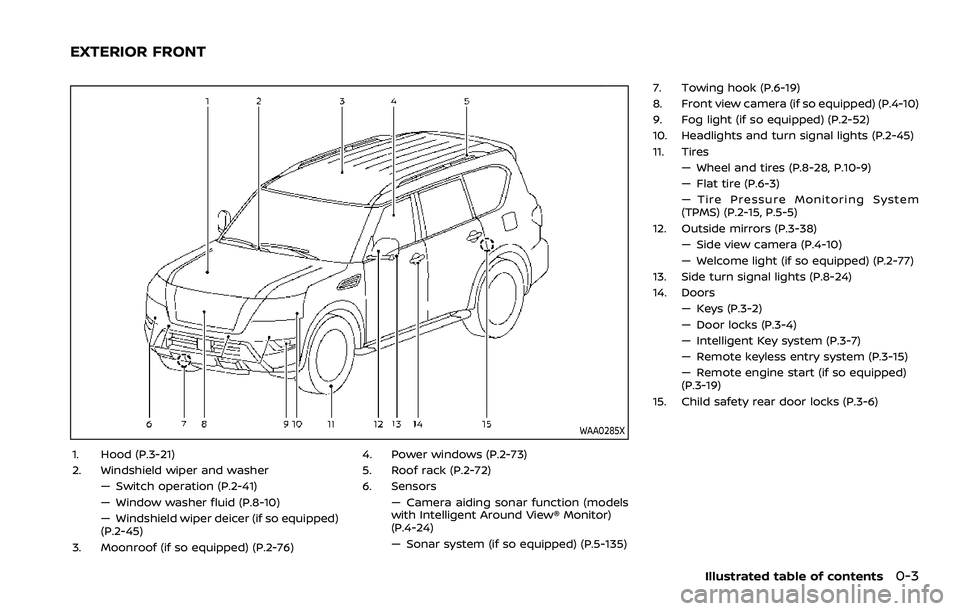
1. Hood (P.3-21)
2. Windshield wiper and washer— Switch operation (P.2-41)
— Window washer fluid (P.8-10)
— Windshield wiper deicer (if so equipped)
(P.2-45)
3. Moonroof (if so equipped) (P.2-76) 4. Power windows (P.2-73)
5. Roof rack (P.2-72)
6. Sensors
— Camera aiding sonar function (models
with Intelligent Around View® Monitor)
(P.4-24)
— Sonar system (if so equipped) (P.5-135) 7. Towing hook (P.6-19)
8. Front view camera (if so equipped) (P.4-10)
9. Fog light (if so equipped) (P.2-52)
10. Headlights and turn signal lights (P.2-45)
11. Tires
— Wheel and tires (P.8-28, P.10-9)
— Flat tire (P.6-3)
— Tire Pressure Monitoring System
(TPMS) (P.2-15, P.5-5)
12. Outside mirrors (P.3-38) — Side view camera (P.4-10)
— Welcome light (if so equipped) (P.2-77)
13. Side turn signal lights (P.8-24)
14. Doors — Keys (P.3-2)
— Door locks (P.3-4)
— Intelligent Key system (P.3-7)
— Remote keyless entry system (P.3-15)
— Remote engine start (if so equipped)
(P.3-19)
15. Child safety rear door locks (P.3-6)
Illustrated table of contents0-3
EXTERIOR FRONT
Page 14 of 603
0-6Illustrated table of contents
WAA0288X
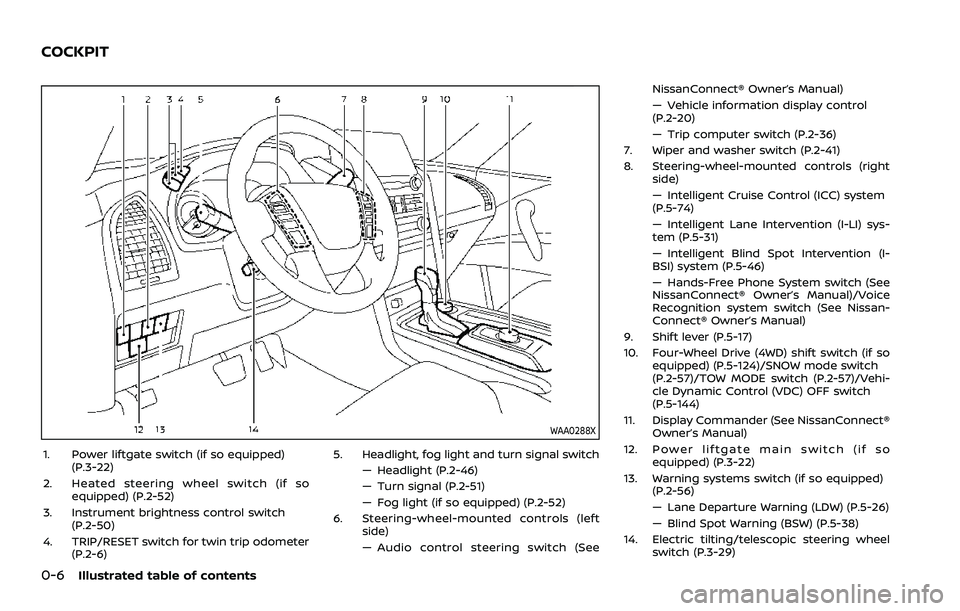
1. Power liftgate switch (if so equipped)(P.3-22)
2. Heated steering wheel switch (if so equipped) (P.2-52)
3. Instrument brightness control switch (P.2-50)
4. TRIP/RESET switch for twin trip odometer (P.2-6) 5. Headlight, fog light and turn signal switch
— Headlight (P.2-46)
— Turn signal (P.2-51)
— Fog light (if so equipped) (P.2-52)
6. Steering-wheel-mounted controls (left side)
— Audio control steering switch (See NissanConnect® Owner’s Manual)
— Vehicle information display control
(P.2-20)
— Trip computer switch (P.2-36)
7. Wiper and washer switch (P.2-41)
8. Steering-wheel-mounted controls (right side)
— Intelligent Cruise Control (ICC) system
(P.5-74)
— Intelligent Lane Intervention (I-LI) sys-
tem (P.5-31)
— Intelligent Blind Spot Intervention (I-
BSI) system (P.5-46)
— Hands-Free Phone System switch (See
NissanConnect® Owner’s Manual)/Voice
Recognition system switch (See Nissan-
Connect® Owner’s Manual)
9. Shift lever (P.5-17)
10. Four-Wheel Drive (4WD) shift switch (if so equipped) (P.5-124)/SNOW mode switch
(P.2-57)/TOW MODE switch (P.2-57)/Vehi-
cle Dynamic Control (VDC) OFF switch
(P.5-144)
11. Display Commander (See NissanConnect® Owner’s Manual)
12. Power liftgate main switch (if so equipped) (P.3-22)
13. Warning systems switch (if so equipped) (P.2-56)
— Lane Departure Warning (LDW) (P.5-26)
— Blind Spot Warning (BSW) (P.5-38)
14. Electric tilting/telescopic steering wheel switch (P.3-29)
COCKPIT
Page 18 of 603
0-10Illustrated table of contents
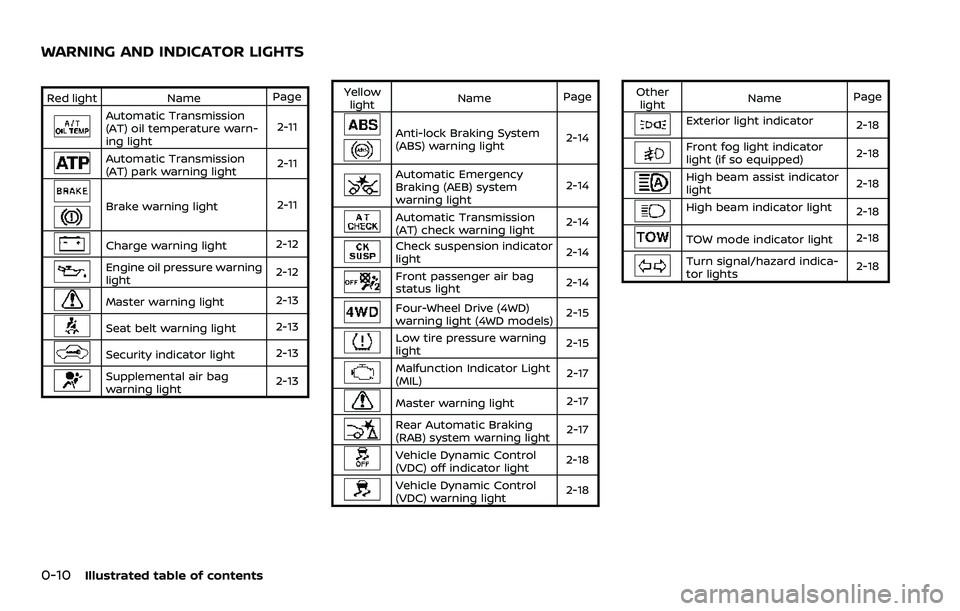
Red lightNamePage
Automatic Transmission
(AT) oil temperature warn-
ing light 2-11
Automatic Transmission
(AT) park warning light
2-11
Brake warning light
2-11
Charge warning light2-12
Engine oil pressure warning
light2-12
Master warning light
2-13
Seat belt warning light
2-13
Security indicator light2-13
Supplemental air bag
warning light2-13Yellow
light Name
Page
Anti-lock Braking System
(ABS) warning light 2-14
Automatic Emergency
Braking (AEB) system
warning light2-14
Automatic Transmission
(AT) check warning light
2-14
Check suspension indicator
light
2-14
Front passenger air bag
status light
2-14
Four-Wheel Drive (4WD)
warning light (4WD models) 2-15
Low tire pressure warning
light
2-15
Malfunction Indicator Light
(MIL) 2-17
Master warning light
2-17
Rear Automatic Braking
(RAB) system warning light2-17
Vehicle Dynamic Control
(VDC) off indicator light
2-18
Vehicle Dynamic Control
(VDC) warning light2-18Other
light Name
Page
Exterior light indicator
2-18
Front fog light indicator
light (if so equipped)2-18
High beam assist indicator
light2-18
High beam indicator light
2-18
TOW mode indicator light2-18
Turn signal/hazard indica-
tor lights2-18
WARNING AND INDICATOR LIGHTS
Page 93 of 603

2 Instruments and controls
Cockpit ........................................................................\
.......................... 2-3
Instrument panel ........................................................................\
.. 2-4
Meters and gauges ..................................................................... 2-5Speedometer and odometer ........................................ 2-6
Tachometer ........................................................................\
........ 2-7
Engine coolant temperature gauge ....................... 2-7
Fuel gauge ........................................................................\
........... 2-8
Engine oil pressure gauge .............................................. 2-8
Voltmeter ........................................................................\
.............. 2-9
Meter illumination and needle sweep ................... 2-9
Warning lights, indicator lights and
audible reminders ..................................................................... 2-10 Checking lights ..................................................................... 2-11
Warning/indicator lights (red) ................................... 2-11
Warning/indicator lights (yellow) ........................... 2-14
Warning/indicator lights (other) ............................. 2-18
Audible reminders .............................................................. 2-19
Vehicle information display ............................................... 2-19 How to use the vehicle
information display ........................................................... 2-20
Startup display ...................................................................... 2-21
Settings ........................................................................\
............... 2-21
Operational indicators .................................................... 2-29
Trip computer ........................................................................\
2-36
Clock and outside air temperature ...................... 2-38 Security systems ....................................................................... 2-38
Vehicle Security System .............................................. 2-38
NISSAN Vehicle Immobilizer System ................. 2-40
Wiper and washer switch ................................................... 2-41 Windshield wiper and washer operation ...... 2-42
Rain-sensing auto wiper system (if
so equipped) ........................................................................\
. 2-43
Rear window wiper and
washer operation ............................................................. 2-44
Rear window and outside mirror
defroster switch ........................................................................\
. 2-44
Windshield deicer switch (if so equipped) ............. 2-45
Headlight and turn signal switch ................................ 2-45
Headlight switch ............................................................... 2-46
Instrument brightness control .............................. 2-50
Turn signal switch ........................................................... 2-51
Fog light switch (if so equipped) ......................... 2-52
Heated steering wheel (if so equipped) .................. 2-52
Horn ........................................................................\
............................. 2-53
Heated seats ........................................................................\
......... 2-53
Front (if so equipped) .................................................... 2-54
Rear (if so equipped) ...................................................... 2-54
Climate controlled seats (if so equipped) ............. 2-55
Warning systems switch (if so equipped) ............. 2-56
SNOW mode switch ................................................................ 2-57
Page 95 of 603
WAA0288X
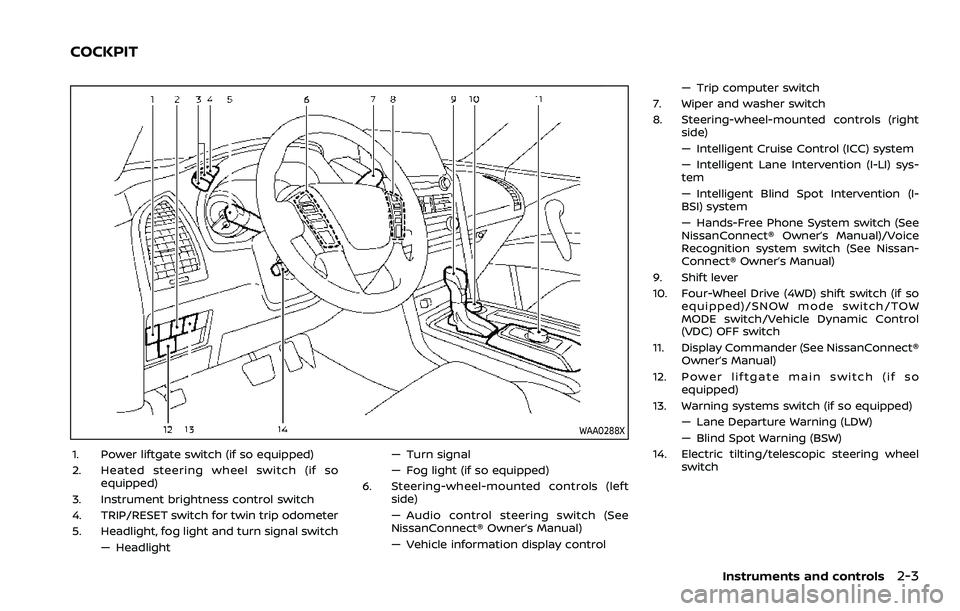
1. Power liftgate switch (if so equipped)
2. Heated steering wheel switch (if soequipped)
3. Instrument brightness control switch
4. TRIP/RESET switch for twin trip odometer
5. Headlight, fog light and turn signal switch — Headlight — Turn signal
— Fog light (if so equipped)
6. Steering-wheel-mounted controls (left side)
— Audio control steering switch (See
NissanConnect® Owner’s Manual)
— Vehicle information display control — Trip computer switch
7. Wiper and washer switch
8. Steering-wheel-mounted controls (right side)
— Intelligent Cruise Control (ICC) system
— Intelligent Lane Intervention (I-LI) sys-
tem
— Intelligent Blind Spot Intervention (I-
BSI) system
— Hands-Free Phone System switch (See
NissanConnect® Owner’s Manual)/Voice
Recognition system switch (See Nissan-
Connect® Owner’s Manual)
9. Shift lever
10. Four-Wheel Drive (4WD) shift switch (if so equipped)/SNOW mode switch/TOW
MODE switch/Vehicle Dynamic Control
(VDC) OFF switch
11. Display Commander (See NissanConnect® Owner’s Manual)
12. Power liftgate main switch (if so equipped)
13. Warning systems switch (if so equipped) — Lane Departure Warning (LDW)
— Blind Spot Warning (BSW)
14. Electric tilting/telescopic steering wheel switch
Instruments and controls2-3
COCKPIT
Page 102 of 603
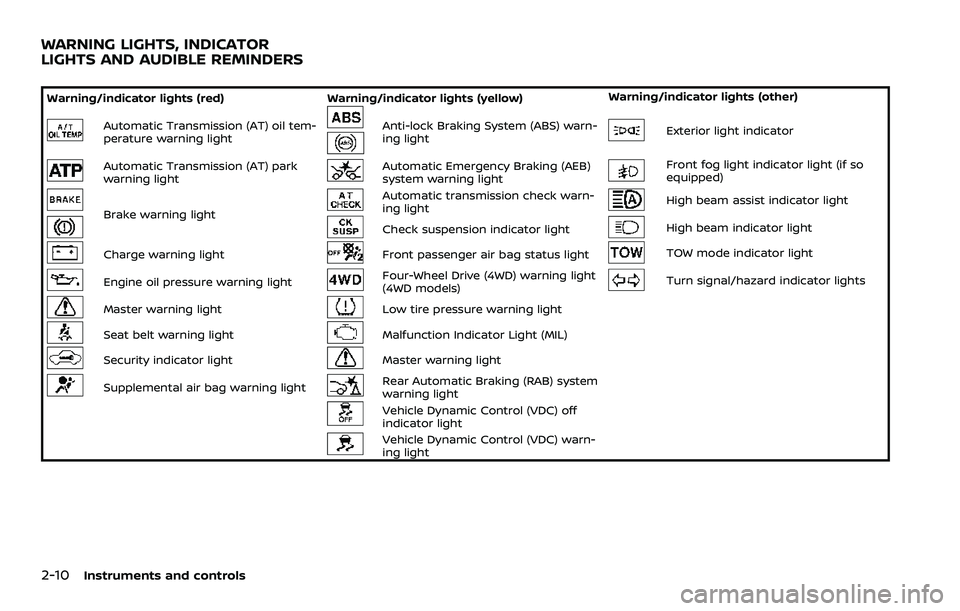
2-10Instruments and controls
Warning/indicator lights (red)Warning/indicator lights (yellow) Warning/indicator lights (other)
Automatic Transmission (AT) oil tem-
perature warning lightAnti-lock Braking System (ABS) warn-
ing lightExterior light indicator
Automatic Transmission (AT) park
warning lightAutomatic Emergency Braking (AEB)
system warning lightFront fog light indicator light (if so
equipped)
Brake warning light
Automatic transmission check warn-
ing lightHigh beam assist indicator light
Check suspension indicator lightHigh beam indicator light
Charge warning lightFront passenger air bag status lightTOW mode indicator light
Engine oil pressure warning lightFour-Wheel Drive (4WD) warning light
(4WD models)Turn signal/hazard indicator lights
Master warning lightLow tire pressure warning light
Seat belt warning lightMalfunction Indicator Light (MIL)
Security indicator lightMaster warning light
Supplemental air bag warning lightRear Automatic Braking (RAB) system
warning light
Vehicle Dynamic Control (VDC) off
indicator light
Vehicle Dynamic Control (VDC) warn-
ing light
WARNING LIGHTS, INDICATOR
LIGHTS AND AUDIBLE REMINDERS
Page 110 of 603
2-18Instruments and controls
If the light illuminates when the RAB
system is on, it may indicate that the
system is unavailable. (See “Rear Auto-
matic Braking (RAB)” (P.5-116).)
Vehicle Dynamic Control (VDC)
off indicator light
When the ignition switch is in the ON
position, the Vehicle Dynamic Control
(VDC) off indicator light illuminates and
then turns off.
The light comes on when the VDC off
switch is pushed to OFF. This indicates
that the VDC system is not operating.
When the 4L position is selected with the
Four-Wheel Drive (4WD) shift switch, the
VDC system is disabled and the VDC off
indicator light illuminates. (4WD models)
For additional information, see “Vehicle
Dynamic Control (VDC) system” (P.5-144).
Vehicle Dynamic Control (VDC)
warning light
When the ignition switch is in the ON
position, the Vehicle Dynamic Control
(VDC) warning light illuminates and then
turns off.
The light will blink when the VDC system
or the traction control system is operat-
ing, thus alerting the driver that the vehicle is nearing its traction limits. The
road surface may be slippery.
When the VDC warning light illuminates
when the VDC system is turned on, this
light alerts the driver to the fact that the
VDC system’s fail-safe mode is operating,
for example the VDC or hill start assist
system may not be functioning properly.
Have the system checked. It is recom-
mended you visit a NISSAN dealer for this
service. If a malfunction occurs in the
system, the VDC system function will be
canceled but the vehicle is still driveable.
For additional information, see “Vehicle
Dynamic Control (VDC) system” (P.5-144).
WARNING/INDICATOR LIGHTS
(other)
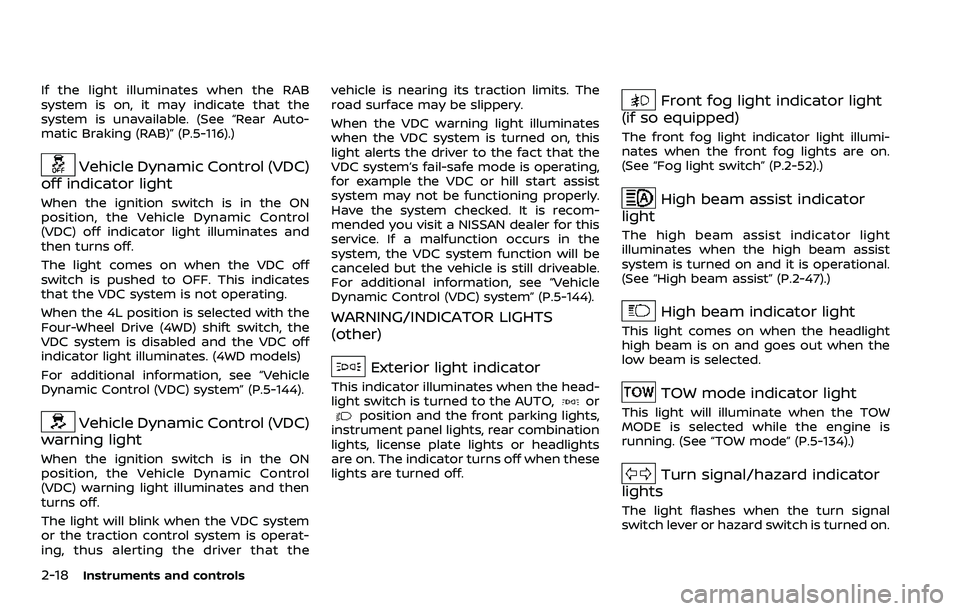
Exterior light indicator
This indicator illuminates when the head-
light switch is turned to the AUTO,orposition and the front parking lights,
instrument panel lights, rear combination
lights, license plate lights or headlights
are on. The indicator turns off when these
lights are turned off.
Front fog light indicator light
(if so equipped)
The front fog light indicator light illumi-
nates when the front fog lights are on.
(See “Fog light switch” (P.2-52).)
High beam assist indicator
light
The high beam assist indicator light
illuminates when the high beam assist
system is turned on and it is operational.
(See “High beam assist” (P.2-47).)
High beam indicator light
This light comes on when the headlight
high beam is on and goes out when the
low beam is selected.
TOW mode indicator light
This light will illuminate when the TOW
MODE is selected while the engine is
running. (See “TOW mode” (P.5-134).)
Turn signal/hazard indicator
lights
The light flashes when the turn signal
switch lever or hazard switch is turned on.
Page 136 of 603
2-44Instruments and controls
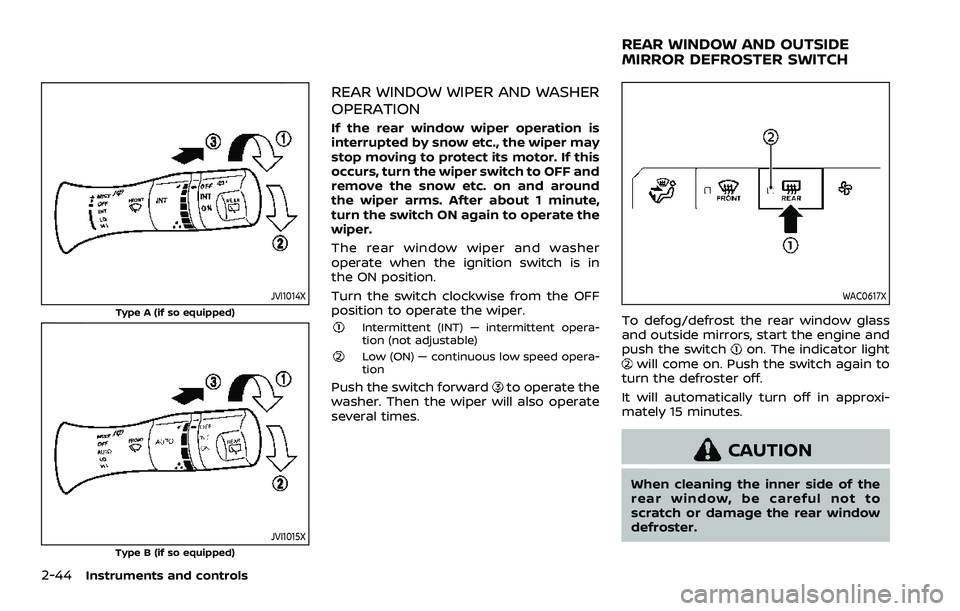
JVI1014X
Type A (if so equipped)
JVI1015XType B (if so equipped)
REAR WINDOW WIPER AND WASHER
OPERATION
If the rear window wiper operation is
interrupted by snow etc., the wiper may
stop moving to protect its motor. If this
occurs, turn the wiper switch to OFF and
remove the snow etc. on and around
the wiper arms. After about 1 minute,
turn the switch ON again to operate the
wiper.
The rear window wiper and washer
operate when the ignition switch is in
the ON position.
Turn the switch clockwise from the OFF
position to operate the wiper.
Intermittent (INT) — intermittent opera-
tion (not adjustable)
Low (ON) — continuous low speed opera-
tion
Push the switch forwardto operate the
washer. Then the wiper will also operate
several times.
WAC0617X
To defog/defrost the rear window glass
and outside mirrors, start the engine and
push the switch
on. The indicator lightwill come on. Push the switch again to
turn the defroster off.
It will automatically turn off in approxi-
mately 15 minutes.
CAUTION
When cleaning the inner side of the
rear window, be careful not to
scratch or damage the rear window
defroster.
REAR WINDOW AND OUTSIDE
MIRROR DEFROSTER SWITCH
Page 139 of 603
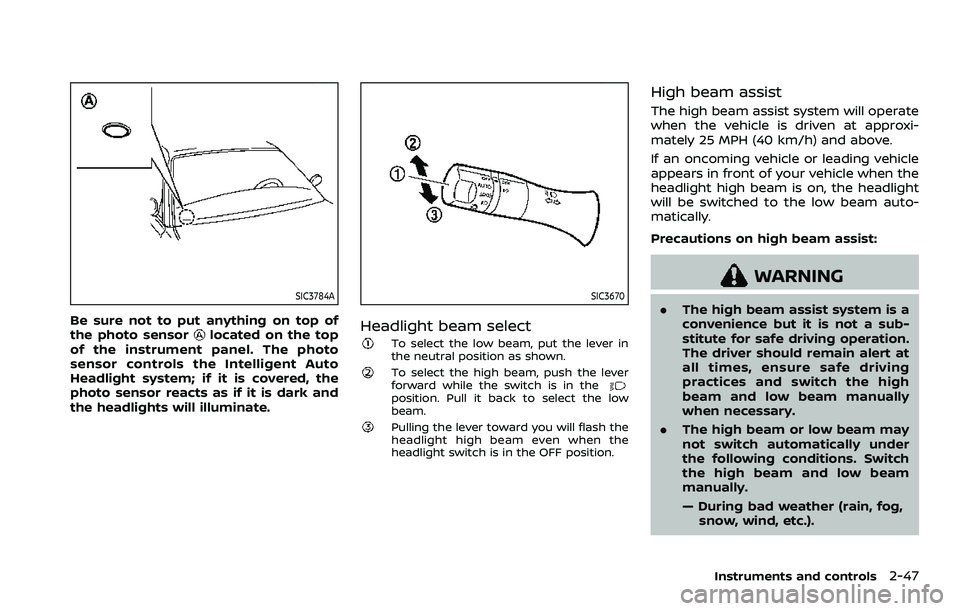
SIC3784A
Be sure not to put anything on top of
the photo sensorlocated on the top
of the instrument panel. The photo
sensor controls the Intelligent Auto
Headlight system; if it is covered, the
photo sensor reacts as if it is dark and
the headlights will illuminate.
SIC3670
Headlight beam select
To select the low beam, put the lever in
the neutral position as shown.
To select the high beam, push the lever
forward while the switch is in the
position. Pull it back to select the low
beam.
Pulling the lever toward you will flash the
headlight high beam even when the
headlight switch is in the OFF position.
High beam assist
The high beam assist system will operate
when the vehicle is driven at approxi-
mately 25 MPH (40 km/h) and above.
If an oncoming vehicle or leading vehicle
appears in front of your vehicle when the
headlight high beam is on, the headlight
will be switched to the low beam auto-
matically.
Precautions on high beam assist:
WARNING
. The high beam assist system is a
convenience but it is not a sub-
stitute for safe driving operation.
The driver should remain alert at
all times, ensure safe driving
practices and switch the high
beam and low beam manually
when necessary.
. The high beam or low beam may
not switch automatically under
the following conditions. Switch
the high beam and low beam
manually.
— During bad weather (rain, fog,
snow, wind, etc.).
Instruments and controls2-47
Page 144 of 603
2-52Instruments and controls
SIC3672
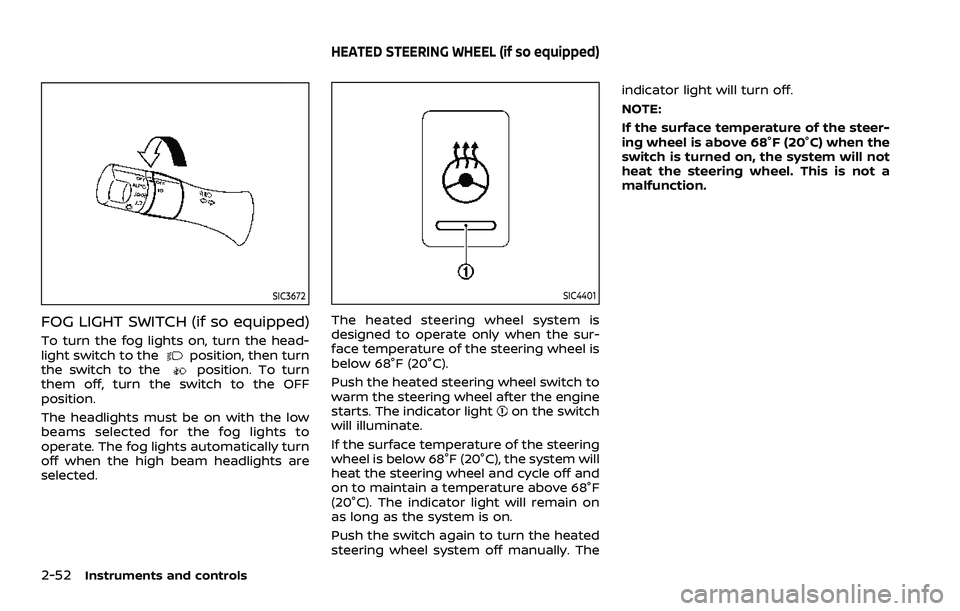
FOG LIGHT SWITCH (if so equipped)
To turn the fog lights on, turn the head-
light switch to theposition, then turn
the switch to theposition. To turn
them off, turn the switch to the OFF
position.
The headlights must be on with the low
beams selected for the fog lights to
operate. The fog lights automatically turn
off when the high beam headlights are
selected.
SIC4401
The heated steering wheel system is
designed to operate only when the sur-
face temperature of the steering wheel is
below 68°F (20°C).
Push the heated steering wheel switch to
warm the steering wheel after the engine
starts. The indicator light
on the switch
will illuminate.
If the surface temperature of the steering
wheel is below 68°F (20°C), the system will
heat the steering wheel and cycle off and
on to maintain a temperature above 68°F
(20°C). The indicator light will remain on
as long as the system is on.
Push the switch again to turn the heated
steering wheel system off manually. The indicator light will turn off.
NOTE:
If the surface temperature of the steer-
ing wheel is above 68°F (20°C) when the
switch is turned on, the system will not
heat the steering wheel. This is not a
malfunction.
HEATED STEERING WHEEL (if so equipped)