key NISSAN ARMADA 2022 Owner´s Manual
[x] Cancel search | Manufacturer: NISSAN, Model Year: 2022, Model line: ARMADA, Model: NISSAN ARMADA 2022Pages: 604, PDF Size: 2.97 MB
Page 327 of 604
CAUTION
Do not leave the vehicle with the
push-button ignition switch in ACC or
ON positions when the engine is not
running for an extended period. This
can discharge the battery.
ACC (Accessories) delay timer
function
When the ignition switch is placed in the
OFF position, the ACC (Accessories) delay
timer function is activated. This function
keeps the power supply to the electrical
accessories for up to 10 minutes. When
the driver’s door is opened, this function is
canceled and the electrical power supply
is stopped. The ACC (Accessories) delay
time function can be enabled or disabled.
(See “Vehicle settings” (P.2-24).)
EMERGENCY ENGINE SHUT OFF
To shut off the engine in an emergency
situation while driving, perform the fol-
lowing procedure:
.Rapidly push the push-button ignition
switch 3 consecutive times in less
than 1.5 seconds, or
. Push and hold the push-button igni-
tion switch for more than 2 seconds.
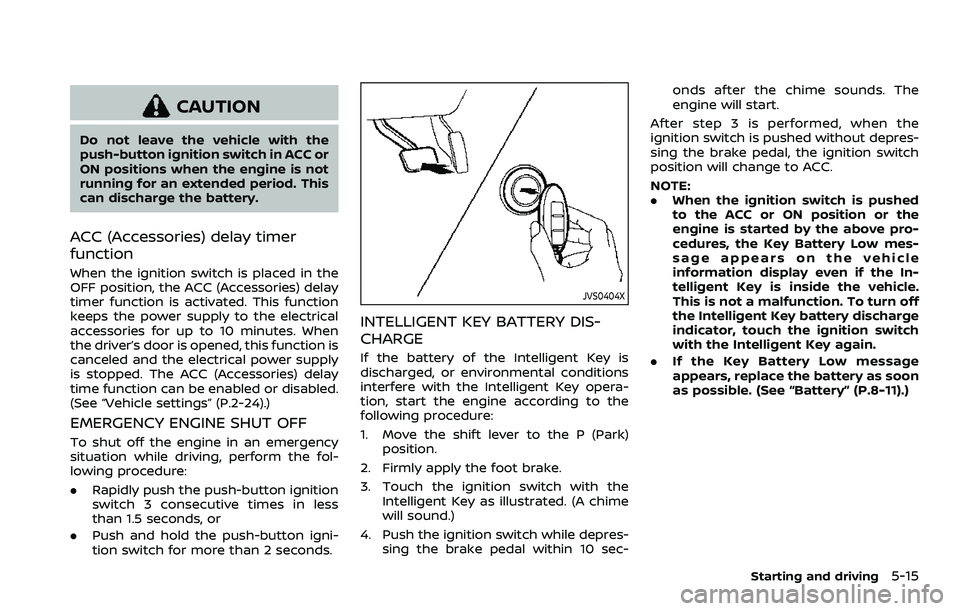
JVS0404X
INTELLIGENT KEY BATTERY DIS-
CHARGE
If the battery of the Intelligent Key is
discharged, or environmental conditions
interfere with the Intelligent Key opera-
tion, start the engine according to the
following procedure:
1. Move the shift lever to the P (Park)
position.
2. Firmly apply the foot brake.
3. Touch the ignition switch with the Intelligent Key as illustrated. (A chime
will sound.)
4. Push the ignition switch while depres- sing the brake pedal within 10 sec- onds after the chime sounds. The
engine will start.
After step 3 is performed, when the
ignition switch is pushed without depres-
sing the brake pedal, the ignition switch
position will change to ACC.
NOTE:
. When the ignition switch is pushed
to the ACC or ON position or the
engine is started by the above pro-
cedures, the Key Battery Low mes-
sage appears on the vehicle
information display even if the In-
telligent Key is inside the vehicle.
This is not a malfunction. To turn off
the Intelligent Key battery discharge
indicator, touch the ignition switch
with the Intelligent Key again.
. If the Key Battery Low message
appears, replace the battery as soon
as possible. (See “Battery” (P.8-11).)
Starting and driving5-15
Page 329 of 604
fuel cut mode.
5. To stop the engine, shift the shift lever to the P (Park) position and push the
ignition switch to the OFF position.
In preparation for the next engine start,
the engine may have a slightly delayed
shutoff after placing the ignition switch in
the OFF position, depending on the driv-
ing conditions.
NOTE:
Care should be taken to avoid situations
that can lead to potential battery dis-
charge and potential no-start condi-
tions such as:
1. Installation or extended use of elec-
tronic accessories that consume
battery power when the engine is
not running (Phone chargers, GPS,
DVD players, etc.)
2. Vehicle is not driven regularly and/
or only driven short distances.
In these cases, the battery may need to
be charged to maintain battery health.
REMOTE ENGINE START (if so
equipped)
Vehicles started with the remote engine
start function require the ignition switch
to be placed in the ON position before the
shift lever can be moved from the P (Park)
position. To place the ignition switch in the ON position, perform the following
steps:
1. Make sure that the Intelligent Key is
on you.
2. Firmly depress the brake pedal.
3. Push the ignition switch once to the ON position.
For additional information about the
remote engine start function, see “Re-
mote engine start” (P.3-19).
ENGINE PROTECTION MODE
The engine has an engine protection
mode to reduce the chance of damage
if the coolant temperature becomes too
high (for example, when climbing steep
grades in high temperature with heavy
loads, such as when towing a trailer).
When the engine temperature reaches a
certain level:
. The engine coolant temperature
gauge will move toward the H posi-
tion.
. Engine power may be reduced.
. The air conditioning cooling function
may be automatically turned OFF for a
short time (the blower will continue to
operate).
Engine power and, under some condi-
tions, vehicle speed will decrease. Vehicle
speed can be controlled with the accel-
erator pedal, but the vehicle may not
accelerate at the desired speed. The
transmission will downshift or upshift as
it reaches prescribed shift points. You can
also shift manually.
As driving conditions change and engine
coolant temperature is reduced, vehicle
speed can be increased using the accel-
erator pedal, and air conditioning cooling
function will automatically be turned
back ON.
Starting and driving5-17
DRIVING THE VEHICLE
Page 377 of 604
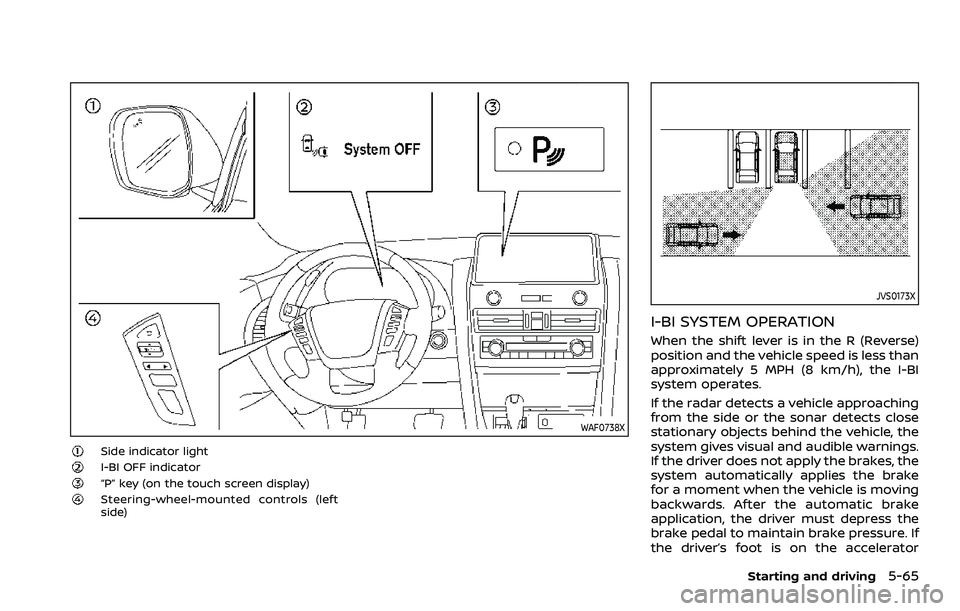
WAF0738X
Side indicator lightI-BI OFF indicator“P” key (on the touch screen display)Steering-wheel-mounted controls (left
side)
JVS0173X
I-BI SYSTEM OPERATION
When the shift lever is in the R (Reverse)
position and the vehicle speed is less than
approximately 5 MPH (8 km/h), the I-BI
system operates.
If the radar detects a vehicle approaching
from the side or the sonar detects close
stationary objects behind the vehicle, the
system gives visual and audible warnings.
If the driver does not apply the brakes, the
system automatically applies the brake
for a moment when the vehicle is moving
backwards. After the automatic brake
application, the driver must depress the
brake pedal to maintain brake pressure. If
the driver’s foot is on the accelerator
Starting and driving5-65
Page 378 of 604
5-66Starting and driving
pedal, the system pushes the accelerator
upward before applying the brake. If you
continue to accelerate, the system will
not engage the brake.
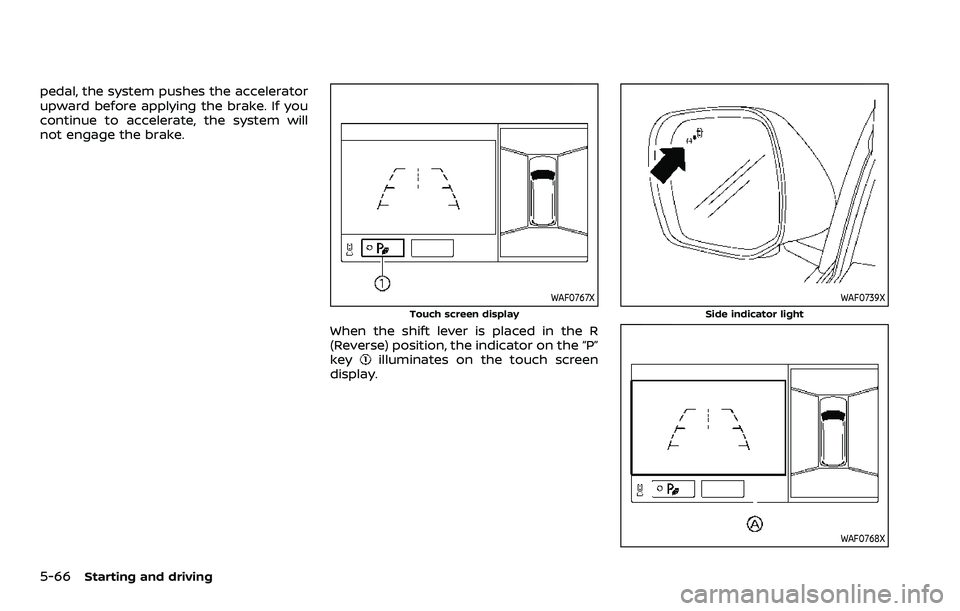
WAF0767X
Touch screen display
When the shift lever is placed in the R
(Reverse) position, the indicator on the “P”
key
illuminates on the touch screen
display.
WAF0739X
Side indicator light
WAF0768X
Page 381 of 604
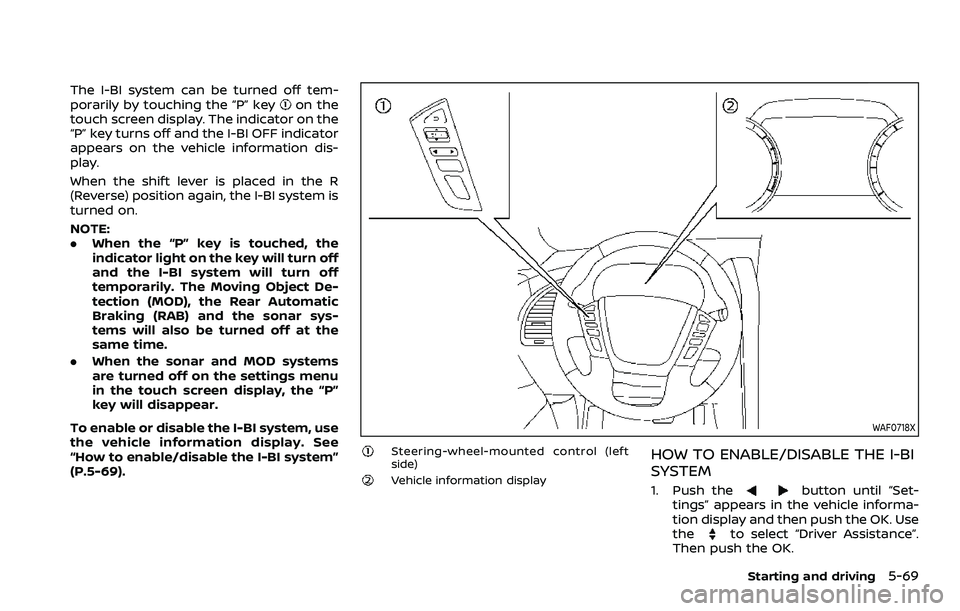
The I-BI system can be turned off tem-
porarily by touching the “P” keyon the
touch screen display. The indicator on the
“P” key turns off and the I-BI OFF indicator
appears on the vehicle information dis-
play.
When the shift lever is placed in the R
(Reverse) position again, the I-BI system is
turned on.
NOTE:
. When the “P” key is touched, the
indicator light on the key will turn off
and the I-BI system will turn off
temporarily. The Moving Object De-
tection (MOD), the Rear Automatic
Braking (RAB) and the sonar sys-
tems will also be turned off at the
same time.
. When the sonar and MOD systems
are turned off on the settings menu
in the touch screen display, the “P”
key will disappear.
To enable or disable the I-BI system, use
the vehicle information display. See
“How to enable/disable the I-BI system”
(P.5-69).
WAF0718X
Steering-wheel-mounted control (left
side)
Vehicle information display
HOW TO ENABLE/DISABLE THE I-BI
SYSTEM
1. Push thebutton until “Set-
tings” appears in the vehicle informa-
tion display and then push the OK. Use
the
to select “Driver Assistance”.
Then push the OK.
Starting and driving5-69
Page 429 of 604
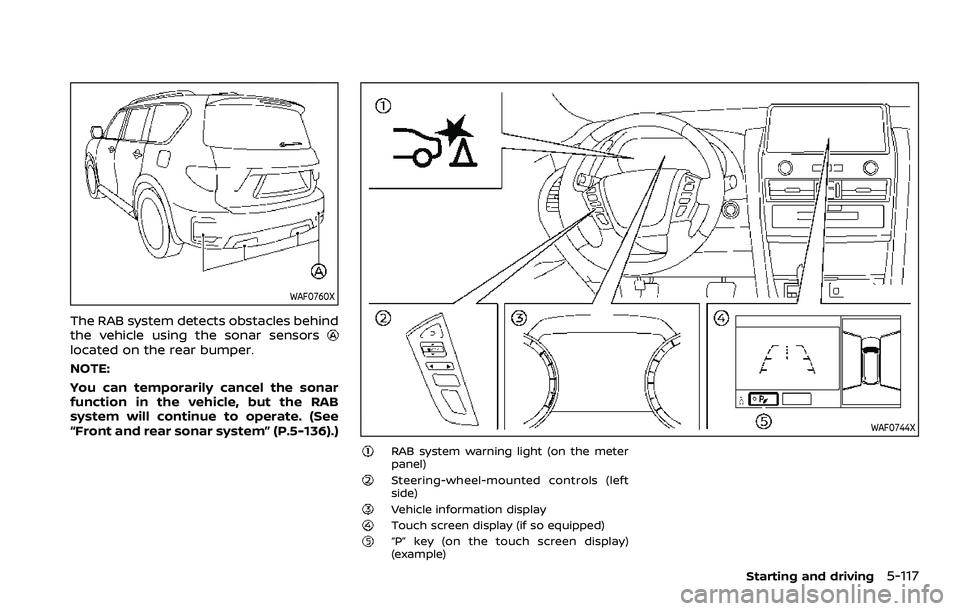
WAF0760X
The RAB system detects obstacles behind
the vehicle using the sonar sensors
located on the rear bumper.
NOTE:
You can temporarily cancel the sonar
function in the vehicle, but the RAB
system will continue to operate. (See
“Front and rear sonar system” (P.5-136).)
WAF0744X
RAB system warning light (on the meter
panel)
Steering-wheel-mounted controls (left
side)
Vehicle information displayTouch screen display (if so equipped)“P” key (on the touch screen display)
(example)
Starting and driving5-117
Page 430 of 604
5-118Starting and driving
RAB SYSTEM OPERATION
When the shift lever is in the R (Reverse)
position and the vehicle speed is less than
approximately 9 MPH (15 km/h), the RAB
system operates.
If a risk of a collision with an obstacle is
detected when your vehicle is backing up,
the RAB system warning indicator will
flash in the vehicle information display, a
red frame will appear in the touch screen
display (models with the Intelligent
Around View® Monitor system), and the
system will chime three times. The system
will then automatically apply the brakes.
After the automatic brake application, the
driver must depress the brake pedal to
maintain brake pressure.
NOTE:
.The stop lights of the vehicle come
on when braking is performed by
the RAB system.
. When the brakes operate, a noise
may be heard. This is not a malfunc-
tion.
. When the “P” key is touched, the
indicator light on the key will turn off
and the the Rear Automatic Braking
(RAB) system will turn off tempora-
rily. The Moving Object Detection
(MOD) (if so equipped), the Intelligent
Back-up Intervention (I-BI) (if so
equipped) and the sonar systems will also be turned off at the same
time.
. When the sonar and MOD systems is
turned off on the settings menu in
the touch screen display, the “P” key
will disappear.
To enable or disable the RAB system,
use the vehicle information display. See
“Turning the RAB system ON/OFF” (P.5-
119).
Page 449 of 604
If your vehicle sustains damage to the
bumper fascia, leaving it misaligned or
bent, the sensing zone may be altered
causing inaccurate measurement of ob-
stacles or false alarms.
CAUTION
.Excessive noise (such as audio
system volume or an open vehi-
cle window) will interfere with the
tone and it may not be heard.
. Keep the sonar sensors (located
on the bumper fascia) free from
snow, ice and large accumula-
tions of dirt. Do not clean the
sonar sensors with sharp objects.
If the sensors are covered, the
accuracy of the sonar function
will be diminished.
SYSTEM OPERATION
The system informs with a visual and
audible signal of front obstacles when the
shift lever is in the D (Drive) position and
both front and rear obstacles when the
shift lever is in the R (Reverse) position.
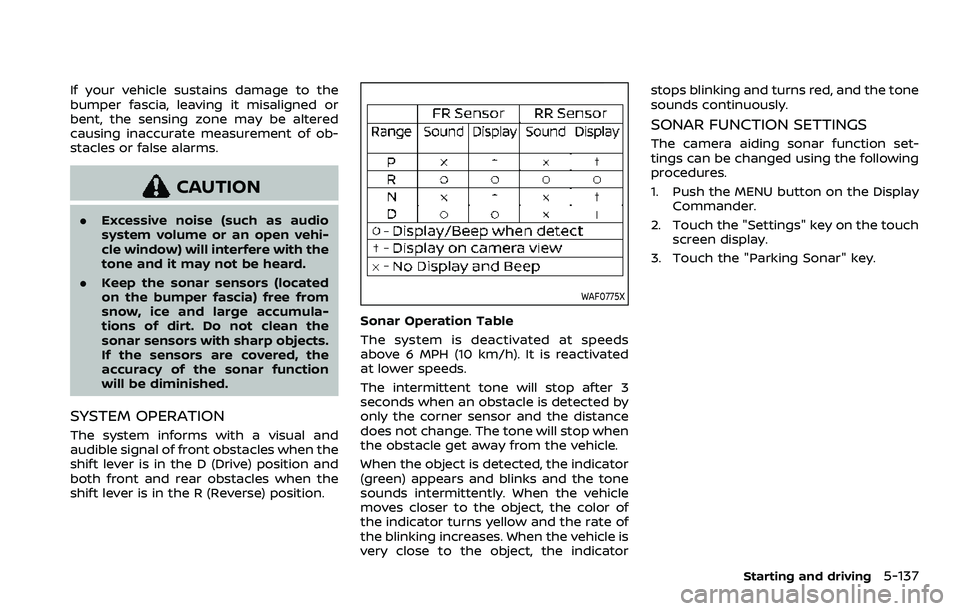
WAF0775X
Sonar Operation Table
The system is deactivated at speeds
above 6 MPH (10 km/h). It is reactivated
at lower speeds.
The intermittent tone will stop after 3
seconds when an obstacle is detected by
only the corner sensor and the distance
does not change. The tone will stop when
the obstacle get away from the vehicle.
When the object is detected, the indicator
(green) appears and blinks and the tone
sounds intermittently. When the vehicle
moves closer to the object, the color of
the indicator turns yellow and the rate of
the blinking increases. When the vehicle is
very close to the object, the indicator stops blinking and turns red, and the tone
sounds continuously.
SONAR FUNCTION SETTINGS
The camera aiding sonar function set-
tings can be changed using the following
procedures.
1. Push the MENU button on the Display
Commander.
2. Touch the "Settings" key on the touch screen display.
3. Touch the "Parking Sonar" key.
Starting and driving5-137
Page 451 of 604
WAF0783X
Example
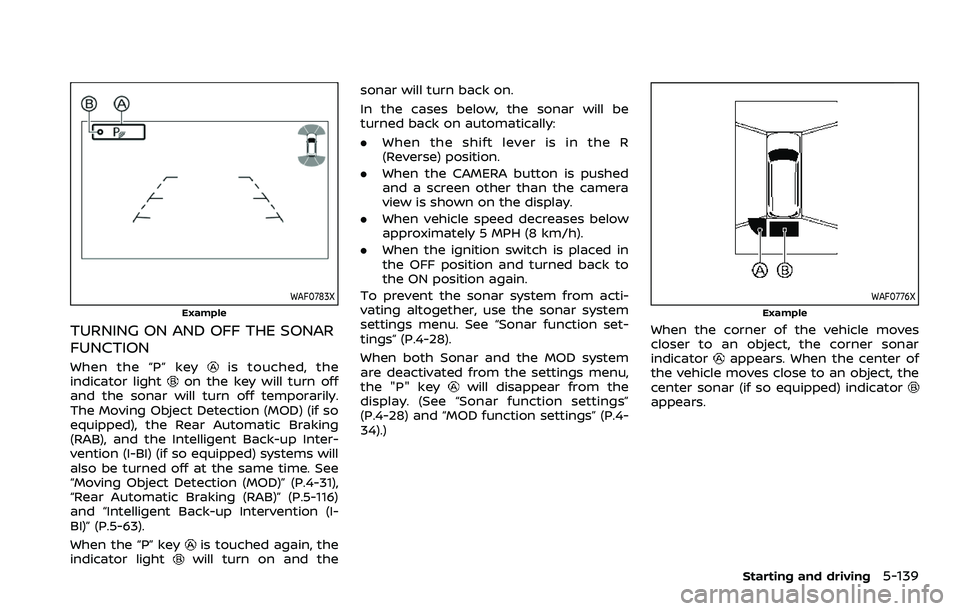
TURNING ON AND OFF THE SONAR
FUNCTION
When the “P” keyis touched, the
indicator lighton the key will turn off
and the sonar will turn off temporarily.
The Moving Object Detection (MOD) (if so
equipped), the Rear Automatic Braking
(RAB), and the Intelligent Back-up Inter-
vention (I-BI) (if so equipped) systems will
also be turned off at the same time. See
“Moving Object Detection (MOD)” (P.4-31),
“Rear Automatic Braking (RAB)” (P.5-116)
and “Intelligent Back-up Intervention (I-
BI)” (P.5-63).
When the “P” key
is touched again, the
indicator lightwill turn on and the sonar will turn back on.
In the cases below, the sonar will be
turned back on automatically:
.
When the shift lever is in the R
(Reverse) position.
. When the CAMERA button is pushed
and a screen other than the camera
view is shown on the display.
. When vehicle speed decreases below
approximately 5 MPH (8 km/h).
. When the ignition switch is placed in
the OFF position and turned back to
the ON position again.
To prevent the sonar system from acti-
vating altogether, use the sonar system
settings menu. See “Sonar function set-
tings” (P.4-28).
When both Sonar and the MOD system
are deactivated from the settings menu,
the "P" key
will disappear from the
display. (See “Sonar function settings”
(P.4-28) and “MOD function settings” (P.4-
34).)
WAF0776X
Example
When the corner of the vehicle moves
closer to an object, the corner sonar
indicator
appears. When the center of
the vehicle moves close to an object, the
center sonar (if so equipped) indicator
appears.
Starting and driving5-139
Page 458 of 604
5-146Starting and driving
SIC4455
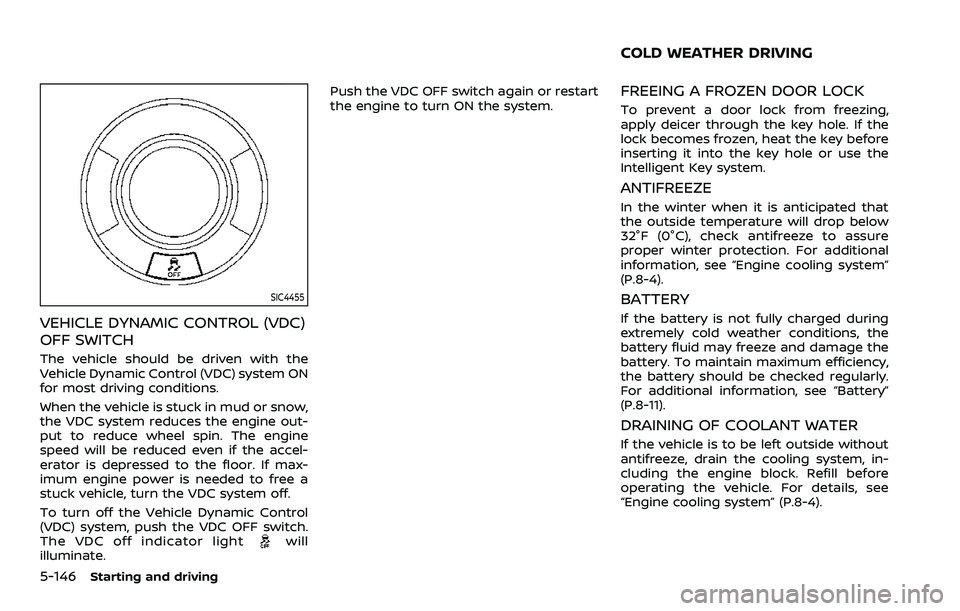
VEHICLE DYNAMIC CONTROL (VDC)
OFF SWITCH
The vehicle should be driven with the
Vehicle Dynamic Control (VDC) system ON
for most driving conditions.
When the vehicle is stuck in mud or snow,
the VDC system reduces the engine out-
put to reduce wheel spin. The engine
speed will be reduced even if the accel-
erator is depressed to the floor. If max-
imum engine power is needed to free a
stuck vehicle, turn the VDC system off.
To turn off the Vehicle Dynamic Control
(VDC) system, push the VDC OFF switch.
The VDC off indicator light
will
illuminate. Push the VDC OFF switch again or restart
the engine to turn ON the system.
FREEING A FROZEN DOOR LOCK
To prevent a door lock from freezing,
apply deicer through the key hole. If the
lock becomes frozen, heat the key before
inserting it into the key hole or use the
Intelligent Key system.
ANTIFREEZE
In the winter when it is anticipated that
the outside temperature will drop below
32°F (0°C), check antifreeze to assure
proper winter protection. For additional
information, see “Engine cooling system”
(P.8-4).
BATTERY
If the battery is not fully charged during
extremely cold weather conditions, the
battery fluid may freeze and damage the
battery. To maintain maximum efficiency,
the battery should be checked regularly.
For additional information, see “Battery”
(P.8-11).
DRAINING OF COOLANT WATER
If the vehicle is to be left outside without
antifreeze, drain the cooling system, in-
cluding the engine block. Refill before
operating the vehicle. For details, see
“Engine cooling system” (P.8-4).
COLD WEATHER DRIVING