remote control NISSAN ARMADA 2023 User Guide
[x] Cancel search | Manufacturer: NISSAN, Model Year: 2023, Model line: ARMADA, Model: NISSAN ARMADA 2023Pages: 604, PDF Size: 2.97 MB
Page 283 of 604
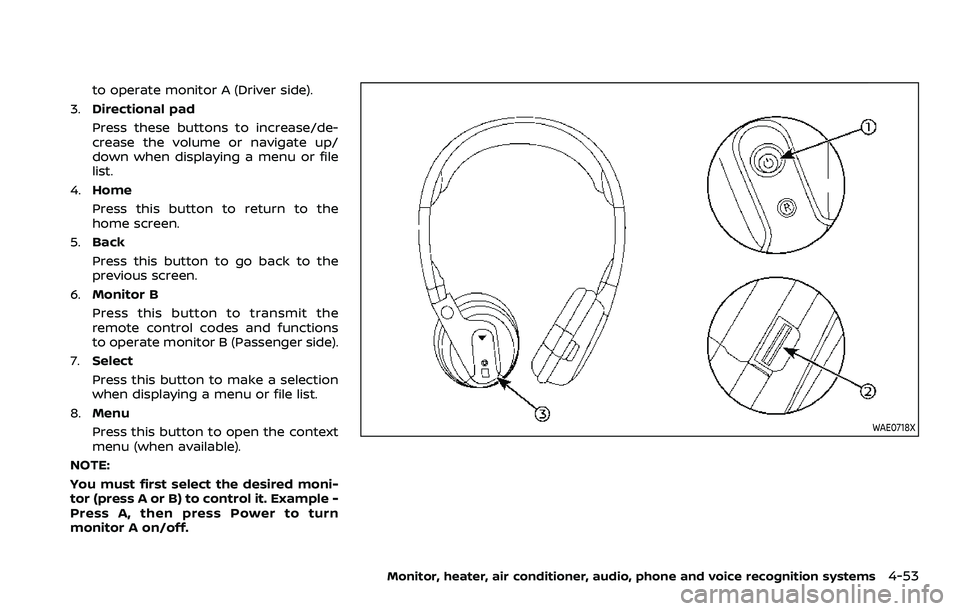
to operate monitor A (Driver side).
3. Directional pad
Press these buttons to increase/de-
crease the volume or navigate up/
down when displaying a menu or file
list.
4. Home
Press this button to return to the
home screen.
5. Back
Press this button to go back to the
previous screen.
6. Monitor B
Press this button to transmit the
remote control codes and functions
to operate monitor B (Passenger side).
7. Select
Press this button to make a selection
when displaying a menu or file list.
8. Menu
Press this button to open the context
menu (when available).
NOTE:
You must first select the desired moni-
tor (press A or B) to control it. Example -
Press A, then press Power to turn
monitor A on/off.
WAE0718X
Monitor, heater, air conditioner, audio, phone and voice recognition systems4-53
Page 285 of 604
WAE0719X
GENERAL OPERATION
Navigating menus
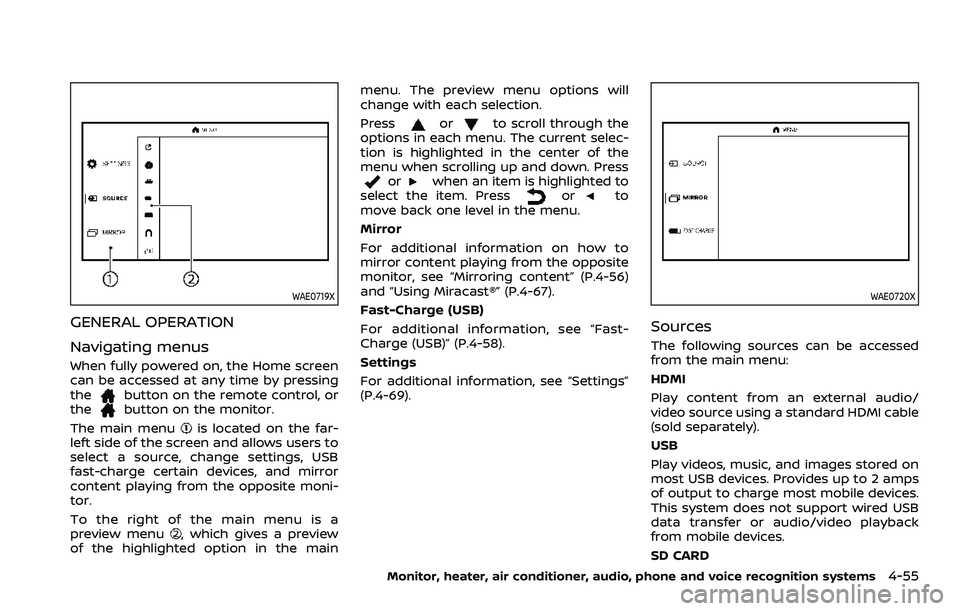
When fully powered on, the Home screen
can be accessed at any time by pressing
the
button on the remote control, or
thebutton on the monitor.
The main menu
is located on the far-
left side of the screen and allows users to
select a source, change settings, USB
fast-charge certain devices, and mirror
content playing from the opposite moni-
tor.
To the right of the main menu is a
preview menu
, which gives a preview
of the highlighted option in the main menu. The preview menu options will
change with each selection.
Press
orto scroll through the
options in each menu. The current selec-
tion is highlighted in the center of the
menu when scrolling up and down. Press
orwhen an item is highlighted to
select the item. Pressorto
move back one level in the menu.
Mirror
For additional information on how to
mirror content playing from the opposite
monitor, see “Mirroring content” (P.4-56)
and “Using Miracast®” (P.4-67).
Fast-Charge (USB)
For additional information, see “Fast-
Charge (USB)” (P.4-58).
Settings
For additional information, see “Settings”
(P.4-69).
WAE0720X
Sources
The following sources can be accessed
from the main menu:
HDMI
Play content from an external audio/
video source using a standard HDMI cable
(sold separately).
USB
Play videos, music, and images stored on
most USB devices. Provides up to 2 amps
of output to charge most mobile devices.
This system does not support wired USB
data transfer or audio/video playback
from mobile devices.
SD CARD
Monitor, heater, air conditioner, audio, phone and voice recognition systems4-55
Page 286 of 604
4-56Monitor, heater, air conditioner, audio, phone and voice recognition systems
Play videos, music, and images stored on
most SD cards.
Slingplayer®
Stream content wirelessly from a Sling-
box® (sold separately) to the RSI system.
*Requires external internet connection.
Miracast®
Stream content wirelessly from a Mira-
cast-enabled device to the RSI system.
NOTE: Miracast® works with Android OS
mobile devices only. This feature is not
supported on iOS devices.
SmartStream
Stream content wirelessly between mo-
bile devices and to the RSI system.
*Requires compatible UPnP application
to be installed on the mobile device. For
additional information, see “SmartStream”
(P.4-67).
NOTE: SmartStream works on both An-
droid and iOS devices using mobile app
(VOXX-RSI).
NOTE:
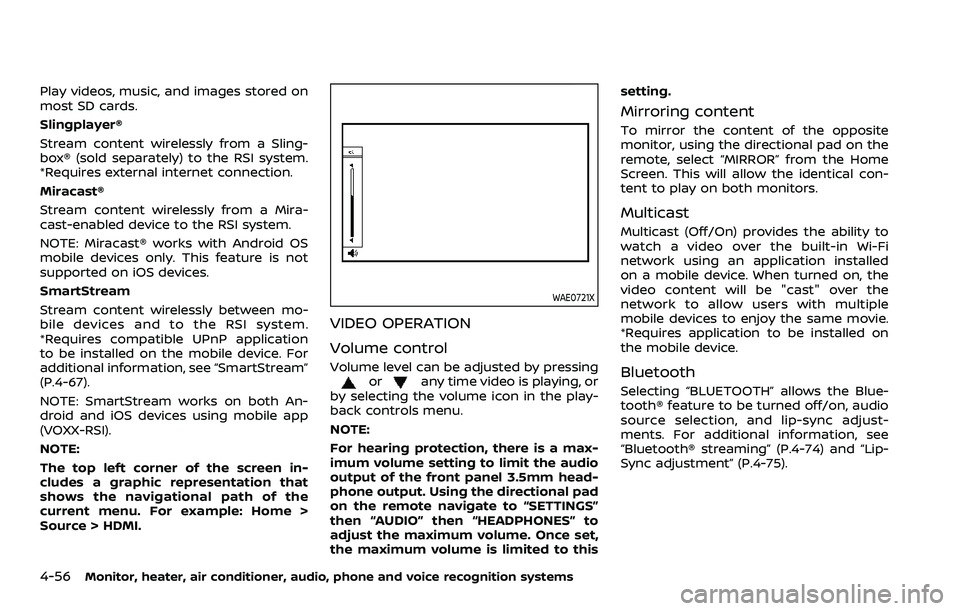
The top left corner of the screen in-
cludes a graphic representation that
shows the navigational path of the
current menu. For example: Home >
Source > HDMI.
WAE0721X
VIDEO OPERATION
Volume control
Volume level can be adjusted by pressingorany time video is playing, or
by selecting the volume icon in the play-
back controls menu.
NOTE:
For hearing protection, there is a max-
imum volume setting to limit the audio
output of the front panel 3.5mm head-
phone output. Using the directional pad
on the remote navigate to “SETTINGS”
then “AUDIO” then “HEADPHONES” to
adjust the maximum volume. Once set,
the maximum volume is limited to this setting.
Mirroring content
To mirror the content of the opposite
monitor, using the directional pad on the
remote, select “MIRROR” from the Home
Screen. This will allow the identical con-
tent to play on both monitors.
Multicast
Multicast (Off/On) provides the ability to
watch a video over the built-in Wi-Fi
network using an application installed
on a mobile device. When turned on, the
video content will be "cast" over the
network to allow users with multiple
mobile devices to enjoy the same movie.
*Requires application to be installed on
the mobile device.
Bluetooth
Selecting “BLUETOOTH” allows the Blue-
tooth® feature to be turned off/on, audio
source selection, and lip-sync adjust-
ments. For additional information, see
“Bluetooth® streaming” (P.4-74) and “Lip-
Sync adjustment” (P.4-75).
Page 287 of 604
WAE0722X
HDMI/MHL CONNECTION
HDMI connection
Display content from an external source
connected to the system using the HDMI
port located on the front of monitor A. A
standard HDMI cable is required (sold
separately).
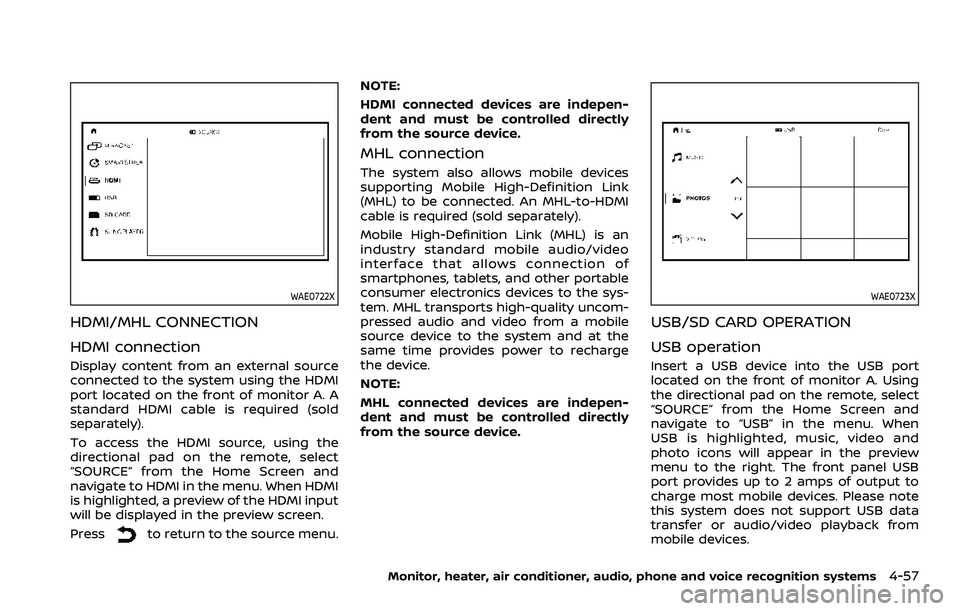
To access the HDMI source, using the
directional pad on the remote, select
“SOURCE” from the Home Screen and
navigate to HDMI in the menu. When HDMI
is highlighted, a preview of the HDMI input
will be displayed in the preview screen.
Press
to return to the source menu.NOTE:
HDMI connected devices are indepen-
dent and must be controlled directly
from the source device.
MHL connection
The system also allows mobile devices
supporting Mobile High-Definition Link
(MHL) to be connected. An MHL-to-HDMI
cable is required (sold separately).
Mobile High-Definition Link (MHL) is an
industry standard mobile audio/video
interface that allows connection of
smartphones, tablets, and other portable
consumer electronics devices to the sys-
tem. MHL transports high-quality uncom-
pressed audio and video from a mobile
source device to the system and at the
same time provides power to recharge
the device.
NOTE:
MHL connected devices are indepen-
dent and must be controlled directly
from the source device.
WAE0723X
USB/SD CARD OPERATION
USB operation
Insert a USB device into the USB port
located on the front of monitor A. Using
the directional pad on the remote, select
“SOURCE” from the Home Screen and
navigate to “USB” in the menu. When
USB is highlighted, music, video and
photo icons will appear in the preview
menu to the right. The front panel USB
port provides up to 2 amps of output to
charge most mobile devices. Please note
this system does not support USB data
transfer or audio/video playback from
mobile devices.
Monitor, heater, air conditioner, audio, phone and voice recognition systems4-57
Page 291 of 604
WAE0728X
USB/SD card USB/SD card video
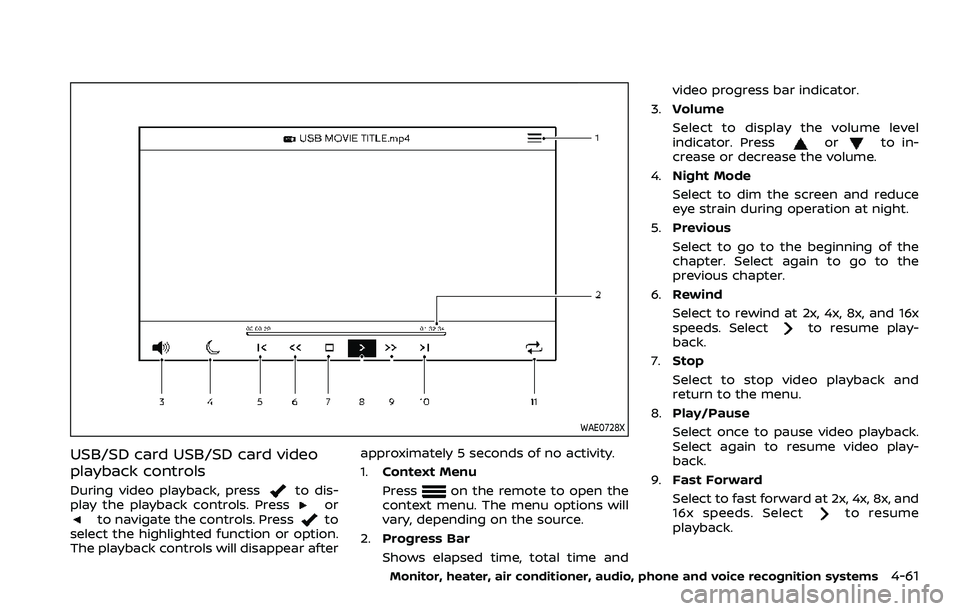
playback controls
During video playback, pressto dis-
play the playback controls. Pressorto navigate the controls. Pressto
select the highlighted function or option.
The playback controls will disappear after approximately 5 seconds of no activity.
1.
Context Menu
Press
on the remote to open the
context menu. The menu options will
vary, depending on the source.
2. Progress Bar
Shows elapsed time, total time and video progress bar indicator.
3. Volume
Select to display the volume level
indicator. Press
orto in-
crease or decrease the volume.
4. Night Mode
Select to dim the screen and reduce
eye strain during operation at night.
5. Previous
Select to go to the beginning of the
chapter. Select again to go to the
previous chapter.
6. Rewind
Select to rewind at 2x, 4x, 8x, and 16x
speeds. Select
to resume play-
back.
7. Stop
Select to stop video playback and
return to the menu.
8. Play/Pause
Select once to pause video playback.
Select again to resume video play-
back.
9. Fast Forward
Select to fast forward at 2x, 4x, 8x, and
16x speeds. Select
to resume
playback.
Monitor, heater, air conditioner, audio, phone and voice recognition systems4-61
Page 294 of 604
4-64Monitor, heater, air conditioner, audio, phone and voice recognition systems
WAE0731X
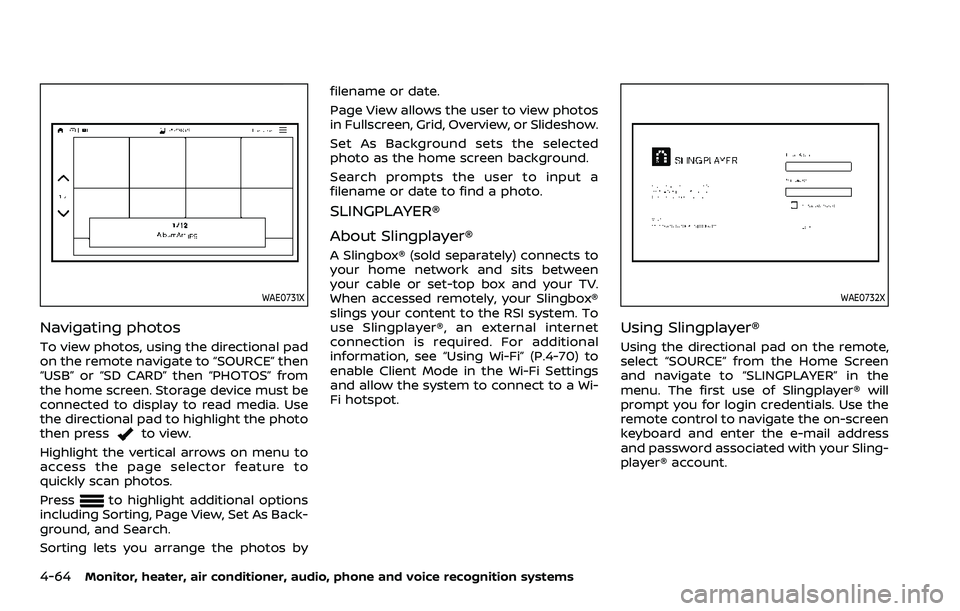
Navigating photos
To view photos, using the directional pad
on the remote navigate to “SOURCE” then
“USB” or “SD CARD” then “PHOTOS” from
the home screen. Storage device must be
connected to display to read media. Use
the directional pad to highlight the photo
then press
to view.
Highlight the vertical arrows on menu to
access the page selector feature to
quickly scan photos.
Press
to highlight additional options
including Sorting, Page View, Set As Back-
ground, and Search.
Sorting lets you arrange the photos by filename or date.
Page View allows the user to view photos
in Fullscreen, Grid, Overview, or Slideshow.
Set As Background sets the selected
photo as the home screen background.
Search prompts the user to input a
filename or date to find a photo.
SLINGPLAYER®
About Slingplayer®
A Slingbox® (sold separately) connects to
your home network and sits between
your cable or set-top box and your TV.
When accessed remotely, your Slingbox®
slings your content to the RSI system. To
use Slingplayer®, an external internet
connection is required. For additional
information, see “Using Wi-Fi” (P.4-70) to
enable Client Mode in the Wi-Fi Settings
and allow the system to connect to a Wi-
Fi hotspot.
WAE0732X
Using Slingplayer®
Using the directional pad on the remote,
select “SOURCE” from the Home Screen
and navigate to “SLINGPLAYER” in the
menu. The first use of Slingplayer® will
prompt you for login credentials. Use the
remote control to navigate the on-screen
keyboard and enter the e-mail address
and password associated with your Sling-
player® account.
Page 306 of 604
4-76Monitor, heater, air conditioner, audio, phone and voice recognition systems
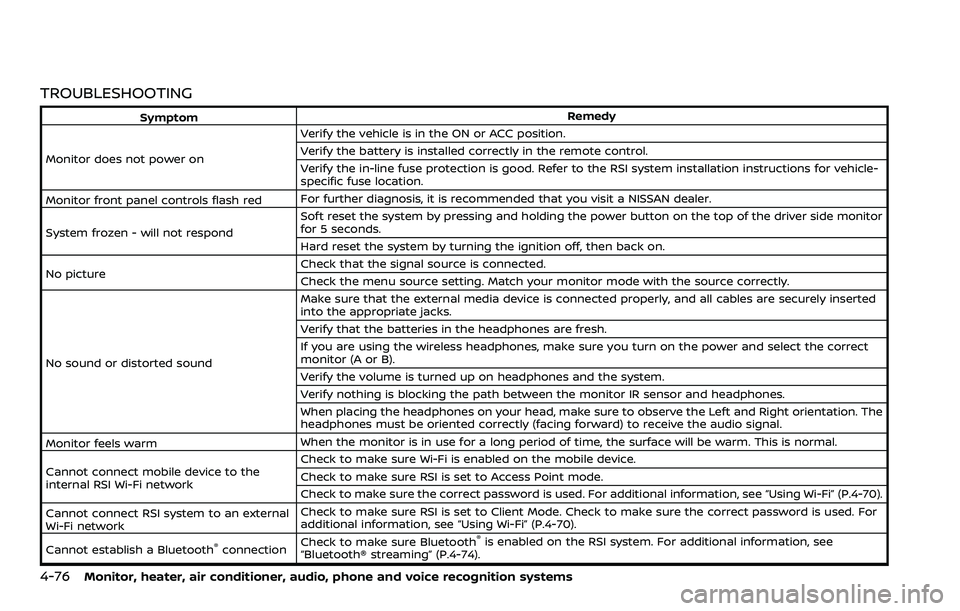
TROUBLESHOOTING
SymptomRemedy
Monitor does not power on Verify the vehicle is in the ON or ACC position.
Verify the battery is installed correctly in the remote control.
Verify the in-line fuse protection is good. Refer to the RSI system installation instructions for vehicle-
specific fuse location.
Monitor front panel controls flash red For further diagnosis, it is recommended that you visit a NISSAN dealer.
System frozen - will not respond Soft reset the system by pressing and holding the power button on the top of the driver side monitor
for 5 seconds.
Hard reset the system by turning the ignition off, then back on.
No picture Check that the signal source is connected.
Check the menu source setting. Match your monitor mode with the source correctly.
No sound or distorted sound Make sure that the external media device is connected properly, and all cables are securely inserted
into the appropriate jacks.
Verify that the batteries in the headphones are fresh.
If you are using the wireless headphones, make sure you turn on the power and select the correct
monitor (A or B).
Verify the volume is turned up on headphones and the system.
Verify nothing is blocking the path between the monitor IR sensor and headphones.
When placing the headphones on your head, make sure to observe the Left and Right orientation. The
headphones must be oriented correctly (facing forward) to receive the audio signal.
Monitor feels warm When the monitor is in use for a long period of time, the surface will be warm. This is normal.
Cannot connect mobile device to the
internal RSI Wi-Fi network Check to make sure Wi-Fi is enabled on the mobile device.
Check to make sure RSI is set to Access Point mode.
Check to make sure the correct password is used. For additional information, see “Using Wi-Fi” (P.4-70).
Cannot connect RSI system to an external
Wi-Fi network Check to make sure RSI is set to Client Mode. Check to make sure the correct password is used. For
additional information, see “Using Wi-Fi” (P.4-70).
Cannot establish a Bluetooth
®connection Check to make sure Bluetooth®is enabled on the RSI system. For additional information, see
“Bluetooth® streaming” (P.4-74).
Page 329 of 604
fuel cut mode.
5. To stop the engine, shift the shift lever to the P (Park) position and push the
ignition switch to the OFF position.
In preparation for the next engine start,
the engine may have a slightly delayed
shutoff after placing the ignition switch in
the OFF position, depending on the driv-
ing conditions.
NOTE:
Care should be taken to avoid situations
that can lead to potential battery dis-
charge and potential no-start condi-
tions such as:
1. Installation or extended use of elec-
tronic accessories that consume
battery power when the engine is
not running (Phone chargers, GPS,
DVD players, etc.)
2. Vehicle is not driven regularly and/
or only driven short distances.
In these cases, the battery may need to
be charged to maintain battery health.
REMOTE ENGINE START (if so
equipped)
Vehicles started with the remote engine
start function require the ignition switch
to be placed in the ON position before the
shift lever can be moved from the P (Park)
position. To place the ignition switch in the ON position, perform the following
steps:
1. Make sure that the Intelligent Key is
on you.
2. Firmly depress the brake pedal.
3. Push the ignition switch once to the ON position.
For additional information about the
remote engine start function, see “Re-
mote engine start” (P.3-19).
ENGINE PROTECTION MODE
The engine has an engine protection
mode to reduce the chance of damage
if the coolant temperature becomes too
high (for example, when climbing steep
grades in high temperature with heavy
loads, such as when towing a trailer).
When the engine temperature reaches a
certain level:
. The engine coolant temperature
gauge will move toward the H posi-
tion.
. Engine power may be reduced.
. The air conditioning cooling function
may be automatically turned OFF for a
short time (the blower will continue to
operate).
Engine power and, under some condi-
tions, vehicle speed will decrease. Vehicle
speed can be controlled with the accel-
erator pedal, but the vehicle may not
accelerate at the desired speed. The
transmission will downshift or upshift as
it reaches prescribed shift points. You can
also shift manually.
As driving conditions change and engine
coolant temperature is reduced, vehicle
speed can be increased using the accel-
erator pedal, and air conditioning cooling
function will automatically be turned
back ON.
Starting and driving5-17
DRIVING THE VEHICLE
Page 597 of 604
Front seatFront seat adjustment ......................... 1-4, 1-11
Front-seat active head restraint..................... 1-19
Fuel Capacities and
recommended fluids/lubricants............... 10-2
Fuel economy...................................................... 5-124
Fuel information.................................................... 10-4
Fuel octane rating ............................................... 10-4
Fuel-filler cap............................................................ 3-26
Fuel-filler door......................................................... 3-26
Gauge........................................................................\
........ 2-9
Loose Fuel Cap warning................................. 3-28
Fuel efficient driving tips .................................... 5-123
Fuses........................................................................\
.............. 8-18
Fusible links...................................................................... 8-19
G
Garage door opener HomeLink®
Universal Transceiver ......................... 2-83, 2-87
Gas cap........................................................................\
........ 3-26
Gauge........................................................................\
................ 2-6 Engine coolant temperature gauge......... 2-8
Engine oil pressure gauge ............................... 2-9
Fuel gauge .................................................................... 2-9
Odometer....................................................................... 2-7
Speedometer .............................................................. 2-7
Tachometer.................................................................. 2-8
Trip computer ......................................................... 2-37
General maintenance................................................... 9-2
Glove box ........................................................................\
... 2-71
H
Hazard warning flasher switch ............................ 6-2
Head restraints/headrests................................... 1-15
Headlights Bulb replacement ................................................. 8-25
Headlight switch ................................................... 2-47
Heated seats ................................................................... 2-55
Heated steering wheel ............................................ 2-54
Heater Automatic air conditioner ............................. 4-38
Engine block heater ....................................... 5-148
Heater and air
conditioner operation....................................... 4-37
High beam assist ......................................................... 2-50
Hill start assist system ......................................... 5-132
HomeLink® Universal Transceiver ..... 2-83, 2-87
Hood release ................................................................... 3-21
Hook Coat hooks ................................................................ 2-73
Luggage hook ......................................................... 2-73
Horn........................................................................\
................ 2-55
I
Ignition switch (Push-button)............................ 5-13
Immobilizer system.................................................... 2-41
In-cabin microfilter ..................................................... 4-43
Indicator Lights..................................................................\
............ 2-15
Vehicle information display.......................... 2-20
Inside mirror .................................................................... 3-30
Inspection/Maintenance (I/M) test............. 10-38
Instrument brightness control ......................... 2-53
Instrument panel ............................................................. 2-5
Intelligent Around View® Monitor................... 4-12
Intelligent Auto Headlight system ................. 2-47 Intelligent Back-up Intervention (I-BI) ......... 5-63
Intelligent Blind Spot
Intervention (I-BSI) ...................................................... 5-46
Intelligent Cruise Control (ICC) ........................ 5-74
Intelligent Driver Alertness (I-DA) ................. 5-114
Intelligent Forward Collision
Warning (I-FCW).......................................................... 5-106
Intelligent Key..................................................................... 3-2
Intelligent Key system ................................................. 3-7
Battery replacement.......................................... 8-21
Key operating range ............................................. 3-9
Key operation .......................................................... 3-10
Warning signals...................................................... 3-12
Intelligent Lane Intervention (I-LI) .................. 5-31
Intelligent Rear View Mirror................................. 3-31
Interior light replacement..................................... 8-26
Interior light switch.................................................... 2-81
Interior lights................................................................... 2-81
ISOFIX child restraint ................................................ 1-35
J
Jump starting ................................................................. 6-12
K
Keyless entry (See remote keyless
entry system) .................................................................. 3-15
Keys ........................................................................\
.................... 3-2 For Intelligent Key system................................ 3-7
L
LabelsAir bag warning labels ..................................... 1-73
Air conditioner specification label....... 10-13
Emission control information label .... 10-12
11-3
Page 599 of 604

PhoneCar phone or CB radio ..................................... 4-44
Pocket........................................................................\
........... 2-73
Power Front seat adjustment ........................................ 1-4
Moonroof..................................................................... 2-78
Power door lock ....................................................... 3-4
Power outlet............................................................. 2-62
Power steering ................................................... 5-141
Power steering fluid .............................................. 8-8
Power windows ..................................................... 2-75
Precautions Braking precautions....................................... 5-142
Child restraints ....................................................... 1-33
Driving safety ........................................................... 5-10
Maintenance................................................................ 8-2
On-pavement and off-road driving .......... 5-9
Seat belt usage ...................................................... 1-20
Supplemental restraint system................. 1-54
When starting and driving................................ 5-4
Push starting................................................................\
... 6-14
Push-button ignition switch............................... 5-13
R
RAB system ................................................................... 5-116
Radio Car phone or CB radio ..................................... 4-44
Rain-sensing auto wiper system .................... 2-44
Rapid air pressure loss................................................ 5-9
Readiness for Inspection/Maintenance
(I/M) test........................................................................\
... 10-38
Rear Automatic Braking (RAB) ....................... 5-116
Rear Automatic Braking (RAB) system
warning light ................................................................... 2-18
Rear Cross Traffic Alert (RCTA)......................... 5-57
Rear Door Alert.............................................................. 2-61 Rear door lock, Child safety rear
door lock ........................................................................\
........ 3-6
Rear personal lights .................................................. 2-82
Rear Seat Infotainment (RSI) system........... 4-45
Rear view monitor settings..................................... 4-9
Rear window wiper and washer switch .... 2-45
Rear window wiper blades .................................. 8-17
RearView Monitor............................................................ 4-4
RearView Monitor system operation ............... 4-5
Recorders, Event data .......................................... 10-39
Registering your vehicle in
another country ........................................................ 10-11
Remote engine start................................................. 3-19
Remote keyless entry system ........................... 3-15
Reporting safety defects .................................... 10-37
Roadside assistance program .............................. 6-2
Rollover ........................................................................\
............ 5-8
Roof
Moonroof..................................................................... 2-79
Roof rack ..................................................................... 2-74
S
SafetyChild seat belts....................................................... 1-30
Towing safety...................................................... 10-24
Seat adjustment Front power seat adjustment ....................... 1-4
Front seats..................................................... 1-4, 1-11
Seat belt(s) Child safety................................................................ 1-30
Infants.................................................................\
........... 1-31
Injured persons ...................................................... 1-22
Larger children ....................................................... 1-31
Precautions on seat belt usage................ 1-20
Pregnant women.................................................. 1-22
Seat belt cleaning ................................................... 7-7 Seat belt extenders............................................. 1-29
Seat belt maintenance..................................... 1-29
Seat belt warning light and chime......... 2-14
Seat belts .................................................................... 1-20
Seat belts with pretensioners .................... 1-72
Small children .......................................................... 1-31
Three-point type ................................................... 1-22
Seat(s) Climate controlled seats................................. 2-57
Driver-side memory ............................................ 3-40
Heated seats ............................................................ 2-55
Seats ........................................................................\
.......... 1-3
Security system (NISSAN Vehicle
Immobilizer System), Engine start ................. 2-41
Security system, Vehicle
security system ............................................................. 2-39
Servicing air conditioner........................................ 4-43
Setting memory function,
memory seat................................................................... 3-42
Shift lever, Shift lock release............................... 5-22
Shift lock release Transmission............................................................ 5-22
Shifting, Automatic transmission ................... 5-18
SNOW mode.................................................................. 5-135
SNOW mode switch ................................................... 2-59
Sonar Rear Automatic Braking (RAB) ............... 5-116
SOS button (See Emergency Call
(SOS) button)................................................................... 2-67
Spare tire............................................................. 8-39, 10-9
Spark plugs....................................................................... 8-14
Speedometer ...................................................................... 2-7
Standard maintenance ............................................... 9-8
Starting Before starting the engine............................ 5-16
Jump starting .......................................................... 6-12
11-5