Sonar NISSAN ARMADA 2023 Owners Manual
[x] Cancel search | Manufacturer: NISSAN, Model Year: 2023, Model line: ARMADA, Model: NISSAN ARMADA 2023Pages: 604, PDF Size: 2.97 MB
Page 11 of 604
WAA0285X
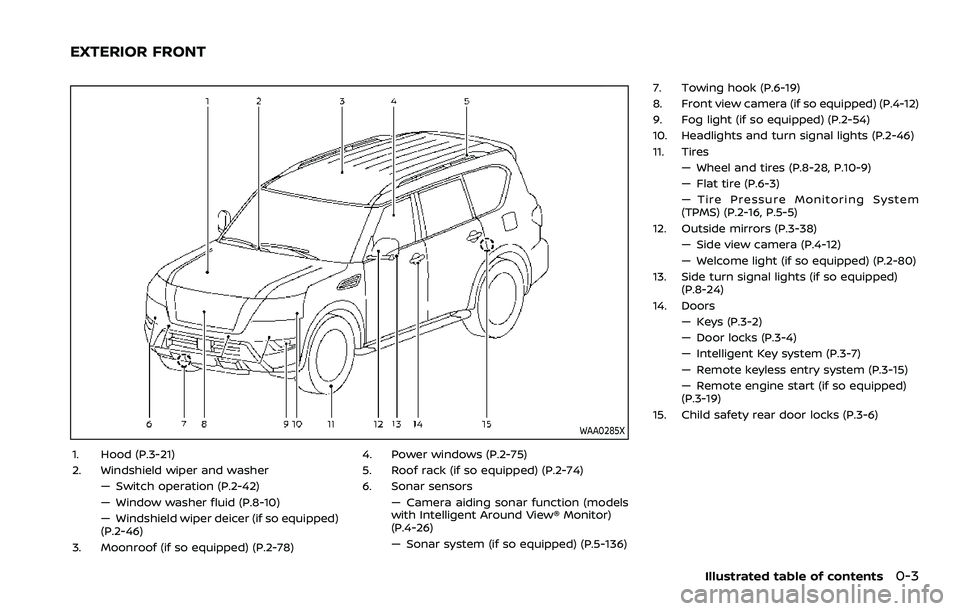
1. Hood (P.3-21)
2. Windshield wiper and washer— Switch operation (P.2-42)
— Window washer fluid (P.8-10)
— Windshield wiper deicer (if so equipped)
(P.2-46)
3. Moonroof (if so equipped) (P.2-78) 4. Power windows (P.2-75)
5. Roof rack (if so equipped) (P.2-74)
6. Sonar sensors
— Camera aiding sonar function (models
with Intelligent Around View® Monitor)
(P.4-26)
— Sonar system (if so equipped) (P.5-136) 7. Towing hook (P.6-19)
8. Front view camera (if so equipped) (P.4-12)
9. Fog light (if so equipped) (P.2-54)
10. Headlights and turn signal lights (P.2-46)
11. Tires
— Wheel and tires (P.8-28, P.10-9)
— Flat tire (P.6-3)
— Tire Pressure Monitoring System
(TPMS) (P.2-16, P.5-5)
12. Outside mirrors (P.3-38) — Side view camera (P.4-12)
— Welcome light (if so equipped) (P.2-80)
13. Side turn signal lights (if so equipped) (P.8-24)
14. Doors — Keys (P.3-2)
— Door locks (P.3-4)
— Intelligent Key system (P.3-7)
— Remote keyless entry system (P.3-15)
— Remote engine start (if so equipped)
(P.3-19)
15. Child safety rear door locks (P.3-6)
Illustrated table of contents0-3
EXTERIOR FRONT
Page 12 of 604
0-4Illustrated table of contents
WAA0286X
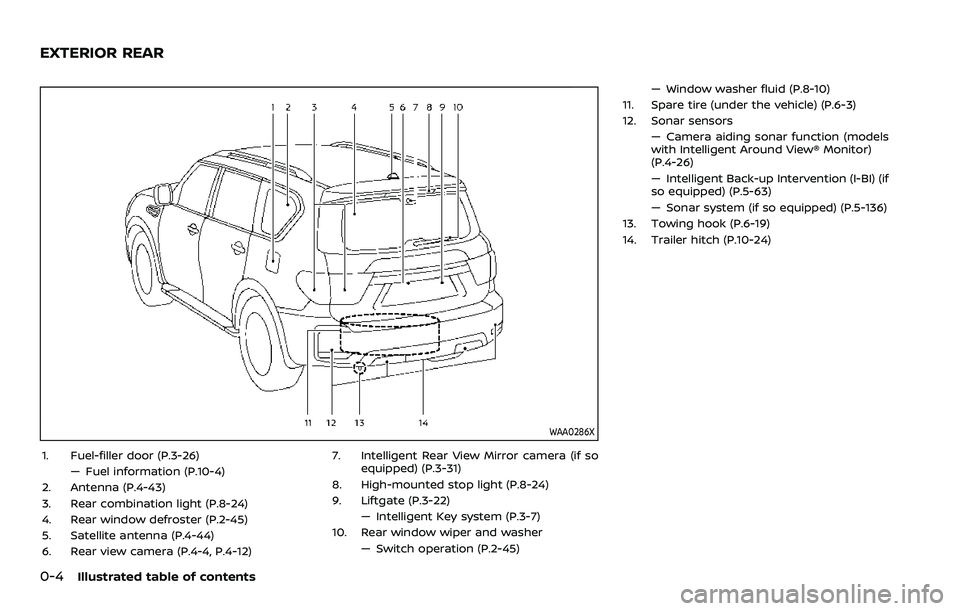
1. Fuel-filler door (P.3-26)— Fuel information (P.10-4)
2. Antenna (P.4-43)
3. Rear combination light (P.8-24)
4. Rear window defroster (P.2-45)
5. Satellite antenna (P.4-44)
6. Rear view camera (P.4-4, P.4-12) 7. Intelligent Rear View Mirror camera (if so
equipped) (P.3-31)
8. High-mounted stop light (P.8-24)
9. Liftgate (P.3-22) — Intelligent Key system (P.3-7)
10. Rear window wiper and washer
— Switch operation (P.2-45) — Window washer fluid (P.8-10)
11. Spare tire (under the vehicle) (P.6-3)
12. Sonar sensors — Camera aiding sonar function (models
with Intelligent Around View® Monitor)
(P.4-26)
— Intelligent Back-up Intervention (I-BI) (if
so equipped) (P.5-63)
— Sonar system (if so equipped) (P.5-136)
13. Towing hook (P.6-19)
14. Trailer hitch (P.10-24)
EXTERIOR REAR
Page 231 of 604
4 Monitor, heater, air conditioner, audio,phone and voice recognition systems
NissanConnect® Owner’s Manual .................................... 4-3
Safety note ........................................................................\
................ 4-3
RearView Monitor (if so equipped) ................................. 4-4
RearView Monitor system operation ..................... 4-5
How to read the displayed lines ................................ 4-5
Difference between predictive and
actual distances ...................................................................... 4-6
How to park with predictive course lines .......... 4-7
RearView Monitor settings ............................................. 4-9
RearView Monitor system limitations ................. 4-10
System maintenance ....................................................... 4-11
Intelligent Around View® Monitor (if
so equipped) ........................................................................\
.......... 4-12
Intelligent Around View® Monitor
system operation ................................................................ 4-13
Intelligent Around View® Monitor settings ...... 4-21
Intelligent Around View® Monitor
system limitations .............................................................. 4-23
System maintenance ....................................................... 4-25
Camera aiding sonar function (models with
Intelligent Around View® Monitor) ............................... 4-26 Sonar system operation ................................................ 4-26
Turning on and off the sonar function ............. 4-27
Sonar function settings ................................................. 4-28
Sonar system limitations .............................................. 4-30
System maintenance ....................................................... 4-30 Moving Object Detection (MOD) ................................... 4-31
MOD system operation ................................................ 4-32
Turning on and off the MOD system ............... 4-33
MOD function settings ................................................. 4-34
MOD system limitations .............................................. 4-34
System maintenance .................................................... 4-35
Ventilators ........................................................................\
.............. 4-36 Center ventilators ............................................................ 4-36
Side ventilators .................................................................. 4-36
Rear ventilators .................................................................. 4-36
Heater and air conditioner ................................................ 4-37 Automatic air conditioner ......................................... 4-38
Rear automatic air conditioning system ....... 4-40
Operating tips ..................................................................... 4-43
Linking Intelligent Key (if so equipped) ........... 4-43
In-cabin microfilter .......................................................... 4-43
Servicing air conditioner ............................................. 4-43
Antenna ........................................................................\
.................... 4-43 Window antenna ............................................................... 4-43
Satellite antenna ............................................................... 4-44
Car phone or CB radio ......................................................... 4-44
Rear Seat Infotainment (RSI) (if so equipped) ...... 4-45 Welcome ........................................................................\
.......... 4-45
Getting started ................................................................... 4-46
Control description ......................................................... 4-50
Page 252 of 604
4-22Monitor, heater, air conditioner, audio, phone and voice recognition systems
Available setting items:
Setting itemAction
Display Settings Brightness Adjust display settings by touching the “+”/“-” key.
Contrast
Tint
Color
Black Level
Camera Moving Object Detection Turn the MOD system on/off. (See “Moving Object Detection (MOD)” (P.4-
31).)
Unviewable Area Reminder When this item is turned on, the unviewable area is highlighted in yellow
for several seconds after the bird’s-eye view is displayed for the first time
when the ignition switch is placed in the ON position.
Predictive Course Lines When this item is turned on, the predictive course lines are displayed in the
front, rear and bird’s-eye view screen.
Auto Show Sonar Image The automatic sonar display can be turned on/off.
NOTE:
Do not adjust any of the Intelligent Around View® Monitor settings while the vehicle is moving. Make sure the parking brake is
firmly applied.
Page 256 of 604
4-26Monitor, heater, air conditioner, audio, phone and voice recognition systems
WARNING
Failure to follow the warnings and
instructions for proper use of the
sonar function as outlined in this
section could result in serious injury
or death.
.The sonar is a convenience fea-
ture. It is not a substitute for
proper parking.
. This function is designed as an
aid to the driver in detecting large
stationary objects to help avoid
damaging the vehicle.
. The driver is always responsible
for safety during parking and
other maneuvers.
. Always look around and check
that it is safe to move before
parking.
. Read and understand the limita-
tions of the sonar as contained in
this section.
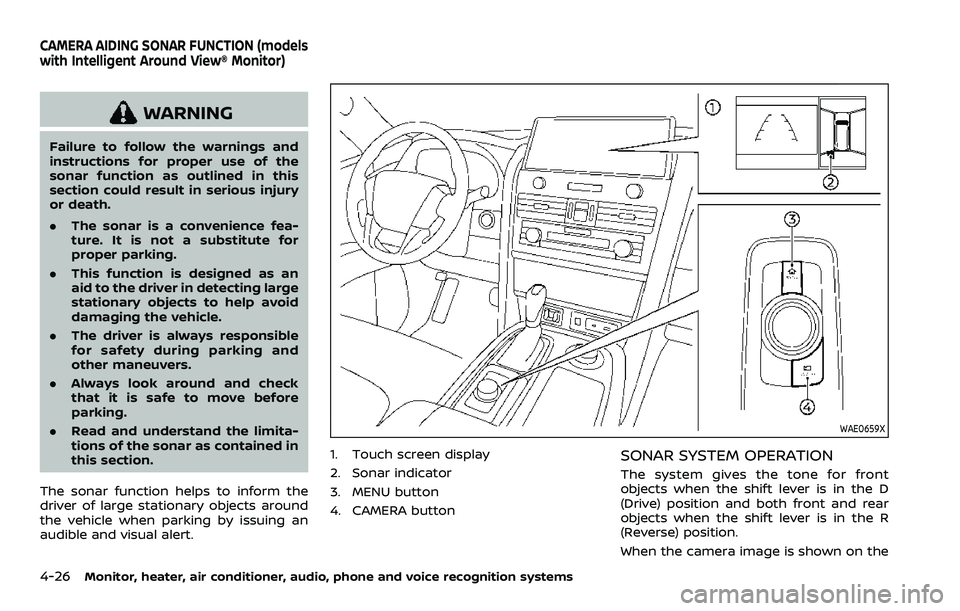
The sonar function helps to inform the
driver of large stationary objects around
the vehicle when parking by issuing an
audible and visual alert.
WAE0659X
1. Touch screen display
2. Sonar indicator
3. MENU button
4. CAMERA buttonSONAR SYSTEM OPERATION
The system gives the tone for front
objects when the shift lever is in the D
(Drive) position and both front and rear
objects when the shift lever is in the R
(Reverse) position.
When the camera image is shown on the
CAMERA AIDING SONAR FUNCTION (models
with Intelligent Around View® Monitor)
Page 257 of 604
touch screen display, the system shows
the sonar indicator regardless of the shift
lever position.
The system is deactivated at speeds
above 6 MPH (10 km/h). It is reactivated
at lower speeds.
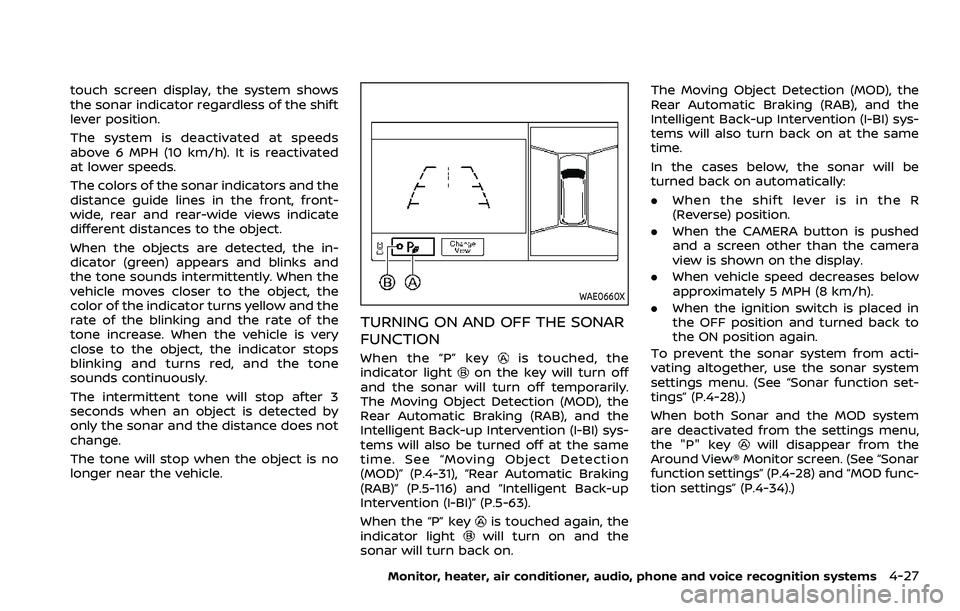
The colors of the sonar indicators and the
distance guide lines in the front, front-
wide, rear and rear-wide views indicate
different distances to the object.
When the objects are detected, the in-
dicator (green) appears and blinks and
the tone sounds intermittently. When the
vehicle moves closer to the object, the
color of the indicator turns yellow and the
rate of the blinking and the rate of the
tone increase. When the vehicle is very
close to the object, the indicator stops
blinking and turns red, and the tone
sounds continuously.
The intermittent tone will stop after 3
seconds when an object is detected by
only the sonar and the distance does not
change.
The tone will stop when the object is no
longer near the vehicle.
WAE0660X
TURNING ON AND OFF THE SONAR
FUNCTION
When the “P” keyis touched, the
indicator lighton the key will turn off
and the sonar will turn off temporarily.
The Moving Object Detection (MOD), the
Rear Automatic Braking (RAB), and the
Intelligent Back-up Intervention (I-BI) sys-
tems will also be turned off at the same
time. See “Moving Object Detection
(MOD)” (P.4-31), “Rear Automatic Braking
(RAB)” (P.5-116) and “Intelligent Back-up
Intervention (I-BI)” (P.5-63).
When the “P” key
is touched again, the
indicator lightwill turn on and the
sonar will turn back on. The Moving Object Detection (MOD), the
Rear Automatic Braking (RAB), and the
Intelligent Back-up Intervention (I-BI) sys-
tems will also turn back on at the same
time.
In the cases below, the sonar will be
turned back on automatically:
.
When the shift lever is in the R
(Reverse) position.
. When the CAMERA button is pushed
and a screen other than the camera
view is shown on the display.
. When vehicle speed decreases below
approximately 5 MPH (8 km/h).
. When the ignition switch is placed in
the OFF position and turned back to
the ON position again.
To prevent the sonar system from acti-
vating altogether, use the sonar system
settings menu. (See “Sonar function set-
tings” (P.4-28).)
When both Sonar and the MOD system
are deactivated from the settings menu,
the "P" key
will disappear from the
Around View® Monitor screen. (See “Sonar
function settings” (P.4-28) and “MOD func-
tion settings” (P.4-34).)
Monitor, heater, air conditioner, audio, phone and voice recognition systems4-27
Page 258 of 604
4-28Monitor, heater, air conditioner, audio, phone and voice recognition systems
SONAR FUNCTION SETTINGS
The camera aiding sonar function set-
tings can be changed using the following
procedures.
1. Push the MENU button on the DisplayCommander.
2. Touch the "Settings" key on the touch screen display.
3. Touch the "Parking Sonar" key.
Page 259 of 604
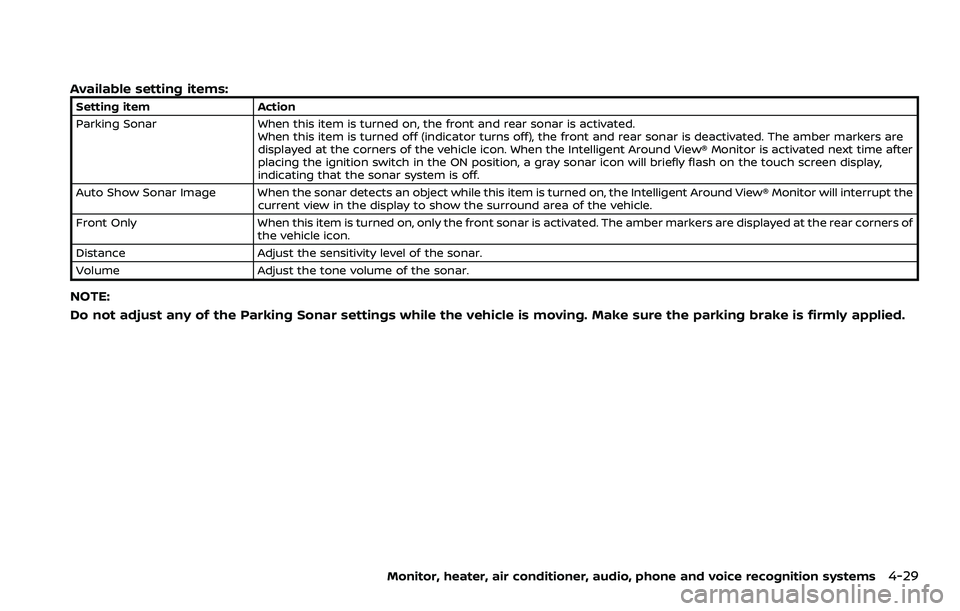
Available setting items:
Setting itemAction
Parking Sonar When this item is turned on, the front and rear sonar is activated.
When this item is turned off (indicator turns off), the front and rear sonar is deactivated. The amber markers are
displayed at the corners of the vehicle icon. When the Intelligent Around View® Monitor is activated next time after
placing the ignition switch in the ON position, a gray sonar icon will briefly flash on the touch screen display,
indicating that the sonar system is off.
Auto Show Sonar Image When the sonar detects an object while this item is turned on, the Intelligent Around View® Monitor will interrupt the current view in the display to show the surround area of the vehicle.
Front Only When this item is turned on, only the front sonar is activated. The amber markers are displayed at the rear corners of
the vehicle icon.
Distance Adjust the sensitivity level of the sonar.
Volume Adjust the tone volume of the sonar.
NOTE:
Do not adjust any of the Parking Sonar settings while the vehicle is moving. Make sure the parking brake is firmly applied.
Monitor, heater, air conditioner, audio, phone and voice recognition systems4-29
Page 260 of 604
4-30Monitor, heater, air conditioner, audio, phone and voice recognition systems
SONAR SYSTEM LIMITATIONS
WARNING
Listed below are the system limita-
tions for the sonar function. Failure
to operate the vehicle in accordance
with these system limitations could
result in serious injury or death.
.Inclement weather or ultrasonic
sources such as an automatic car
wash, a truck’s compressed-air
brakes or a pneumatic drill may
affect the function of the system,
including reduced performance
or a false activation.
. The system is not designed to
prevent contact with small or
moving objects.
. The system will not detect small
objects below the bumper, and
may not detect objects close to
the bumper or on the ground.
. The system may not detect the
following objects:
— Fluffy objects such as snow,
cloth, cotton, grass or wool.
— Thin objects such as rope, wire or chain. — Wedge-shaped objects.
. If your vehicle sustains damage
to the bumper fascia, leaving it
misaligned or bent, the sensing
zone may be altered causing in-
accurate measurement of objects
or false alarms.
CAUTION
Excessive noise (such as audio sys-
tem volume or an open vehicle win-
dow) will interfere with the tone and
it may not be heard.
See “Front and rear sonar system” (P.5-
136) for more information on the sonar
system and limitations.
System temporarily unavailable
When the amber markers are displayed at
the corners of the vehicle icon and the
function cannot be activated from the
Parking sonar settings menu (the setting
items are grayed out), the sonar system
may be malfunctioning.
SYSTEM MAINTENANCE
CAUTION
Keep the surface of the sonar (lo-
cated on the front and rear bumper
fascia) free from accumulations of
snow, ice and dirt. Do not scratch the
surface of the sonar when cleaning.
If the sensors are covered, the accu-
racy of the sonar function will be
diminished.
Page 263 of 604
WAE0663X
Rear and front-side views
WAE0664X
Front-wide view / rear-wide view (example)
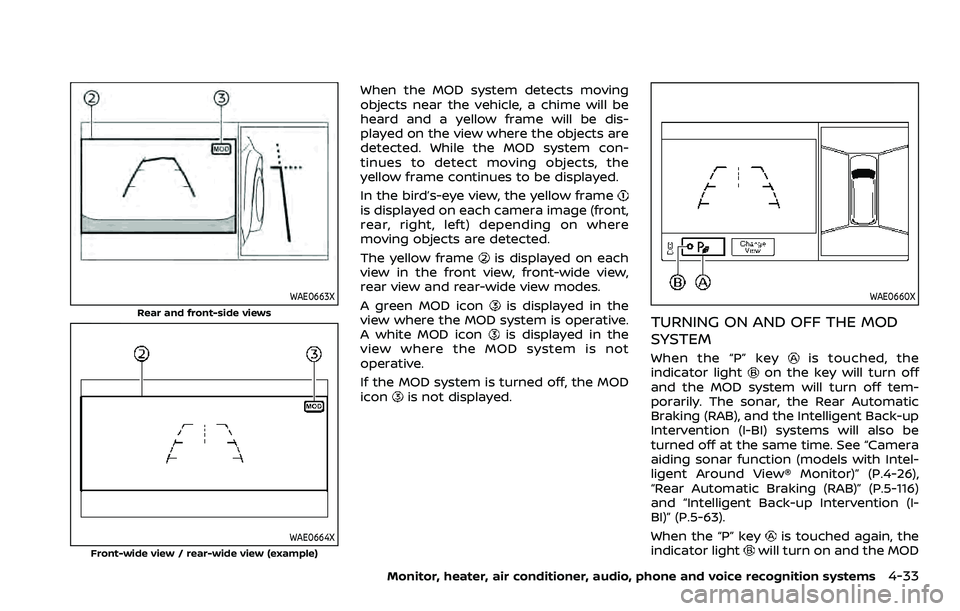
When the MOD system detects moving
objects near the vehicle, a chime will be
heard and a yellow frame will be dis-
played on the view where the objects are
detected. While the MOD system con-
tinues to detect moving objects, the
yellow frame continues to be displayed.
In the bird’s-eye view, the yellow frame
is displayed on each camera image (front,
rear, right, left) depending on where
moving objects are detected.
The yellow frame
is displayed on each
view in the front view, front-wide view,
rear view and rear-wide view modes.
A green MOD icon
is displayed in the
view where the MOD system is operative.
A white MOD icon
is displayed in the
view where the MOD system is not
operative.
If the MOD system is turned off, the MOD
icon
is not displayed.
WAE0660X
TURNING ON AND OFF THE MOD
SYSTEM
When the “P” keyis touched, the
indicator lighton the key will turn off
and the MOD system will turn off tem-
porarily. The sonar, the Rear Automatic
Braking (RAB), and the Intelligent Back-up
Intervention (I-BI) systems will also be
turned off at the same time. See “Camera
aiding sonar function (models with Intel-
ligent Around View® Monitor)” (P.4-26),
“Rear Automatic Braking (RAB)” (P.5-116)
and “Intelligent Back-up Intervention (I-
BI)” (P.5-63).
When the “P” key
is touched again, the
indicator lightwill turn on and the MOD
Monitor, heater, air conditioner, audio, phone and voice recognition systems4-33