fuel NISSAN CUBE 2009 Owners Manual
[x] Cancel search | Manufacturer: NISSAN, Model Year: 2009, Model line: CUBE, Model: NISSAN CUBE 2009Pages: 321, PDF Size: 4.99 MB
Page 10 of 321
Black plate (6,1)
Model "Z12-D" EDITED: 2009/ 1/ 28
SSI0560
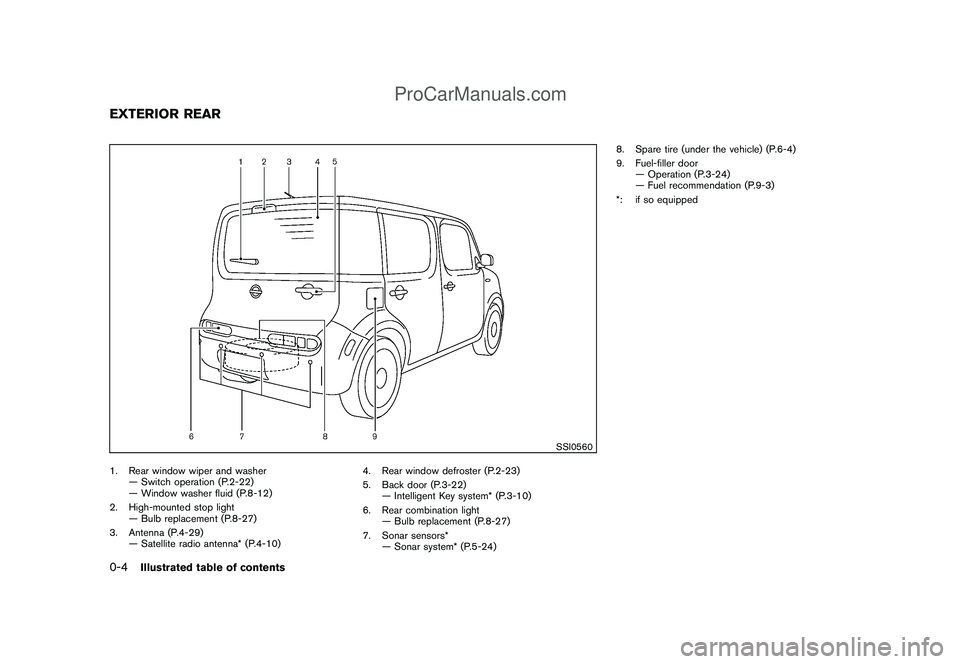
1. Rear window wiper and washer
— Switch operation (P.2-22)
— Window washer fluid (P.8-12)
2. High-mounted stop light
— Bulb replacement (P.8-27)
3. Antenna (P.4-29)
— Satellite radio antenna* (P.4-10)4. Rear window defroster (P.2-23)
5. Back door (P.3-22)
— Intelligent Key system* (P.3-10)
6. Rear combination light
— Bulb replacement (P.8-27)
7. Sonar sensors*
— Sonar system* (P.5-24)8. Spare tire (under the vehicle) (P.6-4)
9. Fuel-filler door
— Operation (P.3-24)
— Fuel recommendation (P.9-3)
*: if so equippedEXTERIOR REAR0-4
Illustrated table of contents
ProCarManuals.com
Page 14 of 321
Black plate (10,1)
Model "Z12-D" EDITED: 2009/ 1/ 28
SSI0562
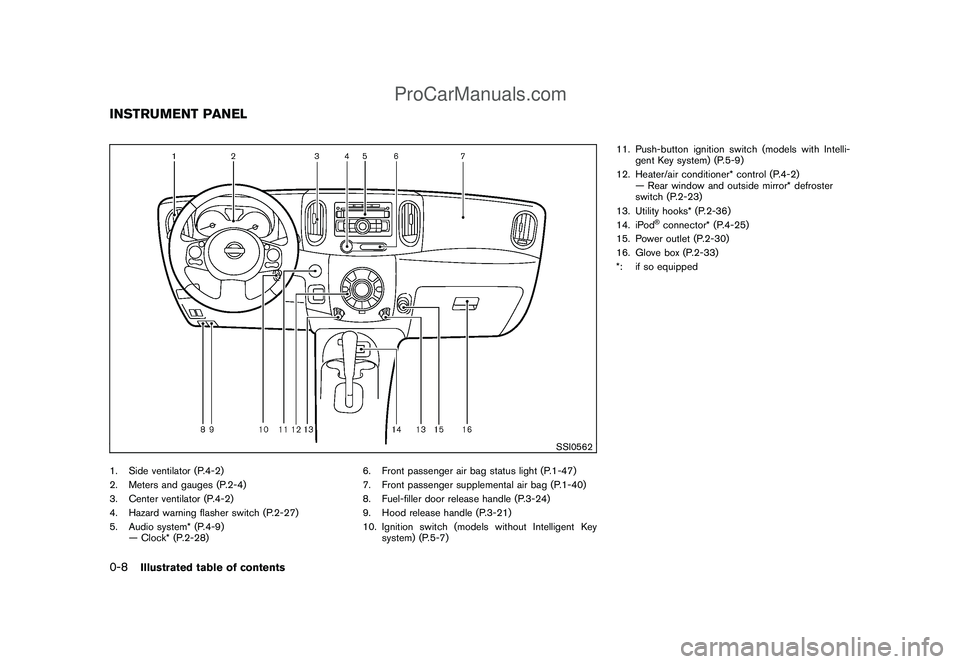
1. Side ventilator (P.4-2)
2. Meters and gauges (P.2-4)
3. Center ventilator (P.4-2)
4. Hazard warning flasher switch (P.2-27)
5. Audio system* (P.4-9)
— Clock* (P.2-28)6. Front passenger air bag status light (P.1-47)
7. Front passenger supplemental air bag (P.1-40)
8. Fuel-filler door release handle (P.3-24)
9. Hood release handle (P.3-21)
10. Ignition switch (models without Intelligent Key
system) (P.5-7)11. Push-button ignition switch (models with Intelli-
gent Key system) (P.5-9)
12. Heater/air conditioner* control (P.4-2)
— Rear window and outside mirror* defroster
switch (P.2-23)
13. Utility hooks* (P.2-36)
14. iPod
®connector* (P.4-25)
15. Power outlet (P.2-30)
16. Glove box (P.2-33)
*: if so equipped
INSTRUMENT PANEL0-8
Illustrated table of contents
ProCarManuals.com
Page 15 of 321
Black plate (11,1)
Model "Z12-D" EDITED: 2009/ 1/ 28
SIC4119
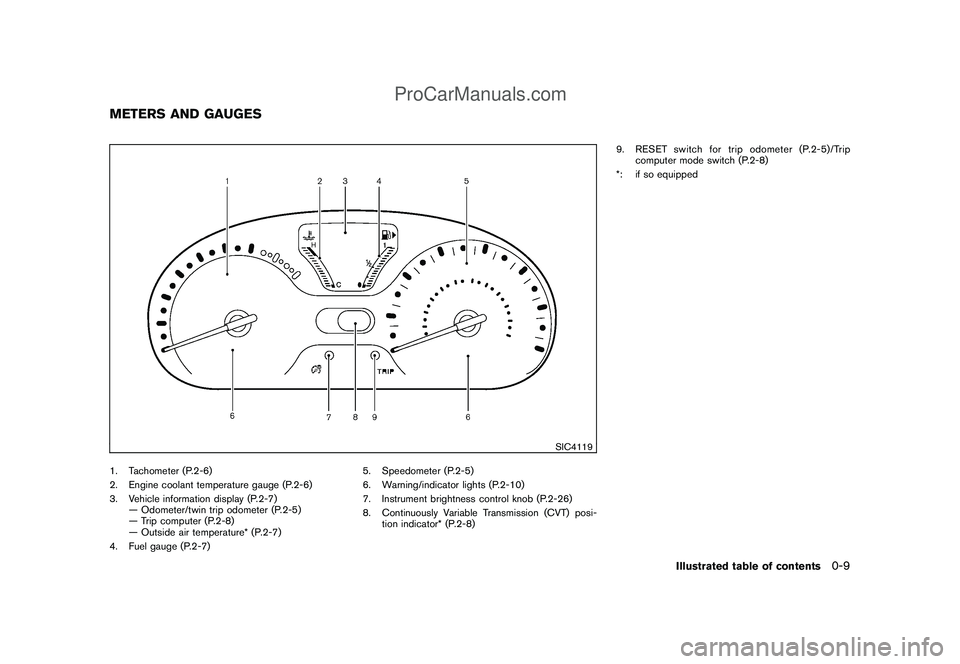
1. Tachometer (P.2-6)
2. Engine coolant temperature gauge (P.2-6)
3. Vehicle information display (P.2-7)
— Odometer/twin trip odometer (P.2-5)
— Trip computer (P.2-8)
— Outside air temperature* (P.2-7)
4. Fuel gauge (P.2-7)5. Speedometer (P.2-5)
6. Warning/indicator lights (P.2-10)
7. Instrument brightness control knob (P.2-26)
8. Continuously Variable Transmission (CVT) posi-
tion indicator* (P.2-8)9. RESET switch for trip odometer (P.2-5)/Trip
computer mode switch (P.2-8)
*: if so equippedMETERS AND GAUGES
Illustrated table of contents
0-9
ProCarManuals.com
Page 73 of 321
Black plate (7,1)
2 Instruments and controls
Model "Z12-D" EDITED: 2009/ 1/ 28
Cockpit............................................................ 2-2
Instrument panel ................................................ 2-3
Meters and gauges ............................................. 2-4
Speedometer and odometer ............................. 2-5
Tachometer ................................................... 2-6
Engine coolant temperature gauge ..................... 2-6
Fuel gauge ................................................... 2-7
Vehicle information display ................................ 2-7
Outside air temperature (if so equipped) .............. 2-7
Continuously Variable Transmission (CVT)
position indicator (if so equipped) ...................... 2-8
Trip computer ................................................ 2-8
Warning/indicator lights and audible reminders ....... 2-10
Checking bulbs ........................................... 2-10
Warning lights ............................................. 2-10
Indicator lights ............................................. 2-15
Audible reminders ........................................ 2-17
Security systems .............................................. 2-17
Vehicle security system .................................. 2-17
NISSAN Vehicle Immobilizer System ................. 2-19
Windshield wiper and washer switch .................... 2-20
Rear window wiper and washer switch .................. 2-22
Rear window and outside mirror defroster switch ..... 2-23
Headlight and turn signal switch .......................... 2-23
Headlight switch .......................................... 2-23 Turn signal switch
........................................ 2-26
Fog light switch (if so equipped) ...................... 2-27
Hazard warning flasher switch ............................. 2-27
Horn ............................................................. 2-28
Vehicle Dynamic Control (VDC) OFF switch ........... 2-28
Clock (if so equipped) ....................................... 2-28
Adjusting the time ........................................ 2-29
Resetting the time ........................................ 2-30
Power outlet ................................................... 2-30
Storage ......................................................... 2-31
Cup holders ................................................ 2-31
Glove box .................................................. 2-33
Rear pillar pocket ......................................... 2-33
Cargo cover (if so equipped) .......................... 2-34
Luggage hooks ............................................ 2-35
Utility hooks (if so equipped) ........................... 2-36
Windows ....................................................... 2-36
Power windows ........................................... 2-36
Interior lights ................................................... 2-39
Map lights (if so equipped) ............................. 2-39
Map light control switch (if so equipped) ........... 2-39
Ceiling light ................................................ 2-40
Cargo light (if so equipped) ................................ 2-41
ProCarManuals.com
Page 75 of 321
Black plate (73,1)
Model "Z12-D" EDITED: 2009/ 1/ 28
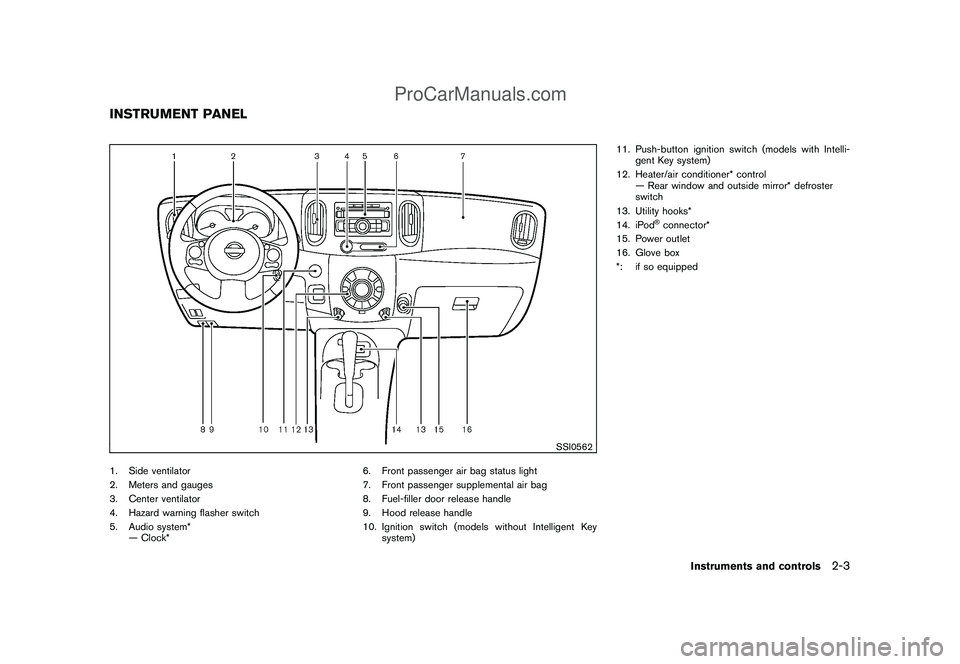
SSI0562
1. Side ventilator
2. Meters and gauges
3. Center ventilator
4. Hazard warning flasher switch
5. Audio system*
— Clock*6. Front passenger air bag status light
7. Front passenger supplemental air bag
8. Fuel-filler door release handle
9. Hood release handle
10. Ignition switch (models without Intelligent Key
system)11. Push-button ignition switch (models with Intelli-
gent Key system)
12. Heater/air conditioner* control
— Rear window and outside mirror* defroster
switch
13. Utility hooks*
14. iPod
®connector*
15. Power outlet
16. Glove box
*: if so equipped
INSTRUMENT PANEL
Instruments and controls
2-3
ProCarManuals.com
Page 76 of 321
Black plate (74,1)
Model "Z12-D" EDITED: 2009/ 1/ 28
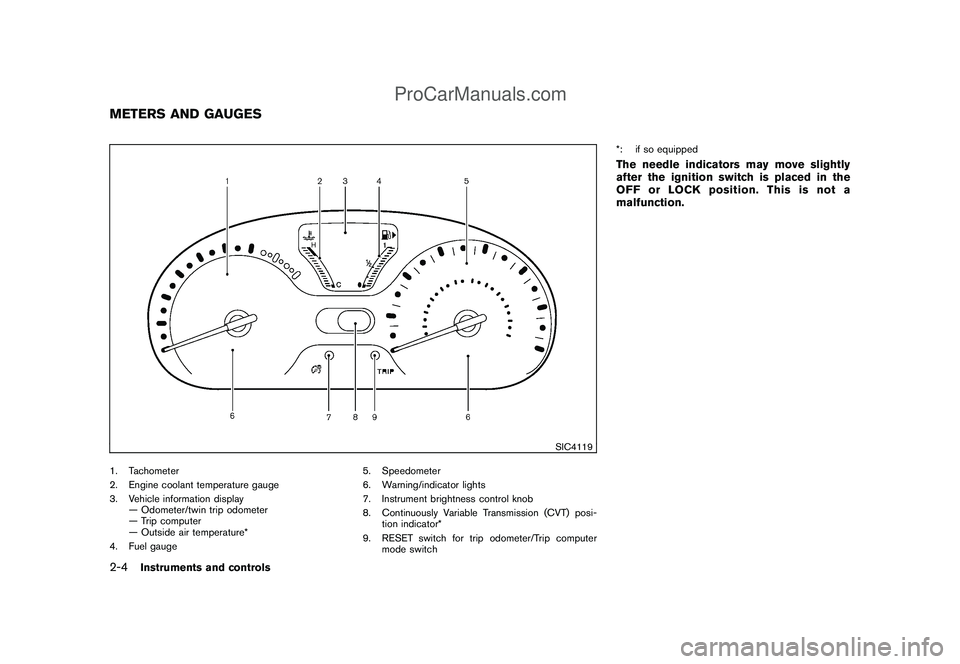
SIC4119
1. Tachometer
2. Engine coolant temperature gauge
3. Vehicle information display
— Odometer/twin trip odometer
— Trip computer
— Outside air temperature*
4. Fuel gauge5. Speedometer
6. Warning/indicator lights
7. Instrument brightness control knob
8. Continuously Variable Transmission (CVT) posi-
tion indicator*
9. RESET switch for trip odometer/Trip computer
mode switch*: if so equipped
The needle indicators may move slightly
after the ignition switch is placed in the
OFF or LOCK position. This is not a
malfunction.
METERS AND GAUGES2-4
Instruments and controls
ProCarManuals.com
Page 79 of 321
Black plate (77,1)
Model "Z12-D" EDITED: 2009/ 1/ 28
SIC4124
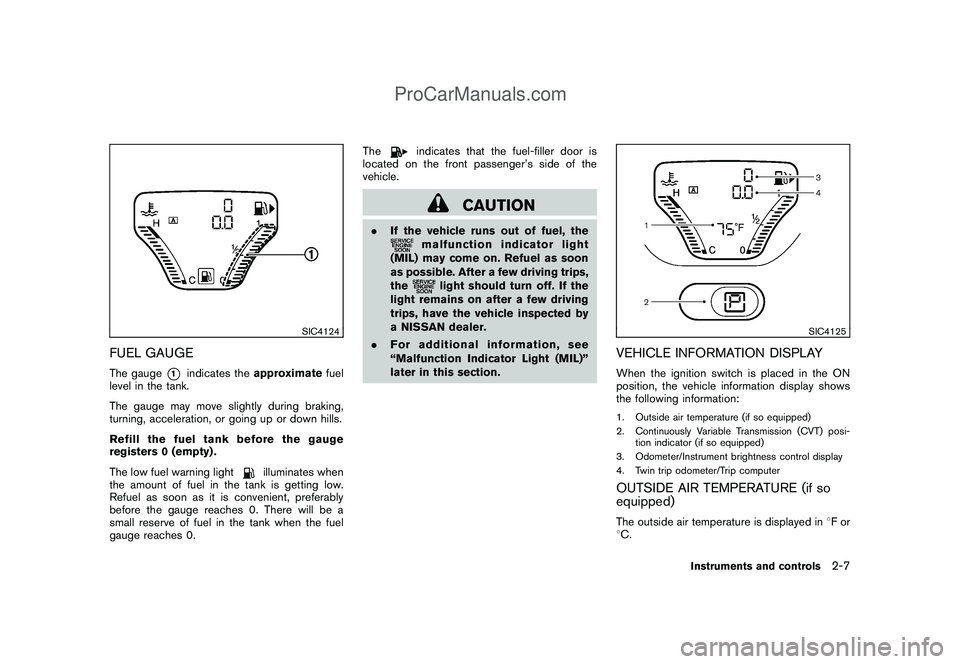
FUEL GAUGEThe gauge
*1
indicates theapproximatefuel
level in the tank.
The gauge may move slightly during braking,
turning, acceleration, or going up or down hills.
Refill the fuel tank before the gauge
registers 0 (empty) .
The low fuel warning light
illuminates when
the amount of fuel in the tank is getting low.
Refuel as soon as it is convenient, preferably
before the gauge reaches 0. There will be a
small reserve of fuel in the tank when the fuel
gauge reaches 0.The
indicates that the fuel-filler door is
located on the front passenger’s side of the
vehicle.
CAUTION
.If the vehicle runs out of fuel, the
malfunction indicator light
(MIL) may come on. Refuel as soon
as possible. After a few driving trips,
the
light should turn off. If the
light remains on after a few driving
trips, have the vehicle inspected by
a NISSAN dealer.
.For additional information, see
“Malfunction Indicator Light (MIL)”
later in this section.
SIC4125
VEHICLE INFORMATION DISPLAYWhen the ignition switch is placed in the ON
position, the vehicle information display shows
the following information:1. Outside air temperature (if so equipped)
2. Continuously Variable Transmission (CVT) posi-
tion indicator (if so equipped)
3. Odometer/Instrument brightness control display
4. Twin trip odometer/Trip computerOUTSIDE AIR TEMPERATURE (if so
equipped)The outside air temperature is displayed in8For
8C.
Instruments and controls
2-7
ProCarManuals.com
Page 80 of 321
Black plate (78,1)
Model "Z12-D" EDITED: 2009/ 1/ 28
When the outside air temperature becomes
378F(38C) or lower, the outside air temperature
display blinks to give a warning. The display will
stop blinking after 1 minute or when the outside
air temperature becomes 398F(48C) or above.
The display may differ from the actual outside
temperature displayed on various signs or bill-
boards.CONTINUOUSLY VARIABLE TRANS-
MISSION (CVT) POSITION INDICATOR
(if so equipped)The Continuously Variable Transmission (CVT)
position indicator indicates the selector lever
position when the ignition switch is in the ON
position.
SIC4126
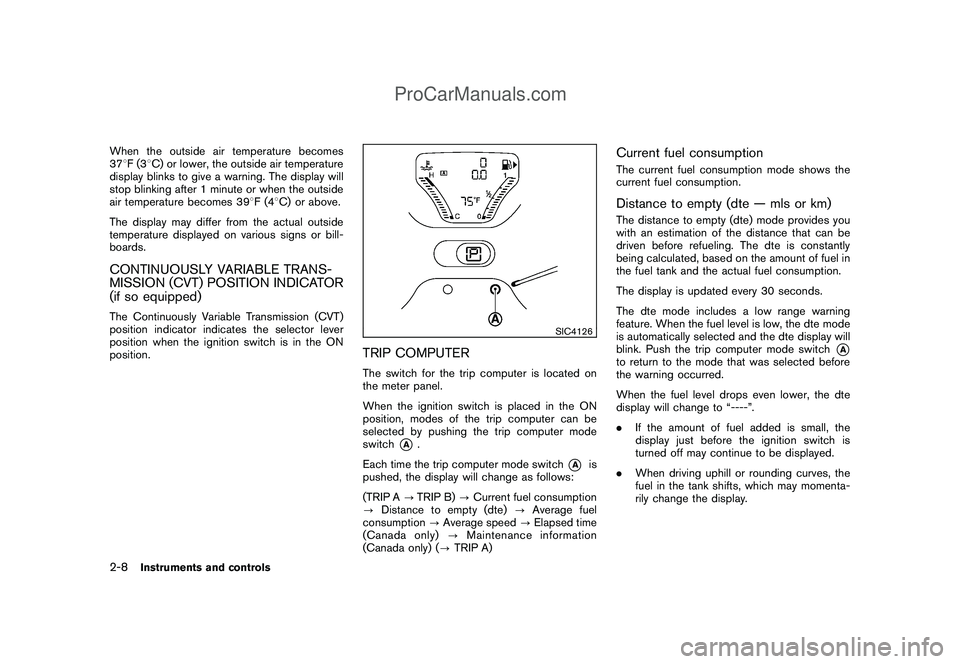
TRIP COMPUTERThe switch for the trip computer is located on
the meter panel.
When the ignition switch is placed in the ON
position, modes of the trip computer can be
selected by pushing the trip computer mode
switch
*A
.
Each time the trip computer mode switch
*A
is
pushed, the display will change as follows:
(TRIP A?TRIP B)?Current fuel consumption
?Distance to empty (dte)?Average fuel
consumption?Average speed?Elapsed time
(Canada only)?Maintenance information
(Canada only) (?TRIP A)
Current fuel consumptionThe current fuel consumption mode shows the
current fuel consumption.Distance to empty (dte — mls or km)The distance to empty (dte) mode provides you
with an estimation of the distance that can be
driven before refueling. The dte is constantly
being calculated, based on the amount of fuel in
the fuel tank and the actual fuel consumption.
The display is updated every 30 seconds.
The dte mode includes a low range warning
feature. When the fuel level is low, the dte mode
is automatically selected and the dte display will
blink. Push the trip computer mode switch
*A
to return to the mode that was selected before
the warning occurred.
When the fuel level drops even lower, the dte
display will change to “----”.
.If the amount of fuel added is small, the
display just before the ignition switch is
turned off may continue to be displayed.
.When driving uphill or rounding curves, the
fuel in the tank shifts, which may momenta-
rily change the display.
2-8
Instruments and controls
ProCarManuals.com
Page 81 of 321
Black plate (79,1)
Model "Z12-D" EDITED: 2009/ 1/ 28
Average fuel consumption (mpg or l
(liter)/100 km)The average fuel consumption mode shows the
average fuel consumption since the last reset.
Resetting is done by pushing the trip computer
mode switch
*A
for approximately 1 second.
The display is updated every 30 seconds. At
about the first 1/3 mile (500 m) after a reset, the
display shows “---”.
Average speed (mph or km/h)The average speed mode shows the average
vehicle speed since the last reset. Resetting is
done by pushing the trip computer mode switch*A
for approximately 1 second.
The display is updated every 30 seconds. The
first 30 seconds after a reset, the display shows
“---”.
Elapsed time (Canada only)The elapsed time mode shows the time since
the last reset. The displayed time can be reset
by pushing the trip computer mode switch
*A
for approximately 1 second.Resetting displaysWhen the average fuel consumption, average
speed, elapsed time or TRIP B is displayed,
push the trip computer mode switch
*A
for
longer than 3 seconds. The average fuelconsumption, average speed, elapsed time and
trip odometer (TRIP B only) displays will be reset
at the same time.
Maintenance information (Canada only)When the ignition switch is placed in the ON
position, maintenance information (the wrench
symbol
and distance to change a main-
tenance item) comes on for about 5 seconds
and then turns off.
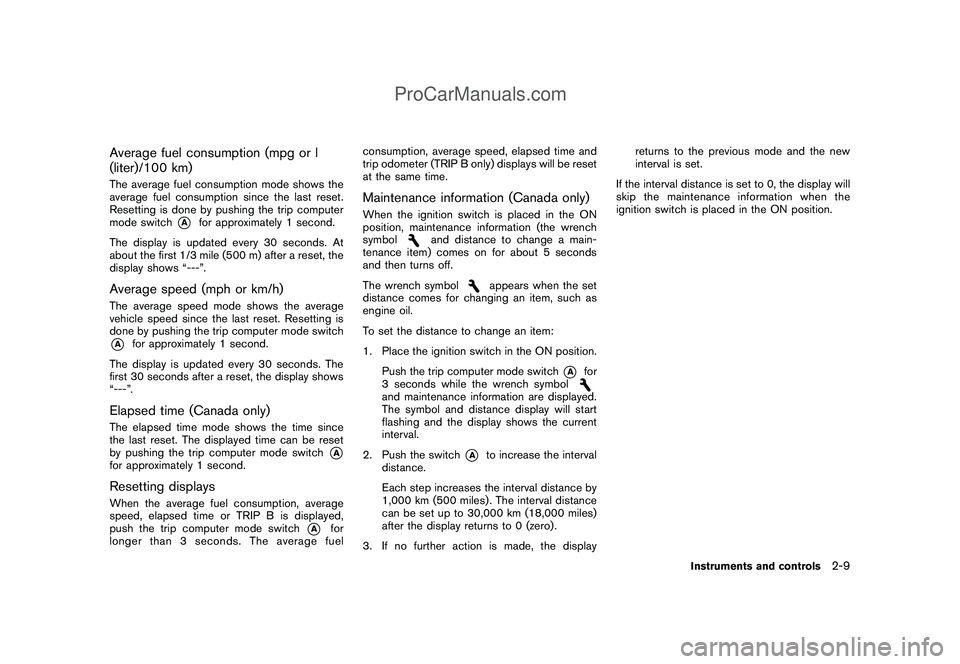
The wrench symbol
appears when the set
distance comes for changing an item, such as
engine oil.
To set the distance to change an item:
1. Place the ignition switch in the ON position.
Push the trip computer mode switch
*A
for
3 seconds while the wrench symbol
and maintenance information are displayed.
The symbol and distance display will start
flashing and the display shows the current
interval.
2. Push the switch
*A
to increase the interval
distance.
Each step increases the interval distance by
1,000 km (500 miles) . The interval distance
can be set up to 30,000 km (18,000 miles)
after the display returns to 0 (zero) .
3. If no further action is made, the displayreturns to the previous mode and the new
interval is set.
If the interval distance is set to 0, the display will
skip the maintenance information when the
ignition switch is placed in the ON position.
Instruments and controls
2-9
ProCarManuals.com
Page 82 of 321
Black plate (80,1)
Model "Z12-D" EDITED: 2009/ 1/ 28
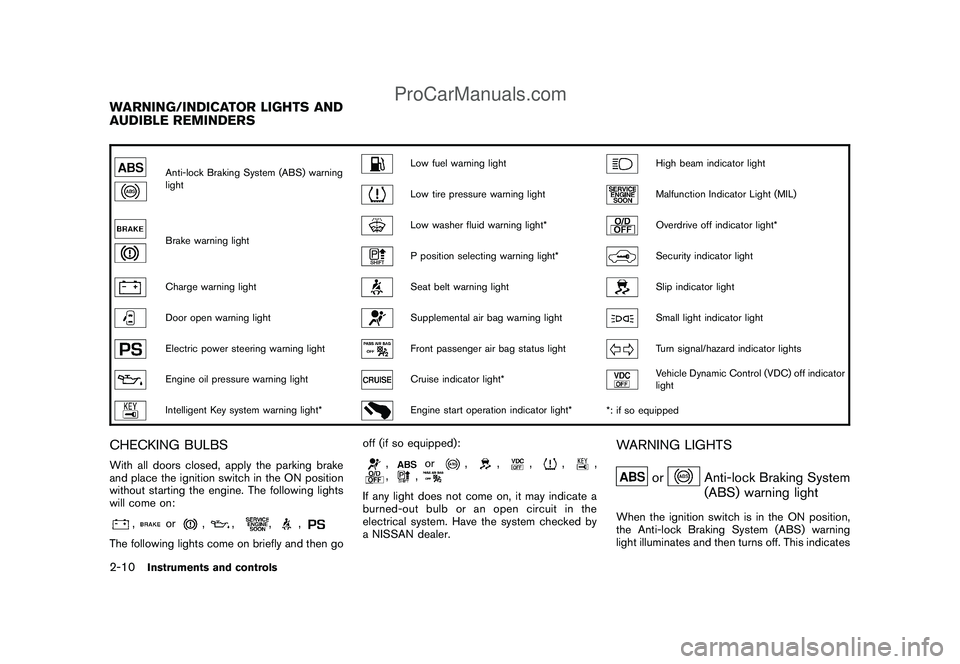
Anti-lock Braking System (ABS) warning
light
Low fuel warning light
High beam indicator light
Low tire pressure warning light
Malfunction Indicator Light (MIL)
Brake warning light
Low washer fluid warning light*
Overdrive off indicator light*
P position selecting warning light*
Security indicator light
Charge warning light
Seat belt warning light
Slip indicator light
Door open warning light
Supplemental air bag warning light
Small light indicator light
Electric power steering warning light
Front passenger air bag status light
Turn signal/hazard indicator lights
Engine oil pressure warning light
Cruise indicator light*
Vehicle Dynamic Control (VDC) off indicator
light
Intelligent Key system warning light*
Engine start operation indicator light*
*: if so equipped
CHECKING BULBSWith all doors closed, apply the parking brake
and place the ignition switch in the ON position
without starting the engine. The following lights
will come on:
,
or
,
,
,
,
The following lights come on briefly and then gooff (if so equipped):
,
or
,
,
,
,
,
,
,
If any light does not come on, it may indicate a
burned-out bulb or an open circuit in the
electrical system. Have the system checked by
a NISSAN dealer.
WARNING LIGHTS
or
Anti-lock Braking System
(ABS) warning light
When the ignition switch is in the ON position,
the Anti-lock Braking System (ABS) warning
light illuminates and then turns off. This indicates
WARNING/INDICATOR LIGHTS AND
AUDIBLE REMINDERS2-10
Instruments and controls
ProCarManuals.com