horn NISSAN CUBE 2009 Owners Manual
[x] Cancel search | Manufacturer: NISSAN, Model Year: 2009, Model line: CUBE, Model: NISSAN CUBE 2009Pages: 321, PDF Size: 4.99 MB
Page 13 of 321
Black plate (9,1)
Model "Z12-D" EDITED: 2009/ 1/ 28
SSI0563
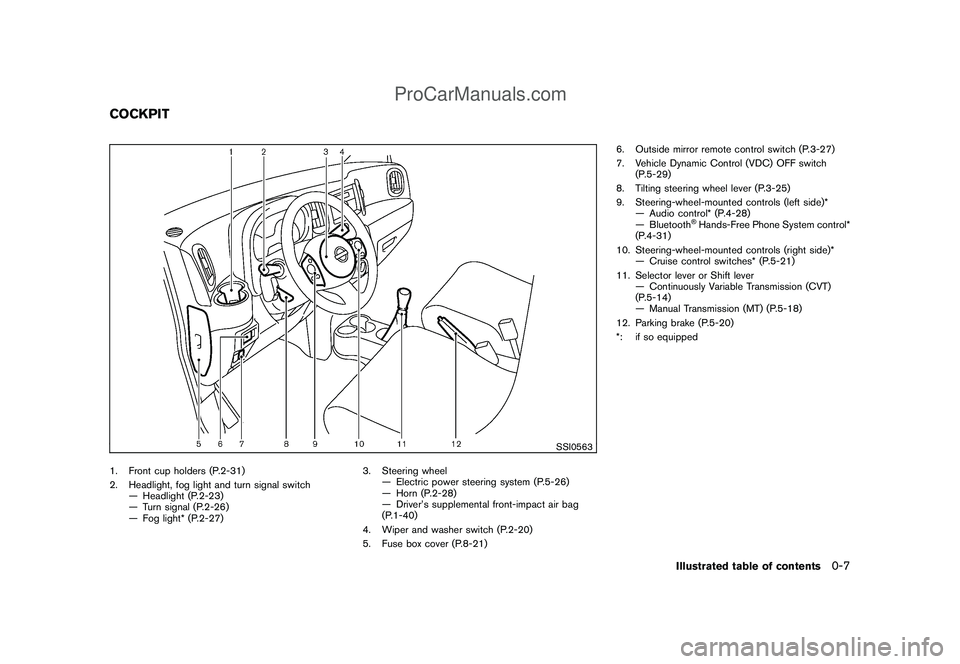
1. Front cup holders (P.2-31)
2. Headlight, fog light and turn signal switch
— Headlight (P.2-23)
— Turn signal (P.2-26)
— Fog light* (P.2-27)3. Steering wheel
— Electric power steering system (P.5-26)
— Horn (P.2-28)
— Driver’s supplemental front-impact air bag
(P.1-40)
4. Wiper and washer switch (P.2-20)
5. Fuse box cover (P.8-21)6. Outside mirror remote control switch (P.3-27)
7. Vehicle Dynamic Control (VDC) OFF switch
(P.5-29)
8. Tilting steering wheel lever (P.3-25)
9. Steering-wheel-mounted controls (left side)*
— Audio control* (P.4-28)
— Bluetooth
®Hands-Free Phone System control*
(P.4-31)
10. Steering-wheel-mounted controls (right side)*
— Cruise control switches* (P.5-21)
11. Selector lever or Shift lever
— Continuously Variable Transmission (CVT)
(P.5-14)
— Manual Transmission (MT) (P.5-18)
12. Parking brake (P.5-20)
*: if so equipped
COCKPIT
Illustrated table of contents
0-7
ProCarManuals.com
Page 73 of 321
Black plate (7,1)
2 Instruments and controls
Model "Z12-D" EDITED: 2009/ 1/ 28
Cockpit............................................................ 2-2
Instrument panel ................................................ 2-3
Meters and gauges ............................................. 2-4
Speedometer and odometer ............................. 2-5
Tachometer ................................................... 2-6
Engine coolant temperature gauge ..................... 2-6
Fuel gauge ................................................... 2-7
Vehicle information display ................................ 2-7
Outside air temperature (if so equipped) .............. 2-7
Continuously Variable Transmission (CVT)
position indicator (if so equipped) ...................... 2-8
Trip computer ................................................ 2-8
Warning/indicator lights and audible reminders ....... 2-10
Checking bulbs ........................................... 2-10
Warning lights ............................................. 2-10
Indicator lights ............................................. 2-15
Audible reminders ........................................ 2-17
Security systems .............................................. 2-17
Vehicle security system .................................. 2-17
NISSAN Vehicle Immobilizer System ................. 2-19
Windshield wiper and washer switch .................... 2-20
Rear window wiper and washer switch .................. 2-22
Rear window and outside mirror defroster switch ..... 2-23
Headlight and turn signal switch .......................... 2-23
Headlight switch .......................................... 2-23 Turn signal switch
........................................ 2-26
Fog light switch (if so equipped) ...................... 2-27
Hazard warning flasher switch ............................. 2-27
Horn ............................................................. 2-28
Vehicle Dynamic Control (VDC) OFF switch ........... 2-28
Clock (if so equipped) ....................................... 2-28
Adjusting the time ........................................ 2-29
Resetting the time ........................................ 2-30
Power outlet ................................................... 2-30
Storage ......................................................... 2-31
Cup holders ................................................ 2-31
Glove box .................................................. 2-33
Rear pillar pocket ......................................... 2-33
Cargo cover (if so equipped) .......................... 2-34
Luggage hooks ............................................ 2-35
Utility hooks (if so equipped) ........................... 2-36
Windows ....................................................... 2-36
Power windows ........................................... 2-36
Interior lights ................................................... 2-39
Map lights (if so equipped) ............................. 2-39
Map light control switch (if so equipped) ........... 2-39
Ceiling light ................................................ 2-40
Cargo light (if so equipped) ................................ 2-41
ProCarManuals.com
Page 74 of 321
Black plate (72,1)
Model "Z12-D" EDITED: 2009/ 1/ 28
SSI0563
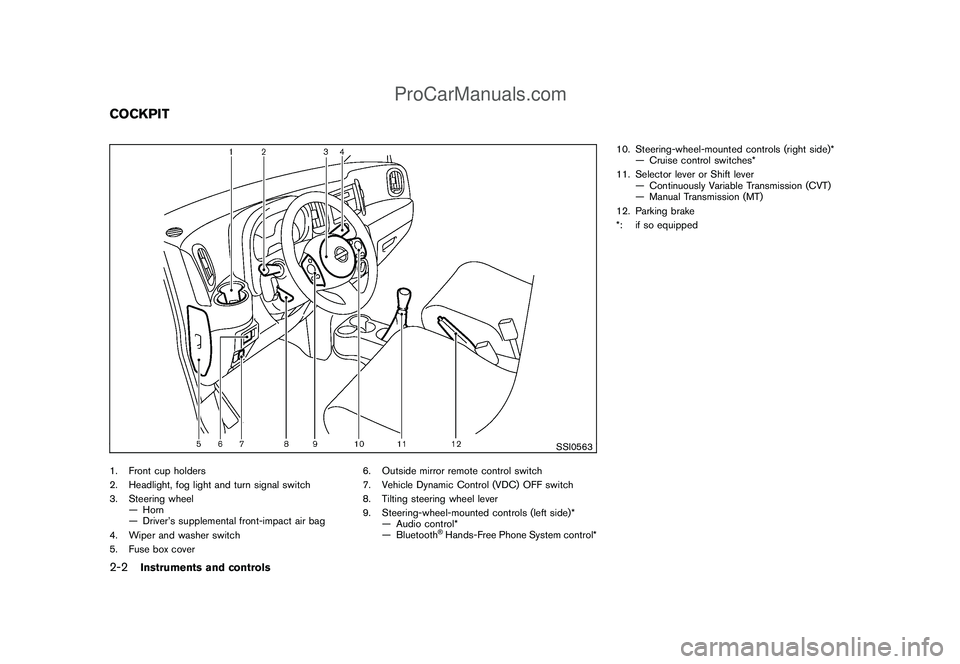
1. Front cup holders
2. Headlight, fog light and turn signal switch
3. Steering wheel
— Horn
— Driver’s supplemental front-impact air bag
4. Wiper and washer switch
5. Fuse box cover6. Outside mirror remote control switch
7. Vehicle Dynamic Control (VDC) OFF switch
8. Tilting steering wheel lever
9. Steering-wheel-mounted controls (left side)*
— Audio control*
— Bluetooth
®Hands-Free Phone System control*10. Steering-wheel-mounted controls (right side)*
— Cruise control switches*
11. Selector lever or Shift lever
— Continuously Variable Transmission (CVT)
— Manual Transmission (MT)
12. Parking brake
*: if so equipped
COCKPIT2-2
Instruments and controls
ProCarManuals.com
Page 91 of 321
Black plate (89,1)
Model "Z12-D" EDITED: 2009/ 1/ 28
Vehicle security system activationThe vehicle security system will give the follow-
ing alarm:
.The headlights blink and the horn sounds
intermittently.
.The alarm automatically turns off after
approximately 50 seconds. However, the
alarm reactivates if the vehicle is tampered
with again.
The alarm is activated by:
.Unlocking the door without using the keyfob,
the Intelligent Key (if so equipped) the
request switch (if so equipped) or the key.
(Even if the door is opened by releasing the
door inside lock knob, the alarm will
activate.)How to stop an activated alarmThe alarm will stop by unlocking a door by
pushing the UNLOCK
button on the keyfob
or Intelligent Key, pushing the request switch or
using the key. The alarm will not stop if the
ignition switch is placed in the ACC or ON
position.
If the system does not operate as de-
scribed above, have it checked by a
NISSAN dealer.
NISSAN VEHICLE IMMOBILIZER SYS-
TEMThe NISSAN Vehicle Immobilizer System will not
allow the engine to start without the use of the
registered key.
If the engine fails to start using the registered
key, it may be due to interference caused by
another registered key, an automated toll road
device or automated payment device on the key
ring. Restart the engine using the following
procedures:
1. Leave the ignition switch in the ON position
for approximately 5 seconds.
2. Place the ignition switch in the OFF or
LOCK position and wait approximately 10
seconds.
3. Repeat step 1 and 2 again.
4. Restart the engine while holding the device
(which may have caused the interference)
separate from the registered key.
If this procedure allows the engine to start,
NISSAN recommends placing the regis-
tered key on a separate key ring to avoid
interference from other devices.
Statement related to section 15 of FCC
rules for NISSAN Vehicle Immobilizer
System (CONT ASSY-BCM. ANT ASSY-
IMMOBILISER)This device complies with part 15 of the
FCC Rules and RSS-210 of Industry Cana-
da. Operation is subject to the following
two conditions;
(1) This device may not cause harmful
interference, and (2) this device must
accept any interference received, including
interference that may cause undesired
operation of the device.
CHANGES OR MODIFICATIONS NOT EX-
PRESSLY APPROVED BY THE PARTY
RESPONSIBLE FOR COMPLIANCE COULD
VOID THE USER’S AUTHORITY TO OPER-
ATE THE EQUIPMENT.
Instruments and controls
2-19
ProCarManuals.com
Page 100 of 321
Black plate (98,1)
Model "Z12-D" EDITED: 2009/ 1/ 28
SIC4130
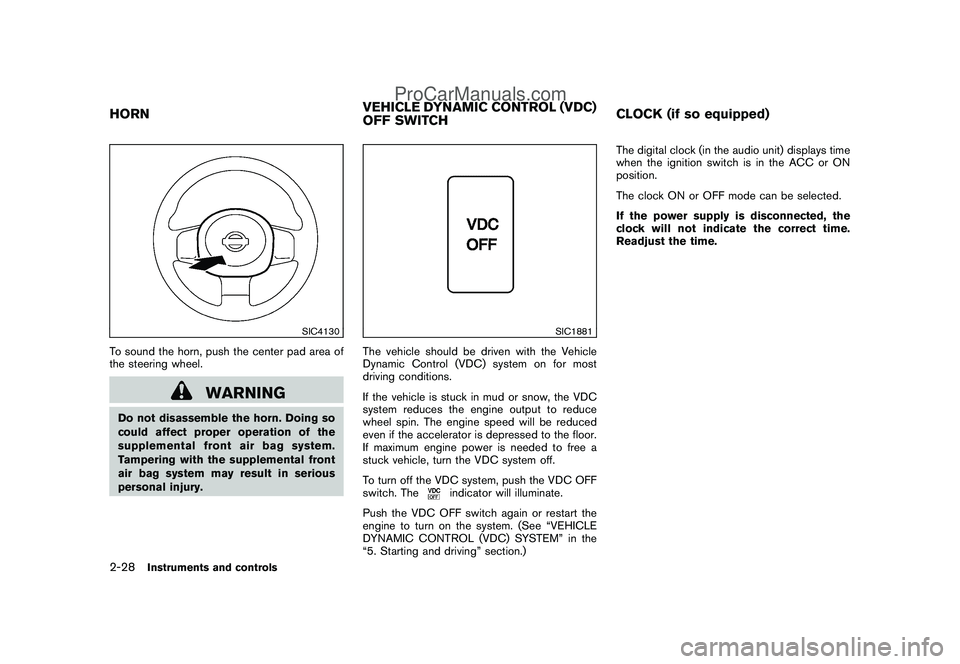
To sound the horn, push the center pad area of
the steering wheel.
WARNING
Do not disassemble the horn. Doing so
could affect proper operation of the
supplemental front air bag system.
Tampering with the supplemental front
air bag system may result in serious
personal injury.
SIC1881
The vehicle should be driven with the Vehicle
Dynamic Control (VDC) system on for most
driving conditions.
If the vehicle is stuck in mud or snow, the VDC
system reduces the engine output to reduce
wheel spin. The engine speed will be reduced
even if the accelerator is depressed to the floor.
If maximum engine power is needed to free a
stuck vehicle, turn the VDC system off.
To turn off the VDC system, push the VDC OFF
switch. The
indicator will illuminate.
Push the VDC OFF switch again or restart the
engine to turn on the system. (See “VEHICLE
DYNAMIC CONTROL (VDC) SYSTEM” in the
“5. Starting and driving” section.)The digital clock (in the audio unit) displays time
when the ignition switch is in the ACC or ON
position.
The clock ON or OFF mode can be selected.
If the power supply is disconnected, the
clock will not indicate the correct time.
Readjust the time.
HORNVEHICLE DYNAMIC CONTROL (VDC)
OFF SWITCHCLOCK (if so equipped)2-28
Instruments and controls
ProCarManuals.com
Page 122 of 321
Black plate (120,1)
Model "Z12-D" EDITED: 2009/ 1/ 28
SPA2416
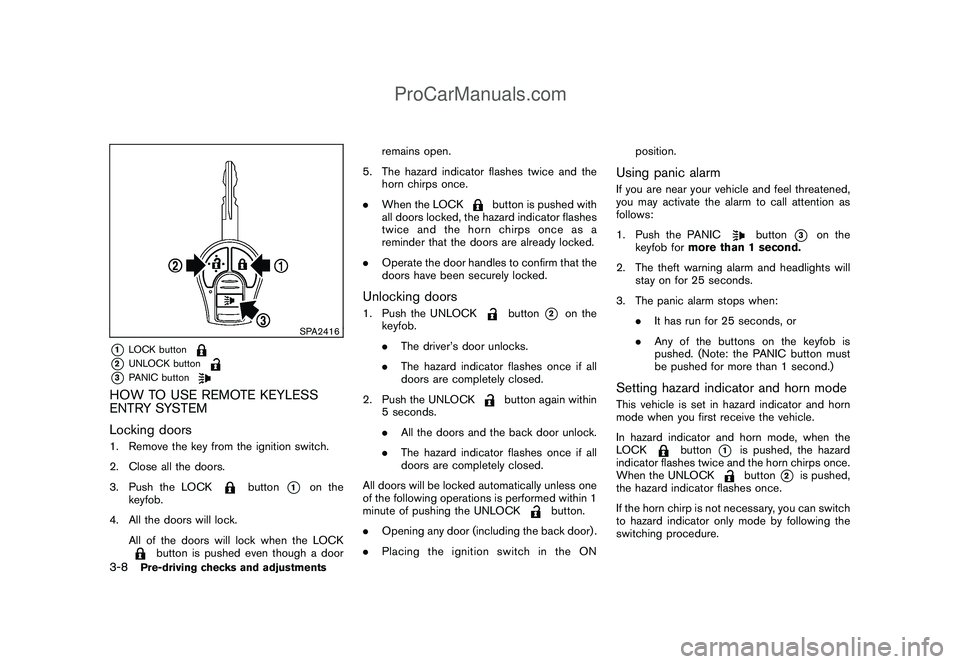
*1
LOCK button
*2
UNLOCK button
*3
PANIC button
HOW TO USE REMOTE KEYLESS
ENTRY SYSTEM
Locking doors1. Remove the key from the ignition switch.
2. Close all the doors.
3. Push the LOCK
button
*1
on the
keyfob.
4. All the doors will lock.
All of the doors will lock when the LOCK
button is pushed even though a doorremains open.
5. The hazard indicator flashes twice and the
horn chirps once.
.When the LOCK
button is pushed with
all doors locked, the hazard indicator flashes
twice and the horn chirps once as a
reminder that the doors are already locked.
.Operate the door handles to confirm that the
doors have been securely locked.
Unlocking doors1. Push the UNLOCK
button
*2
on the
keyfob.
.The driver’s door unlocks.
.The hazard indicator flashes once if all
doors are completely closed.
2. Push the UNLOCK
button again within
5 seconds.
.All the doors and the back door unlock.
.The hazard indicator flashes once if all
doors are completely closed.
All doors will be locked automatically unless one
of the following operations is performed within 1
minute of pushing the UNLOCK
button.
.Opening any door (including the back door) .
.Placing the ignition switch in the ONposition.
Using panic alarmIf you are near your vehicle and feel threatened,
you may activate the alarm to call attention as
follows:
1. Push the PANIC
button
*3
on the
keyfob formore than 1 second.
2. The theft warning alarm and headlights will
stay on for 25 seconds.
3. The panic alarm stops when:
.It has run for 25 seconds, or
.Any of the buttons on the keyfob is
pushed. (Note: the PANIC button must
be pushed for more than 1 second.)
Setting hazard indicator and horn modeThis vehicle is set in hazard indicator and horn
mode when you first receive the vehicle.
In hazard indicator and horn mode, when the
LOCK
button
*1
is pushed, the hazard
indicator flashes twice and the horn chirps once.
When the UNLOCKbutton
*2
is pushed,
the hazard indicator flashes once.
If the horn chirp is not necessary, you can switch
to hazard indicator only mode by following the
switching procedure.
3-8
Pre-driving checks and adjustments
ProCarManuals.com
Page 123 of 321
Black plate (121,1)
Model "Z12-D" EDITED: 2009/ 1/ 28
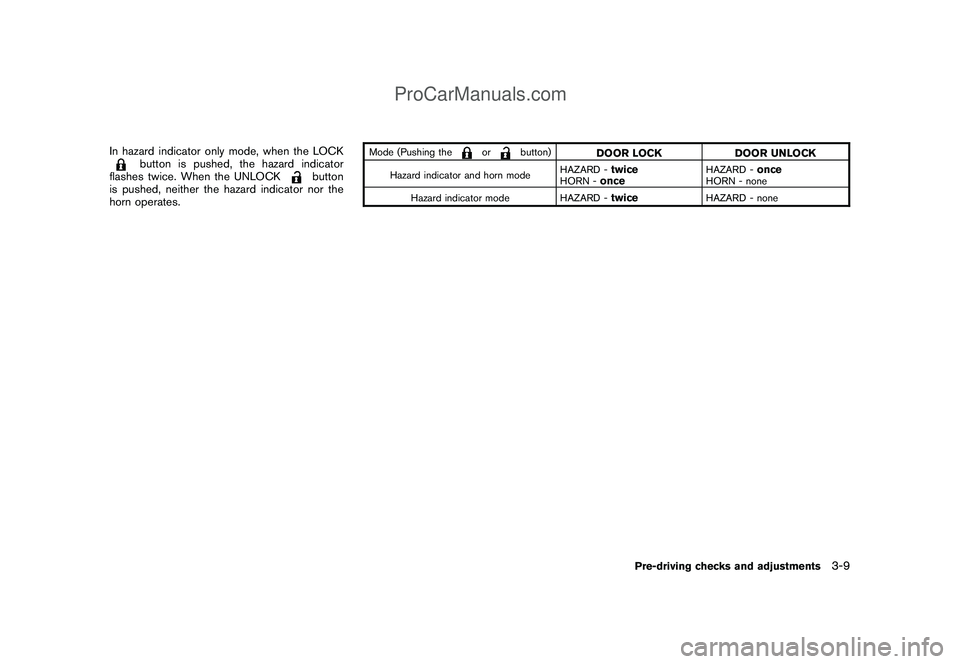
In hazard indicator only mode, when the LOCK
button is pushed, the hazard indicator
flashes twice. When the UNLOCK
button
is pushed, neither the hazard indicator nor the
horn operates.
Mode (Pushing the
or
button)
DOOR LOCK DOOR UNLOCK
Hazard indicator and horn modeHAZARD -
twice
HORN -
once
HAZARD -
once
HORN - none
Hazard indicator mode HAZARD -
twice
HAZARD - none
Pre-driving checks and adjustments
3-9
ProCarManuals.com
Page 124 of 321
Black plate (122,1)
Model "Z12-D" EDITED: 2009/ 1/ 28
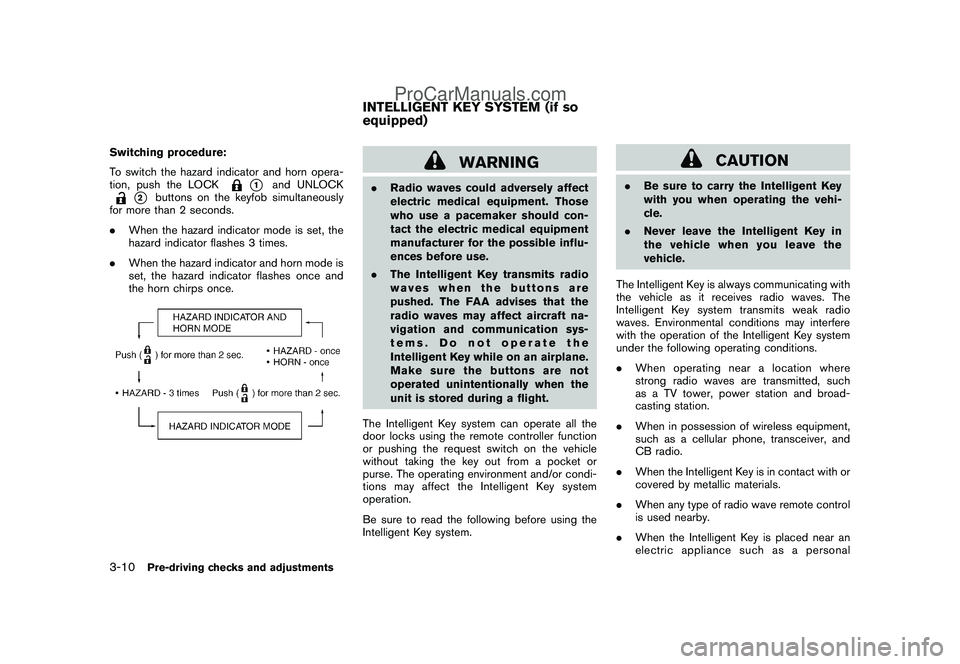
Switching procedure:
To switch the hazard indicator and horn opera-
tion, push the LOCK
*1
and UNLOCK
*2
buttons on the keyfob simultaneously
for more than 2 seconds.
.When the hazard indicator mode is set, the
hazard indicator flashes 3 times.
.When the hazard indicator and horn mode is
set, the hazard indicator flashes once and
the horn chirps once.
WARNING
.Radio waves could adversely affect
electric medical equipment. Those
who use a pacemaker should con-
tact the electric medical equipment
manufacturer for the possible influ-
ences before use.
.The Intelligent Key transmits radio
waves when the buttons are
pushed. The FAA advises that the
radio waves may affect aircraft na-
vigation and communication sys-
tems. Do not operate the
Intelligent Key while on an airplane.
Makesurethebuttonsarenot
operated unintentionally when the
unit is stored during a flight.
The Intelligent Key system can operate all the
door locks using the remote controller function
or pushing the request switch on the vehicle
without taking the key out from a pocket or
purse. The operating environment and/or condi-
tions may affect the Intelligent Key system
operation.
Be sure to read the following before using the
Intelligent Key system.
CAUTION
.Be sure to carry the Intelligent Key
with you when operating the vehi-
cle.
.Never leave the Intelligent Key in
the vehicle when you leave the
vehicle.
The Intelligent Key is always communicating with
the vehicle as it receives radio waves. The
Intelligent Key system transmits weak radio
waves. Environmental conditions may interfere
with the operation of the Intelligent Key system
under the following operating conditions.
.When operating near a location where
strong radio waves are transmitted, such
as a TV tower, power station and broad-
casting station.
.When in possession of wireless equipment,
such as a cellular phone, transceiver, and
CB radio.
.When the Intelligent Key is in contact with or
covered by metallic materials.
.When any type of radio wave remote control
is used nearby.
.When the Intelligent Key is placed near an
electric appliance such as a personal
INTELLIGENT KEY SYSTEM (if so
equipped)
3-10
Pre-driving checks and adjustments
ProCarManuals.com
Page 127 of 321
Black plate (125,1)
Model "Z12-D" EDITED: 2009/ 1/ 28
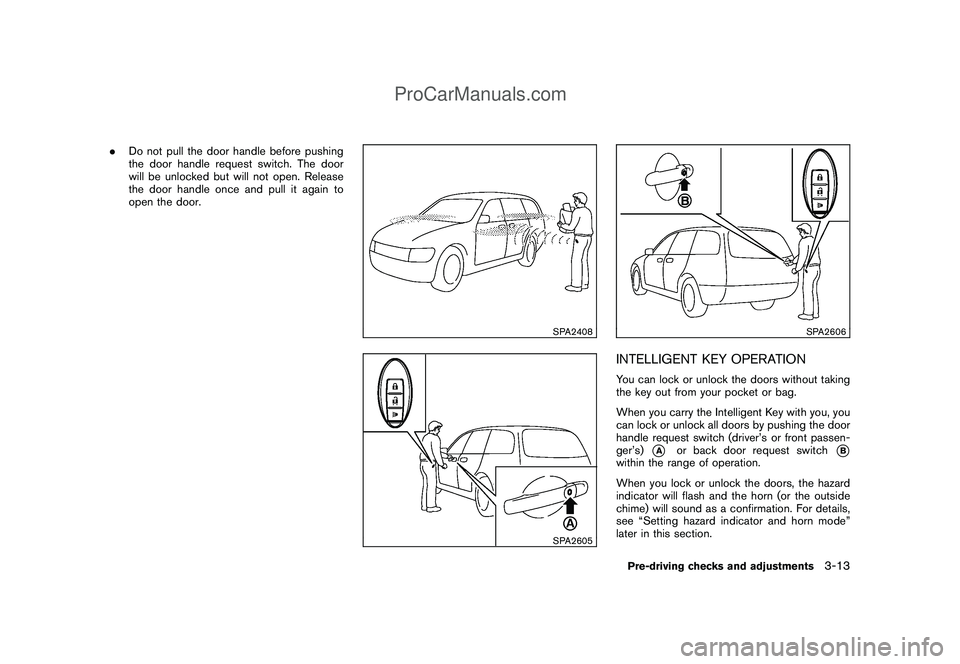
.Do not pull the door handle before pushing
the door handle request switch. The door
will be unlocked but will not open. Release
the door handle once and pull it again to
open the door.
SPA2408SPA2605
SPA2606
INTELLIGENT KEY OPERATIONYou can lock or unlock the doors without taking
the key out from your pocket or bag.
When you carry the Intelligent Key with you, you
can lock or unlock all doors by pushing the door
handle request switch (driver’s or front passen-
ger’s)
*A
or back door request switch
*B
within the range of operation.
When you lock or unlock the doors, the hazard
indicator will flash and the horn (or the outside
chime) will sound as a confirmation. For details,
see “Setting hazard indicator and horn mode”
later in this section.Pre-driving checks and adjustments
3-13
ProCarManuals.com
Page 132 of 321
Black plate (130,1)
Model "Z12-D" EDITED: 2009/ 1/ 28
SPA2252
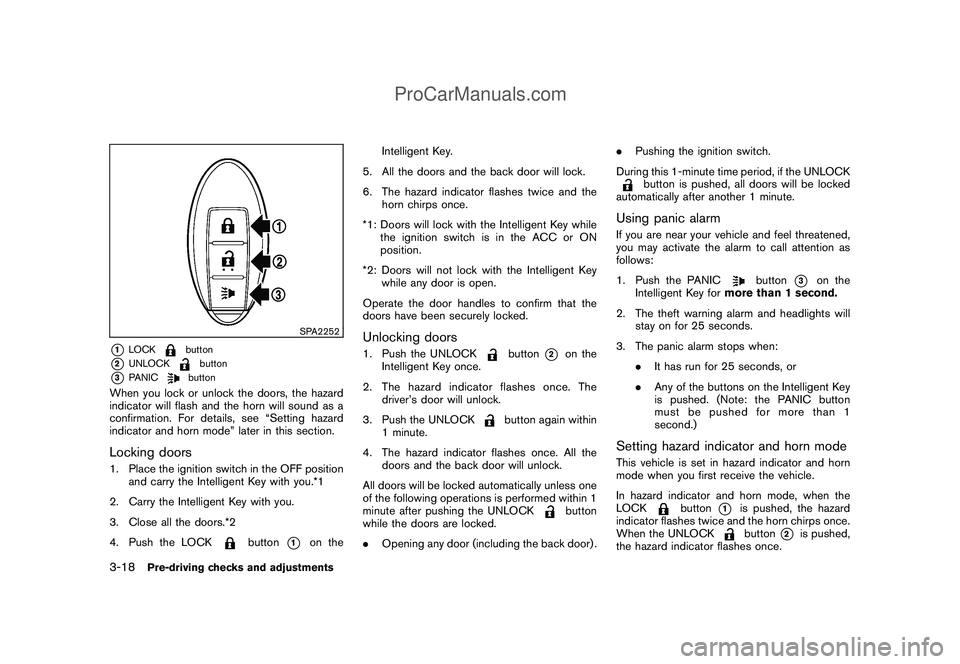
*1
LOCK
button
*2
UNLOCK
button
*3
PANIC
button
When you lock or unlock the doors, the hazard
indicator will flash and the horn will sound as a
confirmation. For details, see “Setting hazard
indicator and horn mode” later in this section.Locking doors1. Place the ignition switch in the OFF position
and carry the Intelligent Key with you.*1
2. Carry the Intelligent Key with you.
3. Close all the doors.*2
4. Push the LOCK
button
*1
on theIntelligent Key.
5. All the doors and the back door will lock.
6. The hazard indicator flashes twice and the
horn chirps once.
*1: Doors will lock with the Intelligent Key while
the ignition switch is in the ACC or ON
position.
*2: Doors will not lock with the Intelligent Key
while any door is open.
Operate the door handles to confirm that the
doors have been securely locked.
Unlocking doors1. Push the UNLOCK
button
*2
on the
Intelligent Key once.
2. The hazard indicator flashes once. The
driver’s door will unlock.
3. Push the UNLOCK
button again within
1 minute.
4. The hazard indicator flashes once. All the
doors and the back door will unlock.
All doors will be locked automatically unless one
of the following operations is performed within 1
minute after pushing the UNLOCK
button
while the doors are locked.
.Opening any door (including the back door) ..Pushing the ignition switch.
During this 1-minute time period, if the UNLOCK
button is pushed, all doors will be locked
automatically after another 1 minute.
Using panic alarmIf you are near your vehicle and feel threatened,
you may activate the alarm to call attention as
follows:
1. Push the PANIC
button
*3
on the
Intelligent Key formore than 1 second.
2. The theft warning alarm and headlights will
stay on for 25 seconds.
3. The panic alarm stops when:
.It has run for 25 seconds, or
.Any of the buttons on the Intelligent Key
is pushed. (Note: the PANIC button
must be pushed for more than 1
second.)
Setting hazard indicator and horn modeThis vehicle is set in hazard indicator and horn
mode when you first receive the vehicle.
In hazard indicator and horn mode, when the
LOCK
button
*1
is pushed, the hazard
indicator flashes twice and the horn chirps once.
When the UNLOCKbutton
*2
is pushed,
the hazard indicator flashes once.
3-18
Pre-driving checks and adjustments
ProCarManuals.com