battery NISSAN CUBE 2011 3.G Service Manual
[x] Cancel search | Manufacturer: NISSAN, Model Year: 2011, Model line: CUBE, Model: NISSAN CUBE 2011 3.GPages: 345, PDF Size: 2.97 MB
Page 280 of 345
Black plate (278,1)
Model "Z12-D" EDITED: 2010/ 9/ 27
difficulties or excessive emissions, and could
affect your warranty coverage.If in doubt
about any servicing, we recommend that
it be done by a NISSAN dealer.
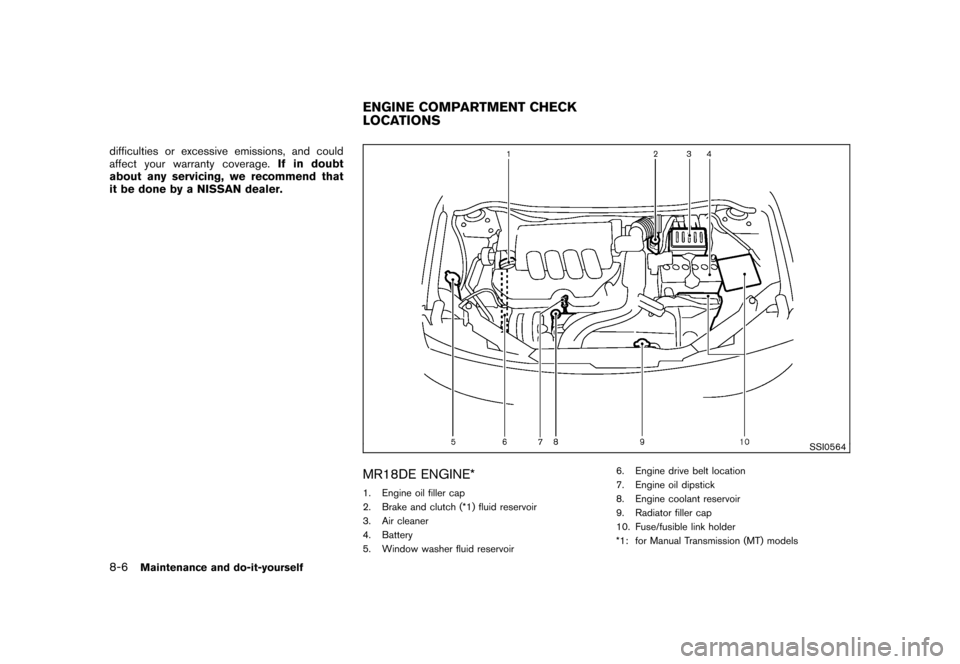
SSI0564
MR18DE ENGINE*1. Engine oil filler cap
2. Brake and clutch (*1) fluid reservoir
3. Air cleaner
4. Battery
5. Window washer fluid reservoir 6. Engine drive belt location
7. Engine oil dipstick
8. Engine coolant reservoir
9. Radiator filler cap
10. Fuse/fusible link holder
*1: for Manual Transmission (MT) modelsENGINE COMPARTMENT CHECK
LOCATIONS
8-6
Maintenance and do-it-yourself
Page 287 of 345
Black plate (285,1)
Model "Z12-D" EDITED: 2010/ 9/ 27
CAUTION
.Do not substitute engine anti-freeze
coolant for window washer solution.
This may result in damage to the
paint.
. Do not fill the window washer
reservoir tank with washer fluid
concentrates at full strength. Some
methyl alcohol based washer fluid
concentrates may permanently stain
the grille if spilled while filling the
window washer reservoir tank.
. Pre-mix washer fluid concentrates
with water to the manufacturer’s
recommended levels before pouring
the fluid into the window washer
reservoir tank. Do not use the
window washer reservoir tank to
mix the washer fluid concentrate
and water. .
Keep the battery surface clean and dry.
Clean the battery with a solution of baking
soda and water.
. Make certain the terminal connections are
clean and securely tightened.
. If the vehicle is not to be used for 30 days or
longer, disconnect the negative 7battery
terminal cable to prevent discharging it.
WARNING
. Do not expose the battery to flames
or electrical sparks. Hydrogen gas
generated by the battery is explo-
sive. Do not allow battery fluid to
contact your skin, eyes, fabrics or
painted surfaces. After touching a
battery or battery cap, do not touch
or rub your eyes. Thoroughly wash
your hands. If the acid contacts your
eyes, skin or clothing, immediately
flush with water for at least 15
minutes and seek medical attention.
. Do not operate the vehicle if the
fluid in the battery is low. Low
battery fluid can cause a higher load
on the battery which can generate
heat, reduce battery life, and in
some cases lead to an explosion. .
When working on or near a battery,
always wear suitable eye protection
and remove all jewelry.
. Battery posts, terminals and related
accessories contain lead and lead
compounds. Wash hands after
handling.
. Keep the battery out of the reach of
children.BATTERY
Maintenance and do-it-yourself
8-13
Page 288 of 345
Black plate (286,1)
Model "Z12-D" EDITED: 2010/ 9/ 27
DI0137MA
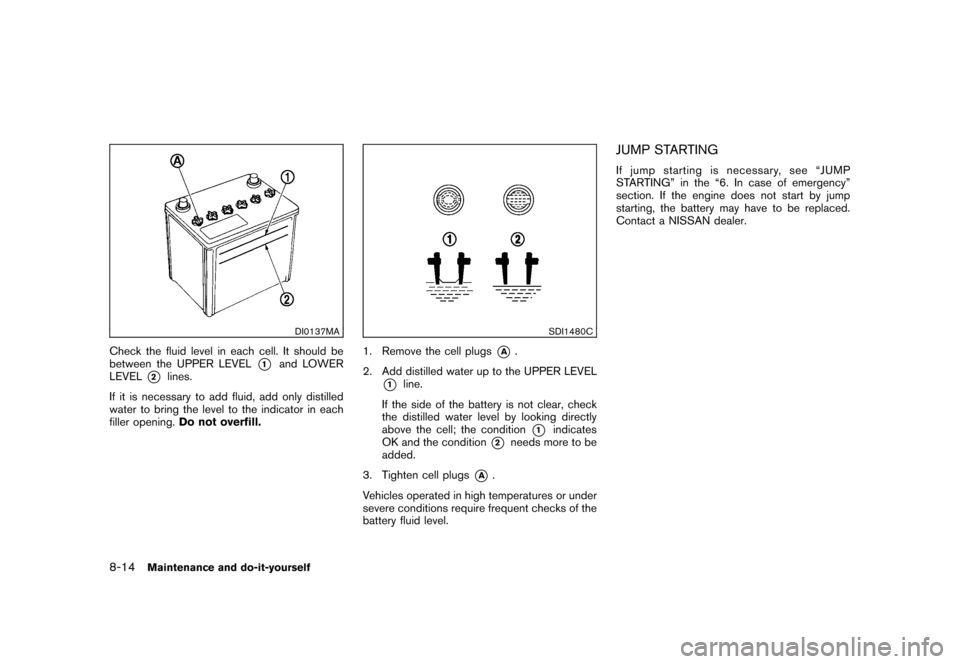
Check the fluid level in each cell. It should be
between the UPPER LEVEL
*1
and LOWER
LEVEL
*2
lines.
If it is necessary to add fluid, add only distilled
water to bring the level to the indicator in each
filler opening. Do not overfill.
SDI1480C
1. Remove the cell plugs
*A
.
2. Add distilled water up to the UPPER LEVEL
*1
line.
If the side of the battery is not clear, check
the distilled water level by looking directly
above the cell; the condition
*1
indicates
OK and the condition
*2
needs more to be
added.
3. Tighten cell plugs
*A
.
Vehicles operated in high temperatures or under
severe conditions require frequent checks of the
battery fluid level.
JUMP STARTINGIf jump starting is necessary, see “JUMP
STARTING” in the “6. In case of emergency”
section. If the engine does not start by jump
starting, the battery may have to be replaced.
Contact a NISSAN dealer.
8-14
Maintenance and do-it-yourself
Page 289 of 345
Black plate (287,1)
Model "Z12-D" EDITED: 2010/ 9/ 27
CAUTION
.Do not ground accessories directly
to the battery terminal. Doing so will
bypass the variable voltage control
system and the vehicle battery may
not charge completely.
. Use electrical accessories with the
engine running to avoid discharging
the vehicle battery.
The variable voltage control system measures
the amount of electrical discharge from the
battery and controls voltage generated by the
generator.
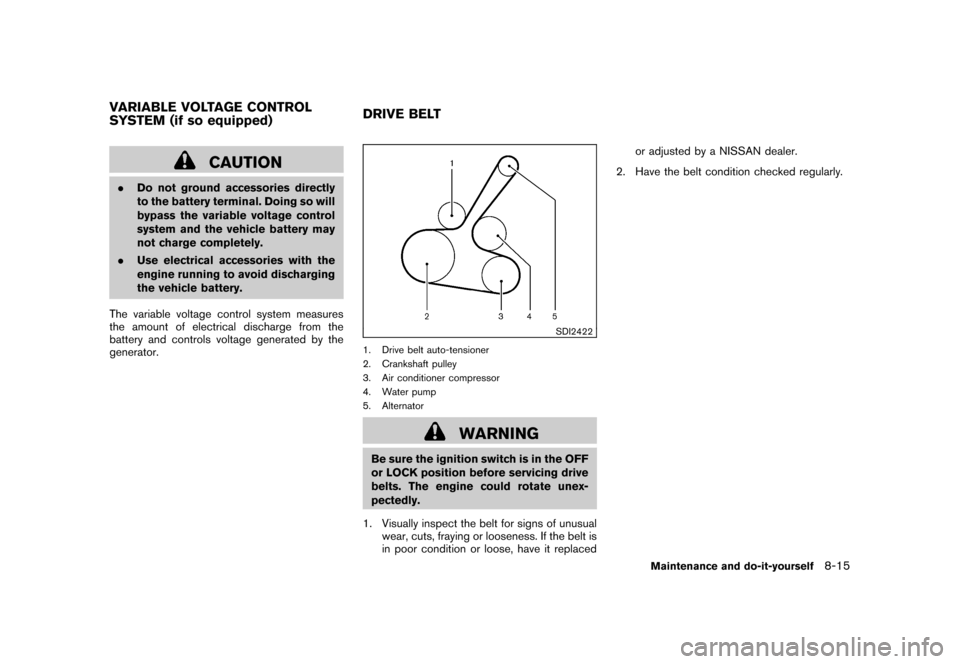
SDI2422
1. Drive belt auto-tensioner
2. Crankshaft pulley
3. Air conditioner compressor
4. Water pump
5. Alternator
WARNING
Be sure the ignition switch is in the OFF
or LOCK position before servicing drive
belts. The engine could rotate unex-
pectedly.
1. Visually inspect the belt for signs of unusual wear, cuts, fraying or looseness. If the belt is
in poor condition or loose, have it replaced or adjusted by a NISSAN dealer.
2. Have the belt condition checked regularly.
VARIABLE VOLTAGE CONTROL
SYSTEM (if so equipped) DRIVE BELT
Maintenance and do-it-yourself
8-15
Page 296 of 345
Black plate (294,1)
Model "Z12-D" EDITED: 2010/ 9/ 27
SDI1753
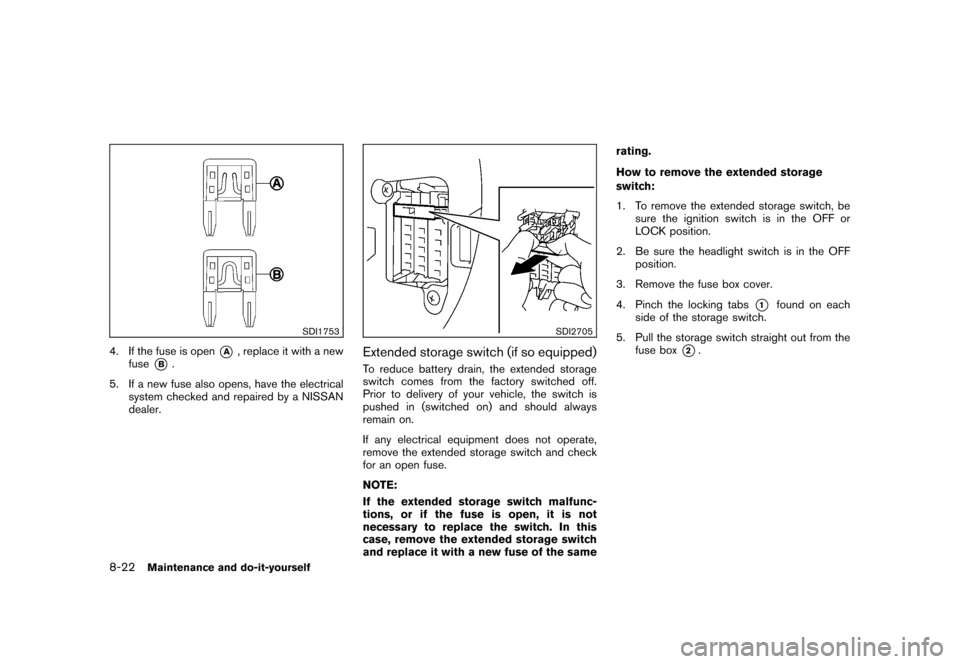
4. If the fuse is open
*A
, replace it with a new
fuse
*B.
5. If a new fuse also opens, have the electrical system checked and repaired by a NISSAN
dealer.
SDI2705
Extended storage switch (if so equipped)To reduce battery drain, the extended storage
switch comes from the factory switched off.
Prior to delivery of your vehicle, the switch is
pushed in (switched on) and should always
remain on.
If any electrical equipment does not operate,
remove the extended storage switch and check
for an open fuse.
NOTE:
If the extended storage switch malfunc-
tions, or if the fuse is open, it is not
necessary to replace the switch. In this
case, remove the extended storage switch
and replace it with a new fuse of the same rating.
How to remove the extended storage
switch:
1. To remove the extended storage switch, be
sure the ignition switch is in the OFF or
LOCK position.
2. Be sure the headlight switch is in the OFF position.
3. Remove the fuse box cover.
4. Pinch the locking tabs
*1
found on each
side of the storage switch.
5. Pull the storage switch straight out from the fuse box
*2.
8-22
Maintenance and do-it-yourself
Page 297 of 345
Black plate (295,1)
Model "Z12-D" EDITED: 2010/ 9/ 27
CAUTION
Be careful not to allow children to
swallow the battery and removed parts.
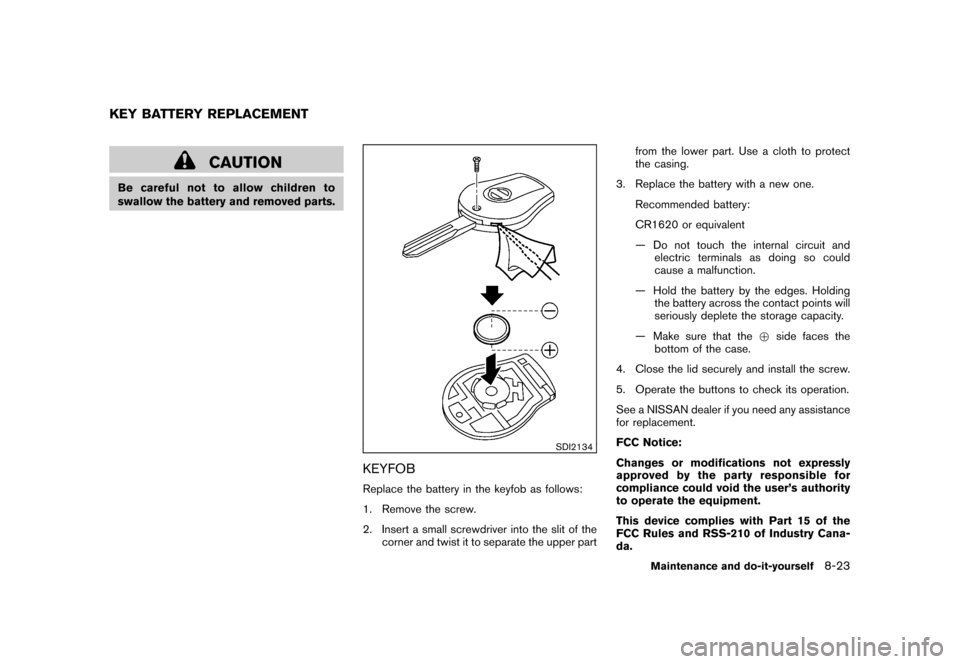
SDI2134
KEYFOBReplace the battery in the keyfob as follows:
1. Remove the screw.
2. Insert a small screwdriver into the slit of thecorner and twist it to separate the upper part from the lower part. Use a cloth to protect
the casing.
3. Replace the battery with a new one. Recommended battery:
CR1620 or equivalent
— Do not touch the internal circuit andelectric terminals as doing so could
cause a malfunction.
— Hold the battery by the edges. Holding the battery across the contact points will
seriously deplete the storage capacity.
— Make sure that the +side faces the
bottom of the case.
4. Close the lid securely and install the screw.
5. Operate the buttons to check its operation.
See a NISSAN dealer if you need any assistance
for replacement.
FCC Notice:
Changes or modifications not expressly
approved by the party responsible for
compliance could void the user’s authority
to operate the equipment.
This device complies with Part 15 of the
FCC Rules and RSS-210 of Industry Cana-
da.
KEY BATTERY REPLACEMENT
Maintenance and do-it-yourself
8-23
Page 298 of 345
Black plate (296,1)
Model "Z12-D" EDITED: 2010/ 9/ 27
Operation is subject to the following two
conditions: (1) This device may not cause
harmful interference, and (2) this device
must accept any interference received,
including interference that may cause un-
desired operation of the device.
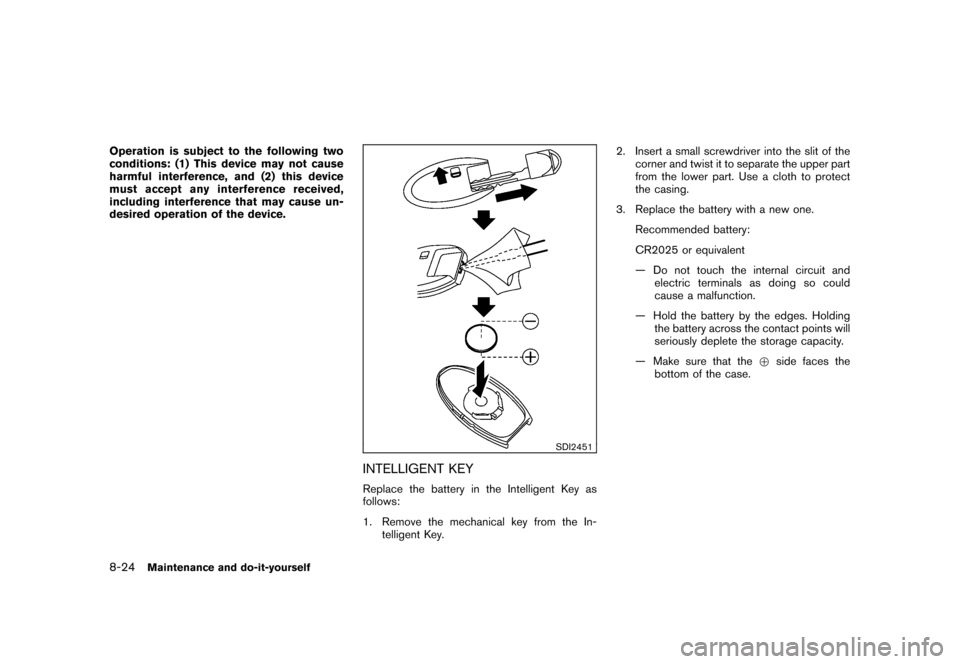
SDI2451
INTELLIGENT KEYReplace the battery in the Intelligent Key as
follows:
1. Remove the mechanical key from the In-telligent Key. 2. Insert a small screwdriver into the slit of the
corner and twist it to separate the upper part
from the lower part. Use a cloth to protect
the casing.
3. Replace the battery with a new one. Recommended battery:
CR2025 or equivalent
— Do not touch the internal circuit andelectric terminals as doing so could
cause a malfunction.
— Hold the battery by the edges. Holding the battery across the contact points will
seriously deplete the storage capacity.
— Make sure that the +side faces the
bottom of the case.
8-24
Maintenance and do-it-yourself
Page 301 of 345
Black plate (299,1)
Model "Z12-D" EDITED: 2010/ 9/ 27
HEADLIGHTSFog may temporarily form inside the lens of the
exterior lights in the rain or in a car wash. A
temperature difference between the inside and
the outside of the lens causes the fog. This is
not a malfunction. If large drops of water collect
inside the lens, contact a NISSAN dealer.ReplacingHalogen headlight model:
The headlight is a semi-sealed beam type which
uses a replaceable headlight (halogen) bulb.
CAUTION
.Do not leave the bulb out of the
headlight reflector for a long period
of time. Dust, moisture, smoke, etc.
entering the headlight body may
affect bulb performance.
. High pressure halogen gas is sealed
inside the halogen bulb. The bulb
may break if the glass envelope is
scratched or the bulb is dropped.
. Only touch the base when handling
the bulb. Never touch the glass
envelope. Touching the glass envel-
ope could significantly affect bulb
life and/or headlight performance. .
Aiming is not necessary after repla-
cing the bulb. When aiming adjust-
ment is necessary, contact a
NISSAN dealer.
Use the same number and wattage as originally
installed as shown in the chart.
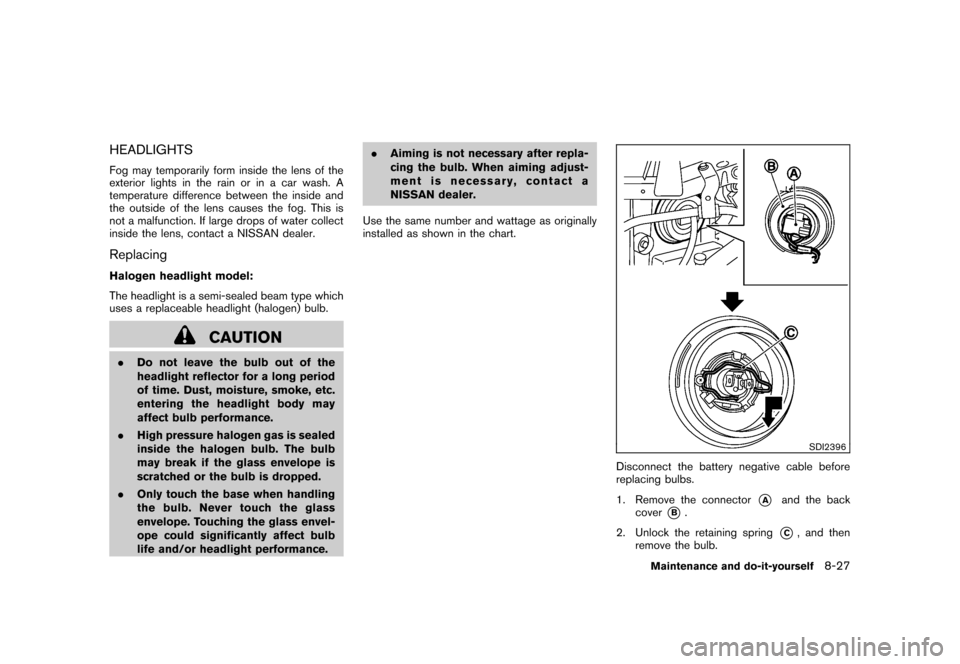
SDI2396
Disconnect the battery negative cable before
replacing bulbs.
1. Remove the connector
*A
and the back
cover
*B.
2. Unlock the retaining spring
*C, and then
remove the bulb.
Maintenance and do-it-yourself
8-27
Page 334 of 345
Black plate (332,1)
Model "Z12-D" EDITED: 2010/ 9/ 27
For Canada
If you believe that your vehicle has a defect
which could cause a crash or could cause
injury or death, you should immediately
inform Transport Canada in addition to
notifying NISSAN.
If Transport Canada receives complaints, it
may open an investigation, and if it finds
that a safety defect exists in a group of
vehicles, it may request that NISSAN
conduct a recall campaign. However,
Transport Canada cannot become involved
in individual problems between you, your
dealer, or NISSAN.
You may contact Transport Canada’s De-
fect Investigations and Recalls Division toll
free at 1-800-333-0510. You may also
report safety defects online at:
https://wwwapps.tc.gc.ca/Saf-Sec-Sur/7/
PCDB-BDPP/Index.aspx.
Additional information concerning motor
vehicle safety may be obtained from Trans-
port Canada’s Road Safety Information
Centre at 1-800-333-0371 or online at
www.tc.gc.ca/roadsafety (English speak-
ers) or www.tc.gc.ca/securiteroutiere
(French speakers) .To notify NISSAN of any safety concerns
please contact our Consumer Information
Center toll free at 1-800-387-0122.
Due to legal requirements in some states/areas
or provinces, your vehicle may be required to be
in what is called the “ready condition” for an
Inspection/Maintenance (I/M) test of the emis-
sion control system.
The vehicle is set to the “ready condition” when
it is driven through certain driving patterns.
Usually, the “ready condition” can be obtained
by ordinary usage of the vehicle.
If a powertrain system component is repaired or
the battery is disconnected, the vehicle may be
reset to a “not ready condition”. Before taking
the I/M test, check the vehicle’s inspection/
maintenance test readiness condition. Place the
ignition switch in the ON position without
starting the engine. If the Malfunction Indicator
Light (MIL) comes on steady for 20 seconds and
then blinks for 10 seconds, the I/M test
condition is “not ready”. If the MIL does not
blink after 20 seconds, the I/M test condition is
“ready”.
Contact a NISSAN dealer to set the “ready
condition” or to prepare the vehicle for testing.READINESS FOR INSPECTION/
MAINTENANCE (I/M) TEST
9-20
Technical and consumer information
Page 337 of 345
Black plate (1,1)
10 Index
A
A/C (Air Conditioner) operation .................. 4-15
ABS (Anti-lock Braking System) .................. 5-26
Advanced air bag system ......................... 1-47
Air bag system Advanced air bag system ..................... 1-47
Front passenger air bag and status light .... 1-49
Front-seat mounted side-impact
supplemental air bag system .................. 1-52
Roof-mounted curtain side-impact
supplemental air bag system .................. 1-52
Air bag warning labels ............................. 1-54
Air bag warning light ....................... 1-55, 2-15
Air cleaner housing filter .......................... 8-16
Air conditioner Air conditioner operation ...................... 4-13
Air conditioner service ......................... 4-20
Air conditioner specification label ............ 9-10
Air conditioning system refrigerant and
lubricant recommendations .............. 4-20, 9-6
In-cabin microfilter ............................. 4-19
Alarm, How to stop alarm
(see vehicle security system) ..................... 2-20
Alcohol, drugs and driving .......................... 5-6
Antenna ............................................. 4-54
Anti-lock Braking System (ABS) .................. 5-26
Anti-lock braking system (ABS) warning light . . . 2-11
Appearance care Exterior appearance care ........................ 7-2
Interior appearance care ........................ 7-5
Armrest ............................................. 1-12
Audible reminders ................................. 2-18 Audio operation precautions
...................... 4-20
Audio setup .......................................... 4-5
Audio system ....................................... 4-20
Steering wheel audio controls ................ 4-53
Autolight system ................................... 2-25
Automatic Air conditioner. ................................. 4-17
Door locks ........................................ 3-5
AUX (Auxiliary) button ............... 4-37, 4-43, 4-48
AUX (Auxiliary) input ................. 4-37, 4-43, 4-48
Average fuel consumption ........................... 2-9
Average speed ....................................... 2-9
Avoiding collision and rollover ...................... 5-5
B
Back door .......................................... 3-22
Battery .............................................. 8-13
Battery replacement, Intelligent Key .......... 8-24
Battery replacement, Keyfob .................. 8-23
Battery saver system .......................... 2-26
Variable voltage control system ............... 8-15
Before starting the engine ........................ 5-12
Bluetooth
®Hands-Free Phone System .......... 4-55
Booster seats ...................................... 1-38
Brake Anti-lock Braking System (ABS) .............. 5-26
Brake and clutch fluid ......................... 8-11
Brake system ................................... 5-26
Parking brake operation ....................... 5-20
Warning light ................................... 2-12
Break-in schedule .................................. 5-23 Brightness control
Display ON/OFF button ......................... 4-5
Instrument panel ............................... 2-27
Bulb check/instrument panel ...................... 2-11
Bulb replacement .................................. 8-26
C
Cabin air filter ...................................... 4-19
Capacities and recommended fuel/lubricants ..... 9-2
Car phone or CB radio ............................ 4-54
Cargo light ......................................... 2-42
Catalytic converter, Three way catalyst ............ 5-2
CD care and cleaning ............................. 4-52
Ceiling light ......................................... 2-42
Child restraints ..................................... 1-23
Booster seats .................................. 1-38
Precautions on child restraints ................ 1-23
Child safety ......................................... 1-21
Child safety rear door lock .......................... 3-6
Chimes, Audible reminders ....................... 2-18
Circuit breaker, Fusible link ....................... 8-21
Cleaning exterior and interior ................. 7-2, 7-5
Clock ............................................... 2-31
Clock (models with navigation system) ............ 4-7
Clutch fluid ......................................... 8-11
Cockpit ............................................... 2-2
Cold weather driving .............................. 5-29
Compact Disc (CD) player
(See audio system) .................. 4-35, 4-40, 4-46
Continuously Variable Transmission (CVT)
fluid ................................................. 8-11
Model "Z12-D" EDITED: 2010/ 9/ 27