battery NISSAN CUBE 2011 3.G Owner's Manual
[x] Cancel search | Manufacturer: NISSAN, Model Year: 2011, Model line: CUBE, Model: NISSAN CUBE 2011 3.GPages: 345, PDF Size: 2.97 MB
Page 183 of 345
Black plate (181,1)
Model "Z12-D" EDITED: 2010/ 9/ 27
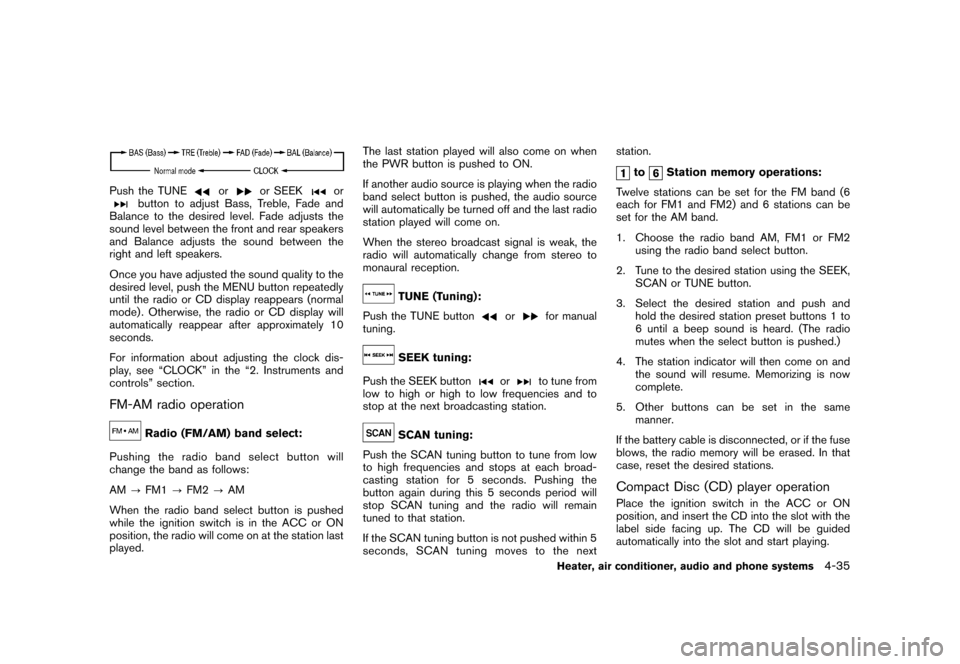
Push the TUNE
or
or SEEK
or
button to adjust Bass, Treble, Fade and
Balance to the desired level. Fade adjusts the
sound level between the front and rear speakers
and Balance adjusts the sound between the
right and left speakers.
Once you have adjusted the sound quality to the
desired level, push the MENU button repeatedly
until the radio or CD display reappears (normal
mode) . Otherwise, the radio or CD display will
automatically reappear after approximately 10
seconds.
For information about adjusting the clock dis-
play, see “CLOCK” in the “2. Instruments and
controls” section.
FM-AM radio operation
Radio (FM/AM) band select:
Pushing the radio band select button will
change the band as follows:
AM ?FM1 ?FM2 ?AM
When the radio band select button is pushed
while the ignition switch is in the ACC or ON
position, the radio will come on at the station last
played. The last station played will also come on when
the PWR button is pushed to ON.
If another audio source is playing when the radio
band select button is pushed, the audio source
will automatically be turned off and the last radio
station played will come on.
When the stereo broadcast signal is weak, the
radio will automatically change from stereo to
monaural reception.
TUNE (Tuning):
Push the TUNE button
or
for manual
tuning.
SEEK tuning:
Push the SEEK button
or
to tune from
low to high or high to low frequencies and to
stop at the next broadcasting station.
SCAN tuning:
Push the SCAN tuning button to tune from low
to high frequencies and stops at each broad-
casting station for 5 seconds. Pushing the
button again during this 5 seconds period will
stop SCAN tuning and the radio will remain
tuned to that station.
If the SCAN tuning button is not pushed within 5
seconds, SCAN tuning moves to the next station.
to
Station memory operations:
Twelve stations can be set for the FM band (6
each for FM1 and FM2) and 6 stations can be
set for the AM band.
1. Choose the radio band AM, FM1 or FM2 using the radio band select button.
2. Tune to the desired station using the SEEK, SCAN or TUNE button.
3. Select the desired station and push and hold the desired station preset buttons 1 to
6 until a beep sound is heard. (The radio
mutes when the select button is pushed.)
4. The station indicator will then come on and the sound will resume. Memorizing is now
complete.
5. Other buttons can be set in the same manner.
If the battery cable is disconnected, or if the fuse
blows, the radio memory will be erased. In that
case, reset the desired stations.
Compact Disc (CD) player operationPlace the ignition switch in the ACC or ON
position, and insert the CD into the slot with the
label side facing up. The CD will be guided
automatically into the slot and start playing.
Heater, air conditioner, audio and phone systems
4-35
Page 188 of 345
Black plate (186,1)
Model "Z12-D" EDITED: 2010/ 9/ 27
2. Tune to the desired station using the SEEK,SCAN or TUNE button.
3. Push and hold the desired radio station preset button
to
until a beep sound is
heard. (The radio mutes when the radio
station preset button is pushed.)
4. The station indicator will then come on and the sound will resume. Memorizing is now
complete.
5. Other buttons can be set in the same manner.
If the battery cable is disconnected, or if the fuse
opens, the radio memory will be erased. In that
case, reset the desired stations.
Radio Data System (RDS):
RDS stands for Radio Data System, and is a
data information service transmitted by some
radio stations on the FM band (not AM band)
encoded within a regular radio broadcast.
Currently, most RDS stations are in large cities,
but many stations are now considering broad-
casting RDS data.
RDS can display:
. Station call sign, such as “WHFR 98.3”.
. Station name, such as “The Groove”.
. Music or programming type such as “Clas- sical”, “Country” or “Rock”.
. Traffic reports about delays or construction.
If the station broadcasts RDS information, the
RDS icon is displayed.
RADIO DISPLAY change:
When the DISP button is pushed during the FM
radio mode, the radio display will change in the
following order.
FM radio:
Frequency ↔PS/PTY
In the FM radio mode, pressing the DISP button
will switch the frequency display to the PTY
display (if available) , and if the DISP button is
not pushed again within 5 seconds, it will
automatically switch to the PS display. If PTY
is not available, pressing the DISP button will
only switch between the frequency display and
the PS display.
Compact Disc (CD) player operationPlace the ignition switch in the ACC or ON
position, and insert the CD into the slot with the
label side facing up. The CD will be guided
automatically into the slot and start playing.
After loading the disc, the number of tracks on
the disc will appear on the display. If the radio is already operating, it will auto-
matically turn off and the CD will play.
If the system has been turned off while the CD
was playing, pushing the PWR button will start
the CD.
Do not use 3.1 in (8 cm) discs.
CD PLAY:
When the CD button is pushed with the system
off and the CD loaded, the system will turn on
and the CD will start to play.
When the CD button is pushed with the CD
loaded and the radio playing, the radio will
automatically be turned off and the CD will start
to play.CD play information:
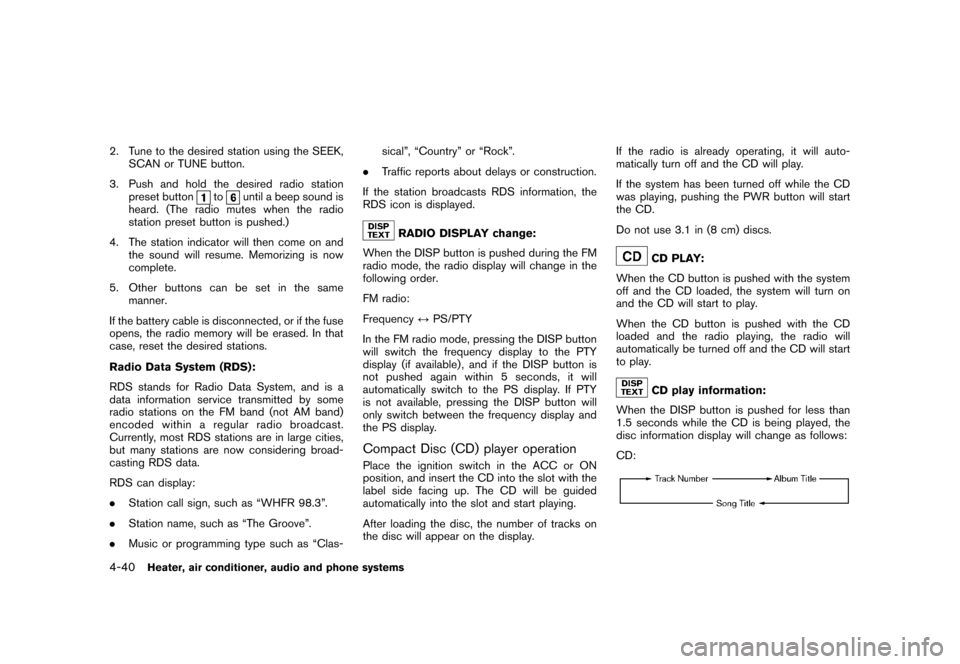
When the DISP button is pushed for less than
1.5 seconds while the CD is being played, the
disc information display will change as follows:
CD:
4-40
Heater, air conditioner, audio and phone systems
Page 190 of 345
Black plate (188,1)
Model "Z12-D" EDITED: 2010/ 9/ 27
SAA2352
Interface system for iPod
®operation
Connecting iPod
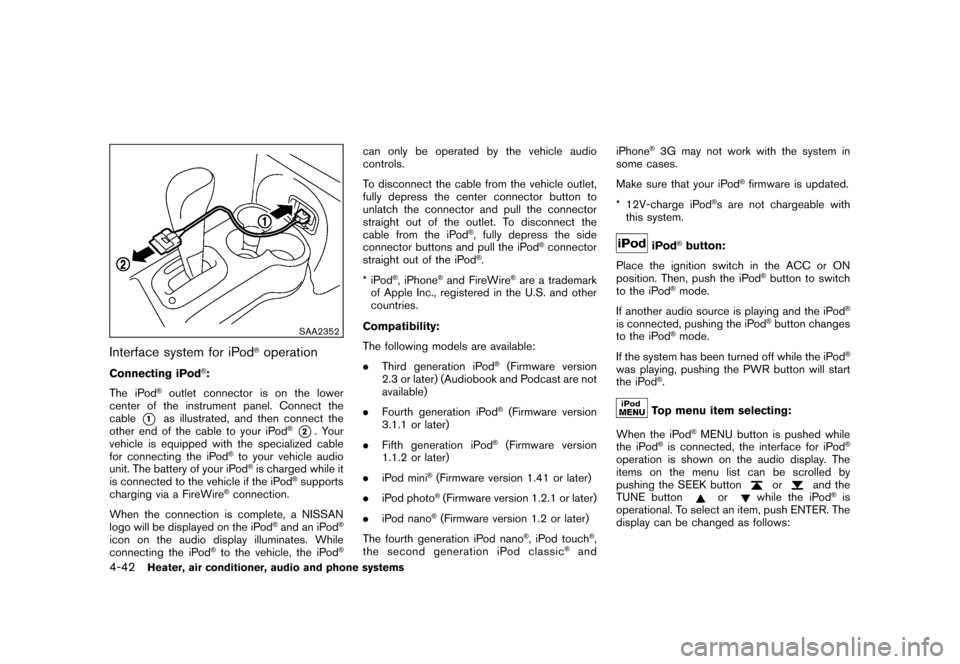
®:
The iPod
®outlet connector is on the lower
center of the instrument panel. Connect the
cable
*1
as illustrated, and then connect the
other end of the cable to your iPod
®*2. Your
vehicle is equipped with the specialized cable
for connecting the iPod
®to your vehicle audio
unit. The battery of your iPod®is charged while it
is connected to the vehicle if the iPod
®supports
charging via a FireWire
®connection.
When the connection is complete, a NISSAN
logo will be displayed on the iPod
®and an iPod
®
icon on the audio display illuminates. While
connecting the iPod
®to the vehicle, the iPod
®
can only be operated by the vehicle audio
controls.
To disconnect the cable from the vehicle outlet,
fully depress the center connector button to
unlatch the connector and pull the connector
straight out of the outlet. To disconnect the
cable from the iPod
®, fully depress the side
connector buttons and pull the iPod
®connector
straight out of the iPod
®.
*iPod
®, iPhone
®and FireWire
®are a trademark
of Apple Inc., registered in the U.S. and other
countries.
Compatibility:
The following models are available:
. Third generation iPod
®(Firmware version
2.3 or later) (Audiobook and Podcast are not
available)
. Fourth generation iPod®(Firmware version
3.1.1 or later)
. Fifth generation iPod
®(Firmware version
1.1.2 or later)
. iPod mini
®(Firmware version 1.41 or later)
. iPod photo®(Firmware version 1.2.1 or later)
. iPod nano®(Firmware version 1.2 or later)
The fourth generation iPod nano
®, iPod touch
®,
the second generation iPod classic
®and iPhone
®3G may not work with the system in
some cases.
Make sure that your iPod
®firmware is updated.
* 12V-charge iPod
®s are not chargeable with
this system.
iPod
®button:
Place the ignition switch in the ACC or ON
position. Then, push the iPod
®button to switch
to the iPod
®mode.
If another audio source is playing and the iPod
®
is connected, pushing the iPod
®button changes
to the iPod
®mode.
If the system has been turned off while the iPod
®
was playing, pushing the PWR button will start
the iPod
®.Top menu item selecting:
When the iPod
®MENU button is pushed while
the iPod
®is connected, the interface for iPod
®
operation is shown on the audio display. The
items on the menu list can be scrolled by
pushing the SEEK button
or
and the
TUNE button
or
while the iPod
®is
operational. To select an item, push ENTER. The
display can be changed as follows:
4-42
Heater, air conditioner, audio and phone systems
Page 194 of 345
Black plate (192,1)
Model "Z12-D" EDITED: 2010/ 9/ 27
TUNE (Tuning):
.For AM and FM radio
Turn the TUNE knob for manual tuning.
. For XM Satellite Radio
Turn the TUNE knob to seek channels from
all of the categories when any category is
not selected.
SEEK tuning:
. For AM and FM radio
Push the SEEK/CATEGORY button
or
to tune from low to high or high to low
frequencies and to stop at the next broad-
casting station.
. For XM Satellite Radio
Push the SEEK/CATEGORY button
or
to tune to the first channel of the next
or previous category.
Tuning with the touchscreen (AM and FM
radio):
When in AM or FM mode, the radio can be
tuned using the touchscreen. To bring up the
visual tuner, touch the “Tune” key on the lower
right corner of the screen. A screen appears
with a bar running from low frequencies on the
left to high frequencies on the right. Touch the screen at the location of the frequency you wish
to tune and the station will change to that
frequency. To return to the regular radio display
screen, touch the “OK” key.
to
Station memory operations:
12 stations/channels can be set for the FM band
(6 each for FM1 and FM2) , 18 for XM radio (6
each for XM1, XM2 and XM3) and 6 stations
can be set for the AM band.
1. Choose the radio band using the radio band select button.
2. Tune to the desired station/channel using the SEEK/CATEGORY button or the TUNE
knob.
3. Push and hold the desired station preset button
to
until the beep sound is
heard.
4. The station indicator will then come on and the sound will resume. Memorizing is now
complete.
5. Other buttons can be set in the same manner.
If the battery cable is disconnected, or if the fuse
opens, the radio memory will be erased. In that
case, reset the desired stations/channels. Touchscreen (XM Satellite Radio):
When the XM Satellite Radio is being played,
the following items are available with the
touchscreen operation.
.
Channels
Displays a list of channels. Touch a preferred
channel displayed on the list to change to
that channel.
. Categories
Displays a list of categories. Touch a
preferred channel displayed on the list to
display options within that category.
Compact Disc (CD) player operationPlace the ignition switch in the ACC or ON
position and insert the Compact Disc (CD) into
the slot with the label side facing up. The CD will
be guided automatically into the slot and start
playing.
If the radio is already operating, it will auto-
matically turn off and the CD will play.
If the system has been turned off while the CD
was playing, pushing the ON·OFF button will
start the CD.
Do not use 3.1 in (8 cm) discs.
4-46
Heater, air conditioner, audio and phone systems
Page 198 of 345
Black plate (196,1)
Model "Z12-D" EDITED: 2010/ 9/ 27
Repeat:
Touch the “Repeat” key to apply a repeat play
pattern to the USB device. When the repeat
mode is active, the
icon is displayed to the
left of the song title or album name to denote
which repeat pattern is applied. To cancel
Repeat mode, touch the “Repeat” key until no
icon is displayed.
SAA3648
iPod
®player operation
Connecting iPod
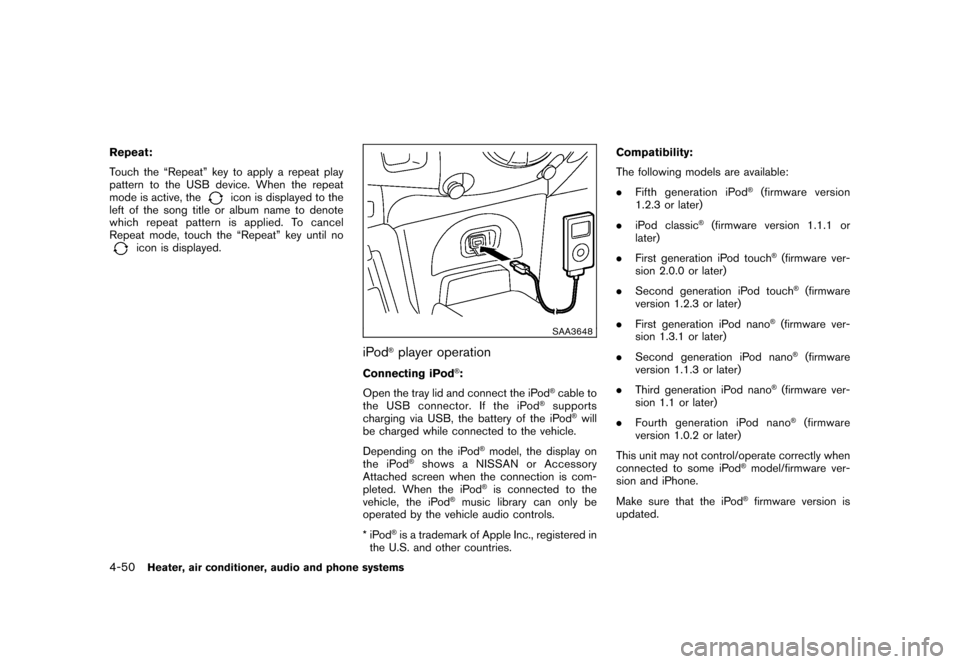
®:
Open the tray lid and connect the iPod
®cable to
the USB connector. If the iPod
®supports
charging via USB, the battery of the iPod
®will
be charged while connected to the vehicle.
Depending on the iPod
®model, the display on
the iPod
®shows a NISSAN or Accessory
Attached screen when the connection is com-
pleted. When the iPod
®is connected to the
vehicle, the iPod
®music library can only be
operated by the vehicle audio controls.
*iPod
®is a trademark of Apple Inc., registered in
the U.S. and other countries. Compatibility:
The following models are available:
.
Fifth generation iPod
®(firmware version
1.2.3 or later)
. iPod classic
®(firmware version 1.1.1 or
later)
. First generation iPod touch
®(firmware ver-
sion 2.0.0 or later)
. Second generation iPod touch®(firmware
version 1.2.3 or later)
. First generation iPod nano
®(firmware ver-
sion 1.3.1 or later)
. Second generation iPod nano®(firmware
version 1.1.3 or later)
. Third generation iPod nano
®(firmware ver-
sion 1.1 or later)
. Fourth generation iPod nano®(firmware
version 1.0.2 or later)
This unit may not control/operate correctly when
connected to some iPod
®model/firmware ver-
sion and iPhone.
Make sure that the iPod®firmware version is
updated.
4-50
Heater, air conditioner, audio and phone systems
Page 203 of 345
Black plate (201,1)
Model "Z12-D" EDITED: 2010/ 9/ 27
CAUTION
.Keep the antenna as far away as
possible from the electronic control
modules.
. Keep the antenna wire more than 8
in (20 cm) away from the electronic
control system harness. Do not
route the antenna wire next to any
harness.
. Adjust the antenna standing-wave
ratio as recommended by the man-
ufacturer.
. Connect the ground wire from the
CB radio chassis to the body.
. For details, consult a NISSAN deal-
er.
WARNING
.Use a phone after stopping your
vehicle in a safe location. If you
have to use a phone while driving,
exercise extreme caution at all
times so full attention may be given
to vehicle operation.
. If you find yourself unable to devote
full attention to vehicle operation
while talking on the phone, pull off
the road to a safe location and stop
your vehicle before doing so.
CAUTION
To avoid draining the vehicle battery,
use a phone after starting the engine.BLUETOOTH
®HANDS-FREE PHONE
SYSTEM (if so equipped)
Heater, air conditioner, audio and phone systems
4-55
Page 205 of 345
Black plate (203,1)
Model "Z12-D" EDITED: 2010/ 9/ 27
surrounded by metal or far away from the in-
vehicle phone module to prevent tone quality
degradation and wireless connection dis-
ruption.
. While a cellular phone is connected through
the Bluetooth
®wireless connection, the
battery power of the cellular phone may
discharge quicker than usual. The Blue-
tooth
®Hands-Free Phone System cannot
charge cellular phones.
. If the Bluetooth
®Hands-Free Phone System
seems to be malfunctioning, see “Trouble-
shooting guide” later in this section. You can
also visit www.nissanusa.com/bluetooth for
troubleshooting help.
. Some cellular phones or other devices may
cause interference or a buzzing noise to
come from the audio system speakers.
Storing the device in a different location
may reduce or eliminate the noise.
. Refer to the cellular phone Owner’s Manual
regarding battery charging, cellular phone
antenna, etc.
This wireless hands-free car kit is based on
Bluetooth technology.
* Frequency: 2402 MHz - 2480 MHz
* Output power: 4.14 dBm E.I.R.P * Modulation: FHSS GFSK 8DPSK,
p/
4DQPSK
* Number of channels: 79
* This wireless equipment cannot be used for any services related to life safety because
there is the possibility of radio interference.
REGULATORY INFORMATIONBluetooth trademark:
Bluetooth
®is a trademark owned
by Bluetooth SIG, Inc., U.S.A.
and licensed to Visteon Corpora-
tion.
FCC Regulatory information— CAUTION: To maintain compliance with FCC’s RF exposure guidelines, use only
the supplied antenna. Unauthorized antenna,
modification, or attachments could damage
the transmitter and may violate FCC regula-
tions.
— Operation is subject to the following two conditions:
1) this device may not cause interference and
2) this device must accept any interference, including interference that may cause un-
desired operation of the device
IC Regulatory information— Operation is subject to the following twoconditions: (1) this device may not cause
interference, and (2) this device must accept
any interference, including interference that
may cause undesired operation of the
device.
— This Class B digital apparatus meets all requirements of the Canadian Interference-
Causing Equipment Regulations.USING THE SYSTEMThe NISSAN Voice Recognition system allows
hands-free operation of the Bluetooth
®Hands-
Free Phone System.
If the vehicle is in motion, some commands may
not be available so full attention may be given to
vehicle operation.
InitializationWhen the ignition switch is pushed to the ON
position, NISSAN Voice Recognition is initia-
lized, which takes a few seconds. If thebutton is pushed before the initialization com-
pletes, the system will not accept any command.Operating tipsTo get the best performance out of the NISSAN
Voice Recognition system, observe the follow-
ing:
Heater, air conditioner, audio and phone systems
4-57
Page 217 of 345
Black plate (16,1)
5 Starting and driving
Model "Z12-D" EDITED: 2010/ 9/ 27
Precautions when starting and driving..................... 5-2
Exhaust gas (carbon monoxide) ......................... 5-2
Three-way catalyst .......................................... 5-2
Tire Pressure Monitoring System (TPMS) ............. 5-3
Avoiding collision and rollover ........................... 5-5
Off-road recovery ........................................... 5-5
Rapid air pressure loss .................................... 5-6
Drinking alcohol/drugs and driving ...................... 5-6
Ignition switch
(models without Intelligent Key system) ................... 5-7
Continuously Variable Transmission (CVT) ............ 5-7
Manual Transmission (MT) ................................ 5-8
Key positions ................................................ 5-8
Push-button ignition switch
(models with Intelligent Key system) ....................... 5-9
Operating range for engine start function ............. 5-9
Push-button ignition switch operation. ............... 5-10
Steering lock (if so equipped) ......................... 5-10
Push-button ignition switch positions ................ 5-10
Emergency engine shut off ............................. 5-11
Intelligent Key battery discharge ...................... 5-11
Before starting the engine .................................. 5-12
Starting the engine ........................................... 5-12
Models without Intelligent Key system ............... 5-12
Models with Intelligent Key system ................... 5-13Driving the vehicle
............................................ 5-14
Continuously Variable Transmission (CVT) .......... 5-14
Manual Transmission (MT) .............................. 5-18
Parking brake .................................................. 5-20
Cruise control (if so equipped) ............................ 5-21
Precautions on cruise control .......................... 5-21
Cruise control operations ............................... 5-21
Break-in schedule ............................................ 5-23
Increasing fuel economy .................................... 5-23
Parking/parking on hills ...................................... 5-24
Electric power steering system ............................ 5-25
Brake system .................................................. 5-26
Braking precautions ...................................... 5-26
Anti-lock Braking System (ABS) ...................... 5-26
Vehicle Dynamic Control (VDC) system ................. 5-28
Cold weather driving ......................................... 5-29
Freeing a frozen door lock .............................. 5-29
Anti-freeze .................................................. 5-29
Battery ...................................................... 5-29
Draining of coolant water ............................... 5-29
Tire equipment ............................................ 5-30
Special winter equipment ............................... 5-30
Driving on snow or ice .................................. 5-30
Engine block heater (if so equipped) ................. 5-30
Page 225 of 345
Black plate (223,1)
Model "Z12-D" EDITED: 2010/ 9/ 27
WARNING
Do not operate the push-button ignition
switch while driving the vehicle except
in an emergency. (The engine will stop
when the ignition switch is pushed 3
consecutive times or the ignition switch
is pushed and held for more than 2
seconds.) If the engine stops while the
vehicle is being driven, this could lead
to a crash and serious injury.
Before operating the push-button ignition
switch, be sure to move the selector lever to
the P (Park) position.
SSD0436
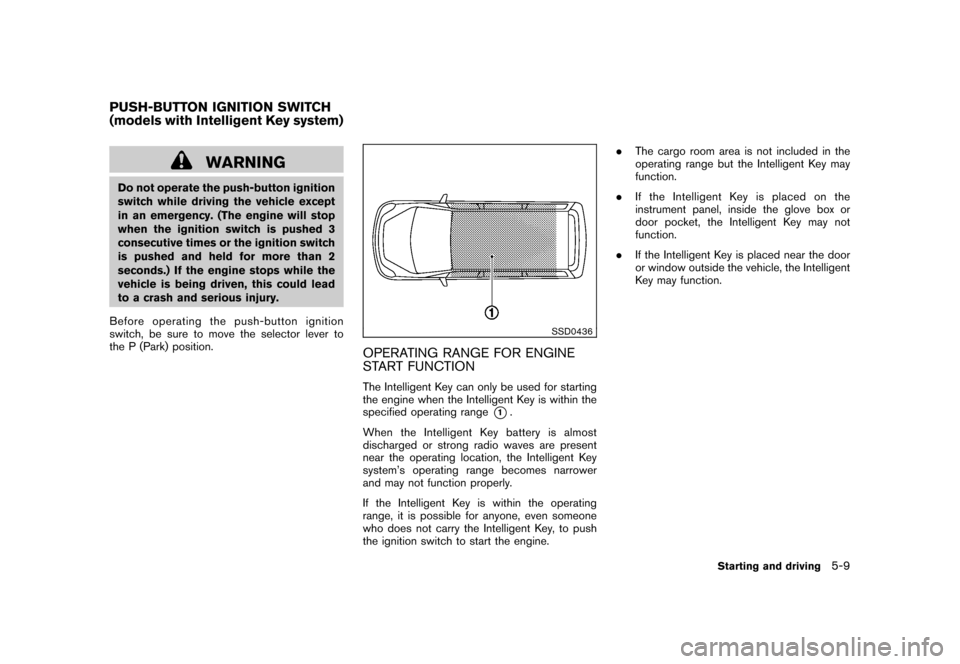
OPERATING RANGE FOR ENGINE
START FUNCTIONThe Intelligent Key can only be used for starting
the engine when the Intelligent Key is within the
specified operating range
*1.
When the Intelligent Key battery is almost
discharged or strong radio waves are present
near the operating location, the Intelligent Key
system’s operating range becomes narrower
and may not function properly.
If the Intelligent Key is within the operating
range, it is possible for anyone, even someone
who does not carry the Intelligent Key, to push
the ignition switch to start the engine. .
The cargo room area is not included in the
operating range but the Intelligent Key may
function.
. If the Intelligent Key is placed on the
instrument panel, inside the glove box or
door pocket, the Intelligent Key may not
function.
. If the Intelligent Key is placed near the door
or window outside the vehicle, the Intelligent
Key may function.
PUSH-BUTTON IGNITION SWITCH
(models with Intelligent Key system)
Starting and driving
5-9
Page 226 of 345
Black plate (224,1)
Model "Z12-D" EDITED: 2010/ 9/ 29
SSD0859
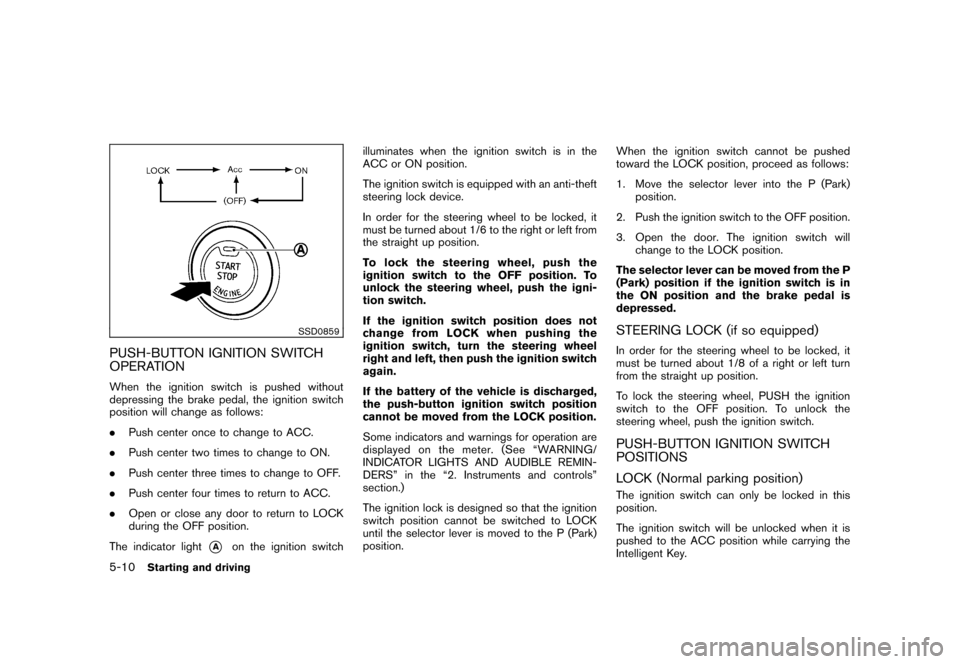
PUSH-BUTTON IGNITION SWITCH
OPERATIONWhen the ignition switch is pushed without
depressing the brake pedal, the ignition switch
position will change as follows:
.Push center once to change to ACC.
. Push center two times to change to ON.
. Push center three times to change to OFF.
. Push center four times to return to ACC.
. Open or close any door to return to LOCK
during the OFF position.
The indicator light
*A
on the ignition switch illuminates when the ignition switch is in the
ACC or ON position.
The ignition switch is equipped with an anti-theft
steering lock device.
In order for the steering wheel to be locked, it
must be turned about 1/6 to the right or left from
the straight up position.
To lock the steering wheel, push the
ignition switch to the OFF position. To
unlock the steering wheel, push the igni-
tion switch.
If the ignition switch position does not
change from LOCK when pushing the
ignition switch, turn the steering wheel
right and left, then push the ignition switch
again.
If the battery of the vehicle is discharged,
the push-button ignition switch position
cannot be moved from the LOCK position.
Some indicators and warnings for operation are
displayed on the meter. (See “WARNING/
INDICATOR LIGHTS AND AUDIBLE REMIN-
DERS” in the “2. Instruments and controls”
section.)
The ignition lock is designed so that the ignition
switch position cannot be switched to LOCK
until the selector lever is moved to the P (Park)
position.
When the ignition switch cannot be pushed
toward the LOCK position, proceed as follows:
1. Move the selector lever into the P (Park)
position.
2. Push the ignition switch to the OFF position.
3. Open the door. The ignition switch will change to the LOCK position.
The selector lever can be moved from the P
(Park) position if the ignition switch is in
the ON position and the brake pedal is
depressed.
STEERING LOCK (if so equipped)In order for the steering wheel to be locked, it
must be turned about 1/8 of a right or left turn
from the straight up position.
To lock the steering wheel, PUSH the ignition
switch to the OFF position. To unlock the
steering wheel, push the ignition switch.PUSH-BUTTON IGNITION SWITCH
POSITIONS
LOCK (Normal parking position)The ignition switch can only be locked in this
position.
The ignition switch will be unlocked when it is
pushed to the ACC position while carrying the
Intelligent Key.
5-10
Starting and driving