light NISSAN FRONTIER 1996 D22 / 1.G User Guide
[x] Cancel search | Manufacturer: NISSAN, Model Year: 1996, Model line: FRONTIER, Model: NISSAN FRONTIER 1996 D22 / 1.GPages: 198, PDF Size: 1.3 MB
Page 21 of 198
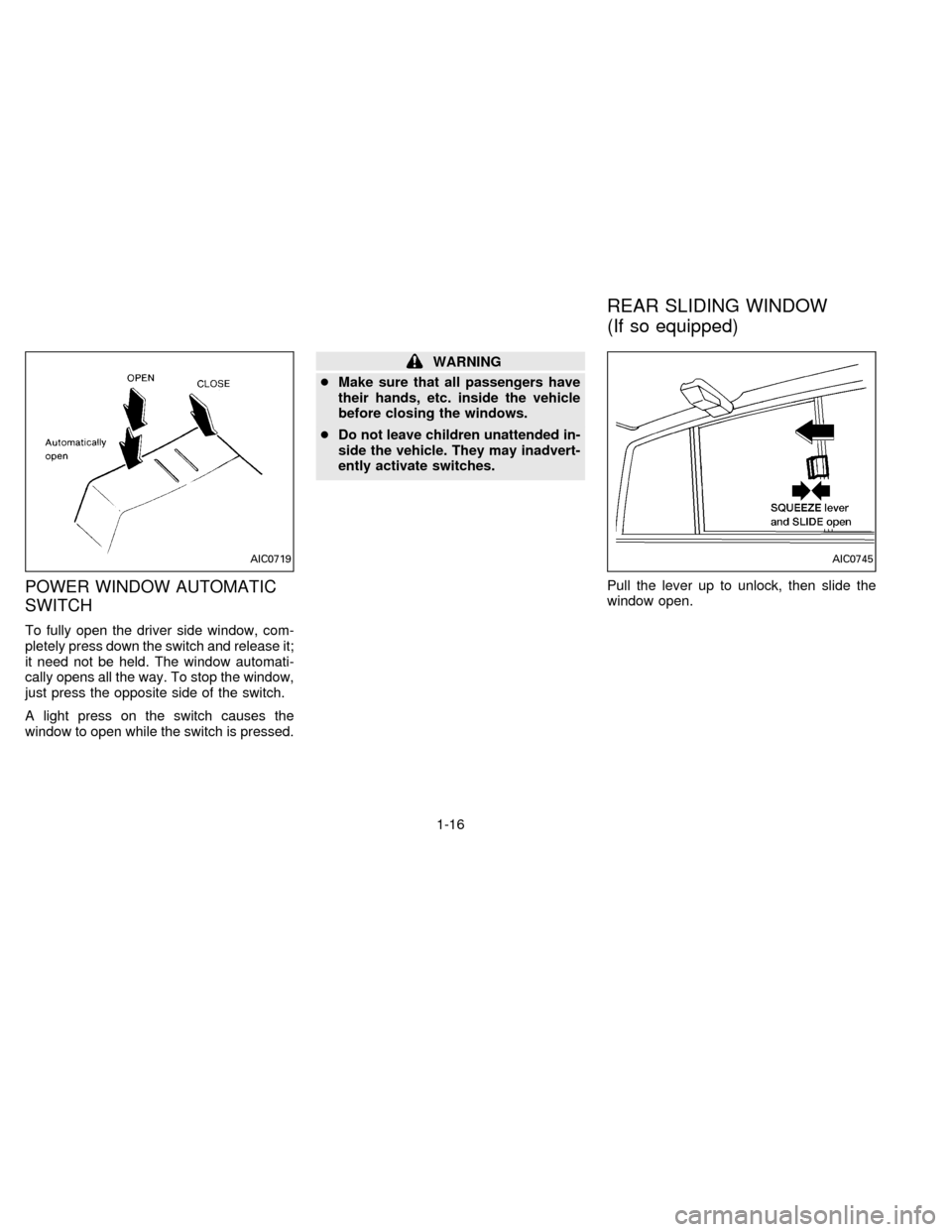
POWER WINDOW AUTOMATIC
SWITCH
To fully open the driver side window, com-
pletely press down the switch and release it;
it need not be held. The window automati-
cally opens all the way. To stop the window,
just press the opposite side of the switch.
A light press on the switch causes the
window to open while the switch is pressed.
WARNING
cMake sure that all passengers have
their hands, etc. inside the vehicle
before closing the windows.
cDo not leave children unattended in-
side the vehicle. They may inadvert-
ently activate switches.
Pull the lever up to unlock, then slide the
window open.
AIC0719AIC0745
REAR SLIDING WINDOW
(If so equipped)
1-16
ZX
Page 26 of 198

2 Pre-driving checks and adjustments
Key ..................................................................... 2-2
Door locks .......................................................... 2-2
Hood release ...................................................... 2-4
Glove box lock (If so equipped) ......................... 2-4
Fuel filler cap ...................................................... 2-5
Tailgate latch ...................................................... 2-5
Tie down hook .................................................... 2-7
Front separate seats ............................................ 2-8
Bench seat ....................................................... 2-10
Jump seat ......................................................... 2-11
Supplemental restraint system
(Supplemental air bag system) ........................ 2-12
Supplemental air bag system ........................... 2-13
Warning labels .................................................. 2-15
Supplemental air bag warning light .................. 2-15
Seat belts ......................................................... 2-17
Child restraints for infants and small children .. 2-22
Tilting steering wheel (If so equipped) ............. 2-26
Outside mirror remote control (If so equipped) . 2-26
Outside mirrors ................................................. 2-26
Inside mirror ..................................................... 2-27
Vanity mirror (If so equipped) .......................... 2-27
ZX
Page 29 of 198
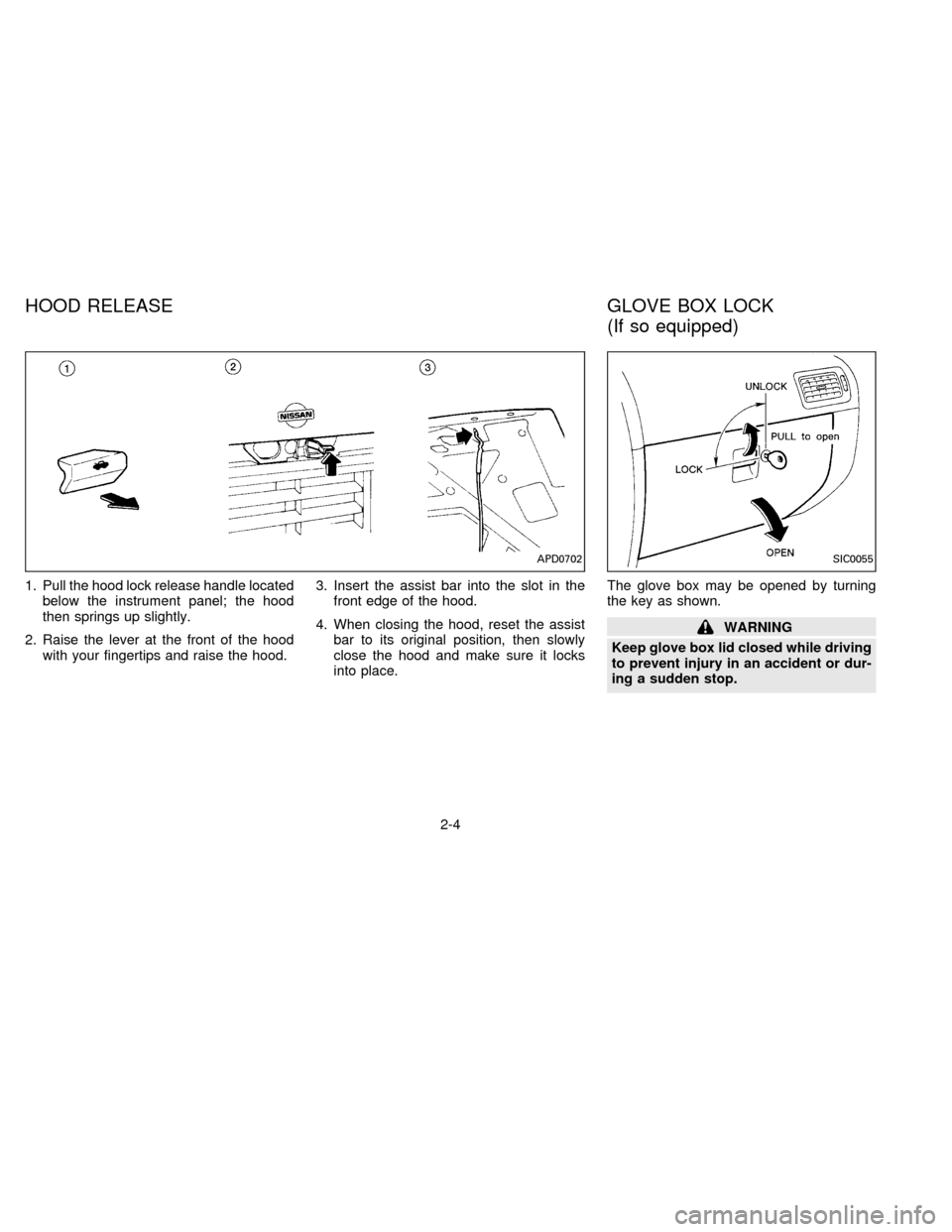
1. Pull the hood lock release handle located
below the instrument panel; the hood
then springs up slightly.
2. Raise the lever at the front of the hood
with your fingertips and raise the hood.3. Insert the assist bar into the slot in the
front edge of the hood.
4. When closing the hood, reset the assist
bar to its original position, then slowly
close the hood and make sure it locks
into place.The glove box may be opened by turning
the key as shown.
WARNING
Keep glove box lid closed while driving
to prevent injury in an accident or dur-
ing a sudden stop.
APD0702SIC0055
HOOD RELEASE GLOVE BOX LOCK
(If so equipped)
2-4
ZX
Page 40 of 198

Warning labels about the supplemental air
bag system are placed in the vehicle as
shown in the illustration.The supplemental air bag light, displaying
AIR BAG in the instrument panel, monitors
the circuits of the supplemental air bag. The
circuits monitored by the supplemental air
bag light are the diagnosis sensor unit, the
supplemental air bag module and all related
wiring.
When the ignition key is in the ON or START
position, the supplemental air bag warning
light illuminates for about 7 seconds and
then turns off. This means the system is
operational.
If any of the following conditions occur, the
supplemental air bag needs servicing and
APD0705APD0706
WARNING LABELS SUPPLEMENTAL AIR BAG
WARNING LIGHT
2-15
ZX
Page 41 of 198
should be taken to your nearest authorized
NISSAN dealer:
1. The supplemental air bag light does not
come on and remain on for 7 seconds
and then go off as described above.
2. The supplemental air bag light flashes
intermittently or remains on.
3. The supplemental air bag light does not
come on at all.
Under these conditions, the Supplemental
Restraint System Air Bag does not operate
properly. It must be checked and repaired.
Repair and replacement procedure
The supplemental air bag system is de-
signed to inflate on a one-time-only basis.
As a reminder, unless it is damaged, the
supplemental air bag light remains illumi-
nated after inflation has occurred. Repair
and replacement of the supplemental air
bag system should be done only by an
authorized NISSAN dealer.
To ensure long-term functioning, the
system must be inspected 10 years after
the date of manufacture noted on the
certification label located on the driver
side front pillar.
When maintenance work is required on the
vehicle, the supplemental air bag system
and related parts should be pointed out to
the person conducting the maintenance.
The ignition key must always be in the LOCK
position when working under the hood or
inside the vehicle.
WARNING
cOnce the supplemental air bag in-
flates, the supplemental air bag
module will not function again and
must be replaced. The supplemental
air bag module cannot be repaired.
cThe supplemental air bag system
should be inspected by an autho-
rized NISSAN dealer if there is any
damage to the front end portion of
the vehicle or if the supplemental air
bag has inflated.
cWhen selling your vehicle, we re-
quest that you inform the buyer
about the supplemental air bag sys-
tem and guide the buyer to the ap-
propriate sections in this Owner's
Manual.cIf you need to dispose of the supple-
mental air bag or scrap the vehicle,
contact an authorized NISSAN
dealer. Correct supplemental air bag
disposal procedures are set forth in
the appropriate NISSAN Service
Manual. Incorrect disposal proce-
dures could cause personal injury.
2-16
ZX
Page 52 of 198
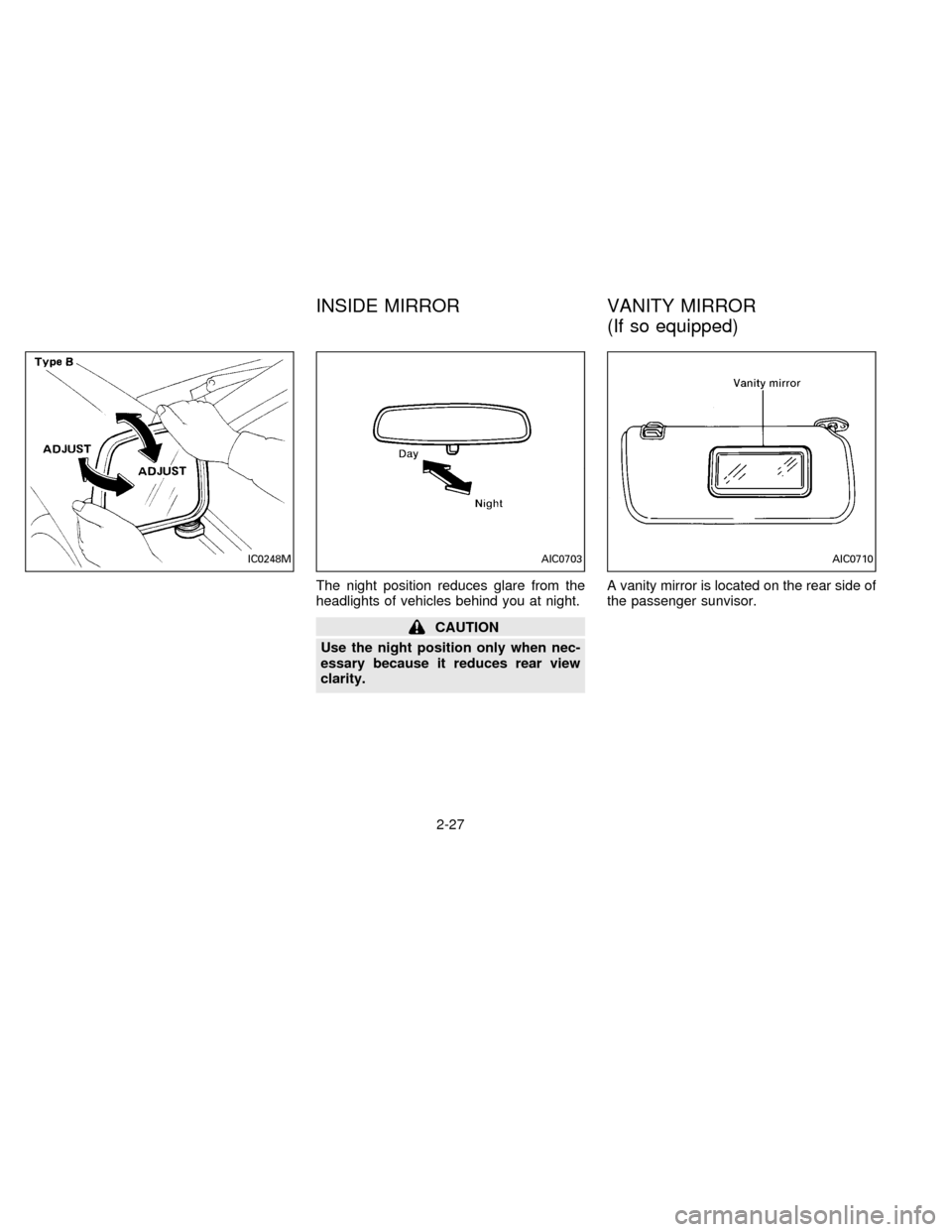
The night position reduces glare from the
headlights of vehicles behind you at night.
CAUTION
Use the night position only when nec-
essary because it reduces rear view
clarity.A vanity mirror is located on the rear side of
the passenger sunvisor.
IC0248MAIC0703AIC0710
INSIDE MIRROR VANITY MIRROR
(If so equipped)
2-27
ZX
Page 57 of 198

Air conditioner switch
(If so equipped)
This button is provided only for vehicles with
an air conditioner.
Start the engine and push the switch to turn
on the air conditioner. The indicator light
comes on when the air conditioner is on.
HEATER OPERATION
Heating
This mode directs hot air to the foot outlets.
A small amount of air is also directed to the
defrost outlets.
1. Move the air intake lever to the
po-
sition for normal heating.
2. Move the air control lever to the
position.
3. Move the fan control lever to the desired
speed.
4. Move the temperature control lever to the
desired position between the middle and
the HOT position.
Ventilation
This mode directs outside air to the side and
center ventilators.
1. Move the air intake lever to the
po-
sition.
2. Move the air control lever to the
position.
3. Move the fan control lever to the desired
speed.
4. Move the temperature control lever to the
desired position.
Defrosting or defogging
This mode defrosts/defogs the windows.
1. Move the air intake lever to the
po-
sition.
2. Move the air control lever to the
position.
3. Move the fan control lever to the desired
speed.
4. Move the temperature control lever to the
desired position between the middle and
the HOT position.
cIf it is difficult to defog the windshield,turn the air conditioner switch on (if so
equipped).
Bi-level heating
This mode directs cooler air from the side
and center ventilators and warmer air from
the foot outlets.
1. Move the air intake lever to the
po-
sition.
2. Move the air control lever to the
position.
3. Move the fan control lever to the desired
speed.
4. Move the temperature control lever to the
desired position.
Heating and defrosting
This mode heats the interior and defogs the
windshield.
1. Move the air intake lever to the
po-
sition.
2. Move the air control lever to the
position.
3. Move the fan control lever to the desired
speed.
3-4
ZX
Page 58 of 198

4. Move the temperature control lever to the
desired position between the middle and
the HOT position.
Operating tips
Clear snow and ice from the wiper blade
and air inlet in front of the windshield.
This improves heater and defroster op-
eration.
AIR CONDITIONER OPERATION
(If so equipped)
Start the engine, move the fan control lever
to the desired (1 to 4) position, and push in
the air conditioner switch to activate the air
conditioner. When the air conditioner is on,
cooling and dehumidifying functions are
added to the heater operation.
The air conditioner cooling function op-
erates only when the engine is running.
Cooling
This mode cools and dehumidifies.
1. Move the air intake lever to the
po-
sition.
2. Move the air control lever to the
position.3. Move the fan control lever to the desired
position.
4. Push in the air conditioner switch. The
indicator light comes on.
5. Move the temperature control lever to the
desired position.
cFor quick cooling when the outside tem-
perature is high, move the air intake lever
to the
position. Be sure to return
the air intake lever to the
position
for normal cooling.
Dehumidified heating
This mode heats and dehumidifies.
1. Move the air intake lever to the
po-
sition.
2. Move the air control lever to the
position.
3. Move the fan control lever to the desired
position.
4. Push in the air conditioner switch. The
indicator light comes on.
5. Move the temperature control lever to the
desired position.
Dehumidified defrosting
This mode defrosts/defogs the windows and
dehumidifies.
1. Move the air intake lever to the
po-
sition.
2. Move the air control lever to the
position.
3. Move the fan control lever to the desired
position.
4. Push in the air conditioner switch. The
indicator light comes on.
5. Move the temperature control lever to the
desired position.
Operating tips
cKeep windows and sunroof closed while
operating the air conditioner.
cAfter parking in the sun, drive for two or
three minutes with the windows open to
vent hot air from the passenger compart-
ment. Then, close the windows. This
allows the air conditioner to cool the
interior more quickly.
cThe air conditioning system should be
operated for about ten minutes at least
3-5
ZX
Page 66 of 198

Adjusting tone quality and sound
balance
To adjust BASS, TREB (treble), FADER,
and BAL (balance) the control knobs must
be released from their stowed positions.
Pushing the knobs once moves them to the
released position.
In the released position, the knobs control
tone quality. Turn the control knobs to ad-
just BASS and TREB to the most pleasing
level.
From the released position, the knobs must
be pulled out in order to control FADER andBAL. FADER adjusts the sound level be-
tween the front and rear speakers, and BAL
adjusts the sound level between the right
and left speakers.
Once sound quality is set to the desired
levels, return the control knobs to the
stowed position by pushing them in com-
pletely and releasing.
CASSETTE TAPE OPERATION
Turn the ignition key to ACC or ON, then
lightly insert the cassette tape into the tape
door.
The cassette tape automatically pulls into
the player. The word TAPE and an arrow
indicating tape side illuminates in the dis-
play window.
Do not force the cassette tape into the
tape door.
Pressing strongly could cause player
damage.
AHA0522AIC0709
3-13
ZX
Page 67 of 198

The cassette tape automatically changes
direction to play the other side when the first
side is complete. At this time, the arrow in
the display window changes direction.
Fast forwarding or rewinding the
tape
Push either the FF (fast forward) or REW
(rewind) button for the desired direction.
The
orsymbol illuminates in the
display. To stop the FF or REW function,
press the PLAY/STOP button.
Automatic Program Search (APS)
fast forwarding or APS rewinding
the tape
Push either the APS FF or APS REW button
while the tape is playing. The tape runs
quickly, stops, then plays the next selection.
The
orsymbol illuminates in
the display.
This system searches for the blank intervals
between selections. If there is a blank inter-
val within one program or there is no interval
between programs, the system may not
stop in the desired or expected location.
Changing the direction of tape play
Push the PROG (program) select button.
The
orsymbol illuminates in the
display window to indicate which program
side is playing.
PLAY/STOP button
Push the PLAY/STOP button to stop cas-
sette tape play and turn the audio system
off. Press the PLAY/STOP button again to
resume cassette tape play.
Also use the PLAY/STOP button to resume
play when the tape is in the fast forward or
rewind mode.
Dolby NR (noise reduction)
Push theDOLBY NR button for
Dolby NR encoded tapes to reduce high
frequency tape noise. The indicator light
comes on.
Dolby NR is manufactured under license
from Dolby Laboratories Licensing Corpora-
tion. DOLBY NR and the double-D symbol
are trademarks of Dolby Laboratories Li-
censing Corporation.
If in the clock priority mode when the
button is pressed,and TAPE il-luminate in the display window for about ten
seconds. The clock mode than returns to
the display window.
Metal or chrome tape usage
The cassette player is automatically set to
high performance play when playing a metal
or chrome cassette tape. The indicator
METAL comes on when playing a metal or
chrome cassette tape.
Ejecting the cassette tape
Push the EJECT button.
The cassette tape automatically comes out.
Precautions on cassette player op-
eration
cTo maintain good quality sound, NIS-
SAN recommends using cassette
tapes of 60 minutes or shorter in
length.
cCassette tapes should be removed
from the player when not in use. Store
cassettes in their protective cases,
away from direct sunlight, heat, mois-
ture and magnetic sources.
3-14
ZX