radio NISSAN FRONTIER 1997 D22 / 1.G Owners Manual
[x] Cancel search | Manufacturer: NISSAN, Model Year: 1997, Model line: FRONTIER, Model: NISSAN FRONTIER 1997 D22 / 1.GPages: 204, PDF Size: 1.45 MB
Page 60 of 204

3Heater, air conditioner and audio system
Ventilators ..............................................................3-2
Heater and air conditioner......................................3-3
Controls ..................................................................3-3
Heater operation ....................................................3-4
Air conditioner operation (if so equipped) ..............3-5
Air flow charts.........................................................3-6
Audio system ........................................................3-10
AM-FM radio with cassette player (30 w) ............3-11Radio operation ....................................................3-11
Cassette tape operation .......................................3-13
AM-FM radio with cassette player (100 W) .........3-16
Radio operation ....................................................3-16
Cassette tape operation .......................................3-19
Manual antenna ...................................................3-20
CB radio or car phone..........................................3-21
ZX
Page 69 of 204

To turn the radio on, turn the ignition key to
ACC or ON. If you listen to the radio when
the engine is not running, turn the key to the
ACC position.
Radio reception is affected by station signal
strength, distance from radio transmitter,
buildings, bridges, mountains and other ex-
ternal influences. Intermittent changes in
reception quality normally are caused by
these external influences.
AHA0709
AUDIO SYSTEM
3-10
ZX
Page 70 of 204
AM-FM RADIO WITH CASSETTE
PLAYER (30 W)
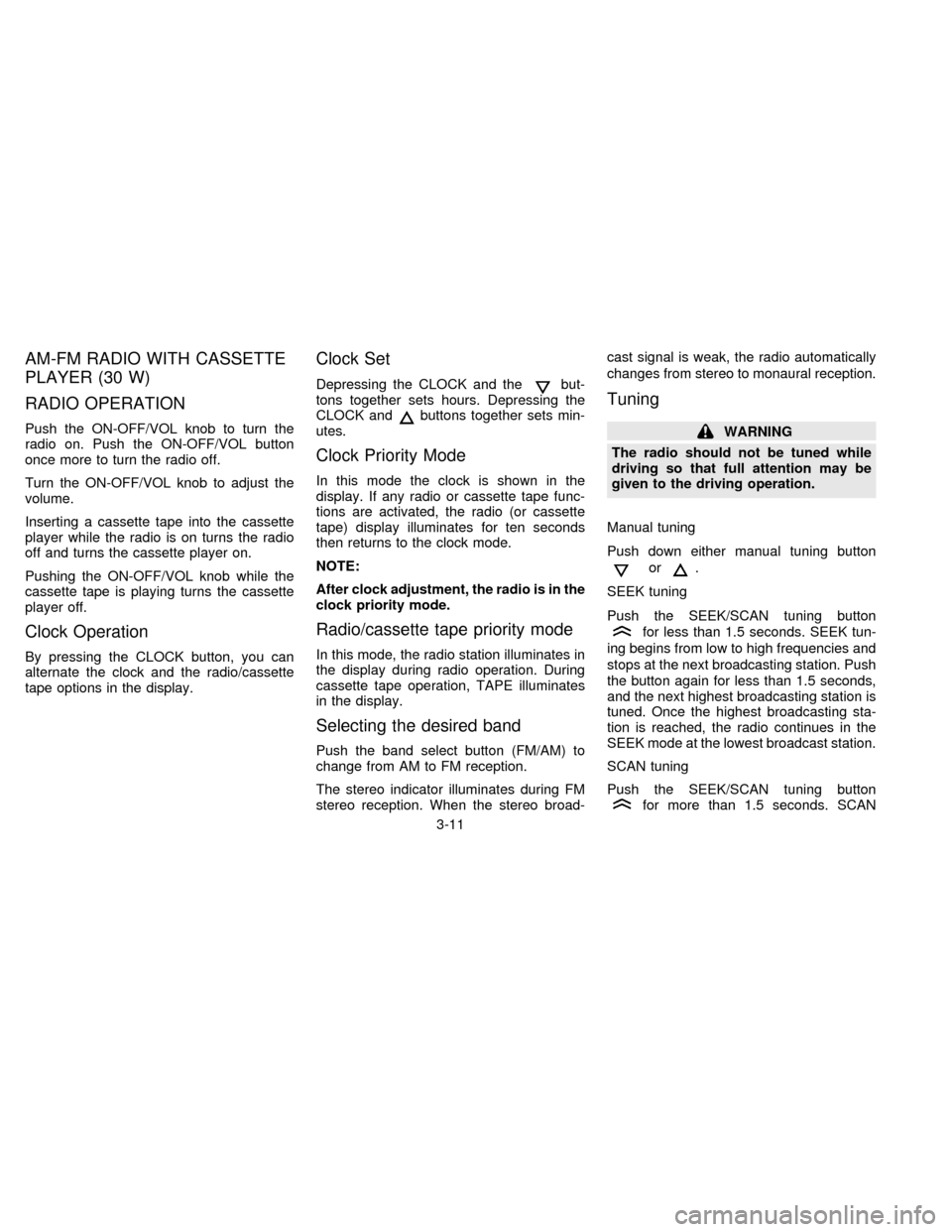
RADIO OPERATION
Push the ON-OFF/VOL knob to turn the
radio on. Push the ON-OFF/VOL button
once more to turn the radio off.
Turn the ON-OFF/VOL knob to adjust the
volume.
Inserting a cassette tape into the cassette
player while the radio is on turns the radio
off and turns the cassette player on.
Pushing the ON-OFF/VOL knob while the
cassette tape is playing turns the cassette
player off.
Clock Operation
By pressing the CLOCK button, you can
alternate the clock and the radio/cassette
tape options in the display.
Clock Set
Depressing the CLOCK and thebut-
tons together sets hours. Depressing the
CLOCK and
buttons together sets min-
utes.
Clock Priority Mode
In this mode the clock is shown in the
display. If any radio or cassette tape func-
tions are activated, the radio (or cassette
tape) display illuminates for ten seconds
then returns to the clock mode.
NOTE:
After clock adjustment, the radio is in the
clock priority mode.
Radio/cassette tape priority mode
In this mode, the radio station illuminates in
the display during radio operation. During
cassette tape operation, TAPE illuminates
in the display.
Selecting the desired band
Push the band select button (FM/AM) to
change from AM to FM reception.
The stereo indicator illuminates during FM
stereo reception. When the stereo broad-cast signal is weak, the radio automatically
changes from stereo to monaural reception.
Tuning
WARNING
The radio should not be tuned while
driving so that full attention may be
given to the driving operation.
Manual tuning
Push down either manual tuning button
or.
SEEK tuning
Push the SEEK/SCAN tuning button
for less than 1.5 seconds. SEEK tun-
ing begins from low to high frequencies and
stops at the next broadcasting station. Push
the button again for less than 1.5 seconds,
and the next highest broadcasting station is
tuned. Once the highest broadcasting sta-
tion is reached, the radio continues in the
SEEK mode at the lowest broadcast station.
SCAN tuning
Push the SEEK/SCAN tuning button
for more than 1.5 seconds. SCAN
3-11
ZX
Page 71 of 204

illuminates in the display window. SCAN
tuning begins from low to high frequencies
and stops at each broadcasting station for
five seconds. Pushing the button again dur-
ing this five second period stops SCAN
tuning and the radio remains tuned to that
station.
Station memory operations
Six stations can be set for each band.
1. Tune to the desired station.
2. Push the desired select button for morethan 2 seconds. For example, in the
diagram ch2 is to be memorized. The
radio mutes when the select button is
pushed.
3. The indicator, ch2, then comes on in the
display and the sound resumes. Memo-
rizing is now complete.
4. Other buttons can be set in the same
manner.
If the battery cable is disconnected, or if the
fuse blows, the radio memory is cancelled.
In that case, reset the desired stations.
HA1088
3-12
ZX
Page 75 of 204

AM-FM RADIO WITH CASSETTE
PLAYER (100 W)
RADIO OPERATION
Push the ON/VOL knob to turn the radio on.
Push the ON/VOL button once more to turn
the radio off.
Turn the ON/VOL knob to adjust the vol-
ume.
Pushing the ON/VOL knob while the cas-
sette tape is playing will turn the cassette
player off and turn the radio on.
The electronic tuning radio has an FM DI-
VERSITY reception system. The FM DI-
VERSITY system employs two antennas;
one is a rod type antenna and the other is an
antenna printed on the front window. This
system automatically switches to the an-
tenna which receives less noise. Thus the
radio provides high quality reception.
Selecting the desired band
Push the band select button (FM/AM) to
change from AM to FM reception.
The FM stereo indicator illuminates during
FM stereo reception. When the stereo
broadcast signal is weak, the radio auto-
AHA0706
3-16
ZX
Page 76 of 204
matically changes from stereo to monaural
reception.
Tuning
WARNING
The radio should not be tuned while
driving so that full attention may be
given to the driving operation.
Manual tuning
Push either manual tuning button
or
.
SEEK tuning
Push the SEEK/SCAN tuning button
for less than 1.5 seconds. SEEK tun-
ing begins from low to high frequencies and
stops at the next broadcasting station. Push
the button again for less than 1.5 seconds,
and the next highest broadcasting station is
tuned. Once the highest broadcasting sta-
tion is reached, the radio continues in the
SEEK mode at the lowest broadcast station.
SCAN tuning
Push the SEEK/SCAN tuning button
for more than 1.5 seconds. SCANilluminates in the display window. SCAN
tuning begins from low to high frequencies
and stops at each broadcasting station for
five seconds. Pushing the button again dur-
ing this five second period stops SCAN
tuning and the radio remains tuned to that
station.
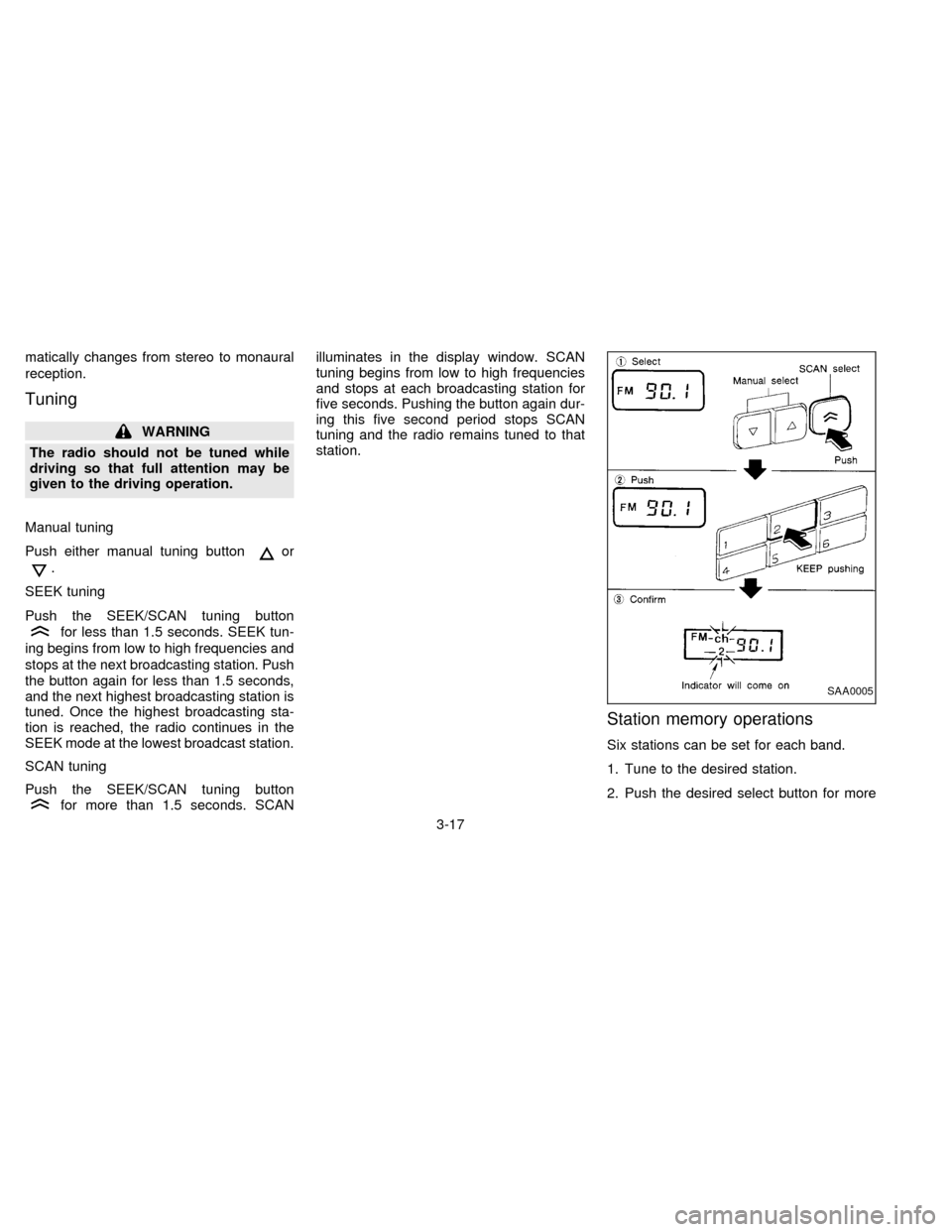
Station memory operations
Six stations can be set for each band.
1. Tune to the desired station.
2. Push the desired select button for more
SAA0005
3-17
ZX
Page 77 of 204

than 2 seconds. For example, in the
diagram ch2 is to be memorized. The
radio mutes when the select button is
pushed.
3. The indicator, ch2, then comes on and
the sound resumes. Memorizing is now
complete.
4. Other buttons can be set in the same
manner.
If the battery cable is disconnected, or if the
fuse blows, the radio memory is cancelled.
In that case, reset the desired stations.
Adjusting tone quality and sound
balance
To adjust BASS, TREB (treble), FADER,
and BAL (balance) the control knobs must
be released from their stowed positions.
Pushing the knobs once moves them to the
released position.
In the released position, the knobs control
tone quality. Turn the control knobs to ad-
just BASS and TREB to the most pleasing
level.
From the released position, the knobs must
be pulled out in order to control FADER andBAL. FADER adjusts the sound level be-
tween the front and rear speakers, and BAL
adjusts the sound level between the right
and left speakers.
Once sound quality is set to the desired
levels, return the control knobs to the
stowed position by pushing them in com-
pletely and releasing.
AHA0705
3-18
ZX
Page 78 of 204
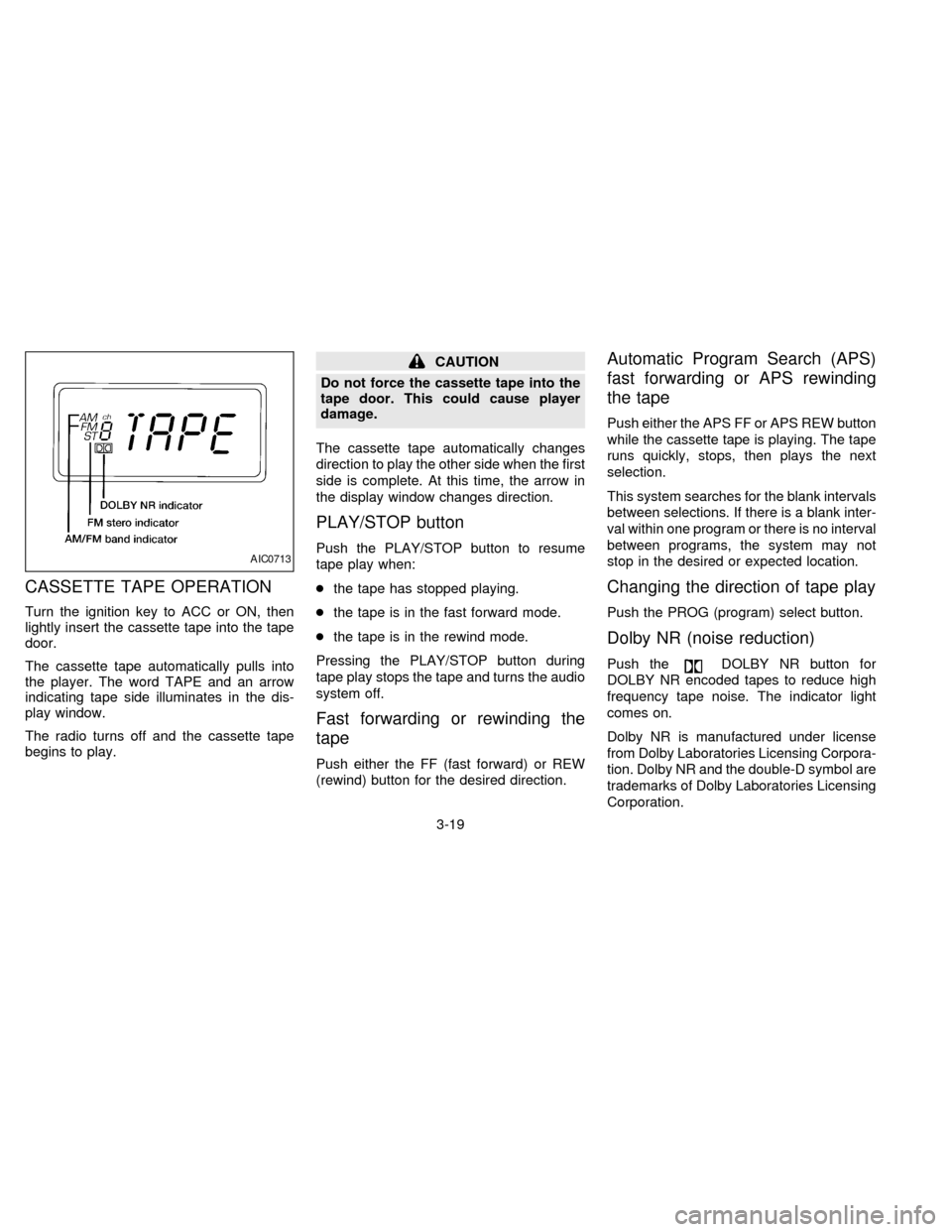
CASSETTE TAPE OPERATION
Turn the ignition key to ACC or ON, then
lightly insert the cassette tape into the tape
door.
The cassette tape automatically pulls into
the player. The word TAPE and an arrow
indicating tape side illuminates in the dis-
play window.
The radio turns off and the cassette tape
begins to play.
CAUTION
Do not force the cassette tape into the
tape door. This could cause player
damage.
The cassette tape automatically changes
direction to play the other side when the first
side is complete. At this time, the arrow in
the display window changes direction.
PLAY/STOP button
Push the PLAY/STOP button to resume
tape play when:
cthe tape has stopped playing.
cthe tape is in the fast forward mode.
cthe tape is in the rewind mode.
Pressing the PLAY/STOP button during
tape play stops the tape and turns the audio
system off.
Fast forwarding or rewinding the
tape
Push either the FF (fast forward) or REW
(rewind) button for the desired direction.
Automatic Program Search (APS)
fast forwarding or APS rewinding
the tape
Push either the APS FF or APS REW button
while the cassette tape is playing. The tape
runs quickly, stops, then plays the next
selection.
This system searches for the blank intervals
between selections. If there is a blank inter-
val within one program or there is no interval
between programs, the system may not
stop in the desired or expected location.
Changing the direction of tape play
Push the PROG (program) select button.
Dolby NR (noise reduction)
Push theDOLBY NR button for
DOLBY NR encoded tapes to reduce high
frequency tape noise. The indicator light
comes on.
Dolby NR is manufactured under license
from Dolby Laboratories Licensing Corpora-
tion. Dolby NR and the double-D symbol are
trademarks of Dolby Laboratories Licensing
Corporation.
AIC0713
3-19
ZX
Page 80 of 204
Microphone installed model
If equipped with a genuine cellular phone,
your NISSAN features a non-directional mi-
crophone in the steering column cover, so it
is not necessary to look at or speak directly
into the microphone when calling.
To do so could detract from the driving
operation and cause an accident.
See the manual for car phone operation
Pre-wired and antenna for phone
installed model
Some models are pre-wired to accept the
genuine NISSAN cellular phone.
In addition, the same model has the phone
antenna built into the rear glass window.
When installing a CB, ham radio or car
phone in your NISSAN, be sure to observe
the following cautions, otherwise the new
equipment may adversely affect the MFI
(Multiport Fuel Injection) system and other
electronic parts.
CAUTION
cKeep the antenna as far away as
possible from the Engine Control
Module (ECM).
cAlso keep the antenna wire more
than 8 inches (20 cm) away from the
fuel injection wiring harness. Do not
route the antenna wire next to any
harness.
cAdjust the antenna standing-wave
ratio as recommended by the
manufacturer.
cConnect the ground wire from the
radio chassis to the body.
cFor details, consult a NISSAN dealer.
CB RADIO OR CAR PHONE
3-21
ZX
Page 86 of 204
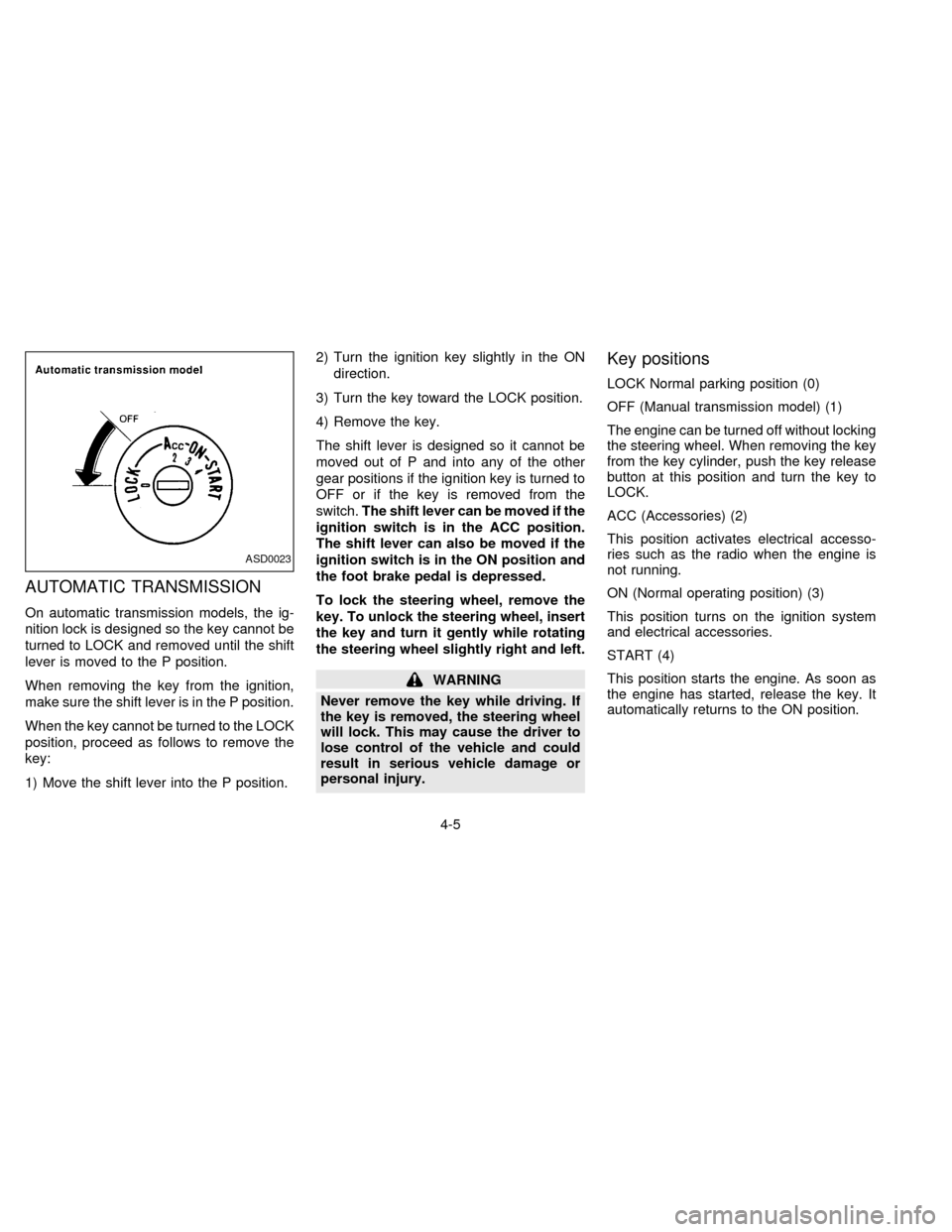
AUTOMATIC TRANSMISSION
On automatic transmission models, the ig-
nition lock is designed so the key cannot be
turned to LOCK and removed until the shift
lever is moved to the P position.
When removing the key from the ignition,
make sure the shift lever is in the P position.
When the key cannot be turned to the LOCK
position, proceed as follows to remove the
key:
1) Move the shift lever into the P position.2) Turn the ignition key slightly in the ON
direction.
3) Turn the key toward the LOCK position.
4) Remove the key.
The shift lever is designed so it cannot be
moved out of P and into any of the other
gear positions if the ignition key is turned to
OFF or if the key is removed from the
switch.The shift lever can be moved if the
ignition switch is in the ACC position.
The shift lever can also be moved if the
ignition switch is in the ON position and
the foot brake pedal is depressed.
To lock the steering wheel, remove the
key. To unlock the steering wheel, insert
the key and turn it gently while rotating
the steering wheel slightly right and left.
WARNING
Never remove the key while driving. If
the key is removed, the steering wheel
will lock. This may cause the driver to
lose control of the vehicle and could
result in serious vehicle damage or
personal injury.
Key positions
LOCK Normal parking position (0)
OFF (Manual transmission model) (1)
The engine can be turned off without locking
the steering wheel. When removing the key
from the key cylinder, push the key release
button at this position and turn the key to
LOCK.
ACC (Accessories) (2)
This position activates electrical accesso-
ries such as the radio when the engine is
not running.
ON (Normal operating position) (3)
This position turns on the ignition system
and electrical accessories.
START (4)
This position starts the engine. As soon as
the engine has started, release the key. It
automatically returns to the ON position.
ASD0023
4-5
ZX