hub NISSAN FRONTIER 1999 D22 / 1.G Owners Manual
[x] Cancel search | Manufacturer: NISSAN, Model Year: 1999, Model line: FRONTIER, Model: NISSAN FRONTIER 1999 D22 / 1.GPages: 247, PDF Size: 1.89 MB
Page 98 of 247
is set to the desired level, press the AUDIO
button repeatedly until the radio or cassette
tape display appears.
CASSETTE TAPE OPERATION
Turn the ignition key to ACC or ON and
carefully insert a cassette tape into the tape
door. The cassette tape automatically pulls
into the player.
The word TAPE and moving digital squares
illuminate on the right side of the display
window. If the radio is already operating it
automatically turns off and the cassette tape
begins to play.
CAUTION
Do not force the cassette tape into the
tape door. This could cause player
damage.
The cassette tape automatically changes
directions to play the other side when the
first side is complete. At this time, the mov-
ing digital squares illuminate on the left side
of the display window.
Precautions on cassette player op-
erations
ITo maintain good quality sound, NIS-
SAN recommends using cassette tapes
of 60 minutes or shorter in length.
ICassette tapes should be removed
from the player when not in use. Store
cassettes in their protective cases
and away from direct sunlight, heat,
dust, moisture and magnetic sources.
IDirect sunlight can cause the cassette
to become deformed. The use of de-
formed cassettes may cause the cas-
sette to jam in the player.
IDo not use cassettes with labels
which are peeling and loose. If used,
the label could jam in the player.
IIf a cassette has loose tape, insert a
pencil through one of the cassette
hubs and rewind the tape firmly
around the hubs. Loose tape may
cause tape jamming and wavering
sound quality.
IOver a period of time, the playback
head, capstan and pinch roller may
collect a tape coating residue as thetape is played. This residue accumu-
lation can cause weak or wavering
sound, and should be removed peri-
odically with a head cleaning tape. If
the residue is not removed periodi-
cally, the player may need to be disas-
sembled for cleaning.Fast forwarding or rewinding the
tape
Push either theorbutton for
the desired direction.
The FF or REW symbol illuminates in the
display.
To stop the FF or REW function, press the
oragain, or thebutton.
Automatic Program Search (APS)
fast forwarding or APS rewinding
the tape
Push either theorbutton
while the cassette tape is playing. The tape
runs quickly, stops, then plays the next
selection from the beginning. Either the FF
or REW symbol flashes in the display while
searching for the selection.
4-14Heater, air conditioner and audio systems
ZX
Page 104 of 247
CASSETTE TAPE OPERATION
Turn the ignition key to the ACC or ON
position, and carefully insert a cassette tape
into the tape door. The cassette tape auto-
matically pulls into the player. The word
TAPE illuminates in the display.
CAUTION
Do not force the cassette tape into the
tape door. This could cause player
damage.
ITo maintain good quality sound,
NISSAN recommends using cassette
tapes of 60 minutes or shorter in
length.
ICassette tapes should be removed
from the player when not in use. Store
cassettes in their protective cases
and away from direct sunlight, heat,
dust, moisture or magnetic sources.
IDirect sunlight can cause the cassette
to become deformed. The use of de-
formed cassettes may cause the cas-
sette to jam in the player.
IDo not use cassettes that have peel-
ing or loose labels. If used, the labelcould jam in the player.
IIf a cassette has loose tape, insert a
pencil through one of the cassette
hubs and rewind the tape firmly.
Loose tape may cause jamming and
wavering sound quality.
IOver a period of time, the playback
head, capstan and pinch roller may
gather a tape coating residue as the
tape is played. This residue accumu-
lation can cause a weak or wavering
sound and should be removed peri-
odically with a head cleaning tape. If
the residue is not removed periodi-
cally, the player may need to be disas-
sembled for cleaning.
PLAY/STOP TAPE button
When thebutton is pushed with the
system turned off and a tape loaded, the
system comes on and the tape plays.
The word tape illuminates.
When the
button is pushed with either
the radio or compact disc turned on and a
tape loaded, the compact disc or the radio
turns off and the tape plays.
While the tape is playing, pushing the
button stops tape play. Pushing thebutton again resumes tape play.
FF (fast forward) and REW (rewind)
buttons
Push thebutton to fast forward the
tape. Push thebutton to rewind the
tape. Either REW or FF illuminates in the
display. To stop the FF or REW function,
press the
,,orbuttons.
Automatic Program Search (APS)
FF and REW buttons
When thebutton is pushed while the
tape is being played, the tape runs quickly,
stops, then plays the next selection from the
beginning. Push the
button several
times to skip several selections. Each time
the button is pushed, the tape fast forwards
one additional selection. This number ap-
pears in the display window. The tape can
be fast forwarded through up to nine selec-
tions. (for example: 7 in the display indi-
cates that the
button has been
pushed seven times to skip forward through
seven selections).
When the
button is pushed, the se-
lection being played starts again from the
4-20Heater, air conditioner and audio systems
ZX
Page 109 of 247

5 Starting and driving
Precautions when starting and driving ...................5-2
Exhaust gas (carbon monoxide) ............................5-2
Three-way catalyst ..................................................5-2
On-pavement and off-road driving precautions......5-3
Avoiding collision and rollover ................................5-3
Drinking alcohol/drugs and driving .........................5-4
Ignition switch .........................................................5-4
Manual transmission...............................................5-4
Automatic transmission ..........................................5-5
Before starting the engine ......................................5-6
Driving with automatic transmission (if so
equipped) ...............................................................5-6
Driving with manual transmission.........................5-12
Starting the engine ...............................................5-14
Parking brake operation .......................................5-14Cruise control (if so equipped) .............................5-16
Break-in schedule ................................................5-18
Increasing fuel economy ......................................5-18
Transfer case shifting procedures for 4-wheel
drive vehicles........................................................5-19
Auto-lock free-running hubs .................................5-20
Manual-lock free-running hubs.............................5-22
Driving your four-wheel drive safely .....................5-24
Tires of four-wheel drive ......................................5-26
Parking/parking on hills ........................................5-27
Power steering system .........................................5-28
Brake system........................................................5-28
Anti-lock brake system (ABS) ..............................5-29
Cold weather driving ............................................5-30
ZX
Page 127 of 247
CAUTION
IDo not drive on dry hard surface
roads in four-wheel drive.IDriving on dry hard surfaces in 4H or
4L may cause unnecessary noise
and tire wear. We recommend driv-
ing in the 2H position under these
conditions.
WARNING
IWhen parking the vehicle, apply the
parking brake and always make sure
to shift the transfer control lever into
the 2H, 4H or 4L position.
IDo not leave the transfer control le-
ver in the N (Neutral) position. Oth-
erwise, the vehicle could roll unex-
pectedly even if the manual
transmission is in gear or the auto-
matic transmission is in the P (Park)
position.
IFailure to engage the transfer con-
trol lever in 2H, 4H, or 4L could result
in the vehicle moving unexpectedly,
which in turn could result in serious
personal injury or property damage.
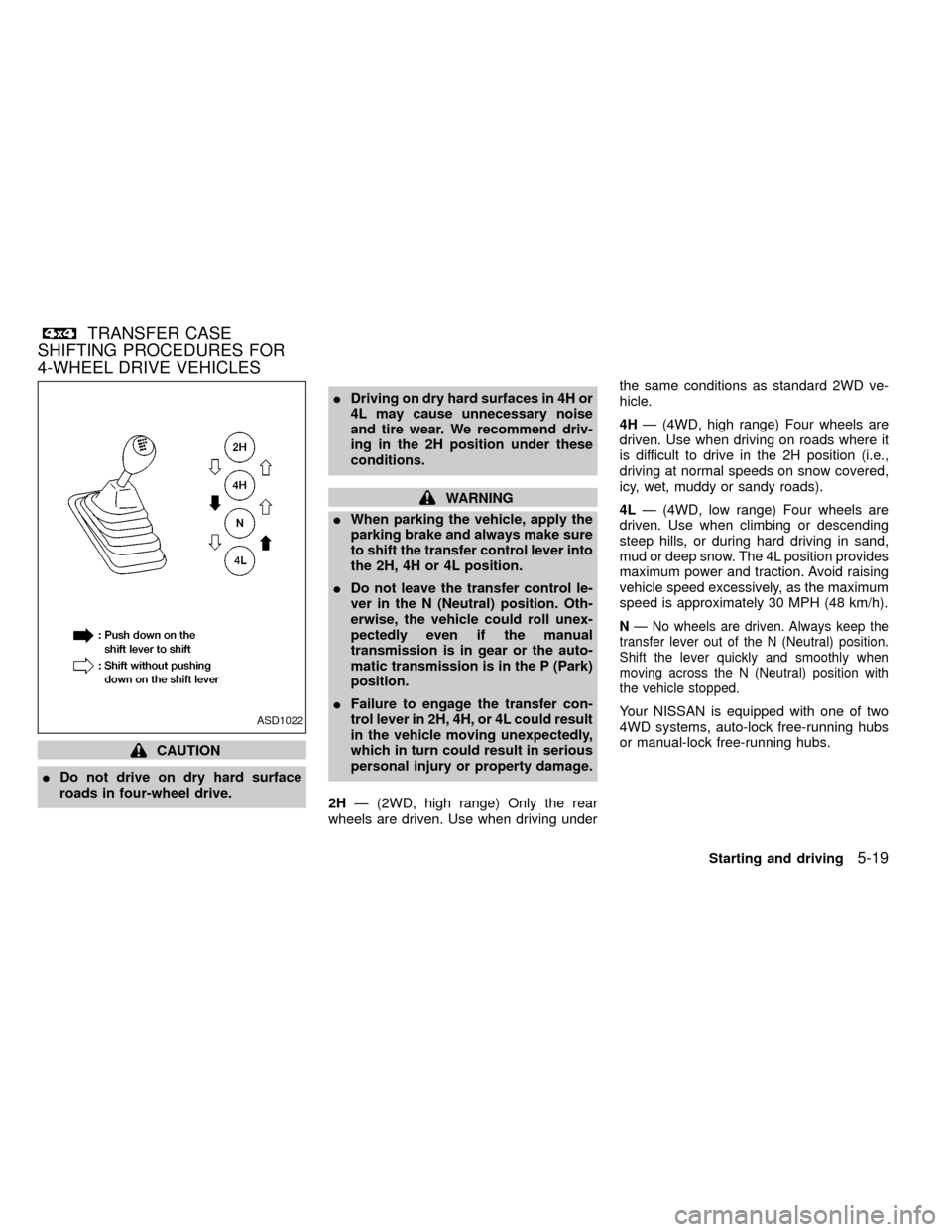
2HÐ (2WD, high range) Only the rear
wheels are driven. Use when driving underthe same conditions as standard 2WD ve-
hicle.
4HÐ (4WD, high range) Four wheels are
driven. Use when driving on roads where it
is difficult to drive in the 2H position (i.e.,
driving at normal speeds on snow covered,
icy, wet, muddy or sandy roads).
4LÐ (4WD, low range) Four wheels are
driven. Use when climbing or descending
steep hills, or during hard driving in sand,
mud or deep snow. The 4L position provides
maximum power and traction. Avoid raising
vehicle speed excessively, as the maximum
speed is approximately 30 MPH (48 km/h).
NÐ No wheels are driven. Always keep the
transfer lever out of the N (Neutral) position.
Shift the lever quickly and smoothly when
moving across the N (Neutral) position with
the vehicle stopped.
Your NISSAN is equipped with one of two
4WD systems, auto-lock free-running hubs
or manual-lock free-running hubs.ASD1022
TRANSFER CASE
SHIFTING PROCEDURES FOR
4-WHEEL DRIVE VEHICLES
Starting and driving5-19
ZX
Page 128 of 247
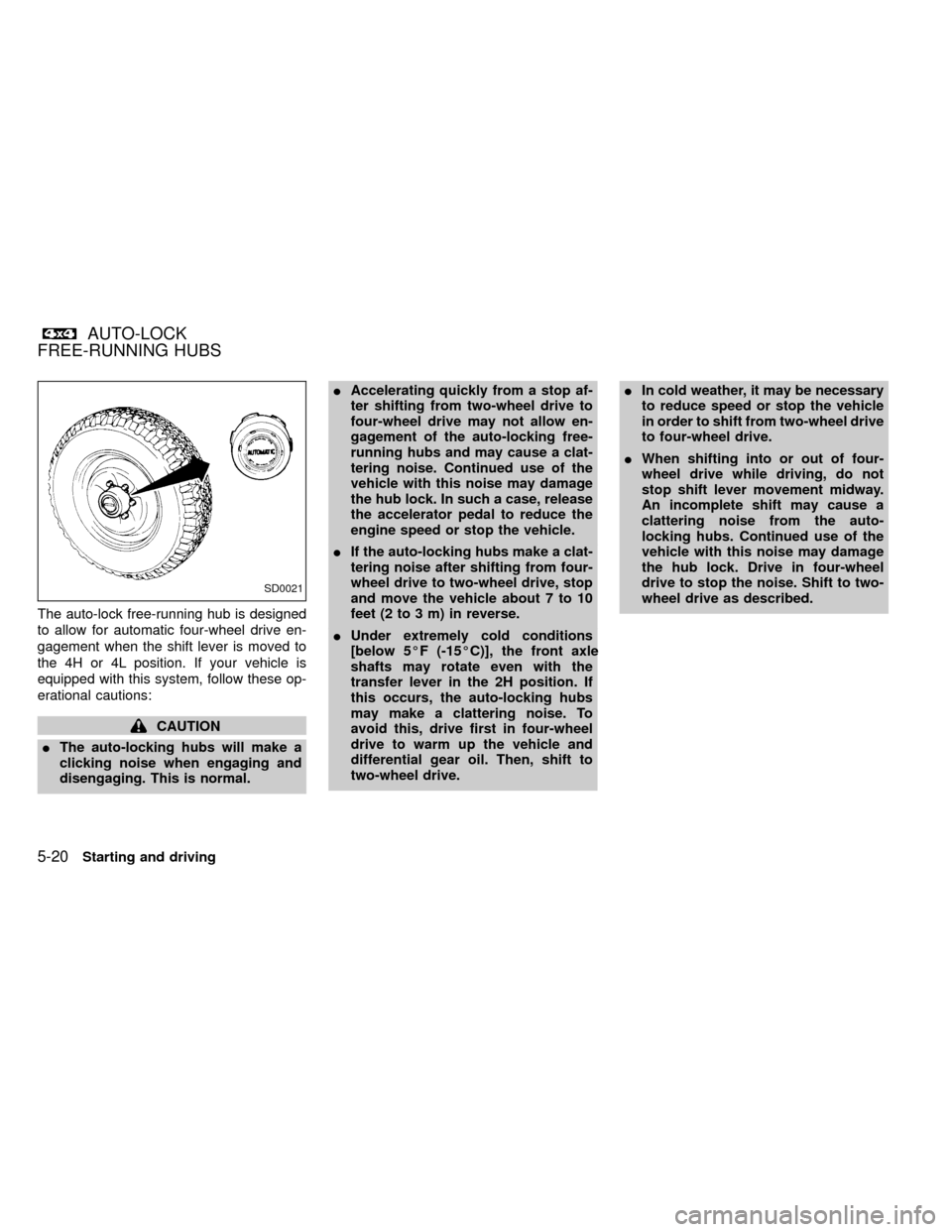
The auto-lock free-running hub is designed
to allow for automatic four-wheel drive en-
gagement when the shift lever is moved to
the 4H or 4L position. If your vehicle is
equipped with this system, follow these op-
erational cautions:
CAUTION
IThe auto-locking hubs will make a
clicking noise when engaging and
disengaging. This is normal.IAccelerating quickly from a stop af-
ter shifting from two-wheel drive to
four-wheel drive may not allow en-
gagement of the auto-locking free-
running hubs and may cause a clat-
tering noise. Continued use of the
vehicle with this noise may damage
the hub lock. In such a case, release
the accelerator pedal to reduce the
engine speed or stop the vehicle.
IIf the auto-locking hubs make a clat-
tering noise after shifting from four-
wheel drive to two-wheel drive, stop
and move the vehicle about 7 to 10
feet (2 to 3 m) in reverse.
IUnder extremely cold conditions
[below 5ÉF (-15ÉC)], the front axle
shafts may rotate even with the
transfer lever in the 2H position. If
this occurs, the auto-locking hubs
may make a clattering noise. To
avoid this, drive first in four-wheel
drive to warm up the vehicle and
differential gear oil. Then, shift to
two-wheel drive.IIn cold weather, it may be necessary
to reduce speed or stop the vehicle
in order to shift from two-wheel drive
to four-wheel drive.
IWhen shifting into or out of four-
wheel drive while driving, do not
stop shift lever movement midway.
An incomplete shift may cause a
clattering noise from the auto-
locking hubs. Continued use of the
vehicle with this noise may damage
the hub lock. Drive in four-wheel
drive to stop the noise. Shift to two-
wheel drive as described.
SD0021
AUTO-LOCK
FREE-RUNNING HUBS
5-20Starting and driving
ZX
Page 129 of 247

TO SHIFT
TRANSFER CASE:SHIFT PROCEDURE FOR AUTO-LOCK FREE-RUNNING HUBS
From 2H to 4HMove the transfer lever to 4H at speeds below 25 MPH (40 km/h). It is not necessary to depress the clutch pedal. Perform
this operation when driving straight.
From 4H to 2HMove the transfer lever to 2H. This can be done at any speed, and it is not necessary to depress the clutch pedal. Perform
this operation when driving straight.
NOTE:
AUTO-LOCK hubs will not disengage until the vehicle is moved about 3 feet (1 m) in the opposite direction of
travel:
IWhen driving forward, stop and move the vehicle 3 feet (1 m) in reverse.
IWhen backing up, stop and move 3 feet (1 m) forward, then move the vehicle about 3 feet (1 m) in reverse.
Disengaging the AUTO LOCK hubs will allow for better fuel economy, quieter ride and less component wear.
From 4H to 4L or 4L
to 4H1. Stop the vehicle.
2. Depress the clutch pedal, or place the selector lever in the P (Park) position.
3. Depress the transfer lever and move it to the 4L or 4H position. Change gears quickly and smoothly.
From 2H to 4L1. Stop the vehicle.
2. Depress the clutch pedal, or place the selector lever in the P (Park) position.
3. Depress the transfer lever and move it to 4L. Change gears quickly and smoothly.
From 4L to 2H1. Stop the vehicle.
2. Depress the clutch pedal, or place the selector lever in the P (Park) position.
3. Depress the transfer lever and move it to 2H. Change gears quickly and smoothly.
NOTE:
Follow the NOTE shown in shifting from 4H to 2H.
Starting and driving5-21
ZX
Page 130 of 247
CAUTION
INever drive in four-wheel drive (4H
or 4L) with the free-running hubs in
the FREE position.
IDo not drive your vehicle with the
left and right free-running hub set to
different positions.
ITo ensure proper lubrication of front
drive components, drive in the LOCK
position for at least 10 miles (16 km)
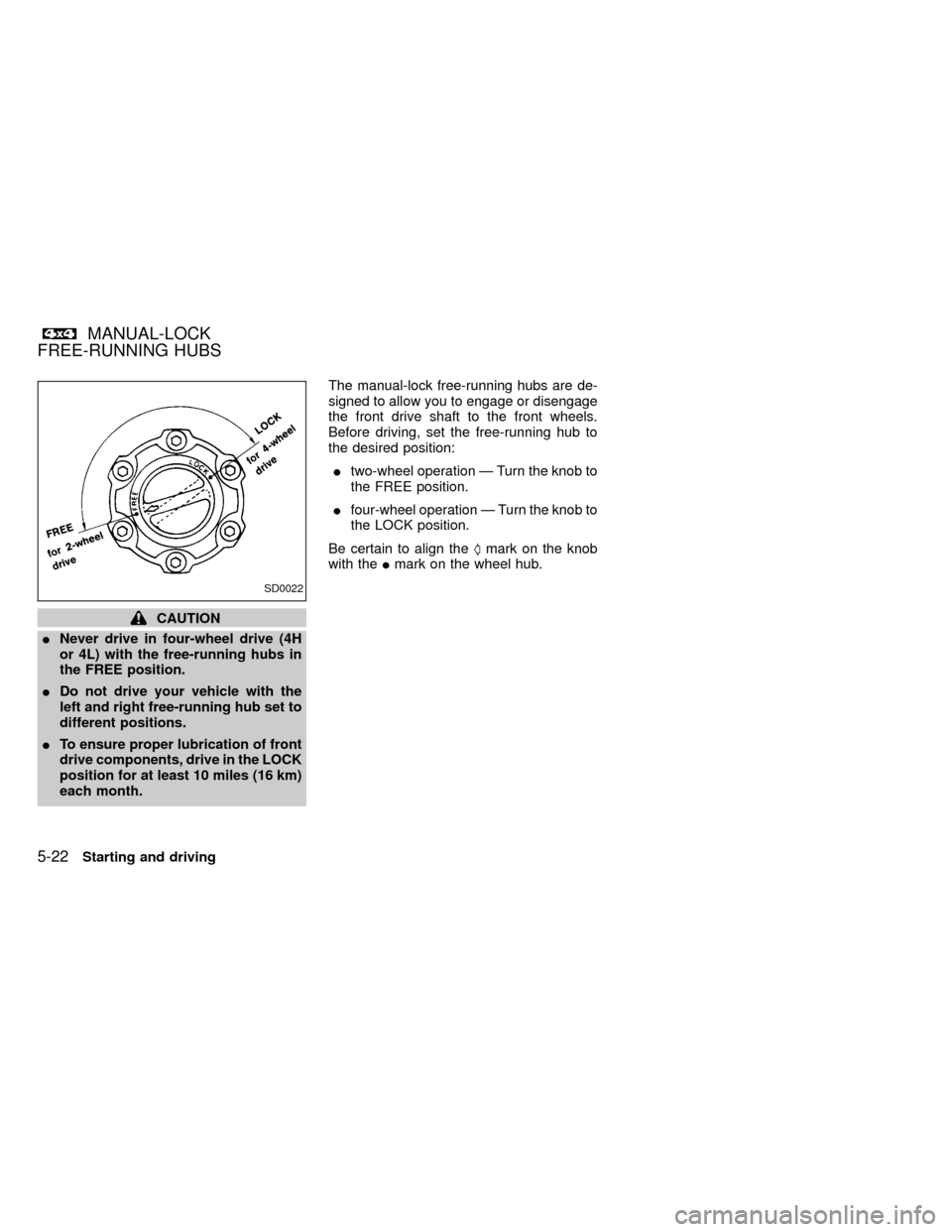
each month.The manual-lock free-running hubs are de-
signed to allow you to engage or disengage
the front drive shaft to the front wheels.
Before driving, set the free-running hub to
the desired position:
Itwo-wheel operation Ð Turn the knob to
the FREE position.
Ifour-wheel operation Ð Turn the knob to
the LOCK position.
Be certain to align theSmark on the knob
with theImark on the wheel hub.
SD0022
MANUAL-LOCK
FREE-RUNNING HUBS
5-22Starting and driving
ZX
Page 131 of 247

TO SHIFT TRANSFER
CASE:SHIFT PROCEDURE FOR MANUAL-LOCK FREE-RUNNING HUBS
From 2H to 4H1. Stop the vehicle.
2. Set both free-running hubs in the LOCK position.
3. Move the transfer lever to 4H. It is not necessary to depress the clutch pedal.
From 4H to 2HMove the transfer lever to 2H. This can be done at any speed, and it is not necessary to depress the clutch pedal. Perform
this operation when driving straight.
NOTE:
For two-wheel drive operation, set the free-running hubs in the FREE position. Disengaging the MANUAL LOCK
hubs will allow for better fuel economy, quieter ride and less component wear.
From 4H to 4L or 4L to
4H1. Stop the vehicle.
2. Depress the clutch pedal, or place the selector lever in the P (Park) position.
3. Depress the transfer lever and move it to the desired 4L or 4H position. Change gears quickly and smoothly.
From 2H to 4L1. Stop the vehicle.
2. Set free-running hubs in the LOCK position.
3. Depress the clutch pedal, or place the selector lever in the P (Park) position.
4. Depress the transfer lever and move it to 4L. Change gears quickly and smoothly.
From 4L to 2H1. Stop the vehicle.
2. Depress the clutch pedal, or place the selector lever in the P (Park) position.
3. Depress the transfer lever and move it to 2H. Chnage gears quickly and smoothly.
NOTE:
Follow the NOTE shown in shifting from 4H to 2H.
Starting and driving5-23
ZX
Page 133 of 247
IBefore operating the vehicle, ensure
that the driver and all passengers
have their seat belts fastened.
IAlways drive with the floor mats in
place as the floor may become very
hot. Particular care should be taken
if you are barefoot.
ILower your speed when encounter-
ing strong crosswinds. With its
higher center of gravity, your
NISSAN is more affected by gusty
side winds. Slower speeds ensure
better vehicle control.
IDo not drive beyond the perfor-
mance of the tires even with 4WD.
IAccelerating quickly, steering or
braking may cause loss of control.
IInstall the same size of winter tires
on all four (four) wheels (such as
studless tires) or install tire chains
to the rear wheels when driving on
slippery roads (e.g., after a snow)
and drive carefully using 4WD.
IBe sure to check the brakes immedi-
ately after driving in mud or water asspecified in ``Wet brakes'' under the
heading ``Brake system,'' later in this
section.
IAvoid parking your vehicle on steep
hills. If you get out of the vehicle and
it rolls forward, backward or side-
ways, you could be injured.
IWhenever you drive off-road
through sand, mud or water as deep
as the wheel hub, more frequent
maintenance may be required. For
details, refer to ``Maintenance for off-
road driving'' in the ``Maintenance''
section of this manual.
Checking water entry
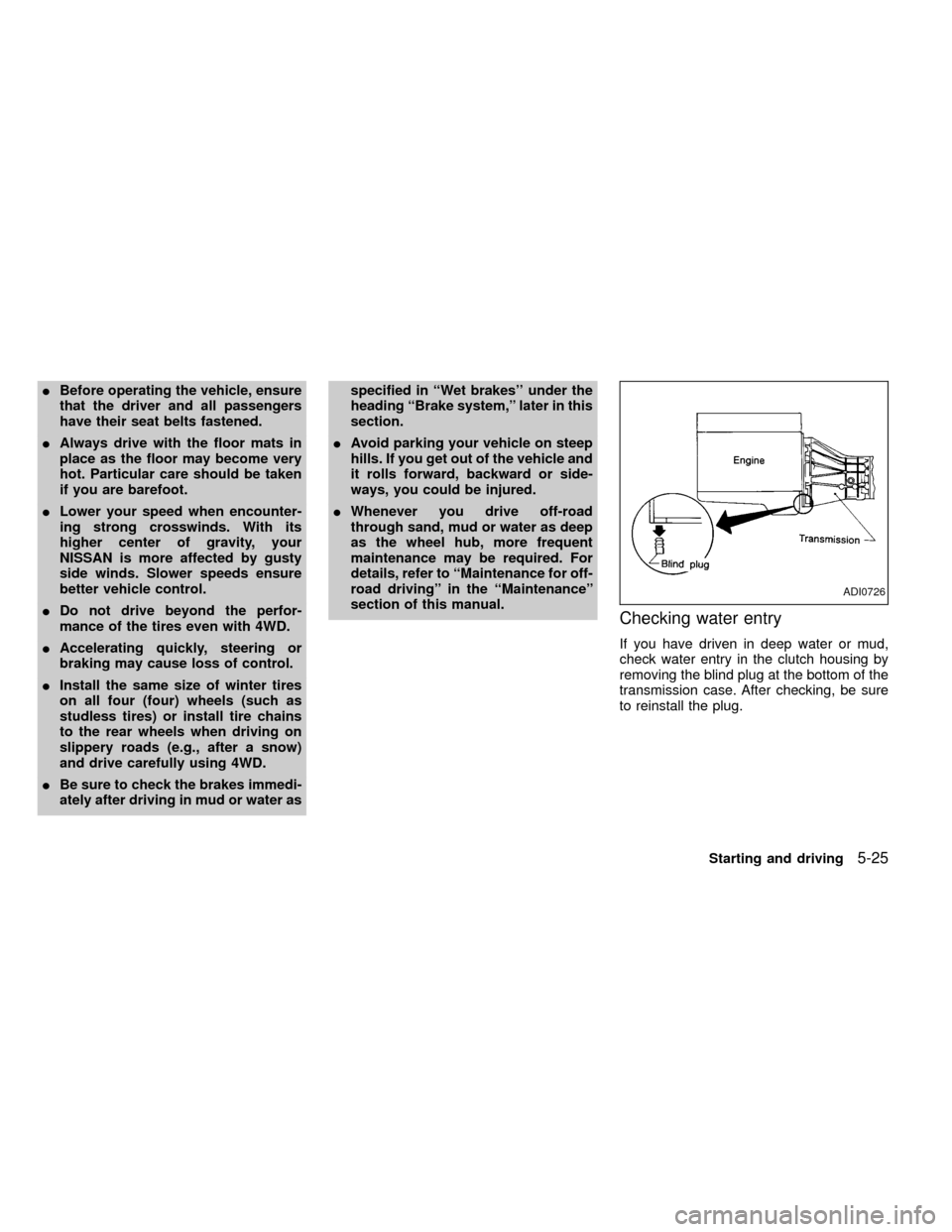
If you have driven in deep water or mud,
check water entry in the clutch housing by
removing the blind plug at the bottom of the
transmission case. After checking, be sure
to reinstall the plug.
ADI0726
Starting and driving5-25
ZX
Page 147 of 247
it-yourself'' section of this owner's
manual.
1. Clean any mud or dirt from the surface
between the wheel and hub.
2. Carefully put the spare tire on and tighten
the wheel nuts finger tight.
3. With the wheel nut wrench, tighten the
wheel nuts alternately and evenly until
they are tight.
4. Lower the vehicle slowly until the tire
touches the ground. Then, with the wheel
nut wrench, tighten the wheel nuts se-
curely in the sequence as illustrated.
Lower the vehicle completely.
As soon as possible, tighten the wheel
nuts to the specified torque with a torque
wrench.
Wheel nut tightening torque:
87 to 108 ft-lb (118 to 147 N×m)
The wheel nuts must be kept tightened to
specification at all times. It is recom-
mended that wheel nuts be tightened to
specification at each lubrication interval.
Adjust tire pressure to the COLD pres-
sure.COLD pressure:
After vehicle has been parked for three
hours or more or driven less than 1 mile
(1.6 km).
COLD tire pressures are shown on the
tire placard affixed to the inside of the
glove box lid.
IRetighten the wheel nuts when the
vehicle has been run for 600 miles
(965 km).
5. Securely store the flat tire and jacking
equipment in the vehicle.
WARNING
IAlways make sure that the spare tire
and jacking equipment are properly
secured after use. Such items can
become dangerous projectiles in an
accident or sudden stop.
IThe spare tire is designed for emer-
gency use. See specific instructions
under the heading ``Wheels and
tires'' in the ``Do-it-yourself'' section
of this manual.
In case of emergency
6-7
ZX