instrument panel NISSAN FRONTIER 2017 D23 / 3.G Owner's Manual
[x] Cancel search | Manufacturer: NISSAN, Model Year: 2017, Model line: FRONTIER, Model: NISSAN FRONTIER 2017 D23 / 3.GPages: 478, PDF Size: 4.22 MB
Page 315 of 478
OFF: For driving up and down longslopes where engine braking is nec-
essary push the overdrive switch
once. The O/D OFF indicator light
in the instrument panel comes on at
this time.
When cruising at a low speed or climbing a
gentle slope, you may feel uncomfortable shift
shocks as the transmission shifts into and out of
overdrive repeatedly. In this case, depress the
overdrive switch to turn the overdrive off. The
O/D OFF indicator light in the instrument panel
comes on at this time.
When driving conditions change, depress the
overdrive switch to turn the overdrive on.
Remember not to drive at high speeds for ex-
tended periods of time with the overdrive off. This
reduces fuel economy.
MANUAL TRANSMISSION (if so
equipped)
WARNING
●Do not downshift abruptly on slippery
roads. This may cause a loss of control.
● Do not over-rev the engine when shift-
ing to a lower gear. This may cause a
loss of control or engine damage.
CAUTION
●Do not rest your foot on the clutch pedal
while driving. This may cause clutch
damage.
● Fully depress the clutch pedal before
shifting to help prevent transmission
damage.
● Stop your vehicle completely before
shifting into R (Reverse) .
● When the vehicle is stopped with the
engine running (for example, at a stop
light) , shift to N (Neutral) and release
the clutch pedal with the foot brake
applied.
Shifting
To change gears, or when upshifting or down-
shifting, depress the clutch pedal fully, shift into
the appropriate gear, then release the clutch
slowly and smoothly.
To ensure smooth gear changes, fully depress
the clutch pedal before operating the shift lever. If
the clutch pedal is not fully depressed before the
transmission is shifted, a gear noise may be
heard. Transmission damage could occur.
Start the vehicle in 1st gear and shift to 2nd, 3rd,
4th, 5th and 6th gear in sequence according to
vehicle speed.
5 - speed
WSD0154
5-18Starting and driving
Page 318 of 478
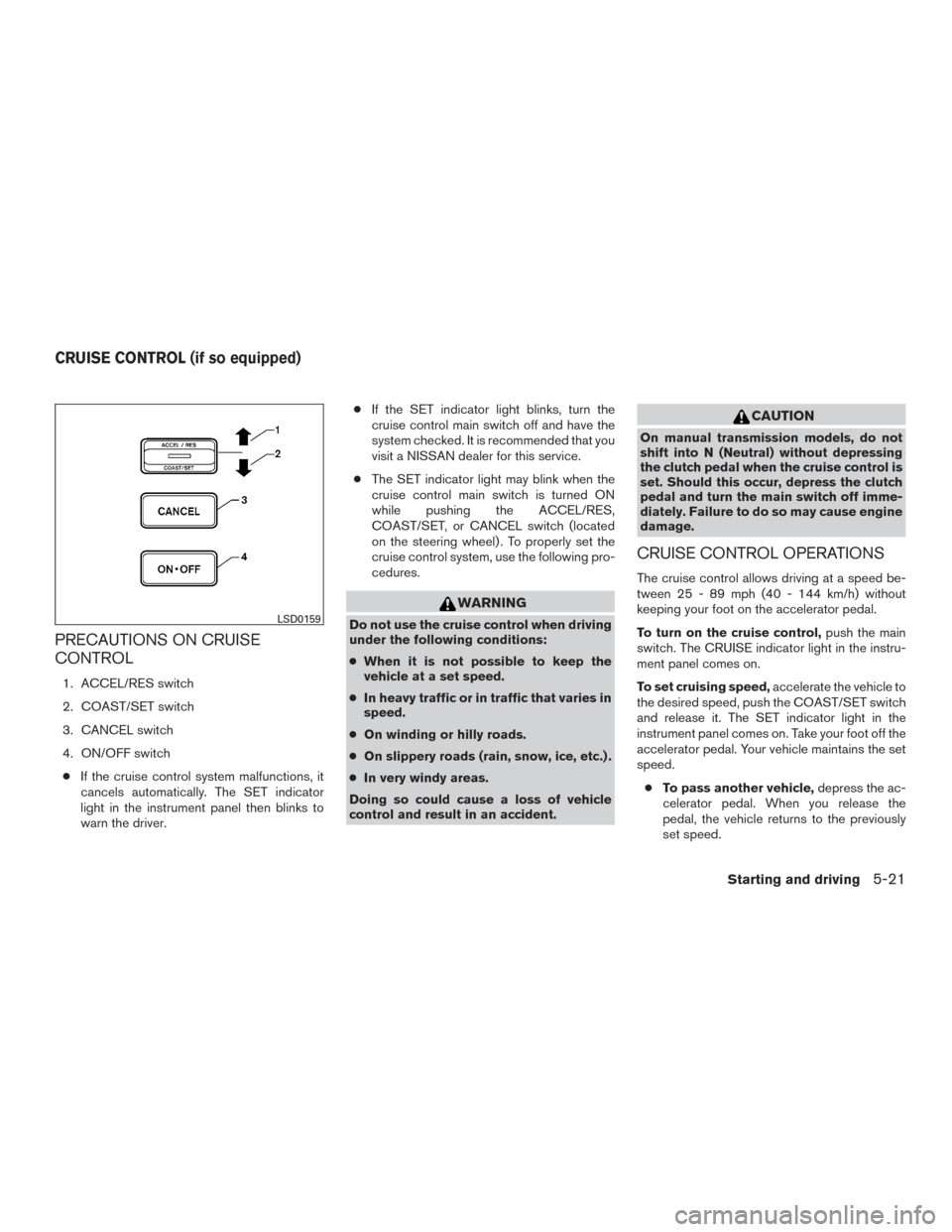
PRECAUTIONS ON CRUISE
CONTROL
1. ACCEL/RES switch
2. COAST/SET switch
3. CANCEL switch
4. ON/OFF switch● If the cruise control system malfunctions, it
cancels automatically. The SET indicator
light in the instrument panel then blinks to
warn the driver. ●
If the SET indicator light blinks, turn the
cruise control main switch off and have the
system checked. It is recommended that you
visit a NISSAN dealer for this service.
● The SET indicator light may blink when the
cruise control main switch is turned ON
while pushing the ACCEL/RES,
COAST/SET, or CANCEL switch (located
on the steering wheel) . To properly set the
cruise control system, use the following pro-
cedures.
WARNING
Do not use the cruise control when driving
under the following conditions:
●When it is not possible to keep the
vehicle at a set speed.
● In heavy traffic or in traffic that varies in
speed.
● On winding or hilly roads.
● On slippery roads (rain, snow, ice, etc.) .
● In very windy areas.
Doing so could cause a loss of vehicle
control and result in an accident.
CAUTION
On manual transmission models, do not
shift into N (Neutral) without depressing
the clutch pedal when the cruise control is
set. Should this occur, depress the clutch
pedal and turn the main switch off imme-
diately. Failure to do so may cause engine
damage.
CRUISE CONTROL OPERATIONS
The cruise control allows driving at a speed be-
tween 25 - 89 mph (40 - 144 km/h) without
keeping your foot on the accelerator pedal.
To turn on the cruise control, push the main
switch. The CRUISE indicator light in the instru-
ment panel comes on.
To set cruising speed, accelerate the vehicle to
the desired speed, push the COAST/SET switch
and release it. The SET indicator light in the
instrument panel comes on. Take your foot off the
accelerator pedal. Your vehicle maintains the set
speed.
● To pass another vehicle, depress the ac-
celerator pedal. When you release the
pedal, the vehicle returns to the previously
set speed.
LSD0159
CRUISE CONTROL (if so equipped)
Starting and driving5-21
Page 319 of 478
●The vehicle may not maintain the set speed
when going up or down steep hills. If this
happens, drive without the cruise control.
To cancel the preset speed, use one of the
following three methods.
● Push the CANCEL button; the SET indicator
light in the instrument panel goes out.
● Tap the brake pedal; the SET indicator light
goes out.
● Turn the main switch off. Both the CRUISE
indicator light and SET indicator light in the
instrument panel go out.
The cruise control is automatically canceled and
the SET light in the instrument panel goes out if: ● you depress the brake or clutch pedal (if so
equipped) while pushing the ACCEL/RES
or COAST/SET switch. The preset speed is
deleted from memory.
● the vehicle slows down more than 8 mph
(13 km/h) below the set speed.
● you depress the clutch pedal (manual trans-
mission) , or move the shift lever to N (Neu-
tral) (automatic transmission) . To reset at a faster cruising speed,
use one of
the following three methods.
● Depress the accelerator pedal. When the
vehicle attains the desired speed, push and
release the COAST/SET switch.
● Push and hold the ACCEL/RES switch.
When the vehicle attains the speed you de-
sire, release the switch.
● Push and release the ACCEL/RES switch.
Each time you do this, the set speed in-
creases by about 1 mph (1.6 km/h).
To reset at a slower cruising speed, use one
of the following three methods.
● Lightly tap the brake pedal. When the ve-
hicle attains the desired speed, push the
COAST/SET switch and release it.
● Push and hold the COAST/SET switch. Re-
lease the switch when the vehicle slows to
the desired speed.
● Push and release the COAST/SET switch.
Each time you do this, the set speed de-
creases by about 1 mph (1.6 km/h).
To resume the preset speed, push and re-
lease the ACCEL/RES switch. The vehicle re-
turns to the last set cruising speed when the
vehicle speed is over 25 mph (40 km/h).CAUTION
During the first 1,200 miles (2,000 km),
follow these recommendations to obtain
maximum engine performance and ensure
the future reliability and economy of your
new vehicle. Failure to follow these rec-
ommendations may result in shortened
engine life and reduced engine
performance.
● Avoid driving for long periods at constant
speed, either fast or slow, and do not run the
engine over 4,000 RPM.
● Do not accelerate at full throttle in any gear.
● Avoid quick starts.
● Avoid hard braking as much as possible.
● Do not tow a trailer for the first 500 mi
(805 km) . Your engine, axle or other parts
could be damaged.
BREAK-IN SCHEDULE
5-22Starting and driving
Page 328 of 478
●When the warning light comes on, the
2WD mode may be engaged even if the
4WD shift switch is in 4H. Be especially
careful when driving. If corresponding
parts are malfunctioning, the 4WD
mode will not be engaged even if the
4WD shift switch is shifted.
● Do not drive the vehicle in the 4H or 4LO
position on dry hard surface roads. Driv-
ing on dry, hard surfaces in 4H or 4LO
may cause unnecessary noise, tire wear
and increased fuel consumption.
If the 4WD warning light turns on when
you are driving on dry hard surface
roads:
– in the 4H position, shift the 4WD shift switch to 2WD.
– in the 4LO position for automatic transmission vehicles, stop the ve-
hicle and shift the shift lever to the N
position with the brake pedal de-
pressed and shift the 4WD shift
switch to 2WD. – in the 4LO position for manual trans-
mission vehicles, stop the vehicle
and shift the shift lever to the N po-
sition with the clutch pedal de-
pressed and shift the 4WD shift
switch to 2WD.
● If the warning light is still on after the
above operation, have your vehicle
checked as soon as possible. It is rec-
ommended that you visit a NISSAN
dealer for this service.
● The transfer case may be damaged if
you continue driving with the warning
light blinking. The E-Lock system can provide additional trac-
tion and should only be used when a vehicle has
become or is becoming stuck. This system oper-
ates by electronically “locking” the two rear drive
wheels together, allowing them to turn at the
same speed. The system is used when it is not
possible to free a stuck vehicle even when using
the 4LO position (4-wheel drive vehicles) .
When added traction is required, activate the
E-Lock system by pushing the switch ON. For
additional information, refer to “Electronic locking
rear differential (E-Lock) system switch” in the
“Instruments and controls” section of this manual.
Once the system fully engages, the indicator light
in the instrument panel will remain ON. When the
system is activated, both rear wheels will engage,
providing added traction.
The rear wheels may momentarily slip or move to
engage the system, and the system will only
engage up to approximately 4 mph (7 km/h).
Once the vehicle is free, the system should be
turned OFF and driving resumed.
The Anti-Lock Brake (ABS) system is disabled
and the ABS light illuminates when the E-Lock
system is ON. Also, the Vehicle Dynamic Control
(VDC) system is disabled and the
light
illuminates when the E-Lock system is ON.
ELECTRONIC LOCKING REAR
DIFFERENTIAL (E-Lock) SYSTEM (if
so equipped)
Starting and driving5-31
Page 333 of 478
WARNING
Do not pump the brake pedal. Doing so
may result in increased stopping
distances.
Self-test feature
The ABS includes electronic sensors, electric
pumps, hydraulic solenoids and a computer. The
computer has a built-in diagnostic feature that
tests the system each time you start the engine
and move the vehicle at a low speed in forward or
reverse. When the self-test occurs, you may hear
a “clunk” noise and/or feel a pulsation in the brake
pedal. This is normal and does not indicate a
malfunction. If the computer senses a malfunc-
tion, it switches the ABS off and illuminates the
ABS warning light on the instrument panel. The
brake system then operates normally but without
anti-lock assistance.
If the ABS warning light illuminates during the
self-test or while driving, have the vehicle
checked. It is recommended that you visit a
NISSAN dealer for this service.
Normal operation
The ABS operates at speeds above3-6mph(5
- 10 km/h). The speed varies according to road
conditions.
When the ABS senses that one or more wheels
are close to locking up, the actuator rapidly ap-
plies and releases hydraulic pressure. This action
is similar to pumping the brakes very quickly. You
may feel a pulsation in the brake pedal and hear a
noise from under the hood or feel a vibration from
the actuator when it is operating. This is normal
and indicates that the ABS is operating properly.
However, the pulsation may indicate that road
conditions are hazardous and extra care is re-
quired while driving.●
ABLS system uses automatic braking to
transfer power from a slipping drive wheel to
the wheel on the same axle with more trac-
tion. The ABLS system applies braking to
the slipping wheel, which helps redirect
power to the other wheel.
● On 4WD models the ABLS system operates
in both 4H and 4LO modes. If 4WD mode is
engaged, the ABLS system operates for
both drive axles. On 2WD vehicles, the
ABLS system operates on the drive axle
only.
● The ABLS system is always ON. In some
conditions, the system may automatically
turn the ABLS system off. If the system is
automatically turned off, normal brake func-
tion will continue. ABLS will function even
when the VDC system is turned OFF.
● The ABLS does not operate if both wheels
on a drive axle are slipping.
ACTIVE BRAKE LIMITED SLIP (ABLS)
SYSTEM
5-36Starting and driving
Page 334 of 478
WARNING
●The ABLS system helps provide in-
creased traction, but will not prevent
accidents due to abrupt steering opera-
tion or by careless driving or dangerous
driving practices. Reduce vehicle speed
and be especially careful when driving
and cornering on slippery surfaces. Al-
ways drive carefully.
●
Do not modify the vehicle’s suspension. If
suspension parts such as shock absorb-
ers, struts, springs, stabilizer bars, bush-
ings and wheels are not NISSAN ap-
proved for your vehicle or are extremely
deteriorated, the ABLS system may not
operate properly. This could adversely af-
fect vehicle handling performance, and
the slip indicator light may illuminate.
● If brake related parts such as brake
pads, rotors and calipers are not
NISSAN recommended or are extremely
deteriorated, the ABLS system may not
operate properly and the slip indicator
light may illuminate.
● If wheels or tires other than the NISSAN
recommended ones are used, the ABLS
system may not operate properly and
the slip indicator light may illuminate. The VDC system uses various sensors to monitor
driver inputs and vehicle motion. Under certain
driving conditions, the VDC System helps to per-
form the following functions:
● Controls brake pressure to reduce wheel
slip on one slipping drive wheel so power is
transferred to a non slipping drive wheel on
the same axle.
● Controls brake pressure and engine output
to reduce drive wheel slip based on vehicle
speed (traction control function) .
● If the 4WD transfer case is shifted into 4LO
the
indicator light will come on and
the VDC system will be turned off. For addi-
tional information, refer to “Using four wheel
drive (4WD)” in this section.
● Controls brake pressure at individual wheels
and engine output to help the driver maintain
control of the vehicle in the following condi-
tions:
– understeer (vehicle tends to not follow the steered path despite increased steer-
ing input)
– oversteer (vehicle tends to spin due to certain road or driving conditions)
The VDC system can help the driver to maintain
control of the vehicle, but it cannot prevent loss of
vehicle control in all driving situations. When the VDC system operates, the
indi-
cator in the instrument panel flashes so note the
following:
● The road may be slippery or the system may
determine some action is required to help
keep the vehicle on the steered path.
● You may feel a pulsation in the brake pedal
and hear a noise or vibration from under the
hood. This is normal and indicates that the
VDC system is working properly.
● Adjust your speed and driving to the road
conditions.
For additional information, refer to “Slip indicator
light” and ”Vehicle Dynamic Control (VDC) OFF
indicator light” in the ”Instruments and controls”
section of this manual.
If a malfunction occurs in the system, the
indicator light will come on in the instrument
panel. The VDC system automatically turns off
when these indicator lights are off.
The VDC OFF switch is used to turn off the VDC
system. The
indicator illuminates to indi-
cate the VDC system is off.
When the VDC switch is used to turn off the
system, the VDC system still operates to prevent
one drive wheel from slipping by transferring
power to a non slipping drive wheel. The
VEHICLE DYNAMIC CONTROL (VDC)
SYSTEM
Starting and driving5-37
Page 337 of 478
centrate on steering while reducing the burden of
brake and accelerator operation.● When additional braking is required on
steep downhill roads, activate the hill de-
scent control system by pushing the switch
ON. For additional information, refer to “Hill
descent control switch” in the “Instruments
and controls” section of this manual.
● Once the system is activated, the indicator
light will remain on in the instrument panel.
For additional information, refer to “Hill de-
scent control system on indicator light” in the
“Instruments and controls” section of this
manual.
If the accelerator or brake pedal is depressed
while the hill descent control system is on, the
system will stop operating temporarily. As soon
as the accelerator or brake pedal is released, the
hill descent control system begins to function
again if the hill descent control operating condi-
tions are fulfilled.
For the best results, when descending steep
downhill grades, the hill descent control switch
should be ON and the shift lever in 2 (Second
gear) or 1 (Low gear) for engine braking.WARNING
● Never rely solely on the hill start assist
system to prevent the vehicle from mov-
ing backward on a hill. Always drive
carefully and attentively. Depress the
brake pedal when the vehicle is stopped
on a steep hill. Be especially careful
when stopped on a hill on frozen or
muddy roads. Failure to prevent the ve-
hicle from rolling backwards may result
in a loss of control of the vehicle and
possible serious injury or death.
● The hill start assist system is not de-
signed to hold the vehicle at a standstill
on a hill. Depress the brake pedal when
the vehicle is stopped on a steep hill.
Failure to do so may cause the vehicle
to roll backwards and may result in a
collision or serious personal injury.
● The hill start assist may not prevent the
vehicle from rolling backwards on a hill
under all load or road conditions. Al-
ways be prepared to depress the brake
pedal to prevent the vehicle from rolling
backwards. Failure to do so may result
in a collision or serious personal injury. When the vehicle is stopped on a hill, the hill start
assist system automatically keeps the brakes ap-
plied. This helps prevents the vehicle from rolling
backward in the time it takes the driver to release
the brake pedal and apply the accelerator.
Hill start assist will operate automatically under
the following conditions:
● The shift lever is shifted to a forward or
reverse gear.
● The vehicle is stopped completely on a hill
by applying the brake.
The maximum holding time is 2 seconds. After
2 seconds the vehicle will begin to roll back and
hill start assist will stop operating completely.
Hill start assist will not operate when the shift
lever is shifted into N (Neutral) or P (Park) or on a
flat and level road.
HILL START ASSIST SYSTEM (if so
equipped)
5-40Starting and driving
Page 338 of 478
WARNING
●Always turn and look back before back-
ing up. The RSS is not a substitute for
proper backing procedures.
● Read and understand the limitations of
the rear sonar system as contained in
this section. Inclement weather may af-
fect the function of the RSS; this may
include reduced performance or a false
activation.
● This system is not designed to prevent
contact with small or moving objects. ●
The system is designed as an aid to the
driver in detecting large stationary ob-
jects to help avoid damaging the ve-
hicle. The system will not detect small
objects below the bumper, and may not
detect objects close to the bumper or
on the ground.
● If your vehicle sustains damage to the
rear bumper fascia, leaving it mis-
aligned or bent, the sensing zone may
be altered causing inaccurate measure-
ment of obstacles or false alarms.
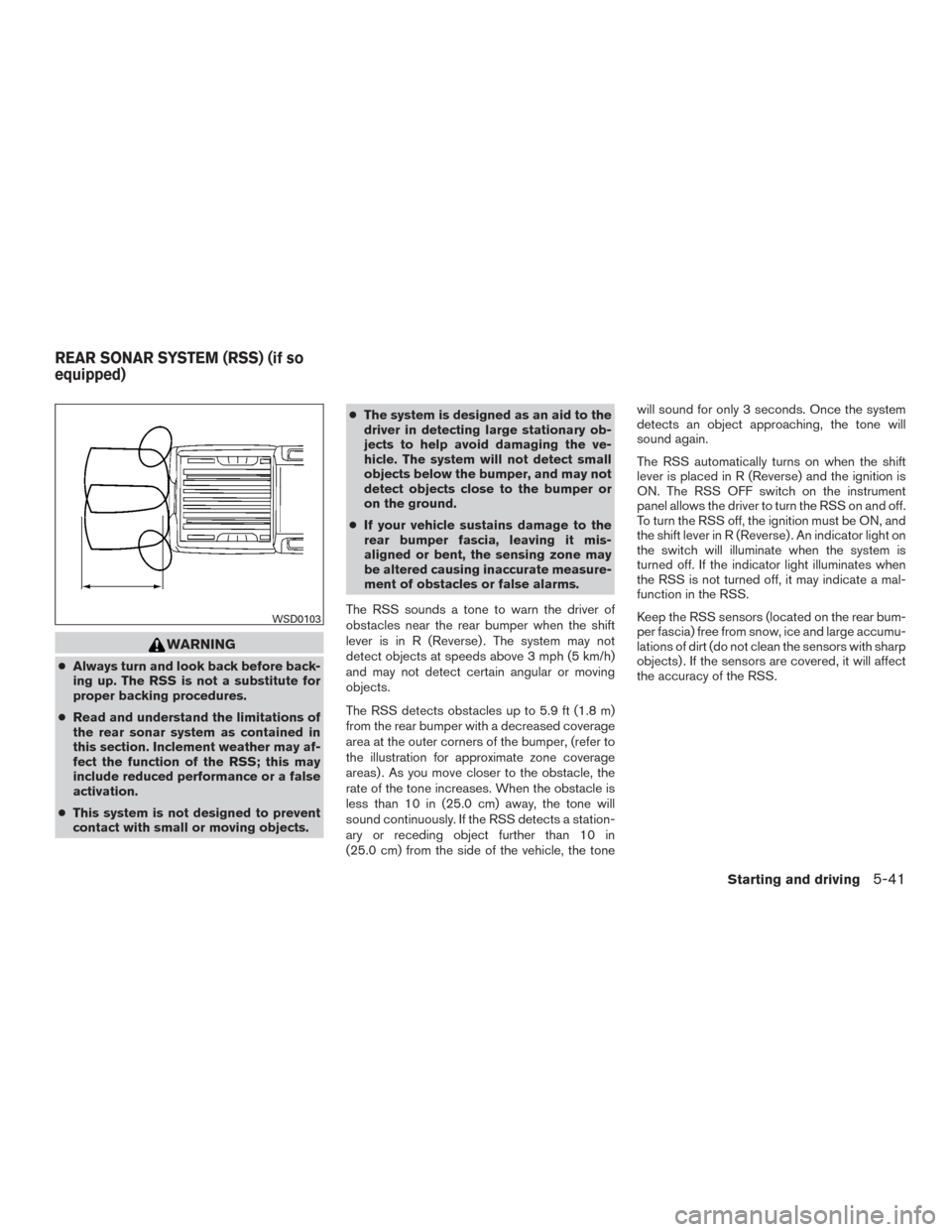
The RSS sounds a tone to warn the driver of
obstacles near the rear bumper when the shift
lever is in R (Reverse) . The system may not
detect objects at speeds above 3 mph (5 km/h)
and may not detect certain angular or moving
objects.
The RSS detects obstacles up to 5.9 ft (1.8 m)
from the rear bumper with a decreased coverage
area at the outer corners of the bumper, (refer to
the illustration for approximate zone coverage
areas) . As you move closer to the obstacle, the
rate of the tone increases. When the obstacle is
less than 10 in (25.0 cm) away, the tone will
sound continuously. If the RSS detects a station-
ary or receding object further than 10 in
(25.0 cm) from the side of the vehicle, the tone will sound for only 3 seconds. Once the system
detects an object approaching, the tone will
sound again.
The RSS automatically turns on when the shift
lever is placed in R (Reverse) and the ignition is
ON. The RSS OFF switch on the instrument
panel allows the driver to turn the RSS on and off.
To turn the RSS off, the ignition must be ON, and
the shift lever in R (Reverse) . An indicator light on
the switch will illuminate when the system is
turned off. If the indicator light illuminates when
the RSS is not turned off, it may indicate a mal-
function in the RSS.
Keep the RSS sensors (located on the rear bum-
per fascia) free from snow, ice and large accumu-
lations of dirt (do not clean the sensors with sharp
objects) . If the sensors are covered, it will affect
the accuracy of the RSS.
WSD0103
REAR SONAR SYSTEM (RSS) (if so
equipped)
Starting and driving5-41
Page 468 of 478
11 Index
4WDwarninglight...............2-15
5-Speed automatic transmission fluid
(ATF).......................4-75A
Active brake limited slip (ABLS) system . . .5-36
Air bag (See supplemental restraint
system) .....................1-71
Air bag system Front (See supplemental front impact
air bag system) ...............1-78
Airbagwarninglabels.............1-86
Airbagwarninglight...........1-86,2-20
Air bag warning light, supplemental . .1-86, 2-20
Air cleaner housing filter ............8-17
Air conditioner Air conditioner operation ..........4-26
Air conditioner service ...........4-36
Air conditioner specification label ....10-16
Air conditioner system refrigerant and
oil recommendations ...........10-10
Air conditioner system refrigerant
recommendations .............10-10
Heater and air conditioner
controls................4-22,4-34
Servicing air conditioner ..........4-36
Airflowcharts..............4-19,4-27
Alarm system
(See vehicle security system) .........2-24
Anchor point locations .............1-32 Antenna.....................4-73
Antifreeze
....................5-42
Anti-lock brake warning light ..........2-15
Anti-lock Braking System (ABS) ........5-35
Apps .......................4-74
Audible reminders ...............2-24
Audio system ..................4-36
AMradioreception.............4-37
Bluetooth®audio..........4-69,4-70
Compact disc (CD) player . .4-47, 4-52, 4-59
FM/AM radio with compact disc (CD)
player ....................4-44
FM/AM/SAT radio with compact disc (CD)
player.................4-48,4-54
FMradioreception.............4-36
Radio ....................4-36
Steering wheel audio control switch . . .4-72
Autolight switch .................2-30
Automatic Automatic power window switch .....2-51
Automatic transmission position indicator
light .....................2-21
Driving with automatic transmission ....5-14
Automatic anti-glare inside mirror .......3-15
Automatic door locks ..............3-5
AUXjack ....................4-60
B
Backbutton....................4-7
Battery ..................5-42,8-13
Chargewarninglight............2-17 Battery replacement
..............8-24
Keyfob................8-24,8-25
Before starting the engine ...........5-12
Belt (See drive belt) ..............8-15
Block heater Engine ....................5-43
Bluetooth® audio ............4-69,4-70
Bluetooth® hands-free phone system ....4-89
Bluetooth® Hands-Free Phone System without
Navigation System ...............4-78
Boosterseats..................1-65
Brake Anti-lock Braking System (ABS) ......5-35
Brake fluid ..................8-11
Brakelight(Seestoplight).........8-28
Brake system ................5-34
Brakewarninglight.............2-16
Brakewearindicators........2-24,8-20
Parking brake operation ..........5-20
Self-adjusting brakes ............8-20
Brake fluid ....................8-11
Brakes ......................8-20
Brake system ..................5-34
Break-inschedule ...............5-22
Brightness/contrast button ...........4-9
Brightness control Instrument panel ..............2-32
Bulb check/instrument panel ..........2-15
Bulbreplacement................8-28
Page 469 of 478
C
Capacities and recommended
fuel/lubricants ..................10-2
Cargolightswitch................2-34
Cargo (See vehicle loading information) . . .10-17
Car phone or CB radio .............4-78
CD care and cleaning ..............4-71
CD player (See audio system) . .4-47, 4-52, 4-59
Child restraints .......1-24,1-25,1-26,1-29
LATCH (Lower Anchors and Tethers for
CHildren) System ..............1-29
Precautions on child
restraints.........1-27,1-39,1-54,1-65
Top tether strap anchor point locations . .1-32
Child restraint with top tether strap .......1-31
Child safety rear door lock ............3-6
Chimes, audible reminders ...........2-24
Cleaningexteriorandinterior........7-2,7-4
Clock
(models without navigation system). .4-46, 4-51
Clockset .................4-46,4-51
Clock set/adjustment ...............4-7
Clock setting
(models with Navigation System) ........4-7
Clock setting (models without Navigation
System) ...........4-45,4-46,4-49,4-51
Clutch Clutch fluid ..................8-12
Clutch interlock (clutch start) switch ......2-38
C.M.V.S.S. certification label .........10-14
Cold weather driving ...............5-42
Compact disc (CD) player ....4-47,4-52,4-59
Compass display .................2-11
Connect phone .................4-74 Console box
...................2-45
Control panel buttons ...............4-4
Back button ..................4-7
Brightness/contrast button ..........4-9
Enterbutton..................4-4
Setting button .................4-7
With navigation system .........4-4,4-5
Controls Audio controls (steering wheel) .......4-72
Heater and air conditioner
controls................4-22,4-34
Coolant Capacities and recommended
fuel/lubricants ................10-2
Changingenginecoolant...........8-6
Checking engine coolant level ........8-6
Engine coolant temperature gauge .....2-6
Corrosion protection ...............7-6
Cruisecontrol..................5-21
Cupholders...................2-46
Curtainside-impactandrolloverairbag....1-83
D
Daytime running light system (Canada only) . .2-32
Defogger Switch .................4-70
Defroster switch Rear window and outside mirror defroster
switch.....................2-28
Rear window defroster switch .......2-28
Dimensionsandweights............10-12
Dimmer switch for instrument panel ......2-32
Display controls (see control panel buttons) . .4-4
Door locks .....................3-3
Door open warning light .............2-17 Doors
........................3-3
Drive belt .....................8-15
Driving Cold weather driving .............5-42
Driving with automatic transmission ....5-14
Driving with manual transmission ......5-18
Precautions when starting and driving ....5-2
Driving the vehicle ................5-14
E
Economy-fuel..................5-24
Electronic locking rear differential (E-Lock)
system ......................5-31
Electronic locking rear differential (E-Lock)
system switch ..................2-37
Emission control information label ......10-15
Emission control system warranty .......10-40
Engine Before starting the engine ..........5-12
Blockheater.................5-43
Capacities and recommended
fuel/lubricants ................10-2
Changing engine coolant ...........8-6
Changingengineoil..............8-8
Changing engine oil filter ...........8-9
Checking engine coolant level ........8-6
Checking engine oil level ...........8-7
Engine compartment check locations ....8-3
Engine coolant
temperature gauge .....2-6
Engine cooling system ............8-5
Engineoil ...................8-7
Engine oil and oil filter recommendation . .10-9
Engineoilpressuregauge..........2-8
Engine oil pressure warning light ......2-17
11-2