window NISSAN FRONTIER 2018 Owner´s Manual
[x] Cancel search | Manufacturer: NISSAN, Model Year: 2018, Model line: FRONTIER, Model: NISSAN FRONTIER 2018Pages: 502, PDF Size: 4.85 MB
Page 219 of 502
∙ When parking, set the heater and airconditioner controls to turn off air recir-
culation to allow fresh air into the pas-
senger compartment. This should help
reduce odors inside the vehicle.
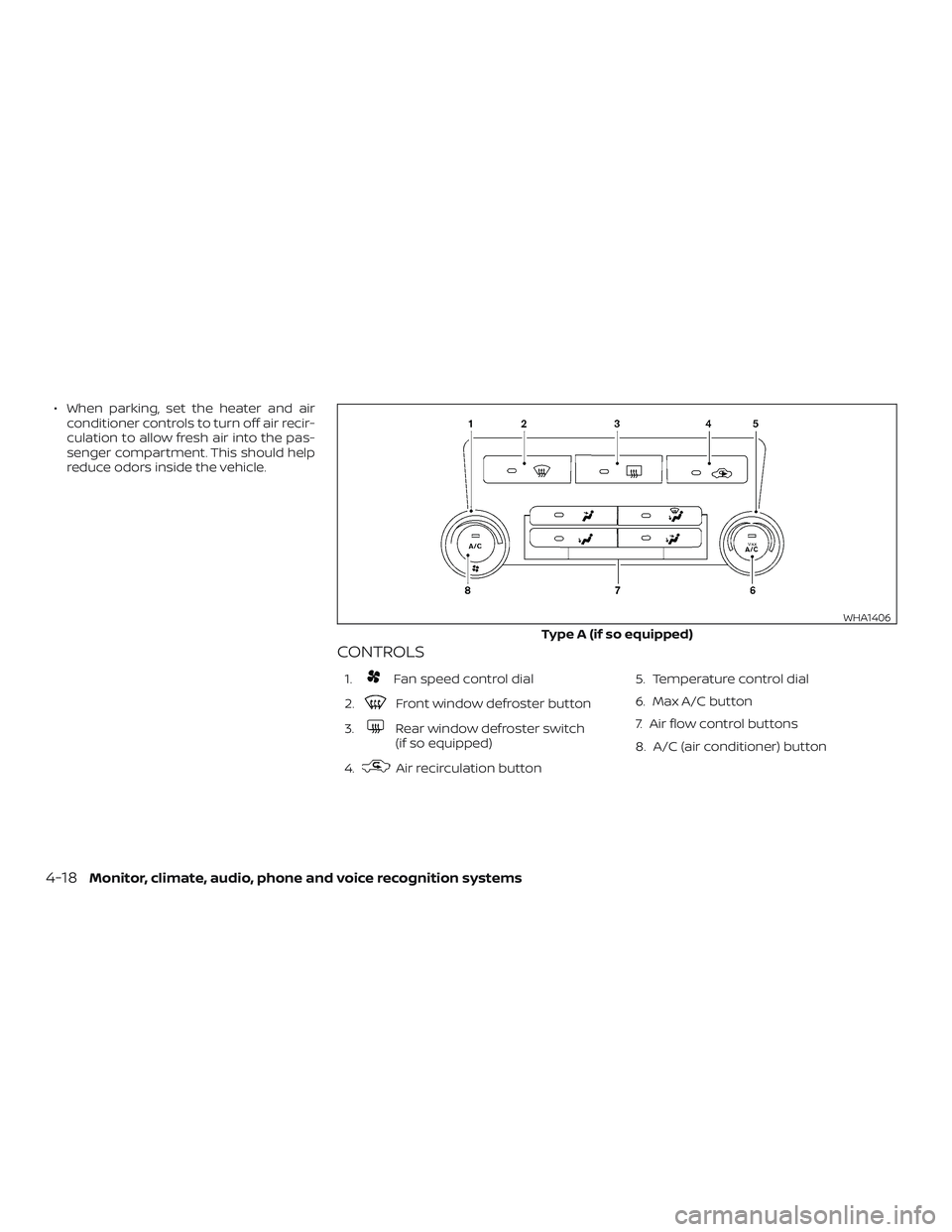
CONTROLS
1.Fan speed control dial
2.
Front window defroster button
3.
Rear window defroster switch
(if so equipped)
4.
Air recirculation button 5. Temperature control dial
6. Max A/C button
7. Air flow control buttons
8. A/C (air conditioner) button
Type A (if so equipped)
WHA1406
4-18Monitor, climate, audio, phone and voice recognition systems
Page 220 of 502
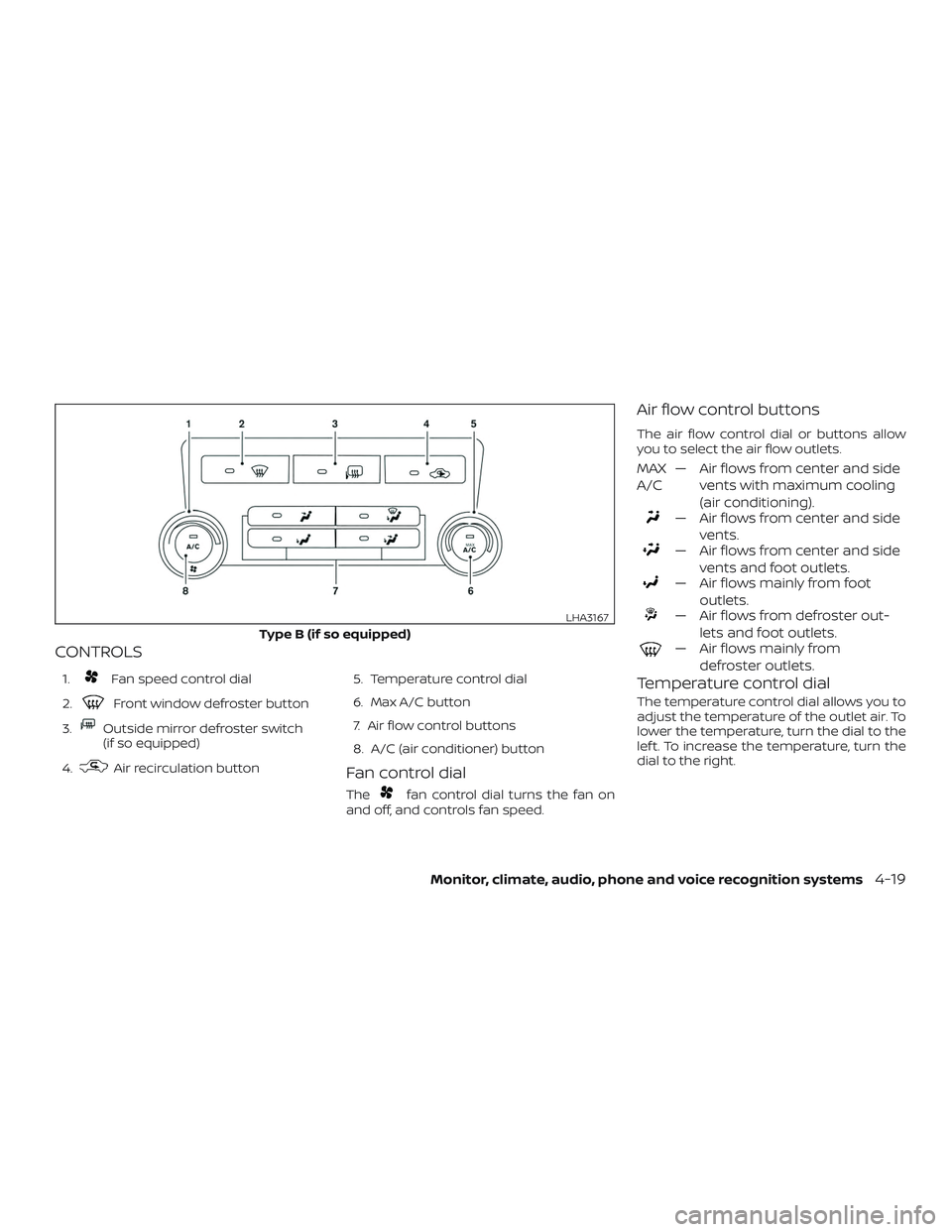
CONTROLS
1.Fan speed control dial
2.
Front window defroster button
3.
Outside mirror defroster switch
(if so equipped)
4.
Air recirculation button 5. Temperature control dial
6. Max A/C button
7. Air flow control buttons
8. A/C (air conditioner) buttonFan control dial
Thefan control dial turns the fan on
and off, and controls fan speed.
Air flow control buttons
The air flow control dial or buttons allow
you to select the air flow outlets.
MAX
A/C — Air flows from center and side
vents with maximum cooling
(air conditioning).
— Air flows from center and sidevents.
— Air flows from center and sidevents and foot outlets.
— Air flows mainly from footoutlets.
— Air flows from defroster out-lets and foot outlets.
— Air flows mainly fromdefroster outlets.
Temperature control dial
The temperature control dial allows you to
adjust the temperature of the outlet air. To
lower the temperature, turn the dial to the
lef t. To increase the temperature, turn the
dial to the right.
Type B (if so equipped)
LHA3167
Monitor, climate, audio, phone and voice recognition systems4-19
Page 221 of 502
Air recirculation button
ON position (Indicator light on)
Interior air is recirculated inside the vehicle.
Press the
button to the ON position
when:
∙ driving on a dusty road.
∙ to prevent traffic fumes from entering passenger compartment.
∙ for maximum cooling when using the air conditioner.
OFF position (Indicator light off )
Outside air is drawn into the passenger
compartment and distributed through the
selected outlet.
Use the OFF position for normal heater or
air conditioner operation.
Air conditioner button
Start the engine, turn thefan control
dial to the desired position and press
the
button to turn on the air condi-
tioner. To turn off the air conditioner, press
the
button again.
The air conditioner cooling function op-
erates only when the engine is running.
Rear window or outside mirror
defroster switch (if so equipped)
For additional information about the rear
window or outside mirror defroster switch,
refer to “Rear window or outside mirror de-
froster switch.” in the “Instruments and
controls” section of this manual.
HEATER OPERATION
Heating
This mode is used to direct heated air to
the foot outlets. Some air also flows from
the defrost outlets.
1. Press the
air flow control button.
2. Turn the
fan control dial to the
desired position.
3. Turn the temperature control dial to the desired position between the
middle and the hot position.
Ventilation
This mode directs outside air to the side
and center vents.
1. Press the
button to the OFF posi-
tion. The indicator light on the
button will go off. 2. Press the
air flow control button.
3. Turn the
fan control dial to the
desired position.
4. Turn the temperature control dial to the desired position.
Defrosting or defogging
This mode directs the air to the defrost
outlets to defrost/defog the windows.
1. Press the
defrost/defog button.
2. Turn the
fan control dial to the
desired position.
3. Turn the temperature control dial to the desired position between the
middle and the hot position.
∙ To quickly remove ice or fog from the windows, turn the
fan control dial
to the highest setting and the tempera-
ture control to the full HOT position.
4-20Monitor, climate, audio, phone and voice recognition systems
Page 223 of 502
∙ For quick cooling when the outsidetemperature is high, press the
button to the ON position. Be sure to
return the
to the OFF position for
normal cooling. The indicator light on
the
button will go off. You may
also select MAX A/C for quick cooling.
Dehumidified heating
This mode is used to heat and dehumidif y
the air.
1. Press the
air flow control button.
2. Turn the
fan control dial to the de-
sired position.
3. Press the
button on.
4. Turn the temperature control dial to the desired position.
Dehumidified defogging
This mode is used to defog the windows
and dehumidif y the air.
1. Press the
air flow control button.
2. Turn the
fan control dial to the
desired position. ∙ When the or
are selected, the air
conditioner automatically turns on if
the outside temperature is more than
36° F (2° C). This dehumidifies the air
which helps defog the windshield.
The
mode automatically turns off,
allowing outside air to be drawn into the
passenger compartment to further im-
prove the defogging performance.
∙ The air conditioner is always on in the
mode, regardless of whether
the indicator light is on or off.
3. Turn the temperature control dial to the desired position.
Operating tips
∙ Keep the windows and moonroof (if soequipped) closed while the air condi-
tioner is in operation.
∙ Af ter parking in the sun, drive for two or three minutes with the windows open
to vent hot air from the passenger
compartment. Then, close the win-
dows. This allows the air conditioner to
cool the interior more quickly. ∙
The air conditioning system should
be operated for approximately
10 minutes at least once a month.
This helps prevent damage to the
system due to lack of lubrication.
∙ A visible mist may be seen coming from the ventilators in hot, humid conditions
as the air is cooled rapidly. This does not
indicate a malfunction.
∙ If the engine coolant temperature
gauge indicates engine coolant tem-
perature over the normal range, turn
the air conditioner off. For additional
information, refer to “If your vehicle
overheats” in the “In case of emer-
gency ” section of this manual.AIR FLOW CHARTS
The following charts show the button and
dial positions for MAXIMUM AND QUICK
heating, cooling or defrosting. The air re-
circulation (
) button should always
be in the OFF position for heating and
defrosting.
4-22Monitor, climate, audio, phone and voice recognition systems
Page 227 of 502
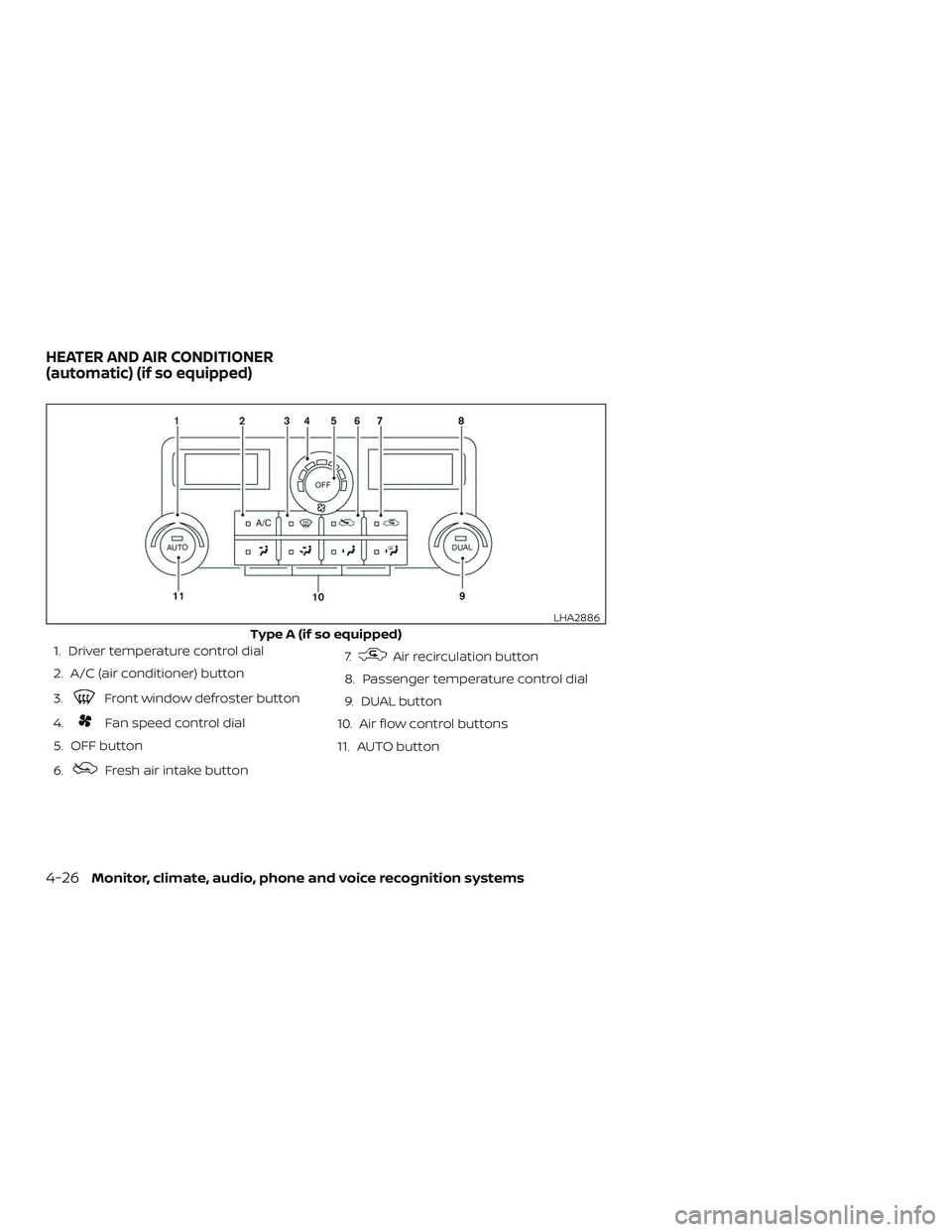
1. Driver temperature control dial
2. A/C (air conditioner) button
3.
Front window defroster button
4.
Fan speed control dial
5. OFF button
6.
Fresh air intake button 7.
Air recirculation button
8. Passenger temperature control dial
9. DUAL button
10. Air flow control buttons
11. AUTO button
Type A (if so equipped)
LHA2886
HEATER AND AIR CONDITIONER
(automatic) (if so equipped)
4-26Monitor, climate, audio, phone and voice recognition systems
Page 228 of 502
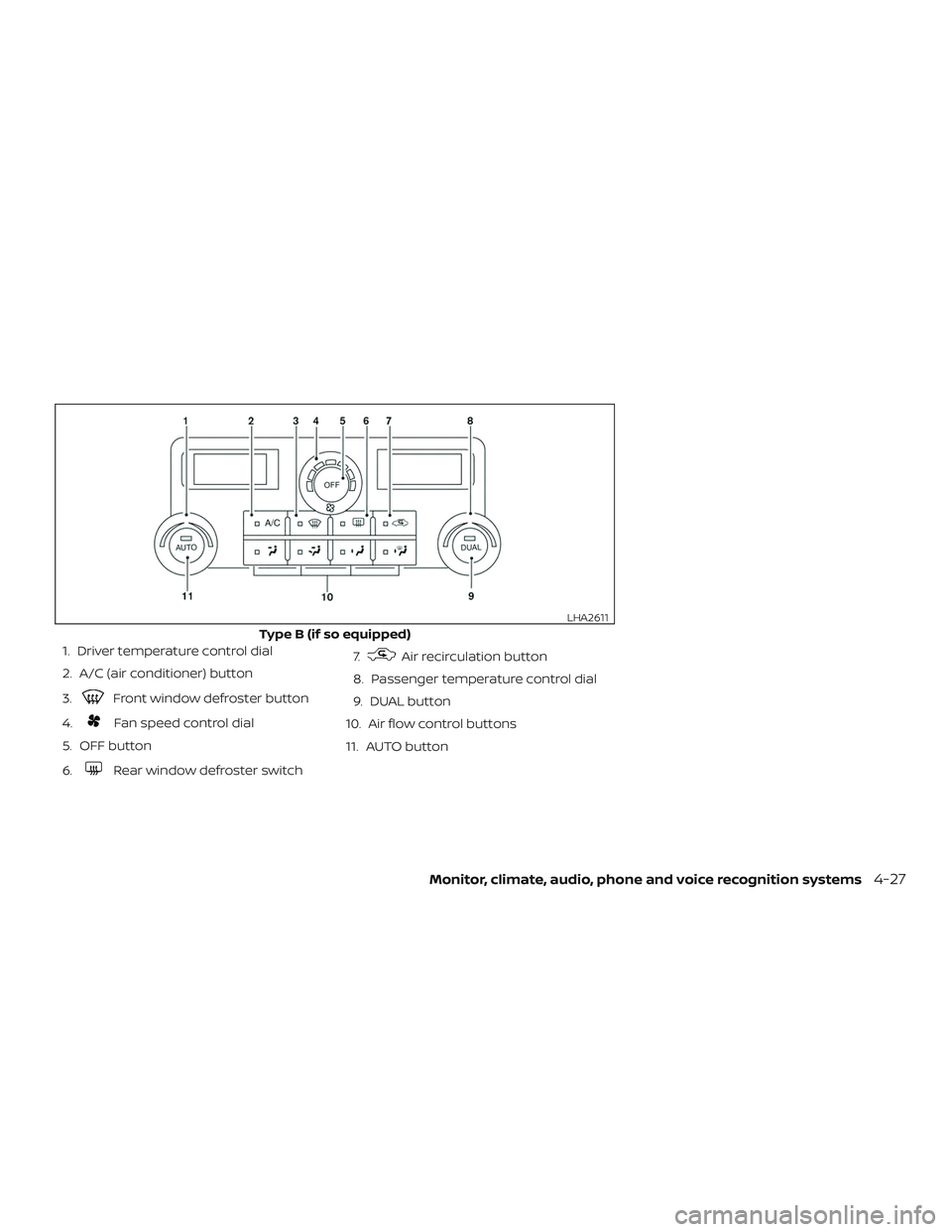
1. Driver temperature control dial
2. A/C (air conditioner) button
3.
Front window defroster button
4.
Fan speed control dial
5. OFF button
6.
Rear window defroster switch 7.
Air recirculation button
8. Passenger temperature control dial
9. DUAL button
10. Air flow control buttons
11. AUTO button
Type B (if so equipped)
LHA2611
Monitor, climate, audio, phone and voice recognition systems4-27
Page 229 of 502
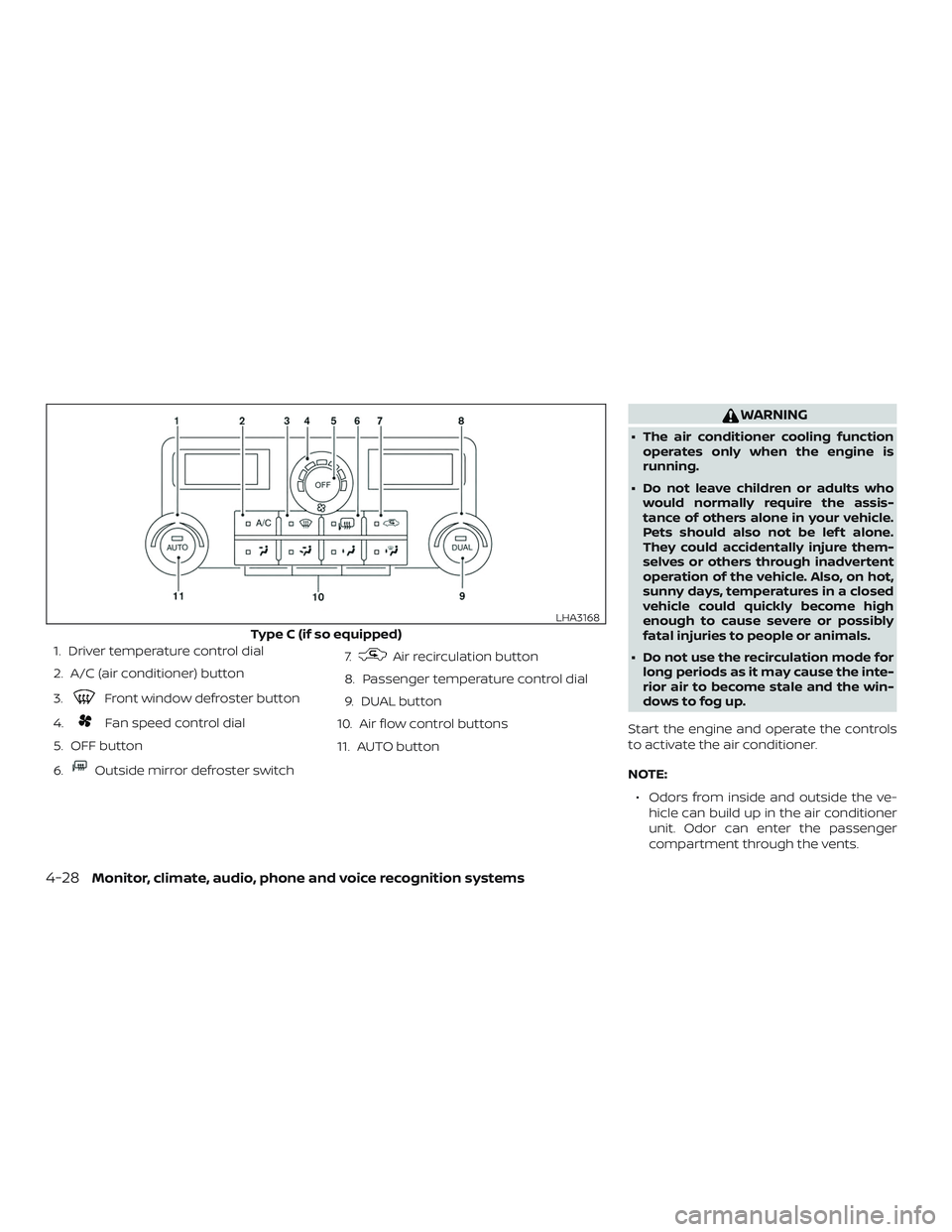
1. Driver temperature control dial
2. A/C (air conditioner) button
3.
Front window defroster button
4.
Fan speed control dial
5. OFF button
6.
Outside mirror defroster switch 7.
Air recirculation button
8. Passenger temperature control dial
9. DUAL button
10. Air flow control buttons
11. AUTO button
WARNING
∙ The air conditioner cooling function operates only when the engine is
running.
∙ Do not leave children or adults who would normally require the assis-
tance of others alone in your vehicle.
Pets should also not be lef t alone.
They could accidentally injure them-
selves or others through inadvertent
operation of the vehicle. Also, on hot,
sunny days, temperatures in a closed
vehicle could quickly become high
enough to cause severe or possibly
fatal injuries to people or animals.
∙ Do not use the recirculation mode for long periods as it may cause the inte-
rior air to become stale and the win-
dows to fog up.
Start the engine and operate the controls
to activate the air conditioner.
NOTE: ∙ Odors from inside and outside the ve- hicle can build up in the air conditioner
unit. Odor can enter the passenger
compartment through the vents.
Type C (if so equipped)
LHA3168
4-28Monitor, climate, audio, phone and voice recognition systems
Page 230 of 502
∙ When parking, set the heater and airconditioner controls to turn off air recir-
culation to allow fresh air into the pas-
senger compartment. This should help
reduce odors inside the vehicle.
AUTOMATIC OPERATION
Cooling or heating (auto)
This mode may be normally used all year
round as the system automatically works
to keep a constant temperature. Air flow
distribution and fan speed are also con-
trolled automatically.
1. Press the AUTO button on.
2. Turn the temperature dial to the lef t or right to set the desired temperature.
Driver and passenger temperatures
can be set independently. Press DUAL
to activate dual climate control func-
tions. Turn the passenger’s side tem-
perature control dial to the lef t or right
to set the desired passenger’s tem-
perature.
∙ Adjust the temperature dial to about 75°F (24°C) for normal operation. ∙ The temperature of the passenger
compartment will be maintained auto-
matically. Air flow distribution, fan speed
and A/C on/off are also controlled auto-
matically.
∙ A visible mist may be seen coming from the vents in hot, humid conditions as
the air is cooled rapidly. This does not
indicate a malfunction.Heating (A/C OFF)
The air conditioner does not activate. When
you need to heat only, use this mode.
1. Press the AUTO button.
2. Turn the temperature control dial to set the desired temperature.
∙ The temperature of the passenger compartment will be maintained auto-
matically. Air flow distribution and fan
speed are also controlled automatically.
∙ Do not set the temperature lower than the outside air temperature. Otherwise,
the system may not work properly.
∙ Not recommended if windows fog up.
Dehumidified defrosting or
defogging
1. Press thedefroster control
switch to turn the system on. The indi-
cator light in the button will illuminate.
2. Turn the temperature dial to the lef t or right to set the desired temperature.
∙ To quickly remove ice from the outside of the windows, turn the manual fan
control to the maximum position.
∙ As soon as possible af ter the wind- shield is clean, press the AUTO button to
return to the auto mode.
Monitor, climate, audio, phone and voice recognition systems4-29
Page 231 of 502
∙ When thecontrol is activated, the
air conditioner will automatically be
turned on at outside temperatures
above 36°F (2°C). If in defrost mode for
more than 1 minute, the air conditioning
system will continue to operate until the
fan control is turned OFF, the vehicle is
shut off or the A/C button is used to
turn off the compressor even if an air
flow button other than
is se-
lected. This dehumidifies the air which
helps defog the windshield. The air re-
circulation mode automatically turns
off, allowing outside air to be drawn into
the passenger compartment to further
improve the defogging performance.
MANUAL OPERATION
Fan speed control
Turn thefan speed control dial to
manually control the fan speed.
Press the AUTO button to return to auto-
matic control of the fan speed.
Air recirculation
Press the air recirculation buttonto
recirculate interior air inside the vehicle.
Press the AUTO button to return to auto-
matic mode.
The air recirculation cannot be activated
when the air conditioner is in the
front defogging mode.
Fresh air intake (if so equipped)
Press thefresh air intake button to
draw outside air into the passenger com-
partment. The
indicator light on the
button will come on.
Air conditioner button
Start the engine, turn thefan speed
control dial to the desired position and
press the
button to turn on the air
conditioner. To turn off the air conditioner,
press the
button again.
The air conditioner cooling function op-
erates only when the engine is running.
Air flow control
Press the air flow control buttons to manu-
ally control air flow and select the air outlet:
— Air flows from center and side vents.
— Air flows from center and sidevents and foot outlets.
— Air flows mainly from footoutlets.
— Air flows from defroster andfoot outlets.
— Air flows from defroster outlets.
To turn system off
Press the OFF button.
Rear window or outside mirror
defroster switch (if so equipped)
For additional information, refer to “Rear
window or outside mirror defroster switch”
in the “Instruments and controls” section of
this manual.
4-30Monitor, climate, audio, phone and voice recognition systems
Page 235 of 502
∙Do not expose the CD to direct sun-
light.
∙ CDs that are in poor condition or are
dirty, scratched or covered with fin-
gerprints may not work properly.
∙ The following CDs may not work
properly:
∙ Copy control compact discs (CCCD)
∙ Recordable compact discs (CD-R)
∙ Rewritable compact discs (CD-RW)
∙ Do not use the following CDs as they
may cause the CD player to malfunc-
tion:
∙ 3.1 in (8 cm) discs with an adapter
∙ CDs that are not round
∙ CDs with a paper label
∙ CDs that are warped, scratched, or
have abnormal edges
∙ This audio system can only play pre-
recorded CDs. It has no capability to
record or burn CDs.
∙ If the CD cannot be played, one of the
following messages will be displayed. CHECK DISC
∙
Confirm that the CD is inserted cor-
rectly (the label side is facing up,
etc.).
∙ Confirm that the CD is not bent or
warped and it is free of scratches.
PRESS EJECT
This is an error due to excessive tem-
perature inside the player. Remove
the CD by pressing the EJECT button.
Af ter a short time, reinsert the CD.
The CD can be played when the tem-
perature of the player returns to nor-
mal.
UNPLAYABLE
The file is unplayable in this audio
system (only MP3 or WMA (if so
equipped) CD).Compact disc with MP3 or WMA
Terms ∙ MP3 — MP3 is short for Moving Pictures Experts Group Audio Layer 3. MP3 is the
most well-known compressed digital
audio file format. This format allows for
near “CD quality” sound, but at a fraction
of the size of normal audio files. MP3
conversion of an audio track from CD-
ROM can reduce the file size by approxi-
mately a 10:1 ratio with virtually no per-
ceptible loss in quality. MP3
compression removes the redundant
and irrelevant parts of a sound signal
that the human ear doesn’t hear.
∙ WMA — Windows Media Audio (WMA)* is a compressed audio format created by
Microsof t as an alternative to MP3. The
WMA codec offers greater file compres-
sion than the MP3 codec, enabling stor-
age of more digital audio tracks in the
same amount of space when com-
pared to MP3s at the same level of qual-
ity.
4-34Monitor, climate, audio, phone and voice recognition systems