engine NISSAN FRONTIER 2019 Owner´s Manual
[x] Cancel search | Manufacturer: NISSAN, Model Year: 2019, Model line: FRONTIER, Model: NISSAN FRONTIER 2019Pages: 516, PDF Size: 5.04 MB
Page 334 of 516
WARNING
If the shif t lever cannot be moved from
the P (Park) position while the engine is
running and the brake pedal is de-
pressed, the stop lights may not work.
Malfunctioning stop lights could cause
an accident injuring yourself and
others.
Accelerator downshif t
— in D (Drive) position —
For passing or hill climbing, depress the
accelerator pedal to the floor. This shif ts
the transmission down into a lower gear,
depending on the vehicle speed.
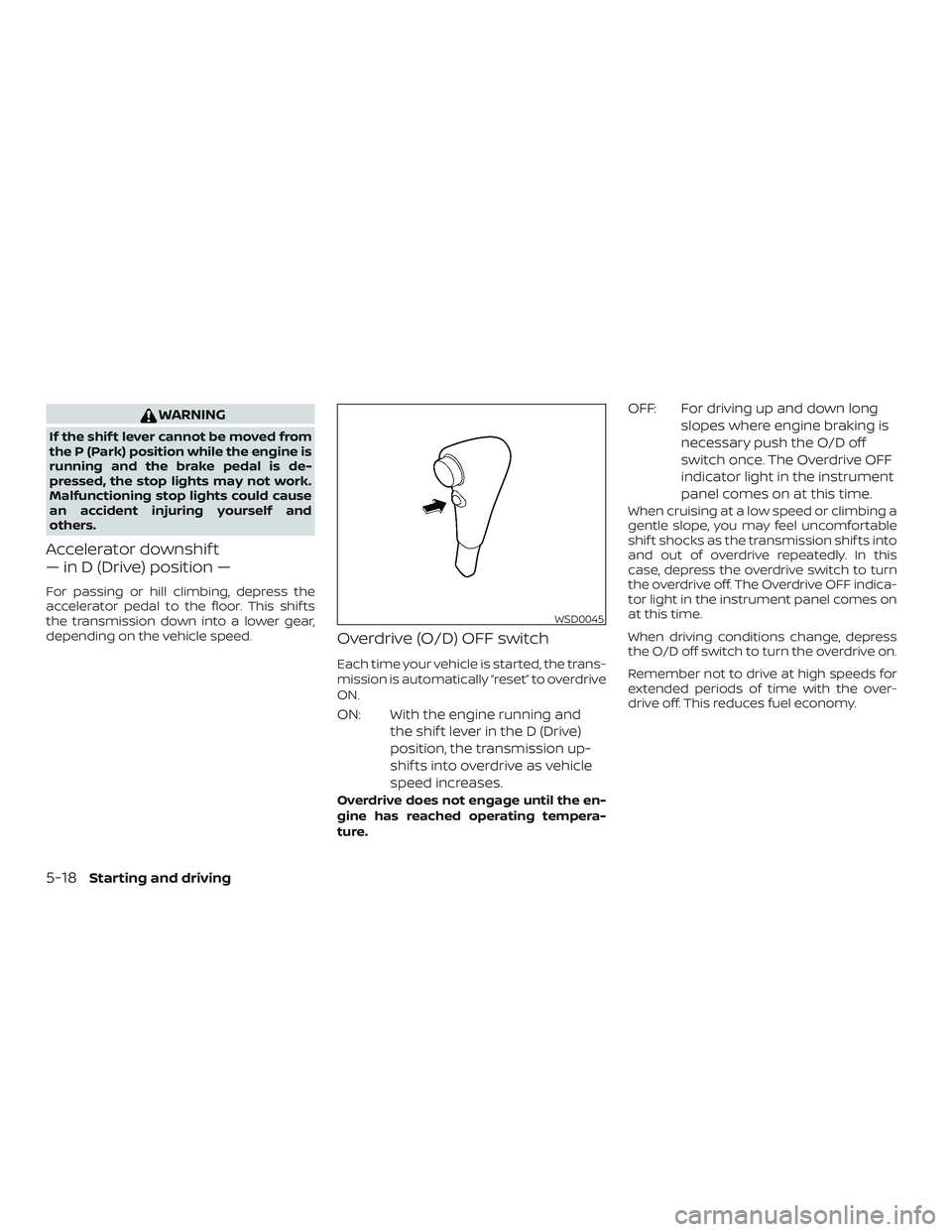
Overdrive (O/D) OFF switch
Each time your vehicle is started, the trans-
mission is automatically “reset” to overdrive
ON.
ON: With the engine running andthe shif t lever in the D (Drive)
position, the transmission up-
shif ts into overdrive as vehicle
speed increases.
Overdrive does not engage until the en-
gine has reached operating tempera-
ture.
OFF: For driving up and down longslopes where engine braking is
necessary push the O/D off
switch once. The Overdrive OFF
indicator light in the instrument
panel comes on at this time.
When cruising at a low speed or climbing a
gentle slope, you may feel uncomfortable
shif t shocks as the transmission shif ts into
and out of overdrive repeatedly. In this
case, depress the overdrive switch to turn
the overdrive off. The Overdrive OFF indica-
tor light in the instrument panel comes on
at this time.
When driving conditions change, depress
the O/D off switch to turn the overdrive on.
Remember not to drive at high speeds for
extended periods of time with the over-
drive off. This reduces fuel economy.
WSD0045
5-18Starting and driving
Page 335 of 516
MANUAL TRANSMISSION (if so
equipped)
WARNING
∙ Do not downshif t abruptly on slipperyroads. This may cause a loss of
control.
∙ Do not over-rev the engine when shif ting to a lower gear. This may
cause a loss of control or engine
damage.
CAUTION
∙ Do not rest your foot on the clutchpedal while driving. This may cause
clutch damage.
∙ Fully depress the clutch pedal before shif ting to help prevent transmission
damage.
∙ Stop your vehicle completely before shif ting into R (Reverse).
∙ When the vehicle is stopped with the engine running (for example, at a stop
light), shif t to N (Neutral) and release
the clutch pedal with the foot brake
applied.
Shif ting
To change gears, or when upshif ting or
downshif ting, depress the clutch pedal
fully, shif t into the appropriate gear, then
release the clutch slowly and smoothly.
To ensure smooth gear changes, fully de-
press the clutch pedal before operating the
shif t lever. If the clutch pedal is not fully
depressed before the transmission is
shif ted, a gear noise may be heard. Trans-
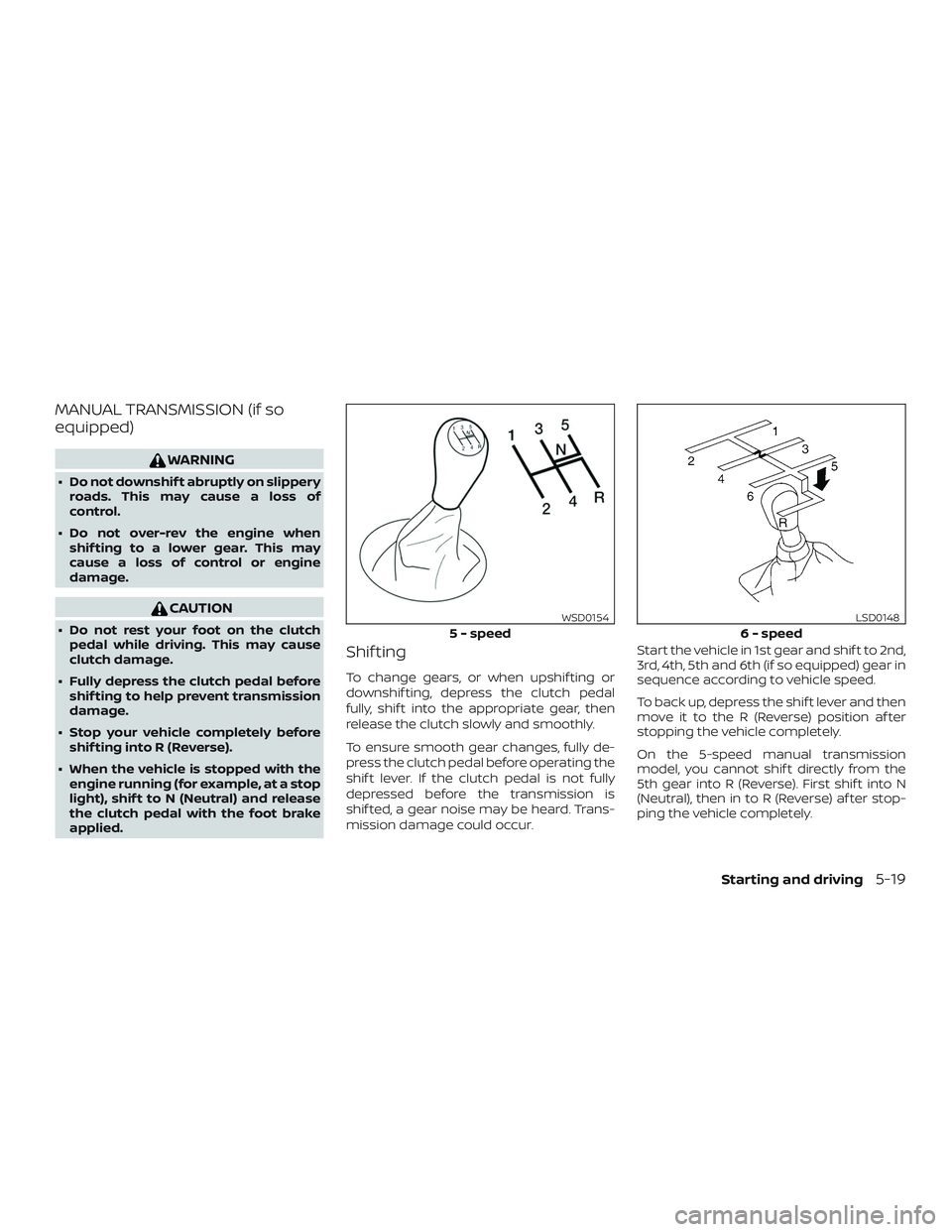
mission damage could occur. Start the vehicle in 1st gear and shif t to 2nd,
3rd, 4th, 5th and 6th (if so equipped) gear in
sequence according to vehicle speed.
To back up, depress the shif t lever and then
move it to the R (Reverse) position af ter
stopping the vehicle completely.
On the 5-speed manual transmission
model, you cannot shif t directly from the
5th gear into R (Reverse). First shif t into N
(Neutral), then in to R (Reverse) af ter stop-
ping the vehicle completely.
5 - speed
WSD0154
6 - speed
LSD0148
Starting and driving5-19
Page 336 of 516
If it is difficult to move the shif t lever into R
(Reverse) or 1st, shif t into N (Neutral), then
release the clutch pedal. Fully depress the
clutch pedal again and shif t into R (Re-
verse) or 1st.
If your vehicle is equipped with 4-wheel
drive, refer to “Transfer case shif ting proce-
dures” in this section.
Suggested up-shif t speeds
The following are suggested vehicle
speeds for shif ting into a higher gear.
These suggestions relate to fuel economy
and vehicle performance. Actual upshif t
speeds will vary according to road condi-
tions, the weather and individual driving
habits.∙ For QR25DE 2-Wheel Drive models:
GEAR CHANGE mph (km/h)
1st to 2nd 11 (17)
2nd to 3rd 15 (24)
3rd to 4th 24 (38)
4th to 5th 35 (56)
∙ For VQ40DE 4-Wheel Drive models and
4-Wheel Drive models (2H and 4H posi-
tion):
GEAR CHANGE mph (km/h)
1st to 2nd 11 (17)
2nd to 3rd 17 (27)
3rd to 4th 25 (40)
4th to 5th 32 (51)
5th to 6th 45 (72)
Suggested maximum speed in
each gear
Downshif t to a lower gear if the engine is
not running smoothly, or if you need to ac-
celerate.
Do not exceed the maximum suggested
speed (shown below) in any gear. For level
road driving, use the highest gear sug-
gested for that speed. Always observe
posted speed limits, and drive according to
the road conditions, which will ensure safe
operation. Do not over-rev the engine
when shif ting to a lower gear as it may
cause engine damage or loss of vehicle
control. Allowable maximum speed in each gear:
2–Wheel Drive models (QR25DE engine)
GEAR
mph (km/h)
1st 34 (54)
2nd 58 (94)
3rd 89 (144)
4th —
5th —
2–Wheel Drive models (VQ40DE engine)
GEARmph (km/h)
1st 35 (56)
2nd 60 (97)
3rd 87 (141)
4th —
5th —
4–Wheel Drive models (VQ40DE engine)
2H position
GEARmph (km/h)
1st 33 (54)
2nd 58 (93)
3rd 84 (135)
4th —
5th —
6th —
5-20Starting and driving
Page 339 of 516
CAUTION
On manual transmission models, do not
shif t into N (Neutral) without depress-
ing the clutch pedal when the cruise
control is set. Should this occur, depress
the clutch pedal and turn the ON•OFF
switch off immediately. Failure to do so
may cause engine damage.
CRUISE CONTROL OPERATIONS
The cruise control allows driving at a speed
between 25 - 89 mph (40 - 144 km/h) with-
out keeping your foot on the accelerator
pedal.
To turn on the cruise control,push the
ON•OFF switch. The CRUISE indicator light
in the instrument panel comes on.
To set cruising speed, accelerate the ve-
hicle to the desired speed, push the COAST-
•SET switch and release it. The SET indica-
tor light in the instrument panel comes on.
Take your foot off the accelerator pedal.
Your vehicle maintains the set speed.
∙ To pass another vehicle, depress the
accelerator pedal. When you release the
pedal, the vehicle returns to the previ-
ously set speed. ∙ The vehicle may not maintain the set
speed when going up or down steep
hills. If this happens, drive without the
cruise control.
To cancel the preset speed, use one of the
following three methods:
∙ Push the CANCEL switch; the SET indi- cator light in the instrument panel goes
out.
∙ Tap the brake pedal; the SET indicator light goes out.
∙ Turn the ON•OFF switch off. Both the CRUISE indicator light and SET indicator
light in the instrument panel go out.
The cruise control is automatically can-
celed and the SET indicator light in the in-
strument panel goes out if: ∙ You depress the brake or clutch pedal (if so equipped) while pushing the ACCEL-
•RES or COAST•SET switch. The preset
speed is deleted from memory.
∙ The vehicle slows down more than 8 mph (13 km/h) below the set speed.
∙ You depress the clutch pedal (manual transmission), or move the shif t lever to
N (Neutral) (automatic transmission). To reset at a faster cruising speed,
use
one of the following three methods:
∙
Depress the accelerator pedal. When the
vehicle attains the desired speed, push
and release the COAST•SET switch.
∙ Push and hold the ACCEL•RES switch. When the vehicle attains the speed you
desire, release the switch.
∙ Push and release the ACCEL•RES switch. Each time you do this, the set speed
increases by about 1 mph (1.6 km/h).
To reset at a slower cruising speed, use
one of the following three methods:
∙ Lightly tap the brake pedal. When the vehicle attains the desired speed, push
the COAST•SET switch and release it.
∙ Push and hold the COAST•SET switch. Release the switch when the vehicle
slows to the desired speed.
∙ Push and release the COAST•SET switch. Each time you do this, the set
speed decreases by about 1 mph
(1.6 km/h).
To resume the preset speed, push and
release the ACCEL•RES switch. The vehicle
returns to the last set cruising speed when
the vehicle speed is over 25 mph (40 km/h).
Starting and driving5-23
Page 340 of 516
CAUTION
During the first 1,200 miles (2,000 km),
follow these recommendations to ob-
tain maximum engine performance
and ensure the future reliability and
economy of your new vehicle. Failure to
follow these recommendations may re-
sult in shortened engine life and re-
duced engine performance.∙ Avoid driving for long periods at con- stant speed, either fast or slow, and do
not run the engine over 4,000 rpm.
∙ Do not accelerate at full throttle in any gear.
∙ Avoid quick starts.
∙ Avoid hard braking as much as pos- sible.
∙ Do not tow a trailer for the first 500 miles (805 kilometers). Your engine, axle or
other parts could be damaged. Follow these easy-to-use Fuel Efficient
Driving Tips to help you achieve the most
fuel economy from your vehicle.
1. Use Smooth Accelerator and Brake
Pedal Application
∙ Avoid rapid starts and stops.
∙ Use smooth, gentle accelerator and brake application whenever possible.
∙ Maintain constant speed while com- muting and coast whenever pos-
sible.
2. Maintain Constant Speed
∙ Look ahead to try and anticipate and minimize stops.
∙ Synchronizing your speed with traffic lights allows you to reduce your num-
ber of stops.
∙ Maintaining a steady speed can mini- mize red light stops and improve fuel
efficiency. 3.
Use Air Conditioning (A/C) at Higher
Vehicle Speeds
∙ Below 40 mph (64 km/h), it is more efficient to open windows to cool the
vehicle due to reduced engine load.
∙ Above 40 mph (64 km/h), it is more efficient to use A/C to cool the vehicle
due to increased aerodynamic drag.
∙ Recirculating the cool air in the cabin when the A/C is on reduces cooling
load.
4. Drive at Economical Speeds and Dis-
tances
∙ Observing the speed limit and not exceeding 60 mph (97 km/h) (where
legally allowed) can improve fuel effi-
ciency due to reduced aerodynamic
drag.
∙ Maintaining a safe following distance behind other vehicles reduces un-
necessary braking.
∙ Safely monitoring traffic to anticipate changes in speed permits reduced
braking and smooth acceleration
changes.
∙ Select a gear range suitable to road conditions.
BREAK-IN SCHEDULE FUEL EFFICIENT DRIVING TIPS
5-24Starting and driving
Page 341 of 516
5.Use Cruise Control
∙ Using cruise control during highway driving helps maintain a steady
speed.
∙ Cruise control is particularly effective in providing fuel savings when driving
on flat terrains.
6. Plan for the Shortest Route
∙ Utilize a map or navigation system to determine the best route to save
time.
7. Avoid Idling
∙ Shutting off your engine when safe for stops exceeding 30–60 seconds
saves fuel and reduces emissions.
8. Buy an Automated Pass for Toll
Roads
∙ Automated passes permit drivers to use special lanes to maintain cruis-
ing speed through the toll and avoid
stopping and starting. 9.
Winter Warm Up
∙ Limit idling time to minimize impact to fuel economy.
∙ Vehicles typically need no more than 30 seconds of idling at start-up to
effectively circulate the engine oil be-
fore driving.
∙ Your vehicle will reach its ideal oper- ating temperature more quickly
while driving versus idling.
10. Keeping your Vehicle Cool
∙ Park your vehicle in a covered parking area or in the shade whenever pos-
sible.
∙ When entering a hot vehicle, opening the windows will help to reduce the
inside temperature faster, resulting in
reduced demand on your A/C sys-
tem. ∙ Keep your engine tuned up.
∙ Follow the recommended scheduled
maintenance.
∙ Keep the tires inflated to the correct pressure. Low tire pressure increases
tire wear and lowers fuel economy.
∙ Keep the wheels in correct alignment. Improper alignment increases tire wear
and lowers fuel economy.
∙ For vehicles equipped with
, use
4H or 4L position only when necessary.
4-Wheel Drive operation lowers fuel
economy.
∙ Use the recommended viscosity engine oil. For additional information, refer to
“Engine oil and oil filter recommenda-
tions” in the “Technical and consumer
information” section of this manual.
INCREASING FUEL ECONOMY
Starting and driving5-25
Page 342 of 516
WARNING
∙ For 4WD equipped vehicles, do not at-tempt to raise two wheels off the
ground and shif t the transmission to
any drive or reverse position with the
engine running. Doing so may result
in drivetrain damage or unexpected
vehicle movement which could result
in serious vehicle damage or personal
injury.
∙ Do not attempt to test a 4WD equipped vehicle on a 2-wheel dyna-
mometer (such as the dynamometers
used by some states for emissions
testing), or similar equipment even if
the other two wheels are raised off the
ground. Make sure you inform test fa-
cility personnel that your vehicle is
equipped with 4WD before it is placed
on a dynamometer. Using the wrong
test equipment may result in drive-
train damage or unexpected vehicle
movement which could result in seri-
ous vehicle damage or personal
injury.
CAUTION
∙ Do not drive the vehicle in the 4H or4LO position on dry hard surface
roads. Driving on dry, hard surfaces in
4H or 4LO may cause unnecessary
noise, tire wear and increased fuel
consumption.
If the 4WD warning light turns on
when you are driving on dry hard sur-
face roads:
– In the 4H position, shif t the 4WD shif t switch to 2–Wheel Drive
(2WD).
– In the 4LO position for automatic transmission vehicles, stop the ve-
hicle and shif t the shif t lever to the
N (Neutral) position with the brake
pedal depressed and shif t the 4WD
shif t switch to 2WD.
– In the 4LO position for manual transmission vehicles, stop the ve-
hicle and shif t the shif t lever to the
N (Neutral) position with the clutch
pedal depressed and shif t the 4WD
shif t switch to 2WD. ∙ If the warning light is still on af ter the
above operation, have your vehicle
checked as soon as possible. It is rec-
ommended that you visit a NISSAN
dealer for this service.
TRANSFER CASE SHIFTING
PROCEDURES
The part-time 4WD system provides three
positions (2WD, 4H and 4LO), so you can
select the desired drive mode according to
the driving conditions.
USING 4–WHEEL DRIVE (4WD)
(if so equipped)
5-26Starting and driving
Page 344 of 516
1. Turn off the engine by turning the ignition switch off.
2. Start the engine.
- Check that the 4WD warning light turns off. If the 4WD warning light illuminates, have the system checked. It is recommended that you
visit a NISSAN dealer for this service.
3. Apply the parking brake, for A/T vehicles, depress the brake pedal and move the shif t lever to N (Neutral) position. For M/T vehicles,
move the shif t lever to the N (Neutral) position.
4. With the brake pedal depressed on A/T vehicles or with the clutch pedal depressed on M/T vehicles, move the 4WD shif t switch to
the desired mode.
- Be sure to wait until the transfer gear change completes before shif ting the shif t lever from the N (Neutral) position.
*2: While changing in and out of 4LO, the ignition key must be on and the vehicle’s engine must be running for a shif t to take place and for the indicator lights (4WD shif t and 4LO position indicator) to be operable. Otherwise, the shif t will not take place and no indicator lights
will be on or flashing.
*3: Make sure the transfer 4LO position indicator light turns on when you shif t the 4WD shif t switch to 4LO. The
indicator light will also
turn on when 4LO is selected. For additional information, refer to “Vehicle Dynamic Control (VDC) system” in this section.
5-28Starting and driving
Page 345 of 516
The transfer case 4WD shif t switch is used
to select either 2WD or 4WD depending on
the driving conditions. There are three
types of drive modes available, 2WD, 4H and
4LO.
The 4WD shif t switch electronically controls
the transfer case operation. Rotate the
switch to move between each mode, 2WD,
4H and 4LO.
To change into or out of 4LO, the vehicle
MUST be stationary, move the shif t lever
to N (Neutral), and for A/T vehicles de-
press the brake pedal or for M/T vehicles
depress the clutch pedal. The switch
must be depressed and turned when
changing into or out of 4LO.
WARNING
∙ When parking, apply the parkingbrake before stopping the engine and
make sure that the 4WD shif t indica-
tor light is on and the ATP warning
light goes off. Otherwise, the vehicle
could unexpectedly move even if the
A/T is in the P (Park) position. ∙ The transfer 4LO position indicator
light must stop blinking and remain
illuminated or turn off before shif ting
the transmission into gear. If the shif t
lever is shif ted from the N (Neutral)
position to any other gear when the
transfer 4LO position indicator light is
blinking, the vehicle may move
unexpectedly.
CAUTION
∙ Never shif t the 4WD shif t switch be-tween 4LO and 4H while driving.
∙ The 4H position provides greater trac- tion. Avoid excessive speed, as it will
cause increased fuel consumption
and higher oil temperatures, and
could damage drivetrain compo-
nents. Speeds over 62 mph
(100 km/h) in 4H is not recommended.
∙ The 4LO position provides maximum power and traction. Avoid raising ve-
hicle speed excessively, as the maxi-
mum speed is approximately 31 mph
(50 km/h). ∙ When driving straight, shif t the 4WD
shif t switch to the 2WD or 4H position.
Do not move the 4WD shif t switch
when making a turn or reversing.
∙ Do not shif t the 4WD shif t switch (be- tween 2WD and 4H) while driving on
steep downhill grades. Use the engine
brake and low A/T gears 2 (Second
gear) or 1 (Low gear), or M/T (1st gear
or 2nd gear) for engine braking.
∙ Do not operate the 4WD shif t switch (between 2WD and 4H) with the rear
wheels spinning.
∙ Do not drive on dry hard surface roads in the 4H or 4LO position. Driving on
dry hard surfaces in 4H or 4LO may
cause unnecessary noise and tire
wear. NISSAN recommends driving in
the 2WD position under these
conditions.
∙ The 4WD transfer case may not be shif ted between 4H and 4LO at low
ambient temperatures and the trans-
fer 4LO position indicator light may
blink even when the 4WD shif t switch
is shif ted. Af ter driving for a while you
can change the 4WD transfer case be-
tween 4H and 4LO.
Starting and driving5-29
Page 346 of 516
When driving on rough roads:∙ Set the 4WD shif t switch to 4H or 4LO.
∙ Drive carefully according to the road surface conditions.
When the vehicle is stuck: ∙ Set the 4WD shif t switch to 4H or 4LO.
∙ Use the Electronic Locking Rear Differ- ential (E-Lock) system (if so equipped).
Turn the switch ON while the vehicle is
stationary and apply the throttle to try
to free the vehicle.
∙ If it is difficult to free the vehicle, rock the vehicle back and forth between R (Re-
verse) and D (Drive) gears.
∙ If the vehicle is stuck deep in mud, place stones or wooden blocks under the
tires. Then try the recovery procedures
above. Tire chains may be effective.
CAUTION
∙ Do not spin the tires excessively. Tireswill sink deep into the mud, making it
difficult to free the vehicle.
∙ Avoid shif ting gears with the engine running at high speeds as this may
cause malfunction.
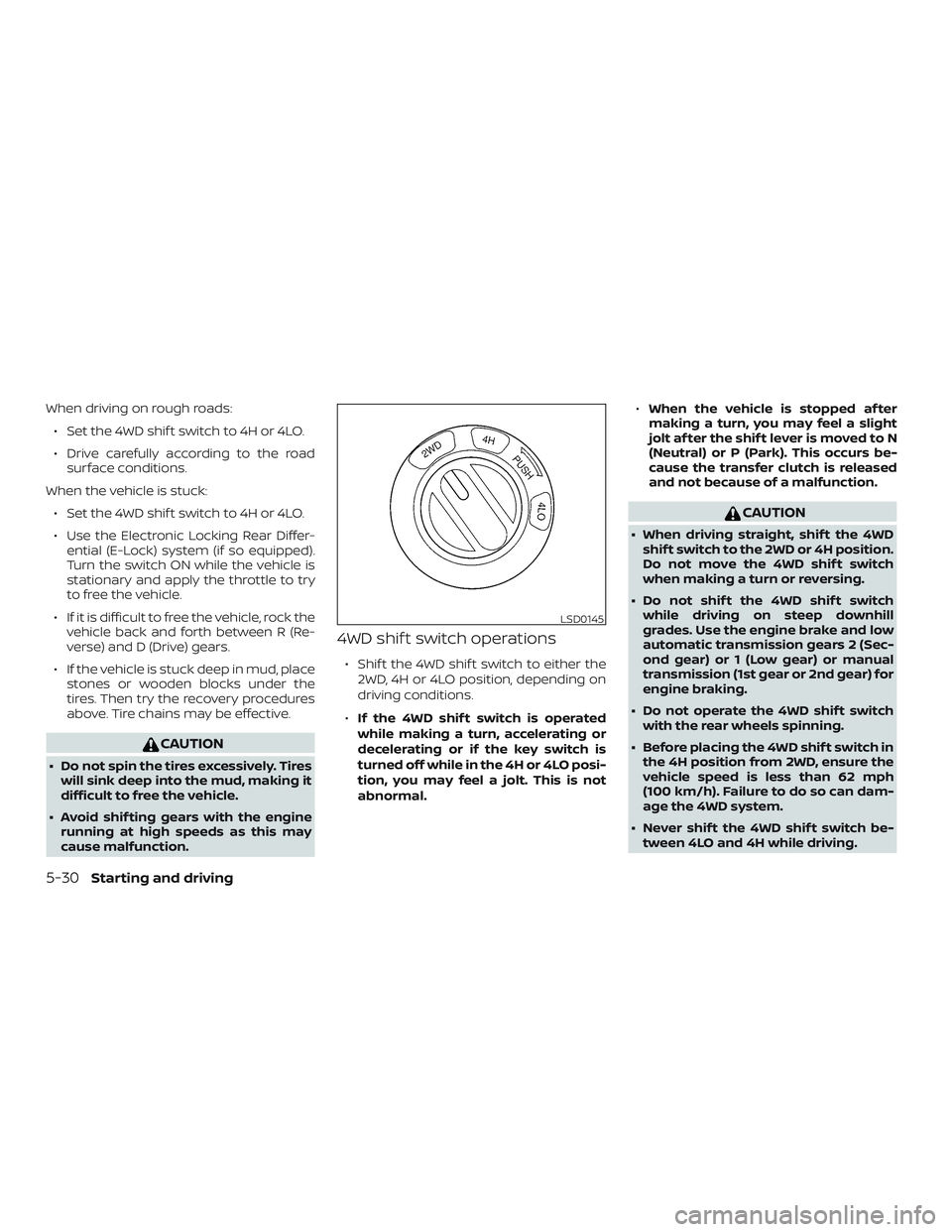
4WD shif t switch operations
∙ Shif t the 4WD shif t switch to either the
2WD, 4H or 4LO position, depending on
driving conditions.
∙ If the 4WD shif t switch is operated
while making a turn, accelerating or
decelerating or if the key switch is
turned off while in the 4H or 4LO posi-
tion, you may feel a jolt. This is not
abnormal. ∙
When the vehicle is stopped af ter
making a turn, you may feel a slight
jolt af ter the shif t lever is moved to N
(Neutral) or P (Park). This occurs be-
cause the transfer clutch is released
and not because of a malfunction.
CAUTION
∙ When driving straight, shif t the 4WD
shif t switch to the 2WD or 4H position.
Do not move the 4WD shif t switch
when making a turn or reversing.
∙ Do not shif t the 4WD shif t switch while driving on steep downhill
grades. Use the engine brake and low
automatic transmission gears 2 (Sec-
ond gear) or 1 (Low gear) or manual
transmission (1st gear or 2nd gear) for
engine braking.
∙ Do not operate the 4WD shif t switch with the rear wheels spinning.
∙ Before placing the 4WD shif t switch in the 4H position from 2WD, ensure the
vehicle speed is less than 62 mph
(100 km/h). Failure to do so can dam-
age the 4WD system.
∙ Never shif t the 4WD shif t switch be- tween 4LO and 4H while driving.
LSD0145
5-30Starting and driving