seats NISSAN FRONTIER 2020 Owner´s Manual
[x] Cancel search | Manufacturer: NISSAN, Model Year: 2020, Model line: FRONTIER, Model: NISSAN FRONTIER 2020Pages: 492, PDF Size: 3.05 MB
Page 356 of 492
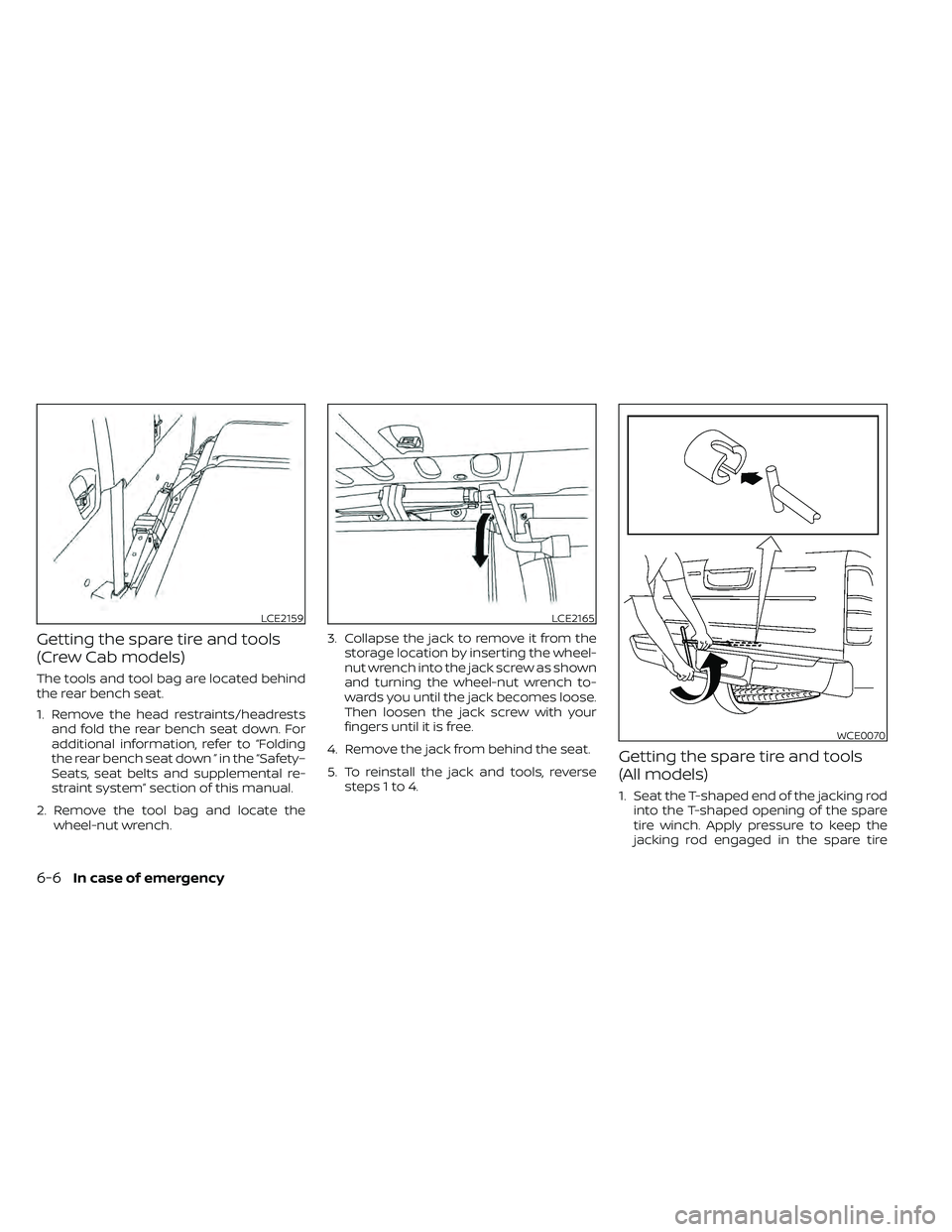
Getting the spare tire and tools
(Crew Cab models)
The tools and tool bag are located behind
the rear bench seat.
1. Remove the head restraints/headrestsand fold the rear bench seat down. For
additional information, refer to “Folding
the rear bench seat down ” in the “Safety–
Seats, seat belts and supplemental re-
straint system” section of this manual.
2. Remove the tool bag and locate the wheel-nut wrench. 3. Collapse the jack to remove it from the
storage location by inserting the wheel-
nut wrench into the jack screw as shown
and turning the wheel-nut wrench to-
wards you until the jack becomes loose.
Then loosen the jack screw with your
fingers until it is free.
4. Remove the jack from behind the seat.
5. To reinstall the jack and tools, reverse steps 1 to 4.
Getting the spare tire and tools
(All models)
1. Seat the T-shaped end of the jacking rodinto the T-shaped opening of the spare
tire winch. Apply pressure to keep the
jacking rod engaged in the spare tire
LCE2159LCE2165
WCE0070
6-6In case of emergency
Page 372 of 492
TIRE DRESSINGS
NISSAN does not recommend the use of
tire dressings. Tire manufacturers apply a
coating to the tires to help reduce discolor-
ation of the rubber. If a tire dressing is ap-
plied to the tires, it may react with the coat-
ing and form a compound. This compound
may come off the tire while driving and
stain the vehicle paint.
If you choose to use a tire dressing, take the
following precautions:
• Use a water-based tire dressing. Thecoating on the tire dissolves more easily
than with an oil-based tire dressing.
• Apply a light coat of tire dressing to help prevent it from entering the tire tread/
grooves (where it would be difficult to re-
move).
• Wipe off excess tire dressing using a dry towel. Make sure the tire dressing is com-
pletely removed from the tire tread/
grooves.
• Allow the tire dressing to dry as recom- mended by the tire dressing manufac-
turer. Occasionally remove loose dust from the
interior trim, plastic parts and seats using a
vacuum cleaner or sof t bristled brush. Wipe
the vinyl and leather (if so equipped) sur-
faces with a clean, sof t cloth dampened in
mild soap solution, then wipe clean with a
dry, sof t cloth.
Regular care and cleaning is required in
order to maintain the appearance of the
leather (if so equipped).
Before using any fabric protector, read the
manufacturer's recommendations. Some
fabric protectors contain chemicals that
may stain or bleach the seat material.
Use a cloth dampened only with water to
clean the meter and gauge lens.
WARNING
Do not use water or acidic cleaners (hot
steam cleaners) on the seat. This can
damage the seat or occupant classifi-
cation sensor. This can also affect the
operation of the air bag system and re-
sult in serious personal injury.
CAUTION
• Never use benzine, thinner or any
similar material.
• Small dirt particles can be abrasive
and damaging to leather surfaces
and should be removed promptly. Do
not use saddle soap, car waxes, pol-
ishes, oils, cleaning fluids, solvents,
detergents or ammonia-based
cleaners as they may damage the
leather's natural finish.
• Never use fabric protectors unless
recommended by the manufacturer.
• Do not use glass or plastic cleaner on
meter or gauge lens covers. It may
damage the lens cover.
AIR FRESHENERS
Most air fresheners use a solvent that
could affect the vehicle interior. If you use
an air freshener, take the following precau-
tions:
• Hanging-type air fresheners can cause permanent discoloration when they con-
tact vehicle interior surfaces. Place the air
freshener in a location that allows it to
hang free and not contact an interior sur-
face.
CLEANING INTERIOR
7-4Appearance and care
Page 374 of 492
•Properly position the mats in the
floorwell using the floor mat posi-
tioning hook. For additional informa-
tion, refer to "Floor mat installation"
in this section.
• Make sure the floor mat does not in-
terfere with pedal operation.
• Periodically check the floor mats to
make sure they are properly
installed.
• Af ter cleaning the vehicle interior,
check the floor mats to make sure
they are properly installed.
The use of Genuine NISSAN floor mats can
extend the life of your vehicle carpet and
make it easier to clean the interior. Mats
should be maintained with regular clean-
ing and replaced if they become exces-
sively worn.
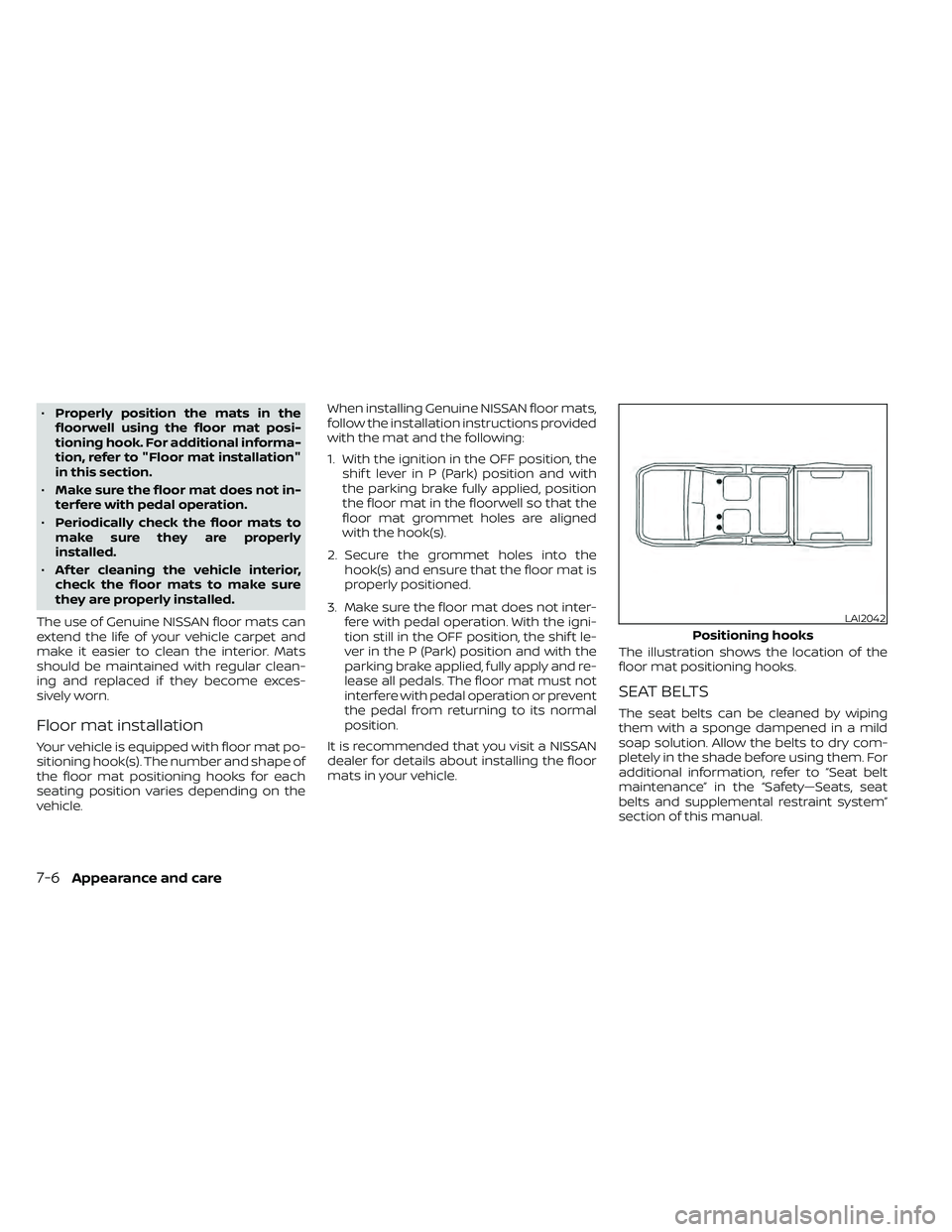
Floor mat installation
Your vehicle is equipped with floor mat po-
sitioning hook(s). The number and shape of
the floor mat positioning hooks for each
seating position varies depending on the
vehicle. When installing Genuine NISSAN floor mats,
follow the installation instructions provided
with the mat and the following:
1. With the ignition in the OFF position, the
shif t lever in P (Park) position and with
the parking brake fully applied, position
the floor mat in the floorwell so that the
floor mat grommet holes are aligned
with the hook(s).
2. Secure the grommet holes into the hook(s) and ensure that the floor mat is
properly positioned.
3. Make sure the floor mat does not inter- fere with pedal operation. With the igni-
tion still in the OFF position, the shif t le-
ver in the P (Park) position and with the
parking brake applied, fully apply and re-
lease all pedals. The floor mat must not
interfere with pedal operation or prevent
the pedal from returning to its normal
position.
It is recommended that you visit a NISSAN
dealer for details about installing the floor
mats in your vehicle. The illustration shows the location of the
floor mat positioning hooks.
SEAT BELTS
The seat belts can be cleaned by wiping
them with a sponge dampened in a mild
soap solution. Allow the belts to dry com-
pletely in the shade before using them. For
additional information, refer to “Seat belt
maintenance” in the “Safety—Seats, seat
belts and supplemental restraint system”
section of this manual.
LAI2042
Positioning hooks
7-6Appearance and care
Page 422 of 492
brake needs adjustment, it is recom-
mended that you visit a NISSAN dealer for
this service.
Seats:
Check seat position controls such as
seat adjusters, seatback recliner, etc., to en-
sure they operate smoothly and all latches
lock securely in every position. Check that the
head restraints/headrests move up and
down smoothly and the locks (if so equipped)
hold securely in all latched positions.
Seat belts: Check that all parts of the seat
belt system (for example, buckles, anchors,
adjusters and retractors) operate properly
and smoothly, and are installed securely.
Check the belt webbing for cuts, fraying,
wear or damage.
Steering wheel: Check for changes in the
steering system, such as excessive free
play, hard steering or strange noises.
Warning lights and chimes: Make sure all
warning lights and chimes are operating
properly.
Windshield defroster: Check that the air
comes out of the defroster outlets properly
and in sufficient quantity when operating
the heater or air conditioner.
Windshield wiper and washer*: Check
that the wipers and washer operate prop-
erly and that the wipers do not streak.
Under the hood and vehicle
The maintenance items listed here should
be checked periodically (for example, each
time you check the engine oil or refuel).
Battery (for maintenance free batter-
ies)*: This vehicle is equipped with a sealed
maintenance free battery. It is recom-
mended that you visit a NISSAN dealer for
service.
NOTE:
Care should be taken to avoid situations
that can lead to potential battery dis-
charge and potential no-start conditions
such as:
1. Installation or extended use of elec-
tronic accessories that consume bat-
tery power when the engine is not run-
ning (Phone chargers, GPS, DVD
players, etc.).
2. Vehicle is not driven regularly and/or
only driven short distances.
In these cases, the battery may need to
be charged to maintain battery health.
Brake fluid level*: Make sure that the fluid
level is between the MAX and MIN lines on
the reservoir. Engine coolant level*:
Check the coolant
level when the engine is cold.
Engine drive belts*: Make sure the drive
belts are not frayed, worn, cracked or oily.
Engine oil level*: Check the level af ter
parking the vehicle on a level spot and
turning off the engine. Wait more than 15
minutes for the oil to drain back into the oil
pan.
Exhaust system: Make sure there are no
loose supports, cracks or holes. If the
sound of the exhaust seems unusual or
there is a smell of exhaust fumes, immedi-
ately have the exhaust system inspected. It
is recommended that you visit a NISSAN
dealer for this service. For additional infor-
mation, refer to “Exhaust gas (carbon mon-
oxide)” in the “Starting and driving” section
of this manual.
Fluid leaks: Check under the vehicle for
fuel, oil, water or other fluid leaks af ter the
vehicle has been parked for a while. Water
dripping from the air conditioner af ter use
is normal. If you should notice any leaks or if
fuel fumes are evident, check for the cause
and have it corrected immediately.
9-4Maintenance and schedules
Page 448 of 492
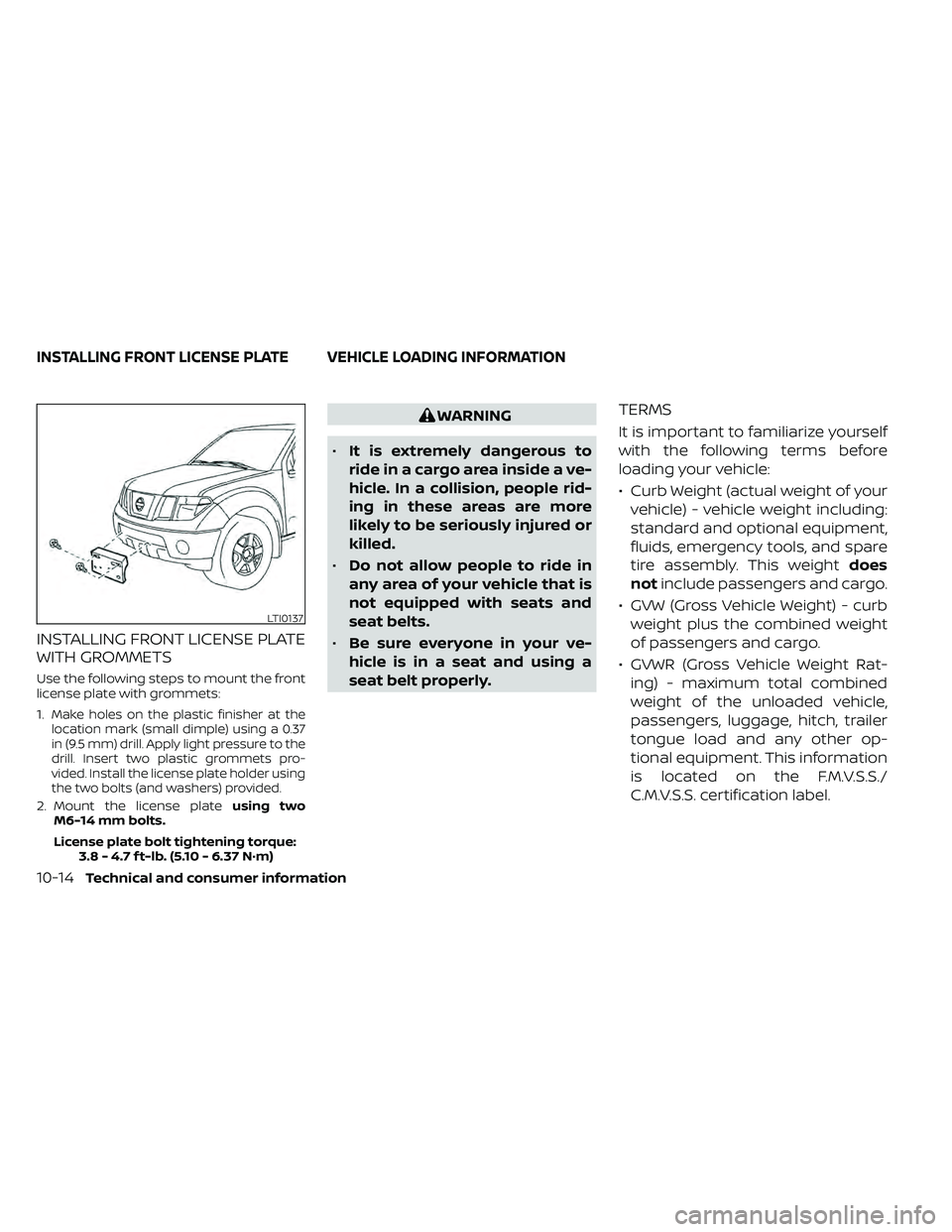
INSTALLING FRONT LICENSE PLATE
WITH GROMMETS
Use the following steps to mount the front
license plate with grommets:
1.
Make holes on the plastic finisher at the
location mark (small dimple) using a 0.37
in (9.5 mm) drill. Apply light pressure to the
drill. Insert two plastic grommets pro-
vided. Install the license plate holder using
the two bolts (and washers) provided.
2. Mount the license plate using two
M6-14 mm bolts.
License plate bolt tightening torque: 3.8 - 4.7 f t-lb. (5.10 - 6.37 N·m)
WARNING
• It is extremely dangerous to
ride in a cargo area inside a ve-
hicle. In a collision, people rid-
ing in these areas are more
likely to be seriously injured or
killed.
• Do not allow people to ride in
any area of your vehicle that is
not equipped with seats and
seat belts.
• Be sure everyone in your ve-
hicle is in a seat and using a
seat belt properly.TERMS
It is important to familiarize yourself
with the following terms before
loading your vehicle:
• Curb Weight (actual weight of your vehicle) - vehicle weight including:
standard and optional equipment,
fluids, emergency tools, and spare
tire assembly. This weight does
not include passengers and cargo.
• GVW (Gross Vehicle Weight) - curb weight plus the combined weight
of passengers and cargo.
• GVWR (Gross Vehicle Weight Rat- ing) - maximum total combined
weight of the unloaded vehicle,
passengers, luggage, hitch, trailer
tongue load and any other op-
tional equipment. This information
is located on the F.M.V.S.S./
C.M.V.S.S. certification label.
LTI0137
INSTALLING FRONT LICENSE PLATE VEHICLE LOADING INFORMATION
10-14Technical and consumer information
Page 477 of 492
11 Index
4WD warning light..............2-15
A
Active Brake Limited Slip (ABLS)
system.....................5-34Air bag (See supplemental restraint
system).....................1-70Air bag system
Front (See supplemental front impact
air bag system)
..............1-77Air bag warning labels............1-85Air bag warning light.........1-85, 2-20Air bag warning light,
supplemental.............1-85, 2-20Air cleaner housing filter..........8-17Air conditionerAir conditioner operation. . . .4-26, 4-34Air conditioner service..........4-36Air conditioner specification label. .10-13Air conditioner system refrigerant
recommendations............10-8Air conditioner system refrigerant
and oil recommendations.......10-8Heater and air conditioner
controls.................. .4-34Servicing air conditioner........4-36Air flow charts.................4-27Alarm system
(See vehicle security system).......2-25
Anchor point locations...........1-33Antenna....................4-72Anti-lock brake warning light.......2-15Anti-lock Braking System (ABS)......5-33Antifreeze...................5-40Apps......................4-72Audio system.................4-36AM radio reception............4-37AM/FM radio................4-46Auxiliary (AUX) devices operation. . .4-47Bluetooth® audio.............4-66Bluetooth® streaming audio......4-69Compact disc (CD) player........4-54FM radio reception............4-36FM/AM/SAT radio with compact disc (CD)
player................4-44, 4-49iPod® Player............4-60, 4-63iPod® player operation......4-60, 4-63Radio................... .4-36Steering wheel audio control
switch....................4-71USB Connections.............4-56Autolight switch................2-31Automatic
Automatic power window switch. . .2-51Automatic transmission position
indicator light...............2-21Driving with automatic
transmission................5-14Automatic anti-glare inside mirror. . . .3-18Automatic door locks.............3-7
AUX jack................... .4-55
B
Back button..................4-13Battery.................5-40, 8-13Charge warning light...........2-17Battery replacement............8-24Key fob...................8-24NISSAN Intelligent Key®.........8-24Before starting the engine.........5-13Belt (See drive belt)..............8-15Bluetooth® audio...........4-66, 4-69Bluetooth® hands-free phone
system.................... .4-96Bluetooth® connections........4-93Connecting procedure......4-84, 4-99Phone indicators.............4-83Text messaging.........4-89, 4-100Voice commands............4-85Bluetooth® Hands-Free Phone System
without Navigation System........4-79Booster seats.................1-65Brake
Anti-lock Braking System (ABS). . . .5-33Brake fluid..................8-11Brake light (See stop light).......8-28Brake system...............5-32Brake warning light............2-16Brake wear indicators......2-24,8-20
Page 479 of 492
EngineBefore starting the engine........5-13Capacities and recommended
fuel/lubricants...............10-2Changing engine coolant.........8-5Changing engine oil............8-6Changing engine oil filter.........8-6Checking engine coolant level......8-5Checking engine oil level.........8-6Engine coolant temperature gauge. . .2-7Engine cooling system...........8-4Engine oil.................. .8-6Engine oil and oil filter
recommendation.............10-7Engine oil pressure warning light. . . .2-17Engine oil viscosity.............10-7Engine serial number...........10-11Engine specifications...........10-9Engine Block Heater.............5-41Engine coolant temperature gauge. . . .2-7Enter button...............4-5, 4-10Event Data recorders............10-40Exhaust gas (Carbon monoxide)......5-2Explanation of maintenance items.....9-2Explanation of scheduled maintenance
items...................... .9-5Extended storage switch..........8-23Eyeglass case.................2-45
F
First aid kit....................6-2
Flashers
(See hazard warning flasher switch). . . .6-2Flat tire.................. .6-3, 6-4Floor mat positioning aid...........7-6Fluid
Brake fluid..................8-11Capacities and recommended
fuel/lubricants...............10-2Engine coolant................8-4Engine oil.................. .8-6Power steering fluid............8-10Windshield-washer fluid.........8-12Fog light switch................2-33Front air bag system
(See supplemental restraint system). . .1-77Front power seat adjustment........1-5Front seats....................1-2Front-door pocket..............2-40Fuel
Capacities and recommended
fuel/lubricants
...............10-2Fuel economy................5-23Fuel gauge................. .2-8Fuel octane rating.............10-6Fuel recommendation..........10-4Fuel-filler cap................3-13Fuel-filler lid.................3-13Loose fuel cap warning..........2-6Fuel efficient driving tips...........5-21Fuel gauge................... .2-8Fuel-filler door.................3-13Fuses......................8-20Fusible links..................8-22
G
Garage door opener, HomeLink® Universal
Transceiver............2-56, 2-58, 2-59Gas cap.....................3-13Gauge
Engine coolant temperature gauge. . .2-7Fuel gauge................. .2-8Odometer.................. .2-5Speedometer................2-5Tachometer..................2-7Trip computer................2-9Trip odometer................2-5General maintenance.............9-2Glove box................... .2-44
H
Hands-free phone system, Bluetooth®. .4-96Hazard warning flasher switch........6-2Head restraints.................1-10Headlight and turn signal switch.....2-30Headlight control switch...........2-30Headlights...................8-26Heated seat switches............2-35Heater
Heater and air conditioner controls. .4-34Heater operation..........4-25, 4-35Hill descent control switch.........2-36Hill descent control system.........5-37Hill start assist system............5-38HomeLink® Universal
Transceiver............2-56, 2-58, 2-59
11-3
Page 481 of 492
M
MaintenanceGeneral maintenance...........9-2Inside the vehicle..............9-3Maintenance precautions.........8-2Outside the vehicle.............9-2Seat belt maintenance..........1-24Under the hood and vehicle.......9-4Maintenance requirements..........9-2Maintenance schedules............9-7Maintenance under severe operation
conditions....................9-10Malfunction indicator light..........2-22Manual front seat adjustment........1-3Manual windows...............2-49Map lights.................. .2-55Map pocket..................2-40Meters and gauges..............2-4Instrument brightness control.....2-33Mirror
Automatic anti-glare inside mirror. . .3-18Outside mirrors...............3-19Rearview...................3-17Vanity mirror.................3-17Mirrors......................3-17Mobile apps...................4-72Moonroof................ .2-52, 7-5
N
NISSAN Intelligent Key®..........3-2,3-8NISSAN Intelligent Key® battery discharge
indicator.....................5-12NISSAN Vehicle Immobilizer
System..................2-27,5-13NISSAN voice recognition system. . . .4-106NissanConnect®................4-72
O
Octane rating (See fuel octane rating). .10-6Odometer................... .2-5Oil
Capacities and recommended
fuel/lubricants
...............10-2Changing engine oil............8-6Changing engine oil filter.........8-6Checking engine oil level.........8-6Engine oil.................. .8-6Engine oil and oil filter
recommendation.............10-7Engine oil viscosity.............10-7One shot call..................4-99Outside mirrors................3-19Overhead sunglasses holder........2-45Overheat
If your vehicle overheats.........6-13Owner's manual order form........10-41Owner's manual/service manual order
information................. .10-41
P
Parking
Parking brake operation.........5-19Parking/parking on hills..........5-31Phone, Bluetooth® hands-free system. .4-96PowerFront seat adjustment...........1-5Power door locks...........3-5, 3-6Power outlet................2-39Power steering fluid............8-10Power steering system..........5-32Power windows..............2-50Rear power windows...........2-51Power outlet................. .2-39Power steering................5-32Power steering fluid..............8-10Precautions
Maintenance precautions.........8-2On-pavement and off-road driving
precautions................. .5-6Precautions on booster
seats...........1-39, 1-42, 1-54, 1-65Precautions on child
restraints.........1-39, 1-42, 1-54, 1-65Precautions on seat belt usage.....1-15Precautions on supplemental restraint
system....................1-70Precautions when starting and
driving.....................5-2Programmable features...........4-13Push starting..................6-13
11-5
Page 482 of 492
R
RadioCar phone or CB radio..........4-79FM/AM/SAT radio with compact disc (CD)
player................ .4-44, 4-49Steering wheel audio control switch. .4-71Readiness for inspection maintenance (I/M)
test...................... .10-40Rear power windows.............2-51Rear seat.....................1-6Rear sliding window.............2-52Rear Sonar System (RSS)..........5-39Rear sonar system OFF switch.......2-38Rear window and outside mirror
defroster switch................2-29Rear window defroster switch.......2-29Rearview mirror................3-17RearView Monitor...............4-16Recommended Fluids............10-2Recorders
Event Data................ .10-40Refrigerant recommendation.......10-8Registering a vehicle in another
country.................... .10-11Reporting safety defects (US only). . . .10-39Roof rack....................2-48
S
Safety
Child safety rear door lock.........3-7Child seat belts. .1-28, 1-39, 1-42, 1-54, 1-65
Reporting safety defects (US only). .10-39SeatJump seat...................1-7Seat adjustmentFront manual seat adjustment......1-3Front power seat adjustment.......1-5Seat beltChild safety.................1-25Infants and small children........1-26Injured person................1-18Larger children...............1-26Precautions on seat belt usage.....1-15Pregnant women..............1-18Seat belt extenders............1-24Seat belt maintenance..........1-24Seat belts................1-15,7-6Shoulder belt height adjustment. . . .1-24Three-point type with retractor.....1-19Seat belt extenders..............1-24Seat belt warning light.........1-18,2-20Seatback pockets...............2-41SeatsAdjustment..................1-2Front seats..................1-2Manual front seat adjustment......1-3Rear seat.................. .1-6Security indicator light............2-23Security system
(NISSAN Vehicle Immobilizer System),
engine start
...............2-27,5-13Security systems
Vehicle security system.........2-25Self-adjusting brakes.............8-20Service manual order form.........10-41
Servicing air conditioner...........4-36Setting button.................4-13Shif tingAutomatic transmission.........5-15Shoulder belt height adjustment......1-24Side air bag system (See supplemental
side air bag, curtain and rollover air bag
systems)
................... .1-82Siri® Eyes-Free..............4-73,4-76Smartphone connectivity..........4-72Sonar
Rear system................5-39Spark plug replacement...........8-16Spark plugs...................8-16Specifications................ .10-9Speedometer................. .2-5Speedometer and odometer........2-4SRS warning label...............1-85Stability control................5-35Standard maintenance.........9-7,9-8Starting
Before starting the engine........5-13Jump starting.............6-11,8-14Precautions when starting and
driving.....................5-2Push starting................6-13Starting the engine
(gasoline engine only)............5-13SteeringPower steering fluid............8-10Power steering system..........5-32Tilting steering wheel...........3-16Steering wheel.................3-16Steering wheel audio control switch. . . .4-71
11-6