window NISSAN FRONTIER 2020 Owner´s Manual
[x] Cancel search | Manufacturer: NISSAN, Model Year: 2020, Model line: FRONTIER, Model: NISSAN FRONTIER 2020Pages: 492, PDF Size: 3.05 MB
Page 159 of 492
on the driver's side door jamb pillar). For
additional information, refer to “Vehicle
loading information” in the “Technical and
consumer information” section of this
manual.
The front crossbar can be adjusted or re-
moved. Use the TORX® driver provided in
the tool kit to loosen both crossbar adjust-
ing screws.
To adjust:
1. Loosen the adjusting screws with theTORX® driver
O1by turning counter-
clockwise
OA.
2. When the clamp is loosened, move the crossbar so the cargo can be positioned
on the crossbar
OB.
3. Tighten the crossbar adjusting screws with the TORX® driver by turning
clockwise.
4. Secure the cargo with rope.
5. Always check the tightness of the cross- bar adjusting screws. To remove:
1. Loosen the adjusting screws with the
TORX® driver
O1by turning counter-
clockwise
OA.
2. Rotate the clamps
OC.
3. Remove the crossbar.
4. Reverse to install.
5. Always check the tightness of the cross- bar adjusting screws.
If you hear wind noise coming from the roof
rack while driving, adjust the roof rack
crossbar to the neutral position.
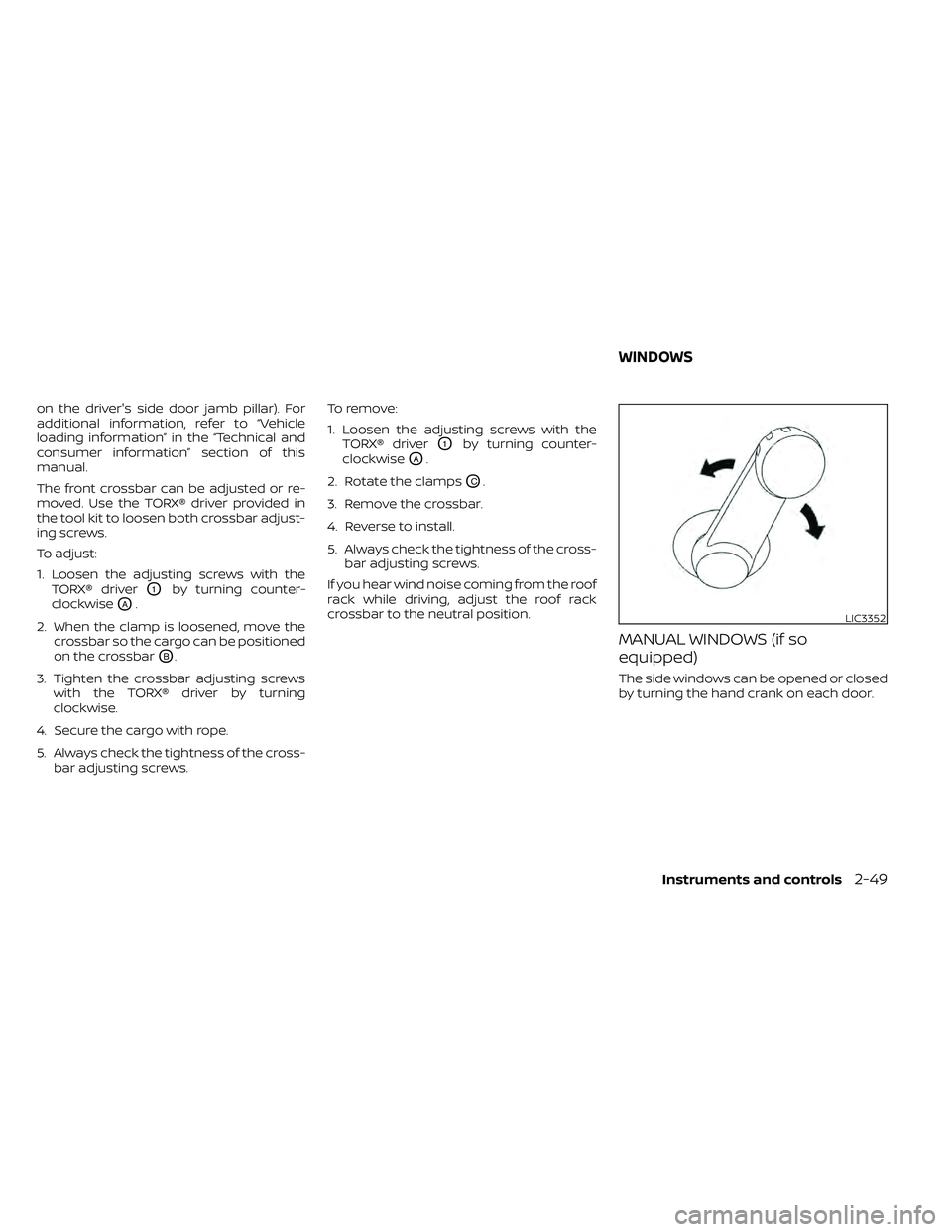
MANUAL WINDOWS (if so
equipped)
The side windows can be opened or closed
by turning the hand crank on each door.
LIC3352
WINDOWS
Instruments and controls2-49
Page 160 of 492
POWER WINDOWS (if so equipped)
WARNING
• Make sure that all passengers have
their hands, etc., inside the vehicle
while it is in motion and before clos-
ing the windows. Use the window
lock switch to prevent unexpected
use of the power windows.
• To help avoid risk of injury or death
through unintended operation of the
vehicle and/or its systems, including
entrapment in windows or inadver-
tent door lock activation, do not
leave children, people who require
the assistance of others or pets unat-
tended in your vehicle. Additionally,
the temperature inside a closed ve-
hicle on a warm day can quickly be-
come high enough to cause a signifi-
cant risk of injury or death to people
and pets.
The power windows operate when the ig-
nition switch is placed in the ON position or
for a period of time af ter the ignition switch
is placed in the ACC or OFF position. If the
driver's or passenger's door is opened dur-
ing this period of time, the power to the
windows is canceled.
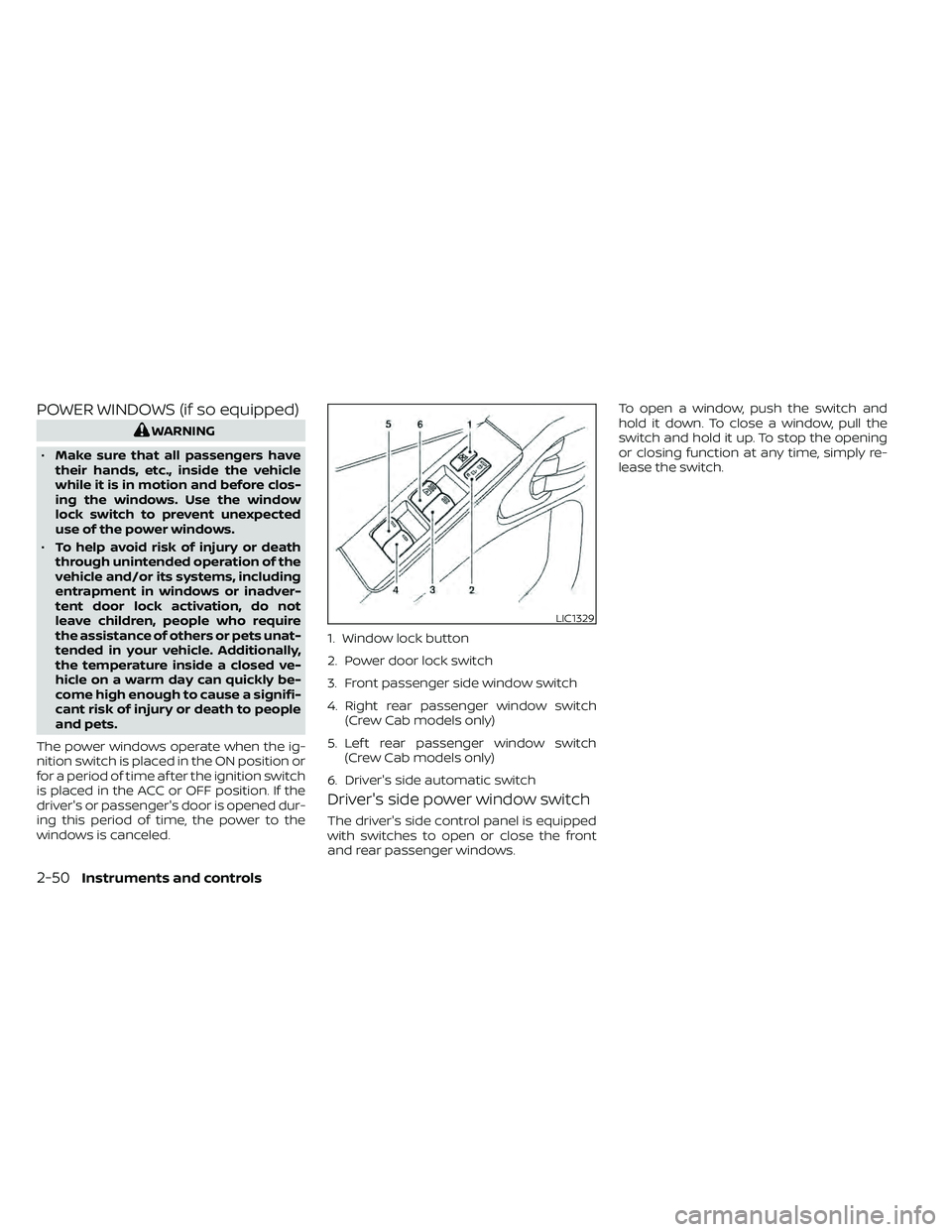
Driver's side power window switch
The driver's side control panel is equipped
with switches to open or close the front
and rear passenger windows. To open a window, push the switch and
hold it down. To close a window, pull the
switch and hold it up. To stop the opening
or closing function at any time, simply re-
lease the switch.
LIC1329
1. Window lock button
2. Power door lock switch
3. Front passenger side window switch
4. Right rear passenger window switch
(Crew Cab models only)
5. Lef t rear passenger window switch (Crew Cab models only)
6. Driver's side automatic switch
2-50Instruments and controls
Page 161 of 492
Front passenger's power window
switch
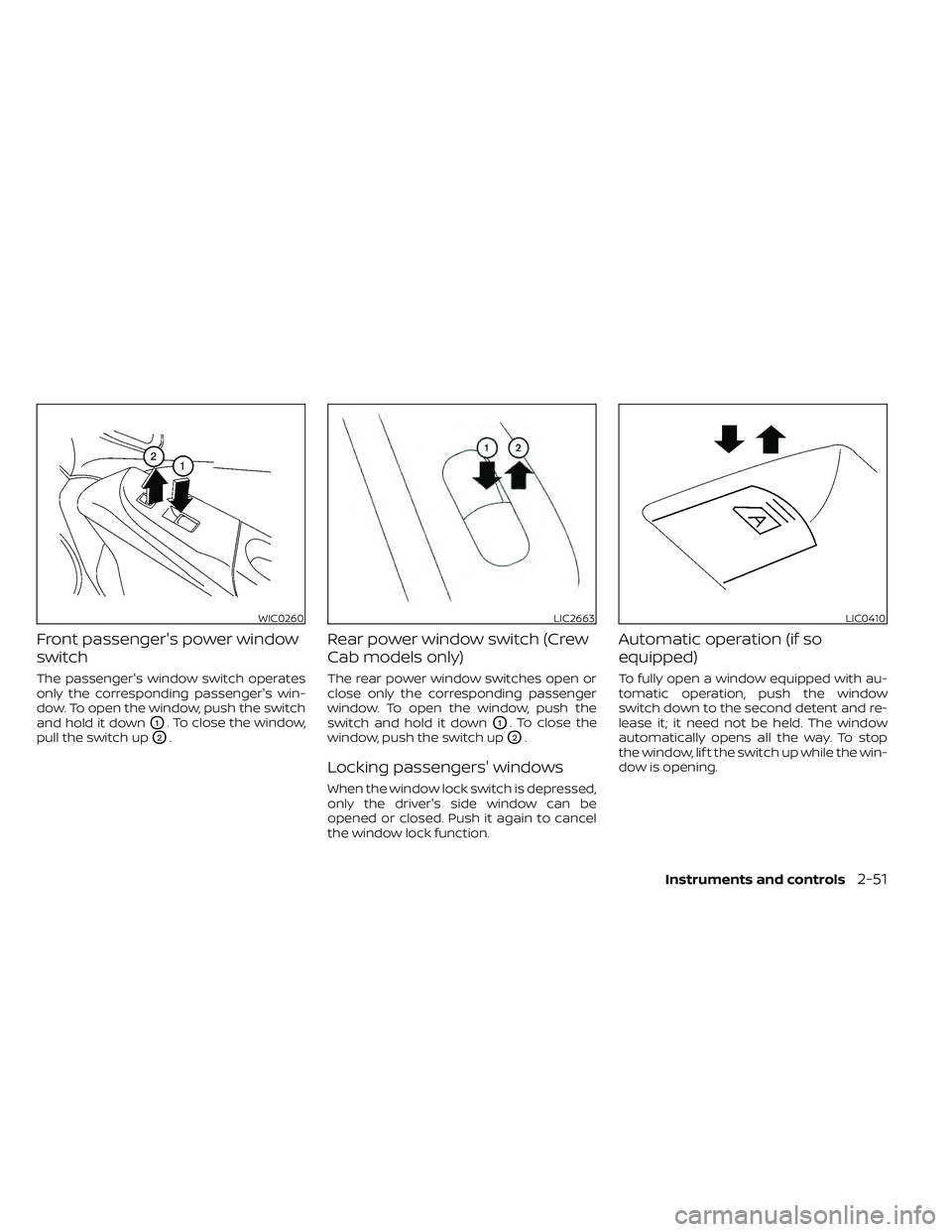
The passenger's window switch operates
only the corresponding passenger's win-
dow. To open the window, push the switch
and hold it down
O1. To close the window,
pull the switch up
O2.
Rear power window switch (Crew
Cab models only)
The rear power window switches open or
close only the corresponding passenger
window. To open the window, push the
switch and hold it down
O1. To close the
window, push the switch up
O2.
Locking passengers' windows
When the window lock switch is depressed,
only the driver's side window can be
opened or closed. Push it again to cancel
the window lock function.
Automatic operation (if so
equipped)
To fully open a window equipped with au-
tomatic operation, push the window
switch down to the second detent and re-
lease it; it need not be held. The window
automatically opens all the way. To stop
the window, lif t the switch up while the win-
dow is opening.
WIC0260LIC2663LIC0410
Instruments and controls2-51
Page 162 of 492
REAR SLIDING WINDOW (if so
equipped)
WARNING
• You must ensure all occupants and
objects are free of the rear window
area prior to and during operation.
Failure to do so may result in injury
and/or damage to the rear window
system.
• The rear window is not designed to
carry long items through it. •
Do not place objects through the
opened rear window. Do not use the
rear window as a cargo area pass-
through. This may result in damage
to the rear window system or per-
sonal injury.
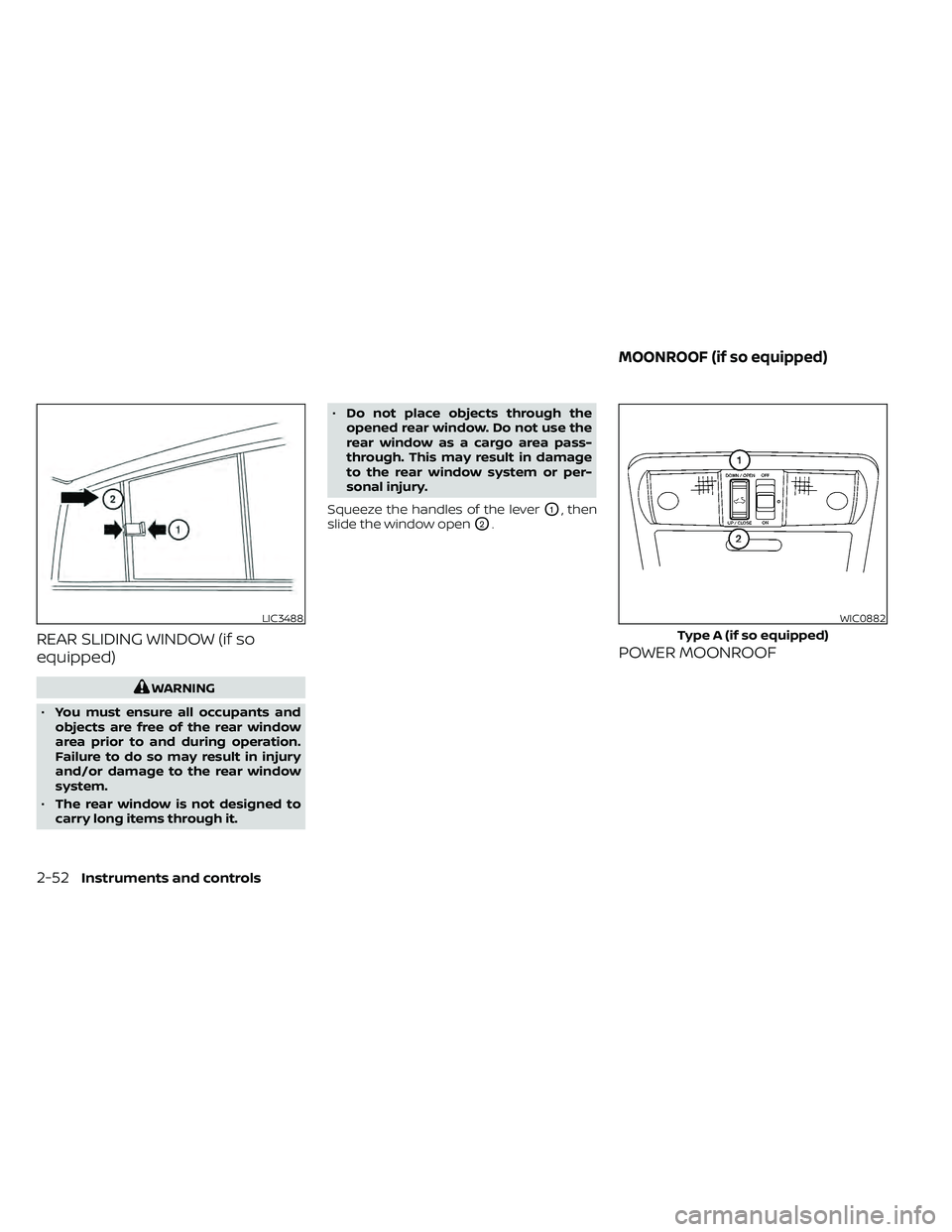
Squeeze the handles of the lever
O1, then
slide the window open
O2.
POWER MOONROOF
LIC3488WIC0882
Type A (if so equipped)
MOONROOF (if so equipped)
2-52Instruments and controls
Page 174 of 492
NISSAN VEHICLE IMMOBILIZER
SYSTEM KEYS
You can only drive your vehicle using the
Intelligent Keys which are registered to the
NISSAN Vehicle Immobilizer System com-
ponents in your vehicle.
The mechanical key can be used for all the
locks.
Never leave the keys in the vehicle.
Additional or replacement keys:
If you still have a key, the key number is not
necessary when you need extra NISSAN Ve-
hicle Immobilizer System keys. Your existing
key can be duplicated without knowing the
key number. As many as four NISSAN Vehicle
Immobilizer System keys can be used with
one vehicle. You should bring all NISSAN Ve-
hicle Immobilizer System keys that you have
to the NISSAN dealer for registration. This is
because the registration process will erase
the memory of all key codes previously reg-
istered into the NISSAN Vehicle Immobilizer
System. Af ter the registration process, these
components will only recognize keys coded
into the NISSAN Vehicle Immobilizer System
during registration. Any key that is not given
to the dealer at the time of registration will
no longer be able to start your vehicle.
CAUTION
Do not allow the immobilizer system
key, which contains an electrical tran-
sponder, to come into contact with wa-
ter or salt water. This could affect sys-
tem function. When the doors are locked using one of the
following methods, the doors cannot be
opened using the inside or outside door
handles. The doors must be unlocked to
open the doors.
WARNING
• Always have the doors locked while
driving. Along with the use of seat
belts, this provides greater safety in
the event of an accident by helping to
prevent persons from being thrown
from the vehicle. This also helps keep
children and others from uninten-
tionally opening the doors, and will
help keep out intruders.
• Before opening any door, always look
for and avoid oncoming traffic.
•
To help avoid risk of injury or death
through unintended operation of the
vehicle and/or its systems, including
entrapment in windows or inadver-
tent door lock activation, do not leave
children, people who require the assis-
tance of others or pets unattended in
your vehicle. Additionally, the tem-
perature inside a closed vehicle on a
warm day can quickly become high
enough to cause a significant risk of
injury or death to people and pets.
DOORS
3-4Pre-driving checks and adjustments
Page 190 of 492
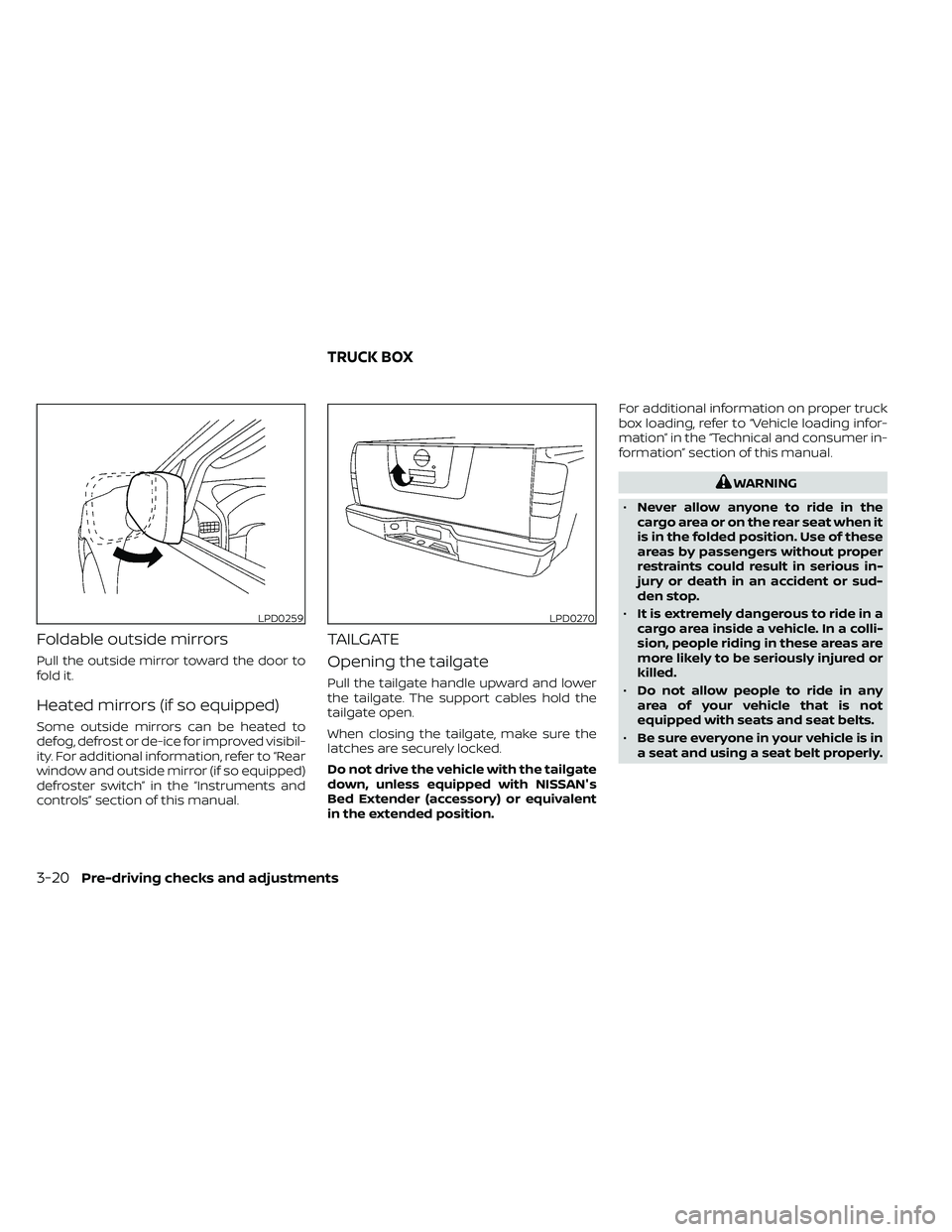
Foldable outside mirrors
Pull the outside mirror toward the door to
fold it.
Heated mirrors (if so equipped)
Some outside mirrors can be heated to
defog, defrost or de-ice for improved visibil-
ity. For additional information, refer to “Rear
window and outside mirror (if so equipped)
defroster switch” in the “Instruments and
controls” section of this manual.
TAILGATE
Opening the tailgate
Pull the tailgate handle upward and lower
the tailgate. The support cables hold the
tailgate open.
When closing the tailgate, make sure the
latches are securely locked.
Do not drive the vehicle with the tailgate
down, unless equipped with NISSAN's
Bed Extender (accessory) or equivalent
in the extended position.For additional information on proper truck
box loading, refer to “Vehicle loading infor-
mation” in the “Technical and consumer in-
formation” section of this manual.
WARNING
• Never allow anyone to ride in the
cargo area or on the rear seat when it
is in the folded position. Use of these
areas by passengers without proper
restraints could result in serious in-
jury or death in an accident or sud-
den stop.
• It is extremely dangerous to ride in a
cargo area inside a vehicle. In a colli-
sion, people riding in these areas are
more likely to be seriously injured or
killed.
• Do not allow people to ride in any
area of your vehicle that is not
equipped with seats and seat belts.
• Be sure everyone in your vehicle is in
a seat and using a seat belt properly.
LPD0259LPD0270
TRUCK BOX
3-20Pre-driving checks and adjustments
Page 212 of 492
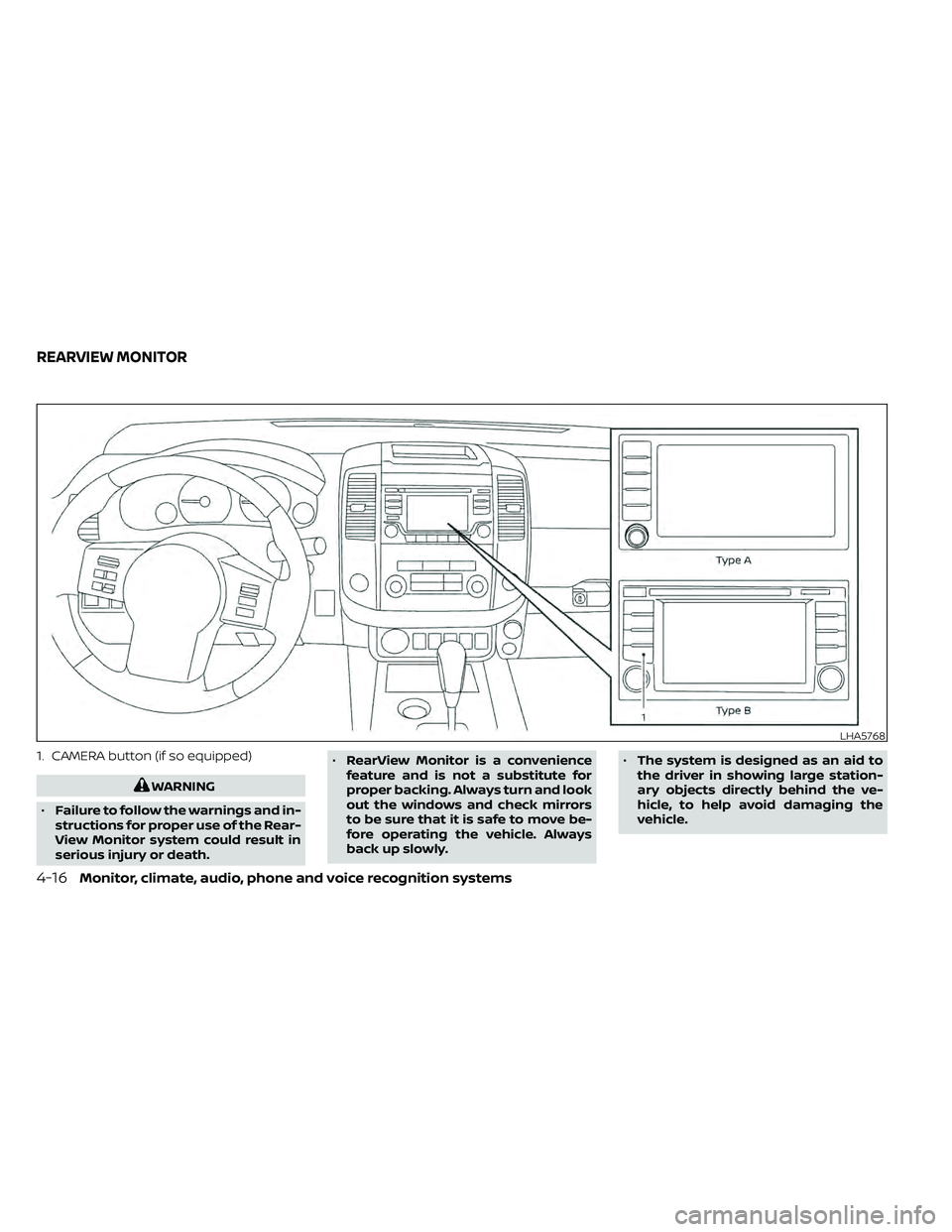
1. CAMERA button (if so equipped)
WARNING
• Failure to follow the warnings and in-
structions for proper use of the Rear-
View Monitor system could result in
serious injury or death. •
RearView Monitor is a convenience
feature and is not a substitute for
proper backing. Always turn and look
out the windows and check mirrors
to be sure that it is safe to move be-
fore operating the vehicle. Always
back up slowly. •
The system is designed as an aid to
the driver in showing large station-
ary objects directly behind the ve-
hicle, to help avoid damaging the
vehicle.
LHA5768
REARVIEW MONITOR
4-16Monitor, climate, audio, phone and voice recognition systems
Page 218 of 492
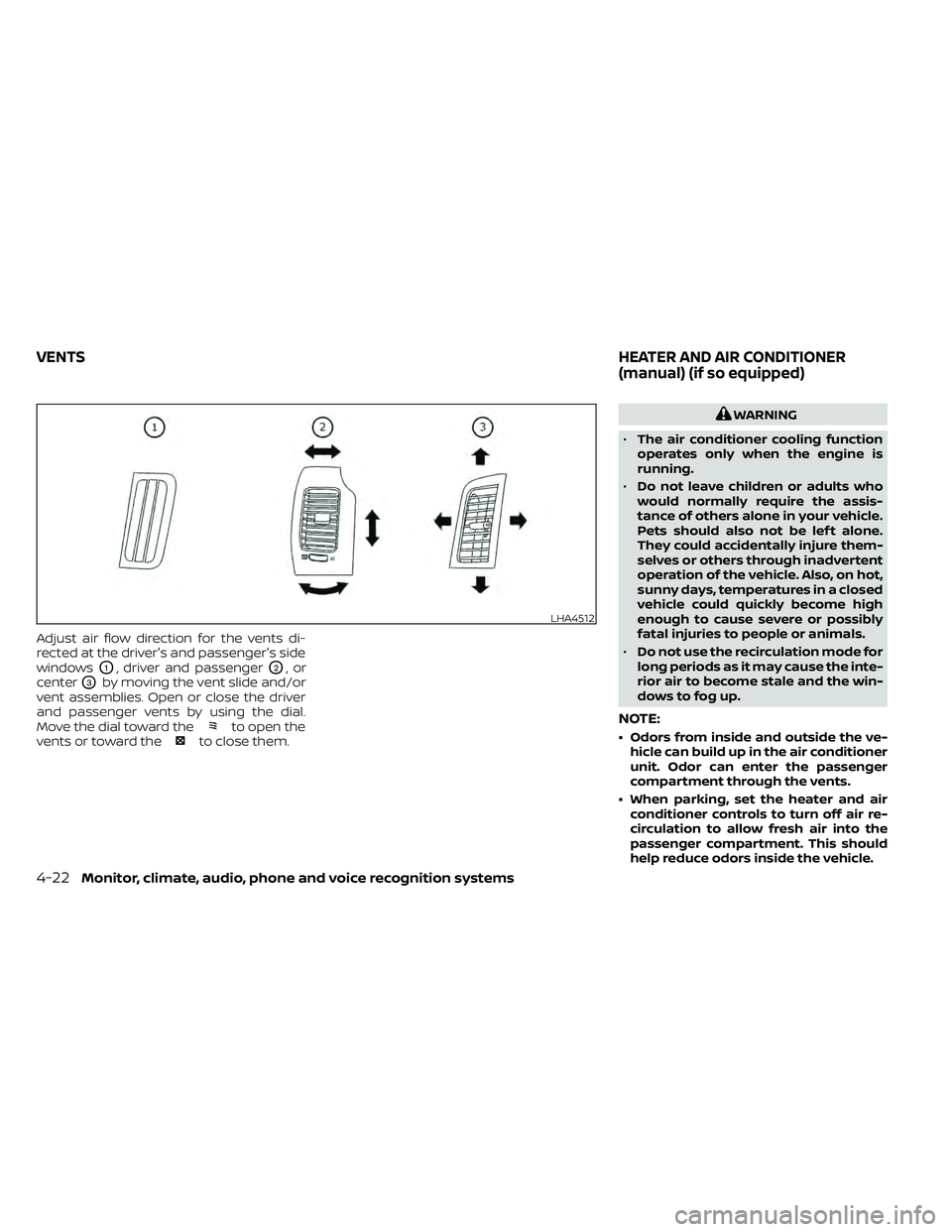
Adjust air flow direction for the vents di-
rected at the driver's and passenger's side
windows
O1, driver and passengerO2,or
center
O3by moving the vent slide and/or
vent assemblies. Open or close the driver
and passenger vents by using the dial.
Move the dial toward the
to open the
vents or toward theto close them.
WARNING
• The air conditioner cooling function
operates only when the engine is
running.
• Do not leave children or adults who
would normally require the assis-
tance of others alone in your vehicle.
Pets should also not be lef t alone.
They could accidentally injure them-
selves or others through inadvertent
operation of the vehicle. Also, on hot,
sunny days, temperatures in a closed
vehicle could quickly become high
enough to cause severe or possibly
fatal injuries to people or animals.
• Do not use the recirculation mode for
long periods as it may cause the inte-
rior air to become stale and the win-
dows to fog up.
NOTE:
• Odors from inside and outside the ve- hicle can build up in the air conditioner
unit. Odor can enter the passenger
compartment through the vents.
• When parking, set the heater and air conditioner controls to turn off air re-
circulation to allow fresh air into the
passenger compartment. This should
help reduce odors inside the vehicle.
LHA4512
VENTS HEATER AND AIR CONDITIONER
(manual) (if so equipped)
4-22Monitor, climate, audio, phone and voice recognition systems
Page 219 of 492
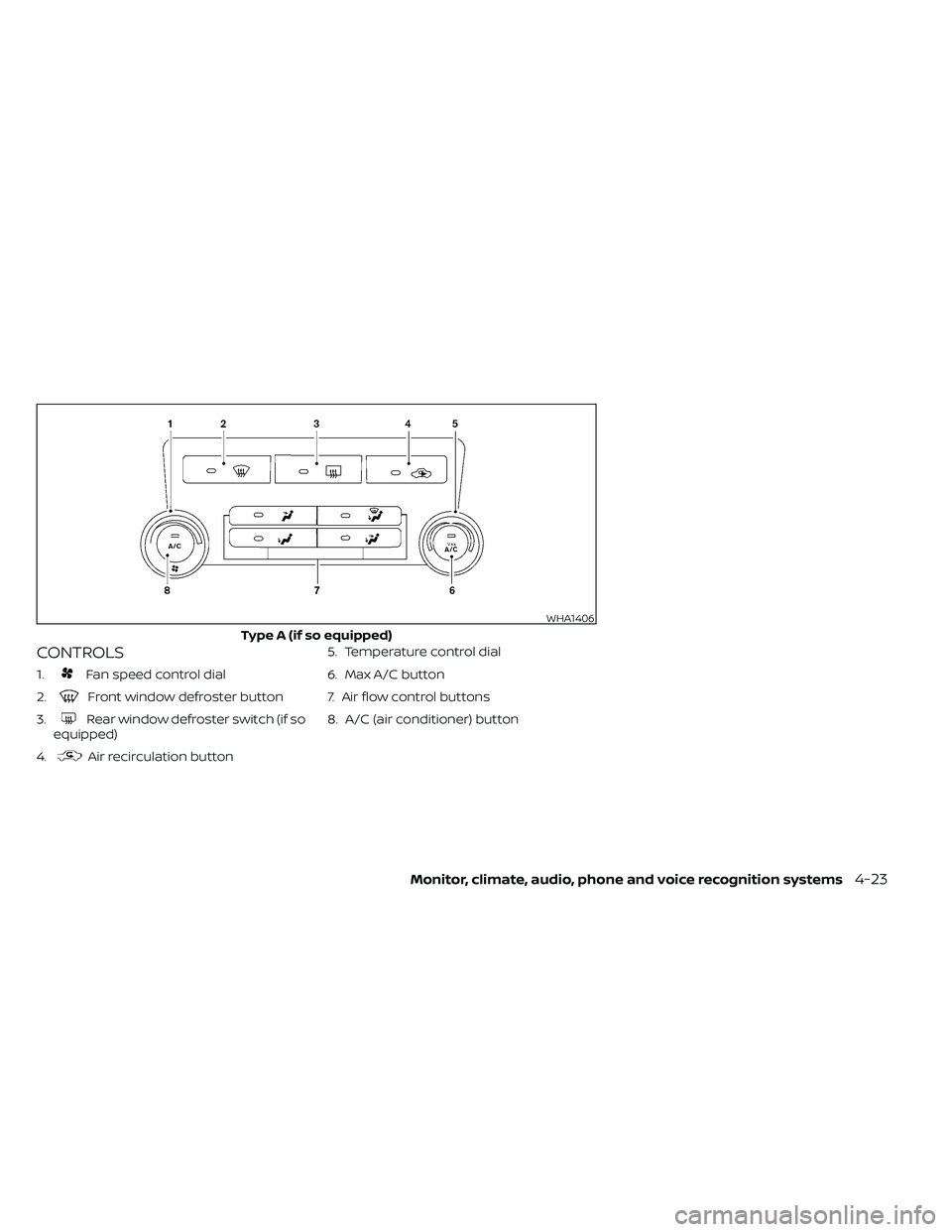
CONTROLS
1.Fan speed control dial
2.
Front window defroster button
3.
Rear window defroster switch (if so
equipped)
4.
Air recirculation button 5. Temperature control dial
6. Max A/C button
7. Air flow control buttons
8. A/C (air conditioner) button
WHA1406
Type A (if so equipped)
Monitor, climate, audio, phone and voice recognition systems4-23
Page 220 of 492
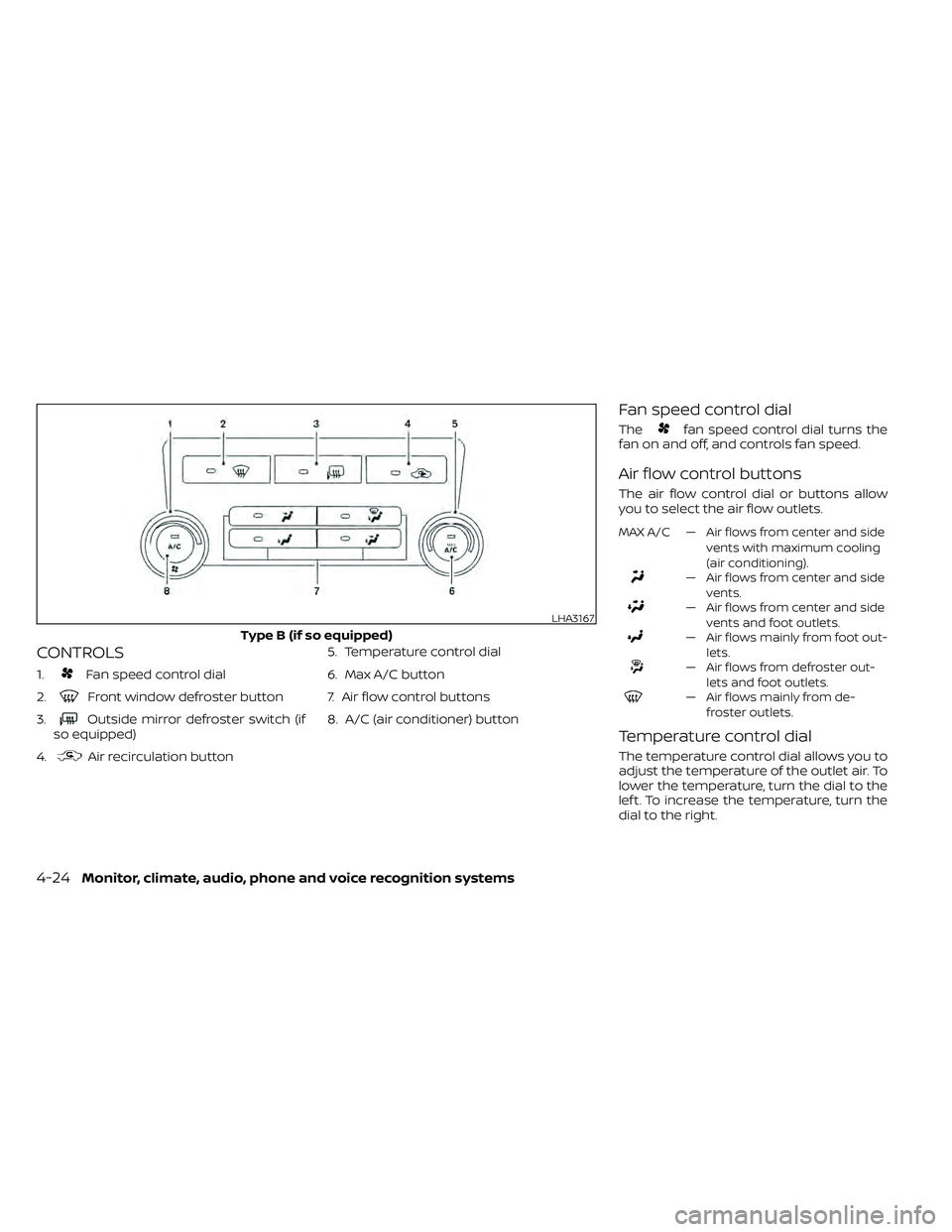
CONTROLS
1.Fan speed control dial
2.
Front window defroster button
3.
Outside mirror defroster switch (if
so equipped)
4.
Air recirculation button 5. Temperature control dial
6. Max A/C button
7. Air flow control buttons
8. A/C (air conditioner) button
Fan speed control dial
Thefan speed control dial turns the
fan on and off, and controls fan speed.
Air flow control buttons
The air flow control dial or buttons allow
you to select the air flow outlets.
MAX A/C — Air flows from center and side
vents with maximum cooling
(air conditioning).
— Air flows from center and sidevents.
— Air flows from center and sidevents and foot outlets.
— Air flows mainly from foot out-lets.
— Air flows from defroster out-lets and foot outlets.
— Air flows mainly from de-froster outlets.
Temperature control dial
The temperature control dial allows you to
adjust the temperature of the outlet air. To
lower the temperature, turn the dial to the
lef t. To increase the temperature, turn the
dial to the right.
LHA3167
Type B (if so equipped)
4-24Monitor, climate, audio, phone and voice recognition systems